
Let Visitors Open a Ticket Without an Account
Asking every visitor to create an account before they can ask a question loses people. A buyer with a pre-sales doubt or a customer who checked out as a guest stops at the sign-in button. Then they write to you somewhere else, or not at all.
Core Support can show a short ticket form to signed-out visitors, right under Sign in. Their ticket arrives like any other, and your replies reach them by email.
Turn On the Form
- Go to Core Support → Settings.
- Choose the Tickets tab.
- Switch on Let visitors open a ticket without an account.
- Choose Save settings.
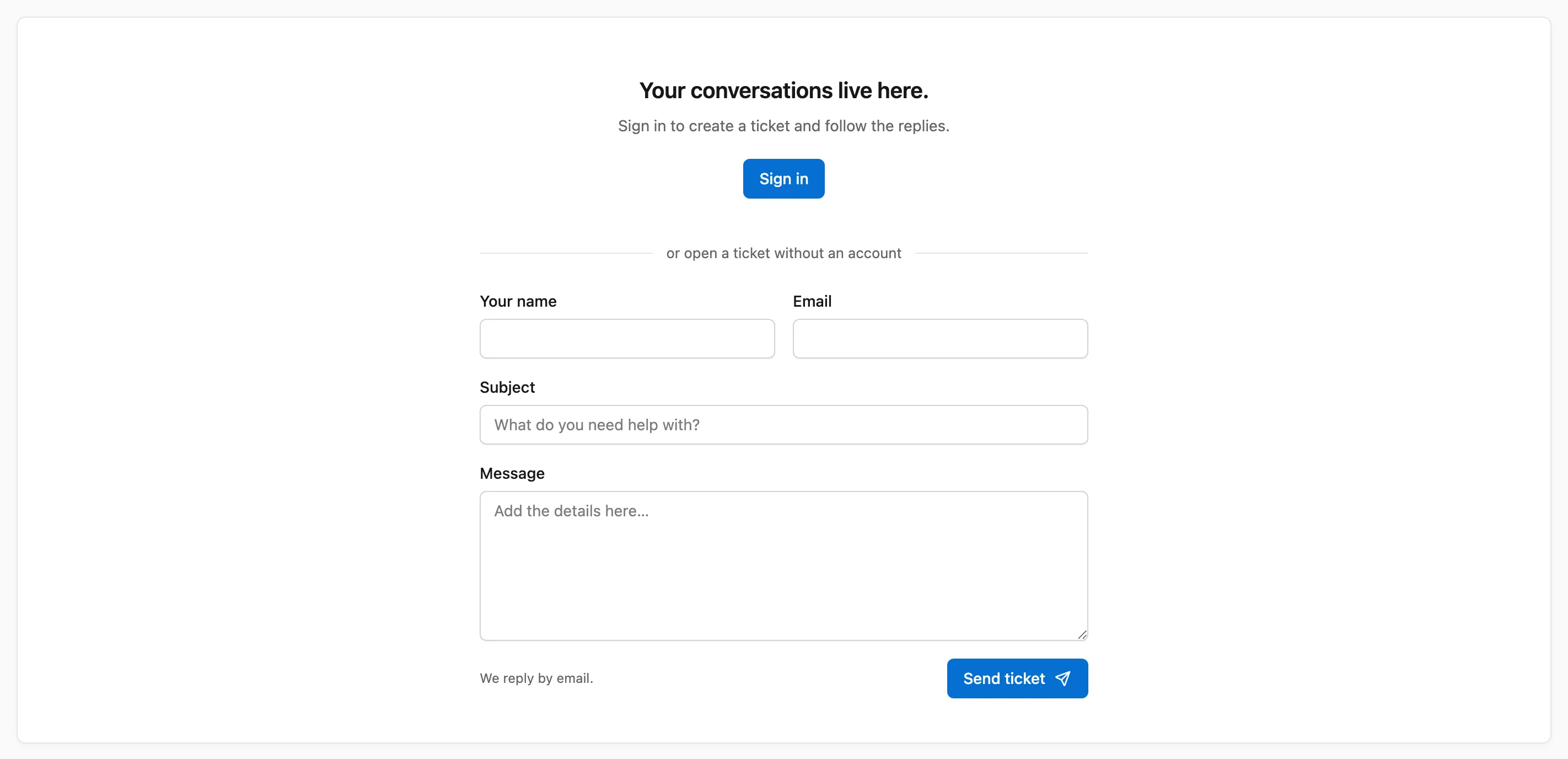
The setting is off by default. Once it is on, the support page and the portal blocks show “or open a ticket without an account” under the Sign in button, with these fields:
- Your name (optional, up to 100 characters)
- Email (required)
- Subject (required, up to 180 characters)
- Message (required, up to your Maximum message length)
The visitor chooses Send ticket and sees “Ticket sent” with “Thanks. We received your message and will reply by email.” in place of the form.
The form stays hidden:
- while Accept new customer tickets is off
- for signed-in customers, who open tickets as usual
- in demo mode, where every visitor already has a demo session
Where These Tickets Go
Each message goes through Core Support → Incoming mail, the same way a form on a connected website does:
- With review off, it opens a ticket straight away. Incoming mail lists it as “Ticket form, no account” and agents see the same label beside the ticket.
- A double click or a resend of the same message on the same day merges into one ticket.
- The message ends with “Sent from the support page without an account” and the address of the page it came from.
- New ticket alerts and team emails go out for it like any new ticket.
Hold tickets from visitors without an account for review sends every one to Incoming mail first. There, an agent chooses Accept as new ticket or Discard.
How Replies Reach the Visitor
The visitor has no account, so the portal can’t show them the conversation. Everything happens by email:
- Your replies go out as usual, so Settings → Customer emails needs a mail service other than Capture only. Send Replies through WordPress Mail or a Provider API covers that.
- The email asks them to reply to continue the conversation. Their reply comes back into the same ticket once receiving email is set up, as How Email Reaches Core Support explains.
- If they later create an account with the same email address and confirm it with the emailed code, their earlier tickets join the account.
Without receiving email, a visitor can still read your answer. They just can’t answer back in the same ticket.
How Spam Stays Out
An open form on a public page attracts bots sooner or later. Core Support checks every message in this order:
- This site only. A request from another website’s page is turned away.
- A hidden field. People never see it, so they never fill it. A bot that does gets the usual thanks, and nothing is stored.
- A start time. The form carries a signed time from when the page opened. A message sent within 3 seconds gets “That was quick. Check your message, then send it again.” One sent from a page left open for over a day, or with a changed time, gets “Reload the page and send the form again.”
- An hourly limit. Each connection can send 5 messages an hour.
- Akismet. With the Akismet plugin active and its API key saved, every message is checked as a contact form entry. One Akismet calls spam waits in Incoming mail as “Marked as spam by Akismet” and opens no ticket.
When Akismet is active, the form tells visitors their message is checked by Akismet and links to its privacy page. If Akismet can’t be reached, the message goes through rather than getting lost.
Developers can change the verdict with the core_support_guest_ticket_is_spam filter, covered in the Hooks and Filters Reference.
When to Use It
The form makes sense when many of the people asking have no account on your site:
- a store with guest checkout
- pre-sales questions before anyone buys
- a product whose buyers never log in to your site
A support desk that only serves logged-in members gains little from it.
I’d keep review on for the first week. You’ll see what Akismet and the time check catch, and what still gets through, before anything lands in the ticket queue on its own.
On a busy site, I wouldn’t skip Akismet. The hidden field and the time check stop simple bots that fill every field or post too fast. Akismet also catches spam that a person or a smarter bot types in.