
Badges in Docs and Changelogs
A release with dozens of changes reads like a wall of text. A reader looking for the one fix they’ve waited on, or the breaking change that will hit their site, has to read every line to find it.
Core Support turns each change’s label into a colored badge, marks pre-releases and shows the version each doc applies to. The built-in badges cover the usual labels, and Settings → Changelogs adds your own.
How a Change Gets a Badge
A change gets a badge in 3 ways:
- A label in square brackets at the start:
[NEW],[BUG FIX]or**[Security]**. Any label up to 24 characters works, and one Core Support doesn’t know shows in gray. - A known word before a colon or a dash:
Fix: ...orAdded - .... Only words a badge knows count here, so an ordinary sentence with a colon stays a sentence. - A group heading above the changes. Any
###heading in Markdown works, and so does a**Fixed**or a bareChangedline when the word is one a badge knows. A change’s own label wins over its group’s.
## [2.1.0] - 2026-10-16

### Added
- Bulk export
- [Beta] Scheduled reports

### Fixed
- Fix: Dates now follow the site's time zone
The badge shows the label as written, in capitals, in the color of the badge that label maps to. In the visual editor, the Label field suggests the built-in labels and your own.
Built-In Badges
Each built-in badge has a color and the words that map to it:
- New (green): new, added, add, feature, features, new feature, introduced
- Improved (blue): improved, improvement, improvements, enhancement, enhancements, enhanced, tweak, tweaks, tweaked, update, updated, updates, changed, change, changes. It also covers performance, compatibility, compat, refactor, accessibility, a11y, localization, translation, translations, docs, documentation, dev, developer, development and misc.
- Fixed (orange): fix, fixed, fixes, bug fix, bug fixes, bugfix, bugfixes, bug, hotfix
- Removed (red): removed, remove, dropped
- Deprecated (yellow): deprecated
- Security (red): security
- Breaking (red): breaking, breaking change, breaking changes
Matching ignores case, and spaces, hyphens and underscores count the same. Bug-fix, bug_fix and BUG FIX all show the Fixed badge.
Docs and documentation changes count as Improved by default. A custom Docs badge gives them their own color.
Add Your Own Badges
- Go to Core Support → Settings → Changelogs.
- Under Custom badges, click Add a badge.
- Enter a Label, such as Beta.
- Pick a Colour, or choose Custom colour to use the picker or type a value.
- Add Other words that should show the same badge, separated by commas, such as preview, experimental.
- Save.
The preview under the editor shows each badge as readers will see it.
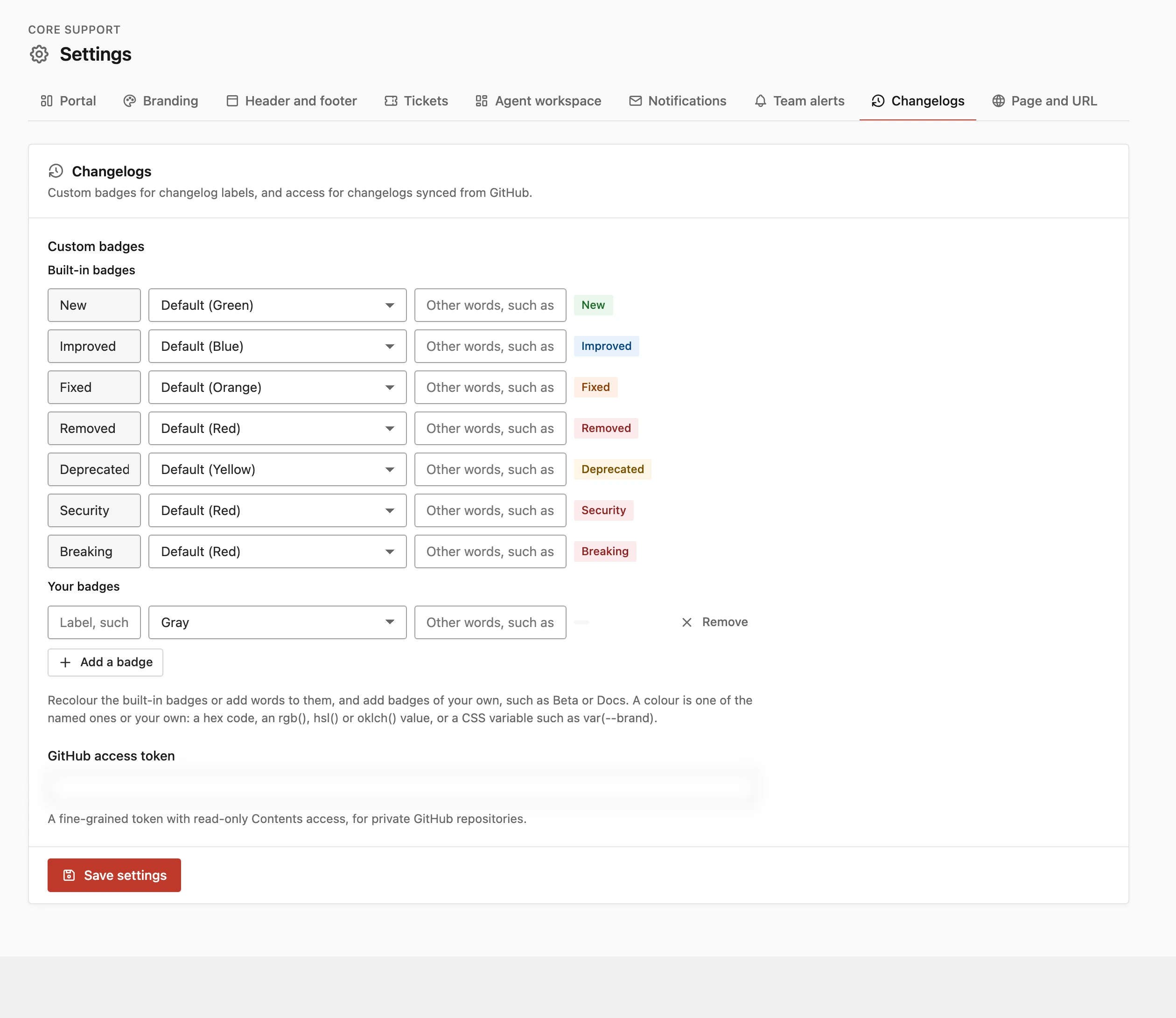
The editor saves one badge per line as Label | colour | other, words, and you can type that text directly:
Beta | yellow | preview, experimental
Docs | #7c3aed | documentation
Fixed | green | patch- You can add up to 20 badges of your own. Recolored built-in badges don’t count toward that.
- A label can be up to 24 characters, with up to 10 other words.
- Square brackets, pipes and colons are removed from labels.
- A later line can’t repeat an earlier label.
Your words win over the built-in ones. In the example above, Docs and documentation show the purple Docs badge instead of Improved.
Recolor a Built-In Badge
Name a line after a built-in badge, such as Fixed | green | patch. Every Fixed change turns green, and patch now shows the Fixed badge too. The editor lists the built-in badges first under Built-in badges for exactly this.
Colors You Can Use
- Named colors: green, blue, orange, red, yellow and gray.
greyworks too. - Your own: a hex code (
#7c3aed), anrgb(),hsl(),hwb(),lab(),lch(),oklab()oroklch()value, or a CSS variable such asvar(--brand). - Anything else becomes gray.
Core Support mixes your own colors so the badge reads in both light and dark mode.
Changelog pages don’t load your theme’s stylesheet, so a variable defined only by your theme is empty there. Give it a fallback, such as var(--brand, #7c3aed).
Stability Marks on Releases
Every release on a changelog page carries a stability mark, worked out from its version:
- RC: versions ending in
-rc, such as2.0.0-rc.1. - Beta: versions ending in
-betaor-b, such as2.0.0-beta.2. - Alpha: versions ending in
-alpha,-a,-dev,-pre,-previewor-nightly. - Stable: everything else.
A GitHub pre-release is marked Beta even when its number looks stable. Stable only on the changelog pages hides every release that isn’t Stable. The Latest figure names the newest stable release, or the newest of any kind when none is stable.
The Version Badge on Docs
Each doc shows a blue “Version 4.12” style badge under its title. It comes from the doc’s Applies to version, or the collection’s Current version when the doc leaves it blank. The collection page shows the collection’s version the same way. Write Product Docs with Collections covers both fields.
For Developers
The changelog API returns each change with its label, category and text. The category is new, improved, fixed, removed, deprecated, security, breaking or other, and it’s empty for a change with no label. A custom badge comes through as custom-{label}, such as custom-beta. A recolored built-in badge keeps its own category, such as fixed.
Core Support has 2 filters for badges. core_support_changelog_category sets the badge a label shows:
add_filter('core_support_changelog_category', function (string $category, string $label): string {
    return strtolower($label) === 'ui' ? 'improved' : $category;
}, 10, 2);
core_support_changelog_tone sets a badge’s color, as a named color or your own value:
add_filter('core_support_changelog_tone', function (string $tone, string $category): string {
    return $category === 'security' ? '#b91c1c' : $tone;
}, 10, 2);
The Hooks and Filters Reference lists every other filter.