
Find Docs Gaps from Questions Chat Could Not Answer
Every question Chat can’t answer is a visitor telling you what your docs are missing. Those questions sit inside hundreds of conversations, and nobody reads hundreds of conversations to find them.
Core Support collects them on Core Support → Docs insights. With summaries on, a model groups them into topics once a day, each with a suggested doc to write.
See the Questions
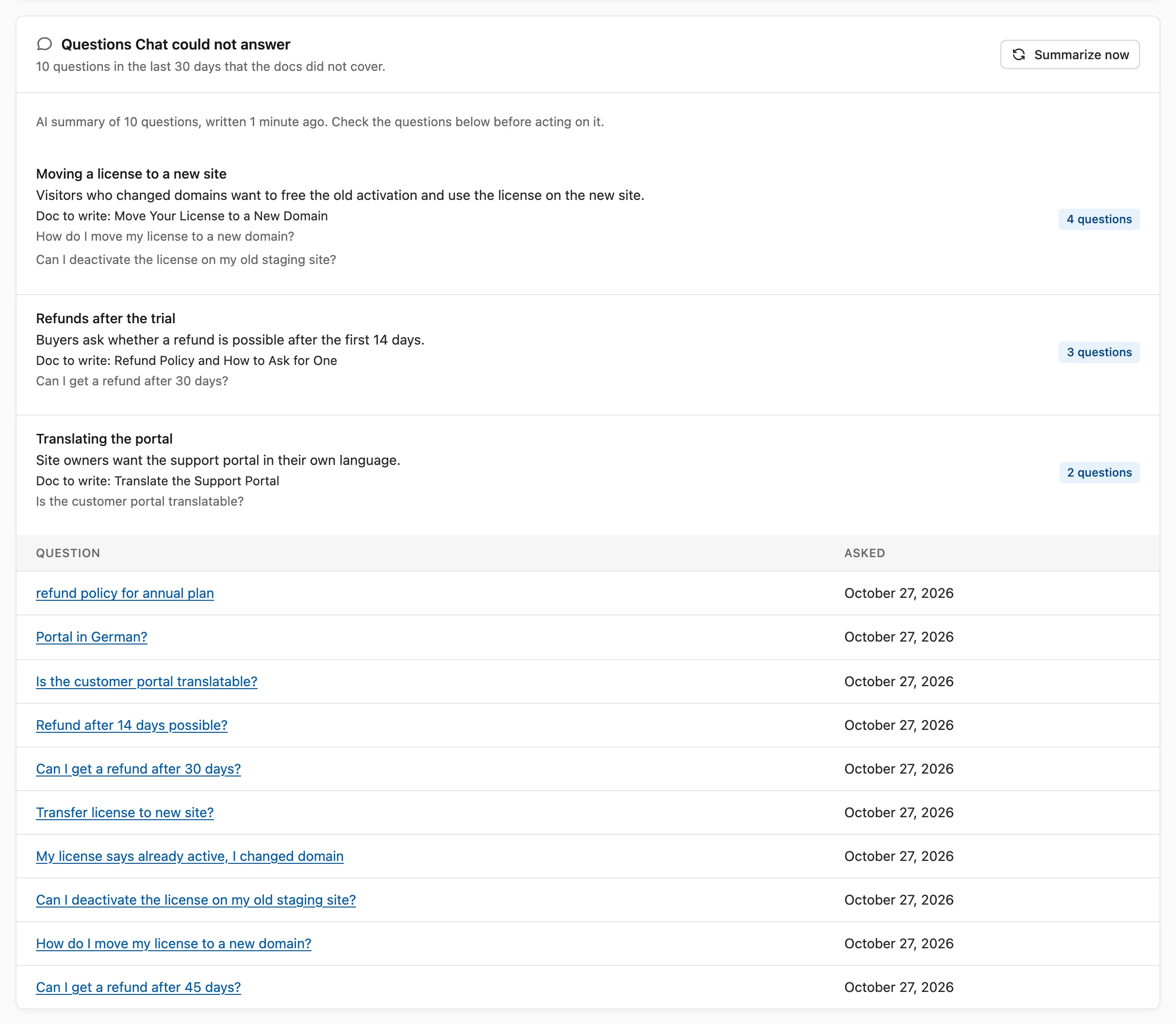
Go to Core Support → Docs insights and find the Questions Chat could not answer card. It shows:
- how many questions in the last 30 days the docs did not cover
- the 15 newest of them, with the date each was asked
- a link from each question to its conversation, for people who can work tickets
A question lands here when Chat found no passage at all to answer from. Chat still replied, but with no doc behind the answer, so the visitor most likely left without what they came for.
The questions are read from the stored conversations themselves. They follow the Keep conversations for setting, and a privacy erasure that removes a visitor’s conversations removes their questions too.
Turn On AI Summaries
- Go to Core Support → AI and Chat.
- Find the AI for your team card.
- Switch on Summarize questions Chat could not answer.
- Choose a Model and a Thinking level under it.
- Choose Save settings.
Summaries are off by default. Model starts on Same as Chat answers and Thinking on Low, which is enough for grouping questions.
Once a day, a model reads up to the 200 newest unanswered questions from the last 30 days. It leaves out greetings, tests, spam and questions unrelated to your product, then groups the rest into at most 8 topics, the most asked first. Each topic shows:
- a short name and how many questions belong to it
- one sentence on what visitors want to know
- “Doc to write:” with a suggested title
- up to 3 of the questions, copied exactly
The summary appears on the same card, above the list, with how many questions it read and how long ago it was written. People who manage Core Support also get a Summarize now button there, for a fresh summary after you publish a batch of docs.
Summaries count toward the Daily token budget on the same screen. If the budget is spent or the provider fails, the card says why, and the next daily run tries again.
Close a Gap
A topic with several questions behind it is a doc worth writing:
- Write the doc the topic suggests, or add the missing answer to an existing doc.
- Make sure its post type is ticked on Chat’s Knowledge tab, so Chat learns it.
- Check the card again after the next summary. Questions asked before the doc existed stay in the 30-day list until they age out, so the topic count drops over the following weeks rather than at once.
I treat the summary as a starting point and read the questions under each topic before writing anything. A topic name can make 2 unrelated questions look like one need, and the questions themselves are the real evidence.