An AI agent that can’t see your WordPress site works from guesses and pasted snippets. Site Agent is my free WordPress MCP plugin that connects your AI client to the site itself, so the agent reads the real content and code before it changes anything.
Clients sign in through WordPress with OAuth, on by default, and every tool that changes something stays off until you switch it on.
Version 0.4.2
WordPress 6.9+
PHP 8.0+
Free, GPL
Site AgentExample tool callsDirect to WordPress
Stage an Edit to a Live Post
The agent sends the new content with the hash it got when it read the post. The post is published and no status is passed, so WordPress saves the change as an autosave for you to review.
Content writes
The live post changes only when the agent passes a status such as publish.
The agent passes a public image URL and the alt text. WordPress downloads the file, checks its type and adds it to the library, and the returned ID can become the featured image.
Content writes
Private and loopback addresses are refused, and the file must fit your upload limit.
The write must include the hash from the last read. Site Agent checks the PHP, saves the file, loads your site and puts the old file back if the change causes a fatal error.
Source inspection and source editing
Source editing changes executable code. Keep it on staging with a backup.
The agent runs PHP with WordPress loaded and gets the echoed output and the return value. When the code fails, the error comes back with its message and line.
PHP execution
PHP runs with server privileges and is not isolated. Code that calls exit or die is rejected.
On Bricks 2.4 and later, the agent runs Bricks' own abilities through Site Agent. A summary read returns the element counts, headings and structure of a page, so even a very large layout fits in one answer.
Bricks tools
Bricks checks its own permissions, and its PHP ability also needs PHP execution.
Ask Site Agent to update a post, fix a template or check a plugin
18 MCP tools
OAuth sign-in
Staged edits
PHP rollback
Setup guides for
ChatGPT
Claude
Gemini
Claude Code
Cursor
VS Code
Codex
Zed
WordPress MCP Tools 18 Tools, Each Behind a Switch
Site Agent gives your agent 18 tools, and on Bricks sites it can add Bricks’ own abilities too. The read tools work as soon as Site Agent is enabled. Every tool that changes something sits behind its own switch in Tools > Site Agent.
Read the Site
On with Site Agent
Site context site-context
WordPress, PHP, theme, plugins, page builders, post types and the tools this connection can use.
List content list-content
Search posts and pages, with the latest edits first.
Read content get-content
Block markup, terms, featured image, SEO fields and the builder that stores the layout, by ID, URL or slug.
List terms list-terms
Categories, tags and other terms with their IDs.
List media list-media
Library items with URLs, dimensions and alt text.
List skills list-skills
The builder skills that ship with the plugin, and which builders this site runs.
Read skill get-skill
A builder’s workflow and reference files, read before the agent writes.
Publish Content
Content writes
Save content save-content
Drafts and updates, with terms, featured image, slug, schedule and SEO meta.
Upload media upload-media
Import an image from a URL or file data, with alt text.
Update media update-media
Fix titles, alt text, captions and descriptions.
Inspect Source
Source inspection
List files list-files
Browse plugins, themes and must-use plugins.
Read file read-file
Source code with the hash needed to change it.
Edit Source
Source editing
Write file write-file
Create or replace a file. A PHP change that breaks the site is reverted.
Create directory create-directory
Start a new plugin or theme folder.
Move file move-file
Rename or move a file that still matches its hash.
Delete file delete-file
Remove a file or an empty folder, with the same checks.
Run Code
PHP and WP-CLI
Execute PHP execute-php
Run PHP with WordPress loaded and get the output and return value.
Run WP-CLI run-wp-cli
Foreground commands as the signed-in user, without a shell.
Bricks Builder
Bricks tools
Bricks fast path bricks-*
Bricks’ own tools for page edits, imports and design context, under their own names.
List Bricks abilities bricks-abilities
Every other ability Bricks offers on this site, with its schema on request.
Run Bricks ability run-bricks-ability
Run any of them, with Bricks’ own permission and input checks.
Works With Your Page Builder
An agent that writes block markup into an Elementor or Bricks page changes nothing visitors see, because the real layout lives somewhere else. Site Agent tells the agent where each layout lives and how that builder expects it to be changed.
Page builders, where each one stores its layouts and how the agent changes them
Builder
Layout lives in
How the agent changes it
Gutenberg
Block markup in the post
Content writes, then a byte-exact read-back
GenerateBlocks
Block markup with its own CSS
Content writes, after a serializer check
Elementor
JSON in post meta
Elementor’s own save, sent as small patches
Bricks
Element arrays in post meta
Bricks’ own abilities on Bricks 2.4 and later
Divi
Shortcodes or Divi 5 blocks in the post
Content writes, or exact fragment edits
A Skill for Each Builder
Five builder skills ship with the plugin. The agent reads the matching one before it writes, so it follows that builder’s storage and escaping rules instead of guessing.
Layout Data Stays Intact
Content writes refuse raw Elementor, Bricks and Divi layout data. Writing it directly skips the builder’s validation and leaves stale CSS behind, so the skills use each builder’s own save.
Bricks on the Same Connection
On Bricks 2.4 and later, switch on Bricks tools and your agent gets Bricks’ own abilities next to Site Agent’s: page summaries, revisions and CSS regeneration, with Bricks’ permissions still in charge.
Works With Page Blocks Builder and GT Link Manager
Install either of my plugins and Site Agent picks up its skill. Your agent reads the skill, then works through that plugin’s own commands, with the same permission checks as wp-admin.
Page Blocks Builder
Pages and sections in your own HTML, CSS and JavaScript
Create a draft page from sections, with or without the theme header and footer.
Read and change one section at a time. A hash check stops the agent from overwriting newer edits.
Changes to a published page are staged as your autosave.
Create, render and place reusable library blocks.
Page Blocks Builder 4.2 or newer, with PHP execution on in Site Agent.
Other plugins can add their own read-only skills through the site_agent_skills filter.
Safety Checks on Every Change
An agent with write access will get something wrong sooner or later. I built Site Agent so the common mistakes are caught, or easy to undo, before your visitors see them.
Live Posts Stay Live
When the agent edits a published post, the change is saved as an autosave you review in the editor, and the agent can read it back to check it. The live post changes only when the agent passes a status.
Broken PHP Gets Reverted
PHP is checked for syntax and compile errors first. After saving, Site Agent loads your site and puts the old file back if the change causes a fatal error.
No Silent Overwrites
Every update needs the hash from the agent’s last read. If you or another tool changed the post or file since then, the write is refused.
Errors the Agent Can Fix
Failed PHP and tool calls return the real message and line number, so the agent can correct its own code instead of guessing.
Limits per Password
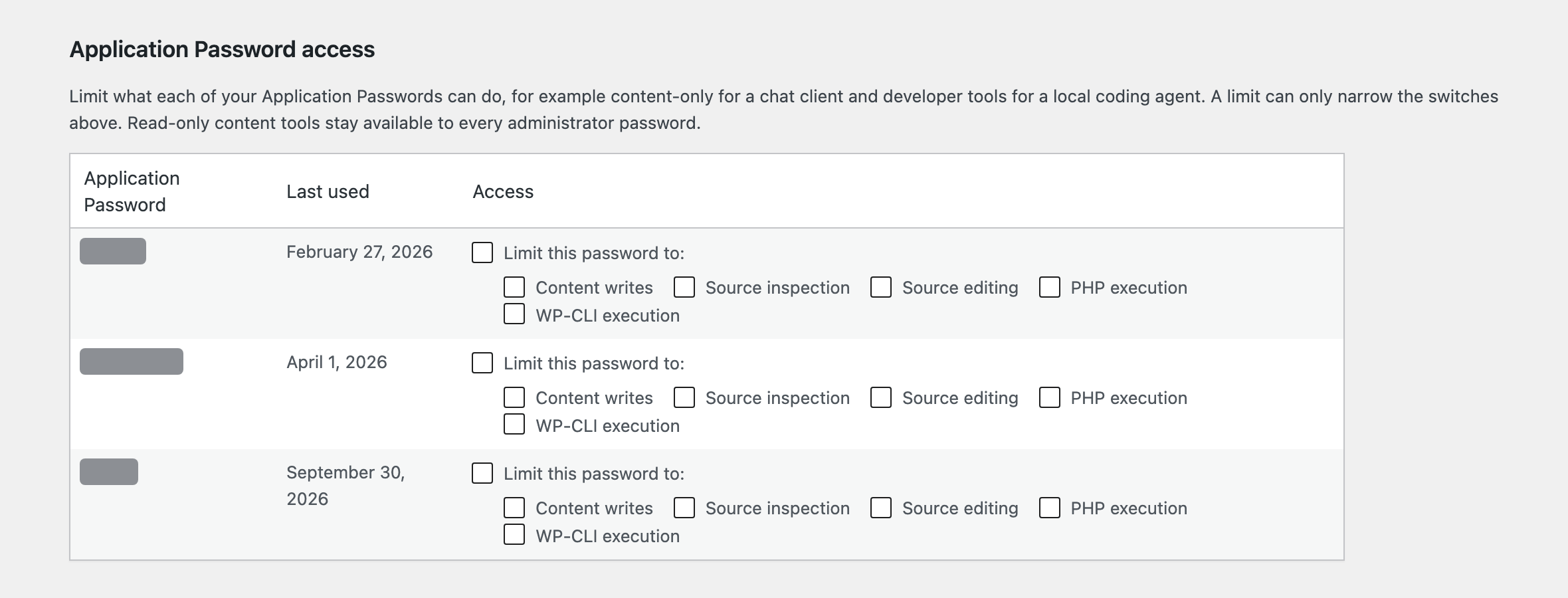
Each Application Password can be limited to the tools it needs, such as content writes for a chat app and developer tools for your local coding agent.
A Record of Every Call
The audit history keeps the last 100 calls with the tool, target, password name and result. It never stores content, code or credentials.
Per-password limits in Tools > Site Agent. Open the screenshot for full size.
Choose Your Agent’s Access Everything Starts Switched Off
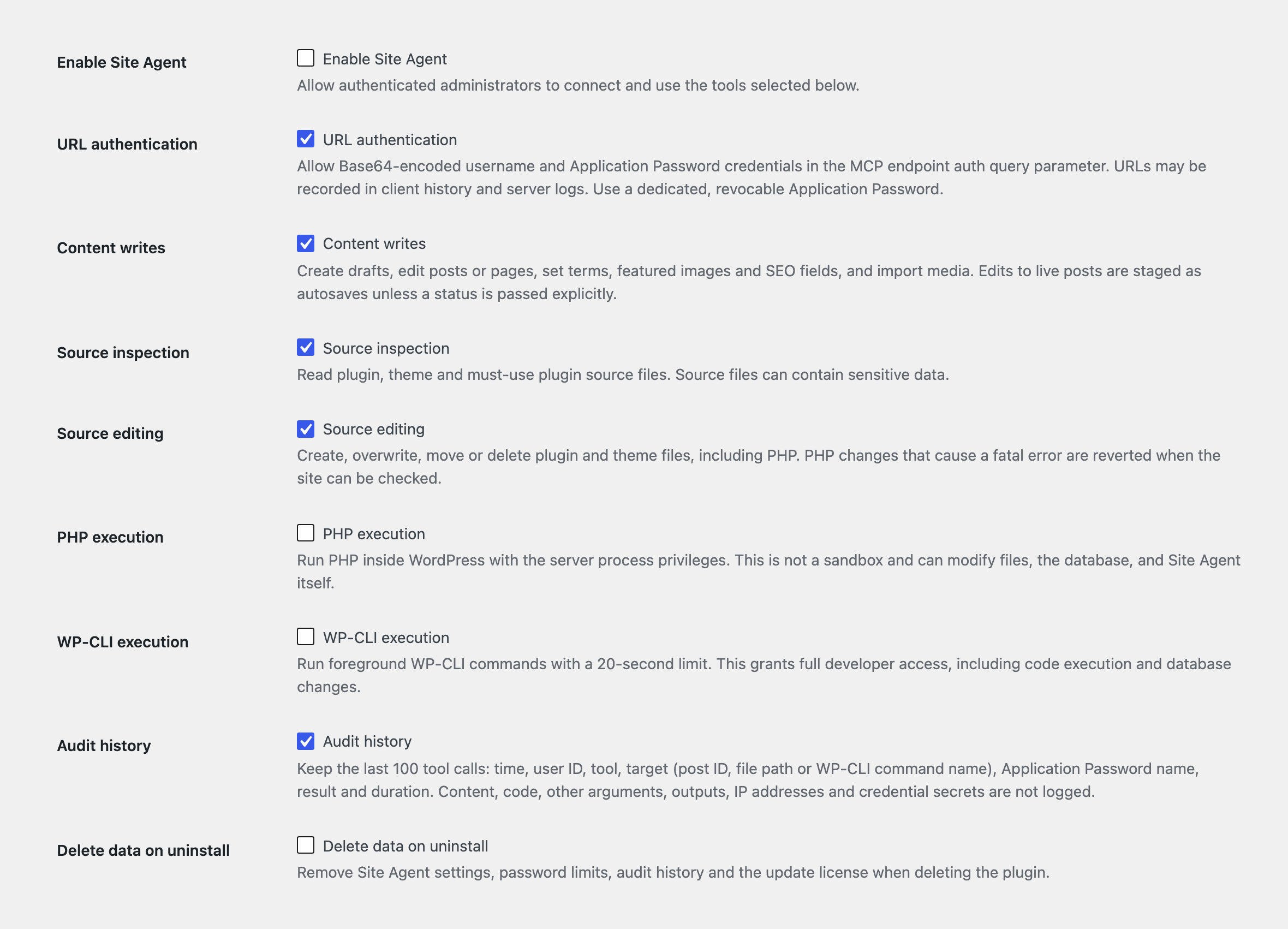
You turn on Site Agent, pick the tool groups the task needs and save. Every tool call then has to pass each of these checks.
Your AI clientSends a tool call
AdministratorA signed-in admin account
Group switchThat tool group is on
Your approvalGranted to this client or password
WordPressThe tool runs, then logs the call
Tool Groups
Read the site7 toolsOn by default
Content writes3 toolsOff by default
Source inspection2 toolsOff by default
Source editing4 toolsOff by default
PHP execution1 toolOff by default
WP-CLI execution1 toolOff by default
Bricks tools2+ toolsOff by default
Bricks tools need Bricks 2.4 or later with its AI/MCP abilities switched on, and add Bricks’ own fast-path tools to the 2 listed.
Server-Level Overrides
SITE_AGENT_DISABLED
in wp-config.php blocks every tool.
SITE_AGENT_ALLOW_EXECUTION
set to false blocks the tools that change code. Content tools and source inspection keep working.
DISALLOW_FILE_EDIT
blocks every source and developer tool.
Revoking a connection in Tools > Site Agent ends it everywhere, including sessions that are already open.
The switches in Tools > Site Agent. Open the screenshot for full size.
Developer Tools Need a Trusted Client
I recommend a staging site with a current backup for the developer tools. They run with server privileges and aren’t a sandbox:
PHP can change the database and files.
Source edits change executable code.
WP-CLI can change the WordPress installation.
Connect Your AI Client Four Steps, No Token to Copy
OAuth is on by default, so connecting takes 4 steps and there’s nothing to paste into your client except the endpoint.
Install the Plugin
Upload the ZIP from your account in Plugins > Add New, then open Tools > Site Agent.
Choose the Tools
Enable Site Agent and the tool groups your task needs, then save.
Add the Endpoint
Add https://your-site.com/wp-json/site-agent/v1/mcp to your client as a remote MCP server, with no credentials.
Approve the Client
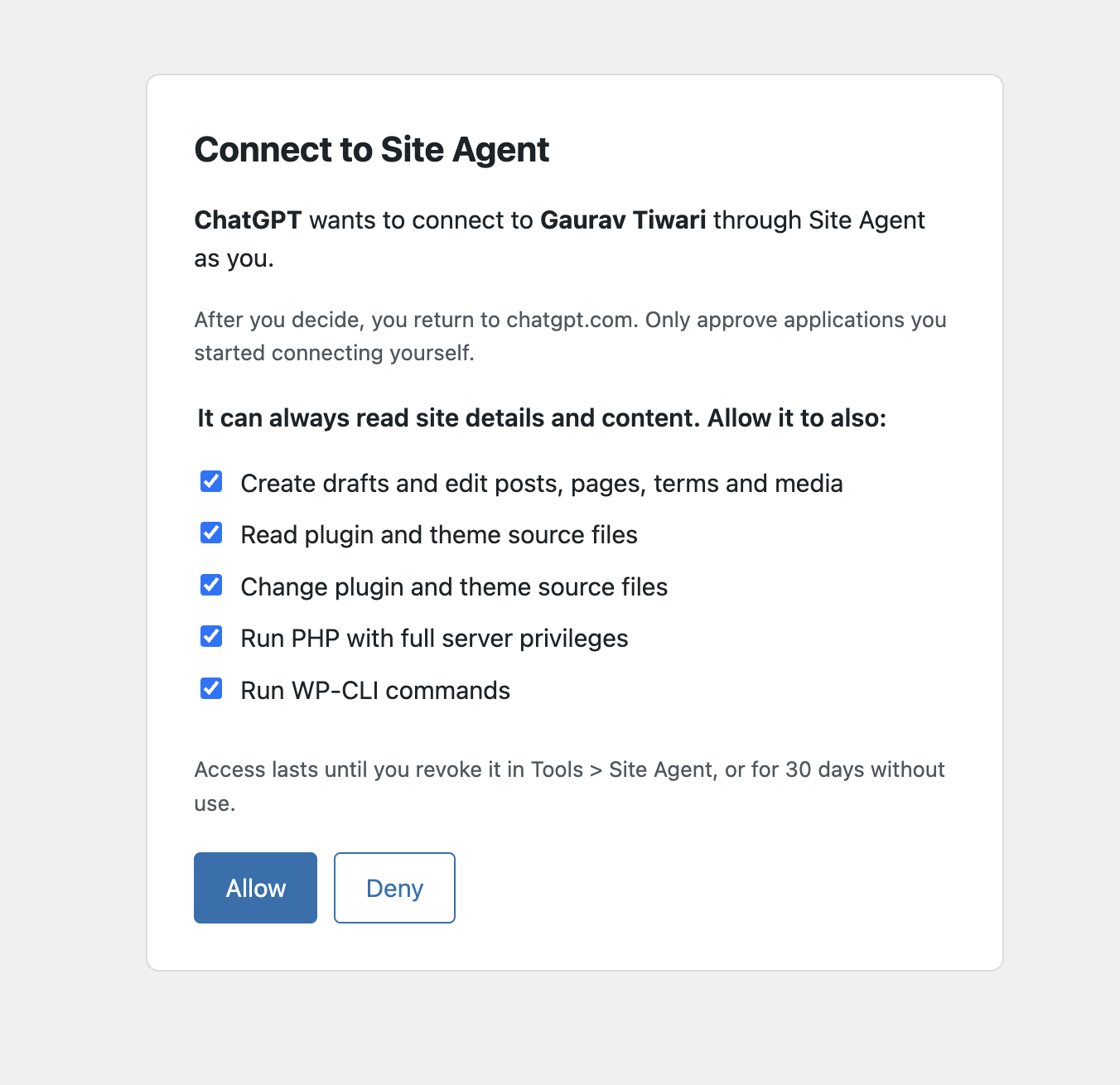
Sign in to WordPress, check the tool groups it should have and choose Allow. You land back in your client, connected.
The consent screen your client opens. You pick what it can do, then choose Allow.
OAuth Sign-In Default
On by default. Clients that follow the MCP authorization spec find Site Agent’s sign-in on their own. You approve each client on a WordPress consent screen and pick its tool groups. Access tokens last an hour, refresh tokens rotate, and you can revoke a connection in Tools > Site Agent.
Application Password Header Not recommended
A client that can’t sign in can send Authorization: Basic BASE64_TOKEN, which keeps the password out of URLs. Tools > Site Agent warns while one is in use, and the agent is told to suggest OAuth.
Authenticated URL Not recommended
Apps that only accept a URL get the endpoint with ?auth=BASE64_TOKEN added. URLs can end up in logs and browser history, and MCP’s authorization guidance discourages tokens in them, so give this route a dedicated password you can revoke.
Setup by Client
Replace your-site.com with your domain. Every client below signs in with OAuth.
ChatGPT
ChatGPT connects to MCP servers in developer mode on paid plans and signs in with OAuth.
Enable Site Agent in Tools > Site Agent. OAuth connections are on by default.
In ChatGPT, open Settings and turn on Developer mode. OpenAI’s guide lists the switch under Security and login.
Add a new app with the plus button, name it Site Agent, paste the endpoint as the MCP server URL and choose OAuth.
Sign in to WordPress when ChatGPT asks, check the tool groups and choose Allow.
In a chat, pick Developer mode from the + menu and select Site Agent.
OpenAI offers developer mode to Plus, Pro, Business, Enterprise and Education accounts on the web. ChatGPT connects from OpenAI’s servers, so your site must be public over HTTPS.
MCP server URL
https://your-site.com/wp-json/site-agent/v1/mcp
Signs in with OAuth. No token to paste.
Claude
Claude.ai, Claude Desktop and the Claude mobile apps share custom connectors, and they sign in with OAuth.
Enable Site Agent in Tools > Site Agent. OAuth connections are on by default.
In Claude, open Customize > Connectors and choose Add custom connector. On Team and Enterprise plans, an owner adds it from Organization settings > Connectors.
Paste the endpoint as the URL and add it, leaving the OAuth client fields empty.
Choose Connect, sign in to WordPress, check the tool groups and choose Allow.
Turn Site Agent on for a chat from the tools menu.
Claude connects from Anthropic’s servers, so the site must be public over HTTPS and your firewall must let Anthropic’s addresses through. The Free plan allows one custom connector.
Remote MCP server URL
https://your-site.com/wp-json/site-agent/v1/mcp
Signs in with OAuth. No token to paste.
Gemini CLI
Gemini CLI signs in with OAuth. Gemini Code Assist’s agent mode in VS Code reads the same settings file.
Add the server to ~/.gemini/settings.json, or to .gemini/settings.json in one project.
Restart Gemini CLI and run /mcp auth site-agent.
Sign in to WordPress in the browser, check the tool groups and choose Allow, then run /mcp to check the tools.
The Gemini app on the web can add custom MCP apps for personal accounts in the US and links them through sign-in. I haven’t tested it with Site Agent yet.
The free checkout gives you the complete plugin and a license for automatic updates.
The code is public and GPL-licensed, and every tool works without activating the license. The license only connects your site to the update service, so new versions arrive in your Plugins screen.
The download and license key appear in your account after the free checkout.
I Build Tools That Pay for Themselves And Give Away the Ones That Can’t
Everything here is quick to set up, light on your pages and built to do one real job well. I only charge for the tools that can make you money. The rest are free.
Any client that supports remote MCP servers over Streamable HTTP. Clients that support MCP’s OAuth sign in through WordPress with no token to copy, and that’s the default.
For a client without OAuth, an Application Password in a header or URL still works, but Tools > Site Agent marks it as not recommended.
Is It Safe to Give an AI Agent Write Access?
It is safe enough for content work on most sites, because edits to live posts are staged and every update is checked against the last read. The developer tools are a different matter. They run with server privileges, so I’d keep them on a staging site with a backup and give production passwords content access only.
What Happens When the Agent Edits a Published Post?
The change is saved as your autosave. WordPress shows it in the editor next to the live version, and you decide whether to restore and publish it. The agent can update the live post directly only by passing a status, and it should do that only when you’ve asked for it.
Does It Work With Elementor, Bricks or Divi?
Yes. Site Agent tells the agent which builder stores each page’s layout, and the matching skill explains how to change it. Content writes refuse raw Elementor, Bricks and Divi layout data, because writing it directly skips the builder’s validation and cache refresh.
On Bricks 2.4 and later, switch on Bricks tools and the agent works through Bricks’ own abilities.
Elementor changes need the PHP tool, because Elementor’s own save runs in PHP.
Divi pages are edited like other post content.
Does It Work With Page Blocks Builder and GT Link Manager?
Yes. Each plugin ships a skill that Site Agent lists automatically. The agent reads it, then runs the plugin’s own commands through the PHP tool, so PHP execution has to be on.
Page Blocks Builder 4.2 and later: build pages, edit sections and manage library blocks.
GT Link Manager 1.10 and later: create, update and organize short links, and read click analytics.
Where Does My Site’s Data Go?
Your AI client connects directly to WordPress. Site Agent has no hosted proxy and no telemetry. The client and its AI provider handle tool results under their own privacy policy.
Automatic updates send gauravtiwari.org:
your license key and activation
your site URL
the plugin, WordPress and PHP versions
PHP and WP-CLI can also make outbound requests when the agent asks them to.
What Can the File Tools Reach?
The file tools work only inside these folders in wp-content:
plugins
themes
mu-plugins
Hidden files and symlinks are blocked, and so are credential files such as wp-config.php and auth.json. Site Agent can’t edit its own files. Source code can still contain secrets, which is why source inspection has its own switch.
How Do Updates Work?
Complete the free checkout, then activate the license on the Site Agent screen. New versions then appear in your Plugins screen like any other update. The license controls updates only, and you can always install a release ZIP by hand.
Start With a Staging Site.
Connect your agent, check what it can read, then switch on more tools when the task needs them.


 Site Agent