
Searchable Tables
Give readers search, sorting, column filters and optional pagination. Choose scrolling or stacked rows on smaller screens.
Core Tables is my WordPress table plugin for searchable tables, comparisons and charts.
Keep your data in one place. Review a draft, publish it and update every linked table and chart across your site.
Unlimited sites. Lifetime updates and support. Or $39/year.
Maintain a comparison, resource list or research dataset once. Choose how each placement displays it.
Give readers search, sorting, column filters and optional pagination. Choose scrolling or stacked rows on smaller screens.
Compare up to 6 numeric series in line or grouped bar charts. The underlying data table remains available below the chart.
Save changes without changing public pages. Restore an earlier revision into the editor and publish when you choose.
Connect a service account, map your columns and refresh manually, hourly or daily. Draft-only refresh is the default.
Bring in CSV, HTML, Markdown or JSON. Import from TablePress, Ninja Tables, wpDataTables and WP Table Builder.
Keep the editing work separate from the version your readers see.
Type rows, import a table or connect a Google Sheet.
Choose types and keep internal columns private.
Review the public columns before publishing.
Add a Core Table, Core Chart or shortcode. Reuse the dataset wherever you need it.
Public tables, charts and API responses use the published revision and its public columns. Keep internal notes or costs out of the public view.
Follow the first table and chart guide, or connect a Google Sheet.
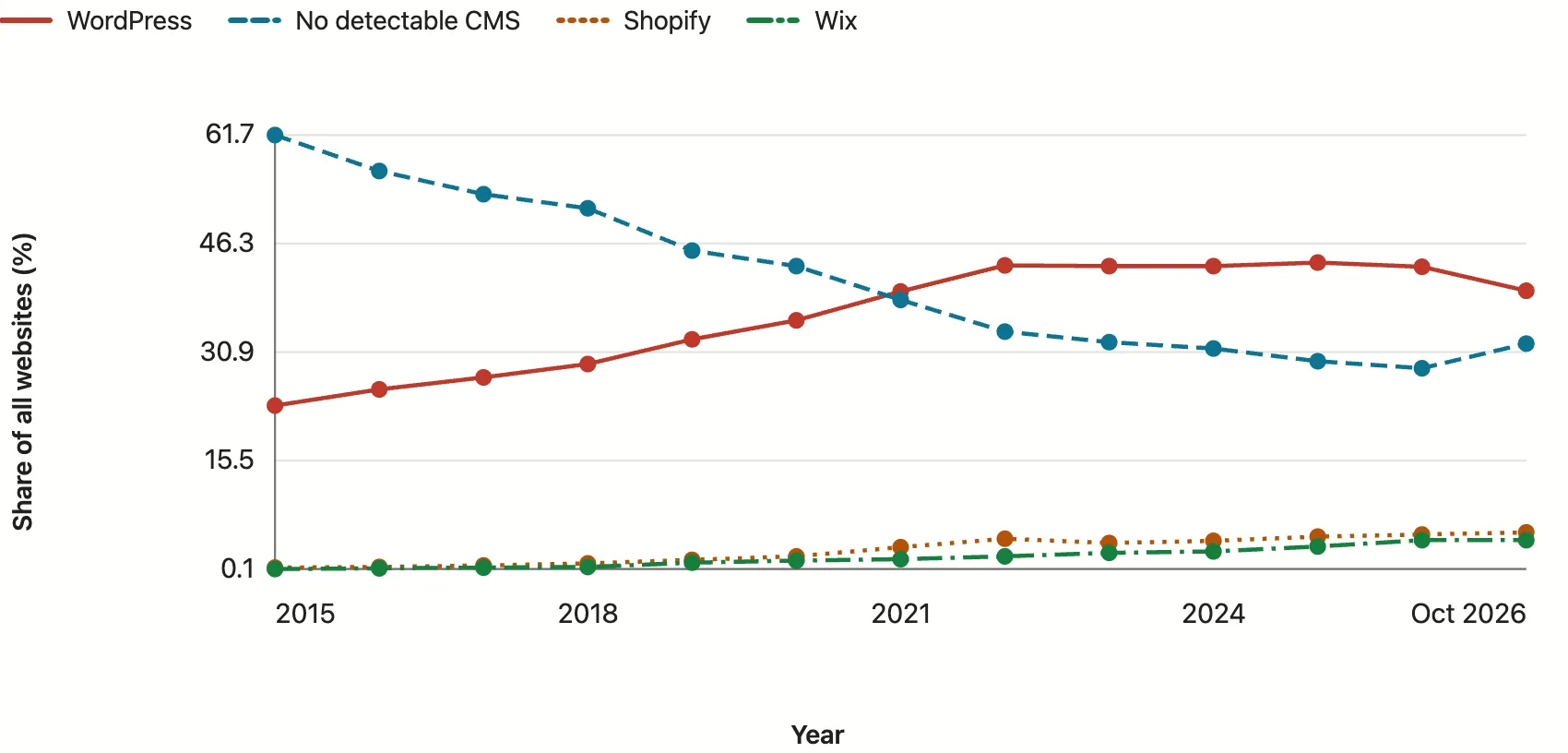
These working examples reuse published datasets from my site. Search the milestones table, sort a column or inspect the chart values.
WordPress market share milestones from the statistics article.
| Date | Milestone | Share of all websites (%) |
|---|---|---|
| Sep 23, 2013 | 1 in 5 websites | 20 |
| Nov 9, 2015 | 1 in 4 websites | 25 |
| Mar 5, 2019 | 1 in 3 websites | 33.3 |
| Jan 1, 2022 | First reading above 43% | 43.2 |
| Jan 1, 2025 | All-time peak | 43.6 |
A grouped bar chart from my GeneratePress pricing article, with its data table below.
| Sites Needed | Previous One Plan | Current One Plan | Annual Change |
|---|---|---|---|
| 1 site | USD 149.00 | USD 99.00 | $50 less (-33.6%) |
| 10 sites | USD 149.00 | USD 149.00 | No price change |
| 100 sites | USD 149.00 | USD 199.00 | $50 more (+33.6%) |
Move data into a reusable dataset and keep it useful across editors, themes and workflows.
Use text, numbers, currency, dates, URLs, true/false fields, rich text and Media Library images.
Use the block editor or place a shortcode in a classic theme, widget or page builder.
Build and update tables through Site Agent, WordPress abilities and MCP. Access is controlled by WordPress permissions.
Core Tables suits comparisons, directories and research tables that you maintain and publish.
It doesn’t calculate formulas, merge cells, write back to Google Sheets or provide a visitor-editable spreadsheet. Activate it on individual sites, rather than network-wide.
Both licenses include every feature and unlimited sites. Choose the update and support term that suits you.
$99 USD, one payment
Keep Core Tables available for the sites you build and maintain.
One payment. Download and license in your account.
$39 USD per year
Start with an annual license for the same complete plugin.
The installed plugin keeps working if the license becomes inactive.
Checkout may show your local currency. Paid plugins include a 14-day money-back period. Manage your downloads and license in your account.
For a specific setup, ask Product Support.
Yes. Select the same published dataset in each Core Table or Core Chart block, or reuse its shortcode. Publishing a dataset change updates every placement that uses it.
Your public pages keep showing the published revision. Saving a draft doesn’t replace it. Google Sheets refresh also saves to a draft by default; automatic publication is an explicit option.
You can import from TablePress, Ninja Tables, wpDataTables and WP Table Builder. CSV, HTML, Markdown and JSON imports are also available. Review the preview and check your column types before publishing.
No form plugin is required. You can use Core Tables with blocks or shortcodes. Google Sheets needs your own service account; AI table building through Site Agent and MCP needs those connections to be configured.
The installed plugin and its tables remain available. A valid license provides protected updates and support for the purchased term. Deactivation and uninstall preserve datasets.
Paid plugins and software have a 14-day money-back period from purchase. Contact me within that period under the refund policy.
I recommend starting with one comparison or dataset you already maintain. Publish it once, then reuse it wherever it belongs.
Upload the plugin ZIP, activate your license and create your first dataset.