
 by
I get why you’re waiting for a GeneratePress Black Friday deal. But the plans have changed, and a cheaper subscription can still leave you with fewer sites than you need. I’d choose the site allowance first, then look at the discount.
GeneratePress One bundles the paid theme tools with its site-building products. It starts at $99 a year for 1 site. For Black Friday 2026, I’m expecting 30% off annual plans and 20% off lifetime, though GeneratePress hasn’t confirmed the offer or dates.
If you’re buying for the first time, the current GeneratePress One plans are your starting point. If you’re already a customer, I’d check your existing allowance before changing anything.
GeneratePress Black Friday Deal
The Black Friday 2026 offer is still unconfirmed. My expectation is 30% off the annual subscriptions and 20% off the 100-site lifetime license. Here’s what those discounts would mean at the current prices.
For context, the official 2025 Black Friday offer reduced the former $149 annual bundle to $99 for the introductory year. That was $50 off, about 33.6%. The old license allowance differs from the plans sold today.
Expected Black Friday Prices
These are estimated first payments in USD. The annual figures assume 30% off; lifetime assumes 20% off. They are not live checkout prices.
| Plan | Regular Price | Expected Discount | Expected First Payment |
|---|---|---|---|
| One, 1 site | $99/year | 30% | $69.30 for 1 year |
| One, 10 sites | $149/year | 30% | $104.30 for 1 year |
| One, 100 sites | $199/year | 30% | $139.30 for 1 year |
| One Lifetime, 100 sites | $596 once | 20% | $476.80 once |
At those prices, you’d save $29.70 on the 1-site annual plan or $119.20 on lifetime. I’d treat that as a budget estimate until the official offer confirms the details.
These estimates do not establish sale dates, coupon requirements, upgrade eligibility or renewal discounts. Check the official offer and your selected plan before paying.
GeneratePress One Pricing
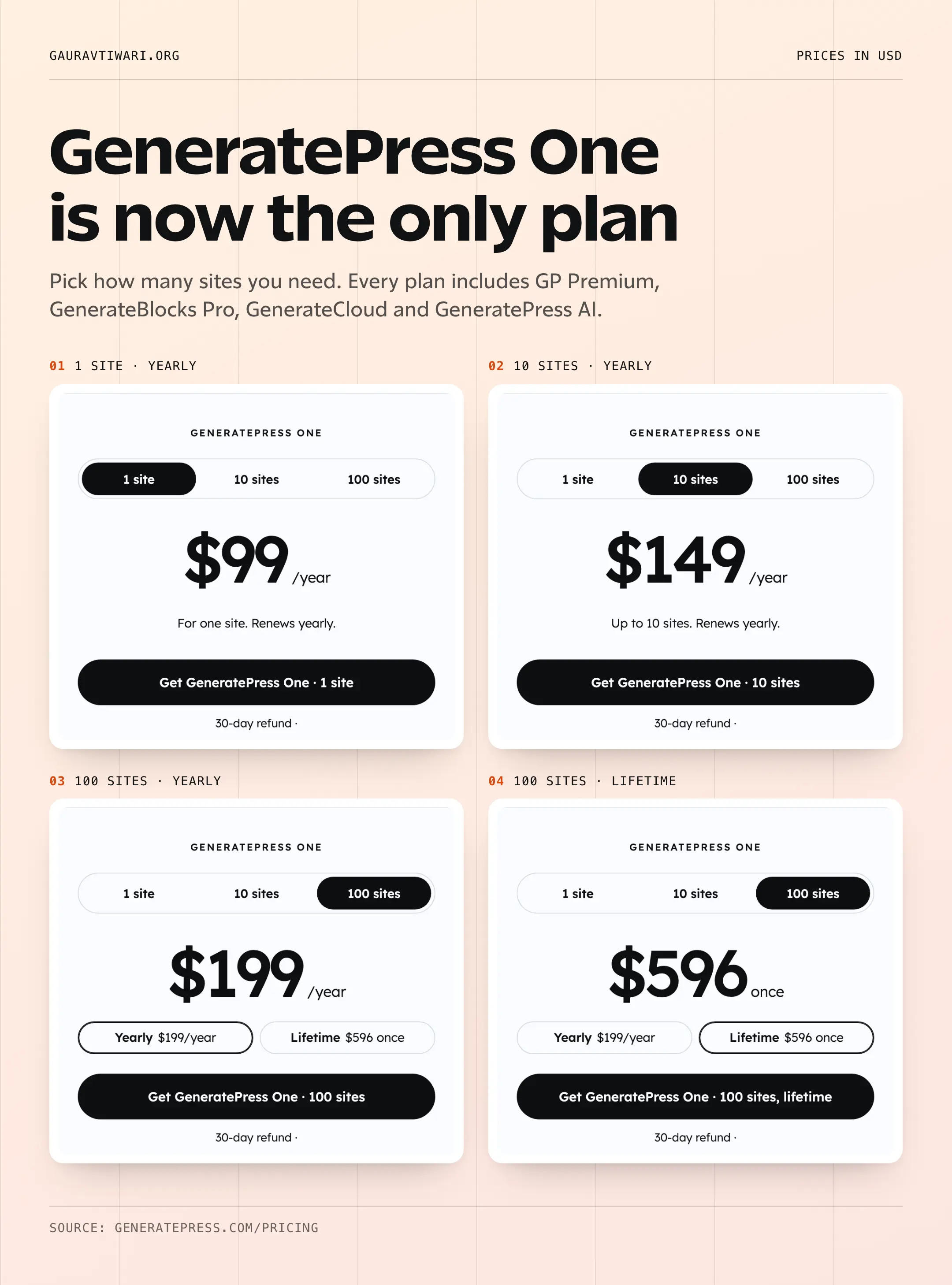
All paid One plans include the same products. You’re choosing how many sites you can use them on and whether to pay yearly or once. These are the regular USD prices before any Black Friday discount.
| Plan | Sites | Payment | Billing |
|---|---|---|---|
| GeneratePress One | 1 | $99 | Yearly |
| GeneratePress One | Up to 10 | $149 | Yearly |
| GeneratePress One | Up to 100 | $199 | Yearly |
| GeneratePress One Lifetime | Up to 100 | $596 | Once |
Annual plans renew automatically unless canceled. The lifetime option has no renewal payment. Both the purchase amount and recurring commitment should be visible before you authorize payment.
GeneratePress Pricing Changes
The old One bundle was $149 a year for up to 500 sites. For a new single-site buyer, the entry payment is now lower. But a new 100-site subscription costs $199 a year, with less capacity than the old plan.
- Previous One Plan
- Current One Plan
| Sites Needed | Previous One Plan | Current One Plan | Annual Change |
|---|---|---|---|
| 1 site | USD 149.00 | USD 99.00 | $50 less (-33.6%) |
| 10 sites | USD 149.00 | USD 149.00 | No price change |
| 100 sites | USD 149.00 | USD 199.00 | $50 more (+33.6%) |
So, the 100-site annual plan costs $50 more, about a 33.6% increase. That matters even if you never needed all 500 sites. And if you manage more than 100, none of the new individual plans covers the whole portfolio.
A higher reference price can make a later percentage discount look more attractive. The timing alone doesn’t establish that this motivated the change. GeneratePress’s stated explanation is simpler bundling and plans based on site count.
What’s Included in GeneratePress One?
I want to make the bundle clear before we talk about value. Every paid One plan includes these 4 products, so you don’t have to choose between the theme addon and the block tools.
GP Premium
GP Premium adds controls to the free GeneratePress theme. Elements lets you create reusable site sections and content templates.
- Build a custom header or post layout.
- Use the Site Library as a starting point.
I’d look here first when the theme’s default layout no longer fits your site.
GenerateBlocks Pro
GenerateBlocks Pro gives you more design control inside the WordPress block editor.
- Reuse global styles and design tokens.
- Build layouts around dynamic content.
If the same card appears across your site, a shared style lets you change its design in one place.
GenerateCloud
GenerateCloud keeps your own patterns in a shared library. You can bring those layouts into other sites instead of copying them by hand.
I’d value this most when several projects reuse the same design. A single-site owner may have less need for it.
GeneratePress AI
GeneratePress AI connects a compatible AI app to your site. You can ask Claude Code or Codex to build a page using your styles, then review the draft.
The plugin is optional. You still need the initial WordPress setup and your own connected AI provider.
If you only need a basic theme, I’d compare GeneratePress Free vs One first. You don’t need to buy the whole toolkit just because it’s on sale.
Building With GeneratePress AI
GeneratePress AI works with Claude Code, Codex and other AI applications that support MCP, the connection protocol those apps use to work with external tools. After initial WordPress setup and connection approval, you can handle supported site-building tasks from your AI app without opening the dashboard for each edit.
- You could ask for a services page built from your existing styles and patterns. It arrives as a draft for review.
- You can request supported changes to a live page and review a preview before approving them.
- You can also work on supported forms, headers and templates through the connected application.
One point I’d keep in mind: the included plugin connects your AI app to WordPress. You still need your own AI provider, and its subscription or usage limits are separate.
If your buying decision is mainly about the editor, my Kadence Blocks vs GenerateBlocks comparison explains the different building approaches.
Which GeneratePress Plan Should You Choose?
I’d pick the smallest plan that comfortably covers your sites. Buying room for 100 sites doesn’t save you money if you only need 1.
- 1 site: The $99 annual plan is the entry option for a single paid project. The free theme remains an option when you do not need the paid tools.
- 2 to 10 sites: The $149 annual plan covers a small portfolio. For example, 3 separate $99 subscriptions would cost $297 a year.
- 11 to 100 sites: The $199 annual plan covers the larger portfolio. Compare its ongoing cost with the $596 lifetime option.
Annual or Lifetime?
For the same 100-site allowance, 3 annual payments at $199 total $597. Lifetime costs $596 once, so the saving at that point is only $1. After 4 annual payments, the difference reaches $200.
I’d consider lifetime when I expected to keep using the 100-site plan for several years. For 1 site, the calculation changes: 6 annual payments of $99 total $594. Those examples use regular prices and assume the annual fee stays the same.
Lifetime support and updates apply for the lifetime of the product under the vendor’s terms. GeneratePress hasn’t announced a withdrawal deadline, so I’d judge the option by its cost and fit rather than an assumed expiry.
Existing Customers and Upgrades
Active legacy subscriptions keep their existing price and site allowance, according to GeneratePress. You can continue renewing an existing standalone product or One subscription without moving to a new plan.
If your existing license covers 500 sites, upgrading to a new plan moves you to the allowance you choose, with a maximum of 100 sites. GeneratePress says you cannot switch back to the old 500-site allowance after that upgrade.
Your account can apply credit for unused paid time when upgrading. That credit is separate from a Black Friday discount. Any sale benefit for an annual-to-lifetime upgrade needs to be stated in the announced offer.
I’d open my account and compare the upgrade quote before buying a new subscription. The official upgrade explanation describes how credits and site limits work. There is no current unlimited plan.
How to Check the GeneratePress Black Friday Offer
The GeneratePress pricing page is the place to compare an announced promotion with the regular prices. Check your exact selection before paying.
Choose your allowance and billing. Select 1, 10 or 100 sites, then annual or lifetime where available.
Check eligibility. Confirm that the advertised offer covers your selected plan or account upgrade. Follow the official coupon instructions if a code is required.
Review the payment. Check the total, currency and any taxes. For an annual subscription, also check the renewal amount and next payment date.
Check an upgrade separately. Compare the credit and new site allowance shown in your account before confirming the change.
FAQs on GeneratePress Black Friday
These details can affect your purchase or renewal even when the headline price looks right.
New customers get GP Premium through GeneratePress One. Existing standalone subscribers can continue renewing their eligible active licenses.
Yes, on client sites you actively build, develop and manage as administrator, within your allowance. The license key cannot be resold or shared as a standalone activation service.
Eligible local and staging addresses do not use a seat. Other testing domains can count, so check the current account documentation before assuming every development site is exempt.
Updates, support and download access end when the paid term expires unless renewed. That does not revoke the software rights already granted under its license.
The voluntary 30-day guarantee applies to the original purchase. Renewal payments are excluded from that guarantee, subject to any additional applicable consumer rights.
The account and licensing guide explains seat management and renewal controls. Review the purchase and refund terms when those conditions affect your decision.
What I Would Choose
For a new single-site project, I’d start with the annual plan if I needed the paid tools. If I expected to manage several sites for years, I’d give lifetime a closer look once the sale price is confirmed.
If you already have a legacy subscription, I’d check what you would give up before switching. You can compare the current GeneratePress plans once you know what you need. If the bundle is more than you want, consider these GeneratePress alternatives.