Skip to content

Palladium Theme for FluentCart and WooCommerce

Give clothing, shoes and accessories a storefront with room to breathe. Palladium pairs editorial product pages with native FluentCart or WooCommerce shopping. Every plan includes a store extension at no extra cost: GT Extensions for FluentCart, or Stackless for WooCommerce.

$59/year for 3 websites · $199 once for 10 websites
Version 1.2.0 · WordPress 6.8+ · PHP 8.1+ · FluentCart 1.7+ or WooCommerce 11.2+

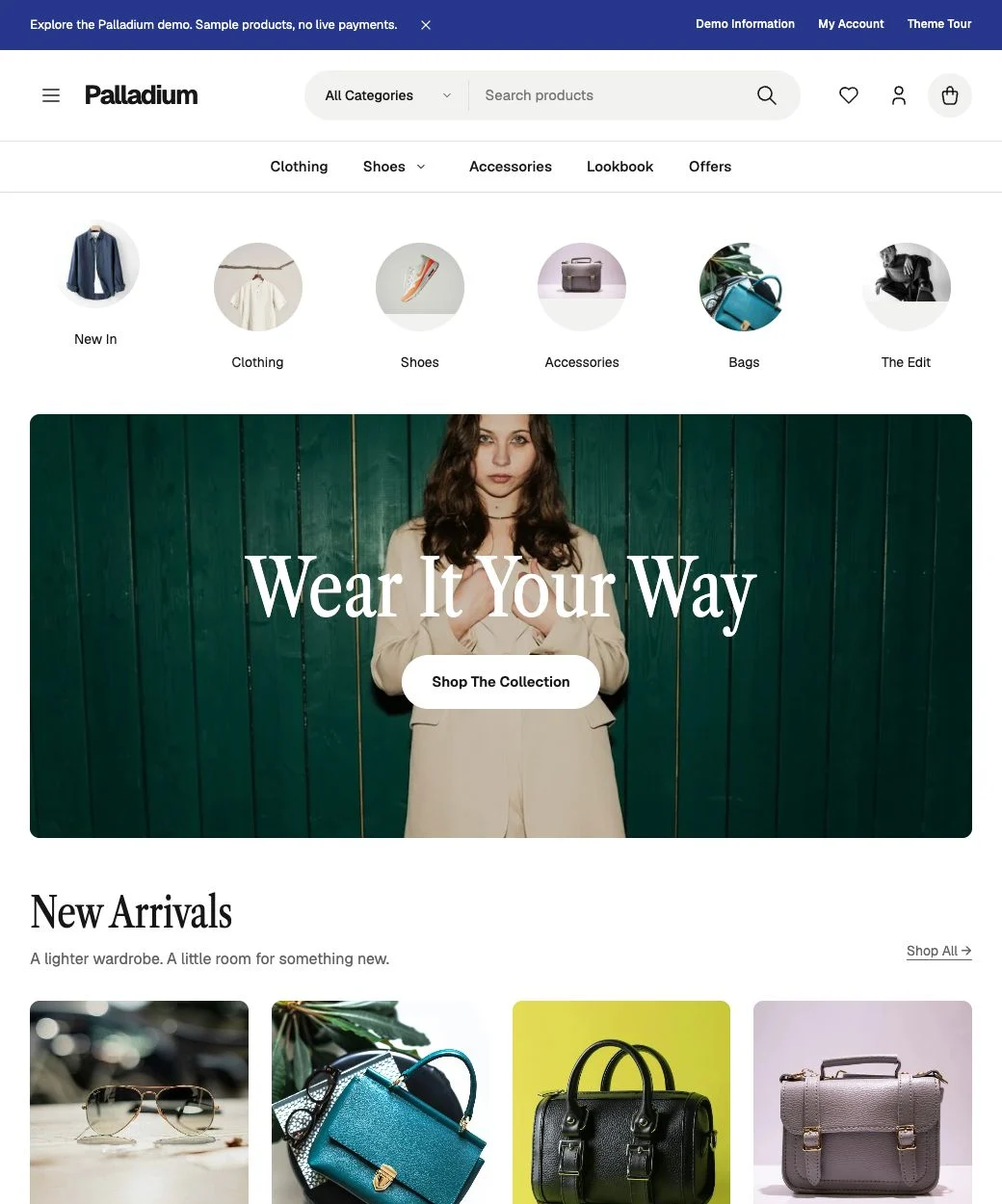
Palladium fashion storefront with category navigation, an editorial hero and new arrivals.
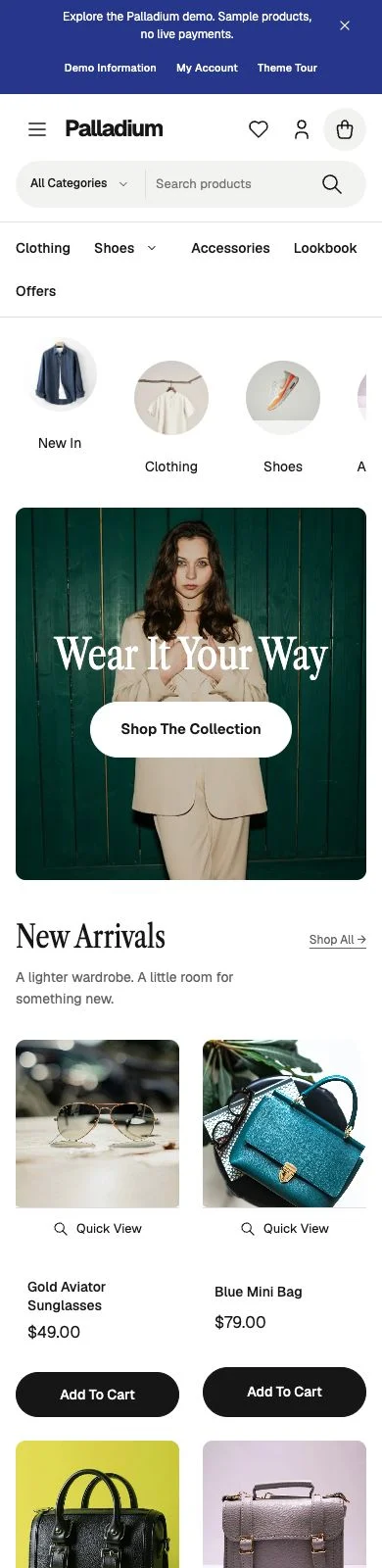
Palladium storefront on a phone, with search, collection navigation and a fashion hero.
15 Retail Patterns
Homepages, collections and campaigns
48 Design Controls
Colors, type, spacing and store layouts
Local Fonts
Geist, Caslon and your Google Fonts
Extensions Included
GT Extensions or Stackless, matched to your store

The Storefront

Made For Your Store

Lead with your collections, then let the products do the talking. Clothing, shoes and accessories share the same catalog, with search, category navigation and clean product cards.

  • Search First, Centered Editorial and Compact headers.
  • Independent Main, Topbar and Burger menus with nested navigation.
  • Native filters, sorting and pagination, with grid and list views on FluentCart.
  • A second photo on hover and result counts, plus Quick View on FluentCart.
  • A slide-out bag on WooCommerce with quantity controls, subtotal and checkout.
  • Campaigns, collection tabs, lookbooks and offers built with editable blocks.
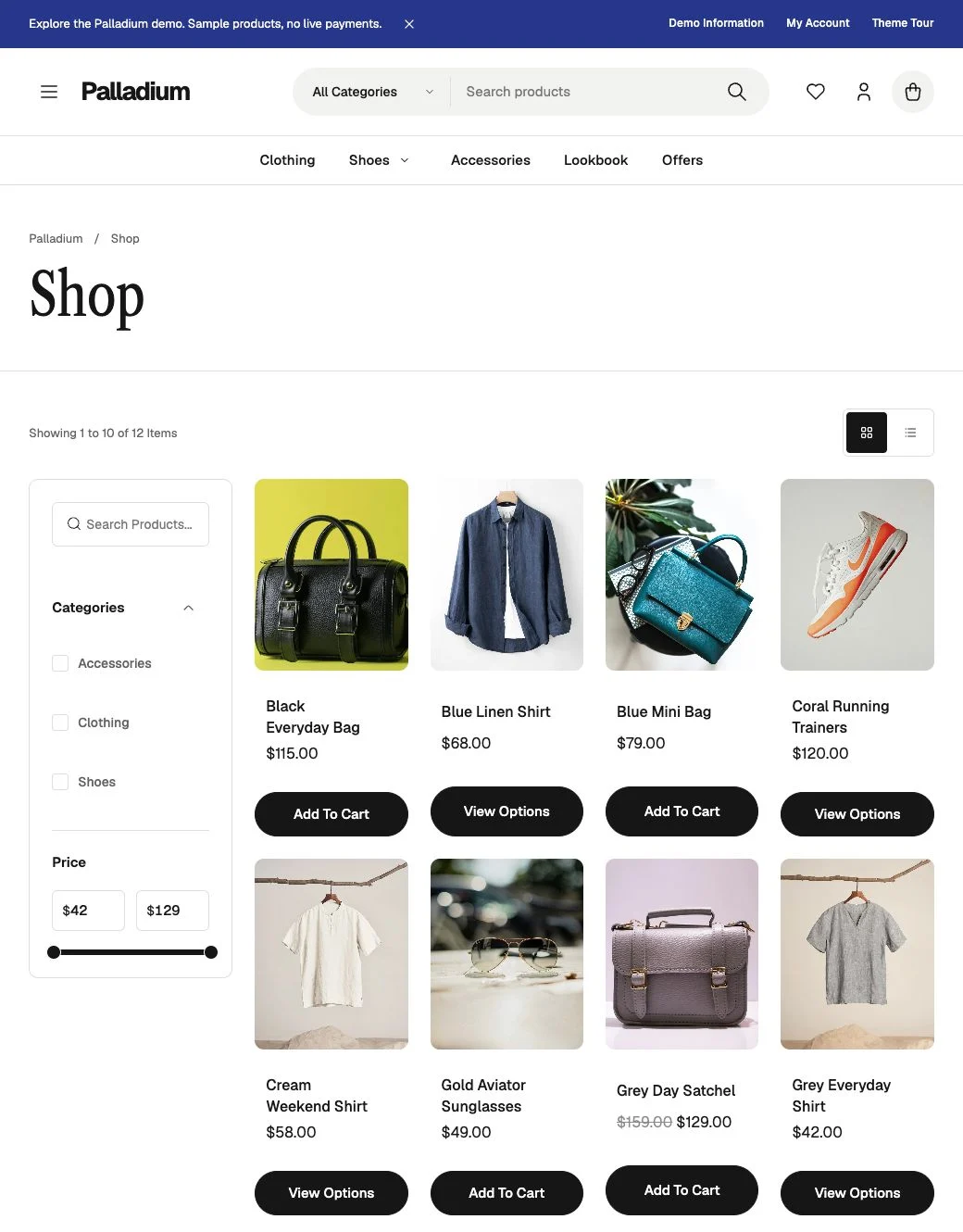
Palladium shop with price filters, product sorting and a clothing, footwear and accessories grid.
Price filters, consistent purchase buttons and native FluentCart product data.
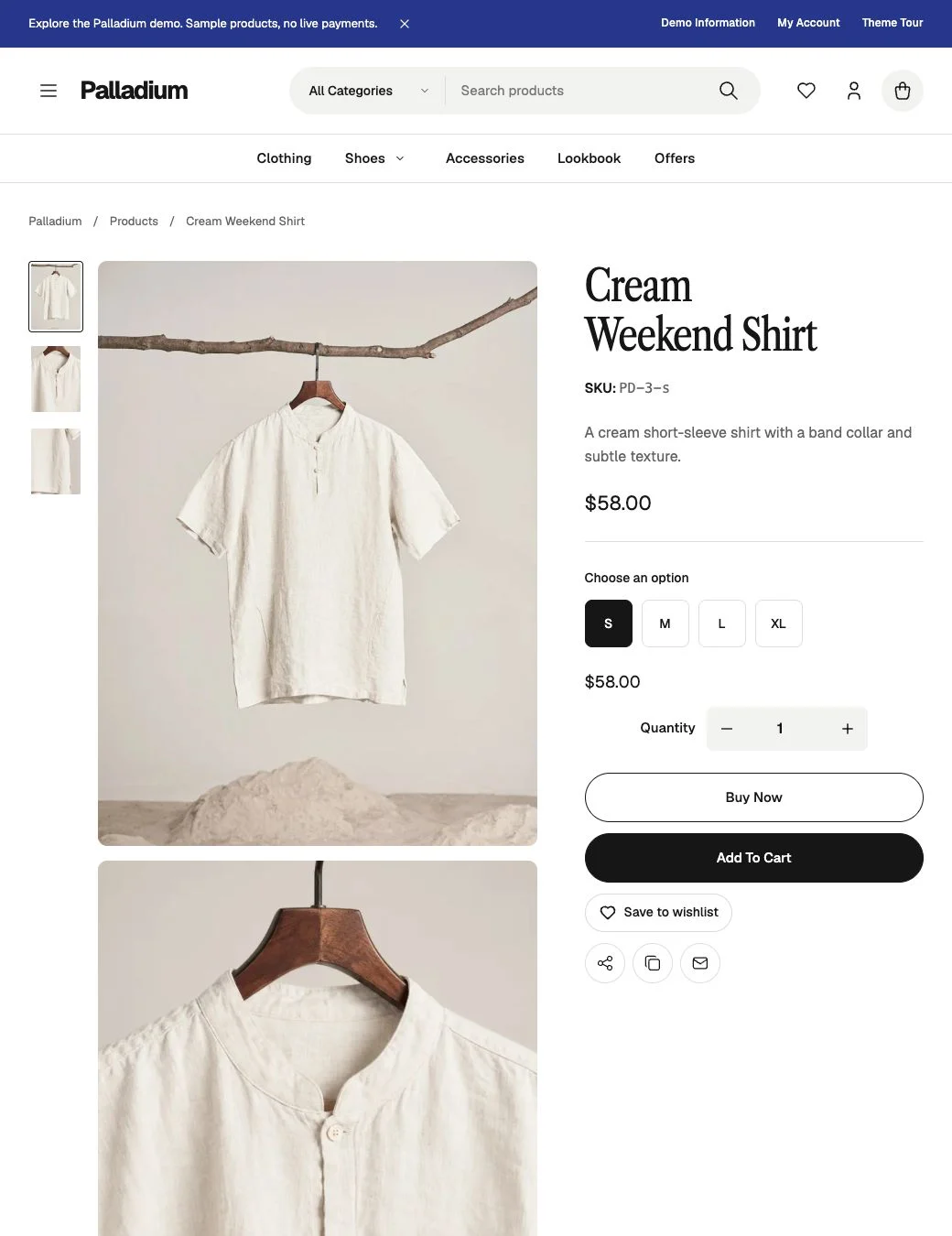
Cream Weekend Shirt with a stacked photo gallery, size options, quantity controls and purchase actions.
A multi-image gallery with the purchase column held alongside it on desktop.

Product Pages

Products Worth A Closer Look

Let customers move through the photos while size, price and purchase options stay within reach. On phones, the gallery becomes a swipeable strip and the product details follow naturally.

  • Stacked images, zoom and a bounded sticky purchase column. Variable WooCommerce products keep WooCommerce’s gallery, so the photo changes with the chosen option.
  • Clear selected options, monospace SKUs and centered quantity controls.
  • Consistent sizing for Add To Cart and, on FluentCart, Buy Now.
  • Icon sharing and related products on both platforms, plus an optional wishlist on FluentCart.
  • Product details and reviews from FluentCart or WooCommerce, plus GT Extensions details on FluentCart.

Your Brand

Make It Yours

Start with Geist for the body and Libre Caslon Condensed for headlines. Adjust the pairing, download Google Fonts locally, and carry your chosen colors into your store.

Typography
Independent body and headline fonts, weights, sizes and line heights. Downloaded families appear in the Customizer.
Layout And Spacing
Content width, gutters, image corners, product columns and gaps, header spacing and footer padding.
Buttons And Product Pages
Separate primary and secondary radii, gallery fit, sticky details, sharing and catalog enhancements.
Headers, Topbar And Blog
3 header styles, an optional topbar menu and dismissible announcement, plus row or card layouts for articles.
4 Presets. Or Your Own Colors.
Cobalt
Forest
Clay
Monochrome

Change the accent, paper, surface, ink, muted text, rules and button colors individually. FluentCart can inherit the published theme palette, while its Default and Customize choices remain available. WooCommerce buttons, prices and notices follow the palette automatically.

Fonts are served from your WordPress installation. The default pairing is bundled with the theme; Google Fonts imports live in WordPress’s Font Library and survive theme updates.

Included Extensions

Included With Every Plan

Every plan includes the extension that matches your store. FluentCart stores get GT Extensions for FluentCart, and WooCommerce stores get Stackless for WooCommerce. You don’t need a separate purchase or plugin license key, and each Palladium update includes the extension’s update.

Palladium installs only the one your store uses and turns it on by default. Turn it off in Palladium Settings, or deactivate or uninstall it in WordPress. Theme updates respect that choice and keep existing settings.

What Each Extension Adds

GT Extensions for FluentCartWishlist, product details, saved carts, shopping lists, Checkout Builder and optional modules such as product add-ons, delivery slots and currency tools.
Stackless for WooCommerceSubscriptions, Stripe, PayPal, Polar and Paddle payments, software licensing, multi-currency, invoices and checkout tools in one plugin. You turn on only the modules you need.

GT Extensions needs FluentCart and Stackless needs WooCommerce, so a store only ever gets the one it can use. FluentCart or WooCommerce is installed separately. FluentCart Pro is optional and is not included. Module requirements and payment-provider compatibility still apply.

Plans

Pay Yearly Or Pay Once

Both plans include the full theme and the extension that matches your store. Pick the one that fits how many stores you run.

3 Sites

$59

Per year · 3 websites

  • All Palladium theme features and patterns.
  • GT Extensions or Stackless for WooCommerce, whichever your store uses.
  • Theme and included-extension updates during your paid term.
  • Support during your paid term.
  • Activate your key in Palladium Settings.
Get 3 Sites · $59/Year

Renews yearly. 3 website activations.

10 Sites Lifetime

$199

One payment · 10 websites

  • The same complete Palladium theme.
  • The same included extensions.
  • Lifetime theme and included-extension updates.
  • Lifetime support.
  • Use across your own and client websites.
Get 10 Sites · $199 Once

Pay once. 10 website activations.

The 3 Sites plan renews yearly, and you manage renewals in your purchase account. If it expires, updates, support and new downloads stop, but your installed storefront keeps working and keeps its data. The 10 Sites plan is one payment with no renewal. Checkout shows any applicable taxes. A 14-day refund period applies under the Terms of Service.

Getting Started

From Download To Storefront

Use the installable theme ZIP for Palladium. The bundle also contains GT Extensions and Stackless for WooCommerce as separate ZIPs for manual installation.

  1. Install The Theme

    Install FluentCart or WooCommerce, then upload Palladium under Appearance → Themes. Palladium then installs and turns on the extension that matches your store.

  2. Activate And Design

    Enter your theme key in Palladium Settings. Choose fonts, colors and spacing in the Customizer, then assign your menus.

  3. Add Your Collections

    Insert the Fashion Store Home pattern, set your homepage and add your own products and photography.

A Good Fit

Fashion and lifestyle stores, footwear catalogs and accessory brands using FluentCart or WooCommerce. Developers can extend the hybrid theme through documented hooks and a child theme.

Before You Choose

Palladium works with FluentCart or WooCommerce. If both are active, it presents FluentCart. Wishlists, saved carts, Quick View and GT Extensions need FluentCart, and Stackless needs WooCommerce. Palladium does not include FluentCart Pro, paid WooCommerce extensions or a one-click demo importer. The demo runs on FluentCart with sample products and blocks orders and payments.

I Build Tools That Pay for Themselves And Give Away the Ones That Can’t

Everything here is quick to set up, light on your pages and built to do one real job well. I only charge for the tools that can make you money. The rest are free.

Gaurav Tiwari

Hi, I’m Gaurav

I design, build and support every product on this site myself. When you email me, the person reading it is the one who wrote the code.

I’d rather ship one tool you’d miss if it vanished than ten that sit in your plugin list doing nothing.

  • You talk to me, not a ticket queue
  • Paid tools have to earn their price
  • Free tools stay free
More about me

18+years building websites, plugins and stores, since 2008

I obsess over performance

Switch a feature off and it loads nothing. What does load stays small. A tool that replaces a plugin shouldn’t make your pages slower.

I care how it feels

Clear screens, sensible defaults and settings written in plain English. If you need a tutorial for the basics, that’s my design mistake, not yours.

I build for everyone

Full keyboard support, visible focus, proper labels and text you can actually read. When more people can use your store, more people can buy from it.

I build tools that earn

My paid tools help you sell, renew, license or convert. If one just sits in your stack, I haven’t done my job.

If it can’t earn, it’s free

I won’t charge for anything that can’t make you money. The free tools get the same care as the paid ones, down to the last setting.

Before You Buy

Common Questions

Does the price renew every year?

Only the 3 Sites plan renews: $59 per year, with updates and support during the paid term. The 10 Sites plan is $199 once, with lifetime updates and support. Both include the same theme and included extensions.

Do I need to buy GT Extensions or Stackless separately?

No. Palladium includes GT Extensions for FluentCart and Stackless for WooCommerce, and installs the one your store uses. No separate purchase or plugin key is required, and each theme update includes the extension update.

Can I switch the bundled extensions off?

Yes. Disable them in Appearance → Palladium Settings, or deactivate or uninstall the plugin. That choice is respected during theme updates, and existing plugin settings and standalone licenses are preserved.

Is FluentCart Pro included or required?

FluentCart is installed separately. FluentCart Pro is not included and is optional. Pro-specific features and optional extension modules retain their own requirements.

Does Palladium work with WooCommerce?

Yes. Since version 1.1.0, Palladium styles WooCommerce through its hooks with no template overrides, so WooCommerce updates never leave outdated theme templates behind. You get the same product cards, product pages, header tools and patterns, plus a slide-out bag. Wishlists, saved carts, Quick View and GT Extensions stay with FluentCart. WooCommerce stores get Stackless for WooCommerce instead.

Should I choose FluentCart or WooCommerce?

If your store already runs on WooCommerce, I’d keep it and change only the theme. Palladium works with your existing products and orders, and Stackless adds subscriptions, licensing and invoices without a stack of paid add-ons. For a new store, I recommend FluentCart, because wishlists, saved carts and Quick View only work there.

What happens if my license expires?

Only the 3 Sites plan can expire, and your installed store keeps working if it does. Updates, support and new downloads need an active term. The 10 Sites Lifetime plan does not expire. Deactivate a website in Palladium Settings before transferring its activation to another website. Local development sites recognized by FluentCart do not use the production activation limit.

Can I change fonts and keep my design during updates?

Yes. Choose body and headline typography independently, download Google Fonts locally and select them in the Customizer. Theme settings and the WordPress Font Library are kept separately from the theme files. Use a child theme for changes to PHP templates.

Build Your Next Store With Palladium

Palladium, your collections and a design you can make your own.