Skip to content
Core Support icon

Core Support for WordPress

Every support tool your customers touch, in one place on your own site.

  • Helpdesk
  • Ticketing system
  • Knowledge base
  • AI chatbot
  • Changelog
  • Live chat, coming next
  • Roadmaps, coming next
Get Core Support for $199
  • Pay once and run this WordPress helpdesk plugin on every site you own, with as many agents as you need.
  • Every update for the life of Core Support, including live chat and roadmaps when they ship.
  • Stuck? Email me or ask on Twitter Chat. I wrote the code, so you get a straight answer.

Secure checkout. 14-day unconditional refund period.

See the live demo siteSee this store’s changelog

  • WordPress 7.0+
  • PHP 8.2+
  • No Core Forms or FluentCart needed
Everything in one plugin
Helpdesk to changelog today. Live chat and roadmaps come next.
Fewer repeat tickets
Docs and the AI chatbot answer the common questions first.
Your site, your data
Tickets, docs and encrypted attachments stay with you.
Unlimited sites
One license for your sites and client projects.

Everything You Need to Answer Tickets, Publish Docs and Announce Releases From One Plugin on Your Own Site

Most WordPress businesses rent these one at a time and stitch them together with email. Core Support puts them under one wp-admin menu, with one brand, and every conversation that needs a person lands in the same inbox.

Ready now

Helpdesk

A shared inbox your whole team answers from.

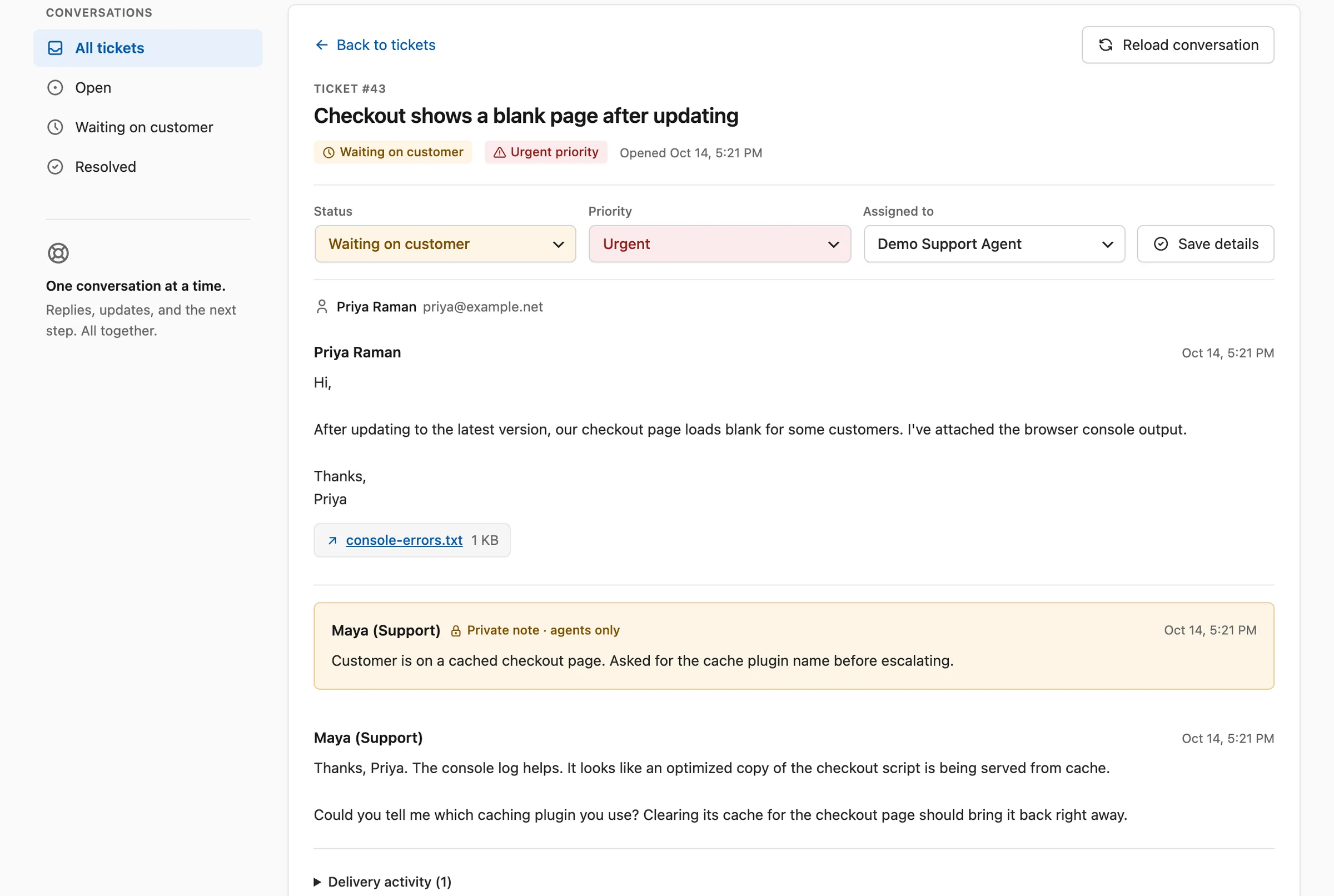
  • Assignment, priorities, private notes and delivery status on every ticket
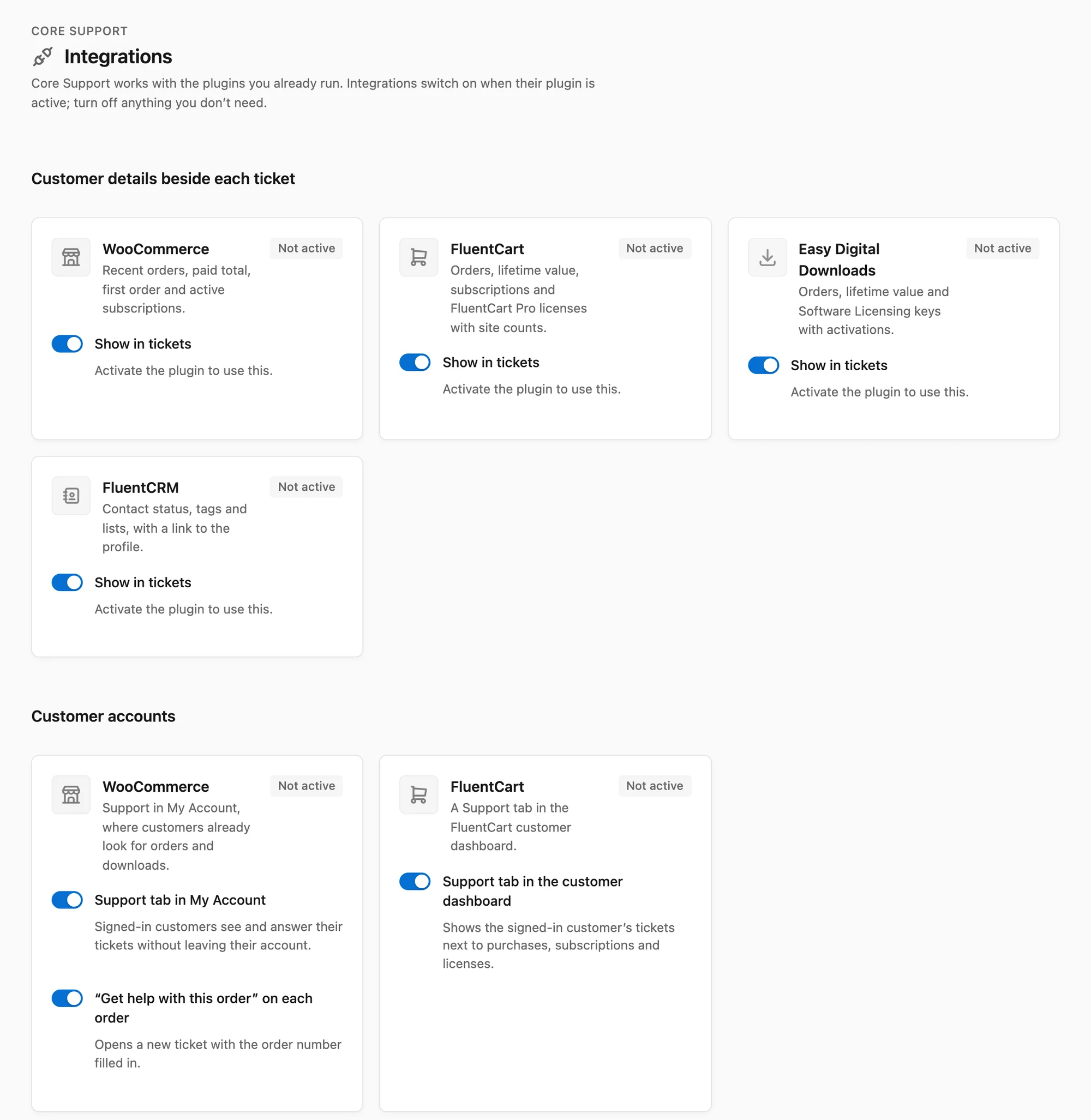
  • Orders and licenses from WooCommerce, FluentCart and Easy Digital Downloads beside the conversation
  • New-ticket alerts in Slack, Telegram, Discord or Pushover

wp-admin → Core Support
Ready now

Ticketing system

Every request becomes a numbered ticket, wherever it starts.

  • Email through IMAP, a Cloudflare relay or tools such as Zapier and n8n
  • Contact Form 7, WPForms, Gravity Forms, Fluent Forms and your other websites
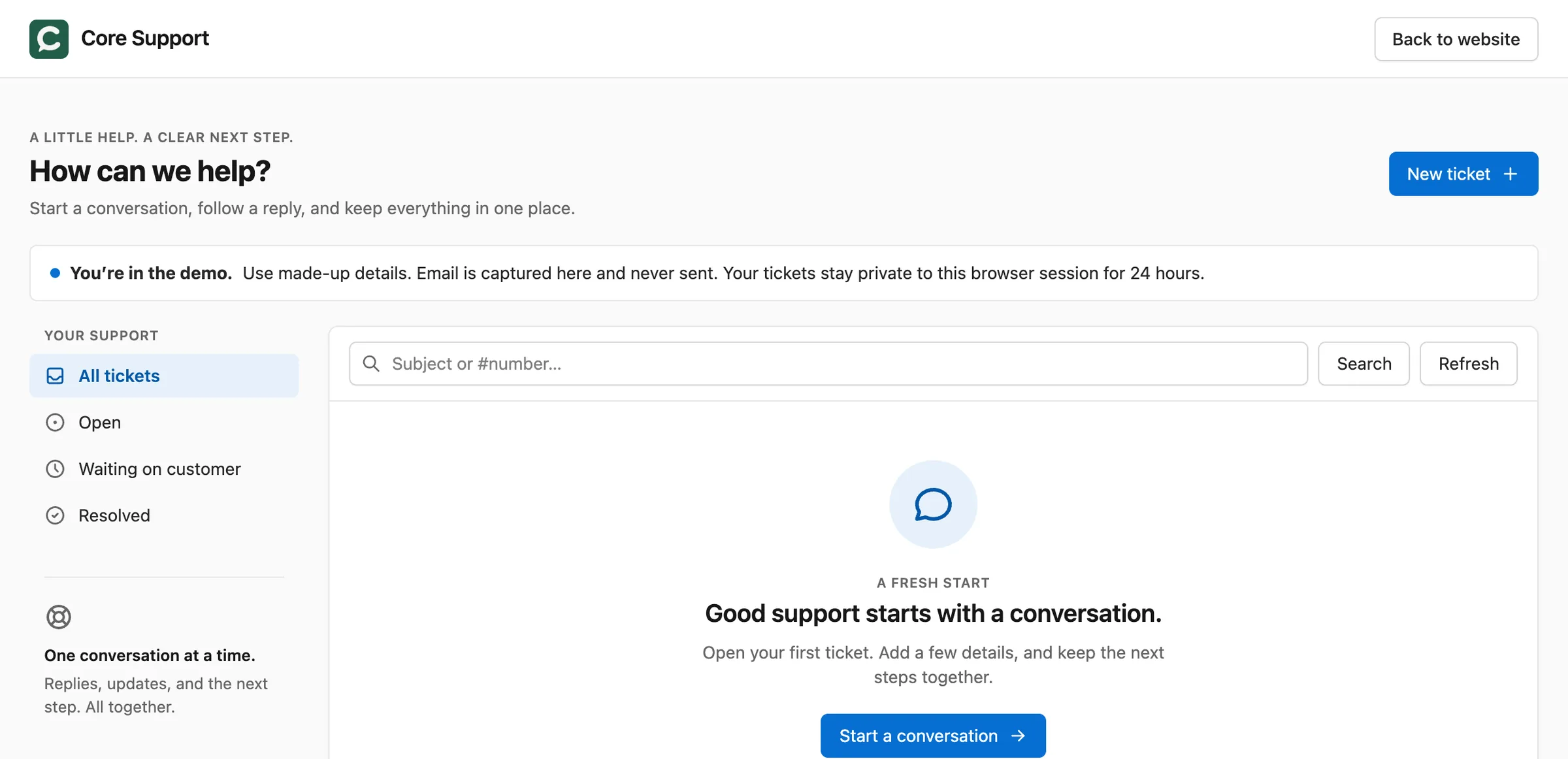
  • A portal where customers follow every ticket sent from their email address

Your support page

Ready now

Knowledge base

Docs that answer the question before it turns into a ticket.

  • One collection per product, with instant search and an On this page outline
  • Import from a sitemap, any website, Markdown or a wordpress.org readme
  • "Was this helpful?" votes show which pages need work

/docs/

Ready now

AI chatbot

Answers from your docs and products, with your own API key.

  • Learns your docs, posts and WooCommerce, FluentCart or EDD products
  • Answer rules and a daily token budget keep it on topic and on budget
  • Talk to a person turns the chat into a ticket with the transcript

Any page, one script tag

Ready now

Changelog

Every release of every product, on one page.

  • Write releases in wp-admin or sync them from GitHub and wordpress.org
  • [NEW] and [BUG FIX] labels become badges
  • RSS feed, JSON API and WP-CLI included

/changelogs/

Coming next

Live chat

Real-time conversations with a person, answered from Core Support.

  • Today, Talk to a person in the AI chatbot opens a ticket with the whole conversation
  • Included in your license when it ships

Free update when it ships

Coming next

Roadmaps

Show customers what you’re building next, on your own site.

  • Today, your changelog shows everything that already shipped
  • Included in your license when it ships

Free update when it ships

See It on Real Sites The Helpdesk, Docs, Chat and Changelog

The helpdesk screens come from the demo site, which runs Core Support with made-up tickets. The changelog is this store’s own, and the docs and Chat screens come from a test install. Look around the demo yourself.

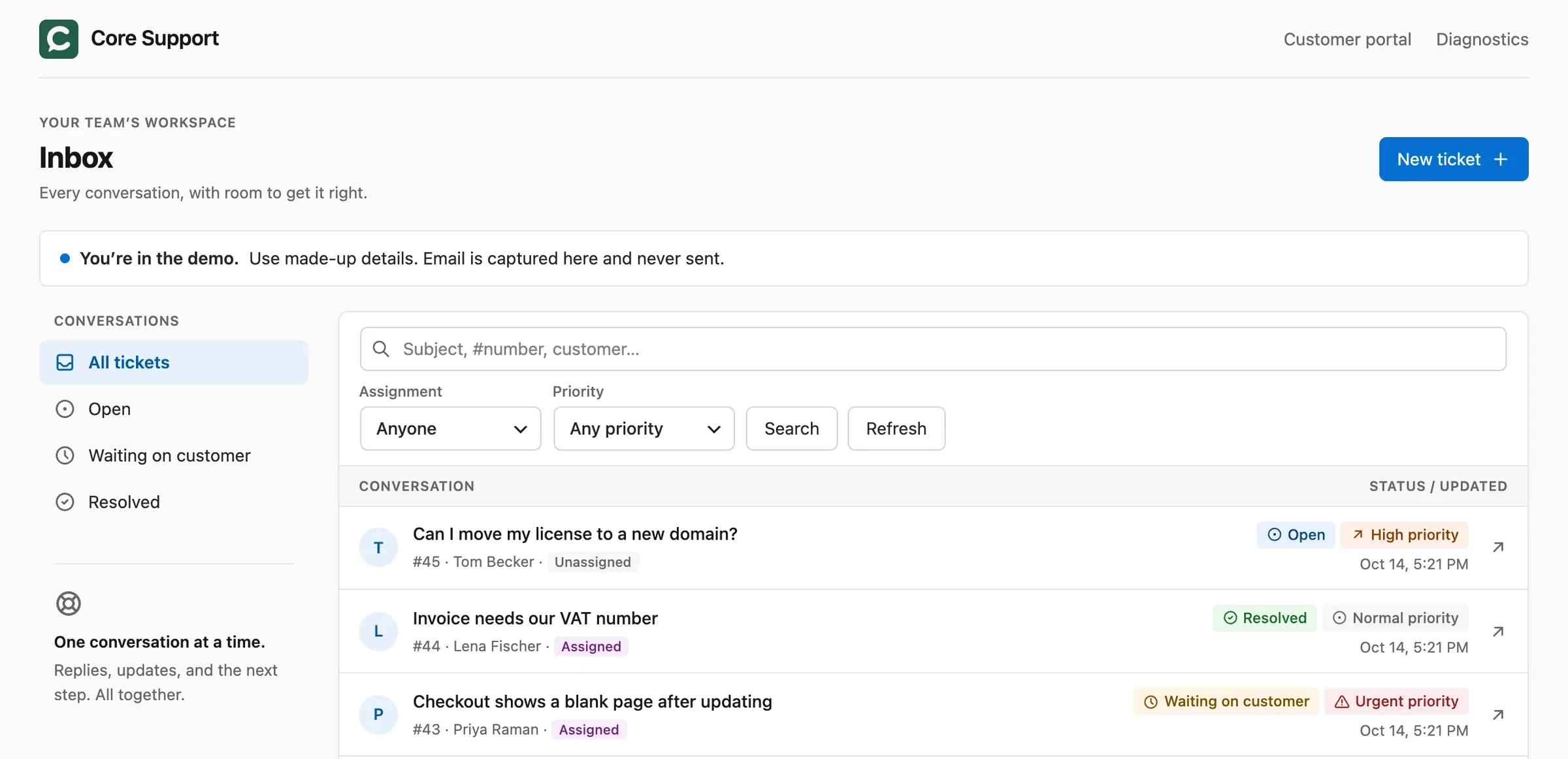
Core Support agent inbox with open, waiting and resolved tickets, priority badges and assignment filters
The helpdesk inbox: status, priority and assignment on every conversation.
A ticket with a customer email, an attached console log, a private agent note and a public reply
One ticket thread for emails, portal replies, private notes and attachments.
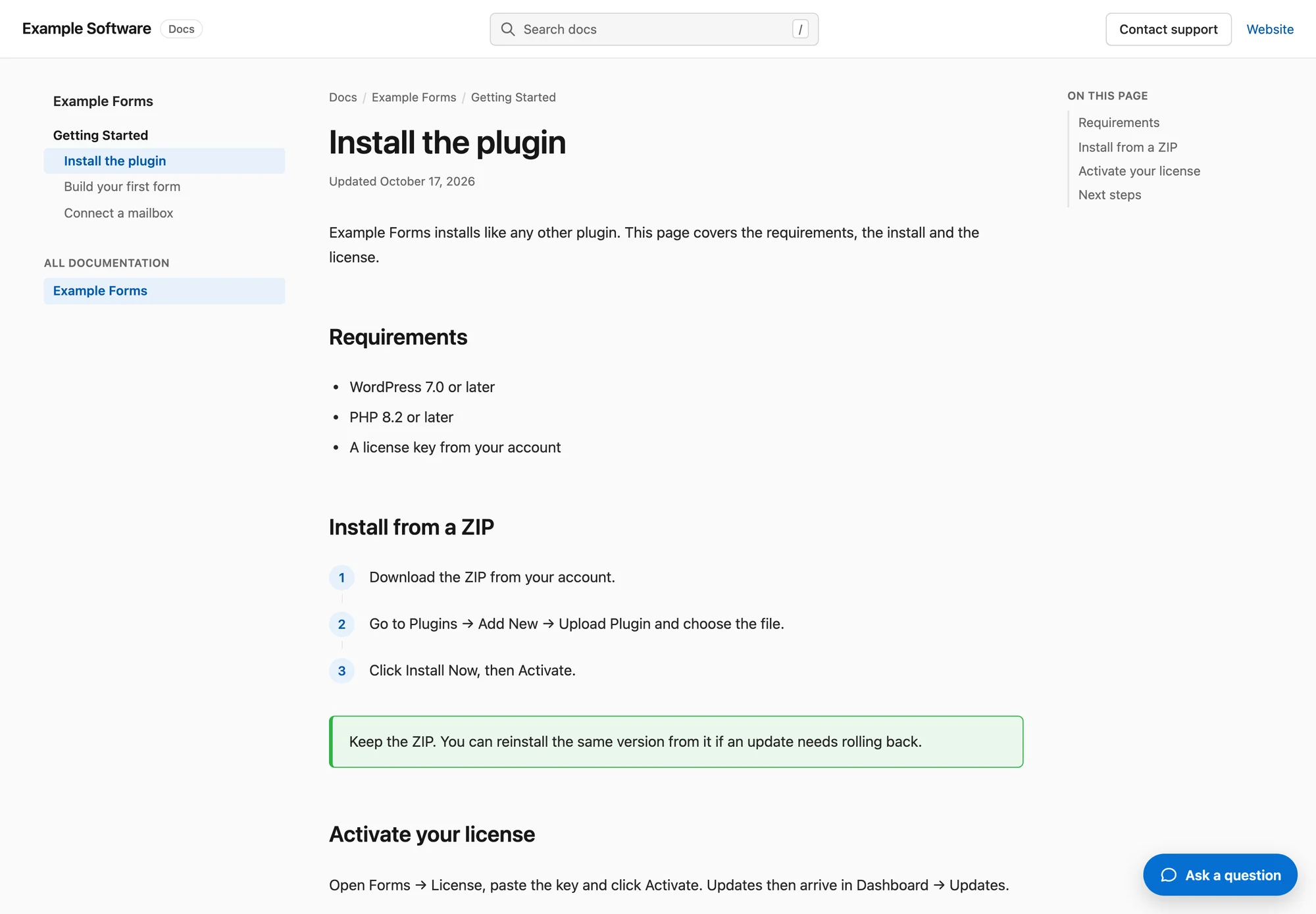
A docs page with search, a sidebar of sections, numbered steps, a tip callout and an On this page outline
The knowledge base at /docs/: search, sections, steps and an On this page outline.
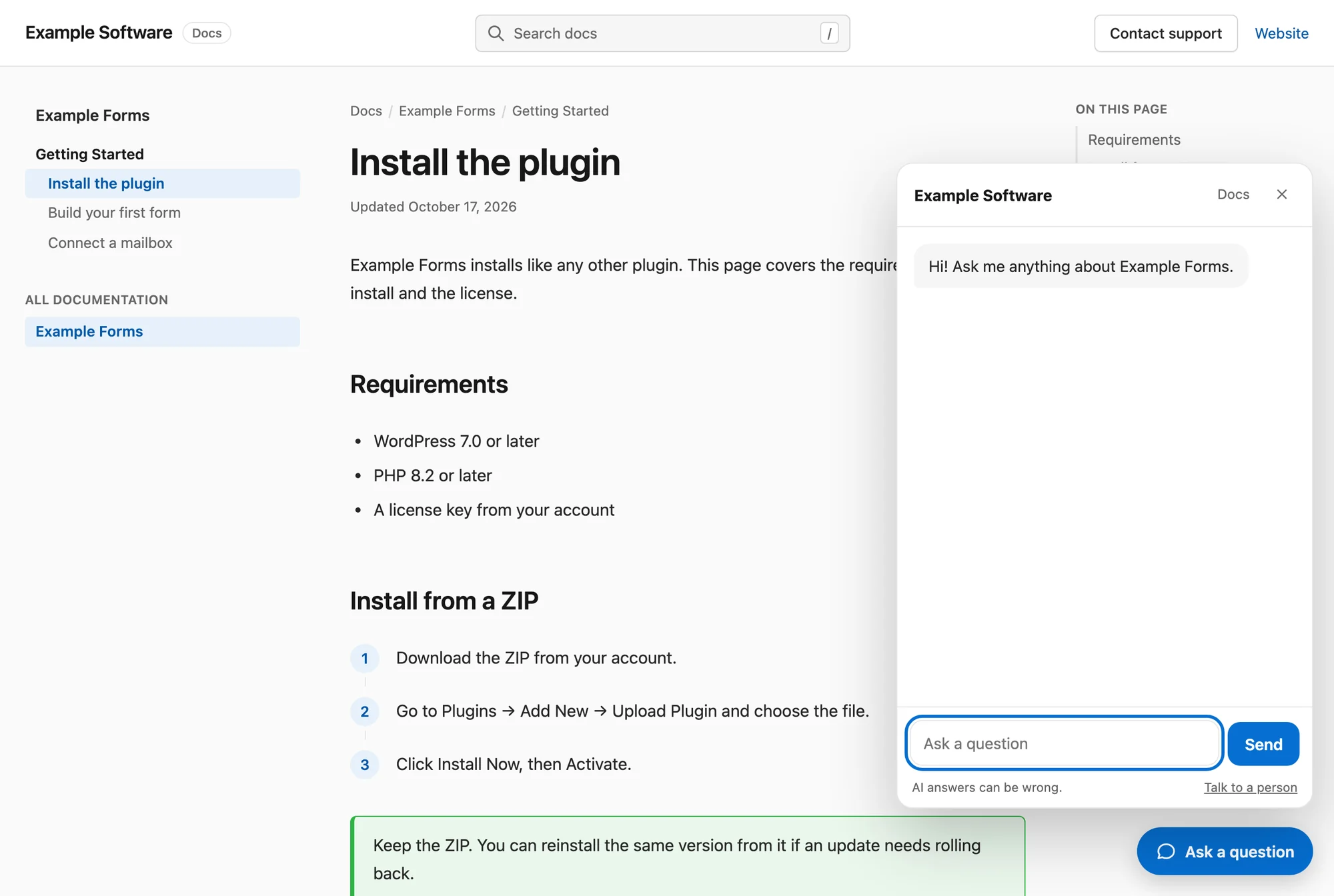
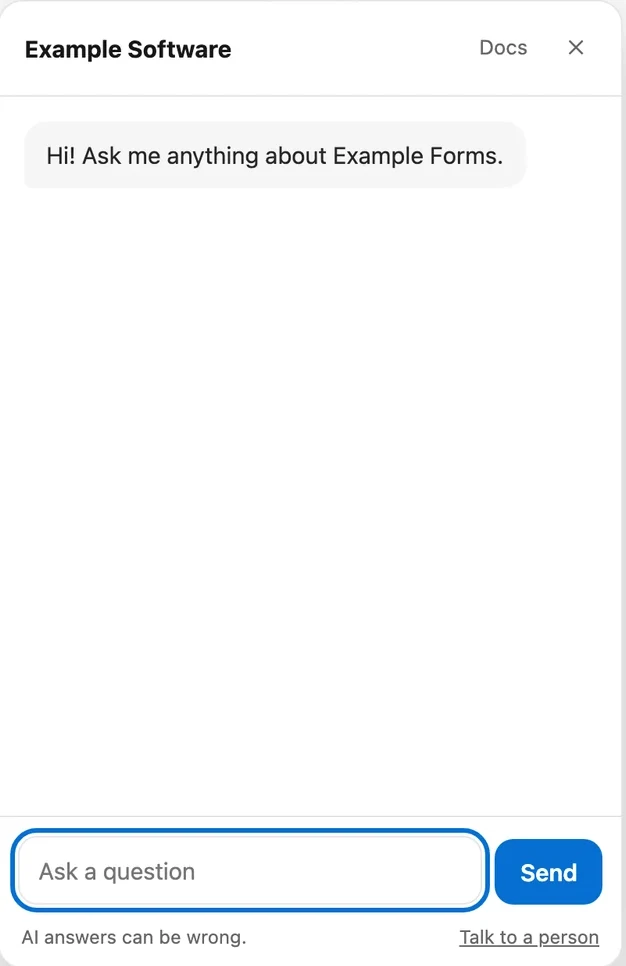
Chat open on a docs page, with Talk to a person under the message box
The AI chatbot answering on a docs page, with Talk to a person one click away.
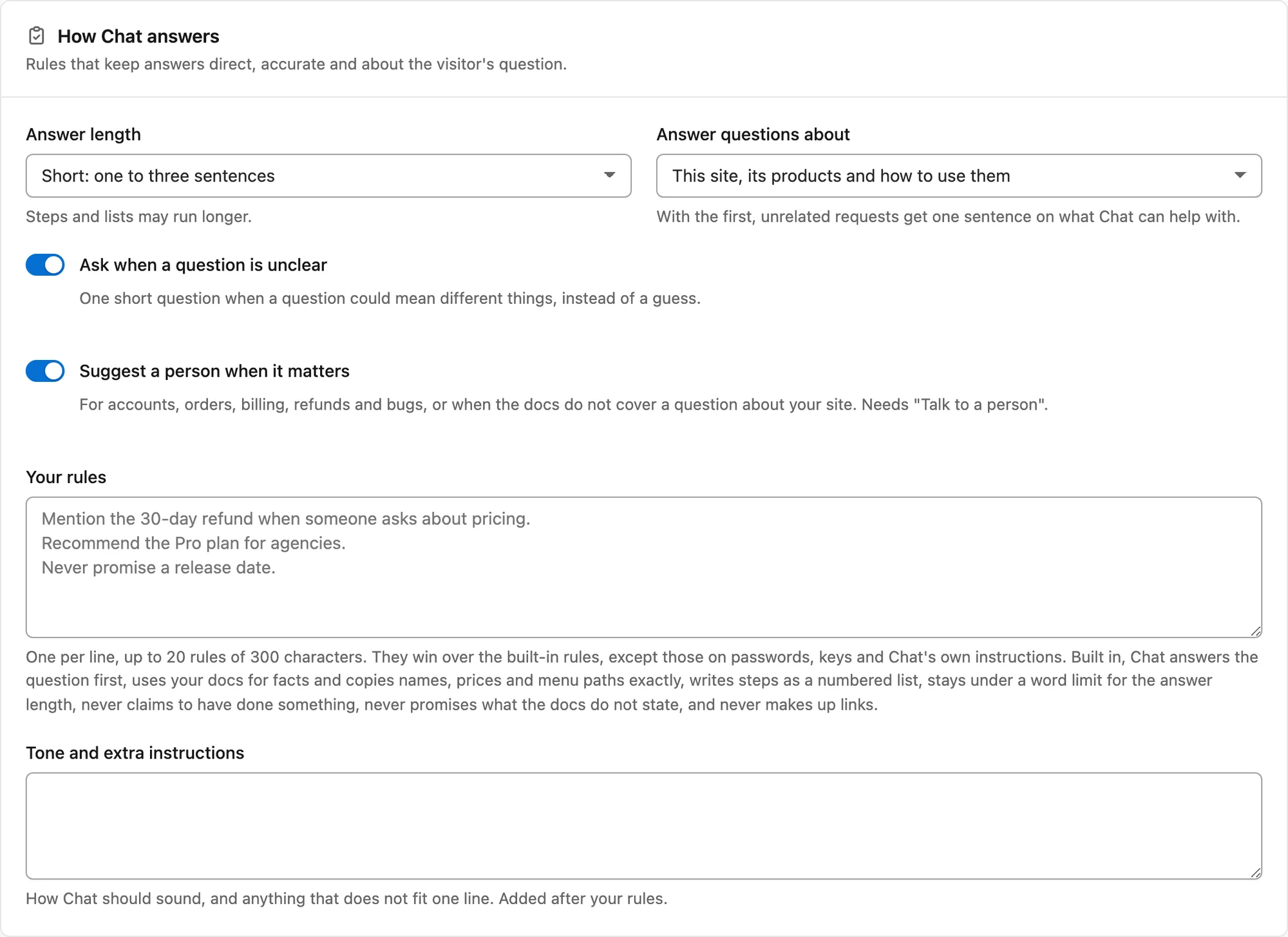
The How Chat answers card with answer length, topic scope, two switches and a box for your own rules
Answer length, topic scope and your own rules for the AI chatbot.
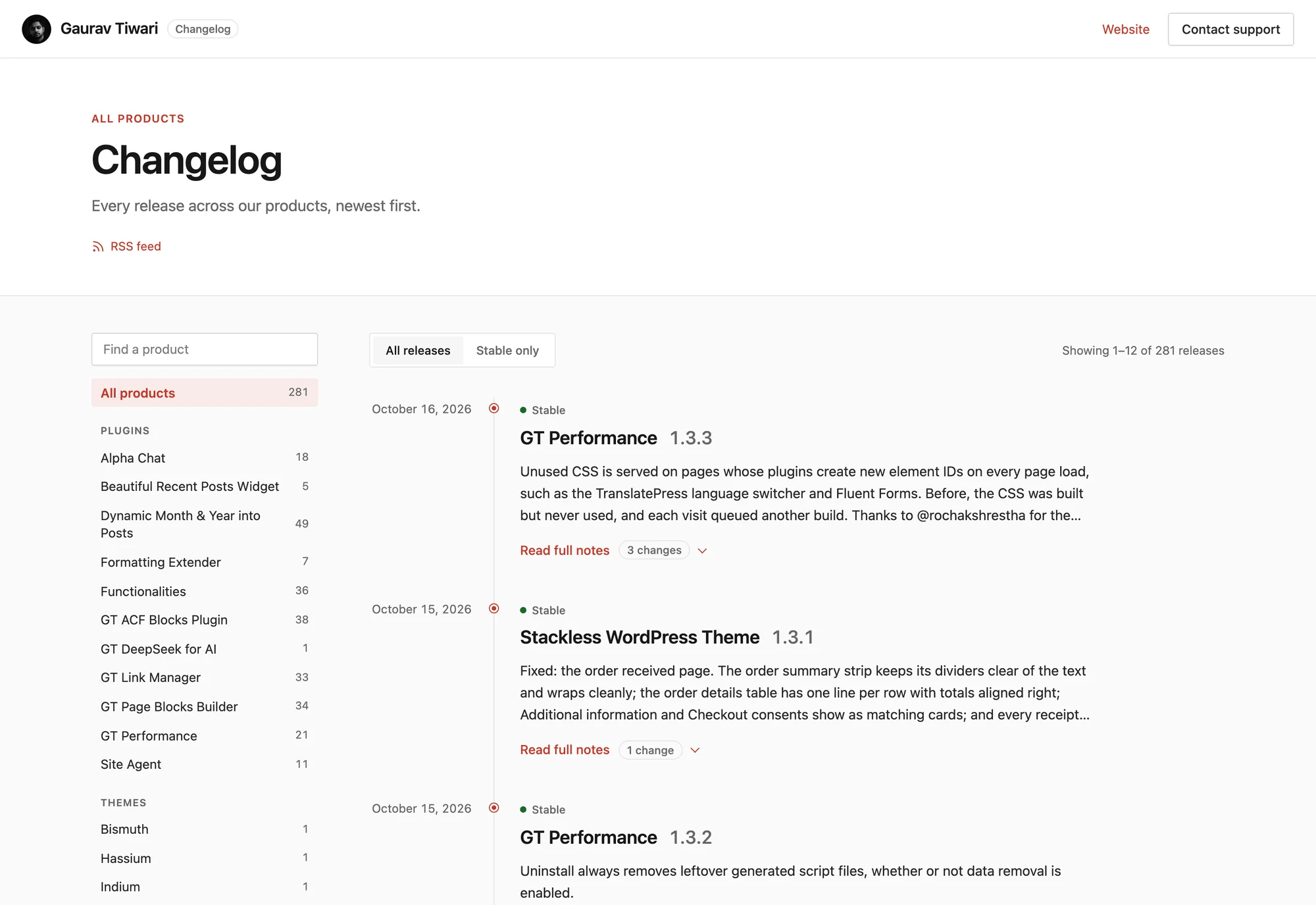
The changelog page on gauravtiwari.org with a product list, an All releases and Stable only switch, and releases with dates and version numbers
This store's changelog: every release of every product, on one page.
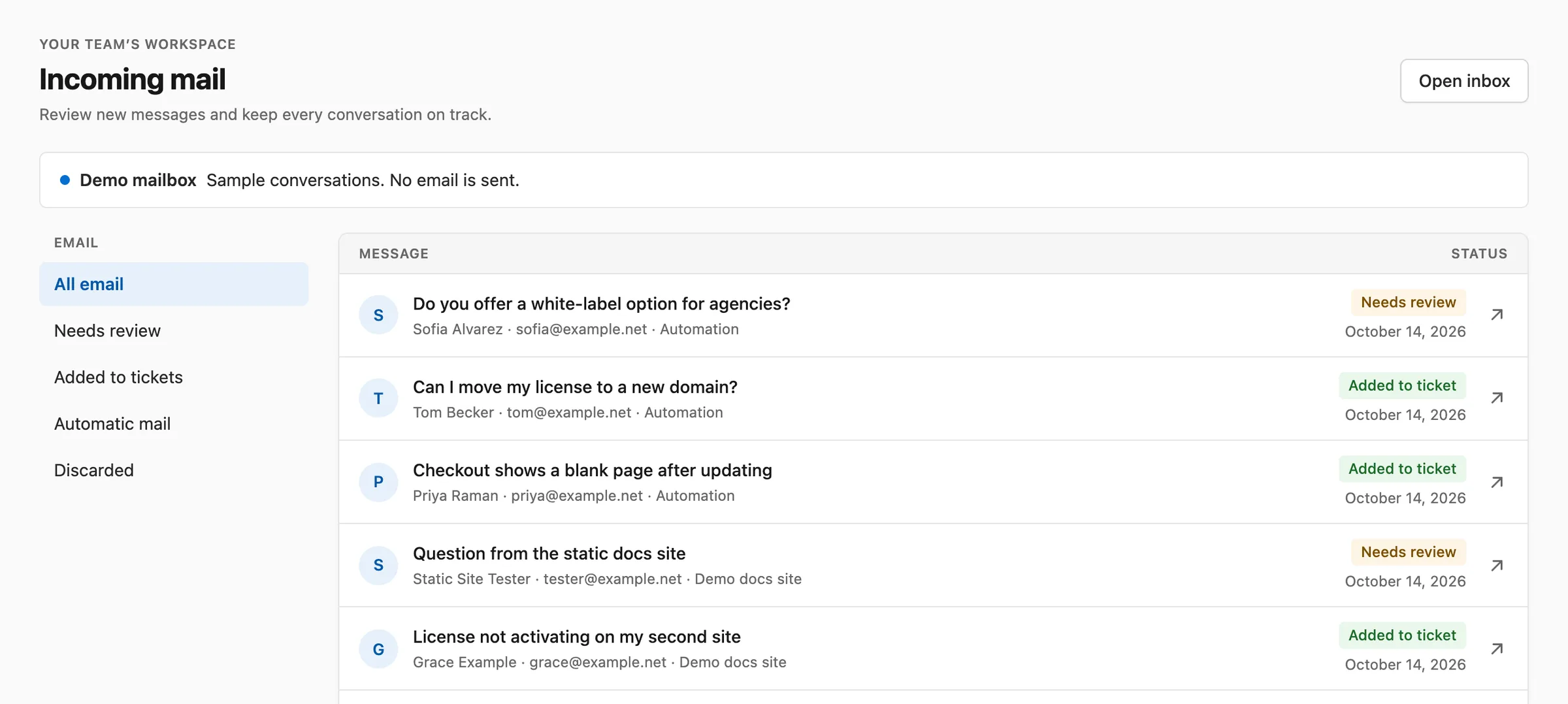
Incoming mail list with messages from automation tools and a connected website, each with a review status
Incoming mail from every route, labelled by where it came from.
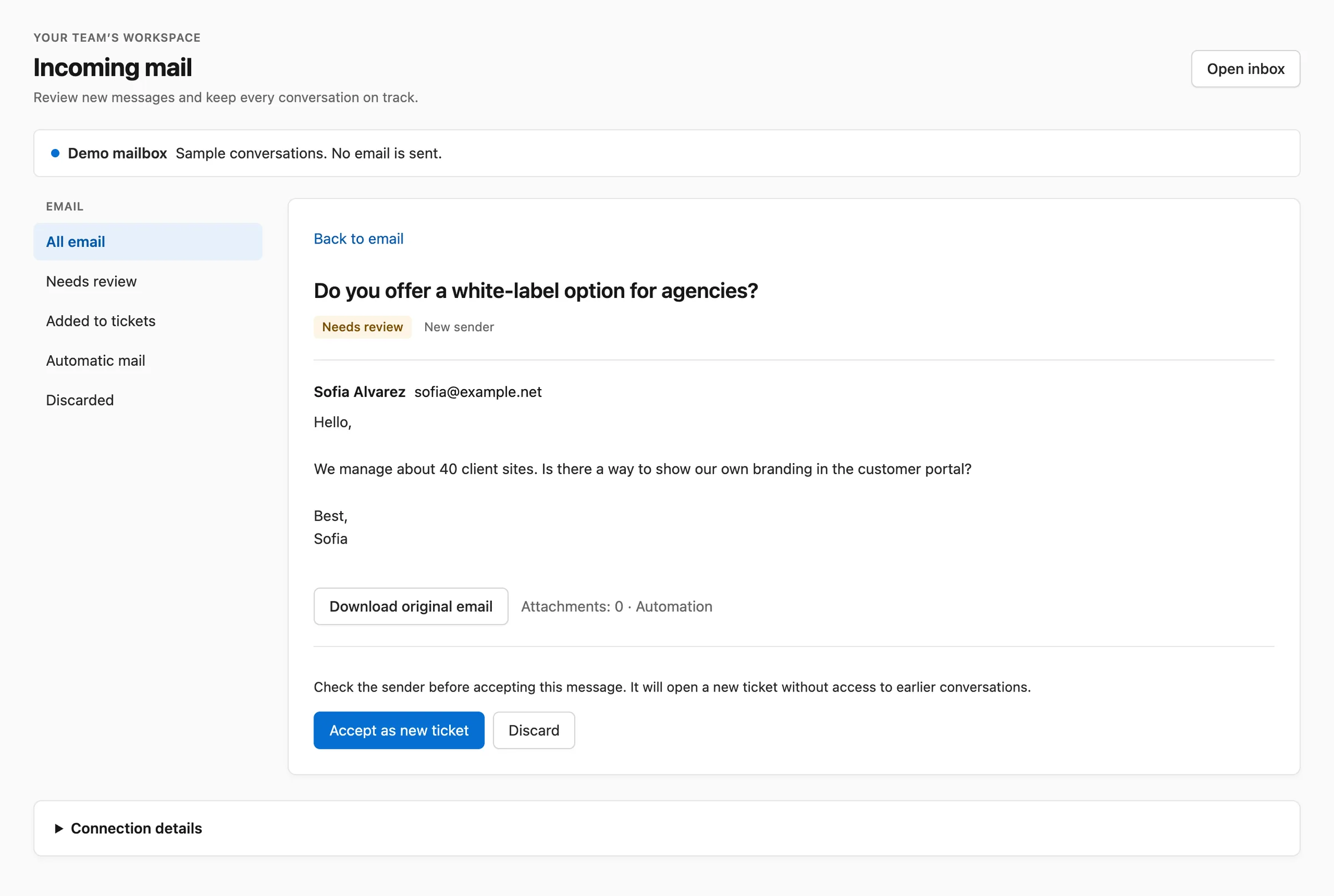
Review screen for a message from a new sender with buttons to accept it as a ticket or discard it
New senders wait for a person to accept or discard them.
The Integrations screen with cards for WooCommerce, FluentCart, Easy Digital Downloads and FluentCRM
Orders, licenses and contacts from WooCommerce, FluentCart, EDD and FluentCRM.
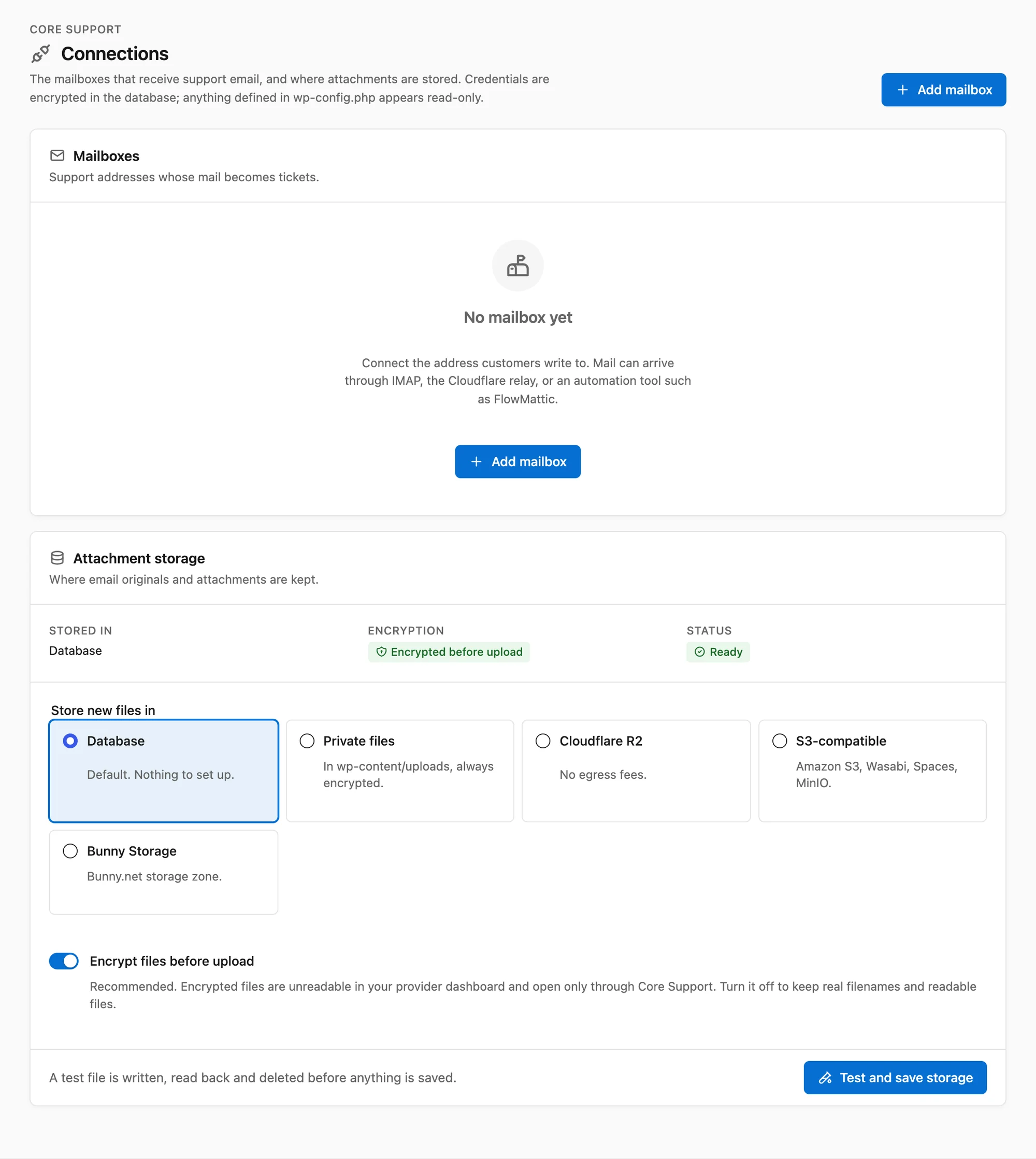
The Connections screen with a Mailboxes card and an Attachment storage card offering Database, Private files, Cloudflare R2, S3-compatible and Bunny Storage
Mailboxes and attachment storage, managed in wp-admin.
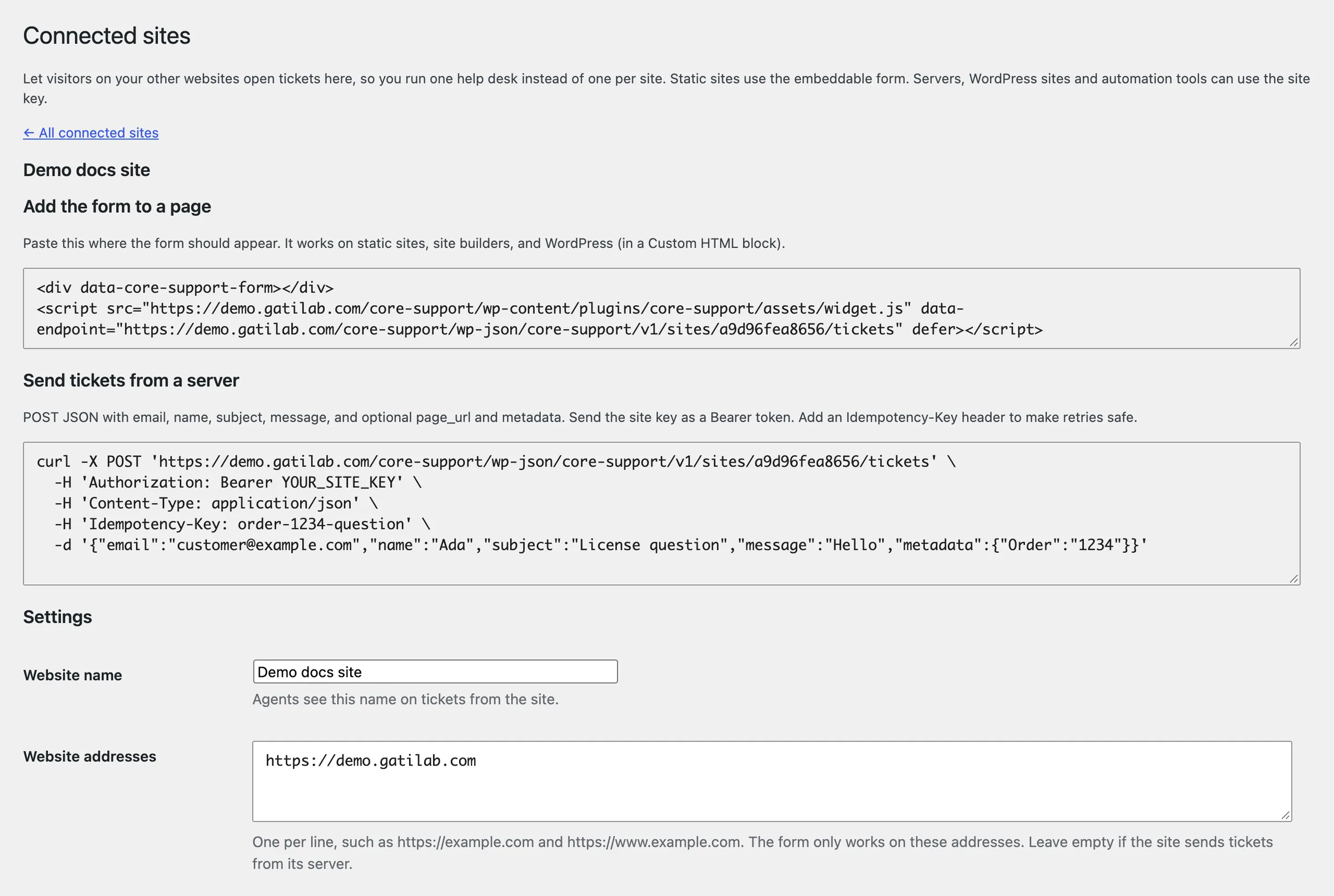
Connected sites screen with an embed snippet, a server request example and allowed website addresses
Connect another website and copy its form snippet or server key.
Customer support portal with ticket filters, search and a button to start a conversation
The customer portal, on its own clean page.
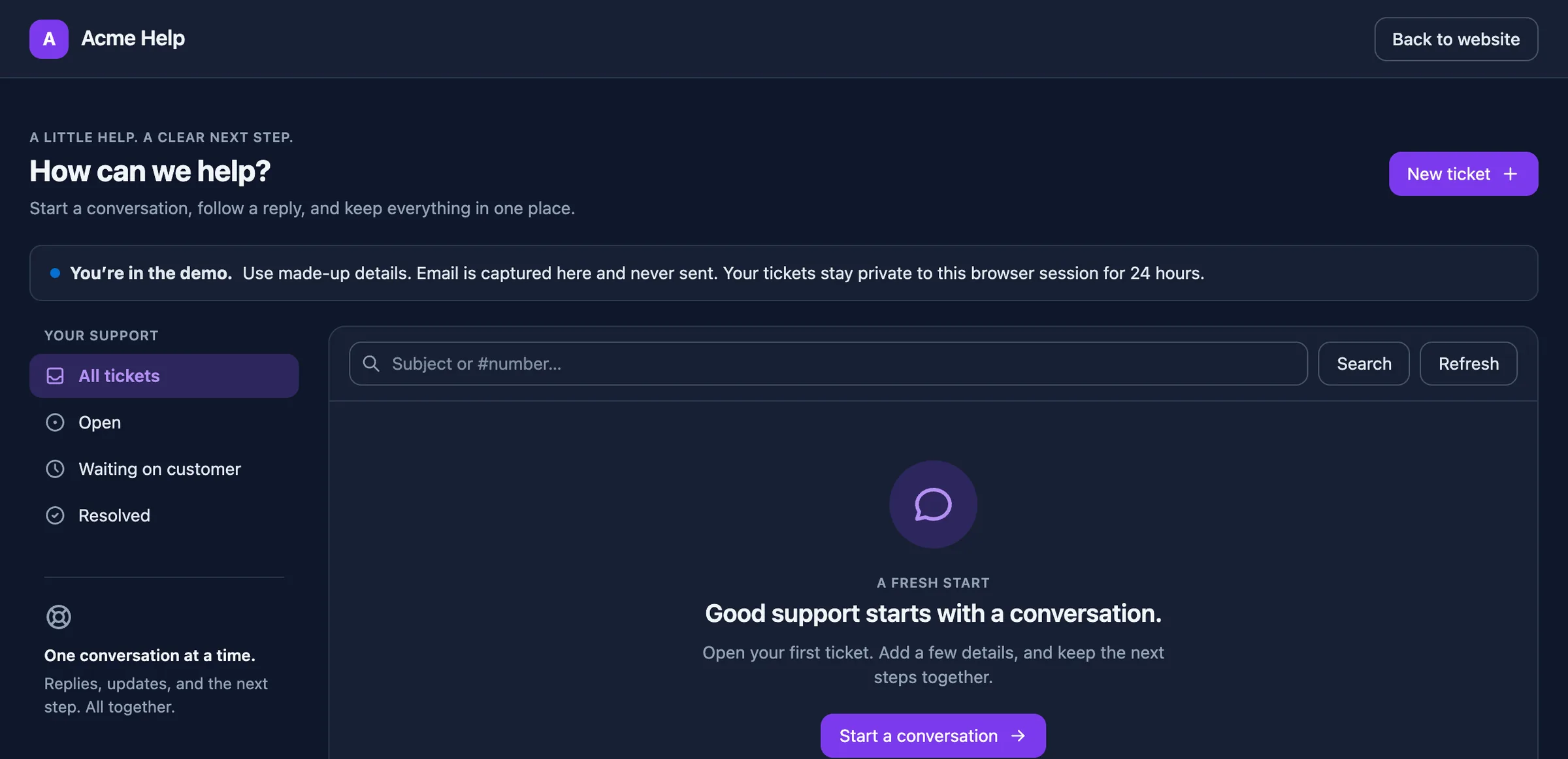
The customer portal branded as Acme Help with a purple accent, slate palette and dark mode
The same portal branded as Acme Help, in dark mode.

1 / 13

Loading screenshot

One Plugin Instead of a Stack of Subscriptions Every Support Job Has a Place on Your Own Site

Here’s the support stack a WordPress business usually pays for, one login and one invoice at a time, matched to the part of Core Support that does the same job.

Support jobs and the Core Support tools that cover them
The jobWhat sites usually pay forIn Core Support
A shared inbox for your teamA hosted helpdesk such as Help Scout or ZendeskHelpdesk: inbox, assignment, private notes and team alerts
Turning email and forms into ticketsAn email-piping add-on, plus a form plugin on every siteTicketing: IMAP, Cloudflare relay, automation tools, form plugins and connected sites
Letting customers follow their requestsA separate customer portal or forumA portal page, blocks and a Support tab in WooCommerce and FluentCart accounts
Answering the same question onceA hosted knowledge base such as HelpDocs or Document360Knowledge base at /docs/, with importers for the docs you already have
Answering when nobody is onlineA chatbot service such as Intercom Fin or ChatbaseAI chatbot that answers from your docs with your own API key
Telling customers what changedA changelog tool such as Beamer or HeadwayChangelog at /changelogs/, written in wp-admin or synced from GitHub
Talking to visitors in real timeA live chat tool such as Crisp or TidioLive chat Coming next
Showing what’s plannedA roadmap tool such as CannyRoadmaps Coming next
Matching your brandCustom CSS on every hosted screenOne branding screen for the customer portal and the inbox

Phone support isn’t included, so keep your current tool for calls. Live chat and roadmaps are next on the list and reach every license as a normal update.

Answer Questions Before They Turn Into Tickets Docs, an AI Assistant and a Changelog on the Same Site

The cheapest ticket is the one nobody needs to send. Core Support publishes your docs, lets the AI chatbot answer from them, and keeps a changelog customers can check before they ask whether something is fixed yet.

A docs page with search, a sidebar of sections, numbered steps, a tip callout and an On this page outline

Knowledge base

Docs at /docs/

A docs site that doesn’t depend on your theme: one collection per product, sections and pages, instant search, numbered steps, callouts and an On this page outline.

  • Import existing docs from a sitemap, any website, Markdown files or a wordpress.org readme
  • "Was this helpful?" votes and a Docs insights screen show which pages need work
  • Signed-in-only collections for guides only customers should see
  • Redirects from old addresses, so moved docs keep their links

The importer brought in core-forms.com’s 112 pages and 4,577 blocks with zero invalid blocks in the editor.

Chat open on a docs page, with Talk to a person under the message box

AI chatbot

Chat, on any page

Chat answers from your docs, posts and product data using your own key from a provider such as OpenAI, Anthropic or DeepSeek. You pick the model, how long answers run and which topics it stays within.

  • Learns WooCommerce, FluentCart and Easy Digital Downloads products, with prices, stock and license terms
  • Talk to a person turns the conversation into a ticket with the full transcript
  • A daily token budget, message limits and retention settings keep cost and data in check
  • One script tag adds it to any page or connected site

Instructions planted in a doc can’t change Chat’s rules, and it never claims to have done something it can’t do.

The changelog page on gauravtiwari.org with a product list, an All releases and Stable only switch, and releases with dates and version numbers

Changelog

Releases at /changelogs/

A changelog for each product plus an All releases page. Customers check what changed before they write in, and search engines get one clean page per release.

  • Write releases in wp-admin, or sync them every 24 hours from GitHub releases, readme.txt, CHANGELOG.md or wordpress.org
  • Private GitHub repositories work with a token
  • [NEW], [BUG FIX] and [REMOVED] labels become badges
  • RSS feed, JSON API and WP-CLI for every changelog, and hand edits survive the next sync

This store’s own changelog runs on it, with close to 300 releases across its products.

See this store’s changelog

Five Ways a Request Becomes a Ticket Every Route Ends in the Same Inbox

Pick the routes that fit the mailbox and forms you already have. Replies are matched by a private reply address or the email’s Message-ID, never the subject line, and mail from a new sender waits for a person unless you choose to open those tickets automatically.

Review screen for a message from a new sender with buttons to accept it as a ticket or discard it

IMAP polling

  • Gmail, Fastmail, Zoho, iCloud and hosting mailboxes with an app password
  • Tracks each message, so mail already read in a mail client still arrives
  • The first connection imports unread mail only

Cloudflare relay

  • A Worker you deploy to your own Cloudflare account
  • Messages are signed, so forged posts are rejected
  • Mail it can’t deliver goes to a fallback address

Automation tools

  • One HTTP step in FlowMattic, Zapier, Make, n8n or Pipedream
  • Raw email or parsed fields, attachments included
  • Retries with the same delivery ID are stored once

Connected sites

  • A form snippet for other websites, or a server request with a site key
  • Allowed addresses, rate limits and an optional review step
  • Agents see which site each ticket came from

Form plugins

  • Contact Form 7, WPForms, Gravity Forms and Fluent Forms, chosen per form
  • Fields are detected for you, with an optional review step
  • A Create Core Support ticket action for Core Forms

Microsoft 365

  • Microsoft turned off password sign-in for IMAP, so Microsoft 365 mailboxes use the relay or an automation tool until OAuth support lands

Everything in Core Support Grouped by the Tool It Belongs To

Everything below ships today and comes with the license. Nothing is held back for a higher tier, and live chat and roadmaps join this list as updates.

Helpdesk5

  • Inbox

    Filter by status, assignment and priority, and search by subject, ticket number, customer name or email.

  • Private notes

    Notes sit in the same thread as replies but never reach the customer or their inbox.

  • Delivery activity

    Every outgoing reply shows its delivery state, with retry and cancel for failures.

  • Team alerts

    New tickets reach Telegram, Slack, Discord, Pushover or a signed webhook, with retries when a service is down.

  • Customer details

    Orders and licenses from WooCommerce, FluentCart and Easy Digital Downloads, and FluentCRM contacts, beside each ticket.

Ticketing system5

  • IMAP polling

    Checks Gmail, Fastmail, Zoho or your host’s mailbox and imports new mail, even if someone already read it.

  • Cloudflare relay

    A Worker on your own Cloudflare account posts signed messages within seconds.

  • Automation intake

    FlowMattic, Zapier, Make, n8n and Pipedream post raw email or parsed fields with a token.

  • Form plugins

    Contact Form 7, WPForms, Gravity Forms and Fluent Forms open tickets per form, and Core Forms gets a ticket action.

  • Review queue

    Replies match by private reply address; new senders, auto-replies and bulk mail are held or filtered.

Customer portal4

  • Portal page

    A ready-made support page with its own layout, independent of your theme’s header and footer.

  • Blocks

    Customer Portal, New Ticket and My Tickets blocks for pages you already have.

  • Account tabs

    A Support tab in WooCommerce My Account and the FluentCart customer dashboard, plus Get help with this order.

  • Connected-site portals

    Customers on your other sites sign in with an emailed code and see that site’s tickets.

Connected sites2

  • Embeddable form

    One snippet for static sites, site builders and other WordPress installs, limited to the addresses you allow.

  • Server API

    Send tickets from your own code with a site key, metadata and attachments.

Knowledge base4

  • Docs at /docs/

    Collections, sections and pages on standalone pages that load only Core Support’s own styles.

  • Search and contents

    Instant search, an On this page outline, previous and next links, steps and callouts.

  • Importers

    Bring docs in from a sitemap, any website, Markdown or wordpress.org, as drafts with images and links fixed.

  • Feedback and insights

    Was this helpful? votes and a Docs insights screen point at the pages that need work.

AI chatbot5

  • Answers from your content

    Learns your docs and any public post type, and keeps answering while it relearns.

  • Store data

    Prices, options, stock, subscription and license terms from WooCommerce, FluentCart and EDD products.

  • Your key, your model

    A model and thinking level for each task, from providers such as OpenAI, Anthropic and DeepSeek.

  • Answer rules

    Answer length, topic scope, your own rules and a daily token budget.

  • Handoff

    Talk to a person opens a ticket with the whole transcript.

Changelog3

  • Product changelogs

    A changelog for each product, an All releases page and a page for every release.

  • Sync

    Pulls releases from GitHub, readme.txt, CHANGELOG.md or wordpress.org every 24 hours, without overwriting your edits.

  • Feeds and API

    RSS, a JSON API and WP-CLI for every changelog.

Storage and branding3

  • Attachments

    Files are saved from each message and listed where they arrived, with authorized downloads.

  • Encrypted storage

    Originals and attachments are encrypted on your server before they reach R2, S3 or Bunny Storage.

  • Your look

    Brand name, logo, accent color, neutral palette, corner radius, font, and light, dark or automatic mode.

Operations4

  • Mail delivery

    Send through WordPress mail or the Emailit, Resend, Brevo or SendGrid API.

  • Diagnostics

    Checks storage, mail connections and signatures from the admin or WP-CLI.

  • WP-CLI

    Poll mailboxes, import docs, test storage and move older originals out of the database.

  • Licensed updates

    Updates arrive in the normal WordPress update screen once a site is activated.

Attachments Stay Where You Choose Encrypted Before They Leave Your Server

Email originals and attachments start in the database. Move them to private files or object storage when the database gets heavy. The storage provider only ever sees encrypted files, and every download goes through WordPress and checks the viewer’s access first.

Database

Default
  • Encrypted originals and attachments in your WordPress database
  • Messages up to 10 MiB
  • Nothing else to set up

Private files

On your server
  • Encrypted files in a private uploads folder
  • Web access denied
  • Set up under Connections or in wp-config.php

R2 and S3

Object storage
  • Cloudflare R2, Amazon S3, Wasabi, MinIO and S3-compatible services
  • Messages up to 25 MiB
  • Encrypted before upload

Bunny Storage

Object storage
  • Bunny.net storage zones through the native API
  • Messages up to 25 MiB
  • Encrypted before upload

Moving older files

Run wp core-support storage migrate to move existing originals out of the database. It reads each file back before switching, and you can rerun it safely.

From Install to First Answer Start on a Staging Site

Core Support adds its own wp-admin menu and creates a support page on activation. Your theme and existing pages stay as they are.

  1. Step 1

    Install and activate

    Upload Core Support to a site running WordPress 7.0+ and PHP 8.2+. The inbox, the customer portal, docs and changelogs are ready straight away.

  2. Step 2

    Connect a mailbox, bring your docs

    Add a mailbox under Core Support → Connections and send a test email. Import your existing docs from a sitemap, Markdown or wordpress.org, or start writing.

  3. Step 3

    Turn on Chat, then invite customers

    Add an AI provider key and let Chat learn your docs. Set your logo and colors, then point customers to the portal and the docs.

Email that isn’t part of a conversation

It waits in Incoming mail. An agent accepts it as a new ticket or discards it, so a forged reply can never land on someone else’s ticket.

What It Doesn’t Do Yet Read This Before You Buy

Core Support is new. These are the edges that matter today, so you can decide before you install it.

Works today

  • Helpdesk inbox, private notes, assignment, priorities, team alerts and delivery activity
  • Tickets from IMAP, the Cloudflare relay, automation tools, form plugins and connected sites
  • Customer portal page and blocks, with branding and dark mode
  • Knowledge base at /docs/ with importers, search and feedback
  • AI chatbot answering from your docs and products, with handoff to a ticket
  • Changelogs at /changelogs/, written in wp-admin or synced from GitHub and wordpress.org
  • Encrypted attachments in the database, private files, R2, S3 or Bunny Storage

Doesn’t yet

  • Live chat with a person isn’t here yet. Talk to a person in the AI chatbot opens a ticket instead.
  • Public roadmaps aren’t here yet. Both are next, and both come with your license.
  • The AI chatbot needs your own provider key, and that provider bills you for usage.
  • Microsoft 365 IMAP needs OAuth, which isn’t included yet. Use the relay or an automation tool.
  • Customers can’t upload files from the portal. Attachments arrive by email, automation or a server request.
  • There are no importers from other helpdesks yet.
  • It hasn’t run a real customer mailbox at high volume. Keep your current channel during a pilot.

One License for Everything Pay Once, Use It Everywhere

The lifetime license covers unlimited sites and agents, including client projects, with updates for the life of Core Support. Live chat and roadmaps arrive as updates, not add-ons.

For comparison, Fluent Support Pro lists $249 a year for 5 sites and $399 a year for 50, and Help Scout Standard lists $25 per user per month, as shown on their pricing pages on October 14, 2026. 14-day unconditional refund period. Hosting, mailbox, storage and AI provider costs are separate. Prices in USD; checkout shows the final amount before payment.

  • WordPress 7.0+
  • PHP 8.2+
  • sodium extension

I Build Tools That Pay for Themselves And Give Away the Ones That Can’t

Everything here is quick to set up, light on your pages and built to do one real job well. I only charge for the tools that can make you money. The rest are free.

Gaurav Tiwari

Hi, I’m Gaurav

I design, build and support every product on this site myself. When you email me, the person reading it is the one who wrote the code.

I’d rather ship one tool you’d miss if it vanished than ten that sit in your plugin list doing nothing.

  • You talk to me, not a ticket queue
  • Paid tools have to earn their price
  • Free tools stay free
More about me

18+years building websites, plugins and stores, since 2008

I obsess over performance

Switch a feature off and it loads nothing. What does load stays small. A tool that replaces a plugin shouldn’t make your pages slower.

I care how it feels

Clear screens, sensible defaults and settings written in plain English. If you need a tutorial for the basics, that’s my design mistake, not yours.

I build for everyone

Full keyboard support, visible focus, proper labels and text you can actually read. When more people can use your store, more people can buy from it.

I build tools that earn

My paid tools help you sell, renew, license or convert. If one just sits in your stack, I haven’t done my job.

If it can’t earn, it’s free

I won’t charge for anything that can’t make you money. The free tools get the same care as the paid ones, down to the last setting.

Questions Before You Switch Answered Plainly

The things worth knowing before you move your helpdesk, docs and changelog onto your own site.

Something else on your mind? Ask through product support. Incredibly fast and helpful one-on-one email and Twitter Chat support.

What’s ready today, and what’s coming?

The helpdesk, ticketing, the customer portal, the knowledge base, the AI chatbot and changelogs are ready today. Live chat with a person and public roadmaps are next. Your license covers both when they arrive, with no upgrade fee.

Do I need an AI subscription for the chatbot?

You need an API key from a provider such as OpenAI, Anthropic or DeepSeek, and that provider bills you for usage. A daily token budget caps what Chat can spend. The helpdesk, docs and changelogs work without any AI key.

Can I bring my existing docs?

Yes. Import them from a sitemap, any website, Markdown files or a wordpress.org readme. Pages arrive as drafts, images are copied into your media library once, and links between pages point at the new docs.

Can changelogs come from GitHub?

Yes. Point a changelog at GitHub releases, a readme.txt, CHANGELOG.md or changelog.txt file, or a wordpress.org plugin. It syncs every 24 hours by default, private repositories work with a token, and releases you edit by hand are never overwritten.

Do I need a Cloudflare account?

No. IMAP polling, automation tools, form plugins and connected-site forms all work without one. The Cloudflare relay is one route among five.

Does it work with Microsoft 365?

Not through IMAP polling yet, because Microsoft requires OAuth for IMAP. Use the Cloudflare relay or an automation tool for Microsoft 365 mailboxes.

Can I use it on client sites?

Yes. The license covers unlimited sites, including client projects. Each WordPress site keeps its own tickets, settings and activation.

Where are attachments stored?

In your database by default. You can move them to private local files, Cloudflare R2, an S3-compatible bucket or Bunny Storage. They’re encrypted before upload.

Do I need Core Forms or FluentCart?

No. Core Support has its own ticket form and portal. FluentCart only handles the purchase and license on this store.

Is this ready for production?

Not yet. It’s new, so start with staging sites and small pilots. Keep your current support channel running while you evaluate it.

What if it doesn’t suit my site?

There’s a 14-day unconditional refund period. Ask for a refund within 14 days of purchase and you get your money back, no questions asked.

Your Whole Support Desk, on Your Own Site Start With One Mailbox and One Docs Collection

Install it on a staging site, connect the mailbox you already use, import your docs and let Chat learn them. Send a few test conversations end to end, then invite customers. One payment covers every site you run, with a 14-day unconditional refund period.