Skip to main contentSkip to content
Stackless for FluentCart icon

Stackless for FluentCart

Everything your FluentCart store needs, in one plugin.

Stackless for FluentCart, formerly GT Extensions for FluentCart, adds 39 optional modules to FluentCart: Stripe and PayPal with your own keys, merchant-of-record gateways, 13 checkout designs, multi-currency checkout, invoices, quotes, software licensing and store tools. Switch on the modules you use. The rest load no code.

Choose a license
  • All 39 modules
  • Unlimited site activations
  • Updates for life, or while Annual is active
  • One-on-one email support
Get Stackless for $99

Secure checkout. 14-day unconditional refund period.

Read the docsRead the changelogWatch the walkthrough

  • WordPress 6.0+
  • FluentCart Free or Pro
  • PHP 7.4+
  • Classic and block themes
  • English + 4 languages
39 modules in 8 groups
Each has its own switch. Switched-off modules load no code.
FluentCart Free or Pro
Your own Stripe and PayPal keys, saved-card renewals and software licensing need no FluentCart Pro.
Classic and block themes
The 13 checkout designs need no block editor or Site Editor.
Unlimited sites
Both licenses cover unlimited site activations.

See It in a Real Store Screens From Stackless for FluentCart

These screens come from a FluentCart test store running Stackless 3.0 with most modules switched on. The checkout designs are the sample previews you get in Checkout Builder. Click any screen to see it full size.

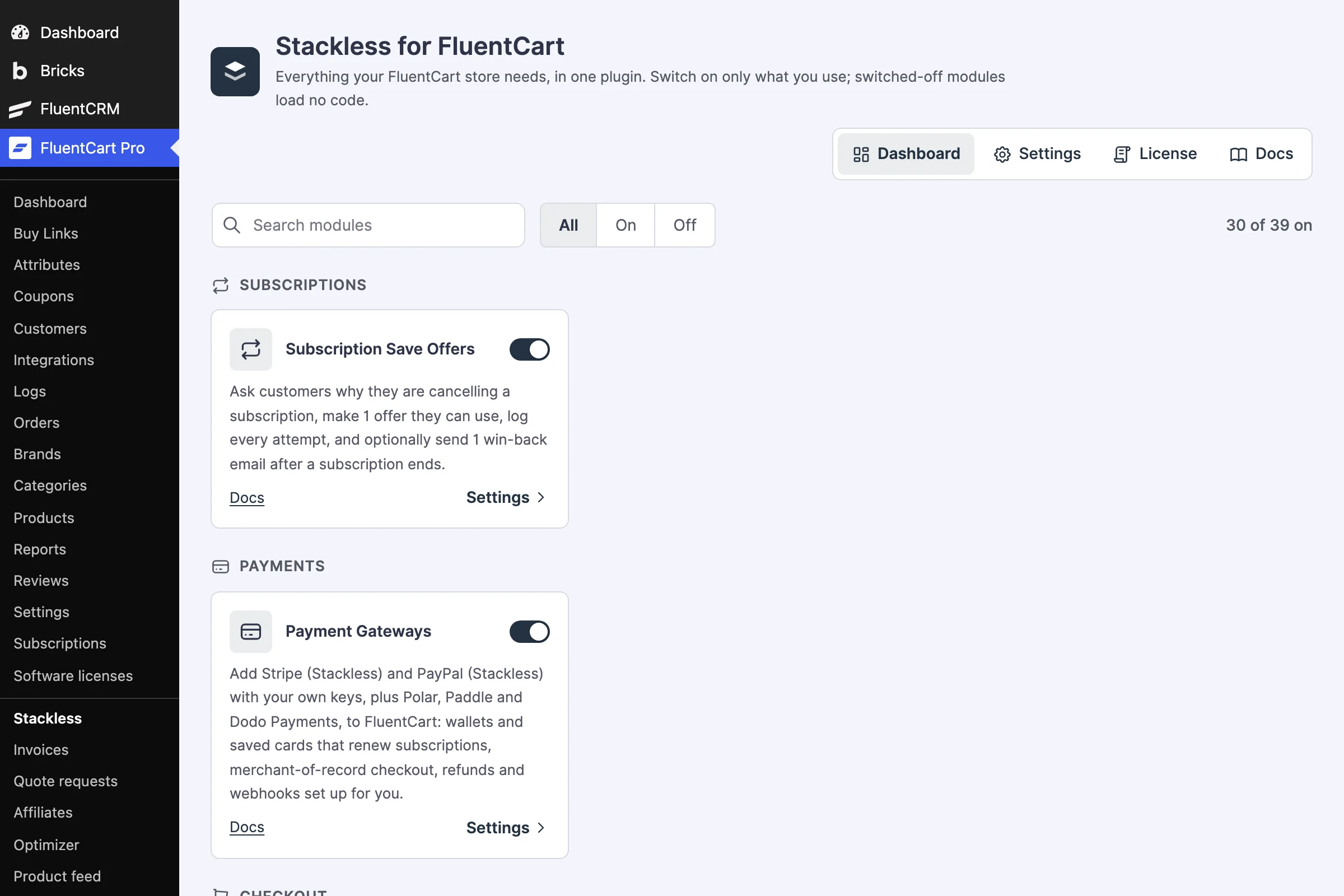
Stackless for FluentCart dashboard in WordPress admin with a module search, All, On and Off filters and module cards for Subscription Save Offers and Payment Gateways, each with a switch
One dashboard, every module on its own switch.
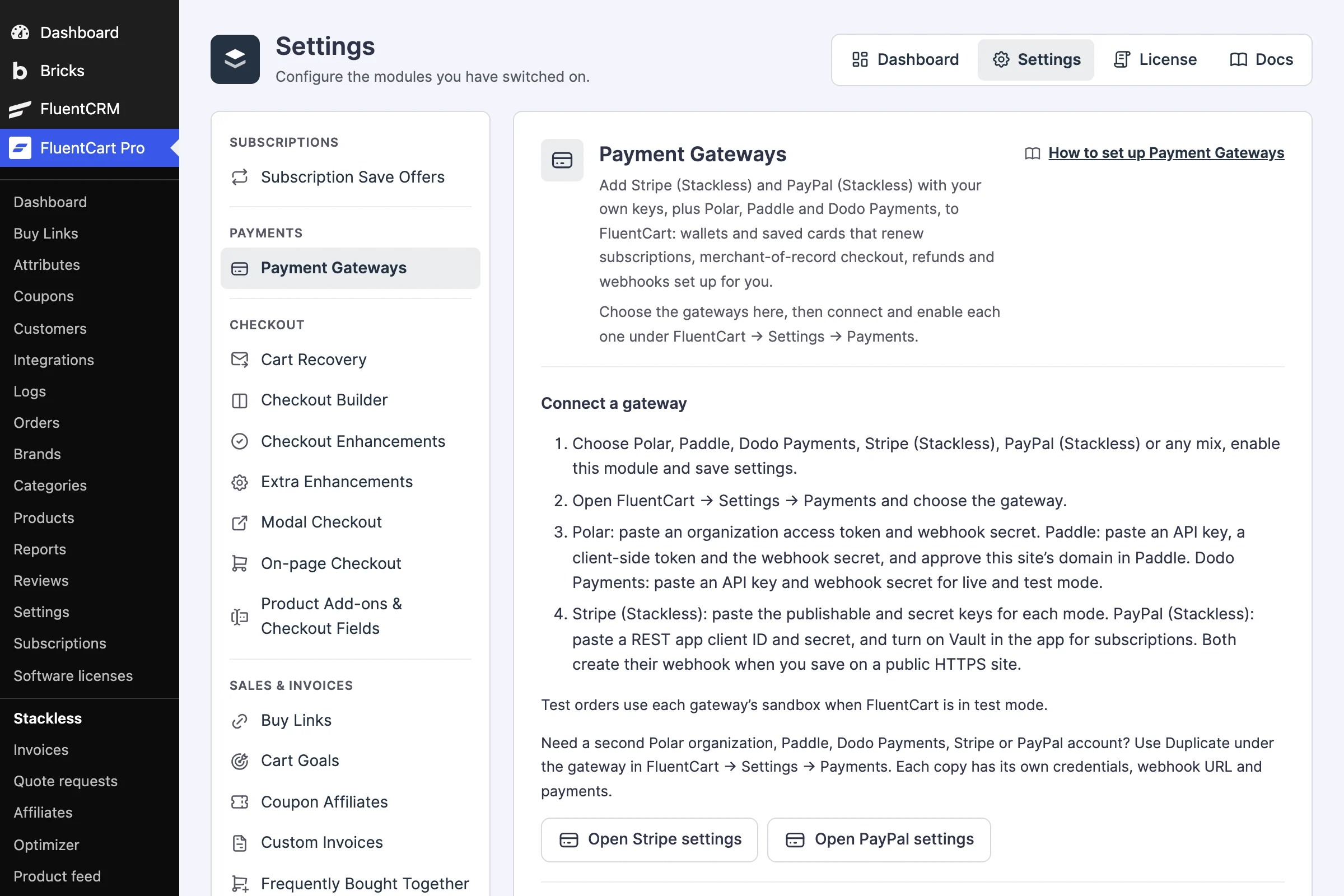
Payment Gateways settings in Stackless with steps to connect Polar, Paddle, Dodo Payments, Stripe (Stackless) and PayPal (Stackless)
Payment Gateways explains each gateway and links to its guide.
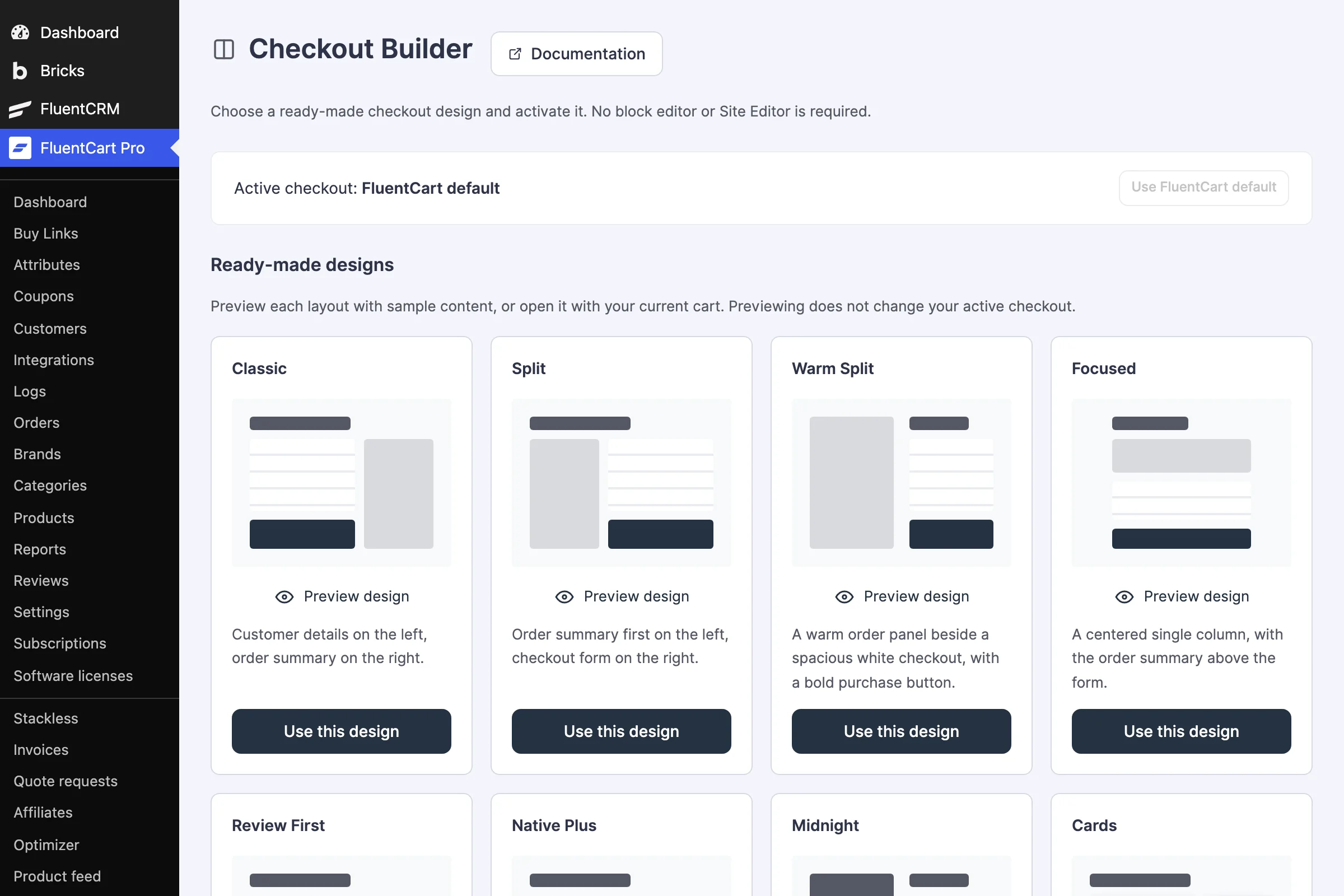
Checkout Builder screen with ready-made designs named Classic, Split, Warm Split and Focused, each with a Preview design link and a Use this design button
Pick a ready-made checkout design and preview it first.
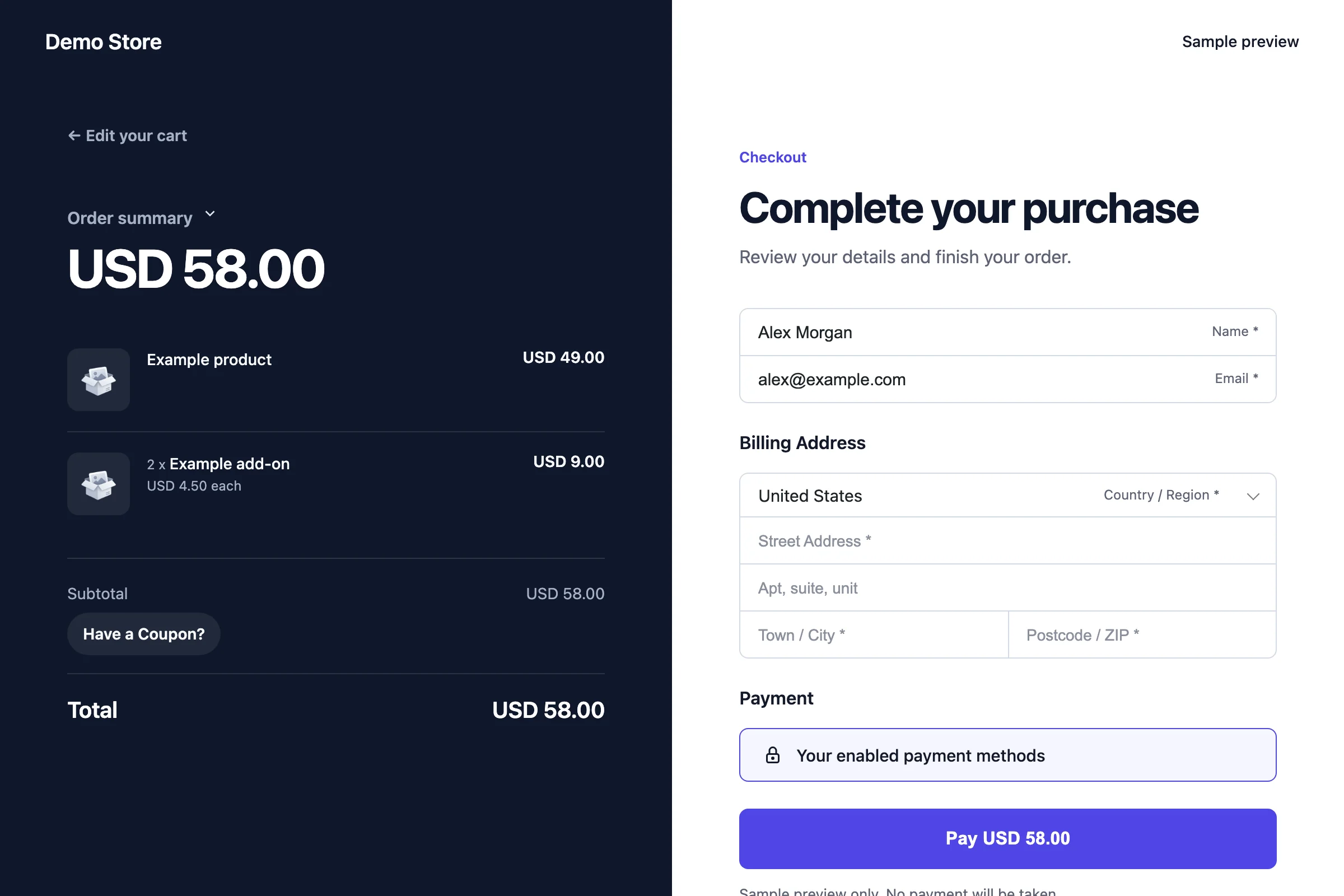
Checkout in the Midnight design, with a dark order summary panel on the left and the customer form on the right
Midnight: a dark order panel beside the form.
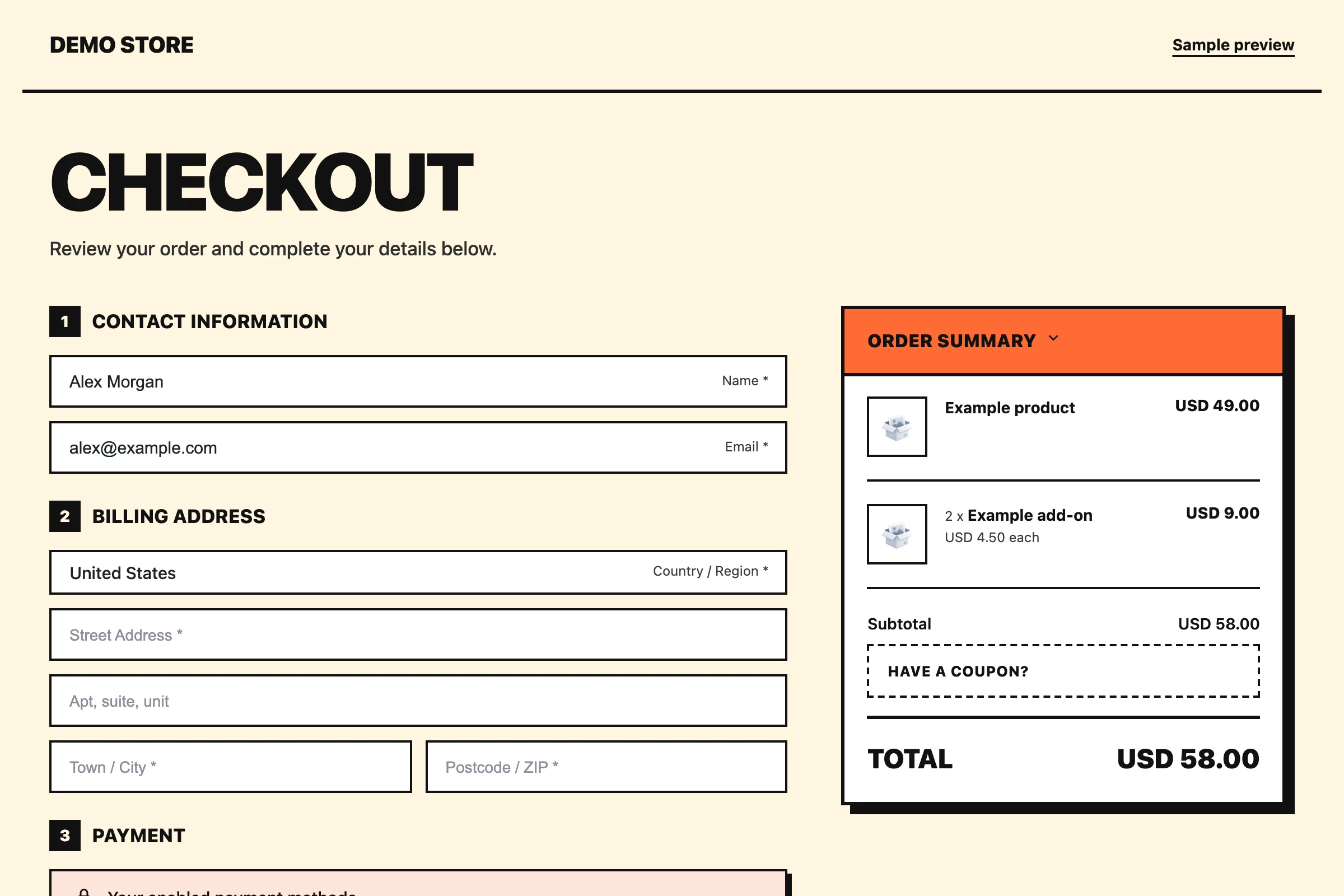
Checkout in the Bold design, with numbered steps in thick outlines and an orange order summary card
Bold: thick outlines and strong contrast.
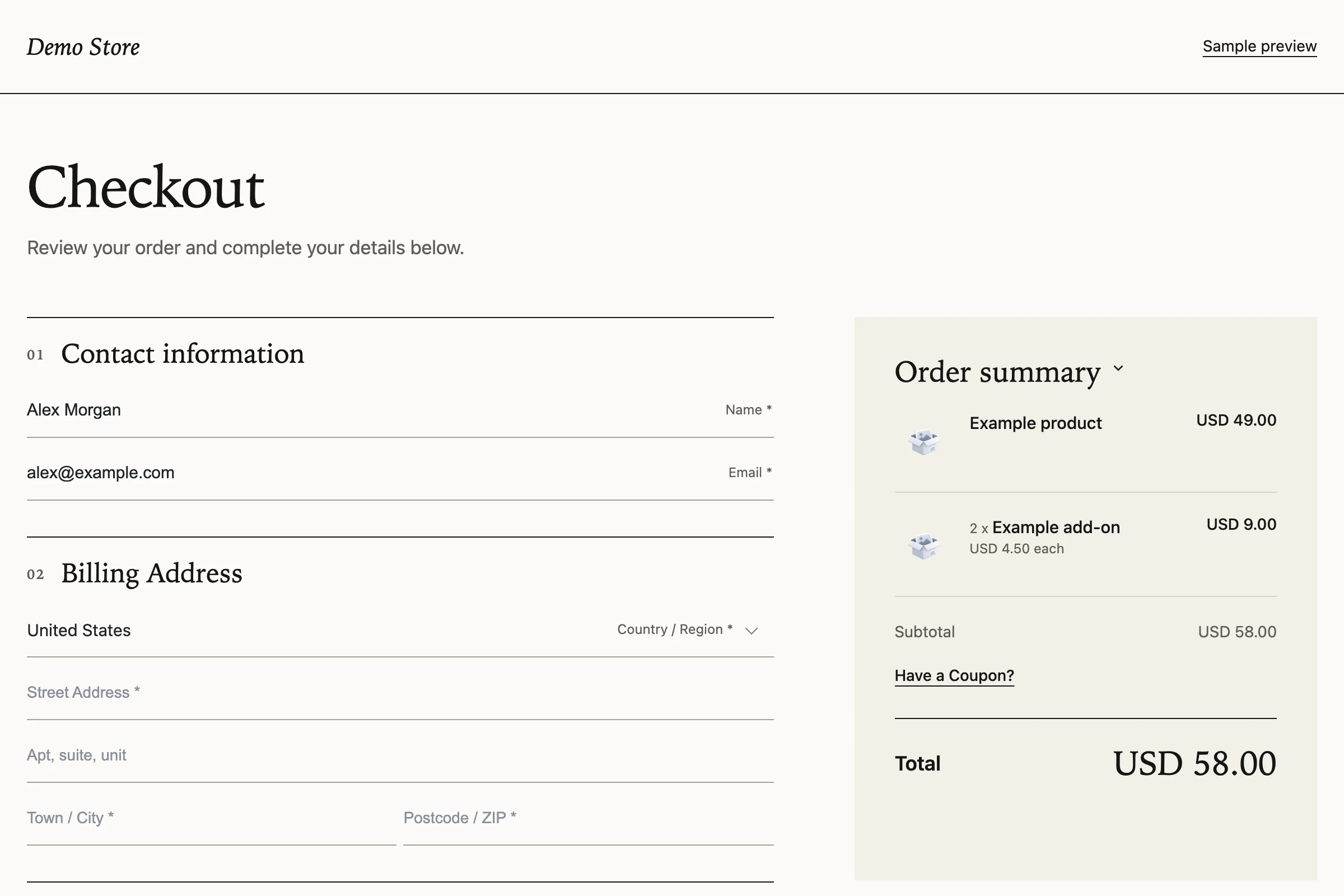
Checkout in the Editorial design, with serif headings, thin rules and a tinted order summary
Editorial: a type-led layout with quiet rules.
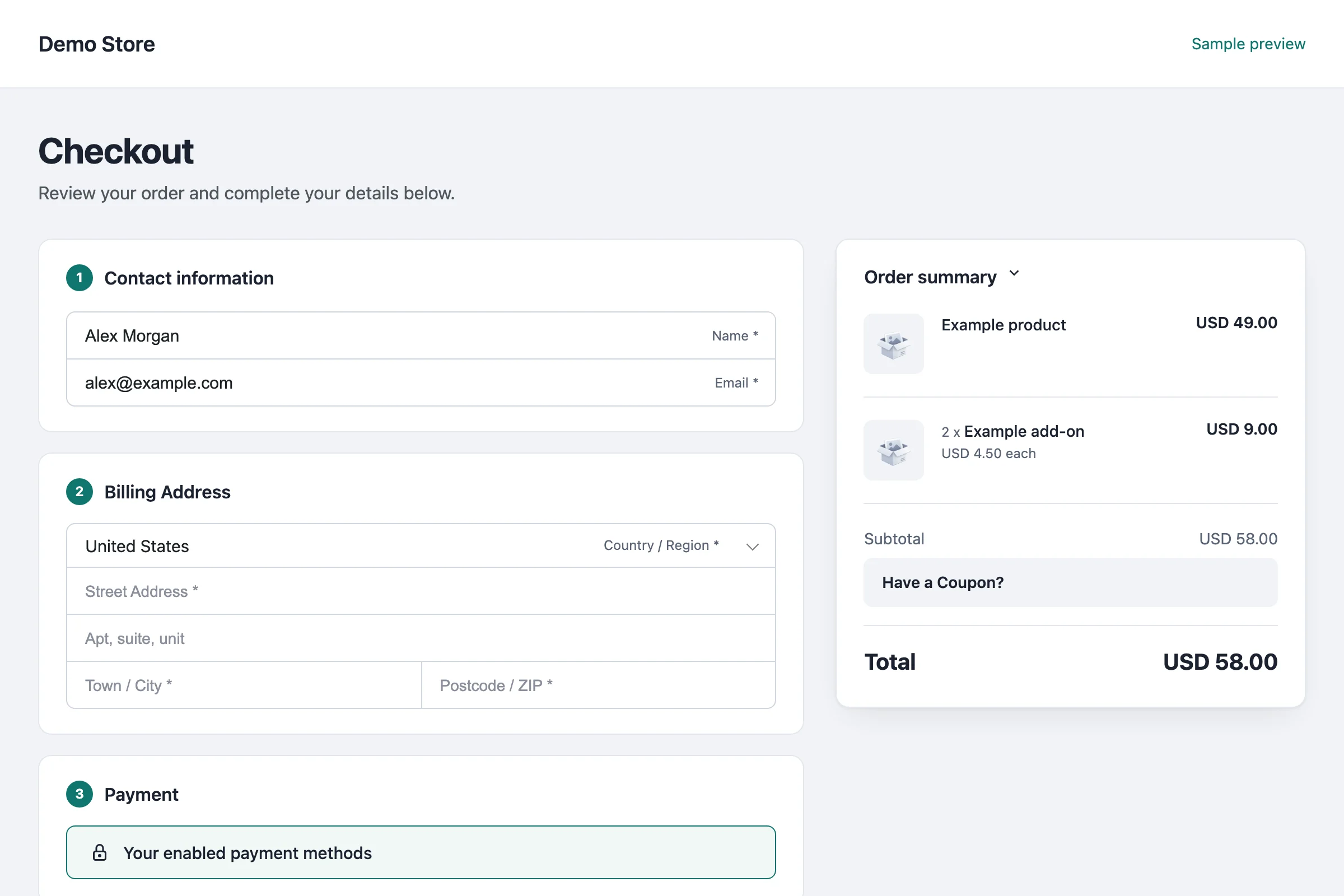
Checkout in the Cards design, with contact, billing and payment steps in separate cards beside the order summary
Cards: each checkout step sits in its own card.
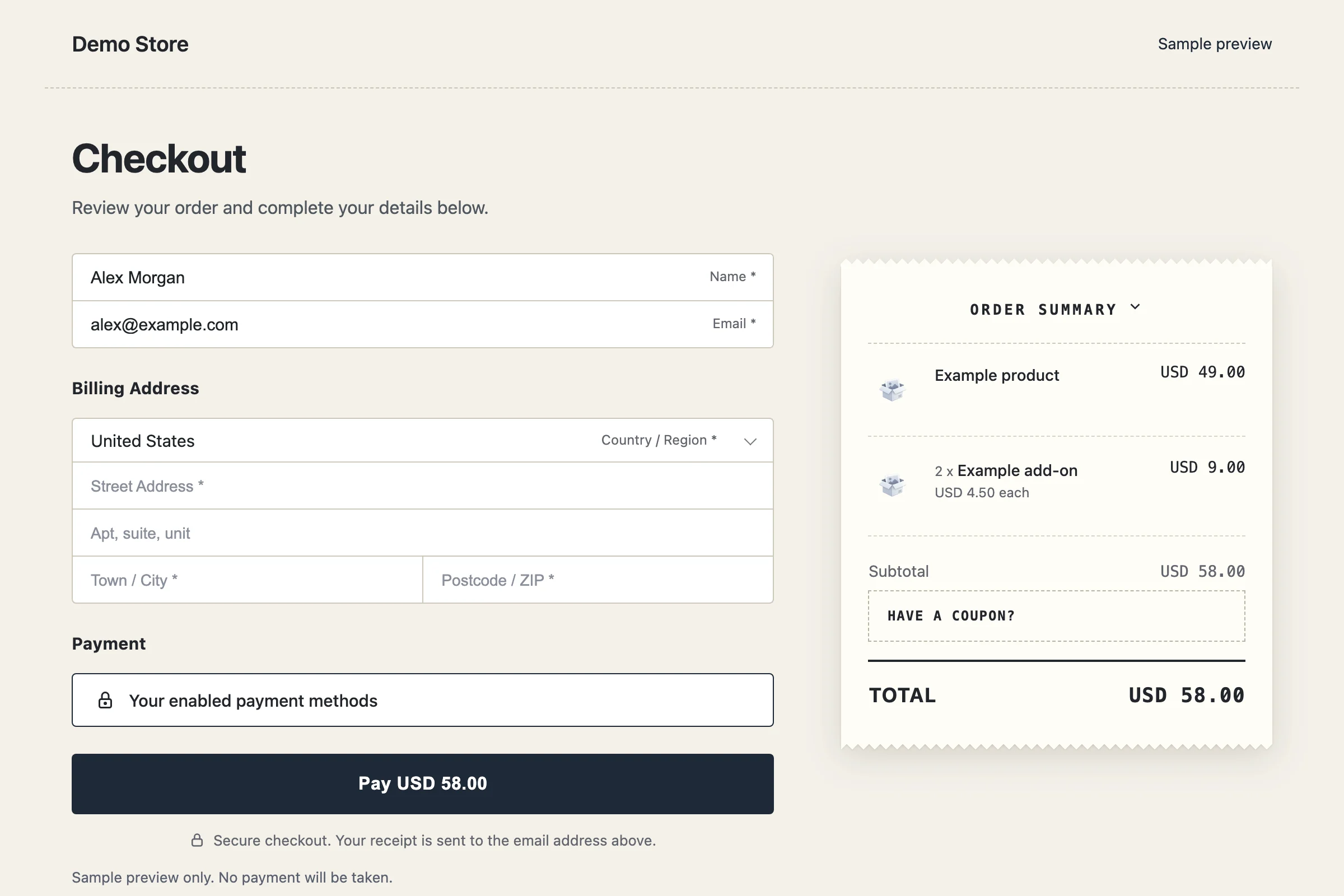
Checkout in the Receipt design, with the order summary styled as a paper receipt
Receipt: the order summary as a paper receipt.
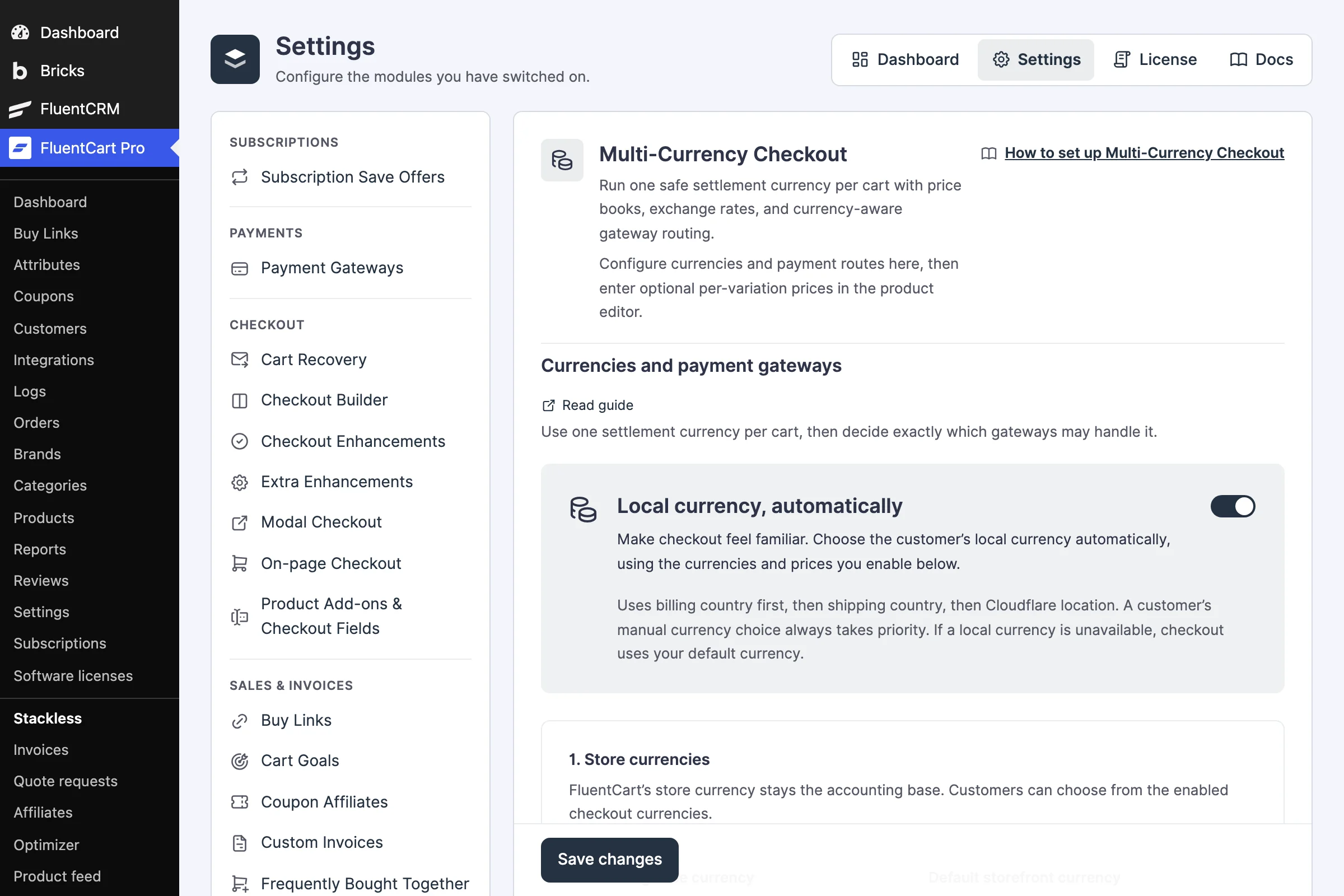
Multi-Currency Checkout settings with the Local currency, automatically switch on and the store currencies section
Local currency chosen for each visitor, with gateways matched to it.
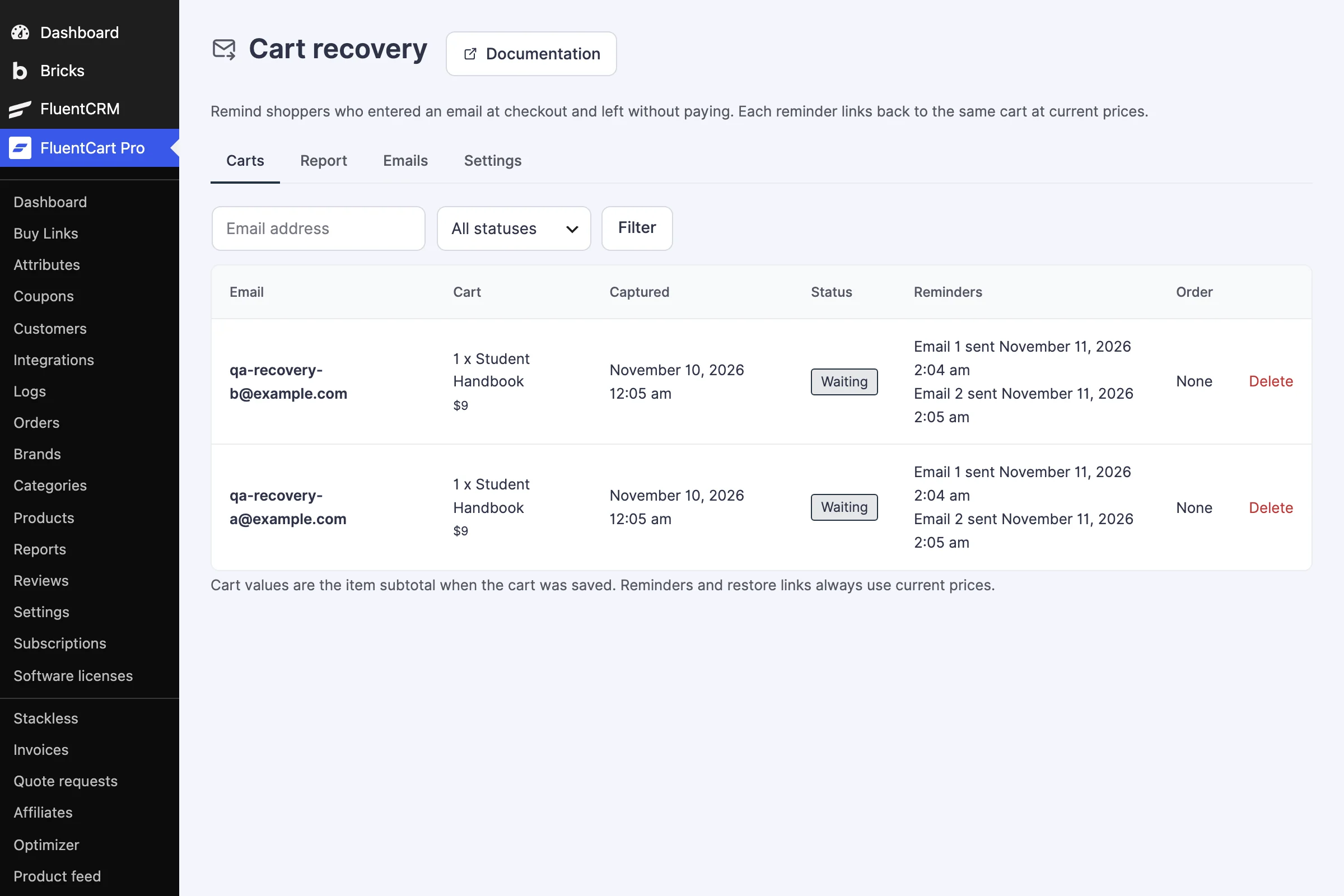
Cart recovery screen listing two captured carts with their status and the reminder emails sent
Cart Recovery lists each captured cart and the reminders sent.
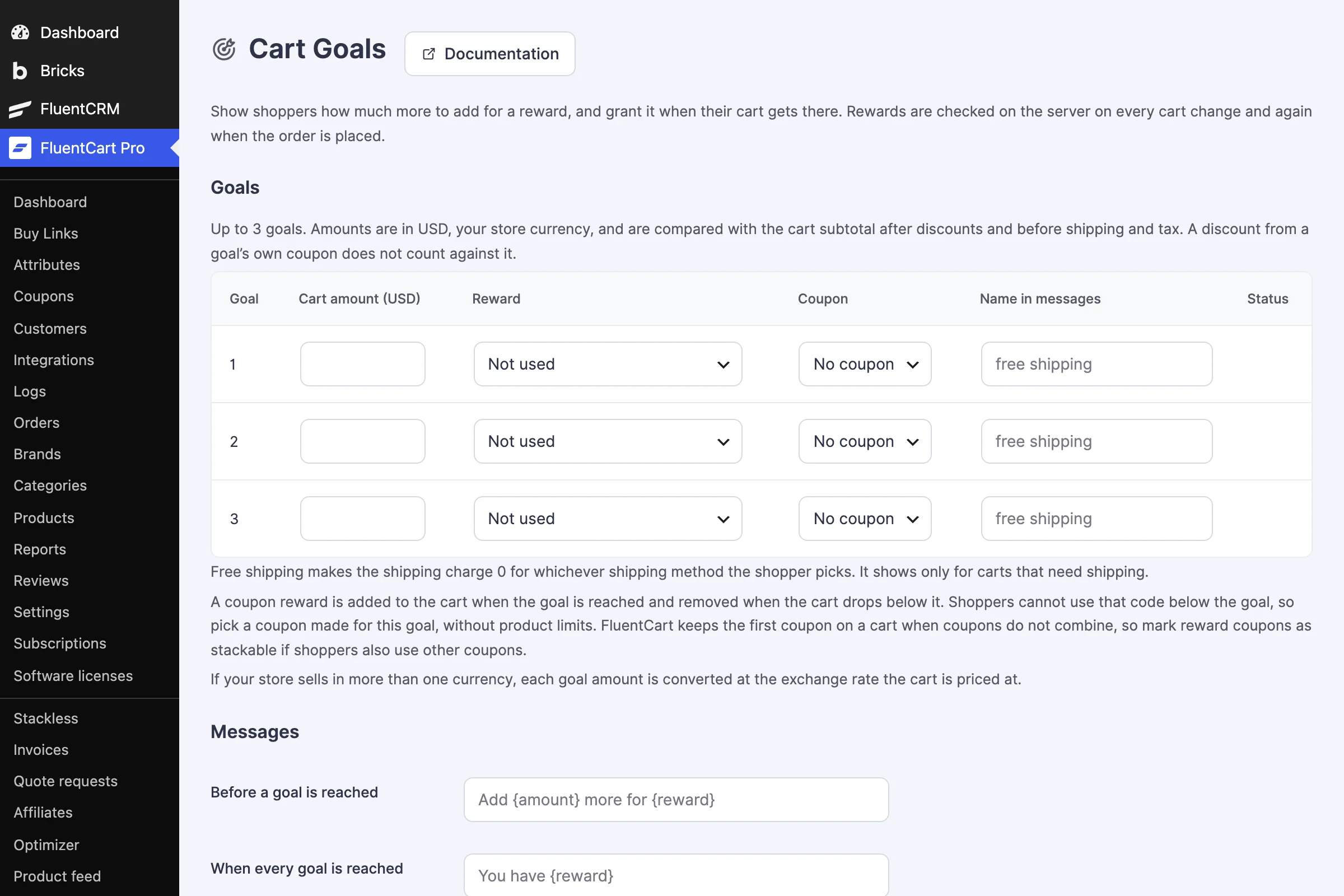
Cart Goals settings with three goal rows for a cart amount, a reward and a coupon, and the messages shown to shoppers
Up to 3 cart goals, each with free shipping or a coupon as the reward.
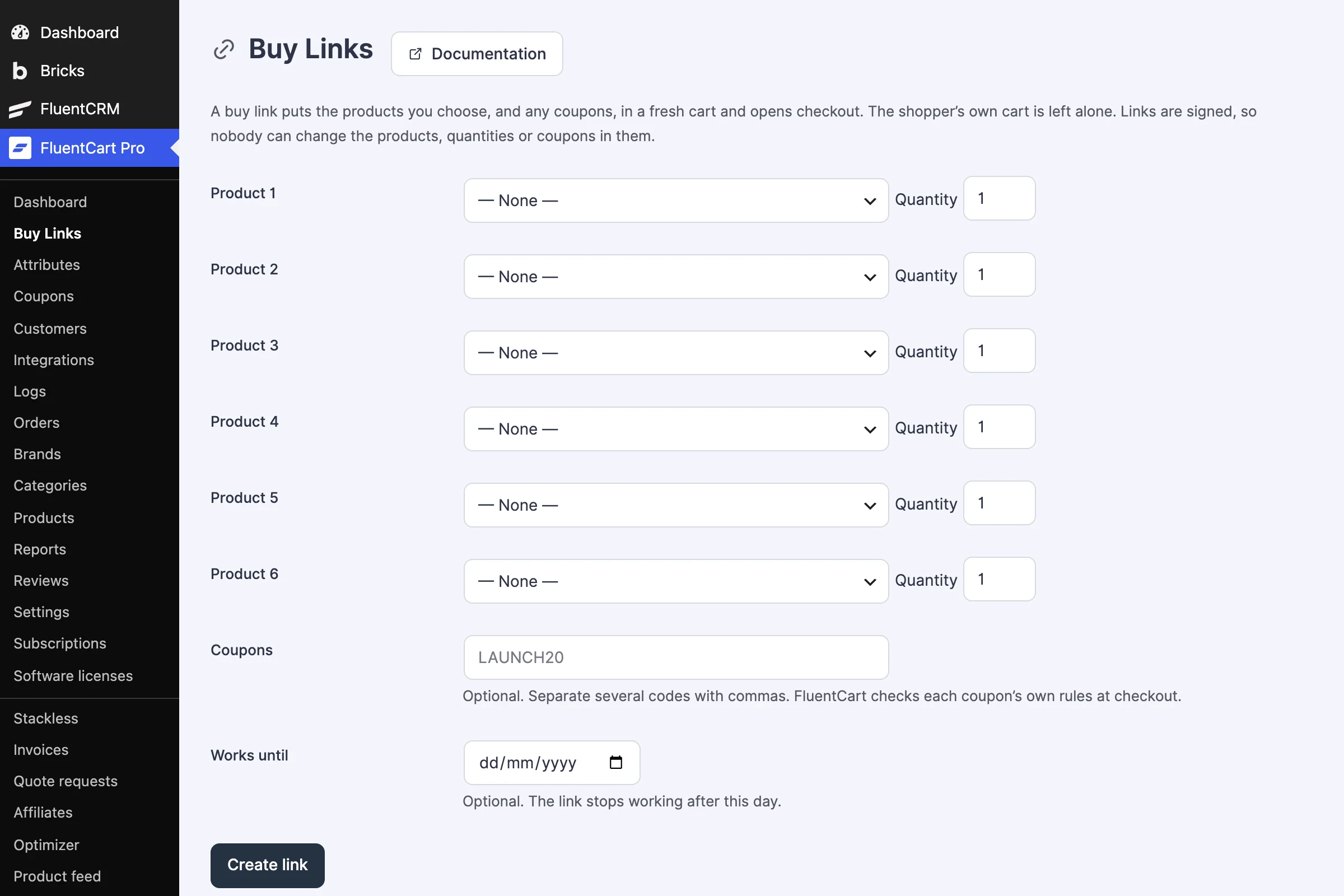
Buy Links screen with six product rows, quantities, a coupon field and a Create link button
Buy Links put products and coupons in a fresh cart.
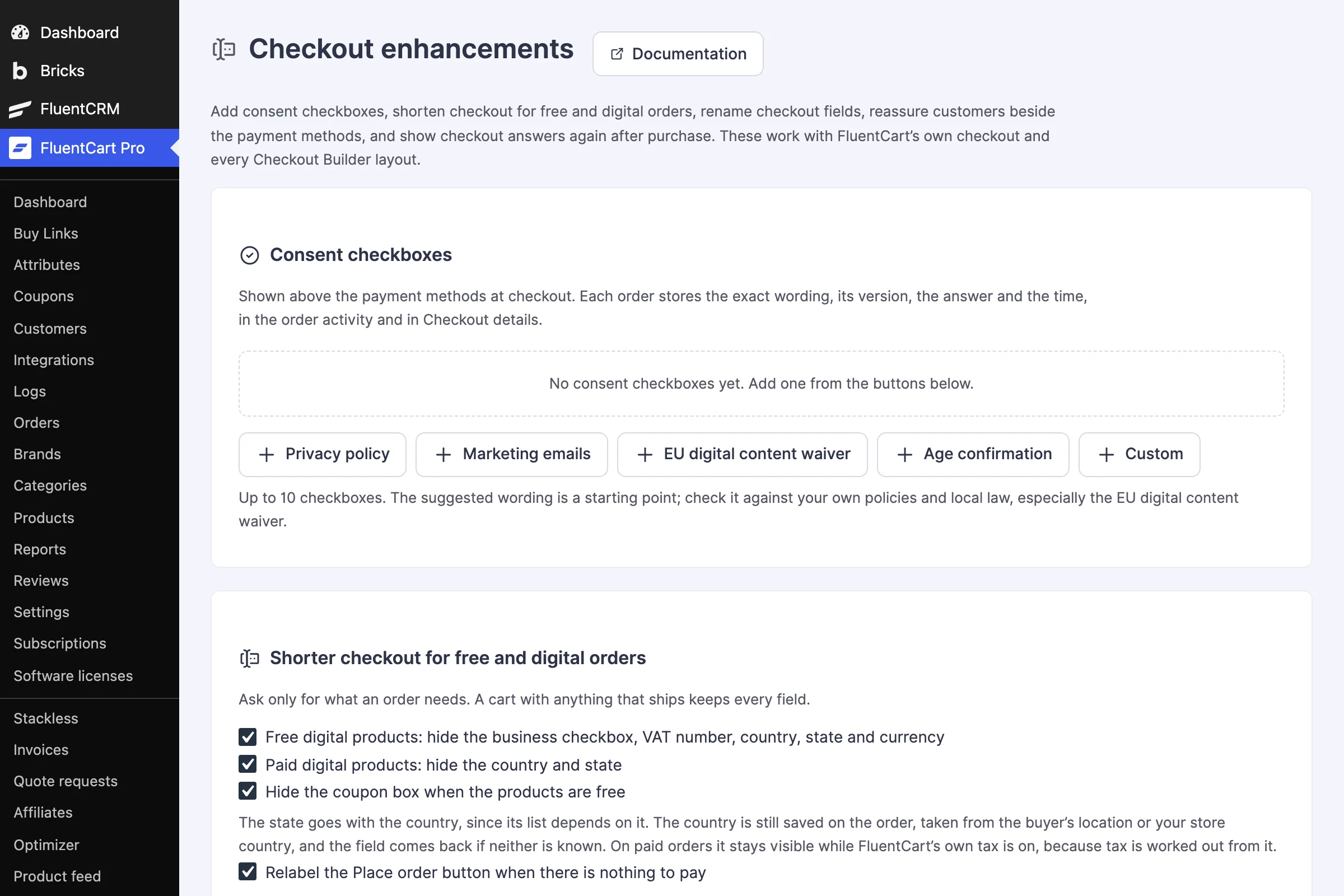
Checkout enhancements screen with consent checkbox presets and options to shorten checkout for free and digital orders
Consent checkboxes and a shorter checkout for digital orders.
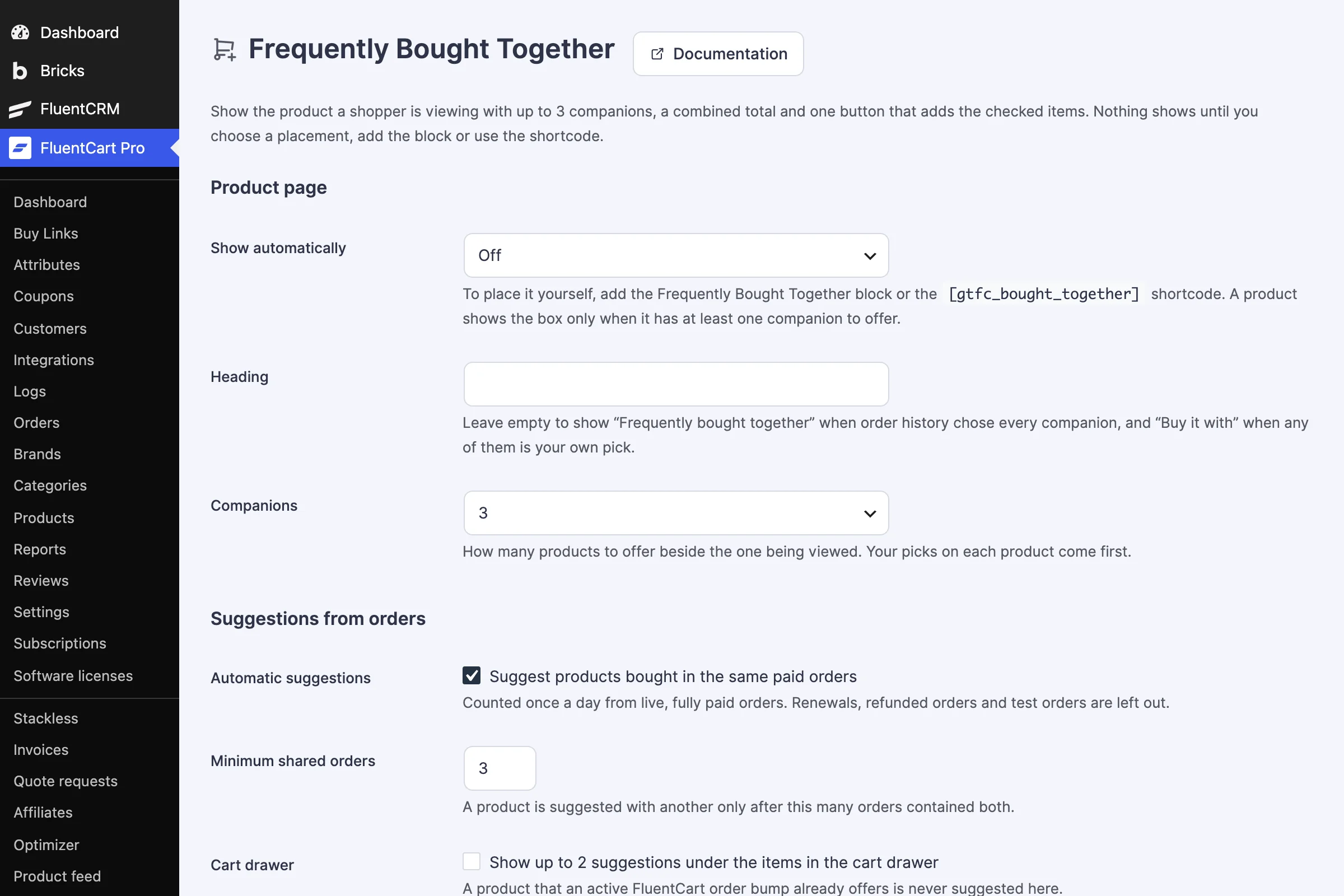
Frequently Bought Together settings for the product page box, companions and suggestions from orders
Frequently Bought Together, from your picks or paid order history.
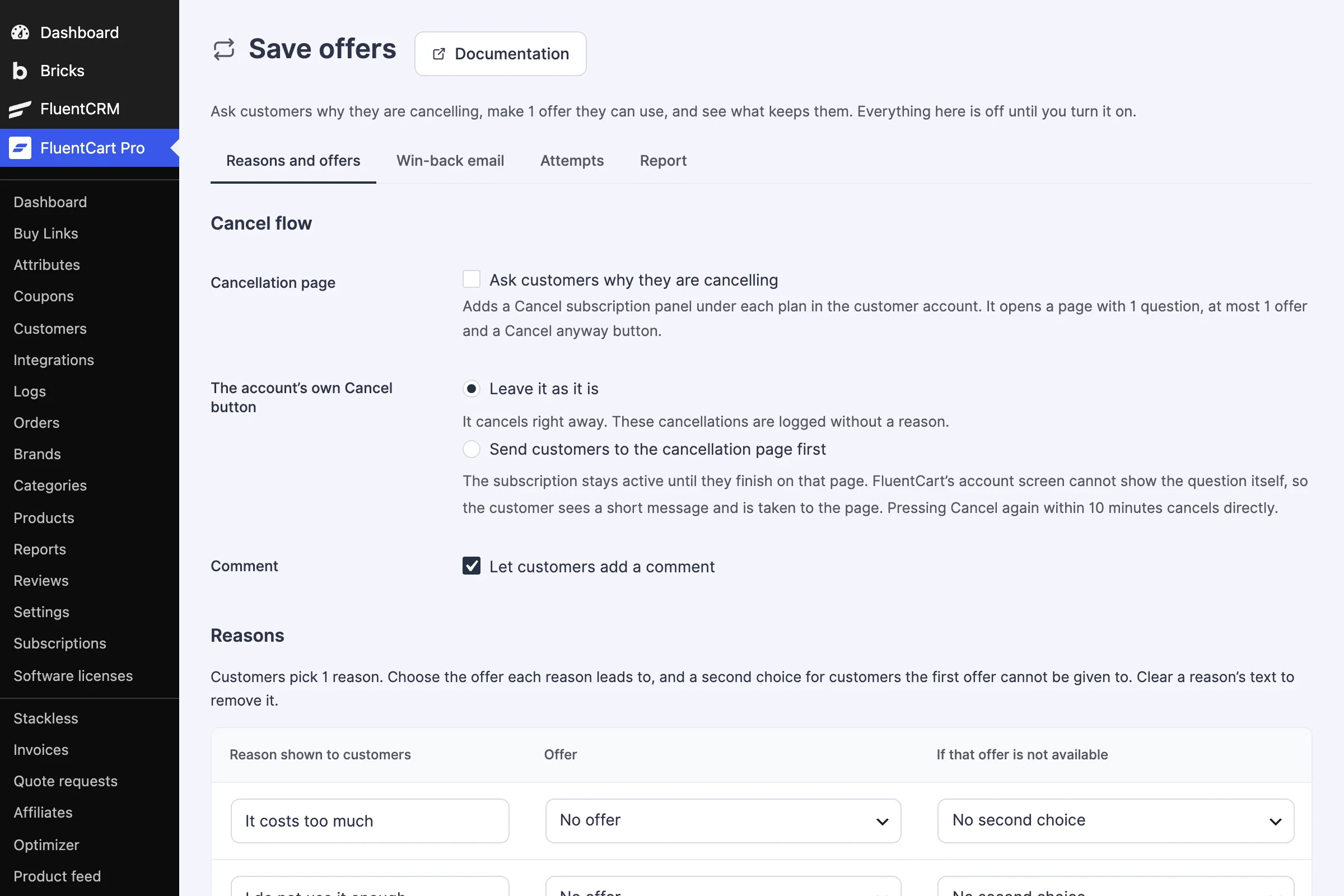
Save offers screen with the cancel flow options and a table of reasons with the offer each one leads to
Ask why a subscriber is leaving, then make one offer.
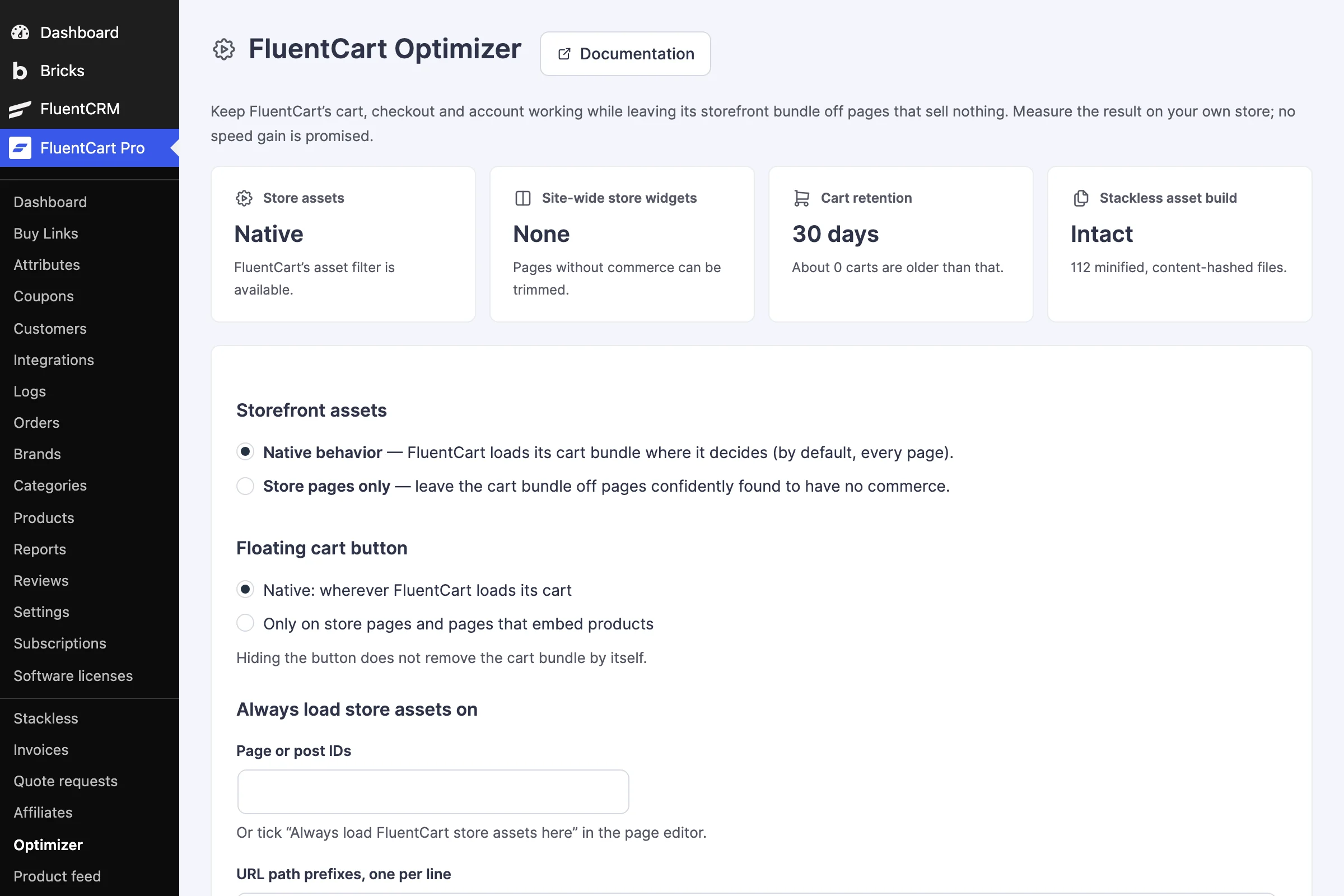
FluentCart Optimizer screen with storefront assets, floating cart button and page override settings
FluentCart Optimizer keeps store scripts off pages that sell nothing.

1 / 16

Loading screenshot

What It Adds to FluentCart Every Job on This List Has a Module

FluentCart covers the core of a store well. Stackless adds the jobs around it, the ones that usually end in another plugin, a snippet or a workaround. Here’s the list, matched to the module that does each job. FluentCart itself is installed separately, and shipping carriers and marketing tools stay separate too.

Store jobs and the Stackless for FluentCart modules that cover them
The jobWhat stores usually doStackless module
Stripe and PayPal on your own keysFluentCart's connected Stripe and PayPalPayment Gateways: Stripe and PayPal
Sales tax and VAT handled for youA separate tax service, or filing in every region yourselfPayment Gateways: Stripe Managed Payments, Polar, Paddle and Dodo Payments
Prices in more than one currencyOne store currency, or a second storeMulti-Currency Checkout
A designed checkoutCustom CSS or a page builder templateCheckout Builder, Checkout Enhancements, Product Add-ons & Checkout Fields
Checkout on any page or buttonSending every buyer to the checkout pageOn-page Checkout, Modal Checkout, Buy Links
Invoices and quotesA separate invoicing tool and a contact formCustom Invoices, Request a Quote
Selling your own plugins and themesFluentCart Pro's Licensing or a separate licensing pluginSoftware Licensing
Abandoned carts and bigger ordersAn abandoned cart service and an upsell pluginCart Recovery, Cart Goals, Post-purchase Offers, Frequently Bought Together, Sale Campaigns
Keeping subscribersA cancellation survey toolSubscription Save Offers
Referrals and name your priceAn affiliate plugin and custom codeCoupon Affiliates, Pay What You Like
Buyer-only pages and purchase limitsA membership or content restriction pluginPage Access, Purchase Rules, Hide Price Until Login
Delivery, pickup and servicesCustom fields and manual emailsDelivery & Pickup Scheduling, Service Products
Customer toolsSeparate wishlist, back-in-stock and saved cart toolsWishlist, Back-in-Stock Alerts, Saved Carts & Order Again
Catalog tweaksSnippets for price text, quantities, badges and buttonsFree Price Text, Sold Count Display, Stock Urgency Labels, Min/Max Quantity, Custom Add to Cart Text, External Product, Product Enhancements
Google ShoppingA product feed plugin for Google Merchant CenterGoogle Product Feed
A faster storeSnippets to stop the store's scripts loading everywhereFluentCart Optimizer, Checkout Cache Buster
Automation and small fixesManual tagging and one-off snippetsFluentCRM, Extra Enhancements

Stackless never replaces what FluentCart already does. Its Stripe and PayPal sit beside FluentCart’s own, each with a Stackless label, so you can move over when you’re ready. Software Licensing runs beside FluentCart Pro’s Licensing without touching its keys, products or API.

39 Modules, Each on Its Own Switch Grouped the Way the Admin Groups Them

Every module is optional. Turn on Payment Gateways and Checkout Builder today, add Cart Recovery next month and leave the rest off. A module you switch off keeps its settings for when you need it again.

  • Subscriptions

    A cancellation page that asks why a customer is leaving, makes one offer they can use and logs every attempt.

    See the module
    • Subscription Save Offers

      Ask customers why they are cancelling a subscription, make 1 offer they can use, log every attempt, and optionally send 1 win-back email after a subscription ends.

  • Payments

    Six gateways in one module: Stripe and PayPal on your own keys, and four merchants of record that handle sales tax and VAT.

    See the 6 gateways
    • Stripe

      Stripe with your own API keys: the Payment Element at checkout, Apple Pay, Google Pay and Link express buttons, saved cards that renew subscriptions, refunds and signed webhooks set up for you.

    • Stripe Managed Payments

      Stripe as merchant of record for digital products: embedded Stripe Checkout on your store, sales tax and VAT handled by Stripe, subscriptions on Stripe Billing, refunds and webhooks. Uses your Stripe keys.

    • PayPal

      PayPal with your own REST app: Smart Buttons with Pay Later, saved PayPal accounts that renew subscriptions, refunds and verified webhooks set up for you.

    • Polar

      Merchant of record for digital products and subscriptions. Polar handles sales tax and VAT.

    • Paddle

      Merchant of record with an overlay checkout for cards, PayPal, Apple Pay and Google Pay, subscriptions with signup fees, and refunds. Paddle handles sales tax and VAT.

    • Dodo Payments

      Merchant of record with a hosted checkout for cards, UPI, Apple Pay, Google Pay and local methods, subscriptions with free trials, and refunds. Dodo handles sales tax, VAT and GST.

  • Checkout

    Ready-made checkout designs, a checkout in a modal or on any page, consent checkboxes, paid add-on fields, delivery slots and recovery emails.

    See the 9 modules
    • Cart Recovery

      Email shoppers who entered an email at checkout and left without paying, with a signed link that restores their cart at current prices.

    • Checkout Builder

      Choose and preview ready-made checkout designs without an editor.

    • Checkout Cache Buster

      Give FluentCart cart requests and drawer checkout links a fresh URL to avoid stale cached guest carts.

    • Checkout Enhancements

      Add consent checkboxes, shorten checkout for free and digital orders, rename checkout fields, add a trust block, and show checkout answers after purchase.

    • Delivery & Pickup Scheduling

      Offer dated delivery slots with capacity limits, booking cutoffs, and blackout dates.

    • Extra Enhancements

      Handy extras for FluentCart: payment failure emails, coupon links, scheduled coupons that start on time, per-product payment methods and thank-you pages, a spam and fraud guard, quieter test orders, and an account menu that opens collapsed.

    • Modal Checkout

      Open FluentCart’s checkout in a modal from any Buy Now button, product link or checkout link, so buyers pay without leaving the page.

    • On-page Checkout

      Put a plan picker and the FluentCart checkout form on any page, so buyers choose and pay without leaving it. Each visitor gets their own cart.

    • Product Add-ons & Checkout Fields

      Collect gift messages, personalization, and paid options with server-validated conditions and native fees.

  • Sales & invoices

    Invoices, quotes, buy links, cart goals, post-purchase offers, sale campaigns, name-your-price and coupon affiliates.

    See the 9 modules
    • Buy Links

      Shareable, signed links that put one or more products and coupons in a fresh cart and open checkout, without touching the shopper’s own cart.

    • Cart Goals

      A progress bar toward up to 3 spend goals in the cart and checkout, with free shipping or a coupon granted automatically when the cart gets there.

    • Coupon Affiliates

      Let customers earn cash commission when friends buy with their personal FluentCart coupon, with refund holds, review, and manual payouts.

    • Custom Invoices

      Create customer invoices, send secure payment links, and collect payments through FluentCart. Repeat invoices on a schedule, take deposits, and remind customers before and after the due date.

    • Frequently Bought Together

      Shows the product being viewed with up to 3 companions, a combined total and one button that adds the checked items, using your picks first and paid order history second.

    • Pay What You Like

      Let buyers choose what to pay for a product, like Gumroad: its FluentCart price is the minimum, with a suggested amount, quick amounts and a maximum.

    • Post-purchase Offers

      After payment, show one rule-matched offer on the order confirmation page; accepting opens a prefilled checkout with an optional FluentCart coupon discount, with a report per offer.

    • Request a Quote

      Collect requests, prepare proposals, and convert accepted proposals into payable FluentCart invoices.

    • Sale Campaigns

      Schedule sales that start and end by themselves, with sale prices, a badge and a countdown to the real end, and regular prices back on time.

  • Currency

    One settlement currency per cart, with exact prices per currency, exchange rates and gateways matched to each one.

    See the module
    • Multi-Currency Checkout

      Run one safe settlement currency per cart with price books, exchange rates, and currency-aware gateway routing.

  • Access & licensing

    License keys, site limits and automatic updates for your own plugins and themes, pages only buyers can open and rules for who can buy.

    See the 4 modules
    • Hide Price Until Login

      Show "Login to see price" to visitors for chosen products or the whole store.

    • Page Access

      Unlock chosen pages for customers who buy a product. Everyone else sees an access notice, or nothing at all for private pages.

    • Purchase Rules

      Limit who can buy a product or variation by WordPress role, FluentCRM tag or WP Fusion tag, and stop repeat purchases.

    • Software Licensing

      Sell plugins and themes with license keys, site activation limits, a license API and automatic updates from your store. Runs beside FluentCart Pro's Licensing without touching its keys, products or API.

  • Catalog

    A Google feed, service and external products, and the small jobs stores solve with snippets: price text, sold counts, stock labels and quantity limits.

    See the 9 modules
    • Custom Add to Cart Text

      Customize button text per product (e.g., "Subscribe", "Pre-Order").

    • External Product

      Keep products in your catalog while sending purchase clicks to an external website.

    • Free Price Text

      Display custom text (like "FREE") instead of 0.00 prices.

    • Google Product Feed

      A Google Merchant Center product feed for free listings and Shopping ads, rebuilt when products change, with each left-out item and its reason.

    • Min/Max Quantity

      Enforce minimum and maximum purchase quantities per product.

    • Product Enhancements

      Add product details such as dimensions, colors, file type, pages or ISBN, filled in from FluentCart where it already knows them, and show them on product pages.

    • Service Products

      Add services to the native product creator, skip shipping and inventory, and keep paid service orders processing until fulfilled.

    • Sold Count Display

      Show "X sold" badge on products to build social proof.

    • Stock Urgency Labels

      Display "Only X left!" or "Low stock" badges when inventory is low.

  • Store tools

    Wishlists, back-in-stock alerts, saved carts, FluentCRM automations and a storefront optimizer.

    See the 5 modules
    • Back-in-Stock Alerts

      Let shoppers request a confirmed availability email for an out-of-stock product option.

    • FluentCart Optimizer

      Leave FluentCart’s storefront bundle off pages that sell nothing, with page overrides, a cache and script report, cart retention, and one-click restore.

    • FluentCRM

      FluentCRM automation triggers, smart codes and contact details for Stackless invoices, quotes, affiliates and stock alerts.

    • Saved Carts & Order Again

      Save shopping lists and rebuild eligible past purchases with current prices and availability.

    • Wishlist

      Save product options as a guest and keep them in the customer account after signing in.

  • Builders & languages

    Storefront pieces come as Gutenberg blocks, shortcodes and Bricks elements. The plugin ships in English with Spanish, German, Italian and French translations.

A Checkout You Choose, Not One You Code 13 Designs, on Any Page, From Any Button

Checkout Builder is optional, and switching it on doesn’t pick a design for you. Your current checkout stays in place until you choose a layout, and FluentCart’s default is always one click away. The same designs work in the On-page Checkout block and its Bricks element.

  • Checkout Builder

    • 13 ready-made designs, from FluentCart’s own layout with numbered steps to Midnight, Receipt, Editorial and Bold
    • A sample preview of every design before it goes live, on desktop and phone
    • Accent color, backgrounds, width, corner radius, logo and font under Appearance

    No editor needed

    • Works with classic themes and block themes; no Site Editor
    • FluentCart Pro order bumps styled for every design, at all six positions
    • Switch back to FluentCart’s default checkout at any time
  • Checkout anywhere

    • On-page Checkout puts a plan picker and the checkout form on any page, and each visitor gets their own cart
    • Modal Checkout opens the checkout from any Buy Now button, product link or checkout link
    • Buy Links are signed links that put products and coupons in a fresh cart, without touching the shopper’s own cart
  • Links that set up checkout

    • Add ?paymethod= to a checkout link to open checkout with one payment method
    • Add ?paycurrency= to fix the currency for that checkout
    • Coupon links, scheduled coupons that start on time, and per-product payment methods and thank-you pages
  • Fields and consents

    • Consent checkboxes that store the exact wording, the answer and the time with the order
    • A shorter checkout for free and digital orders, renamed fields and a trust block
    • Gift messages, personalization and paid options, with conditions checked on the server and native fees

Six Payment Gateways Are Built In Your Keys, Your Accounts, or a Merchant of Record

Payment Gateways adds six gateways to FluentCart → Settings → Payments, next to FluentCart’s own. In the admin each one carries a Stackless label, such as Stripe (Stackless), so you can tell them apart. Buyers see the plain names at checkout. You connect your own accounts, and Stackless sets up the webhooks.

  • Stripe

    Automatic renewals
    • Your own Stripe API keys, with the Payment Element at checkout
    • Apple Pay, Google Pay and Link buttons on product pages and the cart
    • Saved cards that renew subscriptions, without FluentCart Pro
    • Refunds, card updates and signed webhooks set up for you
  • Stripe Managed Payments

    Merchant of record
    • Stripe is the seller of record and handles sales tax and VAT
    • Buyers pay in Stripe Checkout, embedded on a page of your store
    • Subscriptions renew on Stripe Billing
    • Digital products only, once Stripe approves your account; uses your Stripe keys
  • PayPal

    Automatic renewals
    • Your own PayPal REST app, with Smart Buttons and Pay Later
    • Saved PayPal accounts that renew subscriptions
    • Refunds from the order screen
    • Verified webhooks set up for you
  • Polar, Paddle, Dodo Payments

    Merchant of record
    • The provider is the seller of record and handles sales tax and VAT; Dodo also handles GST
    • Polar and Dodo Payments use a hosted checkout; Paddle opens an overlay on your site
    • Subscriptions the provider renews: signup fees on Paddle, free trials on Dodo Payments
    • Payments and refunds sync through signed webhooks
  • Tax the buyer can see

    • With a merchant of record, checkout says before payment that the provider adds sales tax or VAT
    • The receipt and the order email show what the buyer paid
    • The order log spells out the order price and the tax the provider added
  • Gateways matched to currency

    • Multi-Currency Checkout decides which gateways may handle each currency
    • A preferred gateway per currency, or the first one available
    • One settlement currency per cart, so the order, the payment and the refund agree
  • Second accounts and safe copies

    Need a second Stripe account, another Polar organization or a Paddle account for another region? Duplicate the gateway and give the copy its own keys, webhook and name. On a staging, local or migrated copy of your store, Stackless doesn’t email customers or act at your payment providers: refunds, cancellations and renewal charges are refused until an admin confirms it’s the live store.

Switch On What You Use The Rest Stays Out of Your Store

Stackless lives under the FluentCart menu. Every module is a switch on one dashboard, grouped the same way as the list above.

  1. Install it beside FluentCart

    Upload Stackless to a site running WordPress 6.0+, PHP 7.4+ and FluentCart Free or Pro. Nothing changes on your store until you switch a module on.

  2. Switch on the modules you need

    Open FluentCart → Stackless in wp-admin, search or filter the module list, and flip a switch. A module that stays off loads no code at all.

  3. Set it up, then add your license

    Each module has its own settings and a link to its guide. Add your license key for updates and support. Everything works without it.

  4. On a staging copy, it stays quiet

    A copy of your store doesn’t email customers or charge anyone. The dashboard says so: Stackless paused customer emails and payment provider actions on this site.

  • Off means no code
  • Works without a key
  • Staging stays quiet

What It Doesn’t Do Yet Read This Before You Buy

A plugin with 39 modules has edges. These are the ones that matter today, so you can decide before you install it.

Read the docs

Works today

  • FluentCart Free or Pro, on classic themes and block themes
  • Stripe and PayPal on your own keys, with saved cards and PayPal accounts that renew subscriptions
  • Merchant-of-record checkout through Stripe Managed Payments, Polar, Paddle and Dodo Payments
  • Prices in several currencies, with gateways matched to each one
  • 13 checkout designs you can preview before they go live
  • Every module on its own switch, with no license needed to run it

Doesn’t yet

  • A cart and its order use one currency. There are no mixed-currency carts.
  • Stripe Managed Payments needs Stripe to approve your account and sells digital products only.
  • You need your own account with each payment provider. Stackless connects to them; it isn’t a payment processor.
  • A feature that depends on a FluentCart Pro capability still needs that capability in FluentCart.
  • There is no appointment calendar. Service Products and delivery slots don’t book time; Core Bookings does.
  • In the Spanish, German, Italian and French translations, module names stay in English. Several modules need FluentCart 1.6.4 or newer.

Two Licenses, Every Module Pay Yearly or Pay Once

Both licenses include all 39 modules and unlimited site activations. The license adds updates and support; everything works without it.

Both licenses include

  • All 39 modules
  • Unlimited site activations
  • One-on-one email support
  • Download and license key in your account

Getting started

  1. Buy a license and download Stackless from your account.
  2. Upload and activate it beside FluentCart.
  3. Switch on the modules you need and add your key for updates.

Annual

$39USD per year

Updates and support while your subscription is active.

  • All 39 modules
  • Unlimited site activations
  • Updates for as long as you renew
  • One-on-one email support
  • Download and license key in your account
Get Annual for $39/Year

Renews yearly until you cancel.

14-day unconditional refund period. Prices shown in USD; checkout shows supported local currencies and the final amount before payment. Already have a GT Extensions for FluentCart license? It’s the same plugin and the same license; update to 3.0 and carry on.

  • WordPress 6.0+
  • FluentCart Free or Pro
  • PHP 7.4+
  • Classic and block themes

I Build Tools That Pay for Themselves And Give Away the Ones That Can’t

Everything here is quick to set up, light on your pages and built to do one real job well. I only charge for the tools that can make you money. The rest are free.

Gaurav Tiwari

Hi, I’m Gaurav

I design, build and support every product on this site myself. When you email me, the person reading it is the one who wrote the code.

I’d rather ship one tool you’d miss if it vanished than ten that sit in your plugin list doing nothing.

  • You talk to me, not a ticket queue
  • Paid tools have to earn their price
  • Free tools stay free
More about me

18+years building websites, plugins and stores, since 2008

I obsess over performance

Switch a feature off and it loads nothing. What does load stays small. A tool that replaces a plugin shouldn’t make your pages slower.

I care how it feels

Clear screens, sensible defaults and settings written in plain English. If you need a tutorial for the basics, that’s my design mistake, not yours.

I build for everyone

Full keyboard support, visible focus, proper labels and text you can actually read. When more people can use your store, more people can buy from it.

I build tools that earn

My paid tools help you sell, renew, license or convert. If one just sits in your stack, I haven’t done my job.

If it can’t earn, it’s free

I won’t charge for anything that can’t make you money. The free tools get the same care as the paid ones, down to the last setting.

A Few Good Questions Answered Plainly

The things worth knowing before you add something to a working store.

Something else on your mind? Ask through product support. Every module also has a setup guide in the docs.

Is this GT Extensions for FluentCart?

Yes. GT Extensions for FluentCart is now called Stackless for FluentCart. Only the name changed. Your settings, license key, modules, payment gateways, shortcodes and hooks stay as they are, and an existing license keeps working. Update to 3.0 the way you update any plugin.

Does it work with FluentCart Free?

Yes. Stackless works beside FluentCart Free or Pro. FluentCart itself is installed separately, and a feature that depends on a Pro capability still needs that capability in FluentCart.

Will it change my checkout automatically?

No. Checkout Builder is optional, and switching it on doesn’t select a design. Your current checkout stays in place until you choose a ready-made layout, and you can switch back to FluentCart’s default.

Do the checkout designs need a block theme?

No. The ready-made designs work with classic themes and with the block editor on or off. You don’t need Full Site Editing to select one.

How is Stripe (Stackless) different from FluentCart's own Stripe?

Stripe (Stackless) uses your own Stripe keys instead of FluentCart’s Connect relay. It differs in three ways:

  • Apple Pay, Google Pay and Link buttons on product pages and the cart
  • Subscriptions renew on the saved card without FluentCart Pro
  • Stripe Managed Payments can run on the same keys, with Stripe as merchant of record

Both sit in your payment settings with a label on each, so you can move over when you’re ready. PayPal (Stackless) works the same way beside FluentCart’s own PayPal.

Does Software Licensing clash with FluentCart Pro's Licensing?

No. Software Licensing runs beside FluentCart Pro’s Licensing without touching its keys, products or API. Keys that FluentCart Pro creates stay on its own Licenses screen, and a product uses one system or the other.

What happens on a staging copy of my store?

A staging, local or migrated copy doesn’t email customers, run FluentCRM automations or act at your payment providers. Refunds, cancellations and renewal charges are refused until an admin confirms it’s the live store.

Does changing currency only change the symbol?

No. It selects a fixed local price or converts the amount, then uses the payment routes you allow for that currency. A complete cart and its order use one currency. Your gateway account must support the transaction, so check each route in test mode.

Which languages does it come in?

English, with Spanish, German, Italian and French translations for the admin screens, the storefront, emails and error messages. Module names stay in English.

What happens when an annual license expires?

Updates and support stop unless you renew. Every module keeps working, because the license only adds updates and support. A lifetime license has no renewal.

Is there a WooCommerce version?

Yes. Stackless for WooCommerce is the WooCommerce counterpart, with its own subscriptions module and more built-in gateways.

What if it does not suit my store?

There is a 14-day unconditional refund period. Use Product Support for help or a refund request.

Build the Store You Have in Mind Start With the Module Your Store Needs Next

My advice is simple. I’d switch on the one module your customers will notice first and leave the others off until you need them. $99 once covers every module on every site you run.