
What Chat Learns and How It Stays Current
An assistant is only as good as what it read last. If it learned your docs once and never again, it quotes last month’s setting names and last year’s prices, and every wrong answer becomes a ticket anyway.
Chat learns from the post types you choose and keeps that knowledge current on its own. A change to a post marks it, and a check every 30 minutes learns it again, but only when what Chat would learn from it has changed. You manage all of it under Core Support → Chat → Knowledge.
Choose What Chat Learns From
The What Chat learns from card lists every public post type on the site, with its slug and 2 counts: Published and Learned. Docs are ticked by default.
- Go to Core Support → Chat → Knowledge.
- Tick each post type under Keep learning.
- Click Save choices.
Ticked types are learned as posts are published or updated while Chat is on. The 30-minute check picks up published posts of a ticked type that were never learned, so you don’t have to start anything by hand.
Changelogs aren’t ticked by default. Tick Changelogs if visitors ask what the current version is or what changed in a release.
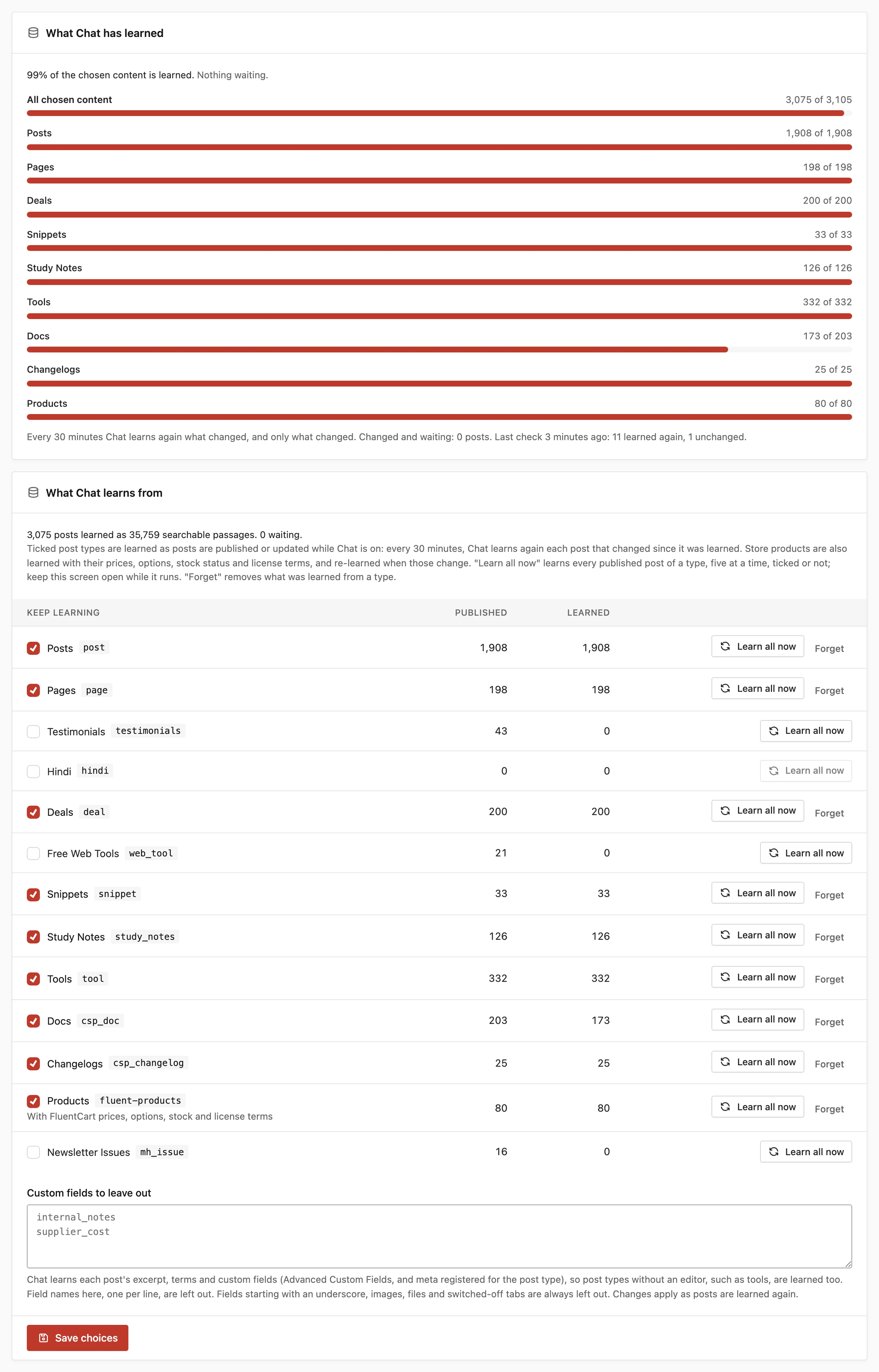
Learn All Now and Forget
Each row has 2 buttons:
- Learn all now: learns every published post of that type, 5 at a time, ticked or not. Keep the screen open while it runs. The Learned column and the progress bars update after every batch. If the provider refuses the key or can’t be reached, the run stops and shows the provider’s reason.
- Forget: removes everything Chat learned from that type. Untick the type too, or new posts of it are learned again.
A type you learned with Learn all now but left unticked is still kept current. Its posts are learned again when they change, and new posts of that type are not added.
What Chat Reads From Each Post
Chat turns each post into searchable passages. A passage is a short piece of the post, small enough to hand to the model with a question. Every passage starts with the post’s title, and docs add the collection first, as in “Core Forms › Install the plugin”.
Chat reads a post in this order:
- Store facts, for products. Store Products, Prices and License Terms in Chat covers these.
- Summary: the excerpt, when the content doesn’t already contain it.
- Details: the post’s terms (categories, tags and custom taxonomies) and its custom fields.
- The content, in sections that follow its H2 and H3 headings. A long section’s later passages repeat its heading.
Because of the summary and details, post types without an editor are learned too. A directory of tools that keeps everything in fields and terms works the same way as a doc.
Custom Fields Chat Reads and Leaves Out
Chat reads custom fields from 2 places:
- Advanced Custom Fields or Secure Custom Fields, in the order the field groups show them
- meta registered for the post type with
register_post_meta()
It reads text, number, email, URL, editor, date and time fields, choices (by their labels), true/false fields, links, related posts, terms, groups and up to 20 repeater rows. Each value is cut at 1,000 characters.
Some fields are never read:
- fields whose names start with an underscore
- images, files and passwords
- values that look like IDs or hashes, and number fields left at 0
- every field in a field group tab that opens with an on/off field that is off
That last rule exists for offers. Say a “Black Friday deal active” switch opens a tab and it’s off. The deal’s price and dates in that tab are left out, so Chat never quotes a switched-off offer.
To leave out more, list field names under Custom fields to leave out, one per line, such as internal_notes or supplier_cost. Changes apply as posts are learned again, so click Learn all now on the type to apply them at once.
How Chat Stays Current
Saving a post doesn’t call the provider straight away. It marks the post as changed, and the 30-minute check learns it again. These also mark a post:
- publishing or updating a post of a learned type
- a custom field Chat reads, changed without a post save, such as an import, WP-CLI or the REST API
- a change to the post’s terms
- a doc moving to another collection, or its collection being renamed
- a store price, option, stock status or license change
- a changelog’s text, synced release dates, pre-releases or kept history
Each check learns marked posts first, oldest change first. Then it takes posts modified since they were learned, then published posts of a learned type that were never learned. That order means a backlog of old posts never holds back a change someone just made.
Each check learns up to 25 posts in up to 20 seconds, and the rest wait for the next check. It also compares up to 10 unchanged learned posts, oldest first, for changes no hook reports. A post whose passages haven’t changed costs no embedding request.
Some changes take effect at once:
- Unpublishing, trashing or deleting a post forgets it right away.
- Restoring a learned post from the trash marks it to be learned again.
- Each check also forgets learned posts that are no longer published.
- Setting a collection’s Who can read to Signed-in visitors forgets its docs right away, even while Chat is off. Setting it back to Everyone marks them to be learned again.
A check ends after 3 embedding failures in a row, and a post that keeps failing moves behind the others. The Recent problems card at the bottom of the Knowledge tab shows the latest errors.
While Chat is off, nothing new is learned. Learn all now still works.
Reading the Learning Card
The What Chat has learned card at the top of the Knowledge tab shows:
- the share of the chosen content that is learned, overall and per post type
- how many posts are waiting in the background queue
- how many posts are changed and waiting for the 30-minute check
- what the last check did: how many posts it learned again and how many were unchanged
- how many published posts aren’t counted because Chat has nothing to learn from them, such as docs sections that only group their docs or password-protected posts
The checks run on WP-Cron, which fires when someone visits the site. On a quiet site, or one with WP-Cron switched off and no server cron in its place, checks run late.
Changelogs and the Current Version
Every release in a changelog is its own passage. On its own, a release passage doesn’t say whether it’s the newest, so a question about the current version could find an old one.
Core Support adds 2 things to every learned changelog:
- a first passage naming the current version and its date, the newest pre-release when there is one, the 6 most recent releases and how many releases are listed
- a first line on every passage, in the form “{Product} changelog (current version X, released D)”
Whichever release search finds, the current version comes with it. Kept release history is learned too, one passage per release. Publish Changelogs by Hand or from a Repository covers kept history and sync.
How Chat Finds the Right Passages
When a visitor asks a question, Chat searches the passages it learned:
- It compares the question by meaning with every learned passage, up to 5,000 passages at the default vector size. Above that, it compares a shortlist from the database’s word search and the current page.
- It combines that ranking with the database’s word search, so a passage naming the exact product, setting or error code still comes first.
- Only passages that are close enough in meaning take part, so a question your docs don’t cover finds nothing.
- On your help-desk site, passages from the page the visitor is reading get a head start.
- The best passages, up to 5 by default, go to the answer model.
With Keyword search, passages are ranked by how many of the question’s words they contain.
Changing the Search Model
Passages learned with one search model can’t be searched with another. When you choose a different Search model, Chat learns every post again with it in the background and keeps answering with the old one. Once every post is learned, Chat switches and deletes the old passages.
The learning card shows the progress while this runs. With an OpenAI or Voyage AI search model, that’s 1 embedding request per post.
Good to Know
- Chat never learns password-protected posts or docs in collections set to Signed-in visitors, because anyone can ask it. Updating from a version before 0.9.2 forgets any such passages Chat had already learned, once.
- A post type with no pages of its own is never shown as a source link.
- The tone of answers, the limits and the handover to a ticket are set on the Settings tab, covered in Answer Rules, Limits and Handover to a Ticket.