
Publish Changelogs by Hand or from a Repository
Customers ask what changed in the last update, and the answer sits in a readme.txt inside a repository they can’t open. When release notes have no public page, support answers the same question after every release.
Core Support Changelogs publishes one changelog per product or service at /changelogs/{product}/ and every release across products at /changelogs/. You write the releases in wp-admin, or Core Support syncs them on a schedule from a repository on GitHub, GitLab, Bitbucket, Gitea or Forgejo, a wordpress.org plugin or any changelog file.
Add a Changelog
- Go to Core Support → Changelogs and click Add changelog.
- Enter the product or service name as the title. Its slug becomes the address,
/changelogs/{slug}/. - In the Releases box, choose where releases come from: Write releases here or Sync from a repository or a file.
- Fill in Product details and Description.
- Set the featured image, which is the product’s icon, and publish.
Product details has 4 settings:
- Kind: Plugin (the default), Theme, App, Service or Other. “Groups the product list on /changelogs/.”
- Product page: a link on the changelog.
- Support page: “Leave blank to use the support portal.” Readers see it as Get support.
- Docs collection: “Links the changelog and the docs to each other.” The changelog gets a Docs link and the collection page gets a Changelog button.
Description is “One line under the product name on its changelog.” The product’s Order sets its place in the product list, then the title.
A published changelog with no releases stays off /changelogs/ for visitors. People who can write docs still see it.
Write Releases Here
Write releases here gives you 2 tabs that stay in step:
- Visual: a card per release with Version, Release date, an optional Summary and Changes. Each change has a Label, such as New, Improved or Fixed, and What changed.
- Text: the same changelog as plain text, newest first.
Saving from the Visual tab writes WordPress readme style. Each release needs a version that starts with a number, such as 1.2.0, and 2 releases can’t share a version.
The text can be in any of 3 formats. WordPress readme style:
== Changelog ==

= 1.2.0 - 2026-10-16 =
Checkout on the page.

* [NEW] On-page checkout
* [BUG FIX] Coupons apply once
Markdown, with groups:
## [1.2.0] - 2026-10-16

### Added
- On-page checkout

### Fixed
- Coupons apply once
WooCommerce changelog.txt:
2026-10-16 - version 1.2.0
* Fix - Coupons apply once
A few rules apply to all 3:
- The date is optional.
- Text after a version heading and before its list is the release summary.
**bold**,`code`and[links](https://example.com/)work in summaries and changes.- In a readme.txt, only the
== Changelog ==section is read. - A heading without a version, such as
## Unreleased, ends the release above it, and its items don’t show. - A changelog’s text is capped at 500 KB.
Labels at the start of a change become colored badges. Badges in Docs and Changelogs lists every label Core Support knows and how to add your own.
WordPress revisions keep earlier versions of the text, so you can restore one if a save goes wrong.
Sync from a Repository or a File
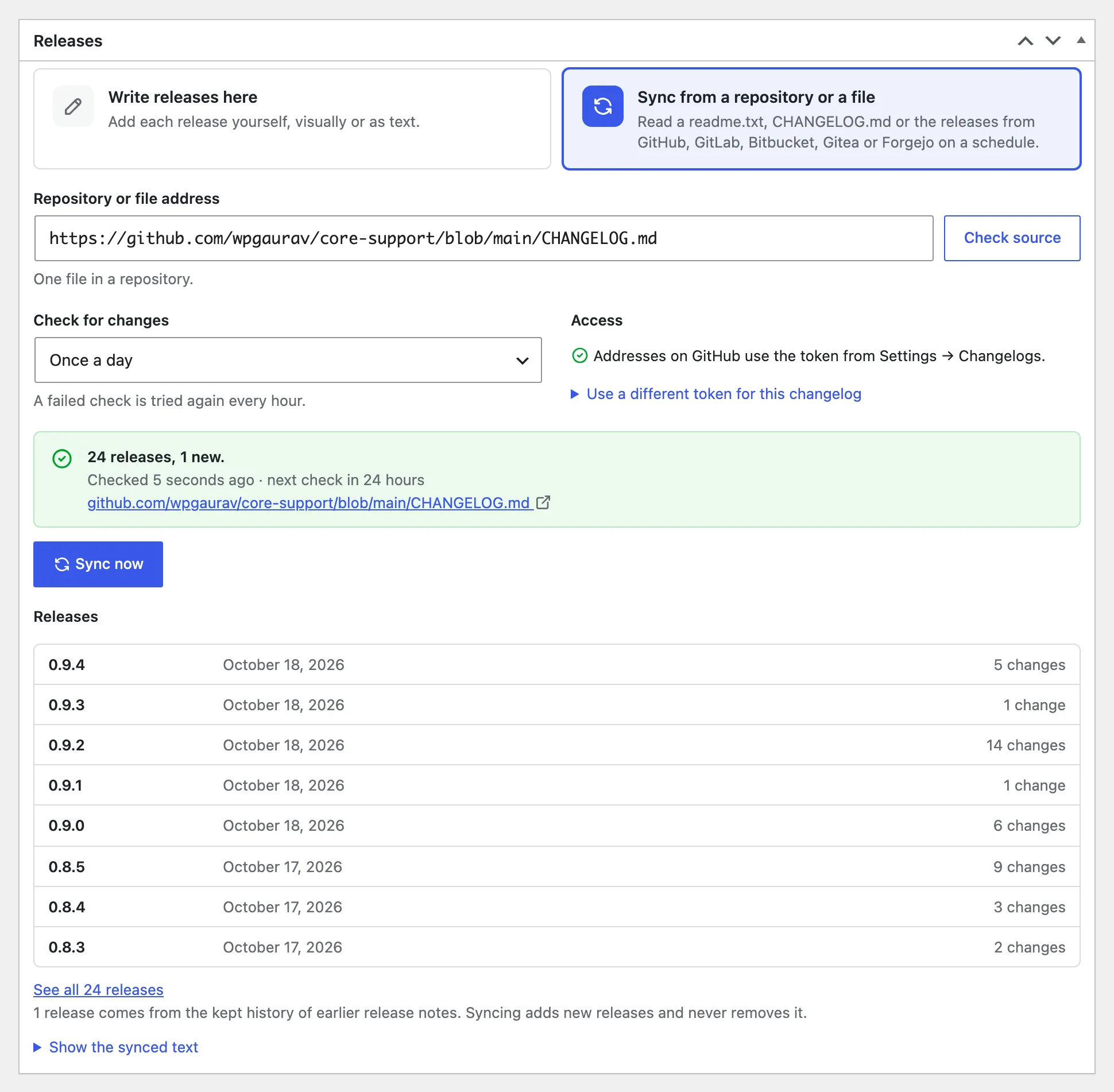
Choose Sync from a repository or a file and paste an address into Repository or file address. Core Support reads these:
- A repository on GitHub, GitLab, Bitbucket, Gitea or Forgejo, such as
https://github.com/owner/repository,https://gitlab.com/group/projectorhttps://codeberg.org/owner/repository. It looks for a readme.txt, CHANGELOG.md or changelog.txt, then falls back to the repository’s releases. Bitbucket has no releases, so a Bitbucket repository needs one of those files. - A folder in a repository. It tries the changelog files inside it.
- One file in a repository, as the service shows it:
/blob/on GitHub,/-/blob/on GitLab,/src/on Bitbucket, Gitea and Forgejo, or a raw-file address. - Releases, an address ending in
/releases(/-/releaseson GitLab). Each release becomes a changelog entry. - A wordpress.org plugin page. It reads the readme.txt changelog.
- A changelog file at any address, such as a readme.txt, CHANGELOG.md or changelog.txt. The address must start with
https://.
A self-hosted GitLab, Gitea or Forgejo server is read the same way once its address is saved in Settings → Changelogs. Until then, an address on it is read as a plain file.
Then set it up:
- Click Check source to preview the address. It reports something like “Found 24 releases. Newest: 1.2.0.” and saves nothing.
- Pick how often to check under Check for changes. The choices are Every hour, Every 3 hours, Every 6 hours, Twice a day, Once a day (the default), Every 2 days and Once a week.
- Click Sync now, or save. A changelog that has never synced syncs when you save it. Without JavaScript, tick Sync now when I save.
Each sync replaces the changelog’s text with the file’s. Core Support uses conditional requests, so a file that hasn’t changed costs one small response. “A failed check is tried again every hour.”
The status card shows the last result, when the last check ran, when the next one is due and the file Core Support is reading. Below it, the newest 8 synced releases show read-only, and Show the synced text opens the full text.
Switching between the 2 modes takes a save. Moving to sync replaces the releases written here with the file’s. Moving back makes the synced releases yours to edit, and they stop updating from the file.
Checks run on WP-Cron, so a quiet site with no real cron job checks late.
Private Repositories
A public repository needs no token. A private one needs a read-only token from its service:
| Service | Token | What it needs |
|---|---|---|
| GitHub | Fine-grained personal access token | Repository access: the private repositories. Repository permissions: Contents set to Read-only. GitHub adds Metadata: Read-only on its own, and nothing else is needed. A classic token needs the repo scope. |
| GitLab | Personal, group or project access token | The read_api scope. A group or project token needs the Reporter role or higher. |
| Bitbucket | Repository, project or workspace access token | The Repositories: Read scope. |
| Bitbucket | Atlassian API token | The read:repository:bitbucket scope. Enter your Atlassian email, a colon, then the token, as you@example.com:token. |
| Gitea, Forgejo or Codeberg | Access token | The read:repository permission. |
- Create the token on the service.
- Go to Core Support → Settings → Changelogs and paste it into GitHub token, GitLab token, Bitbucket token or Gitea or Forgejo token. For a self-hosted server, also enter Self-hosted GitLab address or Self-hosted Gitea or Forgejo address, such as
https://gitlab.example.com. - Save. Core Support queues a fresh check of every changelog whose last sync failed.
Each token serves every changelog synced from its service and is sent only to that service. A changelog can use its own instead: open Use a different token for this changelog under Access and paste it into Access token. Both are stored encrypted, and a changelog’s own token is “Sent only to this address.”
When a service refuses a token, the status card names the permission it needs. A GitHub token without Contents access gets “The GitHub token can see the repository but not its files” in the status card. To fix it, edit the token on GitHub and set Contents to Read-only. The token stays the same, so there’s nothing to paste again.
A token must be one value without spaces. Otherwise Core Support doesn’t save it and says so.
Dates and Pre-Releases
- A version listed without a date takes the date of the matching release, when the source is a repository on GitHub, GitLab, Gitea or Forgejo.
- Otherwise it takes the day Core Support first sees it. Versions in a changelog’s very first text stay undated.
- Versions ending in
-beta,-rcor-alpha, and releases the service marks as pre-releases, are marked as pre-releases. - Latest is the newest stable release, or the newest of any kind when there’s no stable one.
What Readers See
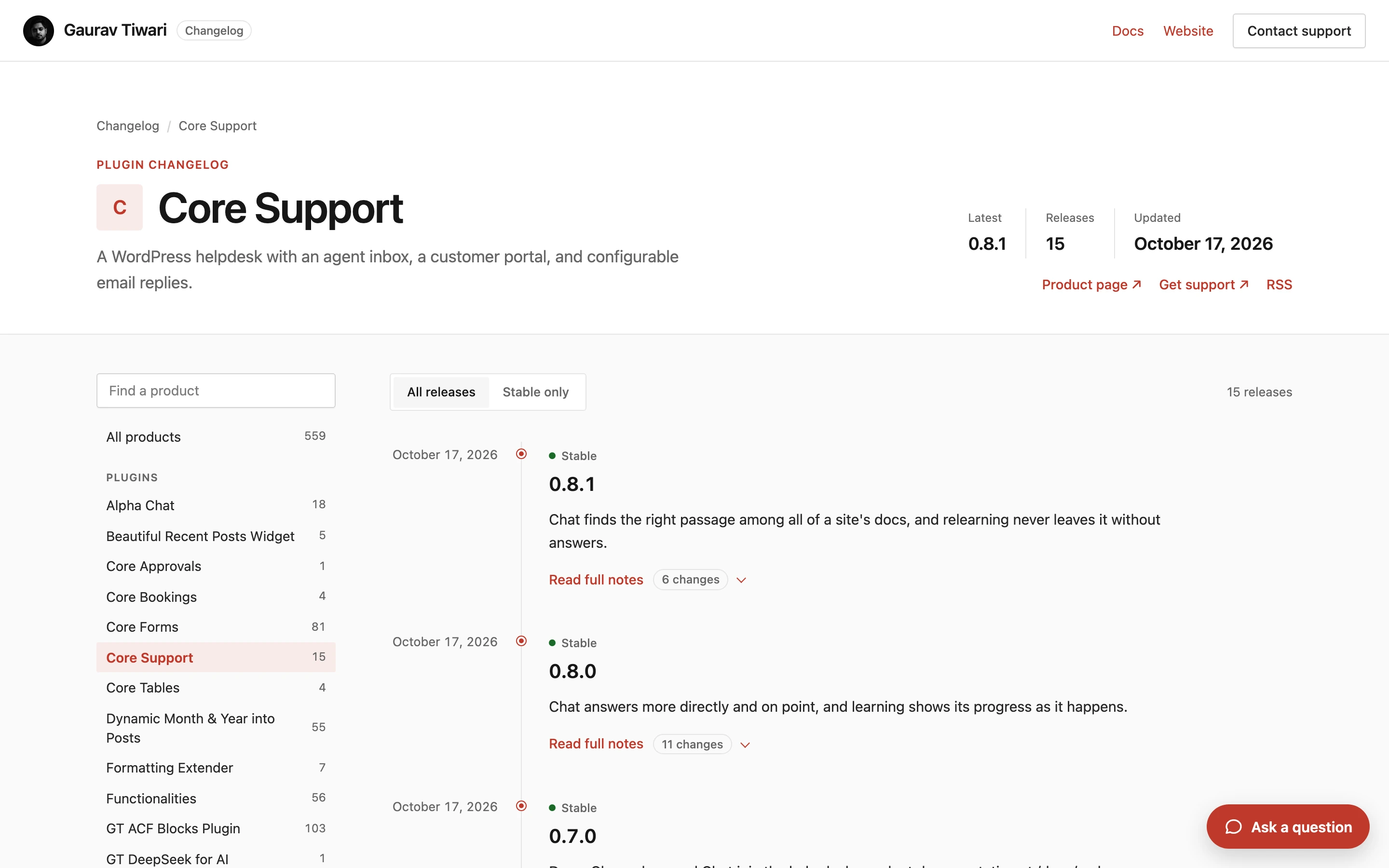
/changelogs/: every release across products, newest first, 12 to a page. The product list is grouped by kind, and readers can switch between All releases and Stable only./changelogs/{product}/: that product’s releases with its Latest version, release count and last update, plus Product page, Docs, Get support and RSS links.- Each release: its summary, then Read full notes with the number of changes.
- An address per release: such as
/changelogs/my-plugin/#v1.2.0, which opens its notes. - RSS:
/changelogs/feed/and/changelogs/{product}/feed/, with the latest 20 releases.
Addresses from earlier builds, such as /changelogs/{product}/{version}/, redirect to the release on its product page.
A plugin can read releases for its own “What’s new” screen from GET /wp-json/core-support/v1/changelogs/{product}?since=1.1.0&stable=1. REST API and Webhooks Reference has every route.
Changelog pages load only Core Support’s own styles and scripts. Docs Pages, Your Theme and Other Plugins explains why and how to keep one script, such as analytics.
Bring Over Older Release History
If an older changelog site already lists your past releases, keep them as history:
wp core-support changelog history https://example.com/changelogs/my-product/ --changelog=my-product --dry-run- The page must list releases as
<article class="release">elements. Core Support also reads its/page/N/pages, up to 60. - History sits beside the changelog’s own text. Syncing adds new releases and never removes kept ones.
- Where a version is in both, the kept notes show.
- The changelog’s edit screen says how many releases come from history.
WP-CLI Commands
wp core-support changelog sync [<changelog>...] [--force]checks synced changelogs now. Without a slug, it checks every one set to sync.--forcereads the file even when it hasn’t changed.wp core-support changelog import ./readme.txt --changelog=<slug> [--dry-run]replaces the text of a changelog written here. It refuses a synced changelog.wp core-support changelog history <url> --changelog=<slug> [--dry-run]keeps releases from another changelog page.
Limits
- A synced changelog’s text comes from the file and can’t be edited in wp-admin. Switch to Write releases here to take it over.
- Core Support reads up to 2 MB from a source and saves up to 500 KB of text.
- Administrators, editors, Support Agents and Support Managers can write changelogs, the same people who write docs.