
Store Products, Prices and License Terms in Chat
“How much is the agency plan?” and “How many sites does a license cover?” are some of the most common questions a store gets. The answers live in your store’s own data, not in the product description, so an assistant that reads only the description guesses or says it doesn’t know.
Chat reads that store data directly. WooCommerce products, FluentCart products and Easy Digital Downloads are learned with their prices, options, stock status, subscription terms and license terms, and learned again when those change. Stackless subscription and licensing terms on WooCommerce products are included too.
Turn It On
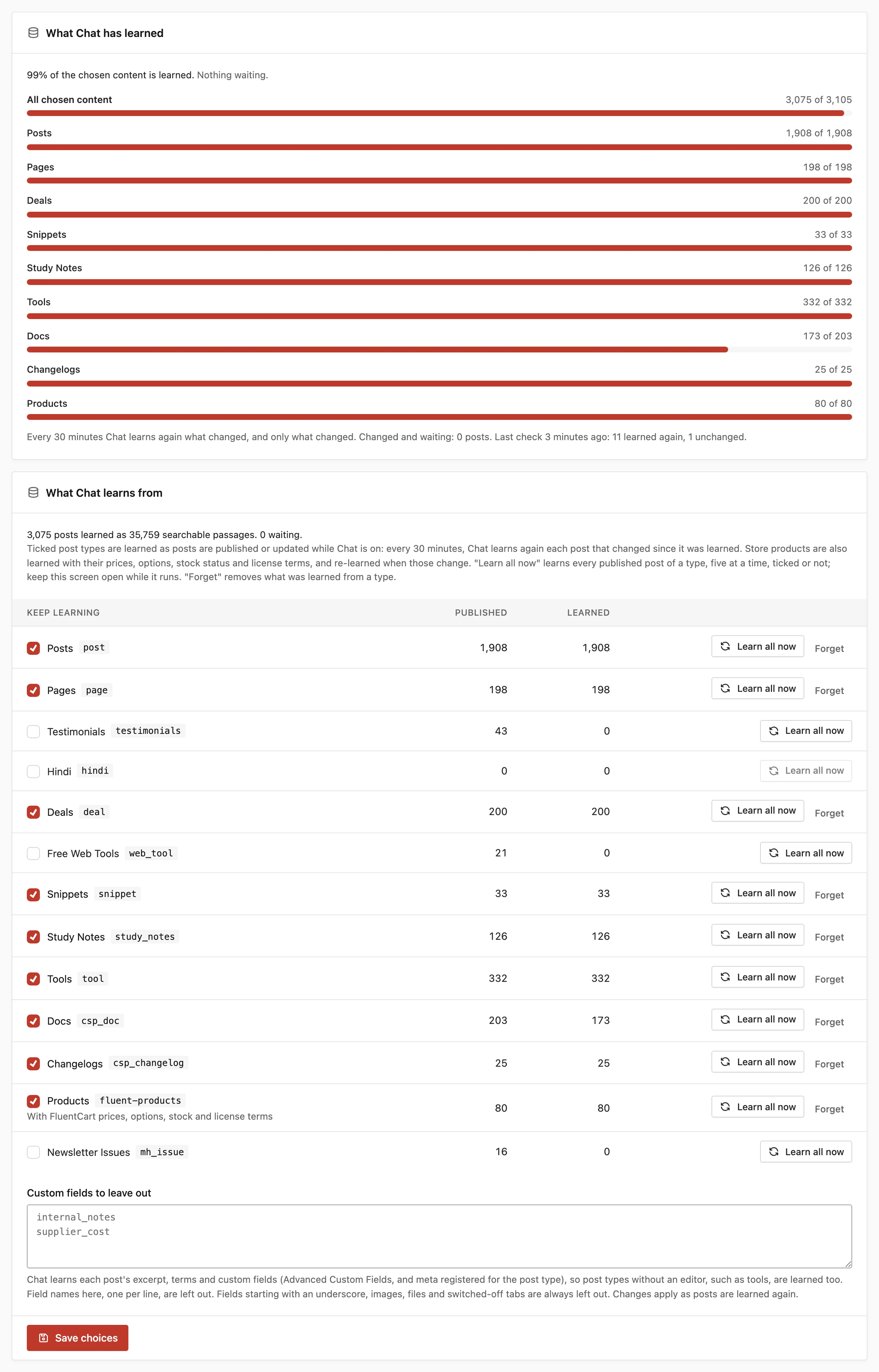
- Go to Core Support → Chat → Knowledge.
- Tick the store’s post type under Keep learning:
productfor WooCommerce,fluent-productsfor FluentCart ordownloadfor Easy Digital Downloads. - Click Save choices, then Learn all now on that row to learn every product at once.
A store type shows a note under its name, such as “With WooCommerce prices, options, stock and license terms”. The note appears only while that store plugin is active.
To show the chat button on product pages, tick the product type under Show the chat button on in Settings. Set Up Chat: Provider, Models and Placement covers placement.
What Chat Learns About a Product
Each product’s first passage is a “Product facts (from the store)” block, ahead of its excerpt, fields and description. Prices are written in your store’s currency and format, as the store shows them.
For WooCommerce, Chat learns:
- the product type, and whether it’s virtual or downloadable
- the price, or the range for a variable product, and the regular price and end date of a sale
- the SKU
- availability: in stock, out of stock or available on backorder
- the short description
- visible attributes, weight and dimensions
- the product’s address for an external product
- each option of a variable product with its price, sale, SKU and stock, up to 30 options
- the product’s categories and tags
For FluentCart, Chat learns:
- delivery: physical and shipped, or a digital download
- availability
- each option with its price, either one-time or with its subscription terms
- each option’s regular price, description, SKU and stock
- each option’s license: how many sites, and how long it’s valid
- the current version and the WordPress and PHP requirements from the product’s license settings
FluentCart subscription terms read like “every month until cancelled” or “every year for 3 payments”, with any free trial and sign-up fee.
For Easy Digital Downloads, Chat learns:
- the price, or each price option with its amount, its recurring period and its license site limit
- with Software Licensing, how long a license is valid and the current version
Stock is always a status, never a count, so Chat can’t tell a visitor how many units are left.
Stackless Subscriptions and Licenses
On a WooCommerce product, Chat also reads the terms set by Stackless for WooCommerce, but only while the matching Stackless module is active. Meta left behind by a switched-off module is never quoted.
With the Subscriptions module active:
- the billing period, as in “billed every month until cancelled” or “for 12 payments”
- the free trial length
- the sign-up fee
With the Software Licensing module active:
- the number of sites per license, or unlimited sites
- how long a license is valid: a number of days, while the subscription is active, or lifetime
- the current version, the WordPress version it requires and is tested up to, and the PHP version it requires
Each option of a variable product lists its own subscription terms. License terms an option doesn’t set come from the parent product.
How Product Changes Reach Chat
Store data lives outside the post, so Chat listens to the store’s own save events. These mark a product as changed:
- saving a WooCommerce product or variation
- a WooCommerce stock status change on a product or variation
- updating a FluentCart product or its variants
- saving an Easy Digital Downloads product
The 30-minute check then learns the marked products again. Once a day, Chat also compares every learned product with what it learned and marks the ones that changed. That catches changes no save event reports, such as FluentCart license settings or a scheduled sale starting. An unchanged product costs no embedding request.
What Chat Learns and How It Stays Current explains the 30-minute check in full.
Add Your Own Product Facts
The core_support_chat_product_facts filter adds lines for any post type, such as a membership plugin’s plans or data your store keeps elsewhere. It receives the lines as "Label: value" strings and the post.
add_filter('core_support_chat_product_facts', function (array $lines, WP_Post $post): array {
    if ($post->post_type === 'product') {
        $days = get_post_meta($post->ID, 'refund_days', true);
        if ($days !== '') {
            $lines[] = 'Refund window: ' . (int) $days . ' days';
        }
    }
    return $lines;
}, 10, 2);
Duplicate lines are dropped, each line is cut at 400 characters and a product keeps up to 80 lines.
Good to Know
- Chat copies prices exactly as it learned them and never promises a price, discount or refund your content doesn’t state.
- A price changed in a way no save event reports can take up to a day, plus the next 30-minute check, to reach Chat.
- Chat learns every published product of a ticked type, including products hidden from the shop catalog. There’s no switch for a single product.
- Chat can’t see orders, licenses or accounts. For “where is my license key” questions it suggests “Talk to a person”, as set in Answer Rules, Limits and Handover to a Ticket.