
Draft Ticket Replies with AI
Most tickets ask something your docs already answer. The agent still has to find the right doc, pull out the steps and write them up for this customer. That is slow work for an answer that already exists.
Draft with AI writes that first draft for you. It reads the conversation and what Chat has learned from your docs, fills the reply box and leaves the sending to you.
Turn On Reply Drafts
- Go to Core Support → AI and Chat.
- Find the AI for your team card.
- Switch on Draft ticket replies with AI.
- Choose a Model and a Thinking level under it.
- Choose Save settings.
Drafts are off by default. They use the API keys and the search model from the Providers and models card above it, and the docs Chat has learned on the Knowledge tab. Chat doesn’t have to be switched on for visitors, but it only learns new and changed posts while it is on. What Chat Learns and How It Stays Current explains learning.
- Model: Same as Chat answers by default, or any model listed for your saved provider keys.
- Thinking: Medium by default. Off, Low, Medium or High.
I’d try a stronger model here than the one Chat uses for visitors, because a reply to a paying customer deserves more care than a chat answer. Higher thinking levels are slower and count more tokens.
Write a Draft
- Open a ticket in the agent workspace.
- Keep the reply box on Public reply. The button doesn’t show for private notes.
- Choose Draft with AI.
- Read the draft, fill in anything in square brackets, edit what needs editing and send it as usual.
If the reply box already has text, Core Support asks before replacing it. While it works, the box says “Drafting a reply from your docs…”. When the draft is in, the status line names the docs it used, or says no doc matched and every detail needs checking.
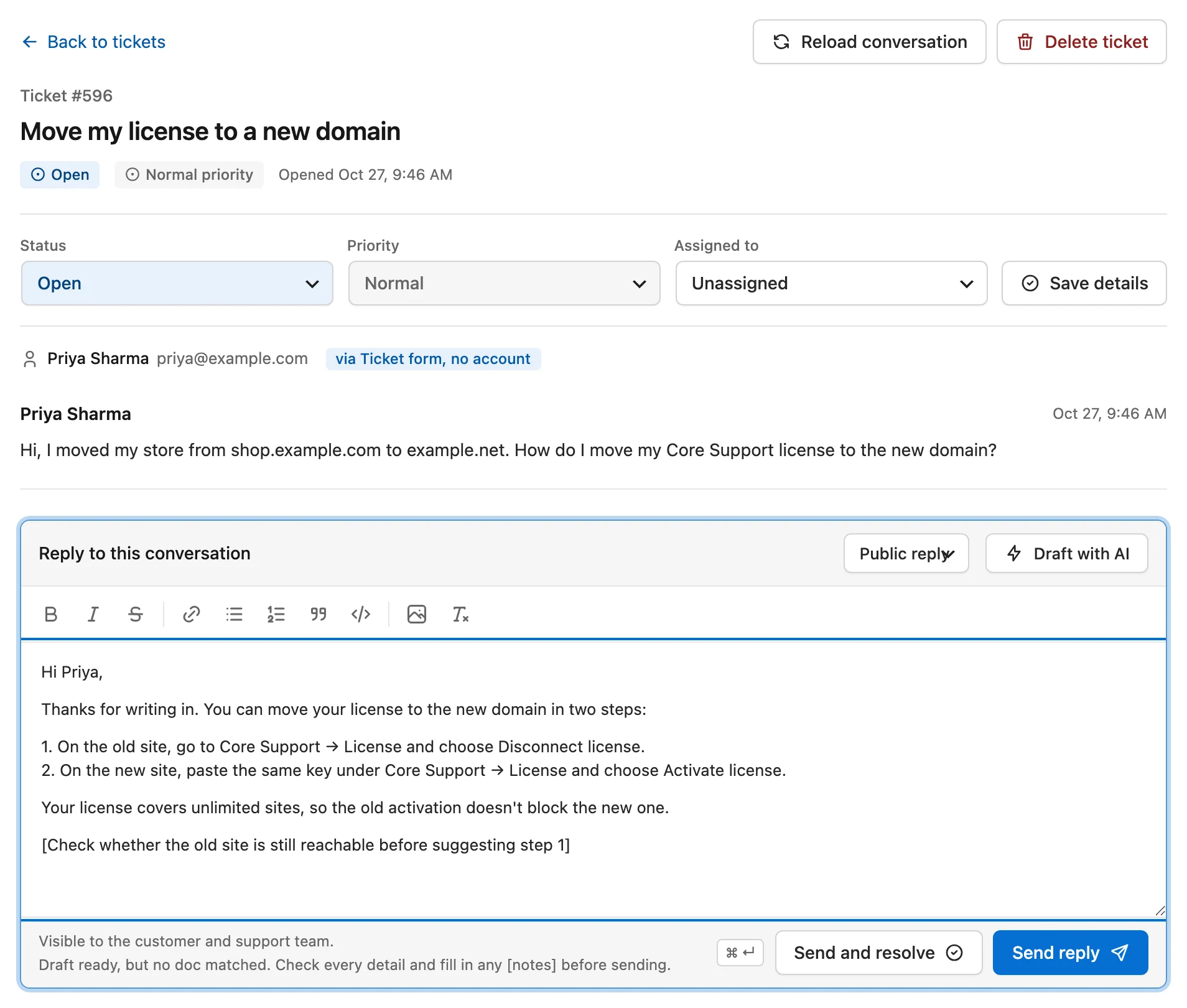
Nothing is sent on its own. The draft is ordinary text in your reply box until you send it.
What the Model Reads and Writes
For each draft, Core Support sends the chosen provider:
- the ticket subject and the customer’s name
- up to the last 12 public messages, each cut at 3,000 characters
- the passages from your docs that best match the subject and the customer’s latest message
- your Tone and extra instructions from the Chat tab
Private notes are never sent. For a ticket that came from a connected website whose Chat answers only from chosen collections and changelogs, the draft uses only those too.
The model is told to:
- write as the agent, in the first person, to the customer
- take every product fact, setting, price and link from the passages, copied exactly
- leave a note in square brackets where the docs don’t cover something, such as “[Check the customer’s license before promising a refund]”
- never claim a refund, change or fix is already done
- greet the customer by first name, skip the signature and answer in the customer’s language
The brackets are the part to read first. They mark exactly where the docs ran out and your own knowledge has to take over.
Limits and Costs
- Each agent can write 60 drafts an hour.
- Drafts count toward the Daily token budget on Core Support → AI and Chat. Once the day’s budget is spent, the button answers with a message instead of a draft.
- A ticket where the customer hasn’t written anything yet has nothing to draft against.
Every draft sends the conversation to your AI provider. If your privacy policy covers Chat already, it should cover this too, since the same provider receives the text.