
Software Licensing
You sell a plugin or a theme, and every buyer needs a license key, a site limit, and updates that arrive in their WordPress dashboard. That usually means a licensing plugin of its own, with a second customer list to keep in sync with your store.
Software Licensing does it inside FluentCart. Paying for a licensed product creates a key, customers activate it on their sites and see it in their account, and your plugin or theme gets updates from your store through a license API. It runs beside FluentCart Pro’s own Licensing without touching its keys, products or API, so you can use both.
Turn It On
- Go to FluentCart → Stackless and switch on Software Licensing under Access & licensing. See the Stackless dashboard for how switches work.
- Open a product in FluentCart and choose Software licensing from its menu.
- Tick Create a license key when this product is paid for, fill in the fields below and choose Save software licensing.
Keys appear under FluentCart → Software licenses. A product that FluentCart Pro already licenses keeps FluentCart Pro: its Software licensing screen is read-only and says FluentCart Pro licenses this product.
Set Up a Product
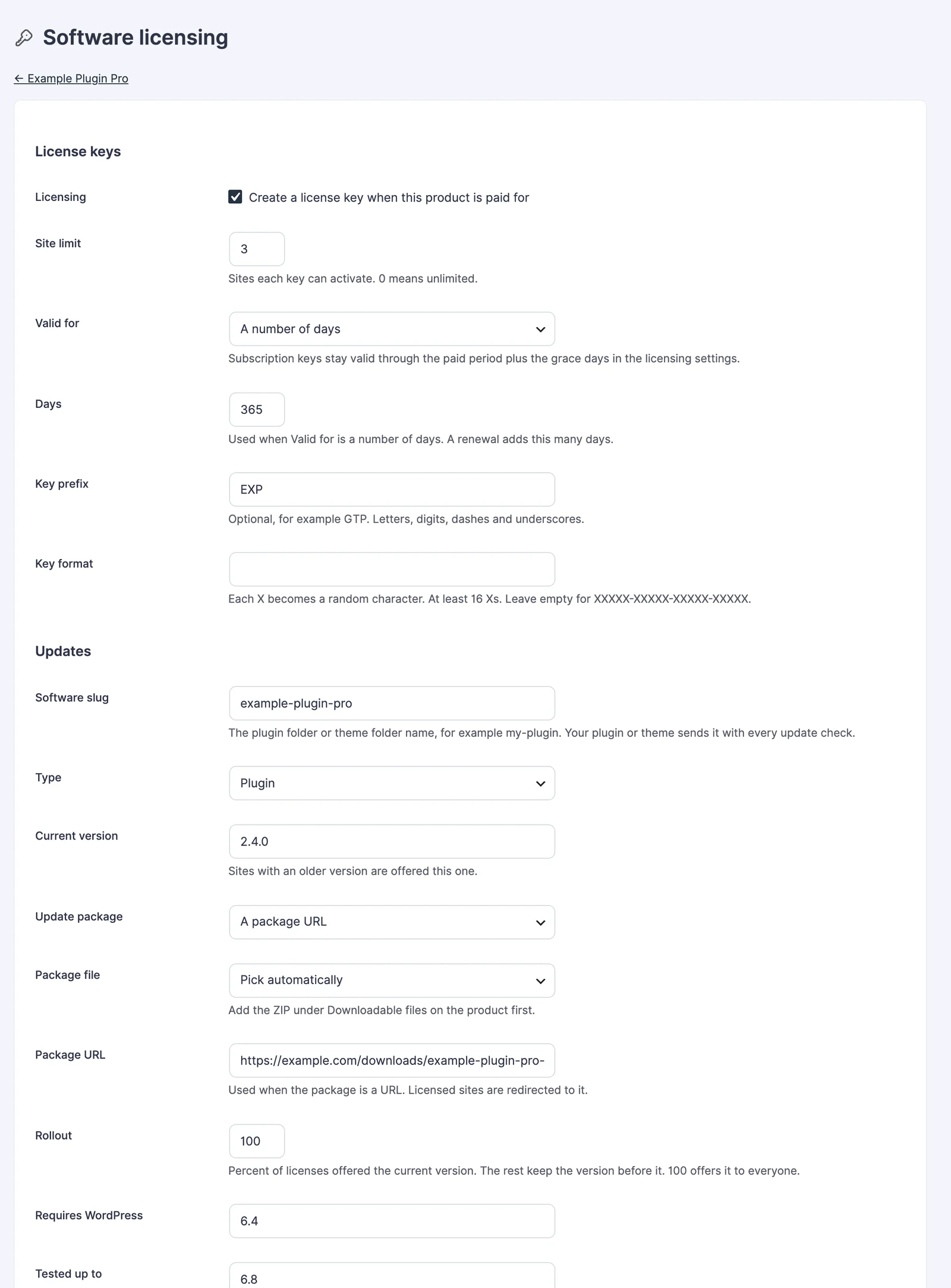
License keys
| Field | What it does |
|---|---|
| Site limit | Sites each key can activate. Default 1; 0 means unlimited. |
| Valid for | Lifetime (default), While the subscription is paid or A number of days. |
| Days | Used with a number of days. Default 365. A renewal adds this many days. |
| Key prefix | Optional, up to 20 letters, digits, dashes and underscores, such as EXP. |
| Key format | Each X becomes a random character. At least 16 Xs. Empty uses XXXXX-XXXXX-XXXXX-XXXXX. |
Keys use letters and digits that can’t be confused, with no 0, O, 1, I or L. With the prefix above, a key looks like EXP-Q6FNB-5TYNG-58WHE-CRUNH. When a product has more than one option, a Per option table lets each option set its own site limit and validity. Empty fields use the product’s.
Updates
| Field | What it does |
|---|---|
| Software slug | The plugin or theme folder name, such as example-plugin-pro. Your software sends it with every update check. |
| Type | Plugin or Theme. |
| Current version | Sites with an older version are offered this one. |
| Update package | A downloadable file of this product (picked by version tag or file name) or A package URL. |
| Rollout | Percent of licenses offered the current version. The rest keep the version before it. Default 100. |
| Requires WordPress, Tested up to, Requires PHP, Requires plugins | Shown in the WordPress update screen. |
| Changelog, Upgrade notice | Shown in the update details and on the Plugins screen. |
| Release history | One version per line: version, date, optional package URL, and beta for a beta. For example 2.5.0-beta.1, 2026-11-15, , beta. |
A version with -beta or rc in it is always a beta. Betas go only to licenses switched to the beta channel. Under View details you can fill in the author, homepage, icon, banner, description, installation and FAQ that WordPress shows in its details popup. Empty fields fall back to the product and its featured image. Signed release takes an Ed25519 manifest and signature if you sign your packages.
What Happens When Someone Buys
- Paid order: a key for each licensed item, with an order note such as 1 license key created. A paid order never creates a second key for the same item, even if FluentCart reports it twice.
- Quantity above one: one key per unit by default, or one key with the site limit multiplied by the quantity (in Settings).
- Renewal: a key valid for a number of days gets that many more days; a subscription key follows the new billing date plus the grace days.
- Upgrade: the keys move to the new product or option, with its site limit and expiry.
- Full refund or cancellation: keys are revoked. If the order is paid again or set back to processing or completed, the same keys come back.
- Partial refund: only keys on fully refunded items are revoked.
- Payment failed after paying: keys are revoked.
- Subscription cancelled or paused: keys stay valid until the end of the paid period. An expired subscription expires its keys.
| Status | Meaning |
|---|---|
| Active | Valid. Sites can activate and get updates. |
| Inactive | Turned off by hand. A renewal doesn’t turn it back on. |
| Expired | Past its expiry date. Setting a future date reactivates it. |
| Revoked | Refunded, cancelled, failed or revoked by hand. |
What Customers See
The customer’s FluentCart account gets a Software licenses page once they own a key:
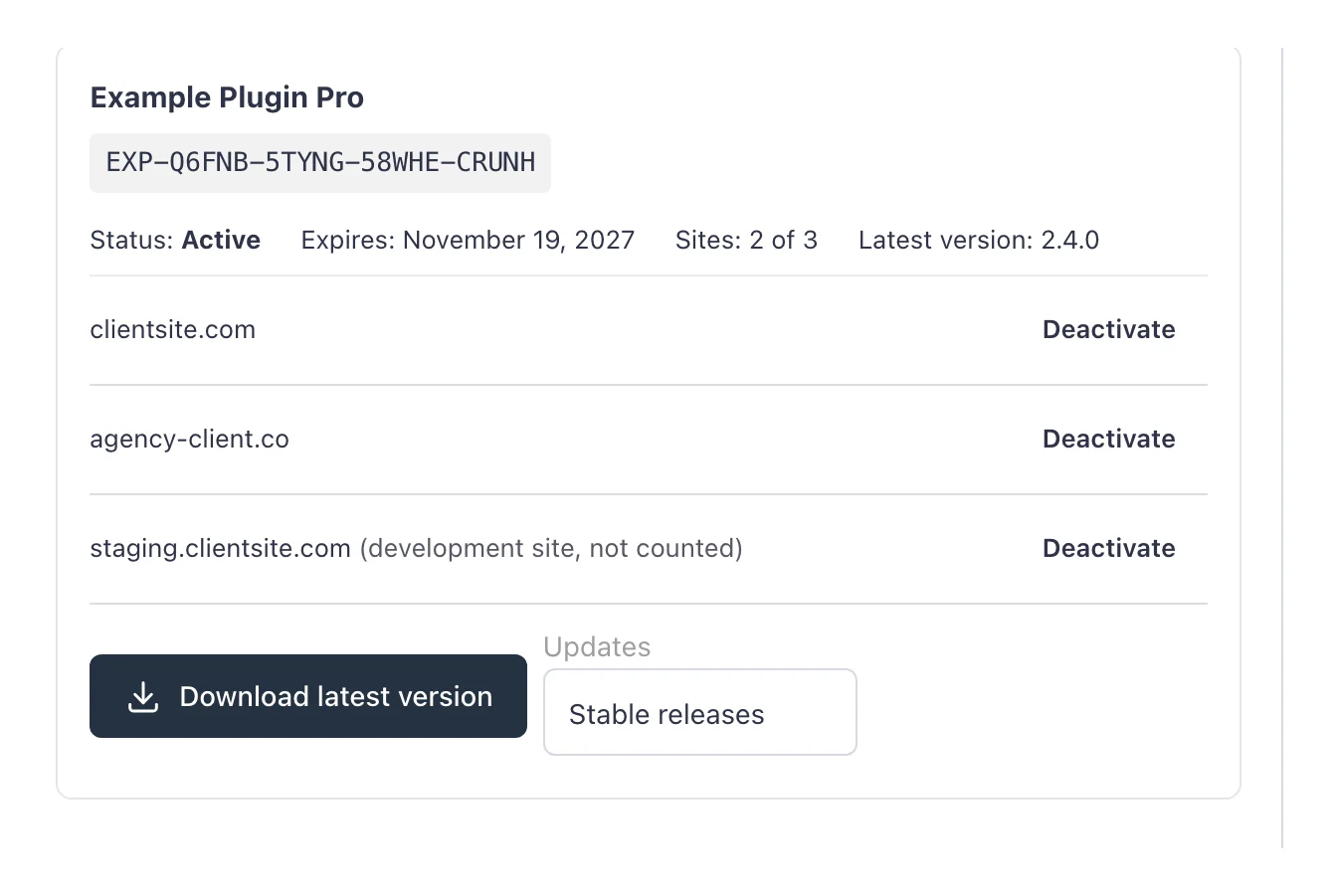
- Each key with its status, expiry, Sites: 2 of 3 and the latest version.
- The sites it’s active on, with Deactivate to free a slot for another site.
- Download latest version, with earlier versions under a disclosure.
- An Updates choice between stable and beta releases, when the product has a beta.
The order confirmation page shows Your license keys with a link to manage them, and the customer gets an email, Your license keys from {your store}. To put keys in FluentCart’s own order emails instead, use the {{order.gtfc_license_keys}} smart code and turn the Stackless email off.
Manage Keys
FluentCart → Software licenses lists every key with its product, customer, status, sites and expiry. Search by key, email, site, order or license number, and filter by status:
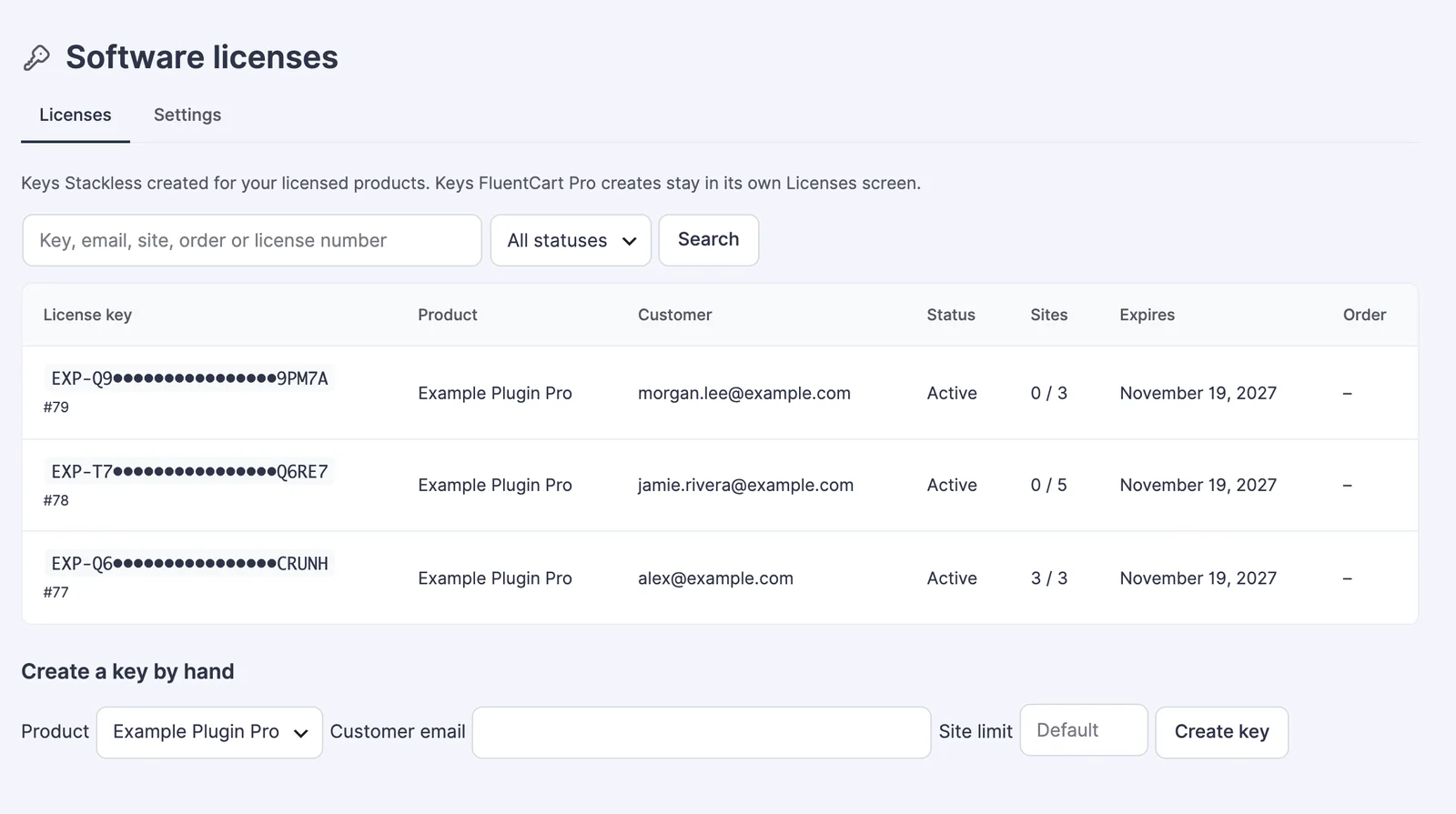
Create a key by hand takes a product, a customer email and an optional site limit. Use it for a gift, a partner or a replacement. A hand-made key has no order, and it’s lifetime unless the product uses a number of days.
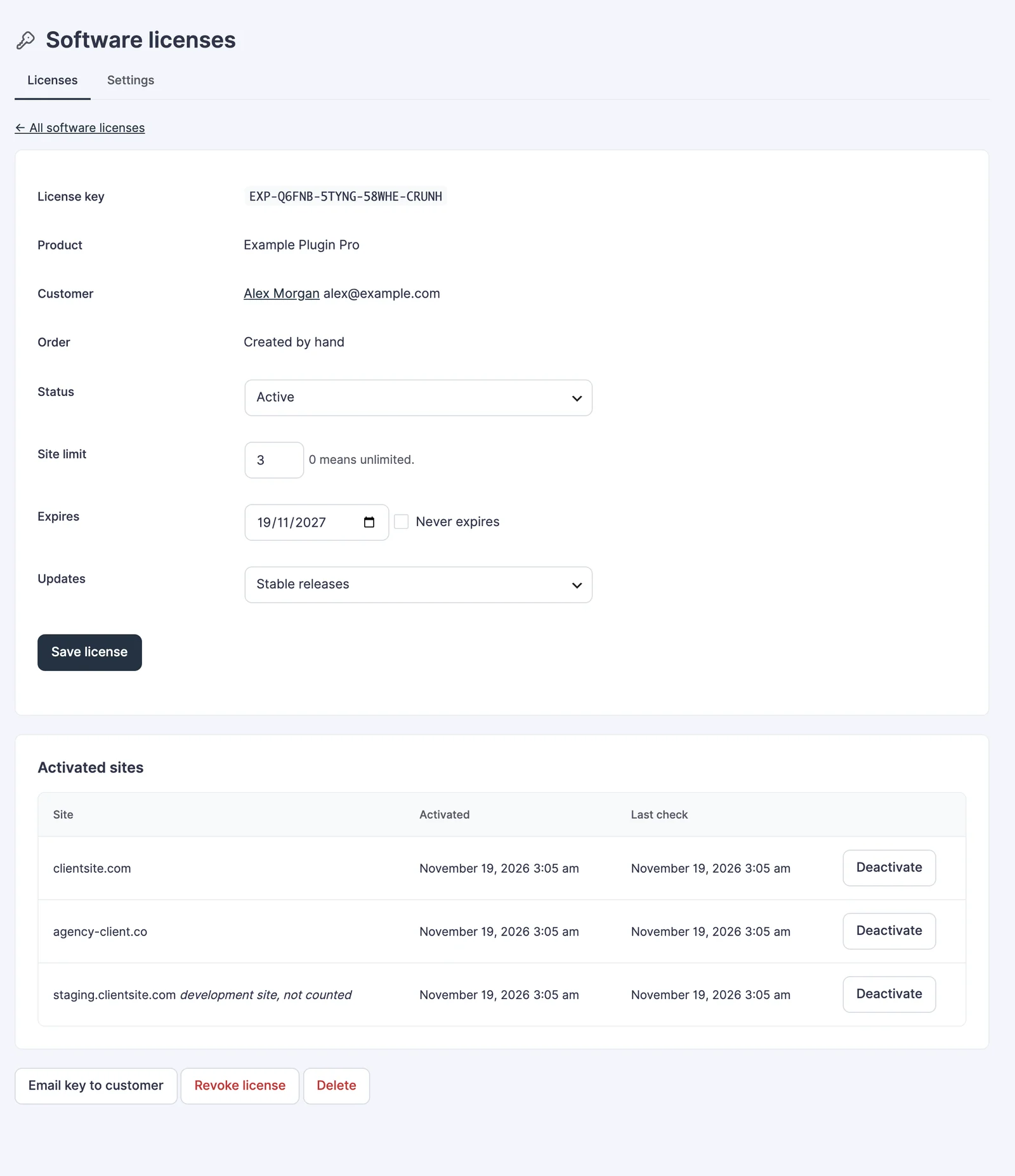
Open a key to change its status, site limit, expiry and update channel, see each activated site with its last check, and deactivate a site. Email key to customer resends the key, Revoke license stops it, and Delete removes it and its sites for good. A deleted key is never created or emailed again for that order.
Settings
The Settings tab under Software licenses holds the store-wide options:
| Setting | Default |
|---|---|
| Quantity above one | One key per unit bought |
| Subscription grace days | 3 (0 to 60) |
| Email new license keys to the customer | On |
| Do not count localhost, .test, .local and staging copies toward the site limit | On |
| More development hosts | Empty. One pattern per line, such as *.mystaging.host |
| Requests per minute | 30 per IP address and per key |
| Failed lookups before a block | 10 in 15 minutes |
| Download link lifetime (hours) | 24 |
| Let expired licenses keep downloading versions released before they expired | Off |
| Menu label | Software licenses |
| Let customers deactivate sites to free an activation | On |
| Let customers switch a license to beta releases | On |
Development sites
Activations on development sites don’t count toward the site limit, so customers can test on staging without using a slot. That covers:
localhost,.test,.local, private IP addresses and hosts with no dot;- subdomains that start with
staging,stage,dev,test,qa,uat,sandboxorpreview; - staging hosts of common WordPress hosts, such as WP Engine, Kinsta, Pantheon, Flywheel, Cloudways and InstaWP.
Site addresses are compared without www, the scheme or a trailing slash, so https://www.clientsite.com/ and clientsite.com are one site. Subdirectory installs count as separate sites.
Connect Your Plugin or Theme
Your software talks to your store at https://your-store.com/wp-json/gtfc/v1/licenses/. The license key is the only credential, so send it over HTTPS. Every response has success, code and message.
- POST
activate: sendlicense_key,site_urlandslug. Returnsactivatedoralready_active, oractivation_limit_reached(409) when the key has no free site. - POST
deactivate: sendlicense_keyandsite_url. Returnsdeactivated, orsite_not_active(404). - GET or POST
check: sendlicense_keyand, optionally,site_url. Returnsvalidwithvalid: true, or the reason it isn’t. - GET or POST
version: sendlicense_key,slug,site_urland the installedversion. Returns the WordPress update shape:new_version,package,tested,requires,sectionsand more. - GET or POST
info: sendslugand, optionally,license_keyandsite_url. Returns the WordPress plugin details shape for the View details popup.
An activation answers like this:
{
  "success": true,
  "code": "activated",
  "message": "Site activated.",
  "status": "active",
  "product_name": "Example Plugin Pro",
  "expires_at": "2027-11-19T03:05:08+00:00",
  "lifetime": false,
  "activation_limit": 3,
  "activations_count": 1,
  "activations_left": 2,
  "channel": "stable",
  "site": "clientsite.com",
  "site_active": true,
  "is_local": false,
  "activation_id": 43
}
version fills in package only when the key is active and the site is activated. The package is a signed link that expires after the download link lifetime, so a shared link stops working. Unknown, mistyped and wrong-product keys all get the same invalid_license answer, so keys can’t be guessed by probing. Expired, revoked and inactive keys get license_expired, license_revoked and license_inactive.
Here’s a minimal plugin client: it activates the key and adds updates to the WordPress update check. Adapt the names, store the key your own way, and add your settings screen:
// In your plugin. Replace the store URL, slug and file with your own.
const EXAMPLE_STORE = 'https://your-store.com/wp-json/gtfc/v1/licenses/';
const EXAMPLE_SLUG  = 'example-plugin-pro';
const EXAMPLE_FILE  = 'example-plugin-pro/example-plugin-pro.php';

// Call once when the customer saves their key.
function example_activate_license(string $key) {
    $response = wp_remote_post(EXAMPLE_STORE . 'activate', [
        'timeout' => 15,
        'body'    => ['license_key' => $key, 'site_url' => home_url(), 'slug' => EXAMPLE_SLUG],
    ]);
    $data = json_decode(wp_remote_retrieve_body($response), true);
    return !empty($data['success']) ? true : ($data['message'] ?? 'Could not reach the license server.');
}

// Offer updates from your store.
add_filter('pre_set_site_transient_update_plugins', function ($transient) {
    if (empty($transient->checked[EXAMPLE_FILE])) {
        return $transient;
    }
    $current  = $transient->checked[EXAMPLE_FILE];
    $response = wp_remote_post(EXAMPLE_STORE . 'version', [
        'timeout' => 15,
        'body'    => [
            'license_key' => get_option('example_plugin_pro_license_key'),
            'slug'        => EXAMPLE_SLUG,
            'site_url'    => home_url(),
            'version'     => $current,
        ],
    ]);
    $data = json_decode(wp_remote_retrieve_body($response), true);
    if (!empty($data['package']) && version_compare($data['new_version'], $current, '>')) {
        $transient->response[EXAMPLE_FILE] = (object) [
            'slug'         => EXAMPLE_SLUG,
            'plugin'       => EXAMPLE_FILE,
            'new_version'  => $data['new_version'],
            'package'      => $data['package'],
            'url'          => $data['url'] ?? '',
            'tested'       => $data['tested'] ?? '',
            'requires_php' => $data['requires_php'] ?? '',
        ];
    }
    return $transient;
});
A theme works the same way with pre_set_site_transient_update_themes, keyed by the theme folder. Behind a load balancer or proxy, the API sees the proxy’s address; set the real one with the gtfc_sl_client_ip filter, because X-Forwarded-For is ignored. Over the rate limit, the API answers rate_limited (429) with a Retry-After header.
With FluentCart Pro Licensing
Software Licensing and FluentCart Pro’s Licensing never share anything: separate database tables, separate keys, a separate API under gtfc/v1 and a separate account page. The Stackless API never answers for a FluentCart Pro key, and FluentCart Pro’s API never sees a Stackless one.
Each product uses one of them. If FluentCart Pro licenses a product, Stackless creates no keys for it, and keys Stackless sold earlier for that product keep validating and updating. If you turn on FluentCart Pro licensing for a product Stackless already licenses, the product screen warns you.
Good to Know
- There’s no license transfer, bulk action, CSV export or per-license activity log. Order notes record when keys are created and revoked.
- Icon, banner and screenshot are entered as media library IDs.
- Releases need a date for the expired-license download rule. An undated version isn’t offered to an expired key.
- Keys from guest orders appear in an account only when the order belongs to that customer, not by matching the email alone.
- Stackless doesn’t sign packages for you. It passes a signed manifest you paste in through to your software.
- Personal data export and erase are supported. Erasing removes the site list and the link to the person, and the key stays valid.
For Developers
Helpers for help desks such as Core Support: gtfc_get_license() and gtfc_get_customer_licenses(). The main hooks are below; the full list is in the hooks reference.
| Hook | What it does |
|---|---|
gtfc_sl_generate_key | Supply your own key. |
gtfc_sl_generate_for_order | Skip key creation for an order. |
gtfc_sl_allow_activation | Return a WP_Error to refuse an activation. |
gtfc_sl_local_patterns | Add development-site patterns. |
gtfc_sl_client_ip | Give the real client IP behind a proxy. |
gtfc_sl_revoke_on_payment_failed | Keep keys when a payment fails. |
gtfc_sl_payload, gtfc_sl_version_payload, gtfc_sl_info_payload | Change API responses. |
gtfc_sl_license_created, gtfc_sl_keys_created, gtfc_sl_order_revoked | Actions when keys are created or revoked. |
gtfc_sl_site_activated, gtfc_sl_site_deactivated | Actions when a site activates or deactivates. |
gtfc_sl_package_download | Action when a package is downloaded. |
Selling access to pages instead of software? See Page Access.