
Accept Payments with the Dodo Payments Gateway
Selling digital products to buyers in India, Europe and the US at once means charging GST, VAT and US sales tax, each with its own rules and filings. Most small stores either skip countries or spend hours on tax paperwork every quarter.
Dodo Payments is a merchant of record: it sells to the buyer on your behalf, then calculates, collects and remits the tax. GT Extensions for FluentCart adds it as a payment gateway inside FluentCart, in FluentCart → Settings → Payments next to Stripe and PayPal. It uses the order, refund and subscription screens FluentCart already has, and needs FluentCart 1.6.4 or newer.
Buyers pay on Dodo’s hosted checkout by card, Apple Pay, Google Pay, UPI and the local methods Dodo offers in their country. That last part matters if many of your buyers are in India, where UPI is how most people pay.
Turn On the Gateway
- Go to FluentCart → GT Extensions, enable Payment Gateways and save.
- Under Configure, tick Dodo Payments. Clearing it later takes Dodo off checkout and keeps its settings saved.
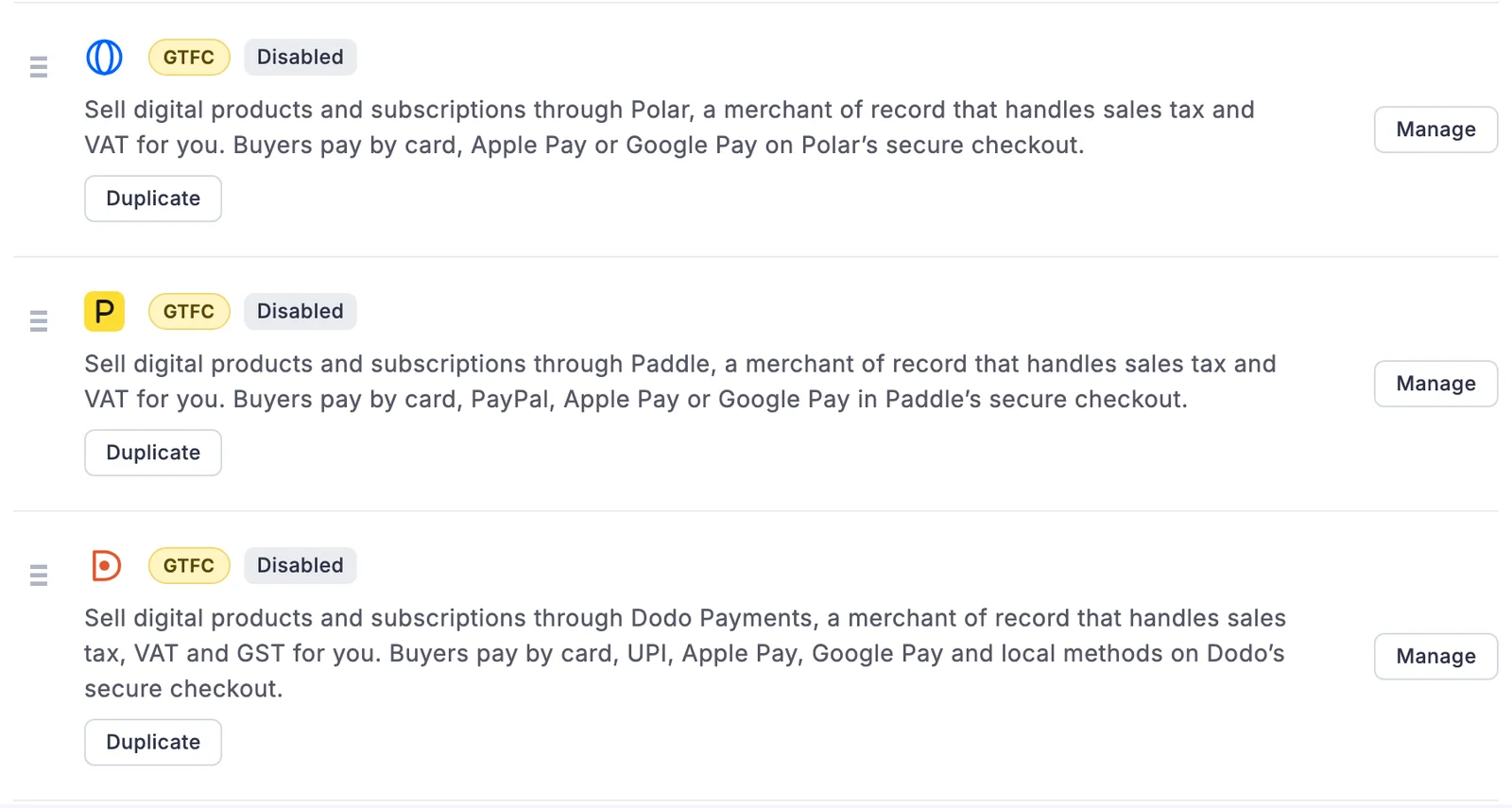
- Open FluentCart → Settings → Payments and choose Dodo Payments.
Dodo sits in the same list as FluentCart’s own gateways. The yellow GTFC badge marks the gateways GT Extensions adds, so you can tell them apart from FluentCart’s:
Connect Your Dodo Payments Account
Dodo has separate live and test modes, each with its own API key and webhook. FluentCart’s Live order mode uses live.dodopayments.com, and Test mode uses test.dodopayments.com. Go through these steps once for each mode:
- In the Dodo dashboard, open Settings → API Keys and create a key with write access. For the test key, switch the dashboard to Test Mode first.
- Open Developer → Webhooks → Add endpoint and paste the webhook URL shown in the Dodo Payments settings in FluentCart (
/?fluent-cart=fct_payment_listener_ipn&method=dodo). Select these events:payment.succeededrefund.succeededrefund.failedsubscription.activesubscription.updatedsubscription.renewedsubscription.on_holdsubscription.past_duesubscription.pausedsubscription.unpausedsubscription.cancelledsubscription.failedsubscription.expireddispute.openeddispute.lost
- Copy the signing secret from the endpoint’s Overview tab.
- Paste the API key and signing secret into the matching tab in FluentCart, choose Prices and tax and a Tax category, turn on Payment Activation and save.
FluentCart checks the key with Dodo before it activates the gateway, and shows the Dodo business it connected to. A live key pasted into the test tab is refused with a message that says which mode it needs.
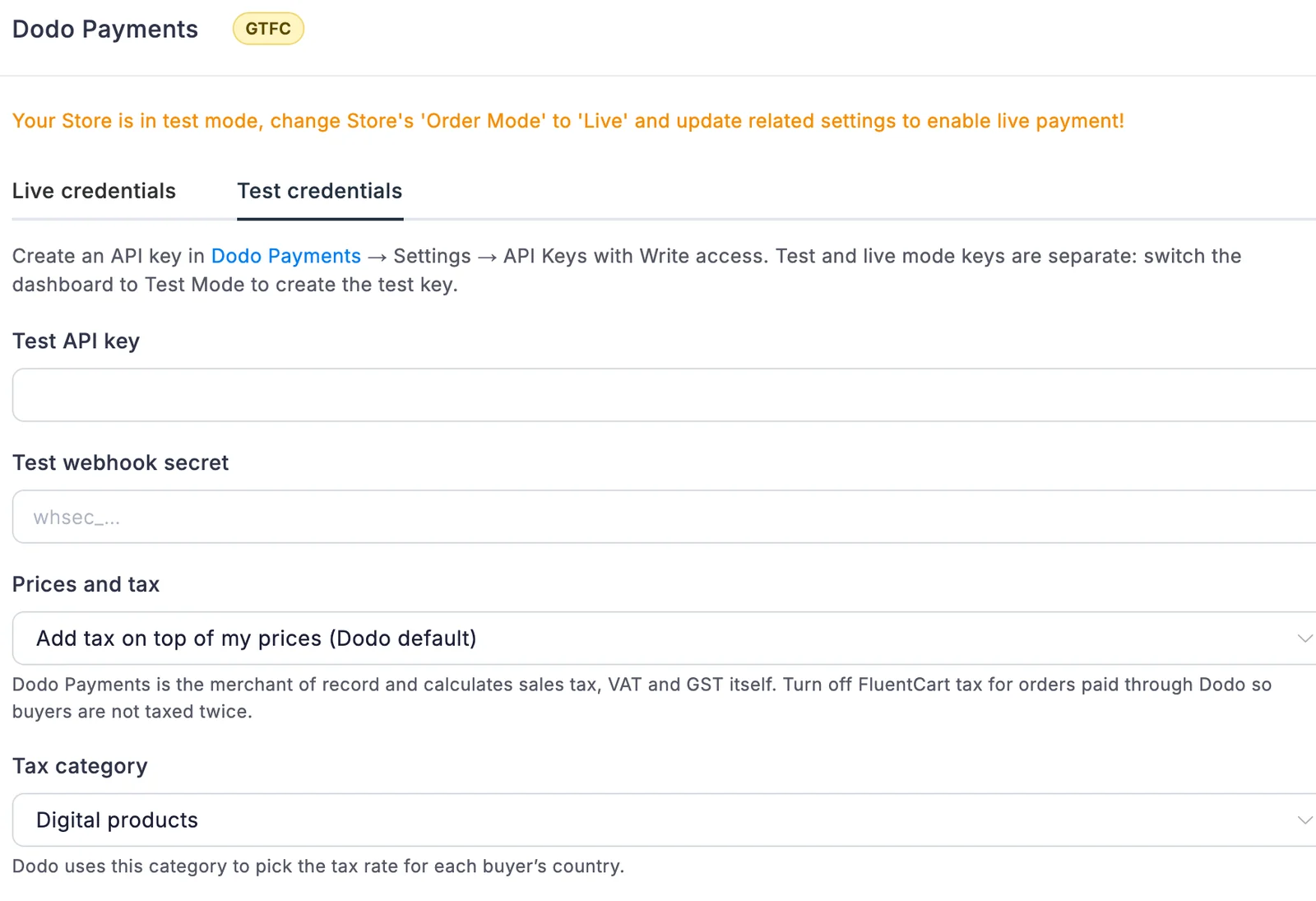
The API key and secret are stored encrypted. If you’d rather keep them out of the database entirely, define them in wp-config.php:
define('GTFC_DODO_LIVE_API_KEY', '...');
define('GTFC_DODO_LIVE_WEBHOOK_SECRET', 'whsec_...');
define('GTFC_DODO_TEST_API_KEY', '...');
define('GTFC_DODO_TEST_WEBHOOK_SECRET', 'whsec_...');
A defined value hides its field in the settings.
How a Dodo Payment Works
From the buyer’s side, Dodo Payments is one more payment method on your checkout, with a short note that the payment finishes on Dodo’s secure checkout. Under the hood:
- The buyer picks Dodo Payments and places the order. FluentCart creates the order, and the buyer is sent to Dodo’s hosted checkout.
- The order total is charged exactly. Coupons, invoice payment links and Pay What You Like amounts all go through as the total FluentCart worked out. Dodo discount codes are turned off on the checkout, so a buyer can’t stack a second discount.
- The checkout currency is pinned to the order’s currency. Dodo’s adaptive pricing can’t move the buyer to another currency, so what FluentCart records is what Dodo charges.
- One-item orders show under the product’s name. Multi-item carts show as “Store name order”.
- The payment is confirmed when the buyer comes back, and again by the
payment.succeededwebhook. If the buyer closes the tab, the webhook still marks the order paid. - A payment for another order, or in another currency, is not confirmed.
- Dodo’s tax, its total, and the card brand and last four digits are kept on the transaction.
- Pressing Place order twice reuses the unpaid Dodo checkout instead of opening a new one.
Products in Your Dodo Catalog
Dodo sells products from its own catalog, so GT Extensions creates them for you on first use and remembers them:
- One-time sales use one product per FluentCart variation, set up so each checkout passes its own amount. A price change or a coupon needs no new product.
- Subscriptions use one product per plan and price, because Dodo can’t set a subscription price per checkout. Change a plan’s price and the next sale creates a new product; existing subscribers stay on the old one.
- If you archive one of these products in Dodo, the next order recreates it.
- Changing Prices and tax or Tax category starts fresh products, since Dodo keeps those settings on the product.
Sales Tax, VAT and GST
Dodo calculates, collects and remits the tax on these orders, so FluentCart tax should be off for orders paid through Dodo. Two settings decide how Dodo treats your prices:
- Prices and tax has two options:
- add tax on top of your prices (Dodo’s default)
- treat your prices as tax-inclusive
- Tax category (digital products, software as a service, e-books, or education and courses) sets the rate Dodo applies in each buyer’s country.
With tax added on top, a $10 product bought from the UK charges $12: $10 for you and $2 VAT. FluentCart records the $10 order total and keeps Dodo’s tax amount on the transaction.
Dodo Payments Subscriptions
- Daily, weekly, monthly, quarterly, half-yearly and yearly plans become Dodo subscriptions that renew until canceled.
- FluentCart trial days become a Dodo trial. Dodo saves the card without charging, and the order is confirmed by the buyer’s return, by
subscription.active, or by the zero-amount card check. The subscription shows as trialing until Dodo’s first billing date, and that first charge is recorded as a renewal. - Each renewal becomes a paid FluentCart renewal order, recorded once even though Dodo sends both
payment.succeededandsubscription.renewed. The next billing date follows Dodo’s. - Cancel in FluentCart stops renewal at the end of the paid period. Cancel immediately ends it now.
- Cancellations, pauses and failed renewals in Dodo are applied to FluentCart. A renewal in Dodo’s grace period shows as expiring, and one on hold shows as failing.
- Sync pulls the subscription’s status and any renewals whose webhook was missed. Edit vendor IDs → Verify looks up a Dodo subscription and checks its customer without changing anything.
- Manual and store-managed subscriptions and renewal invoices are paid through Dodo one payment at a time.
Dodo bills the same amount on every cycle and has no setup fee, so a subscription with a signup fee or a first-payment discount can’t use Dodo. The buyer sees a message at checkout instead of being charged the wrong amount. If you need signup fees, use Paddle for those plans.
Dodo Payments Refunds
- A refund of the whole payment from a FluentCart order refunds the whole Dodo payment, tax included.
- A partial refund is sent in the order’s own terms, and Dodo adds back the tax it charged on that part. Refund $5 of a $10 order that paid $2 VAT, and the buyer gets $6.
- Refunds made in the Dodo dashboard are recorded on the FluentCart order once, scaled back to the order’s pre-tax amount when Dodo added tax on top.
- A refund Dodo later fails is logged on the order, so you know it didn’t reach the buyer.
- Disputes opened or lost in Dodo are logged on the order for review.
Multi-Currency Checkout
Dodo prices products in more than 130 currencies. Three-decimal currencies such as KWD, BHD and OMR are left out, because FluentCart stores amounts in hundredths. With Multi-Currency Checkout on, add Dodo Payments to each currency’s route under Currencies and gateways. Dodo only appears on checkout for the currencies you route to it.
More Than One Dodo Business
Dodo Payments can be duplicated, for example to take payments into a second Dodo business for another brand. Each copy has its own key, webhook URL, payments and subscriptions. The gateway copies guide covers how copies work.
Good to Know
- Webhooks are verified with the
webhook-signatureheader (Standard Webhooks) and a 5-minute window. Deliveries with a wrong or stale signature are refused. - When Dodo Payments is the only payment method at checkout, the Extra Enhancements setting that hides the Payment section works for it too, so Place order goes straight to Dodo.
- With Modal Checkout, the class
pay-via-dodooffers Dodo only. - Payment failure emails in Extra Enhancements can watch Dodo’s live API.
Hooks
| Hook | Type | Use |
|---|---|---|
gtfc/dodo/checkout_args | filter | Change the Dodo checkout session request body. |
gtfc/dodo/product_args | filter | Change a Dodo product before it is created. |
gtfc/dodo/billing_intervals | filter | Map FluentCart billing intervals to Dodo intervals. |
gtfc/dodo/currencies | filter | Change the currencies Dodo Payments is offered for. |
gtfc/dodo/settings | filter | Change the loaded gateway settings. |
gtfc/dodo/webhook | action | Runs for every verified webhook: ($type, $data, $mode). |