
Take a Deposit Before the Full Invoice
Project work carries risk when the whole amount is due at the end. A client can go quiet after you’ve done half the job. Asking for a deposit up front fixes that, but splitting one invoice into two by hand means doing the maths, matching the tax and keeping track of what’s left.
Custom Invoices does the split for you. The customer pays a percentage or a fixed amount first, and once that payment lands, a balance invoice for the rest is issued automatically.
Ask for a Deposit
In the invoice editor, tick Ask for a deposit first under Invoice details, then choose:
- the deposit as a percentage of the total (1 to 99) or as a fixed amount
- how many days after the deposit the balance is due, 14 by default
- whether the balance invoice is emailed as soon as it’s issued
The panel beside the form shows Deposit due now and a line with the full total and the balance to come, and it updates as you type.
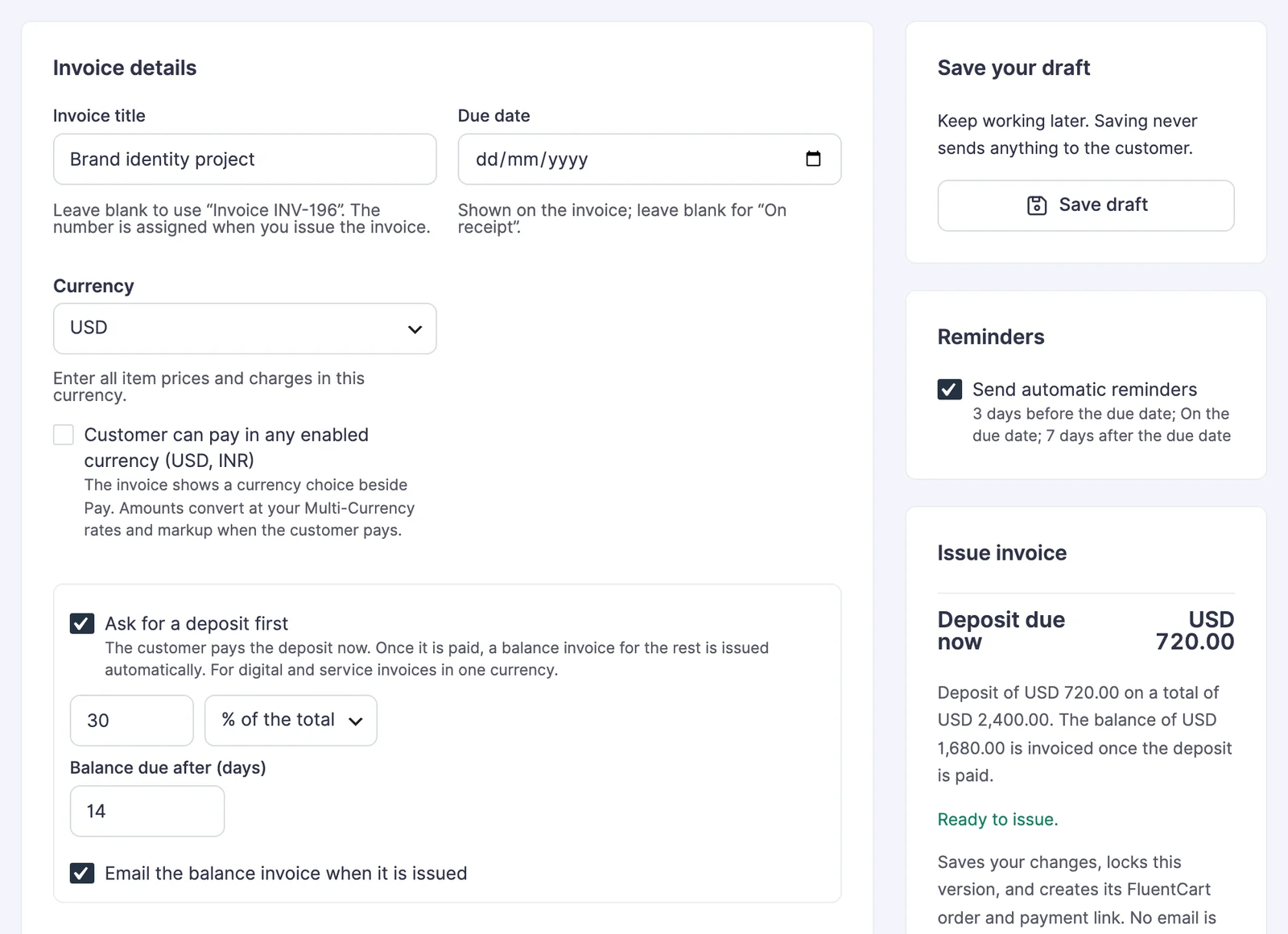
Issue the invoice as usual. Its FluentCart order is for the deposit only.
What Your Customer Sees
The customer invoice still lists every item, so your client can see the whole job. Below the items it shows the invoice total, the deposit and Due now, followed by a note about the balance. The Pay button collects the deposit.
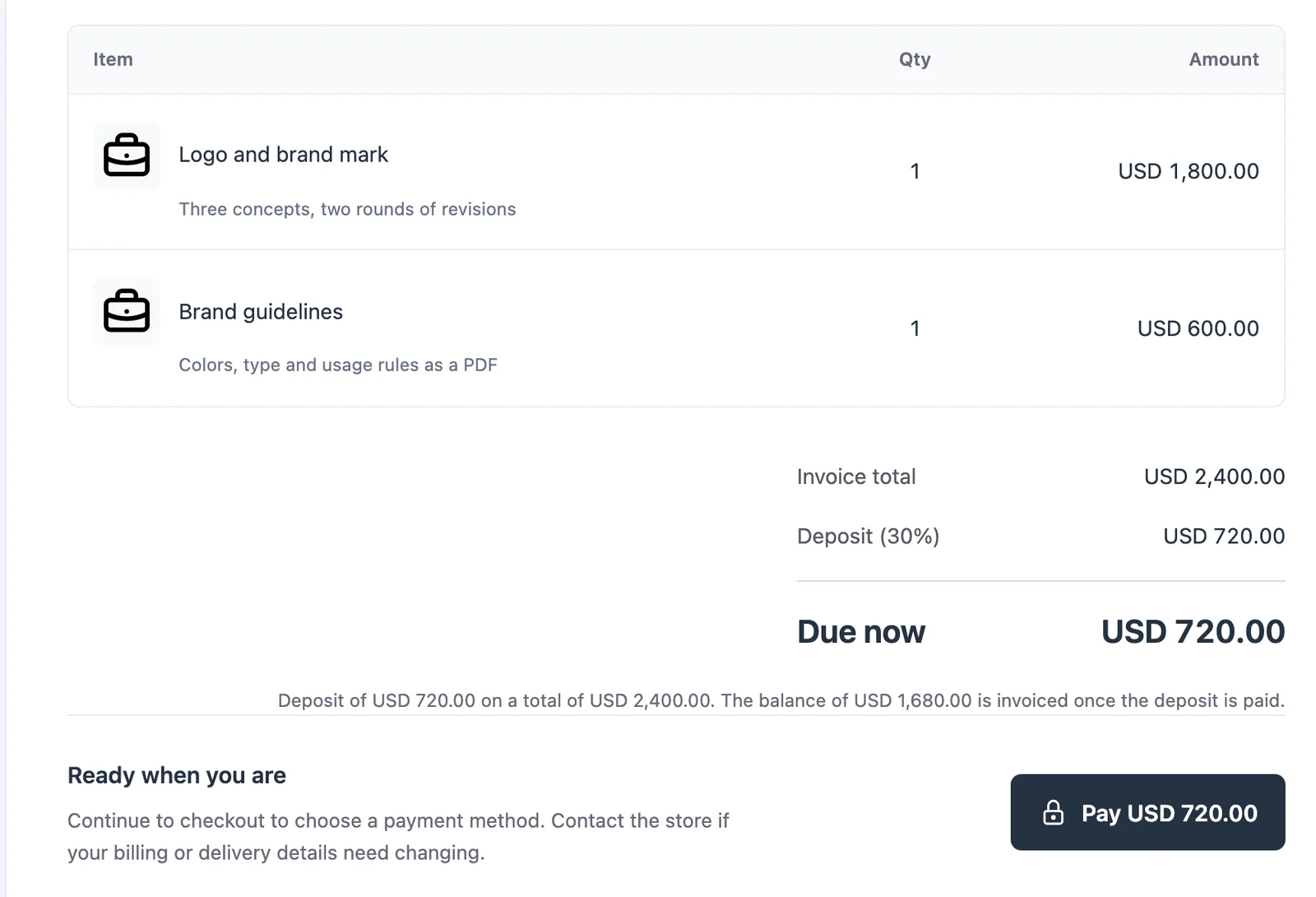
When the Deposit Is Paid
As soon as FluentCart records the deposit payment, GT Extensions issues the balance invoice:
- It has its own invoice number and payment link.
- It’s due the number of days you chose.
- It’s emailed to the customer unless you turned that off.
On your Invoices screen, the deposit invoice and the balance invoice link to each other. The balance invoice shows the deposit already paid and the balance due.
How the Tax Is Split
Each payment carries the same share of the invoice’s tax as its share of the total. With a 30% deposit, the deposit holds 30% of the tax and the balance holds the rest. Deposit plus balance always equal the full total and the full tax exactly, and any rounding difference of a cent goes to the balance.
The amounts are fixed when you issue the deposit invoice, so a later change to your tax rates doesn’t move the balance. In FluentCart, each payment shows its tax as one amount rather than broken down by tax rate.
Deposits on Quote Proposals
A draft linked to a quote request can carry a deposit too. The proposal shows the full total and the deposit, and the proposal email mentions both. Accepting the proposal issues the deposit invoice, and the balance follows the same way once the deposit is paid.
Limits
- Deposits are for digital and service items. Invoices with physical items can’t take a deposit.
- The invoice is paid in its own currency, so Customer can pay in any enabled currency is turned off for deposit invoices.
- Deposit and balance invoices can’t repeat on a schedule.
- Refunding a deposit is done in FluentCart and doesn’t change the balance invoice. If the project stops, cancel the balance invoice from its invoice screen.
- Duplicating a deposit invoice starts a fresh deposit. Duplicating a balance invoice gives a normal invoice.