
Take Payments with GT PayPal
FluentCart’s own PayPal is fine until you want your own REST app, Pay Later, or to authorize first and capture when you ship. GT PayPal is PayPal with your own app: Smart Buttons with Pay Later at checkout, a choice to capture now or later, and saved PayPal accounts that renew subscriptions through FluentCart’s own billing, without FluentCart Pro.
It sits in FluentCart’s Payments list next to FluentCart’s PayPal, loads its own copy of PayPal’s script, and never takes over FluentCart’s PayPal webhook.
Turn It On
- Go to FluentCart → GT Extensions, enable Payment Gateways and save.
- Click Configure on Payment Gateways and tick GT PayPal under Gateways to add to FluentCart. Clearing it later hides it from checkout and keeps its settings.
- Open FluentCart → Settings → Payments and choose Manage on GT PayPal.
Connect Your PayPal App
GT PayPal has a Live credentials tab and a Sandbox credentials tab. For the mode you are setting up:
- Click Get live credentials or Get sandbox credentials. PayPal’s developer dashboard opens in a new tab.
- Open your REST app, or create one, and copy its Client ID and Secret into the matching fields.
- For subscriptions, turn on Vault in the app’s features.
- Save. GT PayPal checks the credentials with PayPal and says PayPal connected.
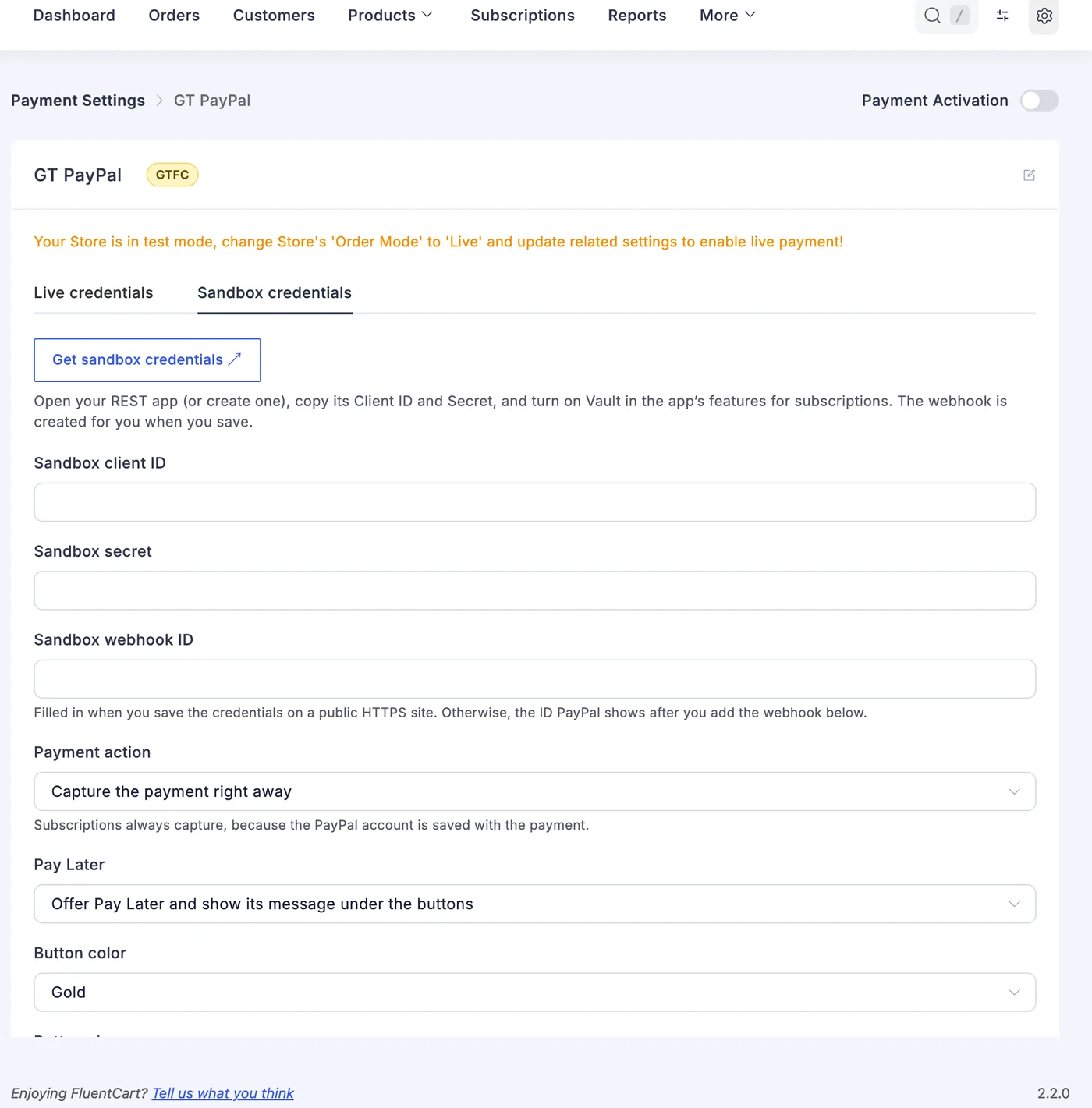
Which app checkout uses follows FluentCart’s store mode: test orders use the sandbox app, live orders the live one. The secret is stored encrypted. To keep credentials in wp-config.php instead:
define('GTFC_PAYPAL_LIVE_CLIENT_ID', '...');
define('GTFC_PAYPAL_LIVE_SECRET', '...');
define('GTFC_PAYPAL_LIVE_WEBHOOK_ID', '...');
define('GTFC_PAYPAL_TEST_CLIENT_ID', '...');
define('GTFC_PAYPAL_TEST_SECRET', '...');
define('GTFC_PAYPAL_TEST_WEBHOOK_ID', '...');
The Webhook Sets Itself Up
On a site reachable over public HTTPS, saving the credentials creates the webhook in your PayPal app and fills in its ID. Elsewhere, add the webhook by hand with the URL and events the settings list, and paste the ID PayPal shows into Webhook ID:
https://your-site.com/?fluent-cart=fct_payment_listener_ipn&method=gtfc_paypalPayPal verifies every delivery, and each event is applied once. A payment for a different amount or currency is held unpaid for you to check, and a paid order is never captured twice. Use a separate REST app for GT PayPal, or keep FluentCart’s own PayPal webhook off this app, so the two don’t both receive the same events.
Checkout Settings
| Setting | What it does |
|---|---|
| Payment action | Capture the payment right away (the default), or authorize only and capture when the order moves to Processing or Completed. Canceling an authorized order releases the hold. Subscriptions always capture. |
| Pay Later | Offers Pay Later and shows its message under the buttons. Pay Later is not offered on subscription checkouts. |
| Button color, shape and label | Gold, blue, silver, white or black; rectangle, pill or sharp; and the button’s wording. |
| Store name on PayPal | The name buyers see in PayPal. It defaults to the site title. |
| Invoice ID prefix | Set a different prefix on each store that shares one PayPal account, so order numbers never collide. |
The buttons appear in FluentCart’s checkout, including payment links for an existing order. Clicking one places the order first, so a missing field stops the buyer before PayPal opens.
Subscriptions and Renewals
GT PayPal uses FluentCart’s store-managed billing, not PayPal billing plans. Turn on Store-managed renewals with Automatic charge in FluentCart’s subscription settings:
- The first payment saves the buyer’s PayPal account. A free trial saves it without charging.
- On each renewal date FluentCart asks GT PayPal to charge the saved account. FluentCart Pro is not needed.
- Subscription checkouts show the PayPal button alone, because only PayPal accounts can be saved.
- If the buyer removes your store in their PayPal account, the saved account is dropped and FluentCart sends its renewal invoice for a manual payment.
Refunds
- Refund from the FluentCart order screen, and it goes back to PayPal.
- Refunds made in PayPal come back into FluentCart.
- An authorized payment that was never captured can’t be refunded. Cancel the order to release it.
- Chargebacks and disputes are noted in the order log for you to handle in PayPal.
Good to Know
- GT PayPal takes 24 currencies, PayPal’s own list.
- Need a second PayPal account? Duplicate GT PayPal. Each copy loads its own PayPal script, so both can sit on one checkout.
- Multi-Currency Checkout knows GT PayPal’s 24 currencies, so it is offered for them without extra setup. Routing you save still decides.
- Payment failure emails in Extra Enhancements watch GT PayPal and its copies. Tick GT PayPal under Watch these payment methods.
- On a staging or local copy of the store, renewals, captures, voids and refunds are refused, and the live webhook is not created.
Developers can change the PayPal order with the gtfc/paypal/order_args filter, style the buttons with gtfc/paypal/button_style, and listen to verified events with the gtfc/paypal/webhook action. See the hooks reference.