
Subscription Save Offers in GT Extensions for FluentCart
Subscription Save Offers asks customers why they’re cancelling a subscription and makes 1 offer they can actually use: a discount on the next renewals, a pause, a skipped payment, a plan change or your own message. You see the save rate by reason, so you know what keeps people and what doesn’t.
The module adds its own cancellation page to the customer account. The customer answers 1 question, sees at most 1 offer and always has a Cancel anyway button. It can also send 1 win-back email after a subscription ends.
Before You Start
- The module starts switched off, and everything inside it is off until you turn it on under FluentCart → Save offers.
- The discount offer needs FluentCart 2.3.1 or newer.
- The two plan switch offers need FluentCart Pro and an upgrade path between the plans.
- The cancellation page needs pretty permalinks, which FluentCart’s own account pages also need.
- Discount and skip offers work only for subscriptions FluentCart bills itself. Pause also works for gateways that support pausing in FluentCart. See Limits before you plan around them.
Turn It On
- Go to FluentCart → GT Extensions, turn on Subscription Save Offers and click Save Settings.
- Open FluentCart → Save offers. You start on the Reasons and offers tab.
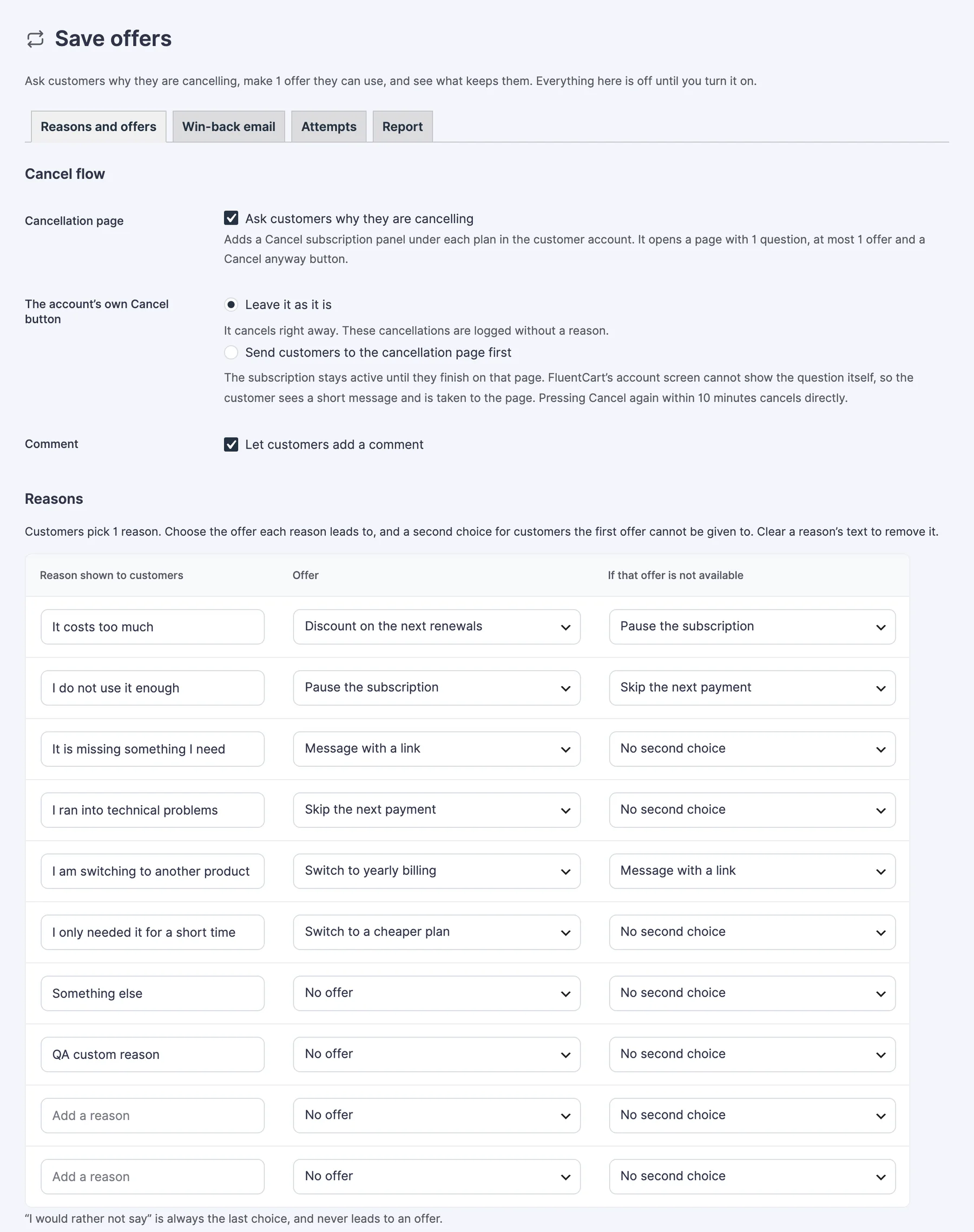
- Under Cancel flow, tick Ask customers why they are cancelling.
- Under Offers, tick Offer this for each offer you want to make.
- Under Reasons, choose the offer each reason leads to.
- Click Save settings.
Cancel Flow
- Cancellation page: adds a Cancel subscription panel under each plan in the customer account. It opens a page with 1 question, at most 1 offer and a Cancel anyway button.
- The account’s own Cancel button: choose what FluentCart’s built-in Cancel button does.
- Leave it as it is (the default): it cancels right away. These cancellations are logged without a reason.
- Send customers to the cancellation page first: the subscription stays active until they finish on that page. The customer sees a short message and is taken to the page. Pressing Cancel again within 10 minutes cancels directly.
- Comment: lets customers add a comment with their reason.
Reasons
Customers pick 1 reason. For each reason, choose an Offer and a second choice under If that offer is not available, for customers the first offer can’t be given to. Clear a reason’s text to remove it.
The module starts with 7 reasons, from “It costs too much” to “Something else”, and none of them leads to an offer until you choose one. “I would rather not say” is always the last choice and never leads to an offer.
Offers
An offer is shown only when it’s on, a reason leads to it and it can be honored for that customer’s subscription.
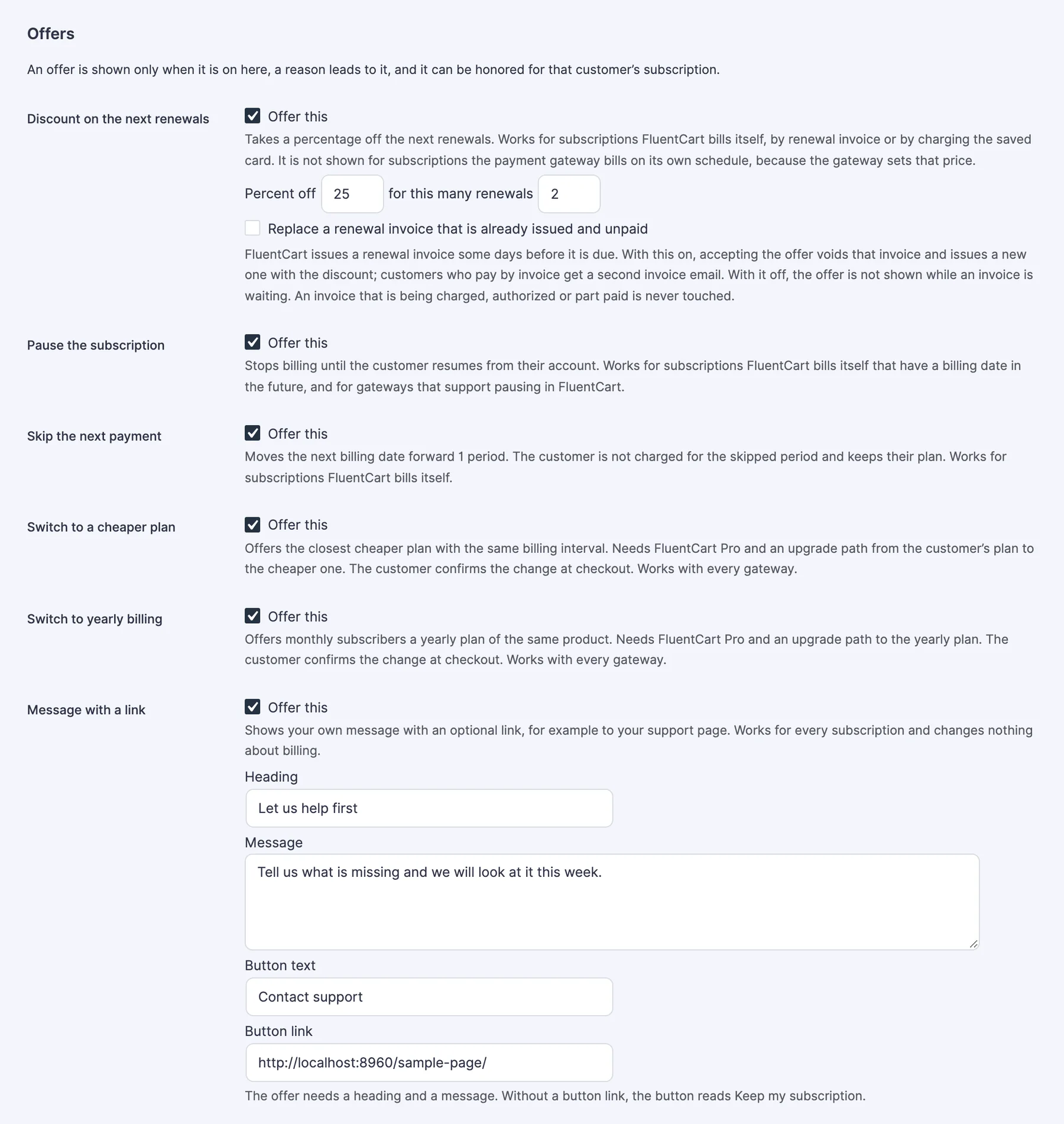
| Offer | What it does | Works for |
|---|---|---|
| Discount on the next renewals | Takes a percentage off the next renewals. 1 to 90 percent, for 1 to 24 renewals. The defaults are 20% and 3 renewals. | Subscriptions FluentCart bills itself |
| Pause the subscription | Stops billing until the customer resumes from their account. | Subscriptions FluentCart bills itself that have a billing date in the future, and gateways that support pausing in FluentCart |
| Skip the next payment | Moves the next billing date forward 1 period. The customer isn’t charged for the skipped period and keeps the plan. | Subscriptions FluentCart bills itself |
| Switch to a cheaper plan | Offers the closest cheaper plan with the same billing interval. The customer confirms the change at checkout. | Every gateway, with FluentCart Pro |
| Switch to yearly billing | Offers monthly subscribers a yearly plan of the same product. The customer confirms the change at checkout. | Every gateway, with FluentCart Pro |
| Message with a link | Shows your own heading and message with an optional button, for example to your support page. Changes nothing about billing. | Every subscription |
The discount offer has one more option: Replace a renewal invoice that is already issued and unpaid. With it on, accepting the offer voids that invoice and issues a new one with the discount, and customers who pay by invoice get a second invoice email. With it off, the offer isn’t shown while an invoice is waiting.
For Message with a link, the offer needs a heading and a message. Without a button link, the button reads “Keep my subscription”.
Limits and Privacy Settings
- Days between money offers: a customer who accepted a discount or a skipped payment isn’t offered either again for this many days. The default is 180. Use 0 for no limit.
- Yearly billing notice: tells monthly subscribers about yearly billing in their account. It’s shown only when FluentCart Pro is active and the plan has an upgrade path to a yearly plan of the same product.
- Keep answers for (days): after this many days a customer’s comment is deleted and the reason is kept without any link to them. The default is 365. Use 0 to keep everything.
What Customers See
- In their account, under the plan: a Cancel subscription panel that says there’s 1 short question.
- On the cancellation page: “Why are you cancelling?” with your reasons and an optional comment box. The page says their access stays active until the current billing period ends.
- If their reason leads to an offer they can use: 1 offer screen with a button to accept it and Cancel anyway.
- The result: the offer was applied and the subscription stays active, or the subscription is cancelled.
Cancel anyway cancels the subscription right away, with no more questions. A plan switch sends the customer to FluentCart Pro’s upgrade checkout, and the attempt counts as saved once the switch is complete.
Win-back Email
The Win-back email tab sends at most 1 email per subscription after it ends.
- Sending: tick Send the win-back email to turn it on. Subscriptions that end while this is off aren’t emailed later.
- Send after (days): from 1 to 365. The default is 14.
- Counted from: the day a subscription is cancelled, the day it expires, or both.
- Coupon code (optional): an existing FluentCart coupon. The email is skipped if the coupon stops working before it’s sent.
- Subject and Message: plain text. You can use
{customer_name},{product_name},{store_name},{resubscribe_url},{coupon_code},{coupon_line}and{unsubscribe_url}.
{coupon_line} becomes a sentence with the code only when the coupon works. An unsubscribe link is added at the end if the message doesn’t include {unsubscribe_url}.
The email is never sent for test-mode orders, to customers who unsubscribed, or to customers who came back or bought anything since. The tab shows how many emails are waiting, sent and not sent, and why. Win-back emails are held on a staging or local copy of the store. See Keep Staging and Local Copies From Emailing Customers.
Attempts and Report
The Attempts tab lists every cancellation attempt with its date, customer, subscription, reason, comment, offer shown, outcome and where it started. Outcomes are Unfinished, Saved, Cancelled and Left without choosing.
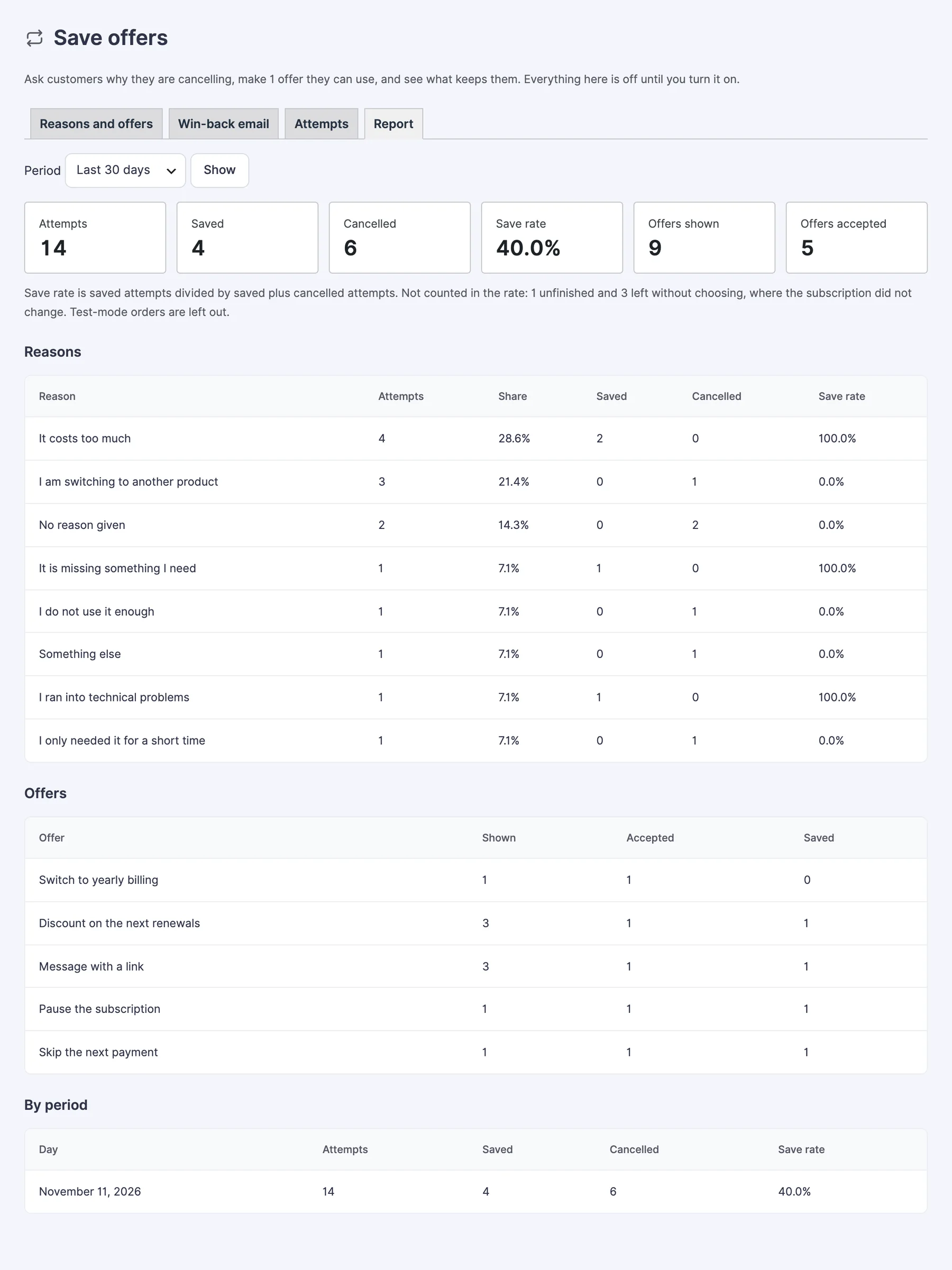
The Report tab covers the last 7, 30, 90 or 365 days, or all time.
- Save rate is saved attempts divided by saved plus cancelled attempts.
- Unfinished attempts and attempts left without choosing aren’t counted in the rate, because the subscription didn’t change.
- Test-mode orders are left out.
Limits
- Discount and skip offers work only for store-billed subscriptions, where FluentCart issues the renewal itself. They aren’t shown for subscriptions billed by Stripe, PayPal, Paddle, Mollie or Authorize.Net on the gateway’s own schedule, because the gateway holds that price and date.
- The pause offer is shown for store-billed subscriptions that have a billing date in the future, and for gateway-billed subscriptions when the gateway supports pausing in FluentCart.
- Plan switches hand off to FluentCart Pro’s upgrade checkout. The plan isn’t changed in place on the same subscription.
- The survey can’t be shown inside FluentCart’s own Cancel button. That’s why the module adds its own page, and why the routed mode shows a short message first.
- A pause has no end date. The customer resumes from their account.
- Offers can’t be set per product or per plan.
- The win-back coupon is one shared code, not a unique code per customer, and there’s only 1 win-back email.
- Cancellations made by an admin or by a payment gateway aren’t logged as attempts. They can still trigger the win-back email.
- One discount runs per subscription at a time, and cancelling ends it.
Troubleshooting
The Cancel subscription panel doesn’t show in the account. Check that Ask customers why they are cancelling is ticked and saved, and that your site uses pretty permalinks.
A reason never shows its offer. The offer has to be ticked under Offers and has to work for that subscription. A discount or skip isn’t shown for a gateway-billed subscription, and a pause is shown there only when the gateway supports pausing in FluentCart. Set a second choice under If that offer is not available, such as Message with a link.
The discount offer doesn’t show for a store-billed subscription. A renewal invoice may already be issued and unpaid, or the customer accepted a discount or a skip within Days between money offers.
A plan switch offer doesn’t show. It needs FluentCart Pro and an upgrade path from the customer’s plan to the cheaper or yearly plan.
No win-back email went out. Check that Send the win-back email was on when the subscription ended, then read “Why emails were not sent” on the Win-back email tab.