
How to Start a Referral Program for Digital Products
Your customers already recommend your templates, plugins or courses to friends. They just have no reason to do it twice. A full affiliate platform with tracking links, cookies and sign-up forms is a lot to run for a handful of happy buyers.
A simpler referral program for digital products gives each paying customer a personal coupon code. A friend who uses it gets a discount, the customer earns a cash commission on that paid order, and you pay it after your refund window closes. There are no links to break and no cookies to lose, because the code on the order decides who earns.
GT Extensions for FluentCart is my add-on plugin for FluentCart, and its Coupon Affiliates module runs this whole program. I’ll set it up from the first setting to your first payout.
Before You Start
You need 3 things in place:
- FluentCart 1.6.4 or newer with customer accounts. Customers join from their FluentCart account, so a guest checkout should create one.
- A refund policy you know, such as 14 or 30 days. The commission hold should match it.
- A way to pay affiliates, such as a bank transfer or PayPal. The module records payouts but never sends money or collects bank details.
If FluentAffiliate, AffiliateWP, SliceWP or Solid Affiliate is active, turn off its FluentCart integration first. Two programs paying on the same coupon means paying twice.
Turn It On and Set Your Terms
- Go to FluentCart → GT Extensions, enable Coupon Affiliates and click Save Settings.
- Open FluentCart → Affiliates → Settings.
- Set the program under Program, then click Save settings.
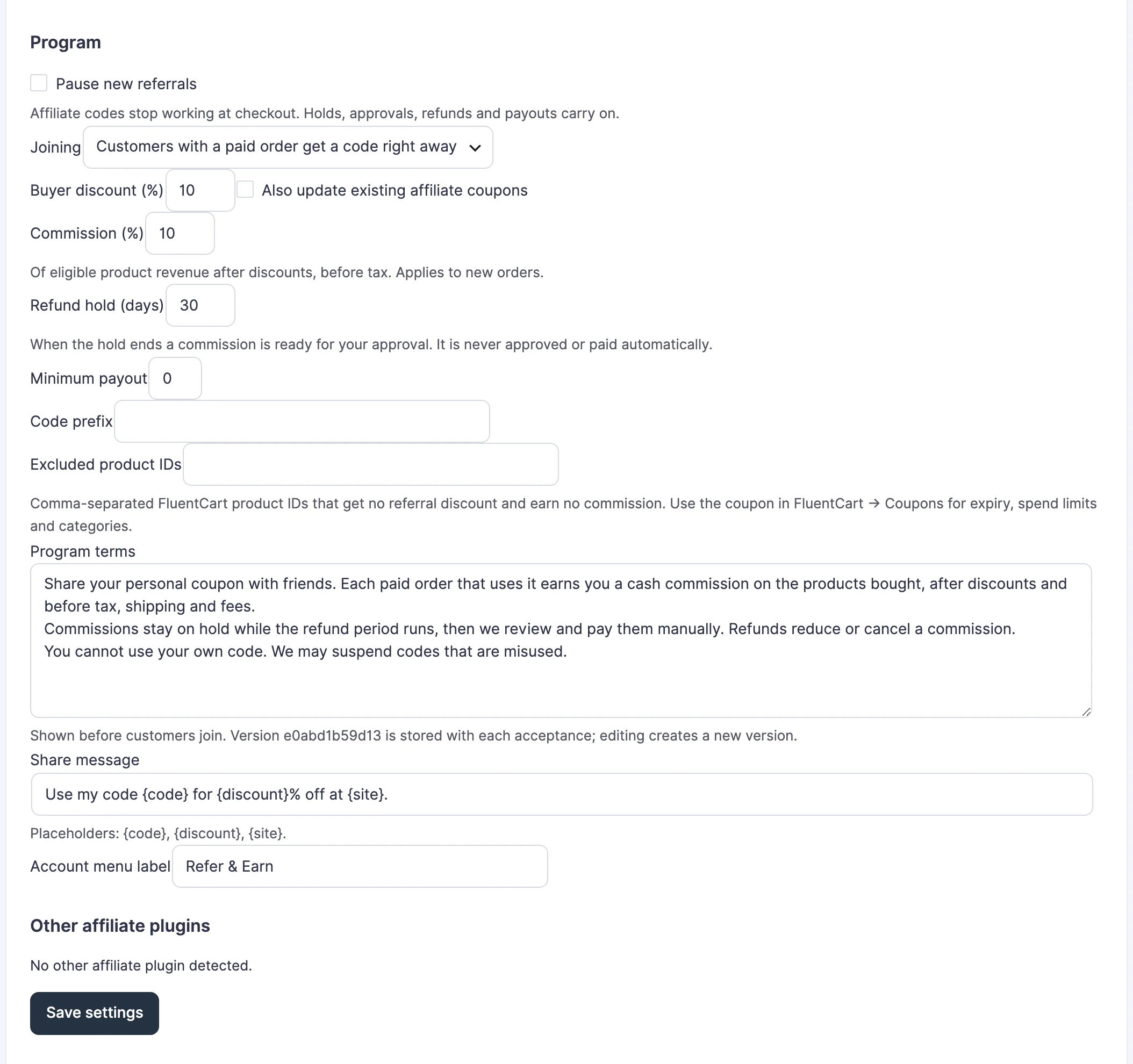
These are the settings that shape the program:
| Setting | Default | What to decide |
|---|---|---|
| Joining | Customers with a paid order get a code right away | Choose I approve each request first to check each person |
| Buyer discount (%) | 10 | What the friend saves |
| Commission (%) | 10 | What the customer earns, after discounts and before tax |
| Refund hold (days) | 30 | Match your refund window, from 0 to 365 |
| Minimum payout | 0 | The smallest amount worth a transfer |
| Code prefix | Empty | Up to 12 letters or numbers, such as REF |
| Excluded product IDs | Empty | Products that get no discount and earn nothing |
Read the default Program terms and edit them to match your business. Each customer’s acceptance stores the version of the terms they agreed to, and editing the text creates a new version.
The 10% defaults are a starting point. A digital product costs almost nothing to deliver, so a bigger discount and commission can still leave a healthy margin. It is wise to check the numbers on your cheapest product before you raise either one.
How Customers Join
Refer & Earn appears in the FluentCart account menu of every customer with at least one paid order. Customers who haven’t paid for anything don’t see it. Before joining, the page shows the discount, the commission and your terms, with a box to accept them and a Join and get my code button.
After joining, the customer sees:
- their code, such as JORDAN7K2M, with a Copy button
- a ready-made share message with a Copy button
- a share link that applies the code, while Extra Enhancements coupon links are on
- balances per currency: on hold, approved and paid
- their referral orders with an anonymous reference such as R-000042
Friends are never named. An affiliate sees no names, emails or products from the orders they referred.
To put the same panel on any page, use the shortcode:
[gtfc_refer_earn]You can also add someone yourself. On the Affiliates tab, enter their account email or username and click Add affiliate. Their coupon is created at once, even without a paid order.
What Earns a Commission
A commission is created when FluentCart records the payment for an order that uses the code. It’s worked out on what the friend paid for each product after discounts, before tax.
Here is an example with the defaults. A friend buys a USD 49 template with a code that gives 10% off. They pay USD 44.10, and the affiliate earns 10% of that, USD 4.41, held for 30 days.
These never earn:
- shipping, tax, fees and signup fees
- subscription renewals and plan upgrades
- GT invoice, quote and deposit payments
- orders placed in FluentCart test mode
- the affiliate’s own orders, matched by account, customer record or email
The code works for a friend’s repeat purchases too, so a returning buyer who uses it again earns the affiliate another commission.
Approve and Pay
Commissions stay On hold for your refund period. When the hold ends, they move to Ready for approval and wait for you. Nothing is approved or paid automatically.
- Open FluentCart → Affiliates → Commissions and filter by Ready for approval.
- Click Approve every commission ready for approval, or open each one to approve it.
- On the Payouts tab, click Reserve payout for an affiliate. This locks the commissions while you pay.
- Download the CSV if you want a record, then send the money your usual way.
- Enter the method, the exact amount, the date and the transfer reference, then click Mark paid.
A refund after you’ve paid creates an adjustment, which comes off that affiliate’s next payout. You never have to ask for money back.
Check It Works
Make a test order before you announce the program:
- Sign in as a customer account with a paid order and open Refer & Earn. Join and copy the code.
- In a private window, buy a product as a different customer with that code.
- Open FluentCart → Affiliates → Commissions. The order should appear as On hold with the commission amount, or as Test ledger if the store is in test mode.
The affiliate’s Refer & Earn page shows the same order with its anonymous reference.
When Something Goes Wrong
These messages show to customers at checkout or on the Refer & Earn page:
| Message | What it means | Fix |
|---|---|---|
| The referral program opens after your first paid order. | The customer has no paid order yet | Expected. Add them yourself from the Affiliates tab if you want |
| You cannot use your own referral code. Remove it to continue. | The buyer is the affiliate, by account, customer record or email | Expected. Self-referrals never earn |
| This referral code is not available right now. Remove it to continue. | The program is paused, or the affiliate is suspended | Check Pause new referrals and the affiliate’s status |
| Coupon Affiliates is holding new commissions because … is active. | Another affiliate plugin is active | Turn off its FluentCart integration and confirm under Other affiliate plugins |
| The amount is below the minimum payout. | The approved amount is under your Minimum payout | Wait for more approved commissions, or lower the minimum |
What It Won’t Do
The program is built on coupons, and a few limits follow from that:
- The code decides who earns. There is no tracking cookie, so a friend who removes the code doesn’t earn the affiliate anything.
- It doesn’t send emails. Affiliates check their balance on Refer & Earn, and you tell them about approvals and payouts your usual way.
- It doesn’t pay anyone. You send the money and record it.
- One rate per program, with a personal rate you can set for one affiliate. There are no per-product rates.
Run a Refer and Earn Program with Coupon Affiliates covers refunds, payouts and the review screen in full. If your digital product is a set of pages or templates buyers open after checkout, How to Give Buyers a Private Download Page sets that up.