
Accept Payments with the Paddle Gateway
Selling to buyers in many countries means dealing with the sales tax and VAT rules of each of them. Keeping up with those rules yourself takes time and accounting work that a small store generally doesn’t have.
Paddle is a merchant of record, so it calculates, collects and remits sales tax and VAT for you. GT Extensions for FluentCart adds Paddle as a payment gateway inside FluentCart. It sits in FluentCart → Settings → Payments as Paddle (GT Extensions), next to Stripe and PayPal, and uses the order, refund and subscription screens FluentCart already has. It needs FluentCart 1.6.4 or newer.
It Runs Next to FluentCart Pro’s Paddle
FluentCart Pro has its own Paddle gateway under the slug paddle. This one uses gtfc_paddle, so the two run side by side with separate settings, webhook URLs, transactions and subscriptions. Neither touches the other’s records.
If both gateways use the same Paddle account, give each one its own notification destination in Paddle.
Turn On the Gateway
- Go to FluentCart → GT Extensions, enable Payment Gateways and save.
- Under Configure, tick Paddle. Clearing it later takes Paddle off checkout and keeps its settings saved.
- Open FluentCart → Settings → Payments and choose Paddle (GT Extensions).
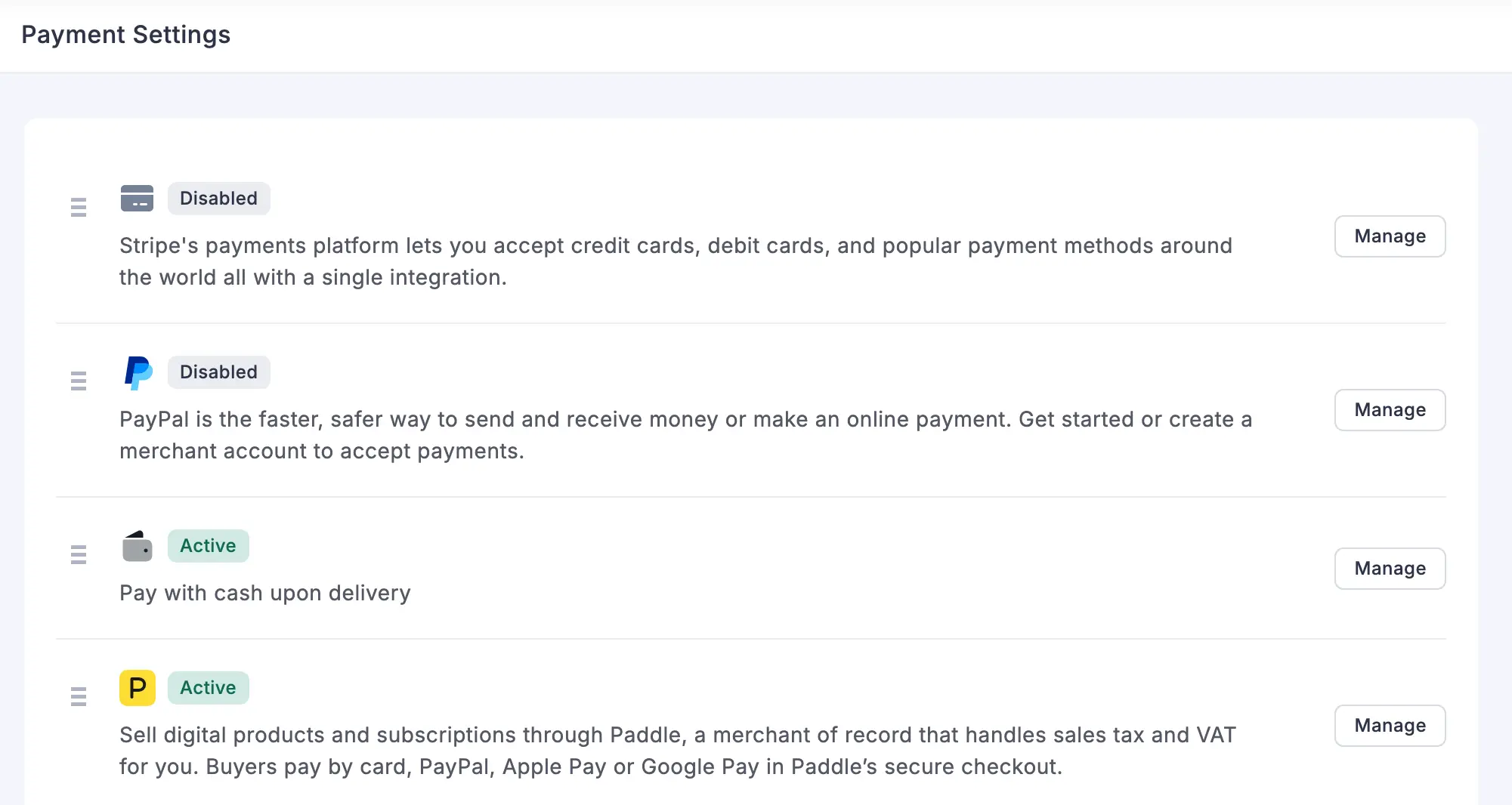
Paddle sits in the same list as FluentCart’s own gateways, and it shows as Active once it is connected:
Connect Your Paddle Account
Paddle Billing has two separate accounts. FluentCart’s Live order mode uses vendors.paddle.com, and Test mode uses the sandbox at sandbox-vendors.paddle.com. Each one needs its own API key, client-side token and webhook secret, entered in the matching tab, so you go through these steps once for each account:
- In Paddle, open Developer tools → Authentication and create an API key with these permissions:
transaction.readtransaction.writesubscription.readsubscription.writeadjustment.readadjustment.writecustomer.read
- Create a client-side token on the same screen.
- Open Checkout → Website approval and add your site’s domain, then set a default payment link under Checkout → Checkout settings. Paddle only opens its checkout on approved domains.
- Open Developer tools → Notifications → New destination and paste the webhook URL shown in the Paddle settings in FluentCart (
/?fluent-cart=fct_payment_listener_ipn&method=gtfc_paddle). Select these events:transaction.paidtransaction.completedtransaction.payment_failedsubscription.createdsubscription.activatedsubscription.trialingsubscription.updatedsubscription.past_duesubscription.pausedsubscription.resumedsubscription.canceledadjustment.createdadjustment.updated
- Copy the destination’s secret key.
- Paste the API key, client-side token and secret key into the matching tab in FluentCart, turn on Payment Activation and save.
The settings screen repeats the permissions and events for the tab you are on, and shows the webhook URL to copy for your site:
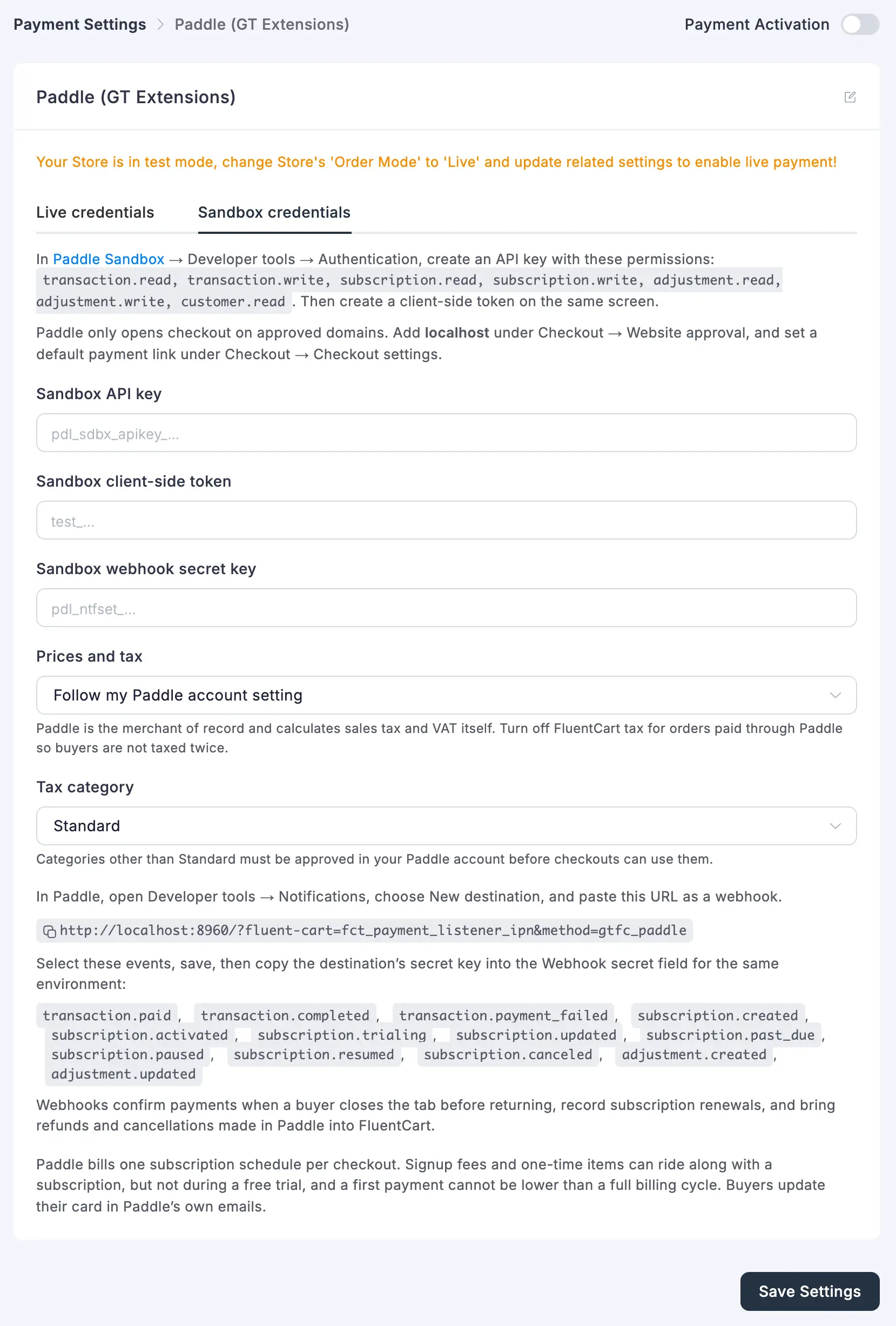
FluentCart checks the key with Paddle before it activates the gateway. It refuses a live key in the sandbox tab, and a sandbox key in the live tab.
The API key and secret are stored encrypted. If you’d rather keep them out of the database entirely, define them in wp-config.php:
define('GTFC_PADDLE_LIVE_API_KEY', 'pdl_live_apikey_...');
define('GTFC_PADDLE_LIVE_CLIENT_TOKEN', 'live_...');
define('GTFC_PADDLE_LIVE_WEBHOOK_SECRET', 'pdl_ntfset_...');
define('GTFC_PADDLE_TEST_API_KEY', 'pdl_sdbx_apikey_...');
define('GTFC_PADDLE_TEST_CLIENT_TOKEN', 'test_...');
define('GTFC_PADDLE_TEST_WEBHOOK_SECRET', 'pdl_ntfset_...');
How a Paddle Payment Works
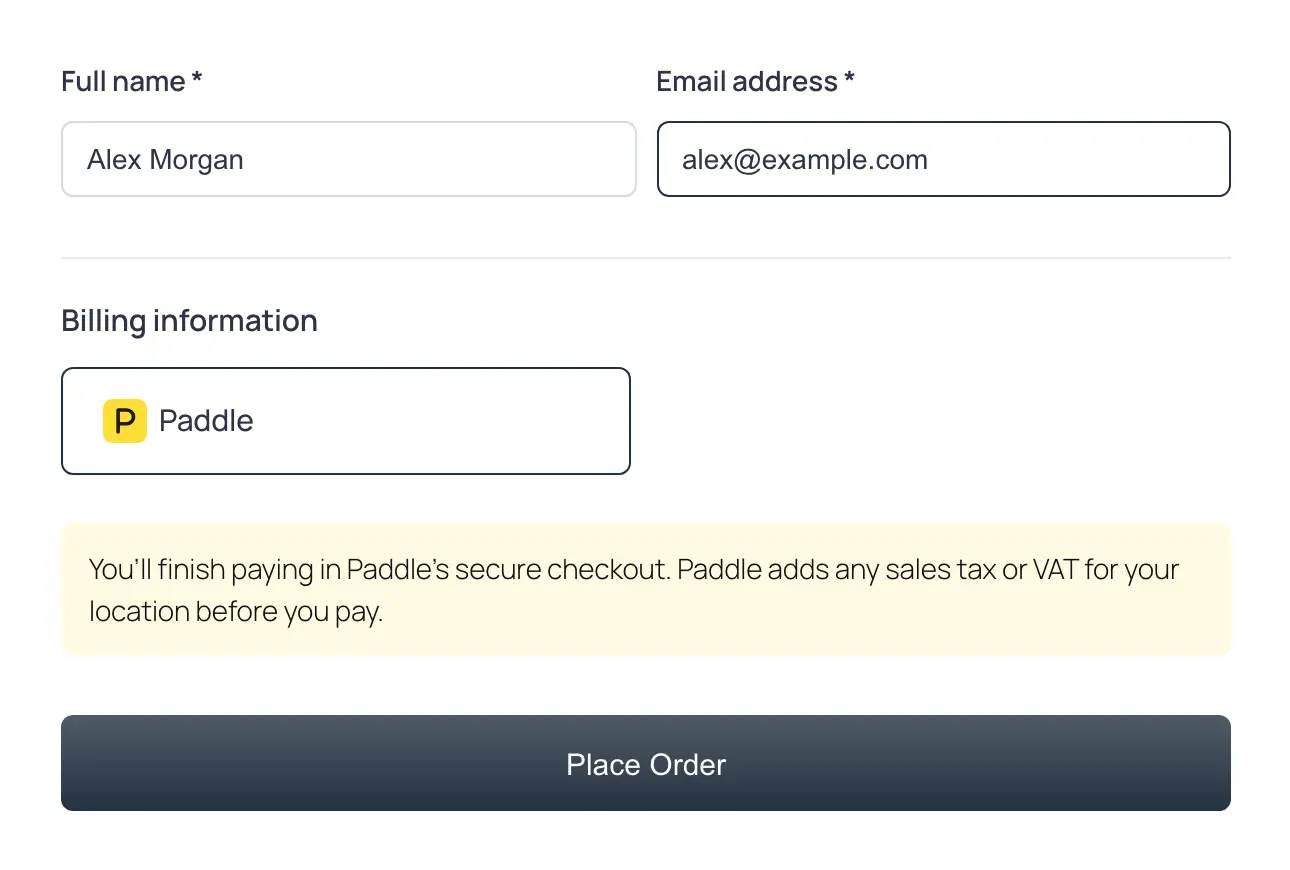
From the buyer’s side, Paddle is one more payment method on your FluentCart checkout, with a short note that the payment finishes in Paddle’s checkout:
Under the hood, this is what happens:
- The buyer picks Paddle and places the order. FluentCart creates the order, and the buyer is sent to a page on your own site that opens Paddle’s overlay checkout for card, PayPal, Apple Pay and Google Pay.
- Nothing is created in your Paddle catalog. Each order goes to Paddle as a transaction with its own prices: one line per order item (plus shipping) when they add up to the order total, otherwise one line for the whole order.
- The payment is confirmed when the buyer comes back, and again by webhook. A charge for a different amount or currency than the order is logged and not confirmed.
- Paddle’s tax and grand total are kept in the transaction meta.
- Pressing Place order twice reuses the open Paddle transaction.
- Several stores can share one Paddle account. Each transaction carries the site’s domain, and webhooks meant for another site are ignored.
Sales Tax and VAT
Paddle calculates, collects and remits the tax on these orders, so FluentCart tax should be turned off for orders paid through Paddle. Two settings decide how Paddle treats your prices:
- Prices and tax has three options:
- follow your Paddle account setting
- add tax on top of your prices
- treat your prices as tax-inclusive
- Tax category must be one Paddle has approved for your account.
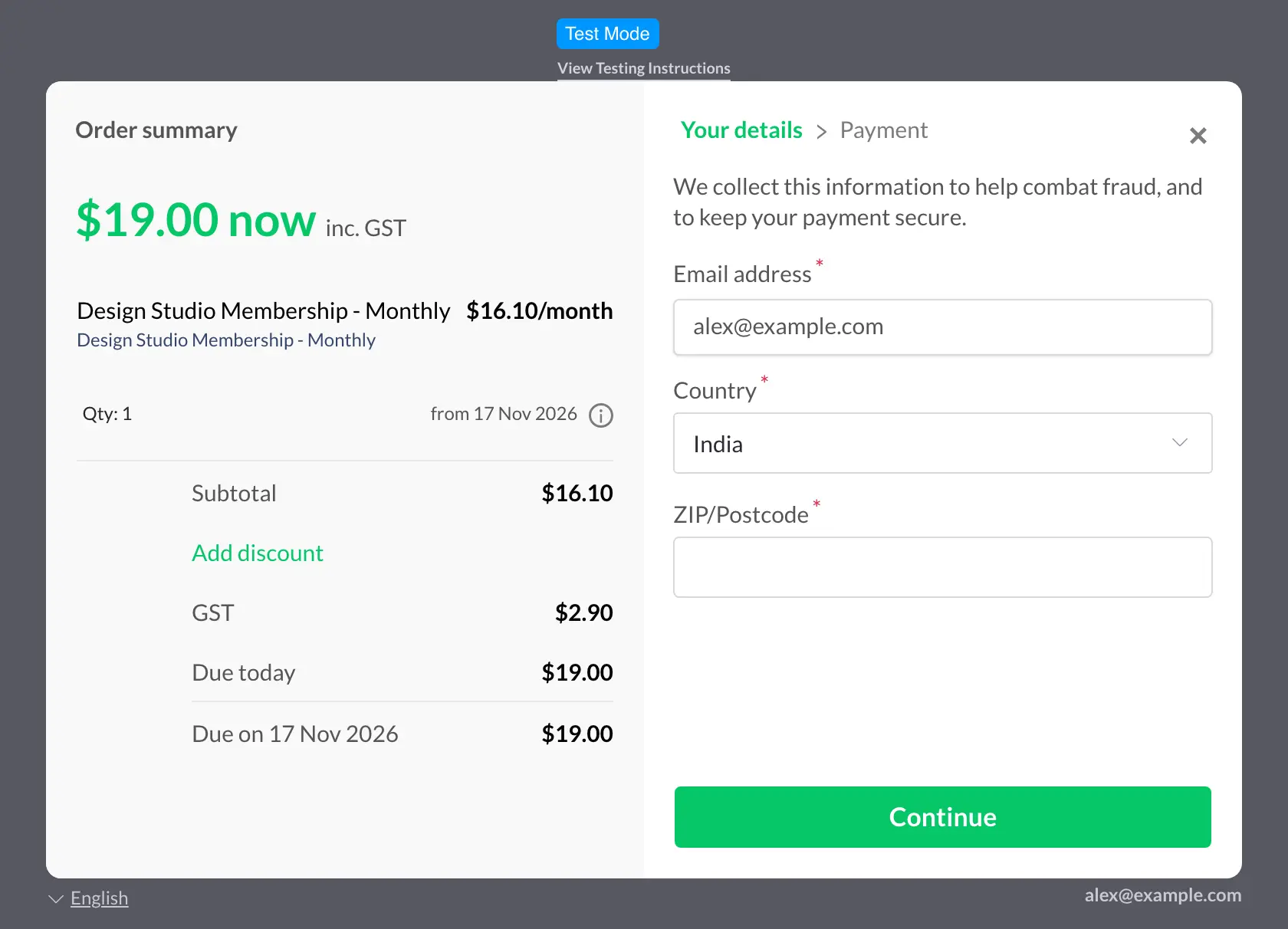
In this sandbox order, Prices and tax follows the Paddle account setting, which treats the $19.00 price as tax-inclusive. Paddle shows the GST for the buyer’s country inside that price:
Paddle Subscriptions
Subscriptions are where most of the work happens after the first sale, and the gateway keeps FluentCart and Paddle in step:
- Daily, weekly, monthly, quarterly, half-yearly and yearly plans become Paddle subscriptions. The first payment is one recurring line plus, when it is larger, a one-time line for the signup fee and any one-time items.
- FluentCart trial days become a Paddle trial period. The order is confirmed by the buyer’s return or by Paddle’s subscription webhook, and the subscription shows as trialing with Paddle’s trial end.
- Each renewal Paddle charges becomes a paid FluentCart renewal order, recorded once even when both
transaction.paidandtransaction.completedarrive. The next billing date follows Paddle’s. - Cancel in FluentCart stops renewal at the end of the paid period, and the subscription stays active until then. Cancel immediately ends it now.
- Cancellations, pauses and past-due states set in Paddle are applied to FluentCart. An older webhook that arrives late is ignored.
- Sync pulls the subscription’s status and any missed renewals from Paddle. Edit vendor IDs → Verify looks up a Paddle subscription without changing anything.
- Manual and store-managed subscriptions and renewal invoices are paid through Paddle one payment at a time.
Paddle charges at least one full cycle on the first payment and nothing extra during a trial. Because of that, a first-payment discount on a subscription, or a signup fee with a free trial, is refused at checkout with an explanation. It is wise to check your subscription plans for either case before you turn Paddle on.
Paddle Refunds
- Refunds from a FluentCart order become Paddle refund adjustments: a full refund for the whole payment, otherwise a partial refund spread over the transaction’s lines, skipping what was already refunded.
- When Paddle added tax on top, the refund is scaled to include it.
- Paddle may hold a refund for approval. A refund Paddle later rejects is logged on the order.
- Refunds approved in the Paddle dashboard are recorded on the FluentCart order once.
- Chargebacks are logged for review.
Multi-Currency Checkout
If you use Multi-Currency Checkout, its gateway routing lists the currencies Paddle supports, so you can send the right currencies to Paddle.
Good to Know
- Webhooks are verified with the
Paddle-Signatureheader and a 5-minute window. - Payments for the wrong amount, currency or site are not confirmed.
Hooks
| Hook | Type | Use |
|---|---|---|
gtfc/paddle/transaction_args | filter | Change the Paddle transaction request body. |
gtfc/paddle/checkout_settings | filter | Change the overlay checkout settings on the pay page. |
gtfc/paddle/billing_intervals | filter | Map FluentCart billing intervals to Paddle billing cycles. |
gtfc/paddle/currencies | filter | Change the currencies Paddle is offered for. |
gtfc/paddle/settings | filter | Change the loaded gateway settings. |
gtfc/paddle/webhook | action | Runs for every verified webhook: ($type, $data, $mode). |