
Google Product Feed
Google Product Feed gives Google Merchant Center a list of your FluentCart products, so they can show in free listings across Google (Search, Shopping, Images and Lens) and in Shopping ads. Merchant Center fetches the feed on a schedule. The plugin rebuilds it a few minutes after products change, and once a day.
Set Up the Feed
- Go to FluentCart → GT Extensions, enable Google Product Feed and save. The first build starts within a few minutes.
- Open FluentCart → Product feed and copy the feed URL. It is
/gtfc-feed/google.xmlon your site, or/?gtfc_feed=googlewithout pretty permalinks. - In Google Merchant Center, verify and claim your site. The Google verification field in your SEO plugin works for this.
- Go to Products → Add product source → Add products from a file, choose the option to enter a link to your file, paste the feed URL and set a daily fetch.
- Set your shipping and return policies in Merchant Center. Digital items are listed with free shipping to your target country.
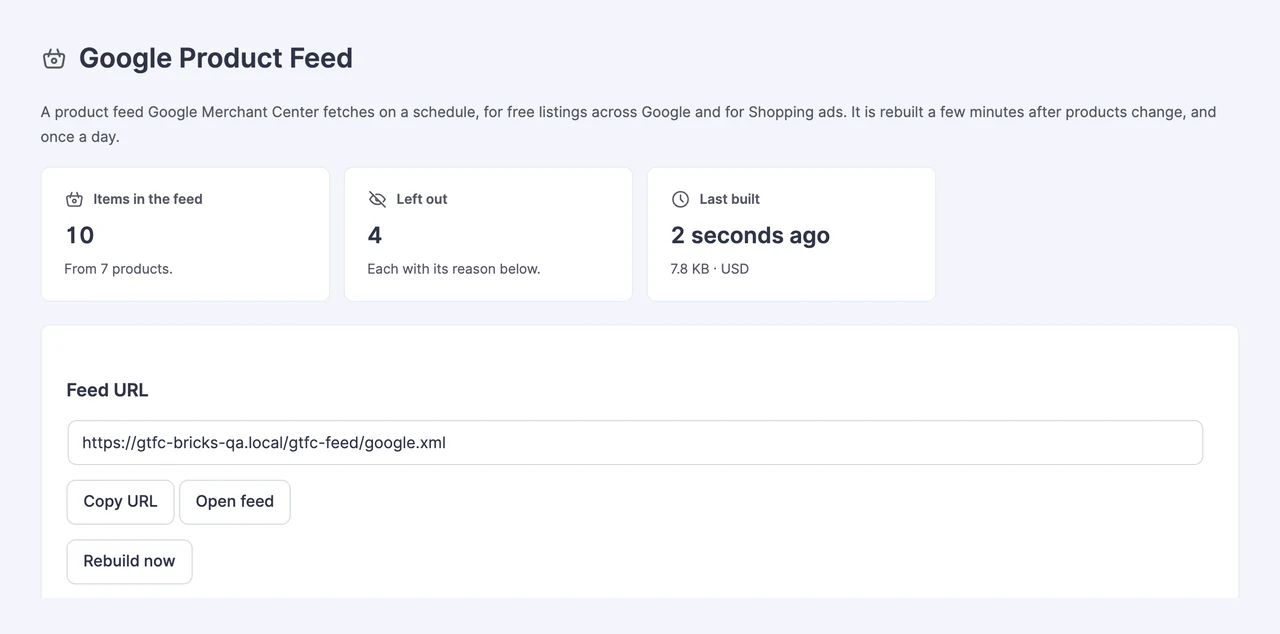
The screen shows how many items are in the feed, how many were left out and when the feed was last built. Use Rebuild now after a change you want in the feed straight away.
What Goes Into Each Item
Each active product option becomes one item. Options of the same product share an item group, so Google shows them as variants of one product. Prices are in your store currency, never a visitor’s switched currency.
| Feed attribute | Where it comes from |
|---|---|
| Title and description | The product title plus the option name, and the excerpt or the opening of the description |
| Images | The option’s image, then the product gallery |
| Price and sale price | The selling price. When an option has a higher compare-at price, that becomes the regular price and the selling price becomes the sale price |
| Availability | The same stock rule as the buy button |
| Yearly subscriptions | Listed at the price of their first year, signup fee included |
| Brand, GTIN, MPN and condition | Product details first, then FluentCart Brands, then the feed’s default brand and condition. An ISBN-13 is used as the GTIN |
| Google category and product type | Your category mapping, and the FluentCart category path |
| Shipping | Weight for physical products, free shipping to your target country for digital ones |
What Is Left Out
Google doesn’t allow some products. The feed leaves these out and lists each one under Left out of the feed with the reason:
- Products you exclude on the feed screen
- Password-protected products
- Service products and external products
- Products whose price is hidden until login
- Options with a zero price, including Pay What You Like products with no minimum
- Payment plans with a set number of payments
- Subscriptions billed more often than yearly. Google allows only yearly prepaid software subscriptions
- Options with no image
Ebooks stay in the feed for free listings and are kept out of Shopping ads, which don’t allow them. One-time software licenses are included, but Merchant Center may still disapprove them.
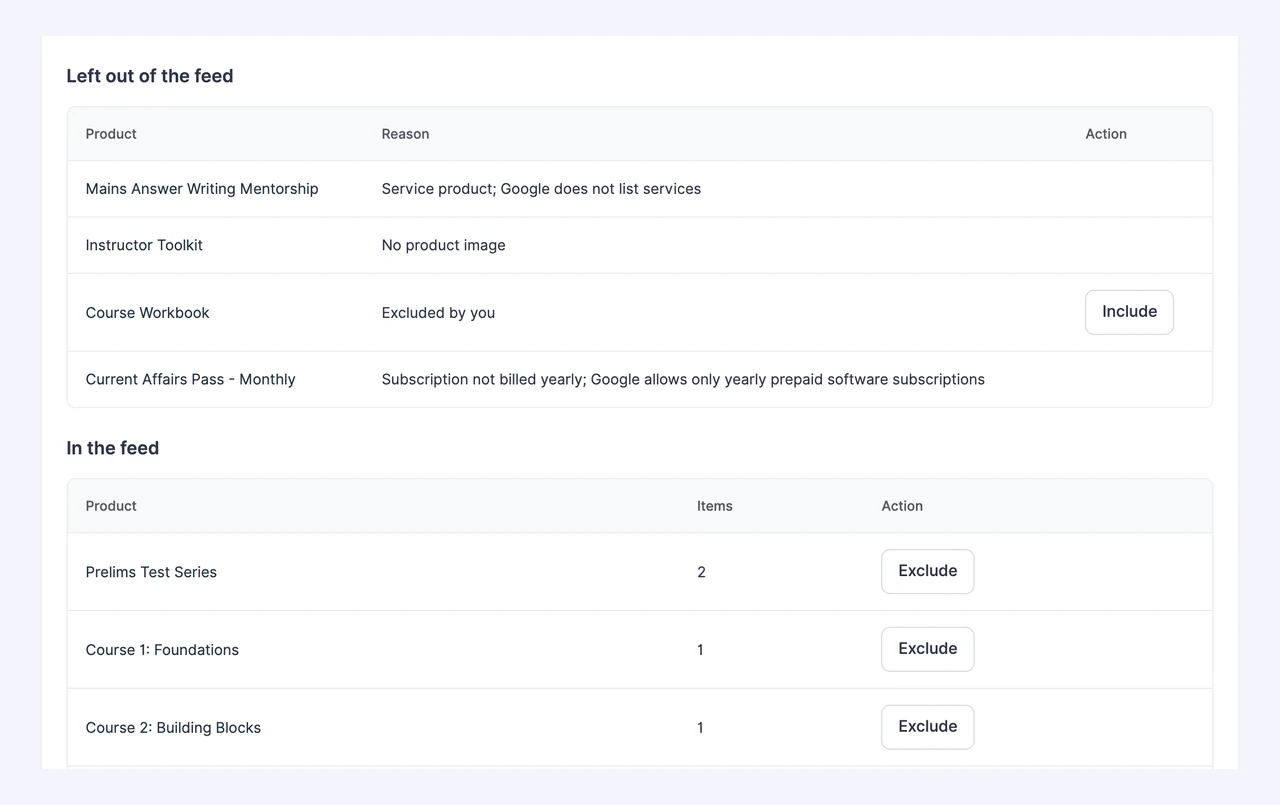
Under In the feed, click Exclude to leave a product out. It moves to the left-out list, where Include puts it back. Changes show in the feed after the next build.
Feed Settings
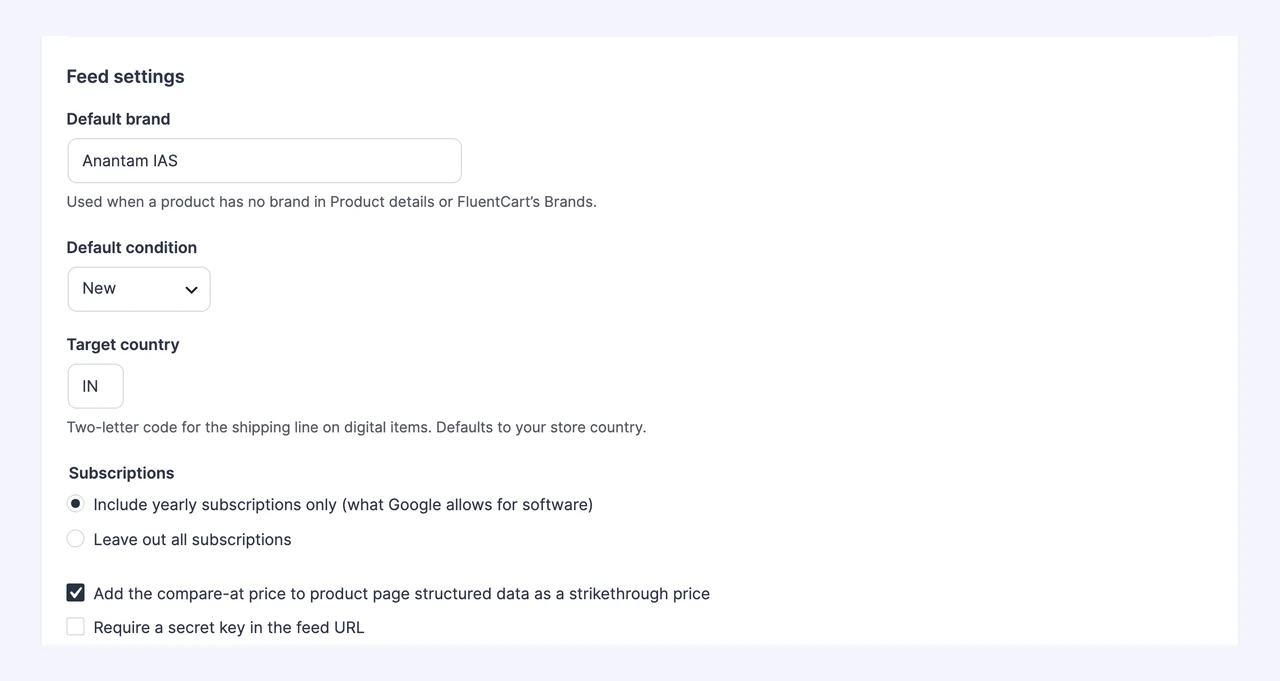
- Default brand: used when a product has no brand in Product details or FluentCart Brands.
- Default condition: New, Used or Refurbished, unless Product details says otherwise.
- Target country: the country on the free shipping line of digital items. It starts as your store country.
- Subscriptions: include yearly subscriptions only, or leave out all subscriptions.
- Strikethrough price: adds the compare-at price to the product page’s structured data, so the page shows the same sale as the feed. Merchant Center checks that the two match.
- Secret key: adds a key to the feed URL, and the feed refuses requests without it. Your product pages already show this data, so most stores leave the feed public. Making a new key stops the old URL, so update it in Merchant Center.
Google Categories
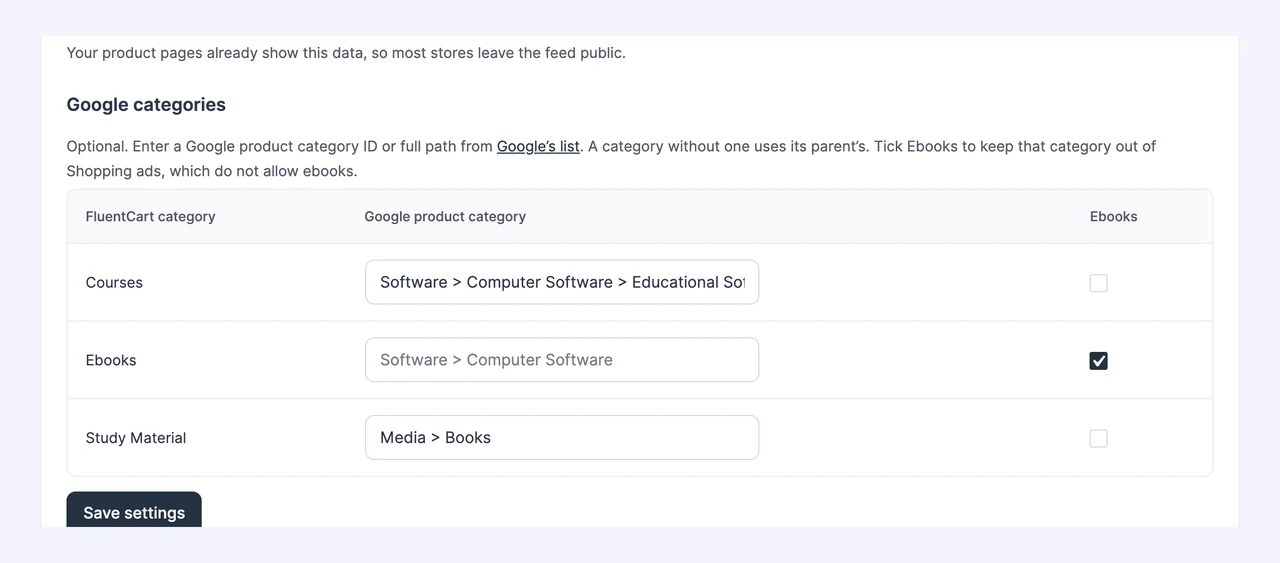
Mapping is optional. Enter a Google product category ID or full path from Google’s list next to each FluentCart category. A category without one uses its parent’s. Tick Ebooks for a category of ebooks to keep it out of Shopping ads.
Good to Know
- Updates: a burst of product edits makes one rebuild, five minutes after the first change. Large catalogs are built in batches in the background.
- No half-built feeds: the feed file is only replaced once a build finishes, so Merchant Center always gets a complete file.
- Caching: the feed tells caches it can be kept for an hour and answers repeat fetches with “not modified”. Nothing is purged when it rebuilds.
- Item IDs: each item’s ID is
fc_plus the option’s ID. It never changes, so Merchant Center keeps each item’s history. - Turning the module off: the feed URL stops working. Your settings and category mapping stay saved.
For Developers
gtfc/product_feed/item changes one item before it is written. It receives the item’s attributes, the variation and the product post. Return null to leave the item out:
add_filter('gtfc/product_feed/item', function ($item, $variation, $post) {
    $item['custom_label_0'] = 'launch';
    return $item;
}, 10, 3);
gtfc/product_feed/built runs after each build with the build summary. WP-CLI can build the feed, show its status, or print one option’s item and why it was left out:
wp gtfc feed build
wp gtfc feed status
wp gtfc feed item 123