
Cart Goals in GT Extensions for FluentCart
Cart Goals shows shoppers how much more they need to add for a reward, then grants the reward when the cart gets there. A shopper sees “Add $22.00 more for free shipping” in the cart, adds one more item and pays 0 for shipping without a code.
You can set up to 3 goals. Each goal has a cart amount and one reward: free shipping, or a FluentCart coupon that’s added automatically. Rewards are checked on the server on every cart change and again when the order is placed.
Before You Start
- Cart Goals needs FluentCart 2.3 or newer. On an older version the module shows a notice in wp-admin and doesn’t load.
- The module starts switched off. Switching it on changes nothing for shoppers until you save a goal.
- A coupon reward uses a coupon you’ve already created in FluentCart → Coupons. Only fixed and percentage coupons can be picked.
Turn It On
- Go to FluentCart → GT Extensions, turn on Cart Goals and click Save Settings.
- Open FluentCart → Cart Goals.
- In the Goals table, enter a Cart amount and choose a Reward for goal 1.
- Click Save cart goals.
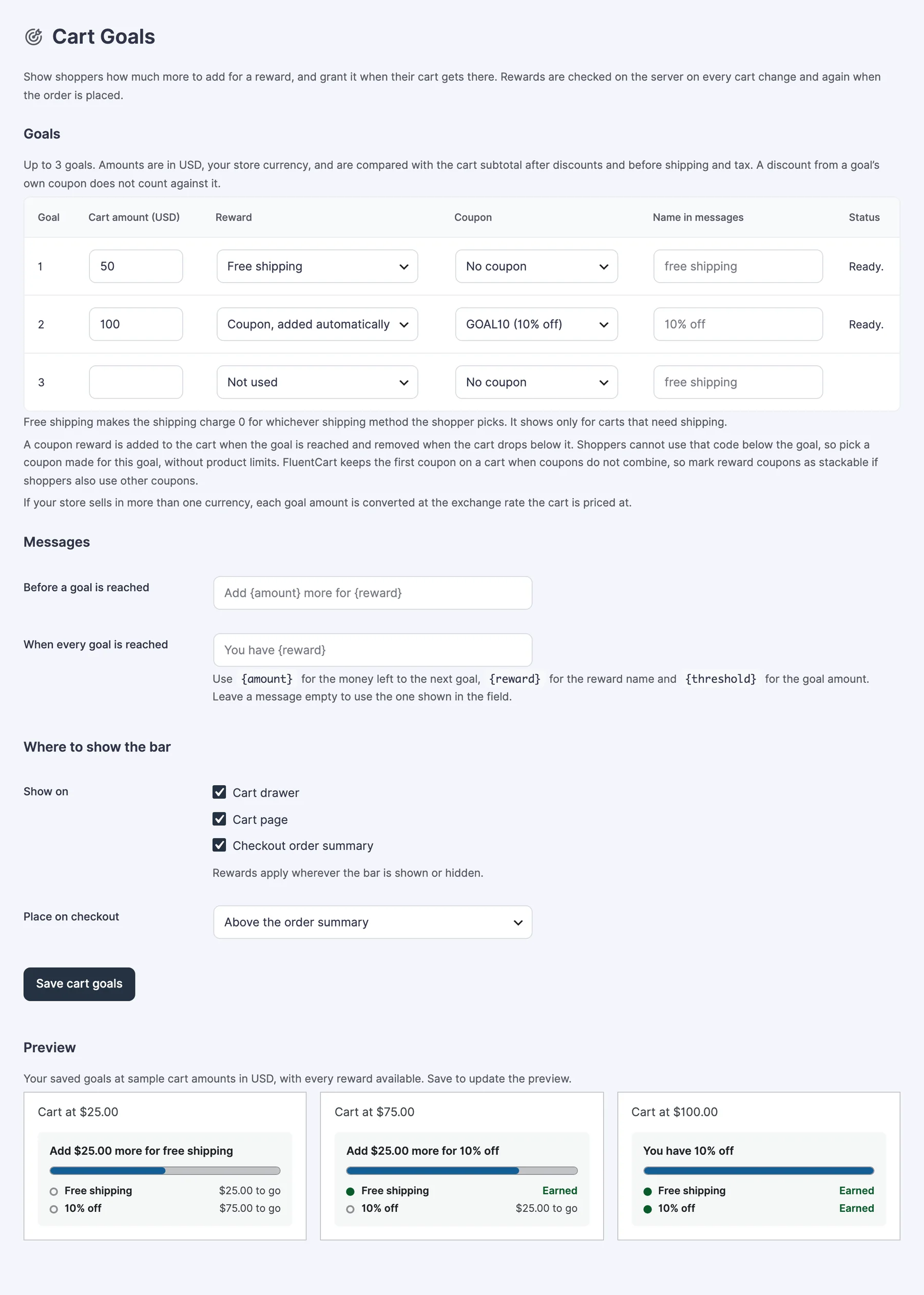
Goals
Each row in the Goals table is one goal.
- Cart amount: the amount the cart has to reach, in your store currency. It’s compared with the cart subtotal after discounts and before shipping and added tax. On a store with tax-inclusive prices, that’s the tax-inclusive subtotal. A discount from a goal’s own coupon doesn’t count against it.
- Reward: Not used, Free shipping or Coupon, added automatically.
- Coupon: the FluentCart coupon to add, when the reward is a coupon. One coupon can reward only one goal.
- Name in messages: what the bar calls the reward. Leave it empty to use the name shown in the field, such as “free shipping” or “10% off”.
- Status: tells you whether the goal can be shown. Ready. means it’s live.
Rewards add up. A cart that passes goal 2 also keeps the reward from goal 1.
Free Shipping
- Free shipping covers the shipping charge for whichever shipping method the shopper picks. At checkout the shipping line still shows the charge, and a separate row with the reward’s name, “Free shipping” by default, subtracts it. The shopper pays 0 for shipping.
- It shows only for carts that need shipping. A cart of digital products never sees a free shipping goal.
Coupon
- The coupon is added to the cart when the goal is reached and removed when the cart drops below it.
- Shoppers can’t use that code below the goal, so pick a coupon made for this goal, without product limits.
- FluentCart keeps the first coupon on a cart when coupons don’t combine. Mark reward coupons as stackable in FluentCart if shoppers also use other coupons.
- A shopper who removes the reward coupon from the cart doesn’t get it added again on that cart until they enter the code themselves.
Messages
- Before a goal is reached: the default is “Add {amount} more for {reward}”.
- When every goal is reached: the default is “You have {reward}”.
Use {amount} for the money left to the next goal, {reward} for the reward name and {threshold} for the goal amount. Leave a message empty to use the default.
Where to Show the Bar
- Show on: Cart drawer, Cart page and Checkout order summary. All 3 start ticked.
- Place on checkout: Above the order summary or Below the order summary.
Rewards apply wherever the bar is shown or hidden. Unticking a place hides the bar there, not the reward.
The Preview at the bottom of the screen shows your saved goals at sample cart amounts. Save to update it.
What Shoppers See
The bar shows the message, a progress line and one row per goal. A goal ahead shows the amount “to go”. A goal the cart has passed shows “Earned”.
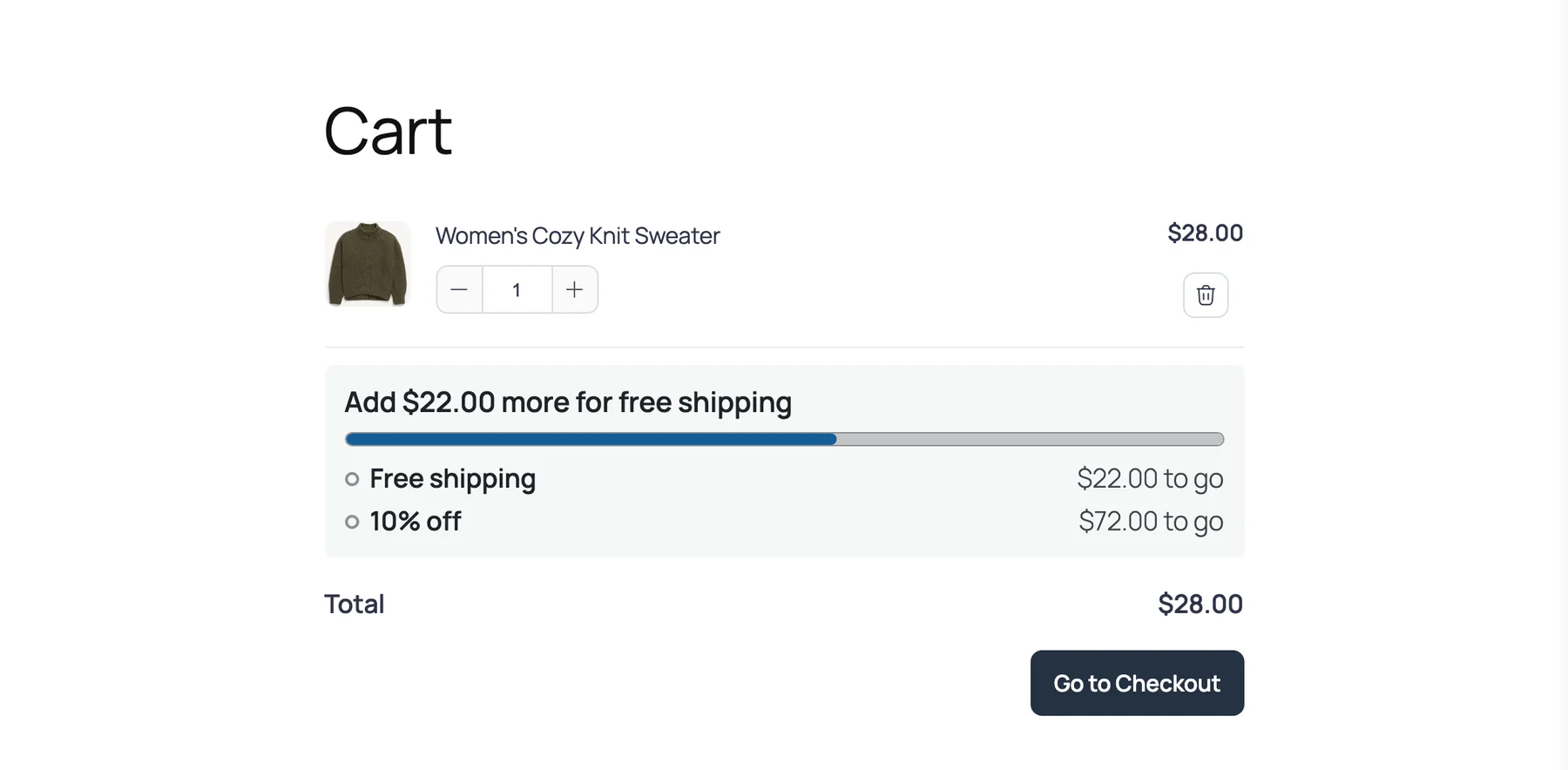
- The bar updates when items, quantities or coupons change.
- A goal is listed only when its reward can be granted to that cart.
- If a reward had to be added or removed while the order was being placed, the order is refused once with “The rewards on your cart changed. Reload the page to review your order, then place it again.”
Other Currencies
Goal amounts are saved in your store currency. If your store sells in more than one currency, each goal amount is converted at the exchange rate the cart is priced at, and the bar shows amounts in the cart’s currency. This works with Multi-Currency Checkout.
Limits
- Rewards are free shipping or a coupon. There’s no free gift reward.
- Free shipping can’t be limited to certain shipping methods or capped at an amount.
- A reward coupon that isn’t stackable is neither shown nor added on a cart that already has another coupon.
- A Frequently Bought Together set discount is the exception: it and a goal’s coupon combine, whichever was added first and whatever either one’s stacking setting says. A code the shopper enters beside them still follows FluentCart’s normal stacking rule.
- A code the shopper applies that can’t combine with a reward coupon replaces the reward coupon. Removing that code brings the reward back.
- Invoice payments, subscription renewals, plan changes and locked checkouts get no bar and no reward.
- Signup fees on subscription products aren’t part of the compared amount.
- The bar has no color or style settings.
- Turning the module off leaves a reward coupon that’s already on a cart there as an ordinary coupon.
Troubleshooting
The bar doesn’t show. Check that at least one goal is saved and its Status reads Ready. Then check the 3 boxes under Show on. A free shipping goal is hidden on carts that don’t need shipping.
The Status column shows a warning. “The coupon is not active” and “Coupon not found in FluentCart” both mean the goal is hidden until you fix the coupon in FluentCart → Coupons.
The coupon wasn’t added at the goal. Look for another coupon on the cart. If the reward coupon isn’t stackable, the first coupon wins. The same happens when the shopper removed the reward coupon earlier. A Frequently Bought Together set discount doesn’t block the reward coupon.
A shopper typed the reward code and it was refused. That’s expected below the goal. The code works only once the cart reaches the goal amount.