
How to Take a 50% Deposit Before You Start Client Work
You quote a project, the client says yes, and you start work on trust. Halfway through, the client goes quiet, and you’ve put in weeks of work with nothing paid.
The usual fix is to take a deposit before client work begins. Doing it by hand means two invoices, splitting the tax yourself and remembering to send the second one. A deposit invoice does the split for you. The client pays 50% from one link, and the moment that payment lands, the balance invoice is issued and emailed on its own.
GT Extensions for FluentCart is my add-on plugin for FluentCart, and deposits are part of its Custom Invoices module. Below, I walk you through one project from the first draft to the paid balance. Take a Deposit Before the Full Invoice lists every deposit rule if you want them in one place.
Before You Start
You need 3 things in place:
- Custom Invoices switched on. Go to FluentCart → GT Extensions, enable Custom Invoices and click Save Settings. It needs FluentCart 1.6.4 or newer.
- Digital or service items only. Deposits work on invoices where every line is Digital / service. An invoice with a physical item can’t take one.
- Working WordPress email, because the balance invoice is emailed automatically.
The invoice is paid in one currency. If you run Multi-Currency Checkout, the Customer can pay in any enabled currency option switches off for deposit invoices.
Create the Project Invoice
Start with the whole job, not the deposit. The client should see every line of the work they’re paying for.
- Go to FluentCart → Invoices → Add invoice.
- Add the client under Find an existing customer, or enter their name and email.
- Add each piece of work with Add custom item, or pick a product from your store. Set Delivery to Digital / service on every line.
- Add a Message for the customer if the scope needs a note, such as what’s included in each phase.
Create and Manage FluentCart Invoices explains every field in the editor, including discounts, tax mode and the invoice layouts.
Ask for 50% Up Front
Under Invoice details, tick Ask for a deposit first. Then set the deposit:
| Setting | For a 50% deposit | Default |
|---|---|---|
| Deposit amount | 50 | 30 |
| Deposit type | % of the total | % of the total |
| Balance due after (days) | The days you give the client after the deposit, such as 14 | 14 |
| Email the balance invoice when it is issued | Ticked | Ticked |
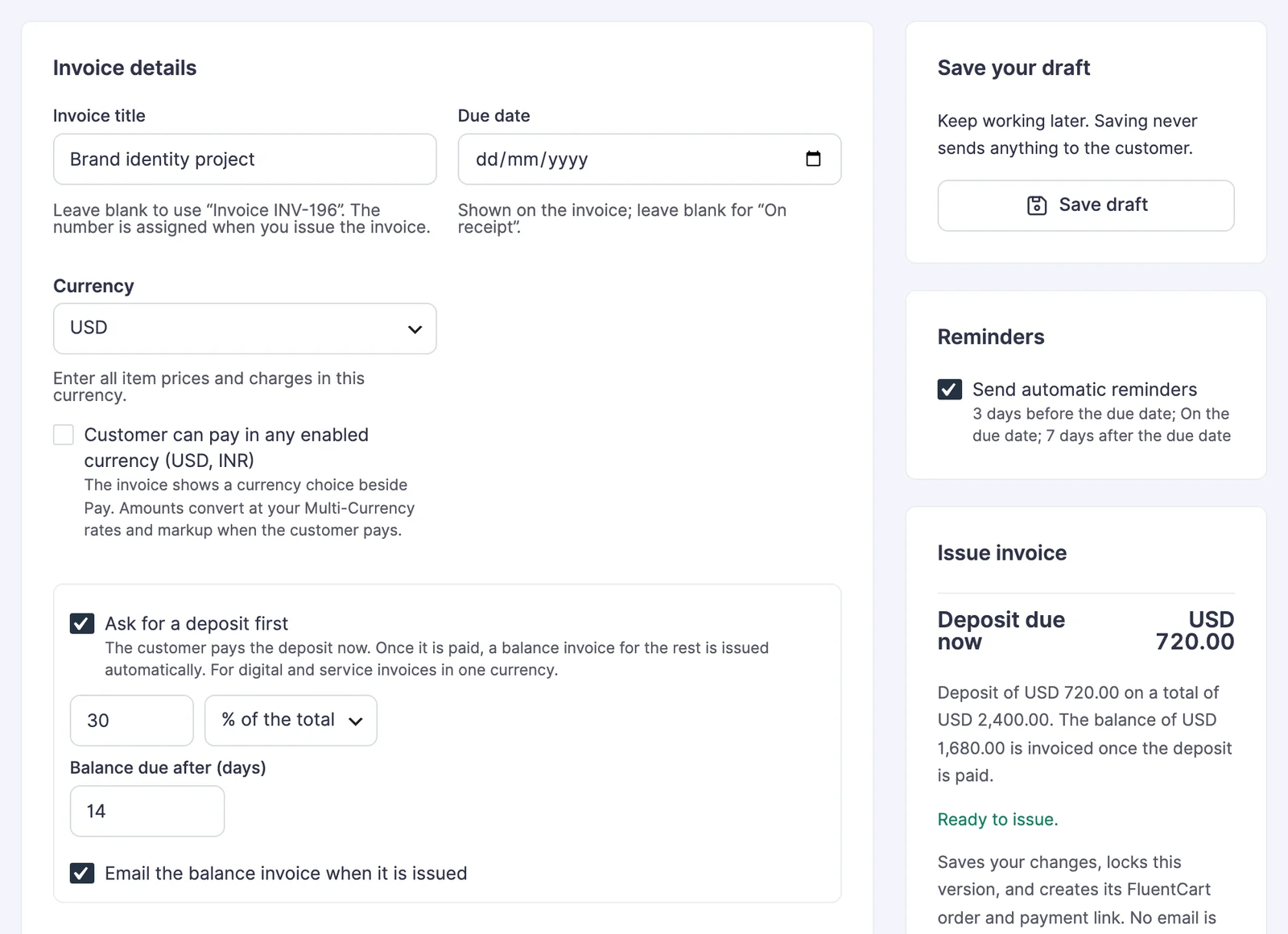
The panel beside the form shows Deposit due now and a line with the full total and the balance to come. It updates as you type, so you can check the split before you save.
A fixed amount works too. Pick fixed amount as the deposit type and enter a figure below the invoice total. A round figure such as USD 1,000 on a USD 4,800 project reads better to some clients than a percentage.
Issue It and Send the Link
- Click Save draft and check the total and the deposit in the panel.
- Click Issue invoice. This locks the invoice and creates its FluentCart order for the deposit only. No email is sent yet.
- Click Email payment link, or copy the link and send it your own way.
Here is how a 50% split works on a USD 3,000 project with no tax:
- The deposit invoice asks for USD 1,500 now.
- The balance invoice asks for the other USD 1,500.
- With a balance due after 14 days, a deposit paid on March 3 gives a balance due on March 17.
When tax applies, each payment carries the same share of the tax as its share of the total. A 50% deposit holds half the tax. Any rounding difference of a cent goes to the balance, so the two payments always add up to the full total.
What Your Client Sees
The client’s invoice still lists every item. Below the items it shows the invoice total, the deposit and Due now, followed by a line about the balance:
“Deposit of USD 1,500.00 on a total of USD 3,000.00. The balance of USD 1,500.00 is invoiced once the deposit is paid.”
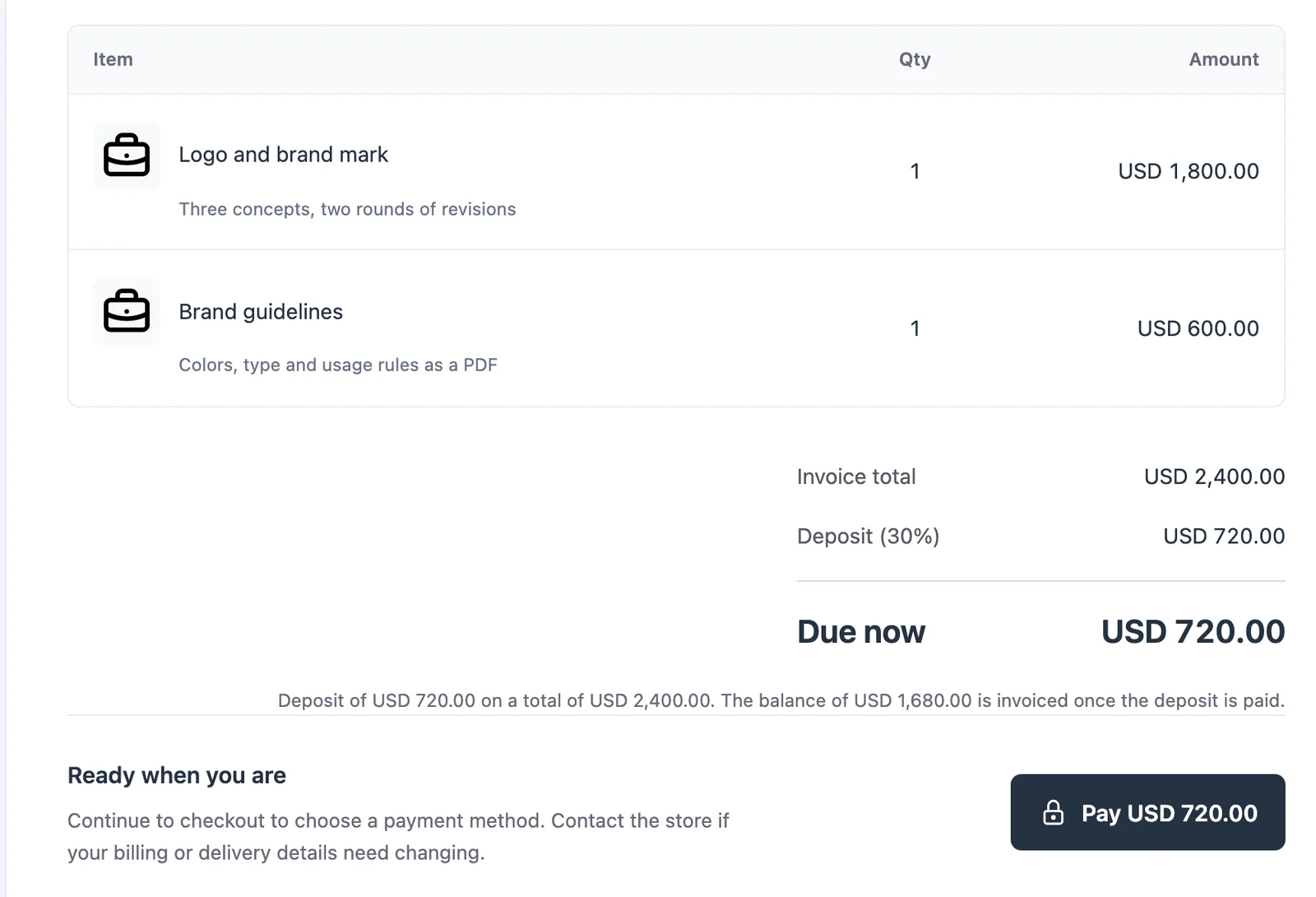
The Pay button takes them to your FluentCart checkout for the deposit amount, where they pick a payment method.
When the Deposit Is Paid
You don’t have to do anything here. As soon as FluentCart records the deposit payment, GT Extensions issues the balance invoice:
- It has its own invoice number and payment link.
- It’s due the number of days you chose.
- It’s emailed to the client, unless you cleared that box.
- It gets your automatic reminders, the same as any issued invoice.
That’s the moment you start the work.
Check It Works
Open the deposit invoice in FluentCart → Invoices after the client pays. You should see Open balance invoice INV-… linking to the new invoice, and the activity log should read:
- “Deposit paid. Creating the balance invoice.”
- “Balance invoice INV-… issued.”
The balance invoice shows Invoice total, Deposit paid as a negative line and Balance due. Its note reads “Balance of … on a total of …. The deposit of … is already paid.”
When Something Goes Wrong
The editor refuses a deposit it can’t split cleanly and tells you why:
| Message | What it means | Fix |
|---|---|---|
| Enter a deposit from 1% to 99%. | The percentage is 0, 100 or more, or not a whole number | Enter a whole number from 1 to 99 |
| Enter a deposit amount above zero. | The fixed amount is empty or 0 | Enter the amount you want up front |
| The deposit must be less than the invoice total of … | The fixed amount is the whole bill or more | Lower the deposit, or send a normal invoice |
| Deposits are available for digital and service invoices. Remove physical items or turn the deposit off. | One line is set to Physical | Change the line to Digital / service, or bill physical goods on a separate invoice |
| The balance invoice could not be created: … Create it manually from Duplicate as draft. | The balance step failed after the deposit was paid | Use Duplicate as draft on the deposit invoice, clear Ask for a deposit first, change the items to the balance amount and issue it |
What It Won’t Do
A deposit invoice is built for one split, and a few limits follow from that:
- It takes 2 payments, the deposit and the balance. For 3 milestones, send 3 separate invoices.
- Deposit and balance invoices can’t repeat on a schedule.
- The amounts are fixed when you issue the deposit invoice, so a later tax-rate change doesn’t move the balance.
- A deposit refund doesn’t touch the balance invoice. Refund in FluentCart, and if the project stops, cancel the balance invoice from its invoice screen.
When the price itself still needs the client’s approval, send a proposal first. How to Sell Services with Quotes, Deposits and Invoices puts the deposit on the proposal, so accepting it opens the deposit payment straight away.