
Handle Renewals and Failed Payments
The first sale is the easy part. The money in a subscription business comes from the hundredth renewal, and most of the support load comes from the ones that fail: an expired card, a bank that wants another approval, a customer who never opened the invoice.
The Subscriptions module creates every renewal as a normal Easy Digital Downloads order, charges it or emails it, and retries on your schedule when payment fails. You set the rules once under Stackless → Settings → Subscriptions.
How a Renewal Order Is Built
On the next payment date, the module creates a pending renewal order from the subscription itself:
- the subscription’s own items, quantities and line totals, never today’s download prices
- its tax, billing address, currency and payment gateway
- the saved payment method from the first order
- any plan switch credit or charge still owed, as a “Plan switch credit” or “Plan switch adjustment” line
The order gets a note saying which subscription it renews, and the subscription gets a note with the order number. Both show the link under Related orders. A duplicate or late scheduled action never bills the same period twice.
Discount codes still discounting the subscription are already part of the line totals. The code is recorded on the renewal order but not applied again, so renewals don’t use up its uses.
Automatic vs Manual Renewals
Each subscription is Automatic or Manual. Checkout decides it from the download’s Renewal mode and the gateway the customer paid with.
| Renewal | What happens on the renewal date |
|---|---|
| Automatic with Stripe or PayPal | The renewal order is charged off-session with the saved method. It’s marked paid when the charge succeeds. |
| Automatic with Polar, Paddle or Dodo Payments | The provider bills on its own schedule. The store doesn’t charge anything and records the renewal when the provider’s webhook reports the payment. |
| Manual | The customer gets the Subscription renewal invoice email with a link to pay the order. |
If an automatic subscription’s gateway can’t charge on its own, the module adds a note to the subscription and sends the renewal invoice instead. A renewal with nothing to pay is completed straight away.
Set the Renewal and Retry Rules
The Renewals and failed payments section has five settings:
- Retry schedule (days): comma-separated days between retries after a failed renewal. Default
1,3,5. Up to 10 entries are used, and each is capped at 60 days. - Manual renewal grace period (days): how long an unpaid manual renewal keeps the subscription active before it goes on hold. 0 to 60, default 0.
- Renewal reminders: email customers before each renewal. On by default.
- Days before renewal: when that reminder goes out. Default 3.
- Days before trial ends: when the Free trial ending email goes out. Default 3, and 0 turns it off.
During a trial, the regular renewal reminder is skipped when the trial ending email already covers the first charge.
What Happens When an Automatic Payment Fails
- The renewal order is marked Failed.
- The subscription goes On hold, and the customer gets the Subscription payment failed email with a link to pay.
- A retry is scheduled using the first number in your retry schedule.
- Each retry charges the same renewal order again. Another failure schedules the next retry.
- When the last retry fails, the renewal order is marked Abandoned and the subscription is cancelled.
With the default 1,3,5, retries run 1 day after the failure, 3 days after that, then 5 days after that. The subscription is cancelled if the third retry fails.
If the payment goes through at any point, the subscription returns to Active, pending retries are removed and the next payment date moves forward.
What Happens When a Manual Renewal Isn’t Paid
- The renewal invoice is emailed when the order is created.
- After the grace period, the subscription goes On hold. The grace period counts from the billing date the order pays for, so an early invoice never takes away paid time. With a grace period of 0, it goes on hold on the billing date.
- The retry schedule then sends the renewal invoice again as a reminder.
- If the order is still unpaid at the end of the schedule, the order is marked Abandoned and the subscription is cancelled.
With 1,3,5, reminders go out 1 day and 4 days after the subscription goes on hold, and it’s cancelled at day 9.
An empty retry schedule behaves differently for each mode. A manual renewal stays on hold until it’s paid or you cancel it. An automatic subscription is cancelled on its first failed payment, because there’s no retry to wait for.
Customers Can Always Pay
A failed or unpaid renewal stays payable through EDD’s payment recovery link. Customers see a “Pay renewal #…” button on their subscription in the account page, and a Pay button next to the order under Related orders.
Once it’s paid, an on-hold subscription returns to Active, retries stop, the next payment date moves forward and the Subscription renewed email goes out. A renewal paid with a newly saved payment method moves the subscription onto that method.
If a customer picks a new payment method while a renewal is waiting for a retry, the next retry uses it. See Let Customers Manage Subscriptions.
Subscription Statuses
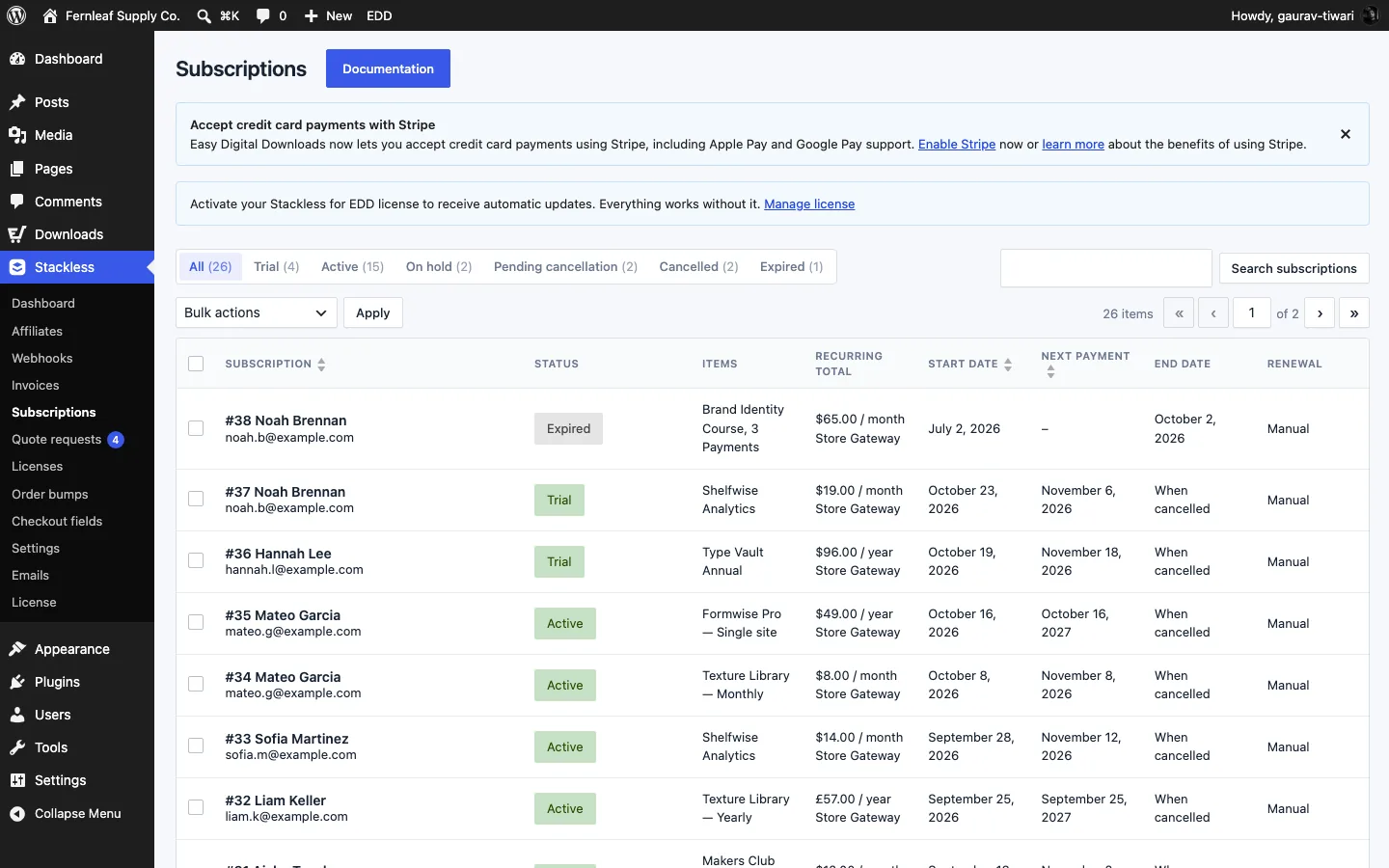
| Status | Meaning |
|---|---|
| Pending | Created at checkout, waiting for the first payment. If EDD marks that order abandoned, the subscription is cancelled. |
| Trial | In a free trial. It moves to Active when the trial ends. |
| Active | Paid and renewing. |
| On hold | A renewal is unpaid, or you paused it. |
| Pending cancellation | Set to end at the close of the paid period. Access continues until then. |
| Cancelled | Ended by you, the customer or the final failed retry. |
| Expired | A fixed-length plan reached its end. |
On a fixed-length plan, the next payment date clears after the last paid period and the subscription expires on its end date. For Polar, Paddle and Dodo Payments, the module also asks the provider to stop billing after that final payment.
The Scheduled actions box on each subscription’s edit screen shows what’s queued next. See Manage Subscriptions in the Admin.
Good to Know
- Renewals, retries, reminders, trial ends and term ends are Action Scheduler jobs in the group
stackless-edd-subscriptions. - If you delete a renewal order, the module won’t recreate it for that period.
- A renewal paid after the subscription was cancelled or expired is recorded, but no dates change.
- A renewal order paid through the recovery link after its cart was changed doesn’t renew the subscription. The module adds a note asking you to review the payment.
- On a copy of your live store, such as staging, renewals aren’t created or charged and customer emails are held. They run once the site is confirmed as the live store.
- Gateway details, like webhooks and saved payment methods, are in each gateway’s guide: Stripe, PayPal, Polar, Paddle and Dodo Payments.