
Open Checkout in a Modal
A buyer clicks Purchase on your sales page and lands somewhere else: the checkout page, wrapped in your theme’s header, menu and footer. The page they were reading is gone, and every link on the new one is a way out.
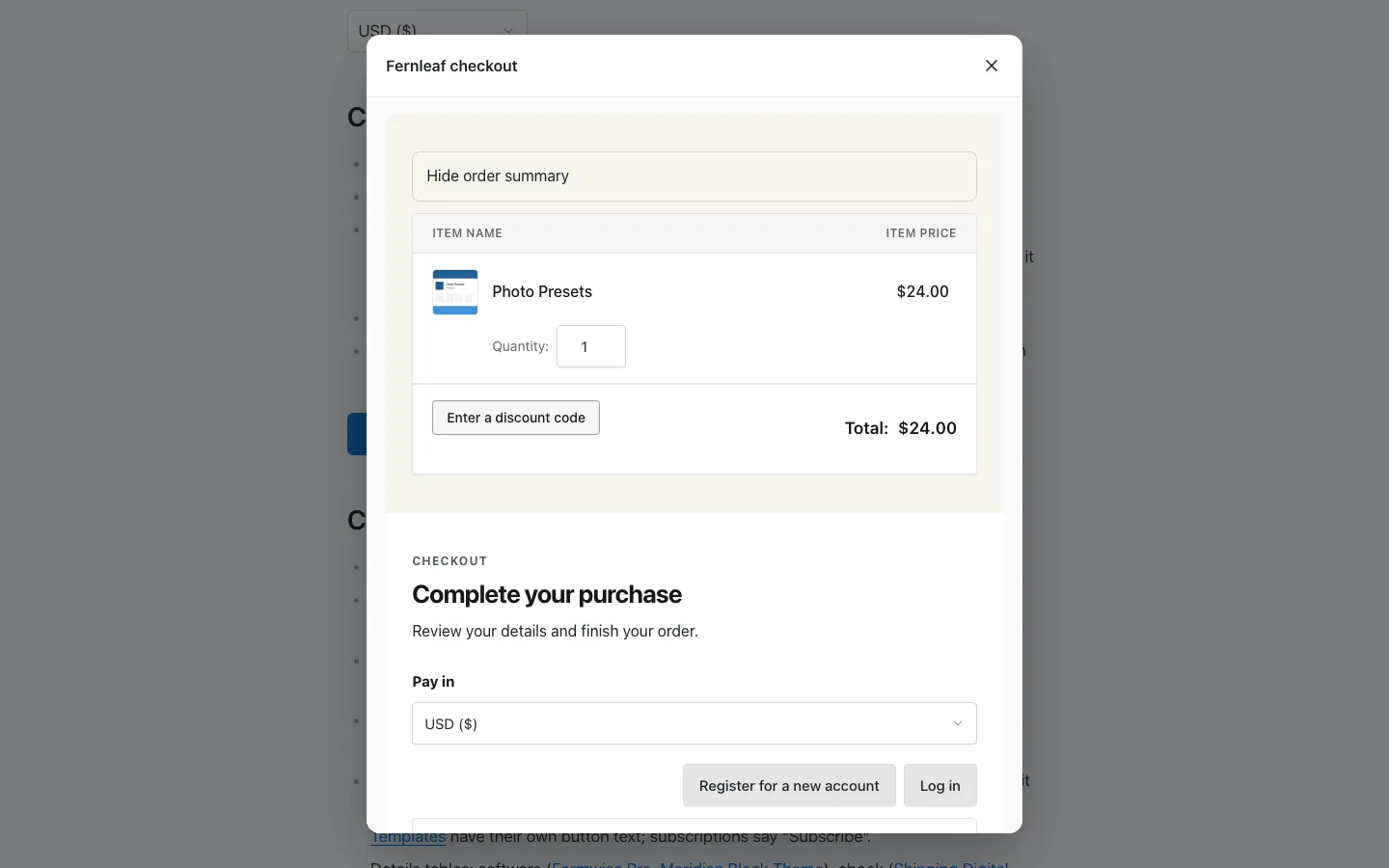
Modal Checkout opens your checkout in a window on top of the page they’re on, so they pay without leaving it. Any button or link can open it, and each one can limit the payment methods it offers.
Turn On the Modal
- Switch on On-page Checkout and Modal Checkout under Stackless → Dashboard. The modal shows On-page Checkout’s embedded checkout. Without it, Modal Checkout stays paused with “Needs the On-page Checkout module enabled.”
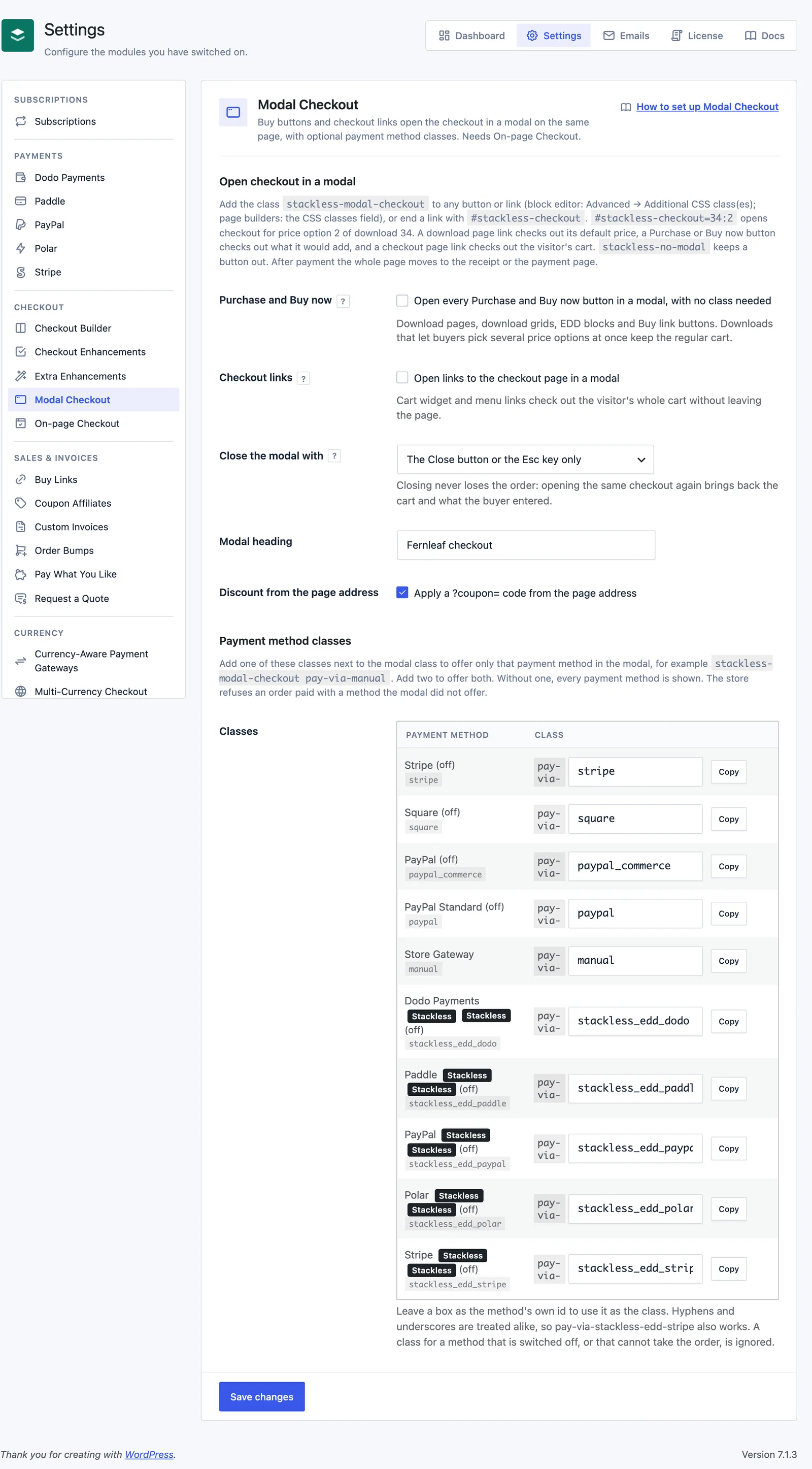
- Go to Stackless → Settings → Modal Checkout. It’s listed under Checkout.
Open the Modal from a Button or Link
Add the class stackless-modal-checkout to a button or link. In the block editor it goes in Advanced → Additional CSS class(es). In page builders, use the CSS classes field. The class also works on a block that wraps the button.
Or end a link with #stackless-checkout. What the modal checks out depends on what was clicked:
- A link to a download page checks out that download at its default price.
- A Purchase or Buy now button checks out what it would add, including the price option and quantity chosen in the purchase form.
- A link to the checkout page checks out the visitor’s cart.
#stackless-checkout=34checks out download 34.#stackless-checkout=34:2checks out price option 2 of download 34.- A page address that ends with
#stackless-checkout=34opens the checkout as soon as the page loads. That suits email and ad links. - A Buy Link for one download, such as
?stackless-edd-buy=34, checks out that download. Signed links and links with several downloads keep working as normal Buy Links.
Add stackless-no-modal to keep a button out. Clicks with Ctrl, Cmd, Shift or Alt held open the link as usual.
Open Every Buy Button Without a Class
Two settings turn the modal on across the store. Both are off by default:
- Purchase and Buy now: “Open every Purchase and Buy now button in a modal, with no class needed”. This covers download pages, download grids, EDD blocks and Buy link buttons. Downloads that let buyers pick several price options at once keep the regular cart. Buttons set to open in a new tab are left alone.
- Checkout links: “Open links to the checkout page in a modal”. Cart widget and menu links check out the visitor’s whole cart without leaving the page.
Limit the Payment Methods a Button Offers
Add a payment method class next to the modal class to offer only that method. For example, stackless-modal-checkout pay-via-manual offers only EDD’s Store Gateway. Add two classes to offer both. Without one, every payment method shows.
Each class is pay-via- plus the gateway’s id. The Classes table under Payment method classes lists every gateway with its id, its class and a Copy button. Switched-off gateways are marked “off”. For the Stackless gateways:
| Stackless gateway | Class |
|---|---|
| Stripe | pay-via-stackless_edd_stripe |
| PayPal | pay-via-stackless_edd_paypal |
| Polar | pay-via-stackless_edd_polar |
| Paddle | pay-via-stackless_edd_paddle |
| Dodo Payments | pay-via-stackless_edd_dodo |
- Hyphens and underscores count as the same, so
pay-via-stackless-edd-stripeworks too. - To use a shorter class, type it in the gateway’s box, such as
polarforpay-via-polar. It can be up to 40 characters, and the id keeps working. A name another gateway already uses, or another gateway’s id, isn’t saved. - Each gateway copy made with Payment Gateway Tools has its own id, such as
stackless_edd_polar_copy2, and its own row in the table.
The limit is enforced on the server, not only in the browser. The modal hides the other methods, and an order placed with one of them is refused with “This payment method is not offered for this purchase. Choose one of the payment methods shown.”
- A class for a gateway that’s switched off, or that can’t take the order, is ignored. If none of the named gateways can take it, every gateway shows, so a buyer is never left with none.
- An order with nothing to pay skips the check.
- The limit applies inside the modal only. The classes don’t change the checkout page itself.
What Happens After Payment
After the buyer completes the purchase, the whole page moves to the receipt or the payment page, not just the modal. Hosted payment pages, such as PayPal’s approval page or Polar’s checkout, open in the full window.
A download checkout runs on its own cart, so the visitor’s store cart stays as it was. A checkout link pays for the store cart itself.
Closing the modal never loses the order. Opening the same checkout again brings back the cart and what the buyer entered.
Other Settings
- Close the modal with: The Close button or the Esc key only (default), or The Close button, the Esc key or a click outside.
- Modal heading: up to 80 characters. Empty by default, which shows “Secure checkout”.
- Discount from the page address: “Apply a ?coupon= code from the page address”. On by default. A
?coupon=in the clicked link wins over the page address.
For Developers
- On a button with the modal class,
data-stackless-product(a download id ordownload:price),data-stackless-quantityanddata-stackless-couponset what it checks out. Adata-stackless-modal-checkoutattribute works like the class. stacklessEddModalCheckoutApi.open('34:2', 1, 'CODE', ['manual'])opens a checkout from your own script.openCart()andclose()are there too.- A
stackless-edd:modal-checkoutevent fires on the document for open, ready, error, close and complete. When the page has adataLayer, it also gets astackless_edd_modal_checkoutevent. - The
stackless_edd_modal_checkout_enabledfilter turns the modal off on a page, andstackless_edd_modal_checkout_configfilters its settings.
Limits
- The modal doesn’t load on the checkout page itself.
- Quantities run from 1 to 100. A buyer can only change the quantity when cart quantities are turned on in EDD and for that download.
- Coupon codes are capped at 64 characters, and one button can name up to 10 payment method classes.
- A checkout that hasn’t loaded after 20 seconds shows “Checkout is taking too long to load.” and an “Open the checkout page instead” link.
- Only pages on your own site can embed the checkout.
- New download checkouts count toward the New checkouts per connection limit in On-page Checkout.