
Manage Subscriptions in the Admin
Sooner or later a subscriber asks you to move their billing date, fix an address or cancel on their behalf. If that means digging through order meta or a database row, you’ll put it off, and the subscriber waits.
The Subscriptions module gives you a list screen, a full edit screen, ten emails and a dashboard widget for recurring revenue. The screens live under Stackless → Subscriptions and need the edit_shop_payments capability.
The Subscriptions List
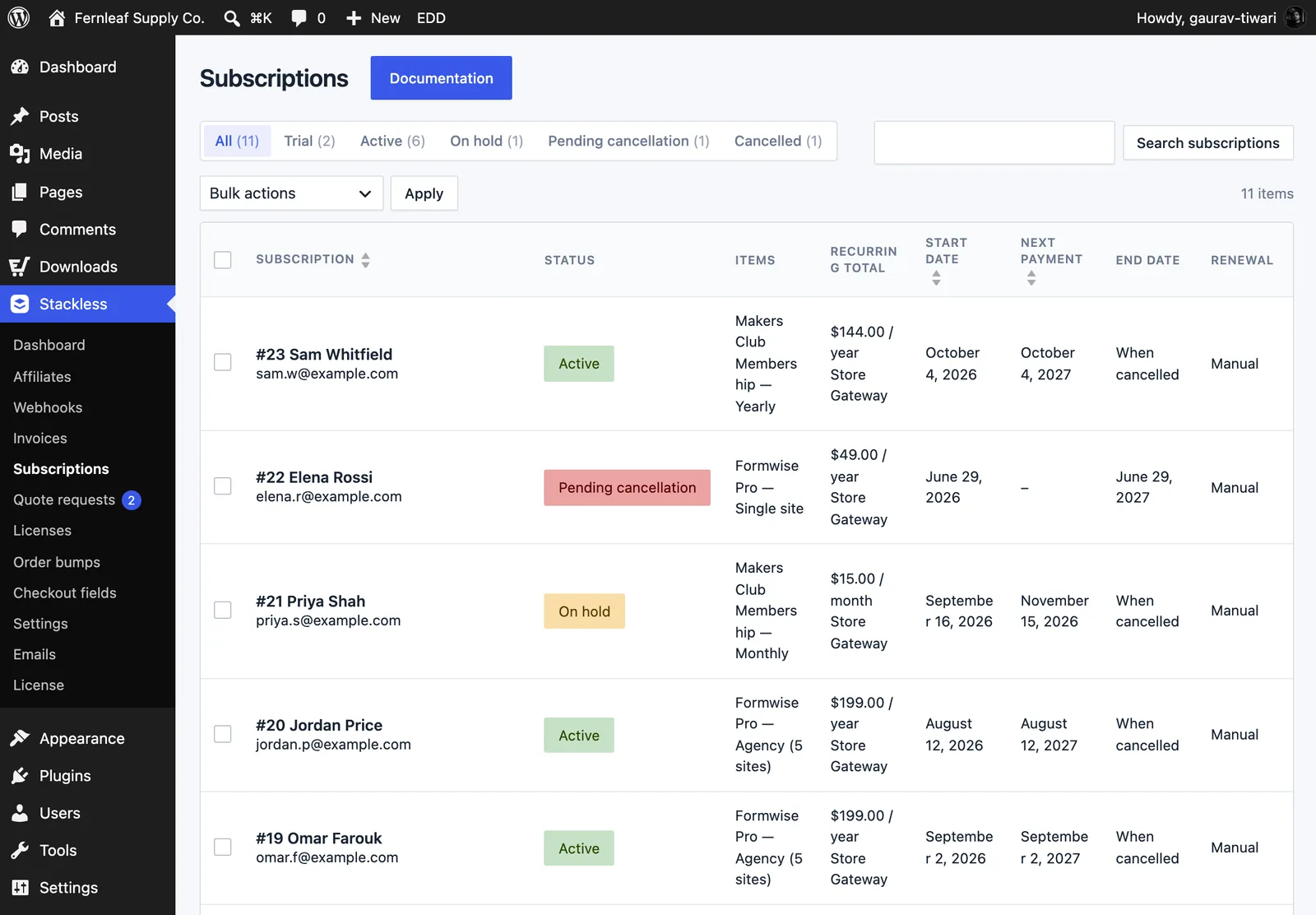
The list has an All view plus a view for each status that has subscriptions: Pending, Trial, Active, On hold, Pending cancellation, Cancelled and Expired, each with a count. The search box matches the subscription ID, email, customer name or item name.
Columns:
- Subscription, with the customer name and email
- Status
- Items
- Recurring total, with the payment method
- Start date, Next payment and End date (“When cancelled” for plans that renew until cancelled)
- Renewal: Automatic, Manual, or Gateway when Polar, Paddle or Dodo Payments bills it
Subscription, Start date and Next payment are sortable. Bulk actions: Cancel at period end, Cancel now, Put on hold and Reactivate.
Edit a Subscription
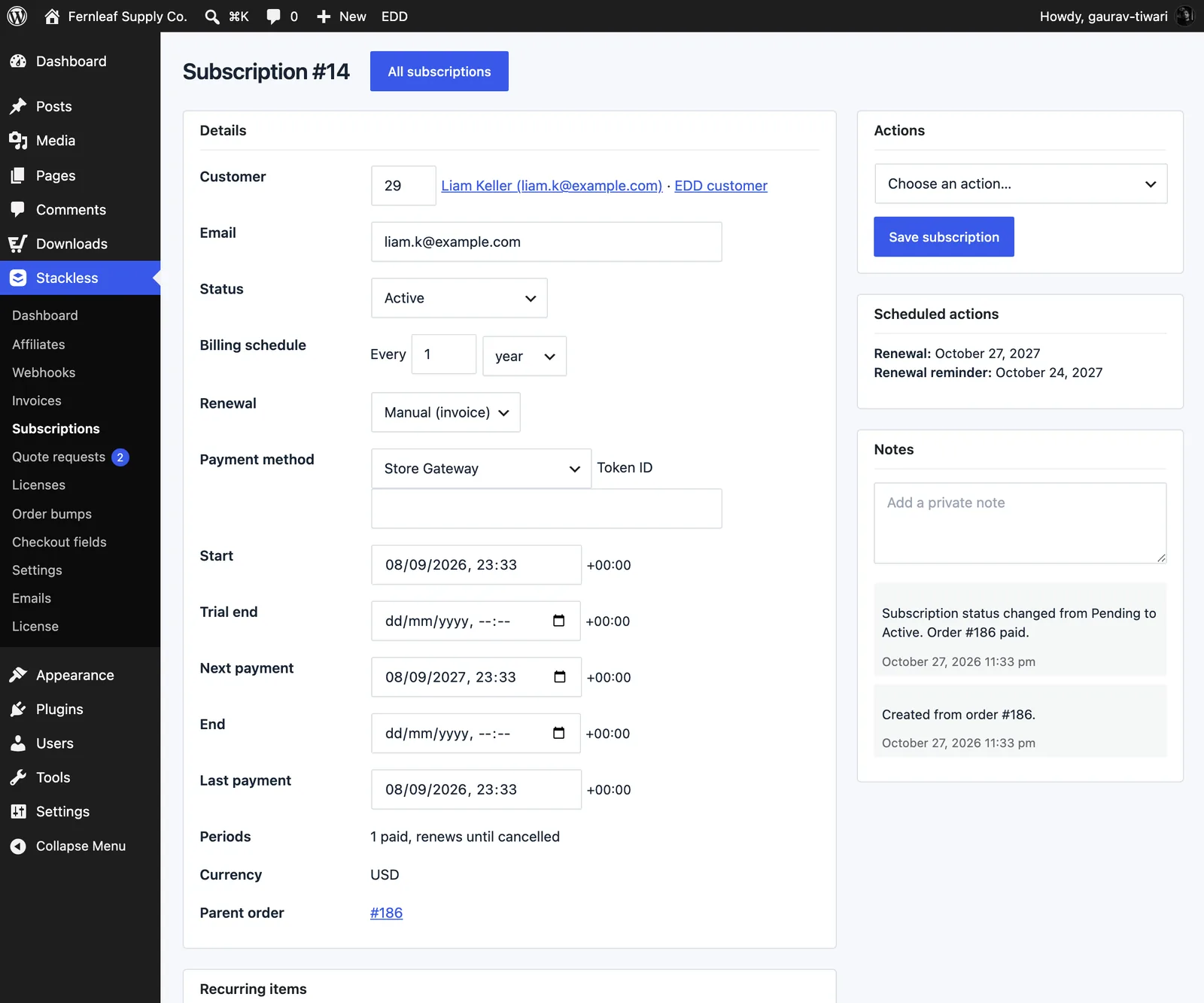
Click a subscription to open its edit screen. The Details box lets you change:
- Customer (user ID), with links to the WordPress user and the EDD customer, and Email.
- Status: a status change runs the same steps as the matching action, so schedules and gateways follow.
- Billing schedule: Every 1 to 365 days, weeks, months or years.
- Renewal: Automatic or Manual (invoice).
- Payment method and Token ID: the gateway and the saved payment method ID it charges.
- Trial end, Next payment and End: dates in your site’s timezone. Start and Last payment are read-only.
Periods shows how many billing periods are paid, like “3 of 12 paid” or “1 paid, renews until cancelled”. Currency and Parent order sit below it.
Below Details:
- Recurring items: edit each item’s quantity and line total (excl. tax). Tick Recalculate taxes from the address after saving item changes when taxes should follow the address. Any switch amount carried to the next renewal shows here.
- Billing address: name, address lines, city, state or region, postal code and country code.
- Related orders: the parent, renewal, early renewal and switch orders.
The side column has three boxes:
- Actions: Process renewal now, Retry failed payment, Email renewal invoice, Email renewal reminder, Put on hold, Reactivate, Cancel at period end and Cancel now. Pick one, then click Save subscription.
- Scheduled actions: the next renewal, trial end, end of term, payment retry, overdue check, renewal reminder and trial reminder.
- Notes: the subscription’s history, plus a box to add a private note.
EDD’s order details screen gets a Subscriptions panel too. It lists each linked subscription and whether the order created, renewed or switched it.
Date and Action Rules
- The next payment date must be in the future and before the end date.
- Changing the next payment date also moves the billing day for later renewals.
- For Polar, Paddle and Dodo Payments subscriptions, the next payment date can’t be changed, and schedule changes here don’t change the provider’s billing.
- Retry failed payment only works on an on-hold subscription with an unpaid renewal.
- Email renewal invoice needs an unpaid renewal order to send.
The Ten Subscription Emails
All ten are on Stackless → Emails, where you can turn each one on or off and change its subject and heading. Admin emails also take a list of recipients, and empty uses the admin notification emails from Downloads → Settings → Emails. Every email is on by default.
| Sent to | When | |
|---|---|---|
| New subscription (admin) | Store | A subscription starts. |
| New subscription | Customer | Their subscription starts. |
| Subscription renewal invoice | Customer | A manual renewal is due, with a link to pay. Also used for unpaid-renewal reminders. |
| Subscription renewed | Customer | A renewal payment succeeds. |
| Subscription payment failed | Customer | A renewal payment fails, with a link to pay. |
| Upcoming renewal reminder | Customer | A few days before each renewal. |
| Free trial ending | Customer | A few days before a free trial ends. |
| Subscription cancelled | Customer | A subscription is cancelled or set to end at the close of the paid period. |
| Subscription expired | Customer | A fixed-length subscription reaches its end. |
| Subscription switched | Customer | The customer switches to another plan. |
Subjects and headings can use {site_title}, {subscription_number}, {order_number} and {next_payment_date}. Each email is wrapped in EDD’s own email template, so it matches your receipts.
To change an email’s body, copy it from templates/subscriptions/emails/ in the plugin to stackless-edd/subscriptions/emails/ in your theme. See Emails for the rest of the email settings.
The Dashboard Widget
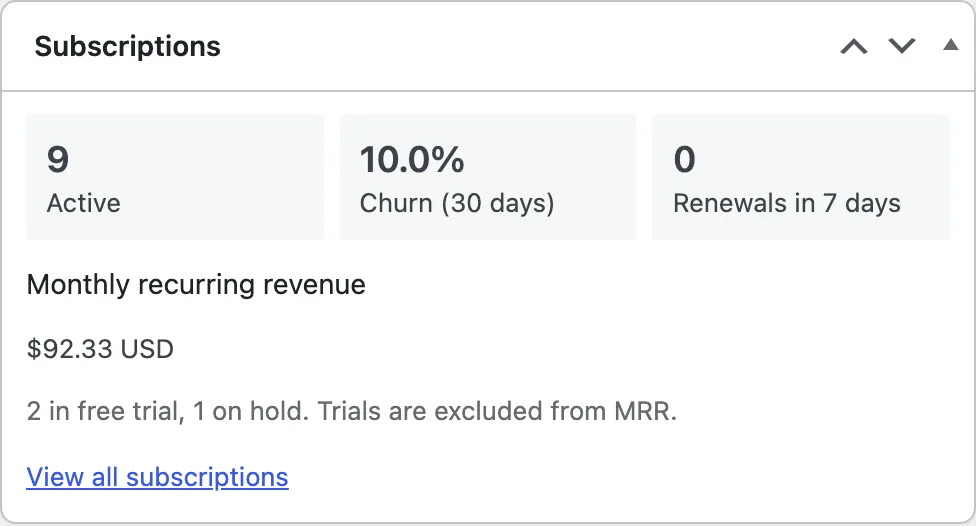
The Subscriptions widget on the WordPress dashboard shows:
- Active: subscriptions that are active, in trial or pending cancellation
- Churn (30 days): subscriptions cancelled or expired in the last 30 days, divided by those plus the ones still active
- Renewals in 7 days
- Monthly recurring revenue, one line per currency, with each plan converted to a monthly amount
- trial and on-hold counts, up to 10 upcoming renewals with links, and View all subscriptions
Trials and on-hold subscriptions aren’t counted in MRR. The numbers are cached for up to an hour and refresh when a subscription changes status or a renewal is paid.
Coexisting with EDD Recurring Payments
Stackless pauses its Subscriptions module while EDD Recurring Payments is active, so the two never process the same renewals. Its card on Stackless → Dashboard shows “Paused because EDD Recurring Payments is active and does the same job.”
Limits
- There’s no importer from EDD Recurring Payments.
- MRR is reported per currency and isn’t converted into one total.
- Changing the billing schedule here doesn’t change what Polar, Paddle or Dodo Payments bill. Change it at the provider.
- For renewal timing and retries, see Handle Renewals and Failed Payments.