
Payment Alerts, Coupon Links and Checkout Guard
A live payment fails overnight and nobody notices until a customer writes in. Your own test orders create customer accounts and land in your CRM. A coupon link does nothing when the visitor’s cart is still empty, and a bot can try a pile of stolen cards before you wake up.
Free in Lite: this module is also in Stackless Lite for EDD, the free edition, and works the same way there, except the email for failed live payments, which needs Stackless for EDD.
Extra Enhancements closes those gaps with five small fixes on one settings page. Each has its own switch.
Turn On Extra Enhancements
Switch on Extra Enhancements under Stackless → Dashboard, then open Stackless → Settings → Extra Enhancements. It’s listed under Checkout.
Most features start on: payment alerts, per-download checkout, coupon links, the throwaway email check and a limit of 10 orders per hour. Internal emails do nothing until you add an address.
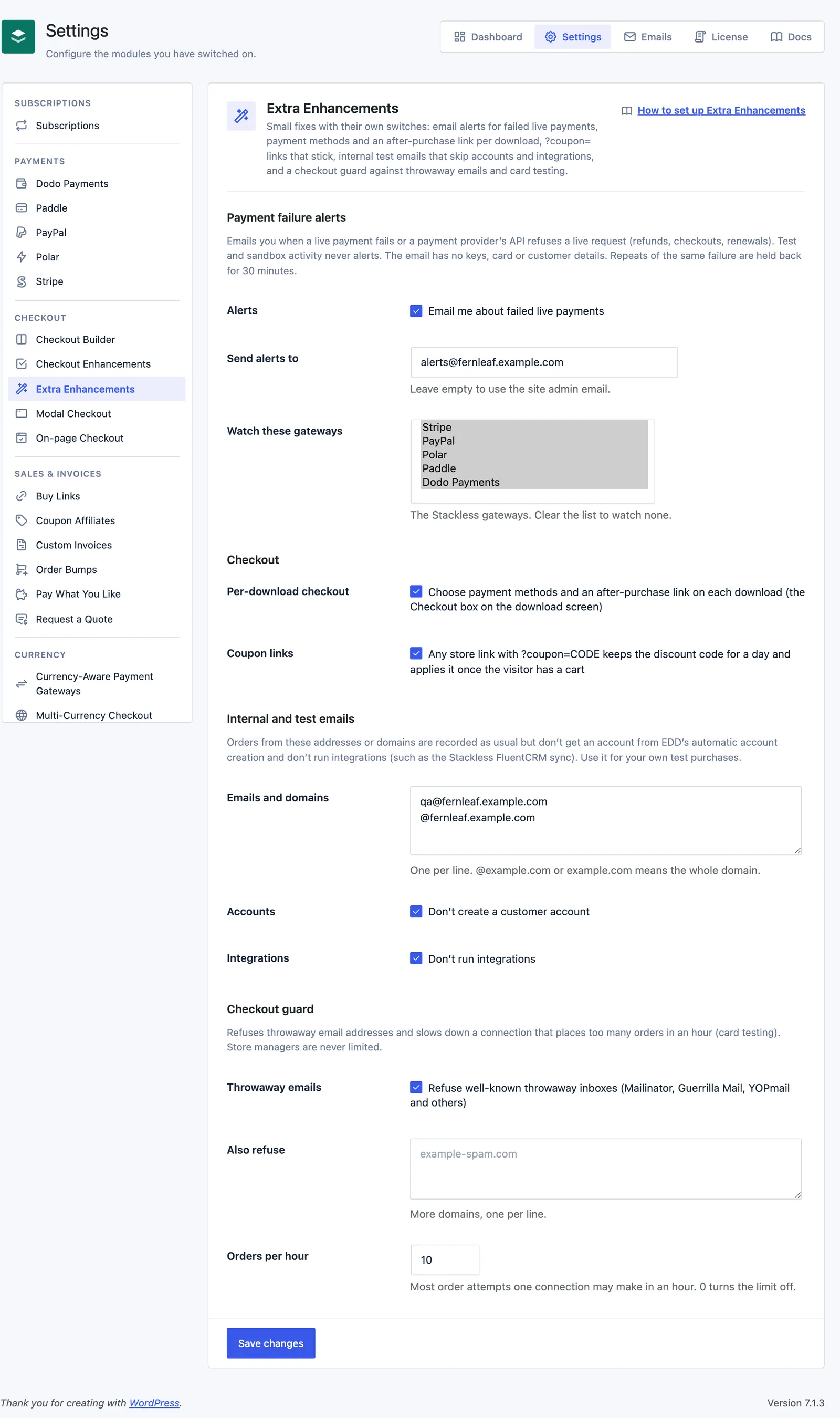
Get an Email When a Live Payment Fails
Under Payment failure alerts:
- Alerts: “Email me about failed live payments”. On by default.
- Send alerts to: the address that gets the alerts. Empty by default, which uses the site admin email.
- Watch these gateways: Stripe, PayPal, Polar, Paddle and Dodo Payments, all selected by default. These are the Stackless gateways. Copies made with Payment Gateway Tools count with their gateway. Clear the list to watch none.
An alert goes out in two cases:
- A live order paid through a watched gateway changes to Failed.
- A live API request Stackless makes to that gateway fails, such as a refund, a checkout or a renewal.
Test and sandbox activity never alerts. Card declines and lookups that find nothing aren’t treated as API errors, so a decline alerts only when its order changes to Failed.
The plain-text email has a subject like “[Shop] Stripe failure on example.com”. It lists the time in UTC, the order with a link to review it, the operation, the error code, the HTTP status, any provider debug or request ID and a link to the gateway settings. Keys, card and customer details are left out.
The same order or API error alerts once per 30 minutes. Mail goes out through Action Scheduler, never during checkout.
To test delivery, run wp stackless-edd payment-alert-test. It sends an alert marked [TEST].
Set Payment Methods and an After-Purchase Link per Download
With Per-download checkout on (the default), every download gets a Checkout box in the sidebar of its edit screen.
- Payment methods: tick the gateways that may sell this download. Leave all unticked to allow every payment method. A gateway you chose and later switched off shows “(off)”.
- After payment, send buyers to: a page on this site such as
/welcome/, or a fullhttps://address on another site. Leave it empty to show EDD’s purchase confirmation page.
When a cart holds downloads with different choices, buyers only see the payment methods they all allow. The method is checked again when the order is placed, so a hidden method can’t be forced through.
The redirect only happens once the order is complete. A payment that’s still open, such as a hosted checkout the provider hasn’t confirmed yet, keeps EDD’s confirmation page. Renewals always show the confirmation page. If several downloads in one order have a link, the first one wins, and each order redirects only once.
Share Coupon Links
With Coupon links on, any store link with ?coupon=CODE remembers the discount code for a day. It applies the code as soon as the visitor has something in the cart. EDD checks the discount’s own rules and shows its usual message at checkout.
- A code EDD refuses is dropped, not tried again.
- EDD’s own
?discount=links keep working as before. - Buy Links and On-page Checkout apply their own coupons, so their links are left alone.
- Inside an On-page Checkout or Modal Checkout frame, the cart belongs to that frame, so a remembered code waits for the store cart instead.
Keep Test Orders Out of Accounts and Integrations
Under Internal and test emails, list the addresses you use for your own test purchases:
- Emails and domains: one per line.
@example.comorexample.commeans the whole domain. Empty by default. - Accounts: “Don’t create a customer account”. On by default. This stops EDD’s automatic account creation for these orders.
- Integrations: “Don’t run integrations”. On by default.
Orders from a listed address are recorded as usual. Integrations means Stackless code that checks the internal list before it syncs, such as the FluentCRM sync and its triggers. Each order gets an “Internal email” note saying what was skipped, and the order meta _stackless_edd_internal_email set to yes.
Your own code can ask the same question before it syncs anything. This returns true for a listed address:
$skip = apply_filters( 'stackless_edd_skip_integrations', false, $email );Block Throwaway Emails and Card Testing
Under Checkout guard:
- Throwaway emails: refuses well-known throwaway inboxes such as Mailinator, Guerrilla Mail and YOPmail, about 60 services in all. On by default.
- Also refuse: more domains, one per line. Empty by default.
- Orders per hour: the most order attempts one connection can make in a rolling hour. Default 10. 0 turns the limit off.
A refused address sees “Please use an email address you keep. We send your receipt and downloads there.” Over the limit, the buyer sees “Too many order attempts from your connection. Please try again in an hour, or contact us for help.” Store managers are never limited or refused.
The count is keyed to the visitor’s IP address, but only a salted hash of it is stored, and it expires after an hour.
Limits
- Alerts only watch the gateways Stackless adds, not EDD’s own Stripe or PayPal.
- An alert the mailer refuses is retried twice, five minutes apart. After that, Stackless logs an error under Downloads → Tools → Debug Log.
- A cart whose downloads share no payment method can’t be paid.
- Coupon codes in links can use letters, numbers, dots, hyphens, underscores and @, up to 50 characters. A new coupon link replaces the remembered code.
- An internal domain matches that exact domain, not its subdomains. The checkout guard’s domain lists do cover subdomains.
- Every order attempt counts toward the hourly limit, not only completed orders. Buyers on one shared connection, such as an office network, share the count.
- There’s no hosted-only payment switch in this edition. EDD already hides the payment method list when only one method can take the order.