
Run Your Store With AI Agents
Checking last month’s sales, finding a customer’s license key or resending an invoice takes a dozen clicks across EDD screens. An AI agent can do it in one sentence, but only if it has a safe, permission-checked way into your store that doesn’t hand it your admin password.
The AI Agents module gives agents such as Claude, ChatGPT and Cursor that way in. It adds store, order, customer, download and report commands, offers three ready-made agent skills and works through the free Site Agent plugin. Agents act as a WordPress user you choose, with that user’s permissions.
What You Need
- Site Agent: a free WordPress plugin that gives AI agents an authenticated MCP connection to your site. Install it on the store.
- Access and PHP execution turned on under Tools → Site Agent. The skills run a single Stackless function,
stackless_edd_agent(), through it. - A WordPress user for the agent with only the access the job needs. A Shop Manager can read orders, customers, downloads and reports. A Shop Accountant can read orders and reports.
Turn On AI Agents
- Go to Stackless → Dashboard and switch on AI Agents. It’s off by default.
- Open Stackless → Settings → AI Agents. The Agent skills panel checks Site Agent for you.
- Follow its message. Without Site Agent it asks you to install it. With Site Agent installed but switched off, it links to Tools → Site Agent. When everything is on, it says “Site Agent (version) is ready.”
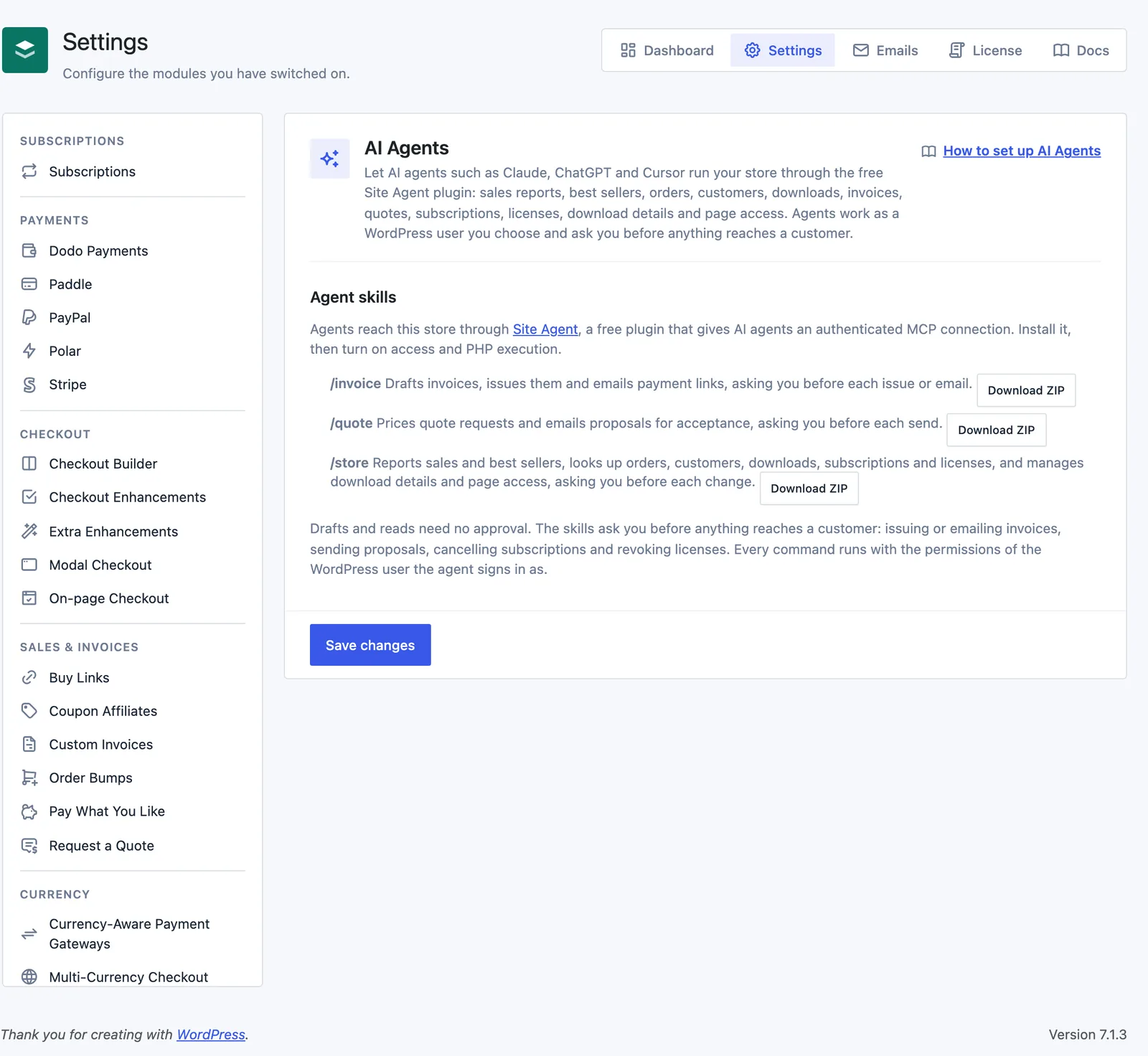
Install the Agent Skills
A skill is a folder with a SKILL.md file that teaches an agent a workflow. Stackless ships three:
| Skill | What it does | Needs |
|---|---|---|
/invoice | Drafts invoices, issues them and emails payment links, asking you before each issue or email. | Custom Invoices |
/quote | Prices quote requests and emails proposals for acceptance, asking you before each send. | Custom Invoices and Request a Quote |
/store | Reports sales and best sellers, looks up orders, customers, downloads, subscriptions and licenses, and manages download details and page access, asking you before each change. | AI Agents |
With Site Agent 0.4 or later, connected agents find the skills on their own as stackless-edd-invoice, stackless-edd-quote and stackless-edd-store. Only skills whose modules are on are listed, so an agent never reads a workflow that can’t run.
Downloading a skill is still worth it. Click Download ZIP next to it. The ZIP holds SKILL.md, a scripts/stackless.py helper for terminal agents, an INSTALL.md filled in with your site’s address and a site-agent.env.example file. It never contains passwords or keys.
- Claude Code: unzip to
~/.claude/skills/store/, or.claude/skills/store/inside a project. - Claude Desktop and claude.ai: upload the ZIP under Settings → Capabilities → Skills.
- Other agents: check how your agent loads
SKILL.mdfolders.
Connect Your Agent
Pick one of the two ways INSTALL.md describes.
Site Agent as an MCP Server
This works in any MCP client and needs no local files. Add your site’s Site Agent endpoint as a server:
https://yourstore.com/wp-json/site-agent/v1/mcpSign in with OAuth if your Site Agent version and client both support it. Otherwise, create an Application Password under Users → Profile → Application Passwords and enter it in the client’s private connection settings. Treat an authenticated URL like the password itself.
The Bundled Script
Terminal agents can use scripts/stackless.py. It needs Python 3.8 or newer and only the standard library. Put your credentials in ~/.env on the computer that runs the agent:
SITE_AGENT_URL=https://yourstore.com
SITE_AGENT_USER=your-wordpress-username
SITE_AGENT_APP_PASSWORD=xxxx xxxx xxxx xxxx xxxx xxxx
What Agents Can Do
Every command runs as the signed-in WordPress user and checks that user’s capabilities. A command whose module is off comes back as an unknown command, with a note that its module may be off. Agents start with context (site, user, store currency, timezone, today’s date and which modules are on) and commands (everything this site supports).
| Commands | What they do | Capability | Module |
|---|---|---|---|
store.summary, report.downloads | Orders, money collected, refunds and net per currency for a date range; best-selling downloads | view_shop_reports | AI Agents |
order.list, order.get | Orders with items, totals, discounts, address, payment, refunds, notes and linked subscriptions or invoice | edit_shop_payments | AI Agents |
customer.list, customer.get | Customers with lifetime value, emails and recent orders | EDD’s view customers role (view_shop_reports by default) | AI Agents |
download.list, download.get | Downloads with prices, variable prices, files, sales, earnings and subscription terms | edit_products | AI Agents |
subscription.list, .get, .summary, .cancel, .reactivate | Look up subscriptions, count them with monthly recurring revenue, cancel or resume | edit_shop_payments | Subscriptions |
license.list, .get, .set_status, .remove_site, .resend | Find keys, activate, deactivate or revoke, free a site slot, resend keys | edit_shop_payments | Software Licensing |
lookup and invoice.* | Draft, preview, issue, send, duplicate, cancel, reopen, mark paid and schedule invoices | edit_shop_payments | Custom Invoices |
quote.* | List, record, price, send and withdraw quote proposals | edit_shop_payments | Request a Quote |
product.details.get, .set | Read and update a download’s details table | edit_product on that download | Product Details Table |
page_access.pages, .add, .remove | See and change which downloads unlock which pages | edit_pages | Page Access |
Reports take from and to as YYYY-MM-DD in the site’s timezone and default to the last 30 days. Lists take page and per_page (20 by default, up to 100). Money stays per currency and is never added across currencies.
Run a Command From PHP
The same commands work from your own code through stackless_edd_agent(). It needs a signed-in user, returns an array with ok and never throws:
$result = stackless_edd_agent('store.summary', ['from' => '2026-10-01', 'to' => '2026-10-31']);
if ($result['ok']) {
    print_r($result['by_currency']);
} else {
    error_log($result['error']);
}
What Agents Can and Can’t Change
Reads and drafts need no approval. These commands accept dry_run, which validates the change and shows what would happen without doing it. The skills run the dry run first and ask you before the real call:
- cancelling or reactivating a subscription
- changing a license’s status, removing a site or resending keys
- emailing an invoice or reminder, marking it paid or scheduling it
- sending a quote proposal
- changing a download’s details or which pages it unlocks
Issuing an invoice needs the signature that invoice.get returns for the draft, and it doesn’t send an email. License keys come back masked unless the agent asks for reveal.
There are no Stackless commands to refund or edit orders, change download prices or files, create or delete downloads, delete customers or change any settings.
For Developers
Modules add command families through three filters on StacklessEDD\Core\Agent:
stackless_edd_agent_command($result, string $command, array $input): return an array for commands you own, and$resultunchanged otherwise. Check capabilities yourself.stackless_edd_agent_commands(array $commands): add'family.verb' => 'one-line description'.stackless_edd_agent_context(array $context): add facts an agent needs before it acts.
add_filter('stackless_edd_agent_commands', function (array $commands) {
    $commands['coupon.count'] = 'Number of active EDD discount codes.';
    return $commands;
});

add_filter('stackless_edd_agent_command', function ($result, $command, $input) {
    if ($result !== null || $command !== 'coupon.count') {
        return $result;
    }
    if (!current_user_can('manage_shop_discounts')) {
        return ['ok' => false, 'error' => 'This user cannot manage discounts.'];
    }
    return ['ok' => true, 'count' => count(edd_get_discounts(['status' => 'active', 'number' => 999]))];
}, 10, 3);
Good to Know
- The approval step lives in the skills. The commands themselves only check the user’s capabilities, so a custom script that skips
dry_runruns the change straight away. - Site Agent’s PHP execution runs with the agent user’s full privileges, beyond Stackless commands. Turn it on only on a site you manage, and connect as a user with the least access the job needs.
- To cut an agent off, turn Site Agent off or revoke its Application Password in the WordPress profile.
- On a staging copy, customer emails and charges stay held even when an agent asks. See Troubleshooting.
store.summaryandreport.downloadsread up to 5,000 orders per request. A longer range comes back marked as truncated, so ask for a shorter one.- Downloading a skill ZIP needs the
manage_shop_settingscapability and PHP’s zip extension on the server. - Invoice and quote commands belong to their own modules and work whenever those modules are on, even with AI Agents off. See Custom Invoices and Request a Quote.