
Let Customers Manage Subscriptions
Every “please cancel my plan” or “can I move to yearly” email costs you time, and the ones that wait too long turn into chargebacks or lost customers. Subscribers want to handle these things themselves, right away.
The Subscriptions module adds a Subscriptions tab to the customer account page. Customers see every subscription and can pay a missed renewal, renew early, cancel, switch plans and change the payment method that renews them. You decide which of these they get under Stackless → Settings → Subscriptions.
The Subscriptions Tab
The tab appears on the account page built with the [stackless_edd_account] shortcode. See The Customer Account Page for setting that page up.
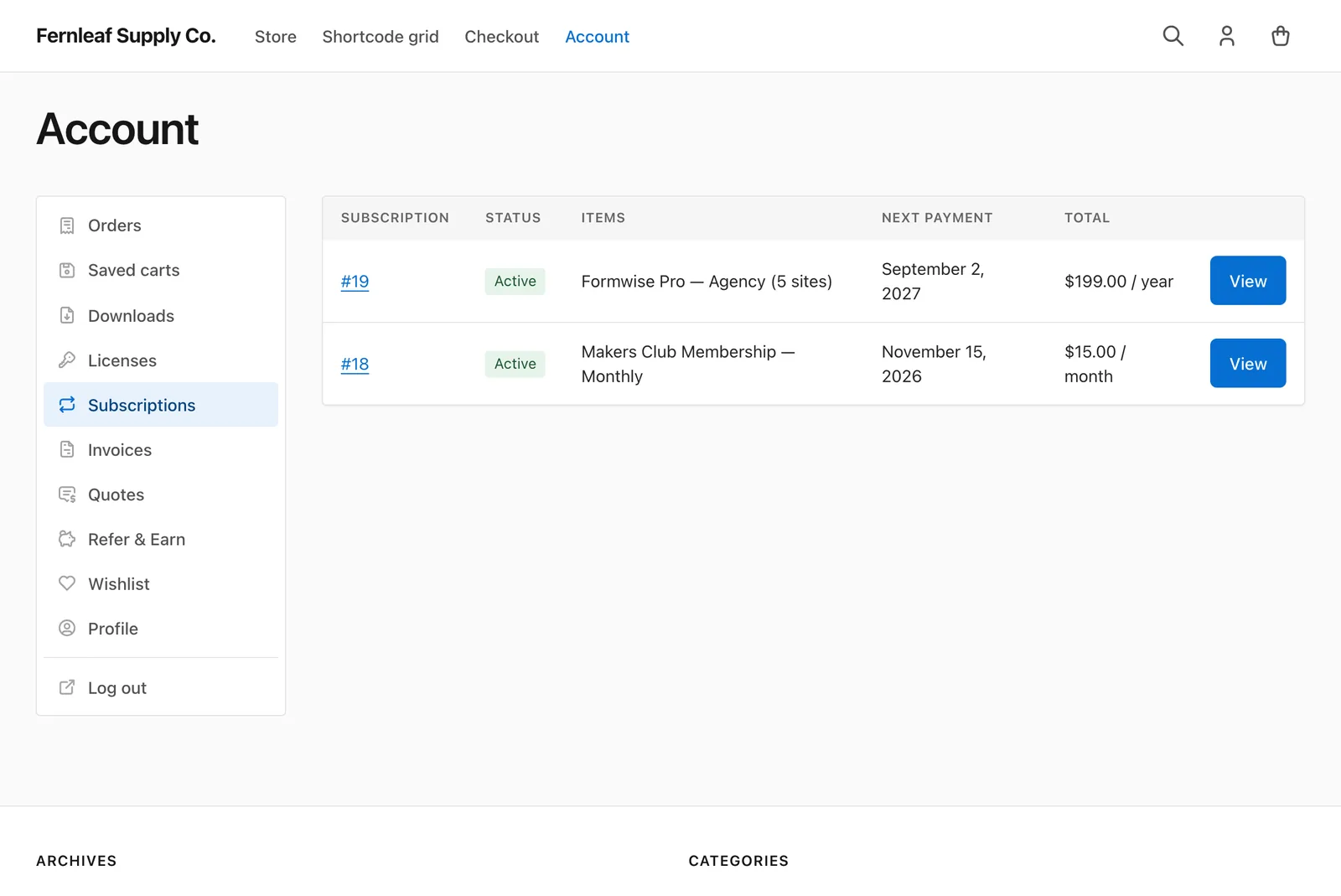
The list shows each subscription’s number, Status, Items, Next payment and Total, with a View button. A customer with no subscriptions sees “You have no subscriptions yet.” and a Browse downloads button.
A subscription’s own page shows:
- Status, Start date, Trial ends, Last payment, Next payment and Ends, where they apply
- Billing, the recurring price and schedule
- Renewal: Automatic, or “Manual: we email you an invoice”
- Payment method
- Subscription totals, with discount, tax and Recurring total
- Related orders, each marked Signup, Renewal or Switch, with Pay and View buttons
- Billing address
The Customer Actions
Buttons appear only when the action fits the subscription:
- Pay renewal #…: one for each unpaid renewal order. It always shows when something is owed.
- Renew now: bills the next period today and moves the following payment date forward. Needs Early renewal on, an Active subscription, a future next payment date and no unpaid renewal.
- Resume subscription: undoes a cancellation that’s waiting for the end of the paid period.
- Turn off auto-renew and Turn on auto-renew: needs the Auto-renew toggle setting and a download set to “Automatic when the gateway supports it, otherwise manual”. Turning it on needs a saved payment method.
- Cancel, Cancel at period end and Cancel now: covered below.
The Customer account section of the settings controls these:
- Customer cancellation: let customers cancel their own subscriptions. On by default.
- When customers cancel: At the end of the paid period (default), Immediately, or Let the customer choose.
- Early renewal: show a “Renew now” button. On by default.
- Auto-renew toggle: let customers switch between automatic and manual renewal when the download allows both. On by default.
Choose How Cancellation Works
When customers cancel decides which buttons they get on an active or trial subscription:
| Setting | Buttons | What happens |
|---|---|---|
| At the end of the paid period | Cancel | The subscription becomes Pending cancellation. Access continues until the paid period or trial ends. |
| Immediately | Cancel now | Access ends right away and unpaid renewal orders are abandoned. |
| Let the customer choose | Cancel at period end and Cancel now | The customer picks one of the two. |
On-hold subscriptions only offer Cancel now, because there’s no paid period left to run out. Every cancel button asks the customer to confirm first, and the Subscription cancelled email goes out.
Set Up Plan Switching
Switching needs the Switching setting, on by default, and a switch path on the download. Edit the download and set one or both:
- Switch between price options: subscribers move between this download’s subscription price options. Shows only with variable pricing on.
- Subscription switch group: a slug like
hosting-plans. Subscribers move between all downloads that share it.
Only published downloads that can be bought, and prices that are subscriptions, are offered.
Customers with an Active subscription then see a Change plan section. Each option shows the new recurring price, the amount Due now, any Adjustment on next renewal, and “A new billing period starts today.” when that applies. The customer picks one and clicks Switch plan.
How Proration Works
The Plan switching section has two more settings:
- Proration: “Credit unused time and charge the difference now” (default), “Credit unused time and apply the difference at the next renewal”, or “No proration: new price from the next renewal”.
- Switch fee: a one-time fee per switch in your store currency. 0 for none, the default.
On the same schedule, the price difference is scaled by the unused part of the current period. An upgrade is charged now with the first mode, or added to the next renewal with the second. A downgrade becomes a credit on the next renewal.
Moving to a different schedule, like monthly to yearly, with the first mode credits the unused time against the new plan. The new period starts today. If the credit is bigger than the new price, the rest carries to the next renewal. With the other two modes, the new price and schedule start at the next renewal.
Every switch creates a switch order:
- A zero total applies the switch right away.
- Automatic subscriptions charge the saved payment method.
- Otherwise, or if that charge fails, the customer is sent to pay the switch order.
The plan changes when the switch order is paid, and the Subscription switched email goes out. Carried amounts show on the next renewal as a “Plan switch credit” or “Plan switch adjustment” line. A credit never takes a renewal below zero, and whatever is left carries to the one after.
Change the Payment Method
When the Stackless Stripe or PayPal gateway is enabled, active, trial and on-hold subscriptions show a Payment method for renewals section. Customers can:
- Pick a saved card or PayPal account and click Use this payment method.
- Or click Add a new payment method, add it on the gateway’s page within the hour, and come back with the new method attached to the subscription.
Picking a saved method also turns automatic renewal on, unless the download is Manual only. A renewal that’s waiting for a retry gets the new method too.
Limits
- Only Active subscriptions can switch. Subscriptions in a free trial can’t.
- Switching one item of a multi-item subscription to a different schedule moves that item to a new subscription of its own.
- A switch group offers up to 50 downloads.
- Polar, Paddle and Dodo Payments subscriptions are billed by the provider. Customers can cancel them but can’t renew early, resume a pending cancellation, toggle auto-renew or change the payment method here.
- Customers can’t pause a subscription themselves. Only you can put one on hold, from Manage Subscriptions in the Admin.