
Give the EDD Admin a Cleaner Look
You spend hours a week in the EDD admin: checking orders, editing downloads, digging through settings. The screens work, but they’re dense and the help hides behind tiny “?” icons. Nothing tells you at a glance what needs attention.
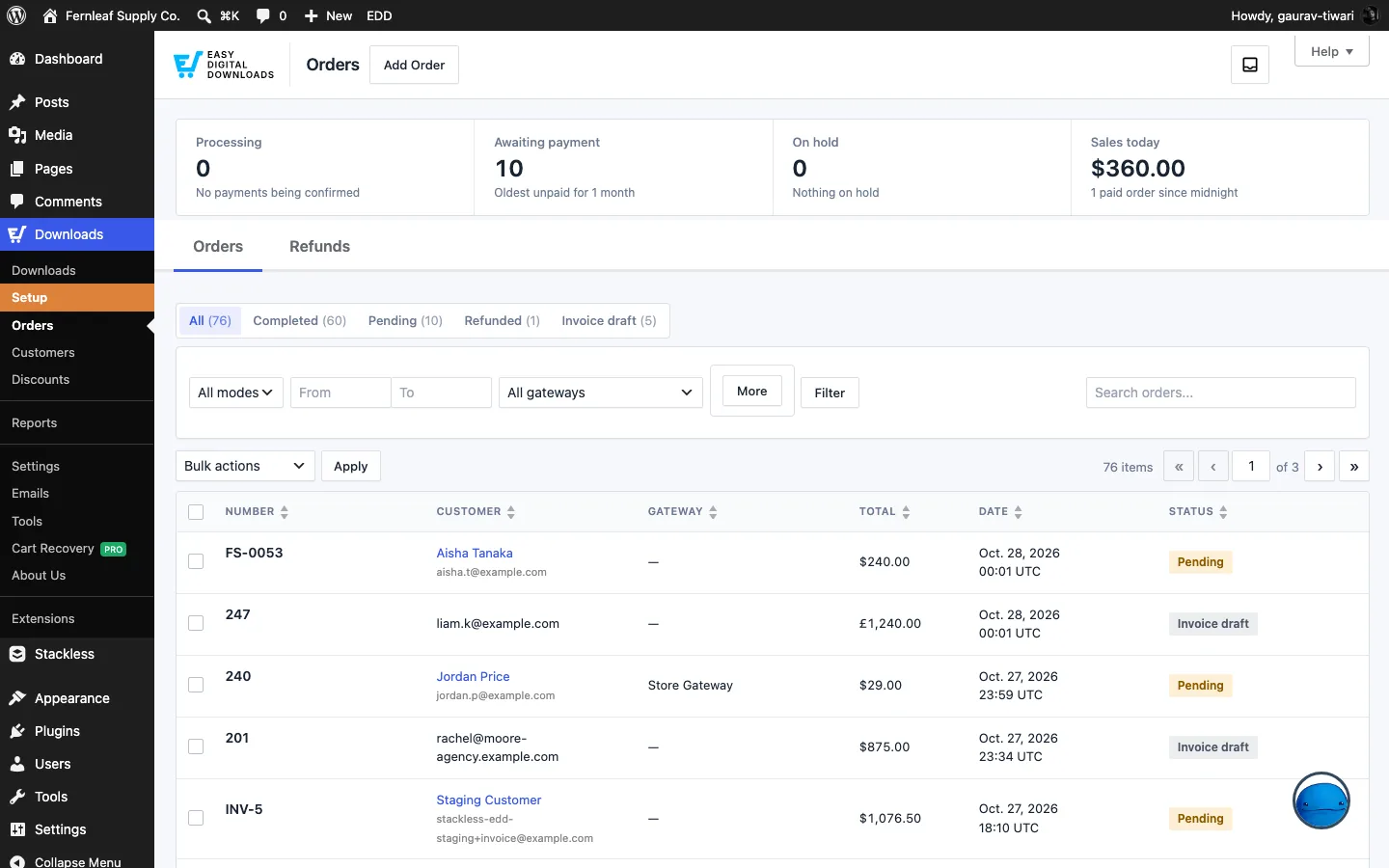
EDD Redesign restyles the Easy Digital Downloads admin in the same clean design as the Stackless screens. It also adds a strip of store numbers above the orders and downloads lists, and a few guides in the download editor. Nothing changes on your storefront.
Turn It On
Enable EDD Redesign on the Stackless Dashboard, then go to Stackless → Settings → EDD Redesign. The new look applies as soon as the module is on.
Only EDD and Stackless screens change. The WordPress menu, the toolbar and other plugins’ pages keep their usual look. The styles load only in wp-admin, never on the storefront.
Choose What to Restyle
The Look section:
- Restyle: the parts of the EDD admin to restyle. All four are selected by default: Orders, customers and discounts. Downloads and categories. Settings, emails and tools. Reports. Downloads include categories and tags. Settings, emails and tools include the Stackless screens and other EDD pages under Downloads.
- Accent color: the color of buttons, links, active tabs and focus rings. Defaults to My WordPress admin color scheme. The other choices are Stackless Blue and Custom color.
- Custom accent: a color picker used when the accent color is Custom color. Defaults to Stackless Blue,
#066fd1. - Table density: Comfortable (the default) or Compact, more rows on screen.
Unselect an area to give those screens back their stock EDD look. EDD’s onboarding wizard is always left alone, since it lays itself out.
What the New Look Changes
Restyled screens get a soft page background, white cards, quiet uppercase table headings, soft status badges, 40px form controls and 2px corners. The styles are scoped to a body class added on EDD screens, so they can’t leak into other admin pages.
The areas cover:
| Area | Screens |
|---|---|
| Orders, customers and discounts | Downloads → Orders, Customers and Discounts |
| Downloads and categories | The downloads list, the download editor, download categories and tags |
| Settings, emails and tools | Downloads → Settings, Emails, Tools and other EDD pages under Downloads, plus every Stackless screen |
| Reports | Downloads → Reports |
Store at a Glance
With Store at a glance on (the default), a row of numbers sits above two lists. Each number links to the list it counts.
- Orders list: Processing, Awaiting payment, On hold and Sales today. The hints show how long the oldest order has waited.
- Downloads list: Live, Drafts, Missing files and Free. A dot marks a number that needs attention, such as downloads with no file.
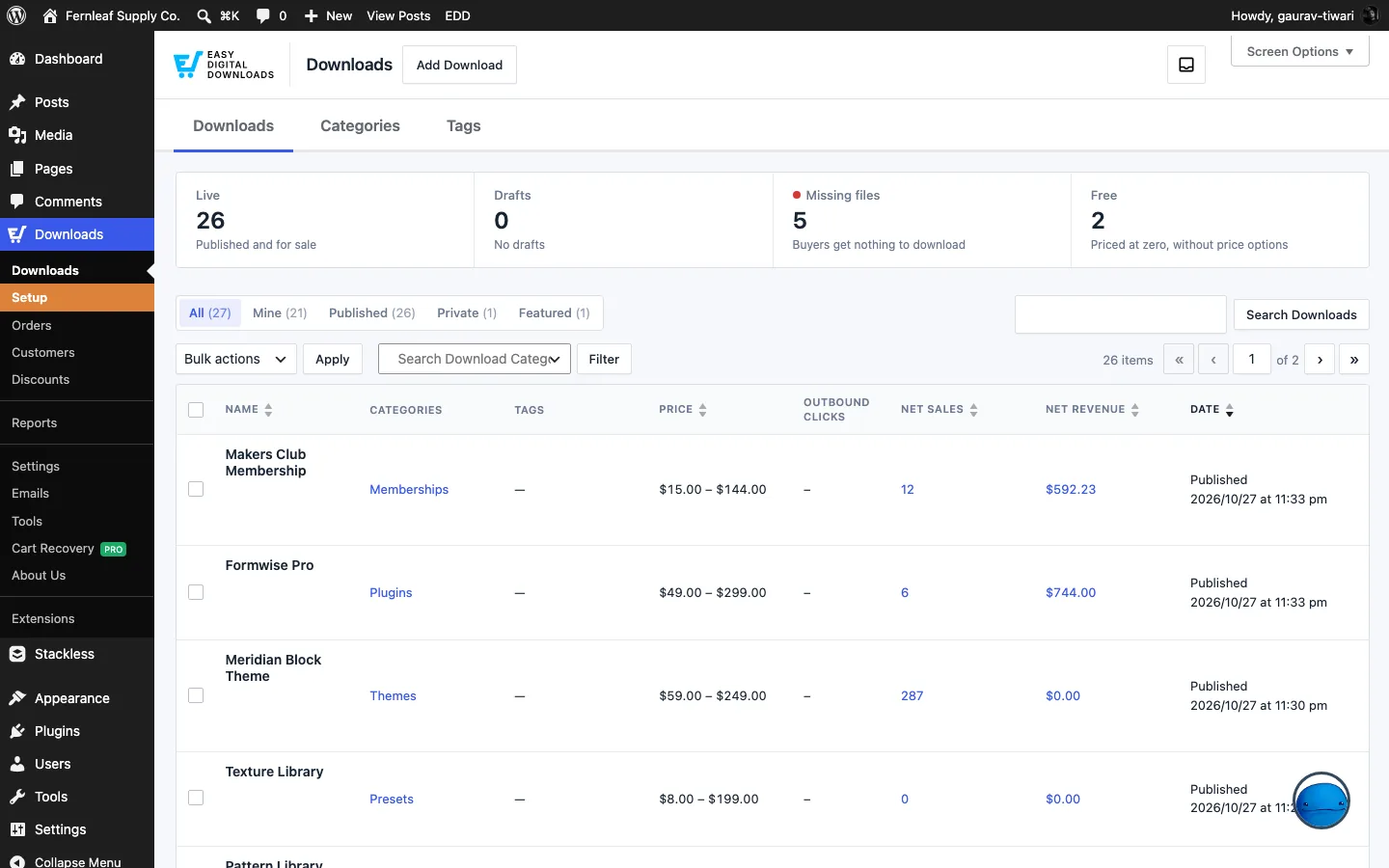
The counts come from EDD’s own queries. They’re cached for five minutes and cleared whenever an order or a download changes. Sales today adds up to 300 of today’s paid orders. On busier days it shows the count only.
Guidance in the Editor
With Guidance on (the default), you get three helpers:
- A Ready to sell? box in the download editor sidebar. It ticks off Name, Price, Download files, Download image and Category as you fill them in, and each item links to its field.
- A one-line intro at the top of each download editor section, such as Details, Price options, Files, Settings and Instructions, saying what it’s for.
- Field help shown as text under each field, in place of the “?” icons. This applies to EDD settings, emails and tools, the discount editor and the download editor. Order and customer screens keep EDD’s tooltips.
For Developers
stackless_edd_redesign_screens(string[]): more screen IDs to restyle as EDD settings screens, for an extension’s page outside the Downloads menu.stackless_edd_redesign_area(string, screen): the area a screen belongs to (orders,downloads,settingsorreports), or an empty string to leave it unstyled.
Good to Know
- EDD Redesign changes styles and adds helpers. It doesn’t change how orders, downloads or settings work.
- Extensions that add their own pages under Downloads are restyled with the Settings, emails and tools area. If one looks wrong, return it to the stock look with the
stackless_edd_redesign_areafilter. - Turning the module off restores EDD’s stock admin right away. Nothing is saved to your orders or downloads.