
Choose a Checkout Layout
The Easy Digital Downloads checkout looks however your theme draws it. Changing that usually means a page builder, a template override or a pile of custom CSS that breaks after the next update.
Checkout Builder gives you five ready-made layouts. You preview each one, pick it, set your colors and save. EDD still handles the fields, taxes and payments. Nothing on your checkout changes until you choose a layout.
Open the Layout Gallery
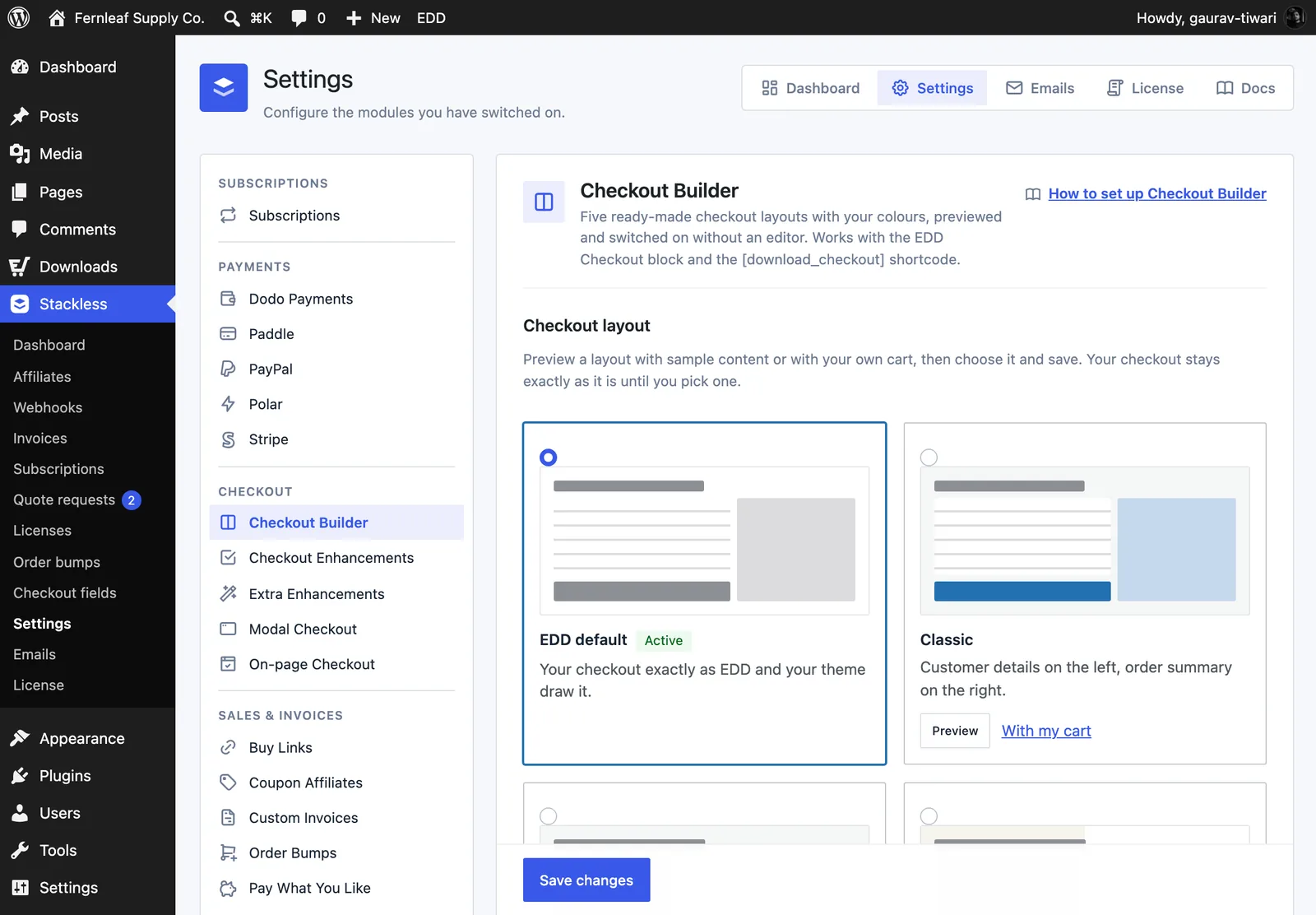
Switch on Checkout Builder from Stackless → Dashboard. Then go to Stackless → Settings and pick Checkout Builder under Checkout in the sidebar.
The Checkout layout section shows a card for each choice:
- EDD default: your checkout exactly as EDD and your theme draw it. This is the starting value.
- Classic: customer details on the left, order summary on the right.
- Split: order summary first on the left, checkout form on the right.
- Warm Split: a warm order panel beside a spacious white checkout, with a bold purchase button.
- Focused: a centered single column, with the order summary above the form.
- Review First: full-width order review, then customer details beside payment.
Preview Before You Switch
Every layout card except EDD default has two preview links:
- Preview: opens a Checkout preview dialog with sample content. Switch between Desktop and Mobile sizes. The sample can’t place an order. Choose this layout selects the layout and saves the settings page, so it goes live right away.
- With my cart: opens your real checkout page in a new tab with that layout applied, only for you. It needs something in your cart.
While you preview with your cart, a notice at the top reads “Previewing [layout]. Your live checkout is unchanged.” Only users with the manage_shop_settings capability can preview. Preview pages are marked noindex.
To go live from the gallery instead:
- Select the layout’s radio card.
- Click Save changes.
- Open your checkout in a private window to see it as a customer does.
To go back, choose EDD default and save.
Set Colors, Width and Corners
The Appearance section applies to every layout:
- Accent colour: the purchase button, selected options and focus outlines. Default
#2271b1. - Checkout background: default
#ffffff. - Summary background: default
#f6f7f7. - Content width (px): between 720 and 1600. Default 1120.
- Corner radius (px): between 0 and 24. Default 4.
You don’t pick text colors. For each background, Stackless picks near-black (#1d2327) or white, whichever has more contrast.
Warm Split has its own palette. The Warm Split colours checkbox is on by default. While it’s on, that layout uses a #222222 accent, a #f6f4ed summary panel, a 1400 px width and a 4 px radius instead of your Appearance values. Untick it to use your own.
Use the Compact Header
Page header has two options:
- Theme header and footer (default)
- Compact store header (logo and Continue shopping only)
The compact header replaces your theme’s header and footer on the checkout page only. It shows your Store logo, or your store name if you haven’t chosen one, plus a Continue shopping link. Pick the logo with Choose logo. Use store name instead clears it.
To change the compact page markup, copy templates/checkout_builder/compact.php from the plugin to stackless-edd/checkout_builder/compact.php in your theme.
Block Checkout and Shortcode Checkout
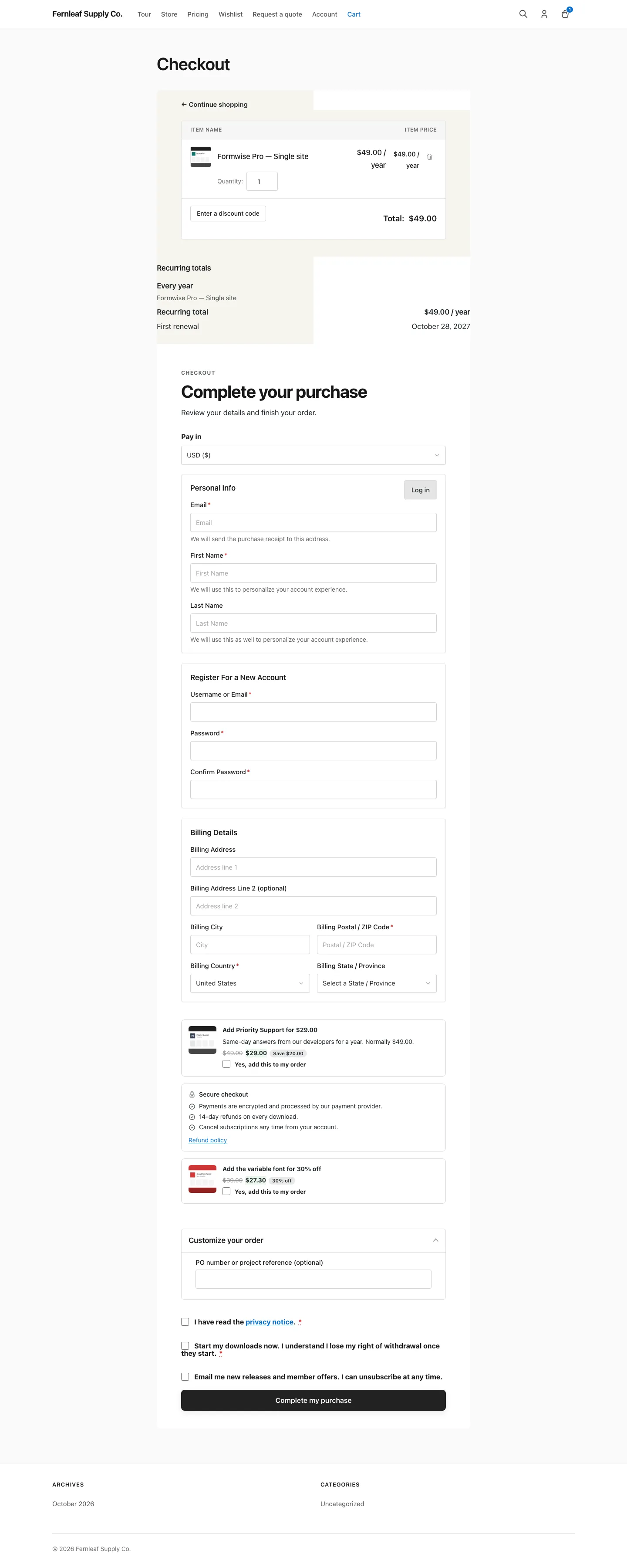
EDD draws one checkout for both the EDD Checkout block and the [download_checkout] shortcode. Checkout Builder wraps either one in a stackless-cb-wrap container and restyles it with scoped CSS.
- The cart summary and the purchase form sit side by side or stacked, depending on the layout.
- A Checkout block built from its own inner blocks keeps EDD’s arrangement. It gets your colors, width and buttons only.
- Warm Split adds a “Complete your purchase” heading above the purchase form and a Continue shopping link above the order summary.
- Screens up to 899 px wide get a Hide order summary / Show order summary button. Payment always stays visible.
The Continue shopping link goes to your downloads archive, or your home page when there isn’t one. The success page keeps your normal look. Layout CSS and JavaScript load on the checkout page only.
Good to Know
- The layout is stored in the
stackless_edd_checkout_builder_layoutoption. An empty value means EDD default. - The body gets
stackless-cb,stackless-cb-layout-{layout}and eitherstackless-cb-blocksorstackless-cb-shortcode, plusstackless-cb-compactwith the compact header. Use these for small CSS tweaks. - Colors are exposed as CSS custom properties such as
--stackless-cb-accentand--stackless-cb-width. - Developers can change where Continue shopping points with the
stackless_edd_checkout_builder_shop_urlfilter. - The compact header isn’t used inside the embedded checkout of On-page Checkout and Modal Checkout, which have their own bare page.
- Checkout Builder changes layout and colors only. It doesn’t add, remove or reorder checkout fields. For consents and checkout wording, see Add Checkout Consents, Wording and a Trust Block.