
Add Checkout Consents, Wording and a Trust Block
A privacy checkbox, a waiver for EU digital buyers, an age check. Most stores add these with a snippet that shows a box but keeps no record of what the customer actually agreed to. Then the checkout headings and the purchase button still say whatever EDD says.
Free in Lite: this module is also in Stackless Lite for EDD, the free edition, and works the same way there.
Checkout Enhancements handles that in one place. It adds consent checkboxes that store proof on the order and relabels the button on free orders. It also lets you rename fields and headings and puts a short trust block under the payment details.
Find the Settings
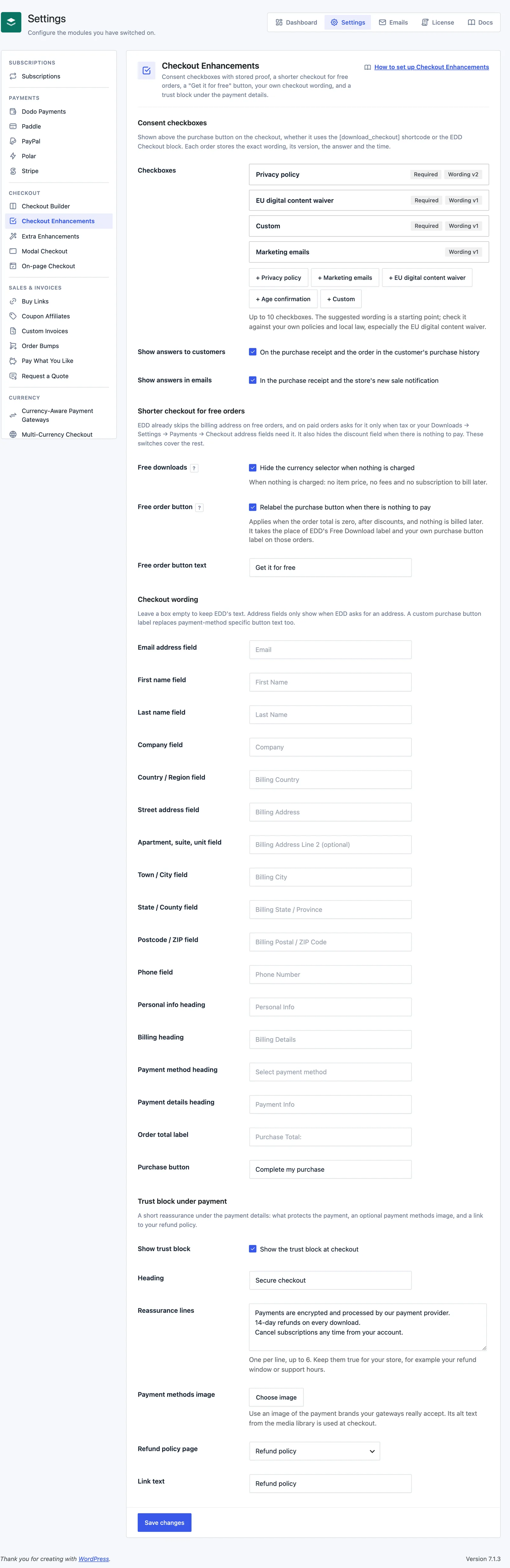
Switch on Checkout Enhancements from Stackless → Dashboard. Then open Stackless → Settings and choose Checkout Enhancements under Checkout. The page has four sections: Consent checkboxes, Shorter checkout for free orders, Checkout wording and Trust block under payment.
Everything here works on the EDD Checkout block and the [download_checkout] shortcode.
Add Consent Checkboxes
Under Consent checkboxes, the add buttons create a consent with starting wording:
- + Privacy policy: “I have read the privacy policy.” Required.
- + Marketing emails: “Email me product updates and offers. I can unsubscribe at any time.” Optional.
- + EU digital content waiver: wording about delivery starting immediately and losing the right of withdrawal. Required.
- + Age confirmation: “I confirm that I am 18 or older.” Required.
- + Custom: empty wording you write yourself.
The suggested wording is a starting point. Check it against your own policies and local law, especially the waiver.
Each consent has these fields:
- Type: one of the five types above.
- Show for: All carts or Carts with a specific download. Pick the Download when you choose the second option.
- Checkbox text: up to 600 characters. Links, bold and italic are allowed.
- Customer must tick this to place the order: makes the box required.
You can add up to 10 checkboxes. Click Save changes when you’re done.
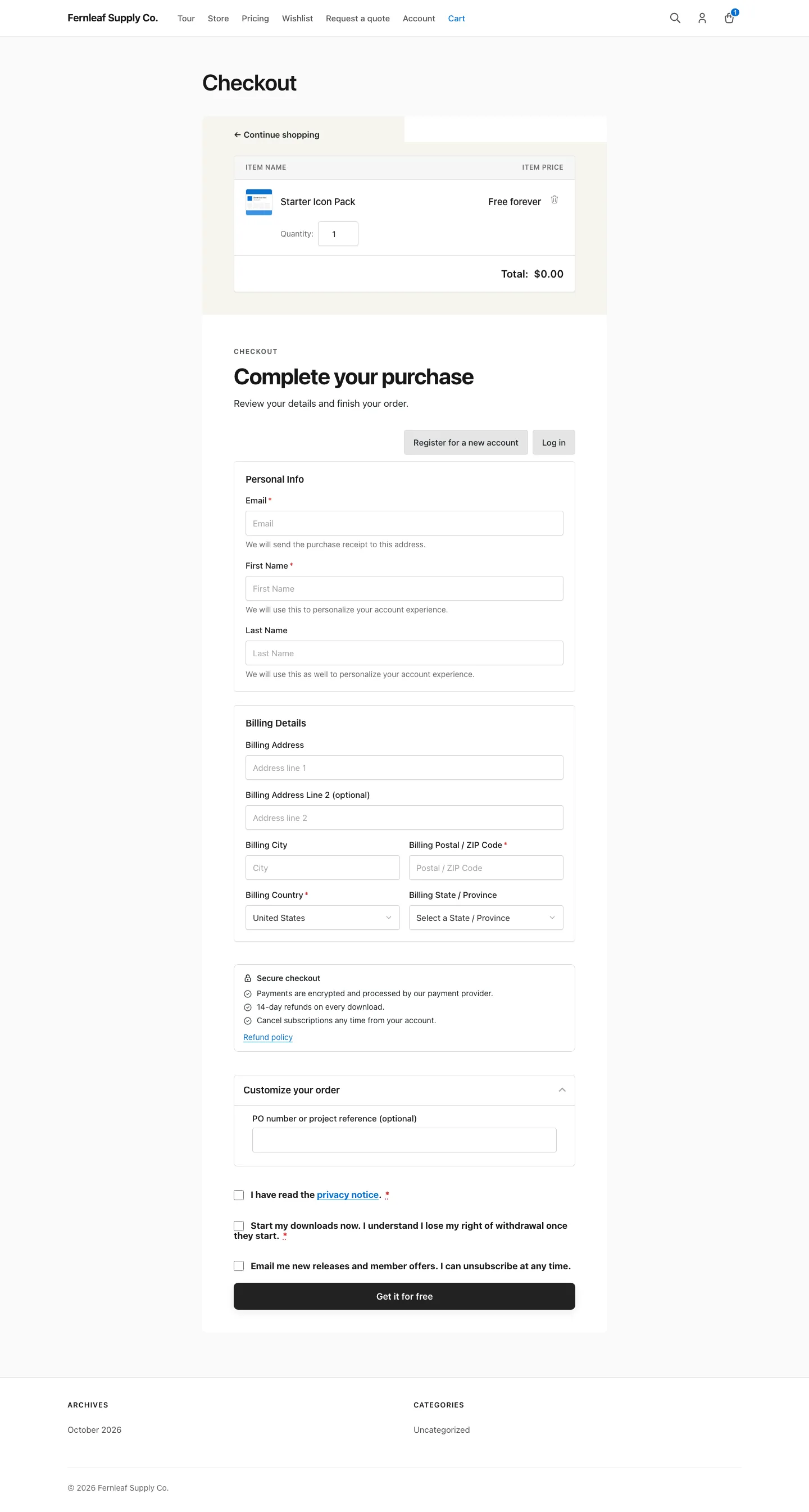
The boxes appear above the purchase button. A missing required box shows “Please tick this box to continue.” in the browser. If the form still reaches the server, EDD shows “Please confirm:” followed by the wording.
The Proof Stored on Each Order
For every consent the customer was shown, the order keeps:
- the exact wording and its version
- whether it was required
- whether it was accepted
- the time, in UTC
Changing a consent’s text starts a new wording version, so the record always matches what that customer saw. The editor shows the current version as a “Wording v2” style badge.
The order details screen in EDD has a Checkout consents box in the sidebar. An order note lists each answer once, so a retried payment doesn’t repeat it. Removing a consent later doesn’t touch orders already placed.
Two checkboxes decide what customers see. Both are on by default:
- Show answers to customers: on the purchase receipt and the order in the customer’s purchase history.
- Show answers in emails: in the purchase receipt and the store’s new sale notification.
Orders that don’t come from the storefront checkout, such as renewals, invoices and orders built in the admin, get no consent record.
Shorten Checkout for Free Orders
EDD already skips the billing address on free orders and hides the discount field when there’s nothing to pay. On paid orders it asks for an address only when tax or your Downloads → Settings → Payments → Checkout address fields need it. Two switches cover the rest. Both are on by default:
- Free downloads: hides the currency selector when nothing is charged. That means no item price, no fees and no subscription to bill later.
- Free order button: relabels the purchase button when there’s nothing to pay.
The free order button applies when the order total is zero after discounts and nothing bills later. It reads “Get it for free” unless you change Free order button text, up to 60 characters. On those orders it replaces EDD’s Free Download label and your own purchase button label.
A subscription never counts as free, even with a free trial, because it bills later. Free downloads looks at item prices, so a cart brought to zero by a discount code keeps the currency selector.
Rename Fields, Headings and the Button
Checkout wording has a text box for each item. Leave a box empty to keep EDD’s text. Each box shows EDD’s own wording as a placeholder.
- Field labels, up to 80 characters each: Email address field, First name field, Last name field, Company field, Country / Region field, Street address field, Apartment, suite, unit field, Town / City field, State / County field, Postcode / ZIP field and Phone field.
- Checkout text, up to 120 characters each: Personal info heading, Billing heading, Payment method heading, Payment details heading and Order total label.
- Purchase button, up to 60 characters.
Address fields only show when EDD asks for an address. A custom purchase button label replaces payment-method specific button text too, so a gateway that sets its own button wording gets yours instead.
The new wording applies on the checkout page only, including the parts EDD redraws when the customer changes gateway or applies a discount.
Add the Trust Block
Under Trust block under payment, tick Show trust block (off by default) and fill in:
- Heading: up to 80 characters. Default “Secure checkout”.
- Reassurance lines: one per line, up to 6. The default line is “Payments are encrypted and processed by our payment provider.” Keep them true for your store, for example your refund window or support hours.
- Payment methods image: pick it with Choose image. Use an image of the brands your gateways really accept. Its alt text from the media library is used at checkout.
- Refund policy page: any published page.
- Link text: up to 60 characters. Default “Refund policy”.
The block shows under the payment details on the checkout.
Good to Know
- A Show for rule of Carts with a specific download falls back to All carts if no download is chosen.
- Consent records are saved in the
_stackless_edd_checkout_enhancements_consentsorder meta. - Developers can react to new records with the
stackless_edd_checkout_enhancements_consents_recordedaction. It receives the order ID and the records. - Layout and colors live in a separate module. See Choose a Checkout Layout.