
Duplicate a Payment Gateway
One account per payment provider works until it doesn’t. A second brand has its own Dodo business or Polar organization. EU and US sales go through separate Paddle accounts. Or a client’s download has to be paid into their account instead of yours. Easy Digital Downloads runs each gateway once, so a second account usually means a second store.
Payment Gateway Tools lets you duplicate Polar, Paddle and Dodo Payments instead. Each copy is a full gateway with its own keys, webhook URL, badge and orders, listed next to the original in Downloads → Settings → Payments. The module also puts a Stackless label next to every gateway Stackless adds, so you can tell them apart in the admin.
Turn It On
Payment Gateway Tools is on by default under Stackless → Dashboard. It has no settings screen of its own. You add and manage copies from the gateway’s settings under Stackless → Settings, and that gateway’s module has to be on.
Add a Copy
- Open the gateway’s settings, for example Stackless → Settings → Dodo Payments.
- In the Copies section, click Duplicate this gateway.
- Enter an optional badge label, such as “EU account”, up to 30 characters. Leave it empty and the copy is badged “Copy 2”, “Copy 3” and so on.
- The copy’s settings open. Connect it like the original, with the second account’s keys and webhook secret, and save.
- Go to Downloads → Settings → Payments and switch the copy on under Active Gateways.
The copy starts switched off, so adding it changes nothing at checkout until you connect it. Back on the original’s settings, the Copies section lists each copy with its badge, a Manage button and a Rename button. You can add up to nine copies of each gateway.
Each copy has its own block on the gateway’s settings screen, headed with its badge, for example “Dodo Payments · EU account”. A copy is set up exactly like its original. See Sell Through Polar as Merchant of Record, Sell Through Paddle as Merchant of Record and Sell Through Dodo Payments as Merchant of Record for keys, webhook events and tax settings.
Connect the Copy’s Webhook
Each copy has its own webhook URL, ending in its number:
https://yoursite.com/wp-json/stackless-edd/v1/polar/webhook/copy2
https://yoursite.com/wp-json/stackless-edd/v1/paddle/webhook/copy2
https://yoursite.com/wp-json/stackless-edd/v1/dodo/webhook/copy2
The copy’s settings show its exact URL. Add it as a webhook endpoint in the second account, not the original’s URL, and paste that endpoint’s secret into the copy’s webhook secret field. Deliveries to a copy that doesn’t exist are refused.
How Copies Stay Separate
- Each copy is its own EDD gateway:
stackless_edd_polar_copy2,stackless_edd_paddle_copy2,stackless_edd_dodo_copy2and so on, numbered 2 to 10. - Payments, refunds, renewals and cancellations stay on the account that took the payment, even when webhooks from both accounts reach the same site.
- Each copy has its own settings, including its own test or sandbox mode and Debug log. It writes to the original’s log, with its id at the start of each line.
- Polar and Dodo Payments copies create their own products in their own account. Polar products you link by hand in a download’s Polar products box belong to the original.
- Credential constants in
wp-config.phpapply to the original only. Copies keep their keys in their own settings.
How Copies Show at Checkout and on Orders
Buyers see a copy’s Title and Description, which start out the same as the original’s. With both switched on, the checkout shows two identical choices, so give the copy its own Title or send payments to one account as shown below.
In the admin, the copy appears as the gateway name with the Stackless label and a second, lighter badge with its label. Gateway dropdowns, such as the gateway filter on the orders list, add the label and badge as text, for example ” · Stackless · EU account”.
Send Payments to One Account
- Currency-Aware Payment Gateways lists each copy as its own gateway with the same currencies as its original, so one copy can take EUR and another USD.
- Modal Checkout lists every copy under Payment method classes. A class starts as the gateway id, so
stackless-modal-checkout pay-via-stackless_edd_dodo_copy2opens a checkout that only pays into that Dodo business.pay-via-stackless_edd_dodomeans the original only. - With Per-download checkout in Extra Enhancements, a download can allow only one copy in the Checkout box on its edit screen.
Rename or Remove a Copy
- Rename in the original’s Copies section, or Rename badge in the copy’s settings, changes the badge. The copy’s id, webhook URL and orders stay the same. An empty label shows “Copy N”.
- Remove copy, in the copy’s settings, deletes the copy and its saved settings. Polar and Dodo Payments copies also drop their remembered products and account lookups.
- Removing only works while the copy has no orders or subscriptions. Otherwise its settings say “Has orders, so it cannot be removed. Switch it off instead.” The copy stays so its refunds and renewals keep working. Switch it off in Downloads → Settings → Payments.
The Stackless Label
Stackless adds Stripe, PayPal, Polar, Paddle and Dodo Payments. Each of them, and each copy, carries “(Stackless)” in its admin name. Payment Gateway Tools swaps that text for a dark Stackless label. Hover the label to see “Added by Stackless for EDD.”
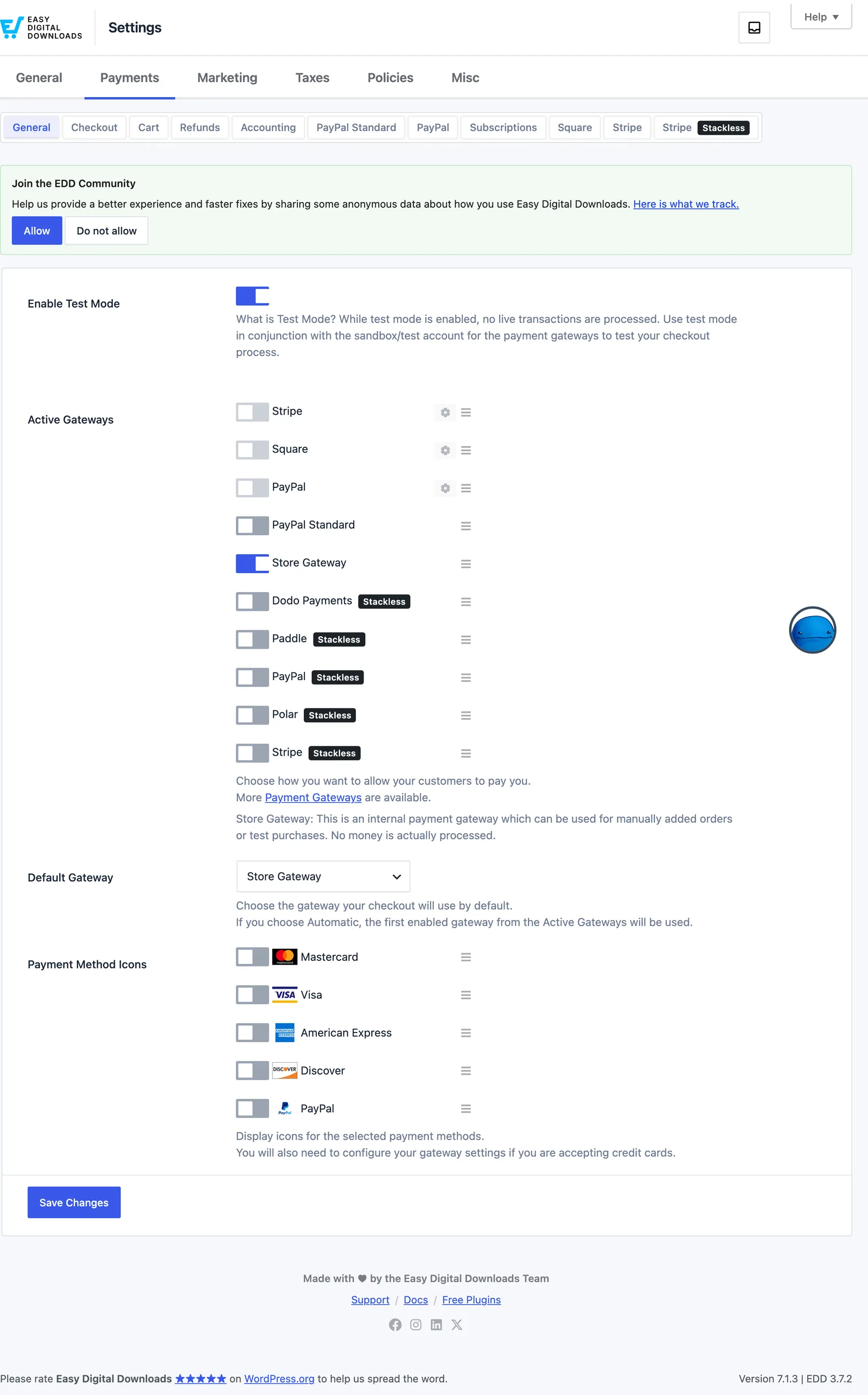
It shows on:
- Downloads → Settings, including Active Gateways and the gateway section tabs on the Payments tab
- the EDD Orders, Customers and Reports screens, including gateway dropdowns
- Stackless’s own screens that list gateways
Buyers never see it. It only shows in the admin, to users who can manage shop settings.
Good to Know
- Only Polar, Paddle and Dodo Payments can be duplicated. Stripe and PayPal can’t, because their saved payment methods and customers belong to one account, so a copy couldn’t charge them.
- Turning off Payment Gateway Tools hides the copy buttons and the labels, but existing copies keep taking payments, renewals, refunds and webhooks. Gateway names then show “(Stackless)” and the copy’s badge as plain text.
- Only users who can manage shop settings can add, rename or remove copies.
- A new copy takes the lowest free number, so it can reuse a removed copy’s webhook URL. Delete the old endpoint in the provider before you connect the new copy.