
Set Up PayPal Payments
Plenty of buyers won’t type a card number into a store they’ve just found, but they’ll click a PayPal button. The catch for subscription stores is that PayPal setups often treat recurring billing as a separate product with its own plans to build inside PayPal.
The PayPal module talks to PayPal’s REST APIs directly. It adds PayPal Smart Buttons and Pay Later to the EDD checkout, refunds from the EDD order screen and saves the buyer’s PayPal account so Stackless can charge subscription renewals itself.
Turn On the Gateway
- Switch on the PayPal module under Stackless → Dashboard.
- Fill in the settings under Stackless → Settings → PayPal and save.
- Go to Downloads → Settings → Payments and switch on PayPal (Stackless) under Active Gateways. Save.
PayPal (Stackless) is its own gateway, separate from the PayPal and PayPal Standard gateways that come with EDD.
Add Your Credentials
Create an app at developer.paypal.com → Apps & Credentials. For subscriptions, the app needs the Vault feature turned on.
- Sandbox: on by default. Uses the PayPal sandbox, so no real money moves. This switch is separate from EDD’s Enable Test Mode.
- Live credentials: Client ID, Secret and Webhook ID.
- Sandbox credentials: Sandbox client ID, Sandbox secret and Sandbox webhook ID.
When you save with PayPal switched on in EDD, Stackless requests a token from PayPal to test the credentials for the selected environment. You’ll see an error if the client ID or secret is empty or rejected, and a reminder if the webhook ID is missing.
You can also keep credentials out of the database by defining constants in wp-config.php. A defined constant wins over the saved setting:
STACKLESS_EDD_PAYPAL_CLIENT_ID
STACKLESS_EDD_PAYPAL_CLIENT_SECRET
STACKLESS_EDD_PAYPAL_WEBHOOK_ID
STACKLESS_EDD_PAYPAL_SANDBOX_CLIENT_ID
STACKLESS_EDD_PAYPAL_SANDBOX_CLIENT_SECRET
STACKLESS_EDD_PAYPAL_SANDBOX_WEBHOOK_ID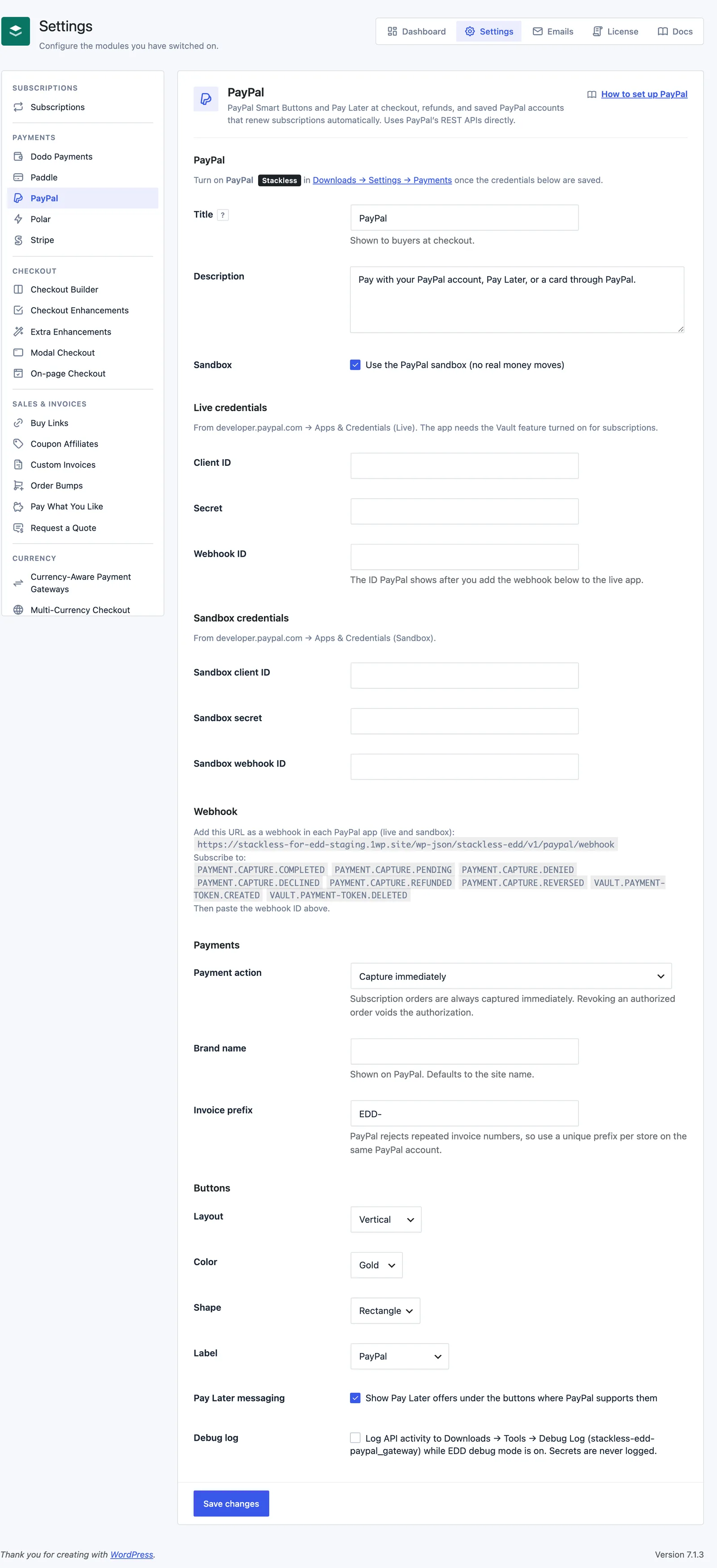
Connect the Webhook
Add https://yoursite.com/wp-json/stackless-edd/v1/paypal/webhook as a webhook in each PayPal app, live and sandbox. The Webhook section of the settings shows your exact URL. Subscribe to:
PAYMENT.CAPTURE.COMPLETED
PAYMENT.CAPTURE.PENDING
PAYMENT.CAPTURE.DENIED
PAYMENT.CAPTURE.DECLINED
PAYMENT.CAPTURE.REFUNDED
PAYMENT.CAPTURE.REVERSED
VAULT.PAYMENT-TOKEN.CREATED
VAULT.PAYMENT-TOKEN.DELETED
Then paste the webhook ID PayPal shows into Webhook ID or Sandbox webhook ID. Every event is checked with PayPal’s signature verification before anything runs, and each event is applied only once. Without the webhook, refunds made in PayPal, delayed payments and saved-account changes won’t reach EDD.
Checkout Settings
- Title: shown to buyers at checkout. Default “PayPal”.
- Description: default “Pay with your PayPal account, Pay Later, or a card through PayPal.”
- Payment action: Capture immediately (default), or Authorize only (capture when the order status changes to Completed). Subscription orders are always captured immediately.
- Brand name: shown on PayPal. Defaults to your site name.
- Invoice prefix: default
EDD-. PayPal rejects repeated invoice numbers, so give each store on the same PayPal account its own prefix.
An authorized order is captured when you change its status to Completed. Moving it to Revoked, Failed or Abandoned voids the authorization.
Button Settings
- Layout: Vertical (default) or Horizontal.
- Color: Gold (default), Blue, Silver, White or Black.
- Shape: Rectangle (default), Pill or Sharp.
- Label: PayPal (default), PayPal Checkout, Buy Now or Pay with PayPal.
- Pay Later messaging: shows Pay Later offers under the buttons where PayPal supports them. On by default.
The buttons show on the EDD checkout and in the Payment methods tab of the customer account page. They don’t show on download pages. Without JavaScript, the buyer completes the purchase and is sent to PayPal to pay.
Saved PayPal Accounts
When the cart contains a subscription, checkout saves the buyer’s PayPal account and says so: future subscription payments are taken automatically, and the buyer can remove the account in PayPal any time.
Signed-in customers also get a Payment methods tab on the customer account page. It lists their saved PayPal accounts, lets them save one without paying anything and remove one. Subscriptions that used a removed account ask for another payment method at renewal. If they remove the account inside PayPal, the webhook removes it in EDD too.
Subscription Renewals
PayPal renews subscriptions automatically by charging the saved account. It supports several subscriptions in one order, free-trial signups with nothing due today, payment method changes, renewal amount changes and next-payment date changes.
A renewal fails straight away when the saved account belongs to the other environment (sandbox vs live), the currency isn’t one PayPal accepts or PayPal needs the customer to approve the payment. Failed renewals follow your retry schedule from Renewals, Failed Payments and Retries.
Refunds and Reversals
Refund from the EDD order screen, in full or in part. The refund form gets a Refund transaction in PayPal box, ticked by default. Untick it to record the refund in EDD only.
An order that was only authorized can’t be refunded. Revoke it to void the authorization instead. Refunds made inside PayPal are recorded on the order through the webhook. A reversal from a chargeback or buyer dispute puts the order on hold with a note to review it in PayPal.
Limits
- PayPal is hidden at checkout for currencies it doesn’t take. The supported list is AUD, BRL, CAD, CNY, CZK, DKK, EUR, HKD, HUF, ILS, JPY, MYR, MXN, TWD, NZD, NOK, PHP, PLN, GBP, SGD, SEK, CHF, THB and USD.
- Saved accounts for automatic renewals need the Vault feature on your PayPal app.
- If PayPal reports a capture that doesn’t match the order total, an unpaid order goes on hold with a note to check the payment in PayPal before you deliver it.
- Turn on Debug log to write API activity to Downloads → Tools → Debug Log, tagged
stackless-edd-paypal_gateway, while EDD debug mode is on. Errors are always logged. Secrets never are. - PayPal can’t be duplicated with Payment Gateway Tools. Saved accounts belong to one PayPal app.