
Introduction to Stackless for EDD
A typical Easy Digital Downloads store picks up extensions one problem at a time. Recurring payments, a second gateway, licensing, invoices, a currency switcher, a wishlist. Each one brings its own settings screen and its own renewal date, and they don’t always agree on how the cart should work.
Stackless for EDD puts that stack into one plugin that runs on Easy Digital Downloads itself. It has 40 modules, and you switch on only the ones you use. A module that’s switched off loads no code, so a store that only needs subscriptions and Stripe carries nothing else.
How Modules Load
Every feature is a module with its own switch on Stackless → Dashboard. When the plugin starts, it reads the list of switched-on modules and starts only those. Nothing from a switched-off module runs, on the storefront or in the admin.
Two modules are on after a fresh install: License & Updates and Payment Gateway Tools. Everything else starts switched off.
A switched-on module can still decide not to start. It pauses when another plugin that does the same job is active, when a module it needs is off or when it hits an error while starting. The dashboard card says which one. The Stackless Dashboard, Modules and Settings covers those messages.
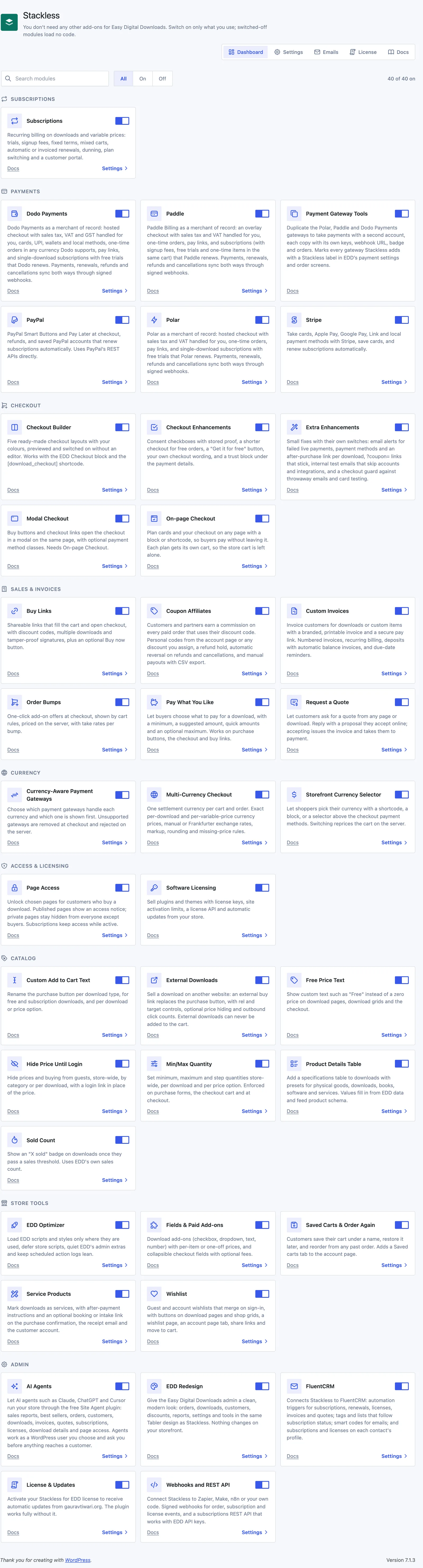
The 40 Modules
Here’s every module by the name it has on the dashboard, grouped the way these docs are organized. Each name links to its page.
Subscriptions
- Subscriptions: recurring billing on downloads and variable prices, with trials, signup fees, fixed terms, renewals, dunning, plan switching and a customer portal.
Payments
- Stripe: cards, Apple Pay, Google Pay, Link and local payment methods, saved cards and automatic renewals.
- PayPal: PayPal Smart Buttons and Pay Later, refunds and saved PayPal accounts that renew subscriptions.
- Polar: Polar as a merchant of record, with hosted checkout, pay links and subscriptions that Polar renews.
- Paddle: Paddle Billing as a merchant of record, with an overlay checkout, pay links and subscriptions that Paddle renews.
- Dodo Payments: Dodo Payments as a merchant of record, with hosted checkout, local methods and subscriptions that Dodo renews.
- Payment Gateway Tools: copies of the Polar, Paddle and Dodo Payments gateways for a second account, and a Stackless label on every Stackless gateway.
Checkout and Sales
- Checkout Builder: five ready-made checkout layouts in your colors.
- Checkout Enhancements: consent checkboxes with stored proof, a shorter checkout for free orders, your own checkout wording and a trust block.
- Order Bumps: one-click add-on offers at checkout, shown by cart rules.
- Buy Links: shareable links that fill the cart and open checkout, plus an optional Buy now button.
- Custom Invoices: branded, printable invoices with a pay link, recurring billing, deposits and due-date reminders.
- Request a Quote: quote requests from any page or download, answered with a proposal the customer accepts online.
- Modal Checkout: buy buttons and checkout links open the checkout in a modal on the same page.
- On-page Checkout: plan cards and a checkout on any page, with a block or shortcode.
- Pay What You Like: buyers choose the price, with a minimum, a suggested amount and an optional maximum.
- Extra Enhancements: small fixes with their own switches, such as failed live payment alerts, sticky ?coupon= links and a checkout guard.
Multi-Currency
- Multi-Currency Checkout: one settlement currency per cart and order, with exact prices per download or manual and automatic exchange rates.
- Currency-Aware Payment Gateways: which gateways handle each currency, and which one shows first.
- Storefront Currency Selector: a currency picker as a shortcode, a block or a selector above the checkout payment methods.
Software and Access
- Software Licensing: license keys, site activation limits, a license API and automatic updates for plugins and themes.
- Page Access: unlock chosen pages for customers who buy a download.
Software Licensing also has two developer pages: the licensing client and the license API.
Catalog
- Free Price Text: custom text such as “Free” instead of a zero price.
- Sold Count: an “X sold” badge once a download passes a sales threshold.
- Min/Max Quantity: minimum, maximum and step quantities store-wide, per download and per price option.
- Hide Price Until Login: hide prices and buying from guests, store-wide, by category or per download.
- Custom Add to Cart Text: rename the purchase button by download type, per download or per price option.
- External Downloads: sell a download on another website through an external buy link.
- Product Details Table: a specifications table on downloads that also feeds product schema.
Store Tools
- Wishlist: guest and account wishlists with share links and move to cart.
- Fields & Paid Add-ons: paid add-ons on downloads and collapsible checkout fields with optional fees.
- Saved Carts & Order Again: customers save a cart under a name and reorder from past orders.
- Service Products: mark downloads as services, with after-payment instructions and an optional booking or intake link.
- Coupon Affiliates: customers and partners earn a commission on paid orders that use their discount code.
- EDD Optimizer: load EDD scripts and styles only where they are used and quiet the admin extras.
- EDD Redesign: a clean, modern look for the Easy Digital Downloads admin, with no storefront changes.
Integrations
- FluentCRM: automation triggers, tags, lists and smart codes for subscriptions, licenses, invoices and quotes.
- AI Agents: let AI agents such as Claude, ChatGPT and Cursor work with your store through the free Site Agent plugin.
Developer and Admin
- Webhooks and REST API: signed webhooks for order, subscription and license events, and a subscriptions REST API.
- License & Updates: your own Stackless for EDD license and automatic plugin updates.
A few modules build on another one. Currency-Aware Payment Gateways and Storefront Currency Selector need Multi-Currency Checkout, Modal Checkout needs On-page Checkout and Request a Quote needs Custom Invoices.
Requirements
- WordPress 6.7 or later
- PHP 8.0 or later
- Easy Digital Downloads 3.5 or later, installed and active
- Stripe, PayPal, Polar, Paddle or Dodo Payments accounts if you use those gateways
If Easy Digital Downloads is missing or older than 3.5, Stackless doesn’t start any module. Administrators see one of these notices instead:
- “Stackless for EDD needs Easy Digital Downloads installed and active.”
- “Stackless for EDD needs Easy Digital Downloads 3.5 or newer. You have (your version).”
Start Free With Stackless Lite for EDD
If your store only needs the catalog, wishlist and checkout tools, Stackless Lite for EDD gives you 15 of these modules for free. It updates without a license key. When your store needs subscriptions, licensing or another payment gateway, Stackless for EDD picks up your settings and your customers’ data.
Where to Go Next
Start with the rest of this section. Install the plugin, activate your license, then learn the dashboard, the emails screen and the customer account page.
- Install Stackless for EDD and Activate Your License
- The Stackless Dashboard, Modules and Settings
- Manage Stackless Emails
- Set Up the Customer Account Page
After that, jump to whatever you need. If you’re selling subscriptions, read the Subscriptions section and the page for the gateway you plan to use before switching anything on. Renewals depend on both.
Limits
- Stackless doesn’t run next to the EDD extension that does the same job. Subscriptions pauses while EDD Recurring Payments is active, and the same goes for EDD Software Licensing, EDD Multi Currency, EDD Content Restriction, EDD Invoices, EDD Wish Lists and EDD Custom Prices. Troubleshooting has the full list.
- EDD’s own Stripe gateway can stay active next to the Stackless Stripe module. They use different gateway IDs, customers and webhooks.
- Payment gateways connect to your own provider accounts. Stackless doesn’t process payments itself.