
Use Webhooks and the REST API
Easy Digital Downloads has no webhook system of its own. So when a sale, a renewal or a license activation should reach Zapier, Make, n8n or your own app, you end up polling, or writing glue code that breaks on the next update.
The Webhooks and REST API module fixes both directions. It sends signed webhooks for order, subscription and license events, and it adds a subscriptions REST API that accepts EDD’s own API keys. Everything on this page comes from the plugin’s code, so the routes, topics and headers are exact.
Turn On the Module
- Go to Stackless → Dashboard and switch on Webhooks and REST API. It’s off by default.
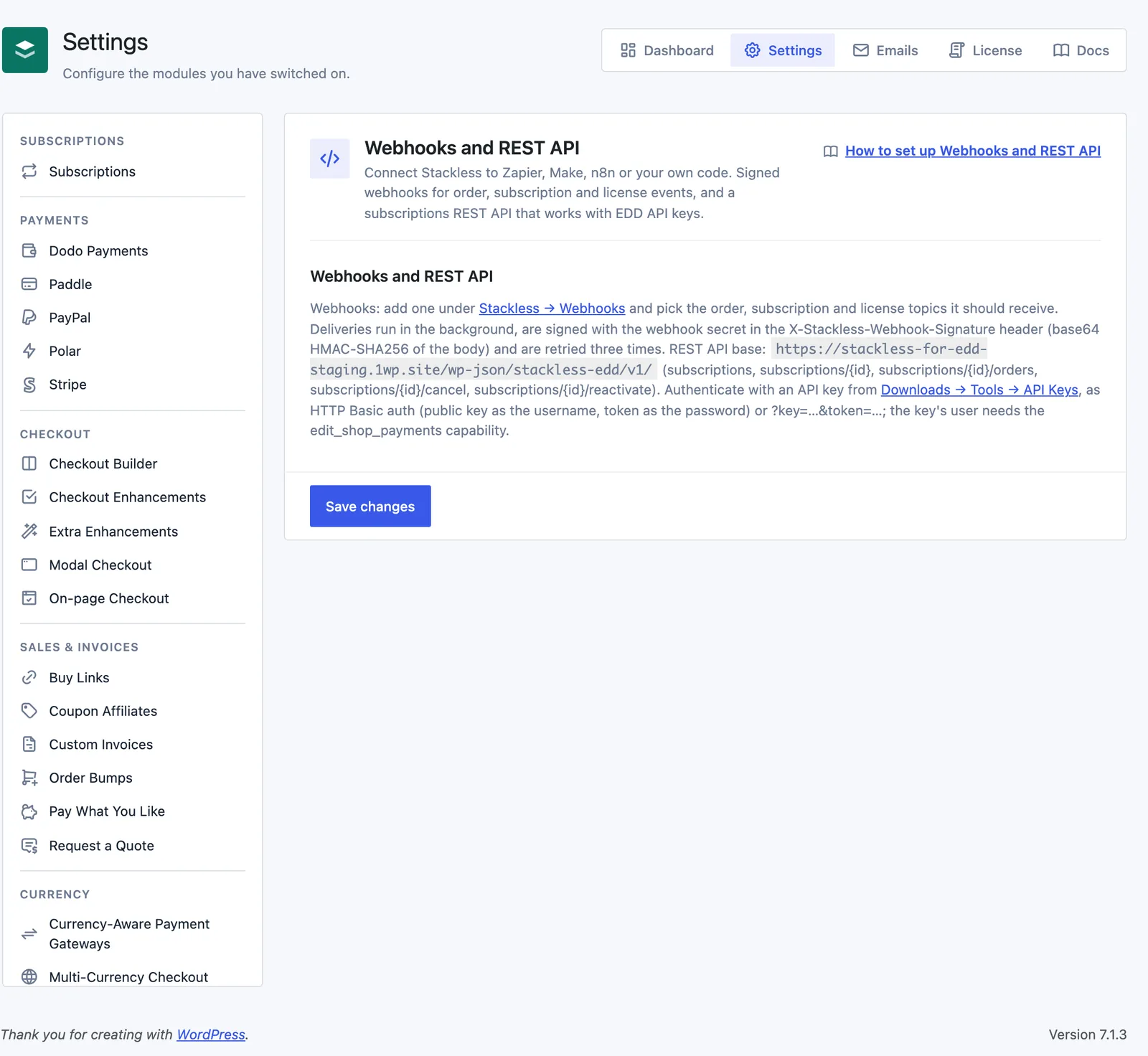
- Open Stackless → Settings → Webhooks and REST API. The screen has no settings to fill in. It shows your REST base address and links to the Webhooks screen and to Downloads → Tools → API Keys.
- Switch on Subscriptions if you want subscription topics and the REST API, and Software Licensing if you want license topics. Order topics only need EDD.
Add a Webhook
Webhooks live on their own screen at Stackless → Webhooks. You need the manage_shop_settings capability to open it.
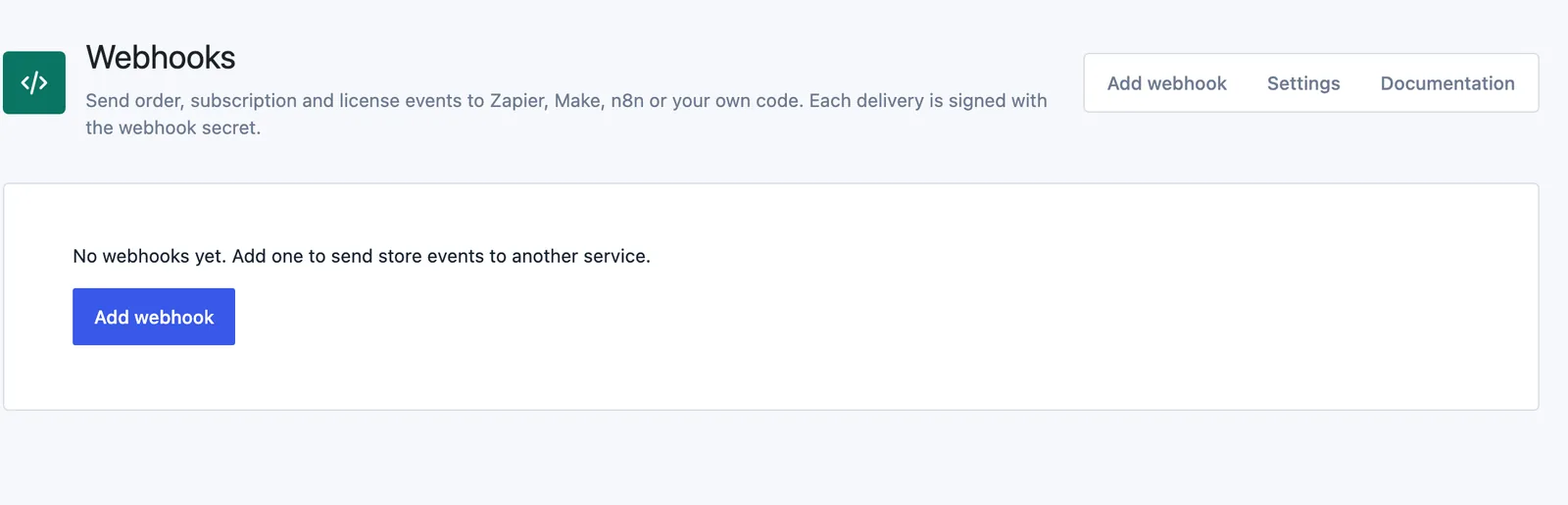
- Click Add webhook.
- Fill in the form (fields below).
- Click Save webhook.
- Back on the list, click Send test to send a signed ping right away. The notice says “Test delivered” with the HTTP code, or why it failed.
The form fields:
- Name: a label for the list. Left empty, it uses the host of the delivery URL.
- Status: Active, Paused or Disabled. Paused webhooks queue nothing. Defaults to Active.
- Topics: tick All topics or pick single events. At least one is required. Subscription and license topics only appear while those modules are on.
- Delivery URL: must start with
https://, orhttp://for a test endpoint. - Secret: signs every delivery. Leave it blank and Stackless generates a 40-character secret when you save. On an existing webhook, blank keeps the current one.
The list shows each webhook’s topics, status, a count of failed deliveries in a row and the last delivery. Deliveries opens the 20 most recent attempts with their date, topic, resource ID, attempt number, response code and time taken. Delete removes the webhook and drops its pending deliveries.
Webhook Topics
Order topics come from EDD itself. They fire only for sale orders, never for EDD’s separate refund records.
| Topic | Label on the screen | Fires when | Needs |
|---|---|---|---|
order.created | Order created | EDD adds a sale order | EDD |
order.paid | Order paid | EDD completes the purchase | EDD |
order.updated | Order status changed | an order moves from one status to another | EDD |
order.refunded | Order refunded | EDD records a refund on the order | EDD |
order.deleted | Order deleted | an order is about to be deleted | EDD |
subscription.created | Subscription created | checkout or a plan switch creates a subscription | Subscriptions |
subscription.updated | Subscription updated | the status changes, or an admin, customer or gateway edits it | Subscriptions |
subscription.renewed | Subscription renewal paid | a renewal order is paid | Subscriptions |
subscription.payment_failed | Subscription renewal payment failed | a renewal payment fails | Subscriptions |
subscription.switched | Subscription switched | the customer switches plans | Subscriptions |
subscription.deleted | Subscription deleted | a subscription is deleted | Subscriptions |
license.created | License key created | an order creates license keys (one delivery per key) | Software Licensing |
license.updated | License key updated | a license record changes | Software Licensing |
license.activated | License activated on a site | a site is activated on a key | Software Licensing |
license.deactivated | License deactivated on a site | a site is removed from a key | Software Licensing |
What a Delivery Looks Like
Each event queues one delivery per active webhook that listens to it. Deliveries run in the background on Action Scheduler, in the group stackless-edd-developer_api, so checkout never waits on your endpoint. The body is built when the delivery runs, so it shows the resource as it is at that moment.
Every delivery is a POST with a JSON body and these headers:
| Header | Value |
|---|---|
Content-Type | application/json |
User-Agent | Stackless for EDD/{version} Hookshot (WordPress/{version}) |
X-Stackless-Webhook-Source | your site’s home URL |
X-Stackless-Webhook-Topic | the topic, such as order.paid |
X-Stackless-Webhook-Resource | order, subscription or license |
X-Stackless-Webhook-Event | the part after the dot, such as paid |
X-Stackless-Webhook-ID | the webhook’s ID |
X-Stackless-Webhook-Delivery-ID | a UUID, new for every attempt |
X-Stackless-Webhook-Timestamp | Unix time of the attempt |
X-Stackless-Webhook-Signature | base64 HMAC-SHA256 of the raw body, keyed with the secret |
The body is the resource itself, with no wrapper. Some events add a field:
order.updatedaddsprevious_status.order.refundedaddsrefund_id.subscription.updatedaddsprevious_statuswhen the status changed. Other edits send the subscription without it.subscription.renewed,subscription.payment_failedandsubscription.switchedaddorder, a short summary of the renewal or switch order.license.activatedandlicense.deactivatedaddsite_url.- Every
.deletedtopic sends only{"id": 123}, because the record is gone.
The test from Send test uses the topic webhook.ping and sends webhook_id, ping: true, the webhook’s topics and site_url.
The Order Object
id,number,status,type,mode,currencysubtotal,discount,tax,total,total_refundedas decimal stringsgateway,transaction_idcustomer:id(EDD customer),user_id,email,namebilling_address:name,address,address2,city,region,postal_code,countryline_items:id,download_id,price_id(null without variable pricing),name,quantity,status,subtotal,discount,tax,totaldiscounts:id,code,amountrefunds:id,number,total,date_createdsubscription_ids: subscriptions this order created or reneweddate_created,date_modified,date_completedin ISO 8601 UTC, or null
The Subscription Object
The REST API returns the same shape, so a subscription looks identical whichever way it arrives.
{
  "id": 42,
  "parent_order_id": 1187,
  "status": "active",
  "customer_id": 12,
  "user_id": 7,
  "email": "jordan@example.com",
  "currency": "USD",
  "recurring_total": "29.00",
  "billing_period": "month",
  "billing_interval": 1,
  "renewal_mode": "auto",
  "gateway": "stackless_edd_stripe",
  "gateway_subscription_id": "",
  "gateway_customer_id": "cus_...",
  "trial_end_date": null,
  "next_payment_date": "2026-11-28T09:14:02Z",
  "end_date": null,
  "line_items": [
    {"download_id": 34, "price_id": 2, "name": "Pro plan", "quantity": 1, "amount": "29.00"}
  ]
}status:pending,trial,active,on-hold,pending-cancel,cancelledorexpired.billing_period:day,week,monthoryear.renewal_mode:autoormanual.end_date: null when the subscription runs until cancelled.
The order summary used in subscription events and in the orders route has id, number, relation (parent, renewal or switch), status, currency, total, tax, gateway, transaction_id, date_created and date_completed.
The License Object
id,license_keystatus(with expiry applied) andstored_status(as saved)download_id,price_id,order_id,subscription_id,customer_id,user_id,customer_emailactivation_limit(0 means unlimited) andactivationsexpires_at,date_created,date_modifiedin ISO 8601 UTC, or null
License payloads include the full key. To keep keys out of webhooks, unset license_key with the stackless_edd_developer_api_license filter (example below).
Verify the Signature
Compute a base64 HMAC-SHA256 of the raw request body with the webhook secret, then compare it to X-Stackless-Webhook-Signature. Use the raw body exactly as received. Parsing and re-encoding the JSON changes the bytes and breaks the match.
$body     = file_get_contents('php://input');
$secret   = 'your-webhook-secret';
$expected = base64_encode(hash_hmac('sha256', $body, $secret, true));
$received = $_SERVER['HTTP_X_STACKLESS_WEBHOOK_SIGNATURE'] ?? '';

if (!hash_equals($expected, $received)) {
    http_response_code(401);
    exit;
}
$event   = $_SERVER['HTTP_X_STACKLESS_WEBHOOK_TOPIC'] ?? '';
$payload = json_decode($body, true);
Reply with any 2xx status to mark the delivery done. Anything else counts as a failure.
Retries and Auto-Disable
A delivery that doesn’t get a 2xx reply is retried three times. Stackless waits 15 seconds for a reply and doesn’t follow redirects, so a 301 or 302 also counts as a failure.
| Attempt | When |
|---|---|
| 1 | right after the event |
| 2 | 1 minute after attempt 1 fails |
| 3 | 10 minutes after attempt 2 fails |
| 4 | 1 hour after attempt 3 fails |
When all four attempts fail, the webhook’s failure count goes up by one. After five events in a row fail for good, Stackless sets the webhook to Disabled and writes a warning to the debug log. A successful delivery or test resets the count, and so does saving the webhook as Active.
Each retry gets a new Delivery ID. If your endpoint timed out but still did the work, the retry brings the same event again, so make your handler safe to run twice.
Call the Subscriptions REST API
The REST API lives in the stackless-edd/v1 namespace. Its routes exist only while the Subscriptions module is on.
https://yourstore.com/wp-json/stackless-edd/v1/| Method and route | What it does |
|---|---|
GET /subscriptions | List subscriptions, newest first |
GET /subscriptions/{id} | One subscription |
GET /subscriptions/{id}/orders | Its parent, renewal and switch orders, newest first |
POST /subscriptions/{id}/cancel | Cancel now, or at the end of the paid period |
POST /subscriptions/{id}/reactivate | Withdraw a pending cancellation, or resume an on-hold subscription |
List Parameters
status: comma-separated public statuses, such asactive,trial. Unknown names are dropped. If none are valid, you getstackless_edd_rest_invalid_status(400).customer: an EDD customer ID.product: a download ID.page: defaults to 1.per_page: defaults to 20, up to 100.
The list response carries X-WP-Total and X-WP-TotalPages headers, like WordPress’s own routes.
Cancel and Reactivate
cancel takes at_period_end, which defaults to true, so the customer keeps access until the paid period ends. Send false to cancel right away. Both actions are recorded as made by an admin in the subscription notes. They return the updated subscription, or a 409 error when the change isn’t allowed from its current status.
curl -u PUBLIC_KEY:TOKEN \
  "https://yourstore.com/wp-json/stackless-edd/v1/subscriptions?status=active,trial&per_page=50"

curl -u PUBLIC_KEY:TOKEN -X POST \
  -H "Content-Type: application/json" \
  -d '{"at_period_end": false}' \
  "https://yourstore.com/wp-json/stackless-edd/v1/subscriptions/42/cancel"
Authenticate With EDD API Keys
The routes accept the API keys EDD already has. Create a key under Downloads → Tools → API Keys for a user who can manage payments, then send it one of two ways:
- HTTP Basic auth: the public key as the username and the token as the password.
- Query string:
?key=PUBLIC_KEY&token=TOKEN, the same way EDD’s own API takes them.
Both values are 32 hexadecimal characters. The token is the one EDD shows next to the key, not the secret key. The request then runs as the key’s owner, so every capability check still applies. Signed-in admin requests with WordPress’s REST nonce work too.
EDD keys only authenticate these subscription routes. They don’t open any other WordPress REST route.
Permissions
Reading and writing both need the edit_shop_payments capability by default. Without it, a request gets stackless_edd_rest_forbidden. You can raise either check separately:
add_filter('stackless_edd_developer_api_write_capability', function () {
    return 'manage_shop_settings';
});| Error code | Status | When |
|---|---|---|
stackless_edd_rest_forbidden | 401 or 403 | the user lacks the capability |
stackless_edd_rest_invalid_status | 400 | no valid status in status |
stackless_edd_rest_subscription_invalid_id | 404 | no subscription with that ID |
| the Subscriptions error code | 409 | cancel or reactivate isn’t possible right now |
Filters for Developers
| Filter | Arguments | Use it to |
|---|---|---|
stackless_edd_developer_api_subscription | array $data, SubscriptionData $subscription | change the subscription JSON (REST and webhooks) |
stackless_edd_developer_api_order | array $data, \EDD\Orders\Order $order | change the order JSON in webhooks |
stackless_edd_developer_api_license | array $data, array $license | change the license JSON in webhooks |
stackless_edd_developer_api_read_capability | string $capability | change who can read |
stackless_edd_developer_api_write_capability | string $capability | change who can cancel or reactivate |
stackless_edd_developer_api_max_failures | int $max, array $webhook | change the five-failure limit (0 never disables) |
stackless_edd_developer_api_deliver_on_copy | bool $deliver, array $webhook, string $topic | allow deliveries from a staging copy |
// Keep license keys out of webhook payloads.
add_filter('stackless_edd_developer_api_license', function (array $data) {
    unset($data['license_key']);
    return $data;
});
Good to Know
- On a copy of your live store, such as a staging site, webhooks aren’t sent. Each one is logged as “Skipped: this site is not the live store.” and the Webhooks screen shows a warning. Troubleshooting explains how a site is confirmed as live.
- Paused and Disabled webhooks queue nothing. Deliveries already queued for them are dropped when they come due.
- The same event goes to the same webhook once per request, even if EDD fires its hook twice.
- If the resource is gone when a delivery runs (other than a delete topic), the attempt is logged as skipped and not retried.
- Deliveries use WordPress’s safe HTTP request, which refuses local and private network addresses. Use a public URL or a tunnel for local testing.
- Failed attempts are written to Downloads → Tools → Debug Log under
[stackless-edd-developer_api]. Secrets never are. - The REST API covers subscriptions only. For orders, customers and downloads, use EDD’s own API. The license server has its own routes, covered in License API.