
 by
by
I get why choosing WordPress hosting feels risky. Every host sells a plan for a few dollars a month and promises fast servers. The real bill shows up when the first term ends, and the renewal price can be 3 or 4 times higher.
For me, the best WordPress hosting in 2026 comes down to one question: who will fix the server when something breaks? If you’re a beginner, I’d let the host do it and start on Hostinger.
If the site makes money and nobody on your team wants to be a server admin, I’d put it on ScalaHosting.
If you’re happy to own the server yourself, I’d copy the stack this site runs on: a Hostinger KVM 4 VPS managed through xCloud.
This site has run on WordPress.com, GoDaddy, WPX, ScalaHosting’s managed cloud and a Hetzner VPS over the years. I still manage client sites on ScalaHosting and WPX, and I have also used Bluehost, HostGator, SiteGround, Rocket.net, Namecheap, Cloudways, BigRock, AccuWeb, GreenGeeks and A2 Hosting, now Hosting.com.
If the names are new to you, these are the main picks and the job each one does:
- Hostinger: a budget host with its own hPanel dashboard, shared and cloud WordPress plans, VPS servers and a data center in India
- xCloud: a control panel that installs and manages WordPress on a VPS you rent elsewhere, such as Hostinger or Hetzner
- ScalaHosting: managed cloud VPS plans with its own SPanel control panel, email and backups on one bill
- WPX: managed WordPress hosting known for fast support, with malware removal and daily backups included
- WordPress.com: hosted WordPress run by Automattic, with plugins on its Business and Commerce plans
Find your situation in the table, then read that host’s section for the catch.
Quick Comparisons
| Use case | My pick | Why I’d pick it | Starts at | Renews at |
|---|---|---|---|---|
| First WordPress site | Hostinger Unlimited | Easy dashboard, daily backups, NVMe storage and unlimited sites on one plan | $3.99/mo on 48 months | $16.99/mo |
| India | Hostinger India | Rupee billing, an India data center and the renewal printed on every plan | Under ₹250/mo on 48 months | ₹649/mo |
| Developers who run their own server | Hostinger KVM 4 + xCloud | 4 vCPU and 16 GB RAM, with a panel that’s free for your first server | $12.99/mo on 24 months | $28.99/mo |
| Business sites | ScalaHosting Entry Cloud | A managed VPS with SPanel, email and backups handled for you | $24.95/mo on 36 months | $39.95/mo |
| Client sites where support matters | WPX | Fast support, malware removal and daily backups included | $14.99/mo billed yearly | Same price |
| Hosted WordPress, no server | WordPress.com Business | Plugins, staging, SSH and backups on a platform Automattic runs | $25/mo billed yearly | Same price |
| Staging and side projects | RackNerd | Annual KVM VPS specials for non-critical work | $35.99/year for 2 GB | Same price |
Budget for the renewal price. It’s the one you pay for as long as you stay.
How I Picked These Hosts
I ranked these hosts on what you live with after checkout. These are the things that decide whether a host still feels like a good choice in year 3:
- Real use: hosts this site has run on, hosts I manage client sites on, and hosts I judge from their current plans and policies. Each section says which.
- Renewal price: the promo price, the term it needs and what the plan renews at.
- Resources: CPU, RAM, NVMe storage, PHP workers, backups, staging and email.
- Who fixes problems: whether the host or you owns server updates, security and restores.
- Exit cost: how painful the host becomes when the site grows or needs to move.
Three terms come up again and again below:
- PHP workers: the number of uncached requests a site can process at the same time. A busy WooCommerce checkout needs more of them than a cached blog.
- Managed vs unmanaged VPS: on a managed VPS the host patches and secures the server. On an unmanaged one, you or a panel like xCloud do that work.
- Renewal price: what the plan costs after the first term, which is the price you pay for as long as you stay.
If you are still comparing managed hosting with raw servers, read my guide to managed WordPress hosting benefits before you buy anything expensive.
Best WordPress Hosting Providers
These are my 6 picks, in the order I’d recommend them to most readers. Each one wins a different job, so the first line of each card matters more than the specs.

Hostinger
Hostinger is my pick for beginners and for most readers in India. It keeps the first bill low and its hPanel dashboard is easy to learn. It’s also one of the 3 hosts listed on WordPress.org’s own hosting page, next to Bluehost and Pressable.
| Hostinger plan | Best for | Intro price (48 months) | Renews at | Key specs |
|---|---|---|---|---|
| Premium | 1 to 3 small sites | $2.99/mo | $10.99/mo (₹449/mo) | 3 websites, 20 GB SSD, weekly backups |
| Unlimited | Most WordPress sites | $3.99/mo | $16.99/mo (₹649/mo) | Unlimited websites under a fair-use policy, 50 GB NVMe, daily backups, CDN |
| Cloud Startup | Busy blogs and small stores | $7.99/mo | $25.99/mo (₹1,599/mo) | 4 CPU cores, 4 GB RAM, 100 PHP workers, 100 GB NVMe, dedicated IP |
My advice is to start on Unlimited instead of Premium. It costs $1 more a month, and that dollar buys daily backups, NVMe storage and room for more than 3 sites. Cloud Startup is the plan I’d pick when you already know the site will be busy. Its 4 GB RAM and 100 PHP workers give WordPress far more room than the shared plans.
The catch is the renewal. Hostinger’s lowest prices need a 48-month term, and Unlimited renews at $16.99/mo, more than 4 times its intro price.
Hostinger also uses hPanel instead of cPanel, which is the main adjustment if you’re moving from an older host. On the plus side, Hostinger refunds renewals within 30 days too.
This site runs on Hostinger’s VPS, which the next card covers, and I’ve set up its shared plans for client sites. Its biggest sale runs around Black Friday every year, and my Hostinger Black Friday deals page tracks the current price.
Hostinger KVM 4 and xCloud
This is the stack this site runs on: a Hostinger KVM 4 VPS, managed through xCloud. It’s my pick for developers and site owners who are happy to own server decisions in exchange for far more resources per dollar than managed hosting gives.
Hostinger provides the raw VPS. xCloud is the control panel on top. It sets up the web server, PHP, SSL, backups and staging, and you add WordPress sites from its dashboard instead of the command line.
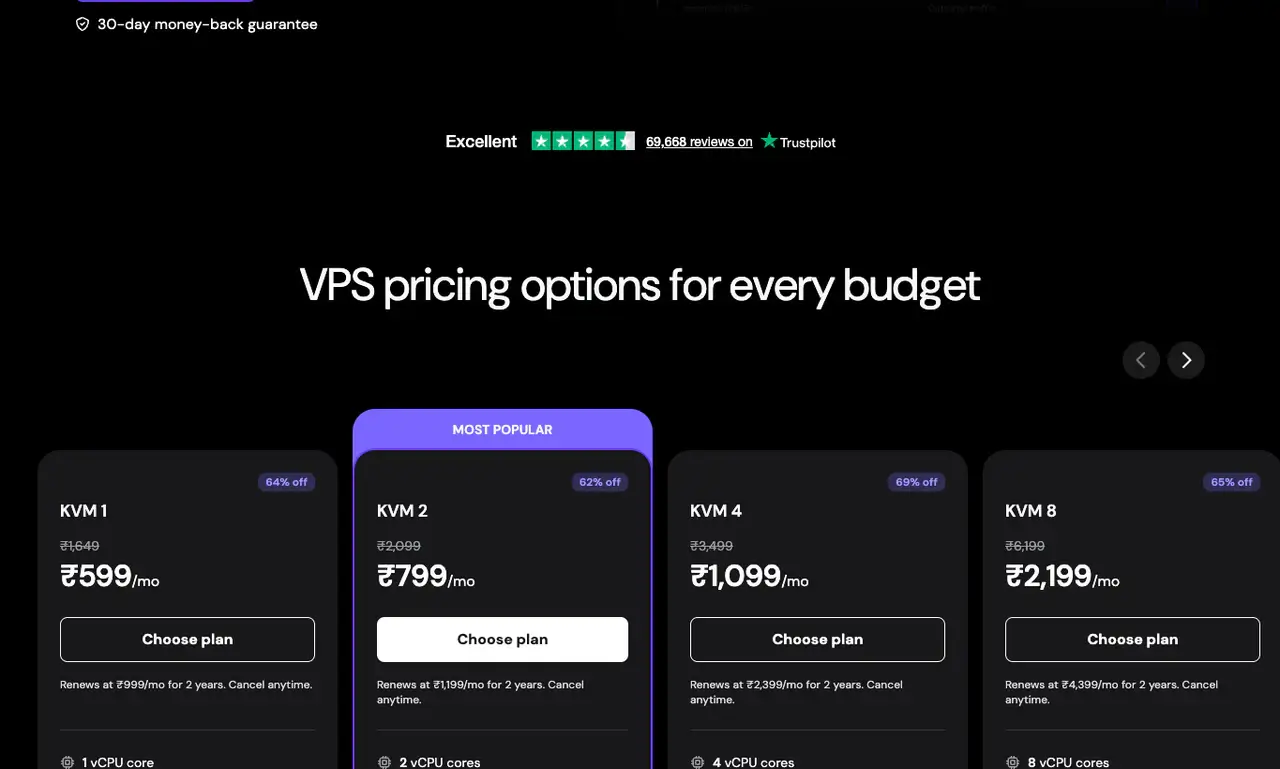
Hostinger’s VPS prices dip during sales, so the renewal column is the stable number to budget for.
| Hostinger VPS plan | Intro price (24 months) | Renews at | CPU | RAM | NVMe storage | Bandwidth |
|---|---|---|---|---|---|---|
| KVM 2 | $8.79/mo or ₹779/mo | $14.99/mo or ₹1,199/mo | 2 vCPU | 8 GB | 100 GB | 8 TB |
| KVM 4 | $12.99/mo or ₹1,099/mo | $28.99/mo or ₹2,399/mo | 4 vCPU | 16 GB | 200 GB | 16 TB |
| KVM 8 | $25.99/mo or ₹2,199/mo | $49.99/mo or ₹4,399/mo | 8 vCPU | 32 GB | 400 GB | 32 TB |
Here’s what the stack costs for one server, as a worked example:
- Server: KVM 4 at $12.99/mo for 24 months ($311.76 upfront), then $28.99/mo
- Panel: xCloud is free for your first server with up to 10 sites. Servers 2 to 5 cost $5 each per month.
- Email: not included on a VPS. xCloud sells mailboxes from $1 a month per 8 GB mailbox, or you can use a separate email host.
- Total: about $13/mo for the first 2 years and about $29/mo after that, for 4 vCPU, 16 GB RAM and 200 GB NVMe
I own an xCloud lifetime deal, so my own panel cost is different, but the free tier covers a single server anyway. For comparison, Hostinger’s Cloud Startup renews at $25.99/mo with 4 GB RAM, and the KVM 4 renews at $28.99/mo with 16 GB. The difference is who does the work: on Cloud Startup, Hostinger runs the server, while on the VPS, you and xCloud do.
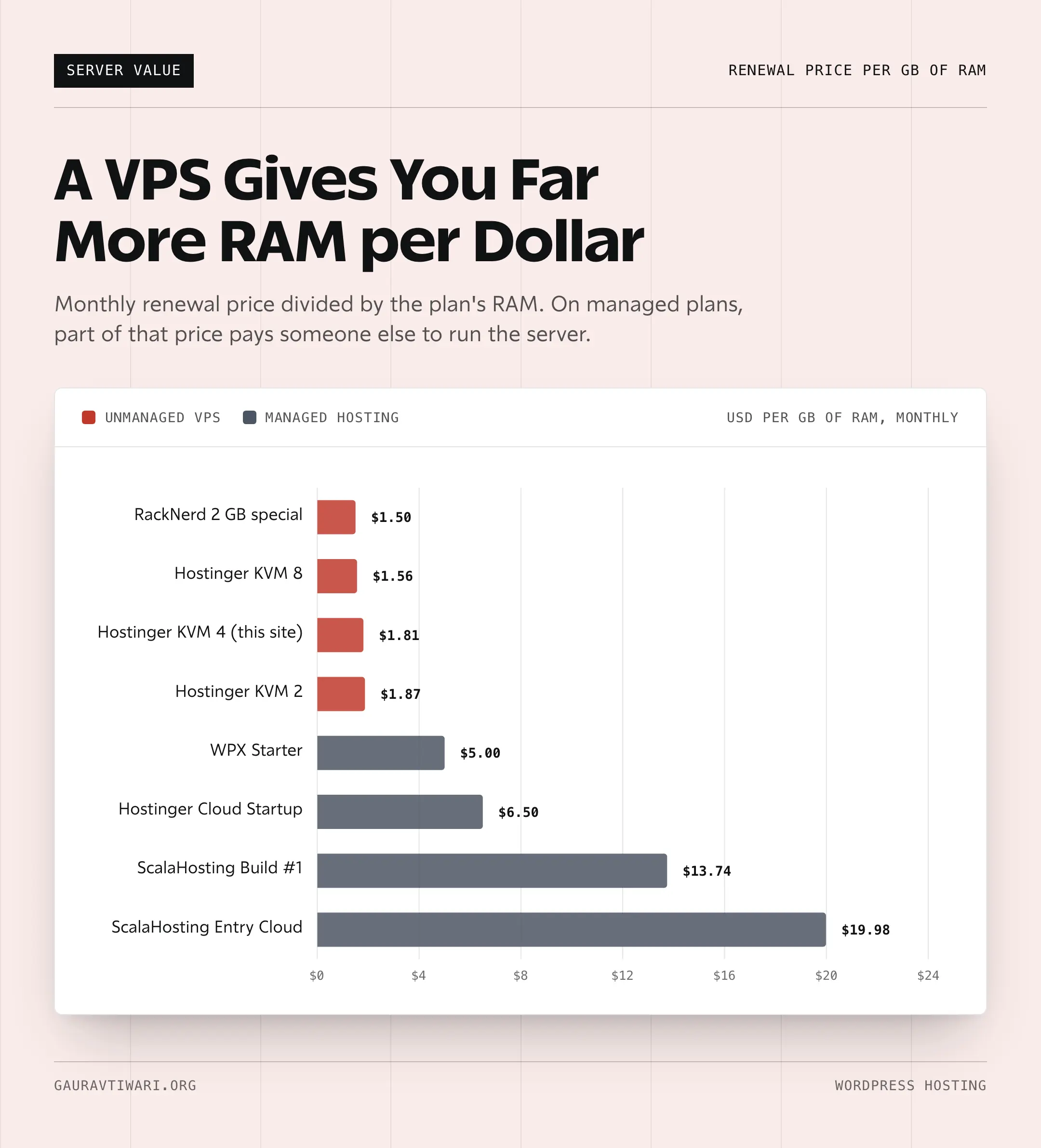
- This stack fits you if DNS, backups, caching, PHP versions and server security already make sense to you.
- It fits if you want VPS resources without premium managed WordPress prices.
- It’s a bad fit if root access is a new idea, or if you want one company to own every support problem.
If server control is the reason you are reading this, my shared vs VPS vs dedicated hosting guide explains that side of the decision in more depth.

ScalaHosting
ScalaHosting is my pick for business sites that make money but have nobody on staff who wants to be a server admin. It sells managed cloud VPS plans, so the site gets its own CPU and RAM while ScalaHosting handles the server, security patches and backups.
This site ran on ScalaHosting’s Entry Cloud after WPX, and I still manage client sites there. Its own SPanel covers email, DNS and databases the way cPanel does, without a cPanel license fee on the bill.
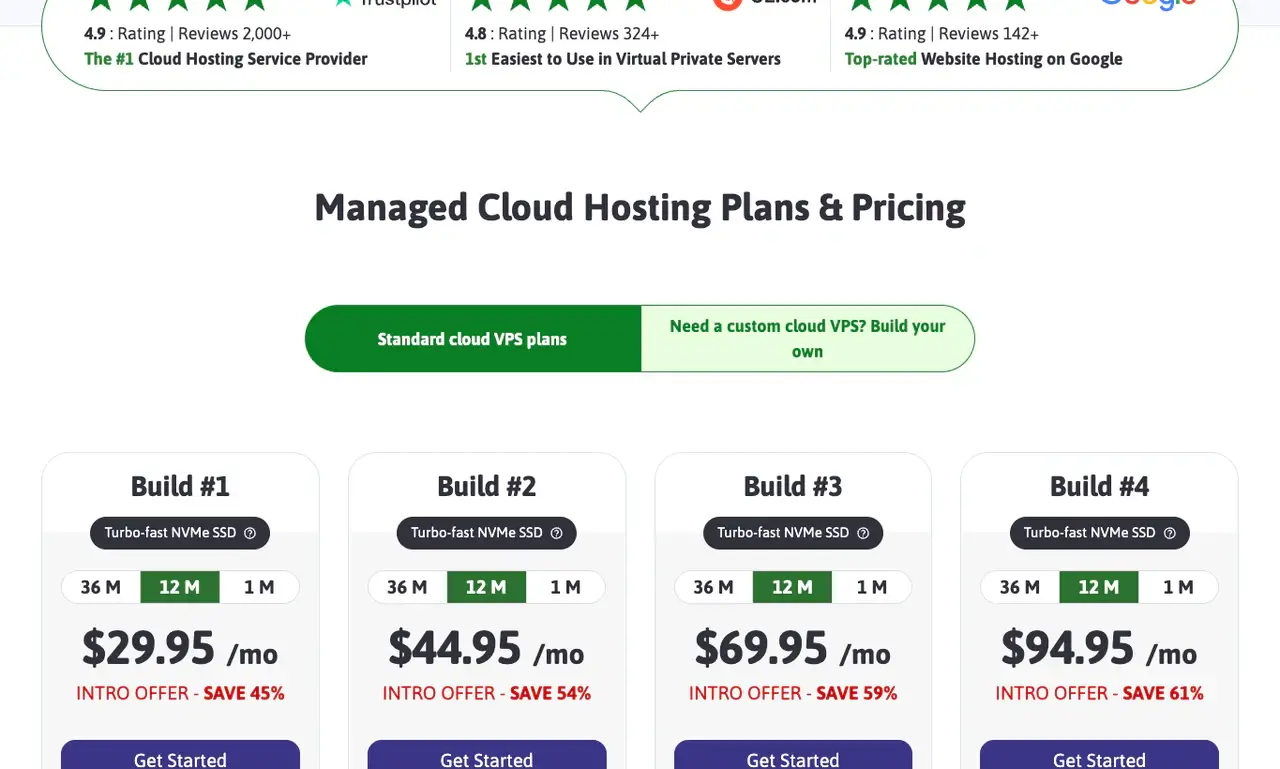
| ScalaHosting plan | Intro price (36 months) | Renews at | CPU | RAM | NVMe storage |
|---|---|---|---|---|---|
| Entry Cloud | $24.95/mo | $39.95/mo | 2 dedicated cores | 2 GB | 50 GB |
| Build #1 | $29.95/mo | $54.95/mo | 2 cores | 4 GB | 50 GB |
| Build #2 | $61.95/mo | $96.95/mo | 4 cores | 8 GB | 100 GB |
Every plan comes with unmetered bandwidth, SPanel, automated backups and a dedicated IP. I’d start most business sites on Entry Cloud, which is the plan this site used. Build #1 doubles the RAM for $5 more a month on the intro term, and that’s the safer choice for a WooCommerce store.
The catch is renewal and reach. Entry Cloud renews at $39.95/mo, coverage in Asia-Pacific is thin and there’s no phone support. On the plus side, ScalaHosting offers an anytime money-back guarantee on these plans.
My ScalaHosting review covers the move from WPX and the day-to-day experience in detail.

WPX
WPX is the host I’d pick when a non-technical client will own the site and support quality matters more than resources per dollar. I used WPX for years, and I still have client sites there.
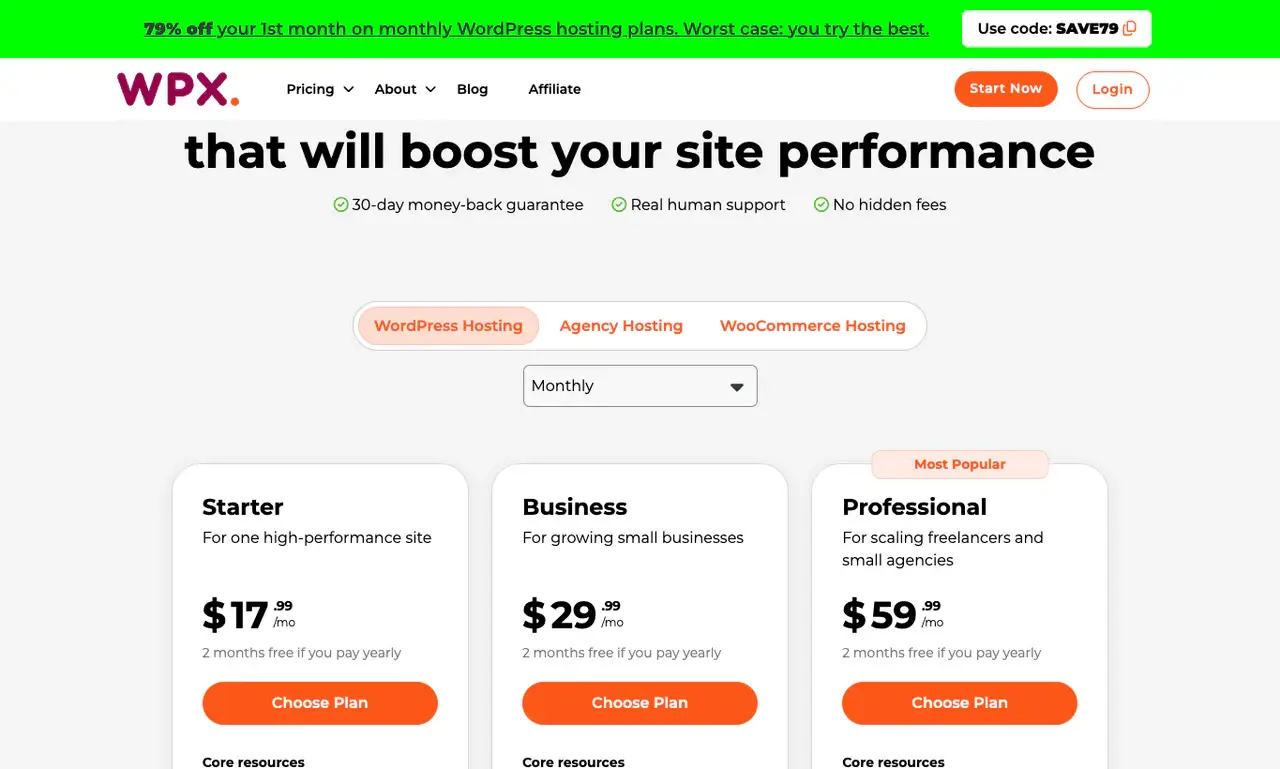
| WPX plan | Monthly | Billed yearly | Sites | Storage | RAM and CPU | PHP workers |
|---|---|---|---|---|---|---|
| Starter | $17.99/mo | $14.99/mo | 1 | 10 GB | 3 GB, 0.5 core | 9 |
| Business | $29.99/mo | $24.99/mo | Up to 5 | 20 GB | 5 GB, 1 core | 15 |
| Professional | $59.99/mo | $49.99/mo | Up to 15 | 40 GB | 15 GB, 2 cores | 45 |
Every plan includes daily backups, malware scans and removal, free migrations and WPX’s own CDN. Visitors are unlimited, so the limits that matter are storage, bandwidth and PHP workers. Business email starts on the Business plan.
The catch is value. Starter’s single site, 10 GB and half a CPU core cost more than Hostinger’s Cloud Startup on its intro term. So WPX only makes sense when you’re paying for the support.
I wrote more about the support side in my WPX hosting review. What WPX sells is fewer panicked client emails.

WordPress.com
WordPress.com Business is my pick when you want WordPress with plugins but don’t want to rent, patch or monitor a server. Automattic, the company behind WordPress.com, runs the platform for you.
Business includes these developer tools:
- 50 GB storage, with add-ons for more
- Plugin and theme installs
- SFTP, SSH, WP-CLI and GitHub deployments
- Staging sites and real-time backups
- Priority 24/7 support
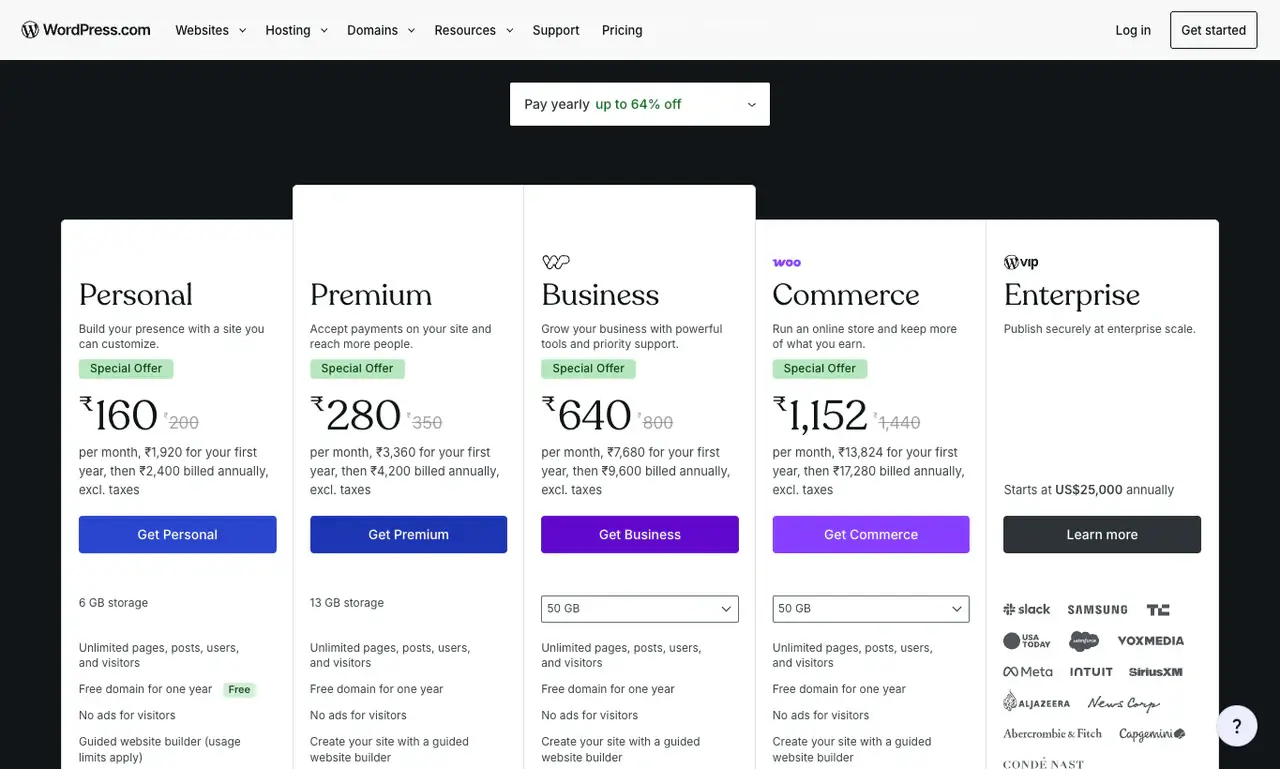
| WordPress.com plan | Monthly billing | Yearly billing | India yearly, before taxes | Best for |
|---|---|---|---|---|
| Business | $40/mo | $25/mo | ₹7,680 (₹640/mo) | Business, content and plugin-powered sites |
| Commerce | $70/mo | $45/mo | ₹13,824 (₹1,152/mo) | WooCommerce stores that want a hosted platform |
The catch is that WordPress.com stays a managed platform. Jetpack and Akismet can’t be deactivated because WordPress.com uses them to run the site, and a short list of plugins is blocked. You also can’t choose your server or PHP stack the way you can on a VPS.
Commerce adds WooCommerce’s premium extensions, selling in 60+ countries and 0% transaction fees on top of Business. My WordPress.com Commerce review covers whether that’s worth $20 more a month.
If the difference between WordPress.com and self-hosted WordPress is still fuzzy, start with my WordPress.com vs WordPress.org comparison. Developers can read my WordPress.com Business plan review for the SSH, Git and staging details.
RackNerd and Hetzner
RackNerd and Hetzner are where I put staging sites, tools and side projects. I’d never send a beginner to either one, because both sell unmanaged servers: you install and secure everything yourself or connect a panel like xCloud.
This site’s staging copy runs on a RackNerd VPS, and this site ran on a Hetzner VPS with xCloud before it moved to Hostinger.
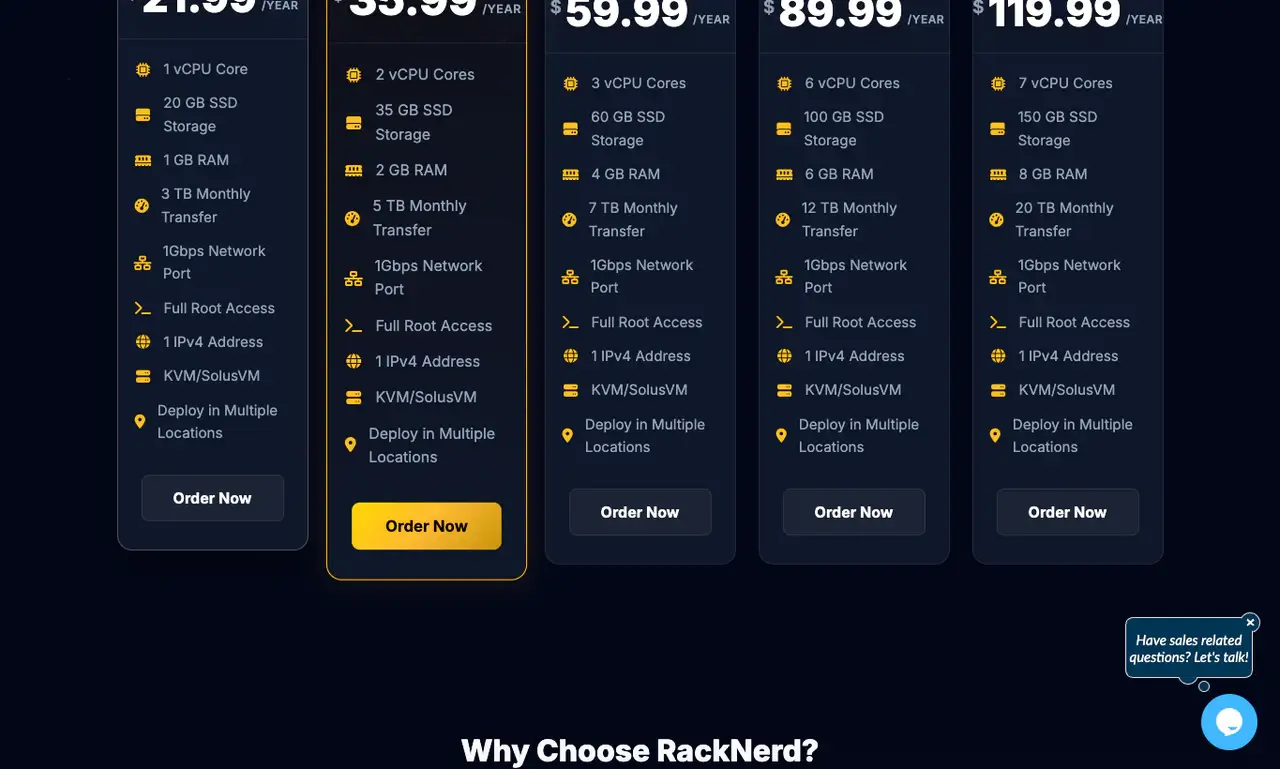
| RackNerd special | Price | CPU | RAM | SSD storage | Monthly transfer |
|---|---|---|---|---|---|
| 1 GB KVM VPS | $21.99/year | 1 vCPU | 1 GB | 20 GB | 3 TB |
| 2 GB KVM VPS | $35.99/year | 2 vCPU | 2 GB | 35 GB | 5 TB |
| 4 GB KVM VPS | $59.99/year | 3 vCPU | 4 GB | 60 GB | 7 TB |
RackNerd says these specials renew at the same rate for as long as you keep them, which is rare at this price, and every plan has a 1 Gbps port. Hetzner bills by the hour with a monthly cap, from data centers in Germany, Finland, the US and Singapore.
The catch is that you are the support team. When a cheap VPS runs out of memory at night, nobody restarts PHP for you. My Hetzner vs Vultr vs RackNerd comparison covers how these budget servers perform.
What WordPress Hosting Costs
I compare WordPress hosts on what they cost after the first term, because the renewal is the price you pay for as long as you stay.
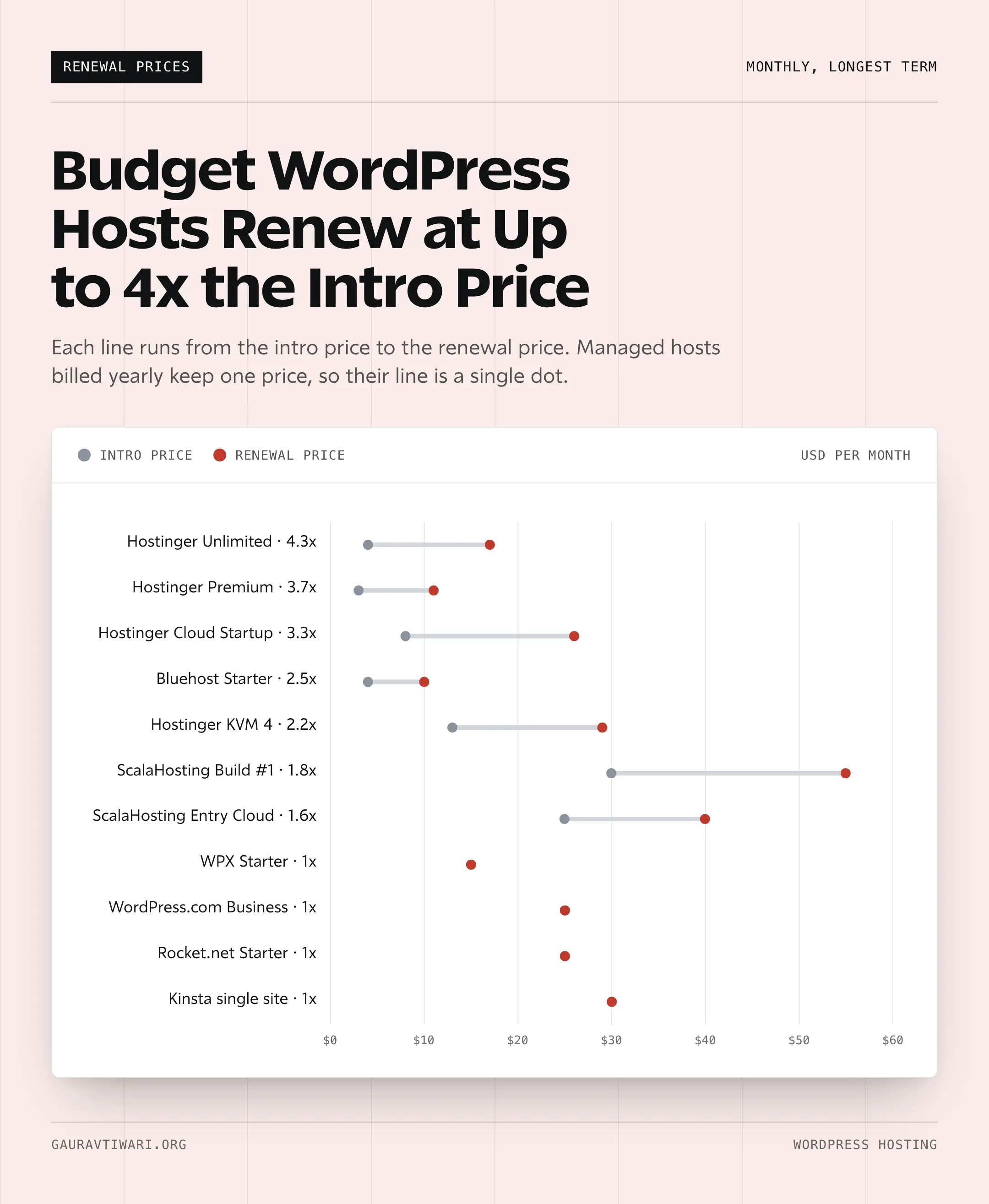
This is the first bill and the renewal for each pick’s main plan:
| Plan | First bill | Term | Renews at | Yearly cost after renewal |
|---|---|---|---|---|
| Hostinger Unlimited | $191.52 | 48 months | $16.99/mo | $203.88 |
| Hostinger Cloud Startup | $383.52 | 48 months | $25.99/mo | $311.88 |
| Hostinger KVM 4 + xCloud (1 server) | $311.76 | 24 months | $28.99/mo | $347.88 |
| ScalaHosting Entry Cloud | $898.20 | 36 months | $39.95/mo | $479.40 |
| WPX Starter | $179.90 | 12 months | Same price | $179.90 |
| WordPress.com Business | $300 | 12 months | Same price | $300 |
| Rocket.net Starter | $300 | 12 months | Same price | $300 |
| Kinsta single site | $350 | 12 months | Same price | $350 |
| RackNerd 2 GB special | $35.99 | 12 months | Same price | $35.99 |
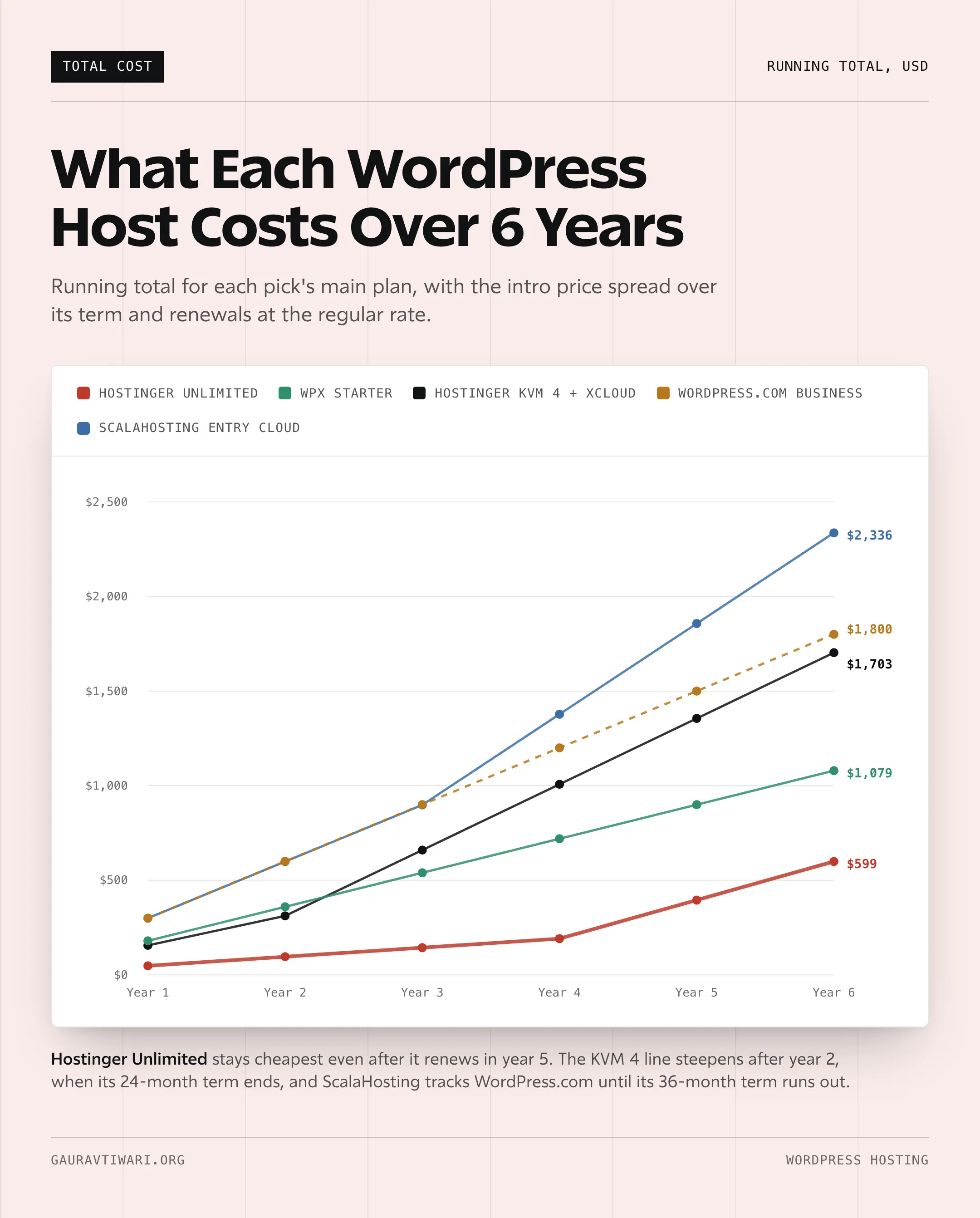
Two things stand out. After its 4-year term, Hostinger Unlimited costs $203.88 a year, about $24 more than WPX Starter’s yearly price for a single site. That’s why I’d plan the renewal before you buy, and why moving a single growing site to a managed host or a VPS at renewal time often makes sense.
ScalaHosting’s first bill is the largest because the 36-month price is paid upfront. On a 12-month term, Entry Cloud costs $14.95/mo, so the cash outlay is smaller if you’d rather not commit for 3 years.
Black Friday sales cut the first bill further on most of these hosts, and I track the current offers in my Black Friday web hosting deals roundup. Moving to another host later is a normal step, and my guide to migrating a WordPress site to a new host walks through it.
Best WordPress Hosting in India
For a WordPress site with mostly Indian visitors, I’d pick Hostinger. It bills in rupees, it has a data center in India for shared, cloud and VPS plans, and the renewal price is printed on every plan card.
This is what the main plans cost on Hostinger India:
- Unlimited: under ₹250 a month on 48 months, depending on the sale, renewing at ₹649/mo
- Premium: renews at ₹449/mo, for up to 3 small sites with weekly backups
- Cloud Startup: ₹599/mo on 48 months, renewing at ₹1,599/mo
- KVM 4: ₹1,099/mo on 24 months, renewing at ₹2,399/mo
You should pick the India data center at checkout when most of your visitors are in India. For a site that sells abroad, a US or European location usually serves the buyers better.
WordPress.com Business costs ₹7,680 a year in India before taxes, which is a fair price for a platform you never patch. If you want an Indian host, MilesWeb is the one I’d look at next, and my MilesWeb review covers its India servers and tradeoffs.
Best WordPress Hosting by Use Case
If you already know what you’re building, this is how I’d route it:
- First WordPress site: Hostinger Unlimited. It’s cheap to start, easy to learn and has daily backups.
- Growing blog or affiliate site: Hostinger Cloud Startup for a managed setup, or KVM 4 with xCloud if you’re comfortable running a server.
- Business website: ScalaHosting Entry Cloud when the business needs its own server and email on one bill, or WordPress.com Business when the owner wants a hosted platform.
- WooCommerce store: ScalaHosting Build #1 for control, WordPress.com Commerce for a hosted store and Rocket.net or Kinsta when the budget is higher. My best WooCommerce hosting guide goes deeper.
- Client sites: WPX when the client calls you about every problem, ScalaHosting when they need a managed server and KVM 4 with xCloud when you’ll run the server yourself.
- Staging, tools and experiments: RackNerd or Hetzner.
Other Hosts Worth Considering
These hosts are good at specific jobs. They aren’t where I’d start most readers, but each one is the right answer for someone.
Rocket.net
Rocket.net is managed WordPress hosting with Cloudflare Enterprise caching and a firewall built into every plan. Starter costs $30/mo, or $25/mo billed yearly, for 1 site, with unmetered visitors, daily backups kept for 30 days and a promise of no price hikes at renewal.
I’ve used Rocket.net, and I’d consider it when speed matters more than saving money. Rocket.net now partners with Hosting.com and still runs under its own brand, and my Rocket.net review covers what that changed.

Kinsta
Kinsta is premium managed WordPress hosting on Google Cloud. Its single-site plan costs $35/mo, or $30/mo billed yearly, with 10 GB storage and about 35,000 visits a month, and the first month is free.
I’ve hosted client stores at Kinsta, and the MyKinsta dashboard is the most polished on this list. The entry plans are capped by visits or bandwidth, though, so a traffic spike can push a site into a bigger plan or overage charges. That makes Kinsta a poor fit for low-budget blogs and Indian beginners.

Cloudways
Cloudways gives you managed cloud servers on providers such as DigitalOcean, AWS and Google Cloud without running your own panel. DigitalOcean Premium servers start at $14/mo.
I ran sites on Cloudways’ DigitalOcean servers in Mumbai before moving to my own VPS with xCloud, and it still suits people who want cloud servers without root-level chores. My list of Cloudways alternatives covers where it falls short.

WP Engine
WP Engine is managed WordPress hosting aimed at larger businesses. Its entry plan costs $35/mo, or $28/mo for the first year on annual billing before it renews at $420 a year, and each extra site costs $20/mo.
I haven’t run a site on WP Engine, so this verdict comes from its current plans. There’s no money-back guarantee on them, and phone support starts on the Business tier. My WP Engine alternatives list covers cheaper options with similar features.

Bluehost
Bluehost is the host WordPress.org’s hosting page calls its longest-running recommendation. Its Starter plan costs $3.99/mo on 36 months and renews at $9.99/mo, a dollar under Hostinger Premium.
I’ve used it, and that lower renewal is Bluehost’s best argument. I still prefer Hostinger for beginners because of the 48-month price lock, daily backups on Unlimited and the India data center.

Hosting.com
Hosting.com is the brand A2 Hosting became in 2025. Its managed WordPress Small plan costs $4.49/mo and renews at $9.99/mo, and it now uses its own Hosting Panel instead of cPanel.
I used it back when it was A2 Hosting. It’s a fair choice for a small site, and my Hosting.com review covers the speed, renewals and support in detail.
Hosts I’d Skip
I’ve used all 4 of these. They can still run a small site, but each one loses to a pick above at the job it’s sold for.

HostGator
HostGator had its run as a beginner host. In 2026, I’d send a new WordPress user to Hostinger for the easier dashboard and lower 4-year cost, and a serious site to ScalaHosting, WPX or WordPress.com.

Namecheap
Namecheap is good for domains. Its hosting is cheap at checkout, but the Stellar plan renews at $102.88 for 2 years after its $1.88/mo start. I’d want better WordPress tooling and support for that money.
My Namecheap hosting review has the full picture.
GoDaddy
GoDaddy does sell managed WordPress hosting, and it has India pricing and a brand everyone recognizes. This site ran on GoDaddy once. Its dashboard pushes upsells at every step, and that’s not where I want a beginner to start a clean WordPress site.

SiteGround
SiteGround has fans and a polished set of tools. I don’t make it a primary pick because its renewal prices and storage limits make the value hard to defend next to ScalaHosting for business sites.
FAQs on WordPress Hosting
What is the best WordPress hosting?
For most beginners, Hostinger Unlimited is the best WordPress hosting. It costs $3.99 a month on a 48-month term, includes daily backups and NVMe storage, and renews at $16.99 a month. Business sites that need their own managed server do better on ScalaHosting, and developers get the most resources per dollar from a Hostinger KVM 4 VPS managed through xCloud.
What is the best WordPress hosting in India?
Hostinger is my pick for India. It bills in rupees, has an India data center and prints the renewal price on every plan. Unlimited costs under ₹250 a month on a 48-month term and renews at ₹649 a month.
How much does WordPress hosting cost?
Shared WordPress hosting starts around $3 to $4 a month on long terms and renews at $10 to $17 a month. Managed WordPress hosting such as WPX, Rocket.net or Kinsta costs $15 to $35 a month for one site.
A managed VPS such as ScalaHosting Entry Cloud renews at $39.95 a month. The renewal price is the number to compare.
Can I host a WordPress site for free?
Yes, with limits. WordPress.com’s free plan gives you a subdomain, 1 GB of storage and ads, and it doesn’t allow plugins. Free hosts that let you install WordPress usually cap resources and offer little support, so I’d use free hosting only to learn.
Is managed WordPress hosting worth it?
It’s worth it when downtime or a hacked site would cost you more than the hosting bill. Managed hosts handle updates, backups, caching and malware cleanup, which saves real time on a business site. For a hobby blog, shared hosting with daily backups is usually enough.
Should I use a VPS for WordPress?
A VPS makes sense when you know how to manage a server or you use a panel like xCloud. A Hostinger KVM 4 gives you 4 vCPU cores, 16 GB RAM and 200 GB NVMe storage for $12.99 a month on a 24-month term. That’s far more than shared hosting offers at a similar price. If root access is new to you, I’d start on managed hosting instead.
Which hosts does WordPress.org recommend?
WordPress.org’s hosting page lists Bluehost, Hostinger and Pressable. The page doesn’t compare renewal prices or resources, so check those before you buy.
Which WordPress host is the fastest?
Speed depends more on your theme, plugins and caching than on a host’s marketing. Among my picks, Rocket.net puts Cloudflare Enterprise caching in front of every site, and a VPS such as Hostinger KVM 4 gives you dedicated resources. A heavy page builder on a fast host is still a slow site.
Is WordPress.com good hosting?
WordPress.com Business and Commerce are good hosted options if you want WordPress with plugins and no server to manage. Business costs $25 a month billed yearly. The tradeoff is control: Jetpack and Akismet can’t be deactivated, some plugins are blocked and you can’t choose your server stack.
Is ScalaHosting better than WPX?
ScalaHosting is better if you want a managed VPS with SPanel, email, databases and room for several business sites. WPX is better if you want simpler managed WordPress hosting with fast support, daily backups and malware removal for client sites.
Which WordPress hosts should I avoid?
I don’t make HostGator, Namecheap, GoDaddy or SiteGround primary recommendations. They can run a small site, but Hostinger, ScalaHosting, WPX and WordPress.com do the same jobs better for beginners, business sites and client work.
How do I move my WordPress site to a new host?
Most managed hosts on this list, including WPX, ScalaHosting, Kinsta and Rocket.net, migrate a site for free. On a VPS, you can copy the site with a migration plugin or xCloud’s migration tool, then switch DNS once the copy works.
Final Remarks
If you’re still stuck between two hosts, I’d let two things decide: the renewal price and who fixes problems. I’d pick the one whose renewal you’d happily pay and whose support fits you, whether you’re a beginner, a business owner or the person holding root access.
For a brand new site in 2026, I’d start on Hostinger Unlimited and move up to Cloud Startup, ScalaHosting or a VPS once the site earns enough to need it. That move is normal, and most of these hosts will do the migration for you. Best of luck.
Tell Google you want more of this.
Add Gaurav Tiwari as a preferred sourceOne tap, and this site shows up more often in your own Top Stories, AI Overviews and AI Mode. Remove it any time.
Disclaimer: This site is reader-supported. If you buy through some links, I may earn a small commission at no extra cost to you. I only recommend tools I trust and would use myself. Your support helps keep gauravtiwari.org free and focused on real-world advice. Thanks. - Gaurav Tiwari