
 by
by
WordPress.com vs WordPress.org is the first decision most people face when they want a WordPress site, and the shared name makes it more confusing than it should be. Both run the same open-source WordPress software. The difference is who hosts it, who maintains it and how much of the setup you are allowed to change.
Most advice you’ll find still says WordPress.com is fine until you need plugins. That stopped being true on April 2, 2026, when WordPress.com opened plugins and custom themes to every paid plan. So the useful question today is a different one: do you want to run the hosting yourself, or do you want someone else to run it for you?
WordPress.org is where the free software lives. You download it, install it on a host you choose and run it on your own terms. WordPress.com is Automattic’s hosted service built on the same software, with a free plan and paid plans from $4 a month on annual billing. This site runs on self-hosted WordPress, and I still think a WordPress.com paid plan is now a sensible home for a lot of small sites.
What Is WordPress.org?
WordPress.org is the home of WordPress, the open-source content management system. The software is free under the GPL license. You download it, install it on a web host and decide everything that happens after that: the theme, the plugins, the server, the caching and the backups.
When people say “WordPress.org”, they usually mean self-hosted WordPress. The WordPress.org website hosts the software, the plugin and theme directories, the documentation and the community forums, while your site lives on whichever host you pick.
WordPress runs 40.2% of all websites and 58.7% of the sites whose content management system is known, according to W3Techs. That reach is why almost every host, developer and plugin company supports it.
What You Get
Self-hosting gives you the full software with nothing switched off by a platform. In practice that means:
- the WordPress.org plugin directory, which lists more than 70,000 free plugins, plus any commercial plugin you buy
- more than 8,700 free themes in the theme directory, plus premium and custom themes
- file, database and server access, limited only by the hosting plan you choose
- any way of earning money you want to use: ad networks, affiliate links, memberships, courses or a store built with WooCommerce or another cart
How much of that freedom you actually get depends on your host. A cheap shared plan can still block certain plugins, cap resources or limit cron jobs, so a self-hosted site still lives by its host’s rules.
What You Need
Self-hosted WordPress needs 2 paid things: a domain name and web hosting. WordPress recommends a host with PHP 8.3 or newer, MySQL 8.0 or MariaDB 10.11 or newer and HTTPS support. Nearly every WordPress host covers that, and most install WordPress in one click, so you don’t need to write code to get started.
What you do take on is maintenance. Someone has to update WordPress core, themes and plugins, keep backups that can actually be restored and watch security. A managed WordPress host takes much of that off your plate, and my WordPress hosting guide lists the hosts I’d consider for different budgets.
What Is WordPress.com?
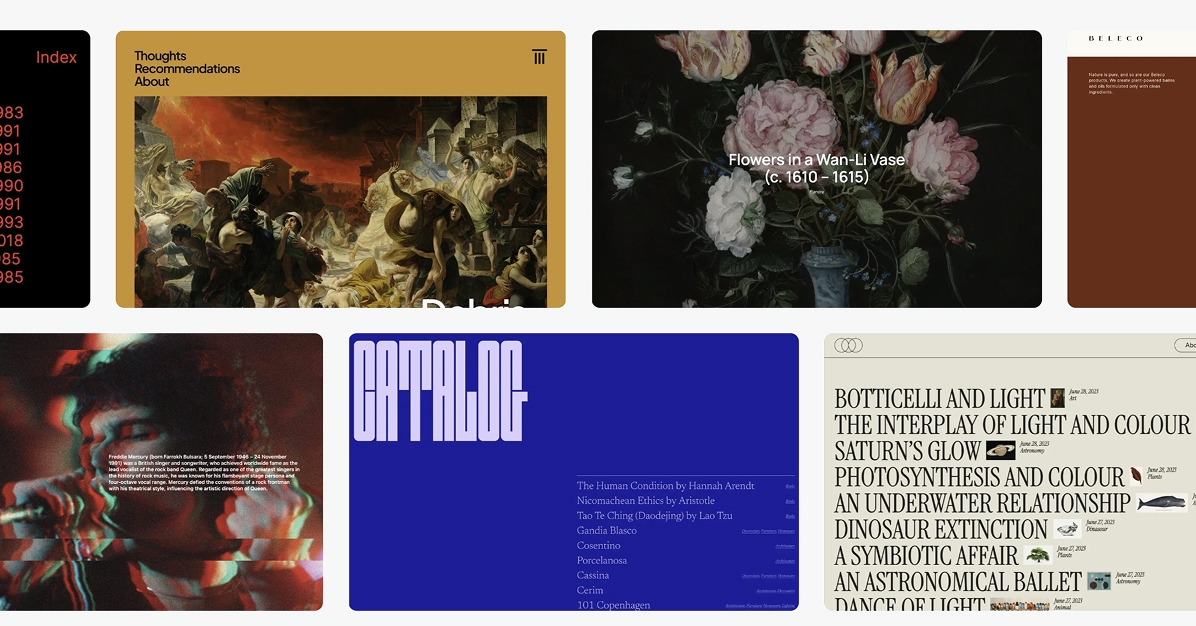
WordPress.com is a hosted platform run by Automattic, the company Matt Mullenweg founded in 2005. It runs the same WordPress software, but Automattic looks after the servers, security and core updates. You sign up, pick a plan and start building.
The trade-off is that you work inside its platform. You can’t choose the server, install software at the server level or switch off the Jetpack and Akismet integration that WordPress.com sites run on. For most site owners that’s a fair exchange. For a developer with a specific stack in mind, it’s the first thing to check.
The Free Plan
The free plan is free for as long as you want it. You get a yoursite.wordpress.com address, 1 GB of storage and a set of free themes. WordPress.com shows its own ads on your pages, and you can’t install plugins, upload a custom theme or use your own domain as the site’s address.
That’s enough for a personal journal, a class project or a way to try the editor before paying. A business site needs a paid plan, mainly for the custom domain and the ad-free pages.
Paid Plans
Every paid plan now allows plugins, so the plans differ by what else they bundle. WordPress.com extended plugins and customization to every paid plan on April 2, 2026, so Personal can install plugins and upload a custom theme just like Business can.
Here’s what each plan costs in USD before tax and what it adds:
- Personal: $4 a month on annual billing ($48 a year) or $9 month to month. Custom domain, no WordPress.com ads, 6 GB of storage, plugins and custom themes.
- Premium: $8 a month on annual billing ($96 a year) or $18 monthly. 13 GB of storage, premium themes, video uploads, advanced stats, WordAds and payment features.
- Business: $25 a month on annual billing ($300 a year) or $40 monthly. 50 GB of storage, SFTP and SSH, WP-CLI, database access, a staging site, GitHub deployments and automatic backups with one-click restores. My WordPress.com Business plan guide for developers covers that workflow and its limits.
- Commerce: $45 a month on annual billing ($540 a year) or $70 monthly. Everything in Business plus a WooCommerce setup with selected store extensions included. My WordPress.com Commerce review works out when that bundle pays for itself.
Annual billing is paid upfront, so Personal’s $4 rate is charged as one $48 payment. Annual and longer plans include a free domain for the first year, and monthly plans don’t. WordPress.com also shows local prices in many countries. In India, for example, annual plans currently show a first-year discount in rupees that renews at a higher price, so check the current pricing page and the renewal line at checkout before you budget.
WordPress.com Limits to Know
Plugin access on paid plans still has some boundaries. These are the ones I’d check before choosing WordPress.com for anything beyond a simple site:
- WordPress.com keeps an incompatible-plugin list of plugins that clash with its managed hosting, such as ones that duplicate its caching, backups or security. Paying for Business doesn’t change that.
- SFTP, SSH, WP-CLI, database access, PHP version switching, staging and GitHub deployments are Business and Commerce features. Personal and Premium manage everything through the dashboard.
- Even on Business, you work inside a managed environment. WordPress core files are read-only, you can’t edit the PHP or Nginx configuration or add custom PHP modules, and WordPress Multisite isn’t supported.
- Jetpack and Akismet must stay installed and active, because WordPress.com relies on them for security and storage features.
- Every site needs its own plan. 10 client sites on Business means 10 Business subscriptions.
None of these matters for a typical blog or business site. They matter when you already know the stack you want, or when the per-site price starts to add up across many sites.
WordPress.com vs WordPress.org: Key Differences
The real difference is a split of responsibilities. The software is identical, but who handles the hosting, updates, security and limits changes with the route you pick.
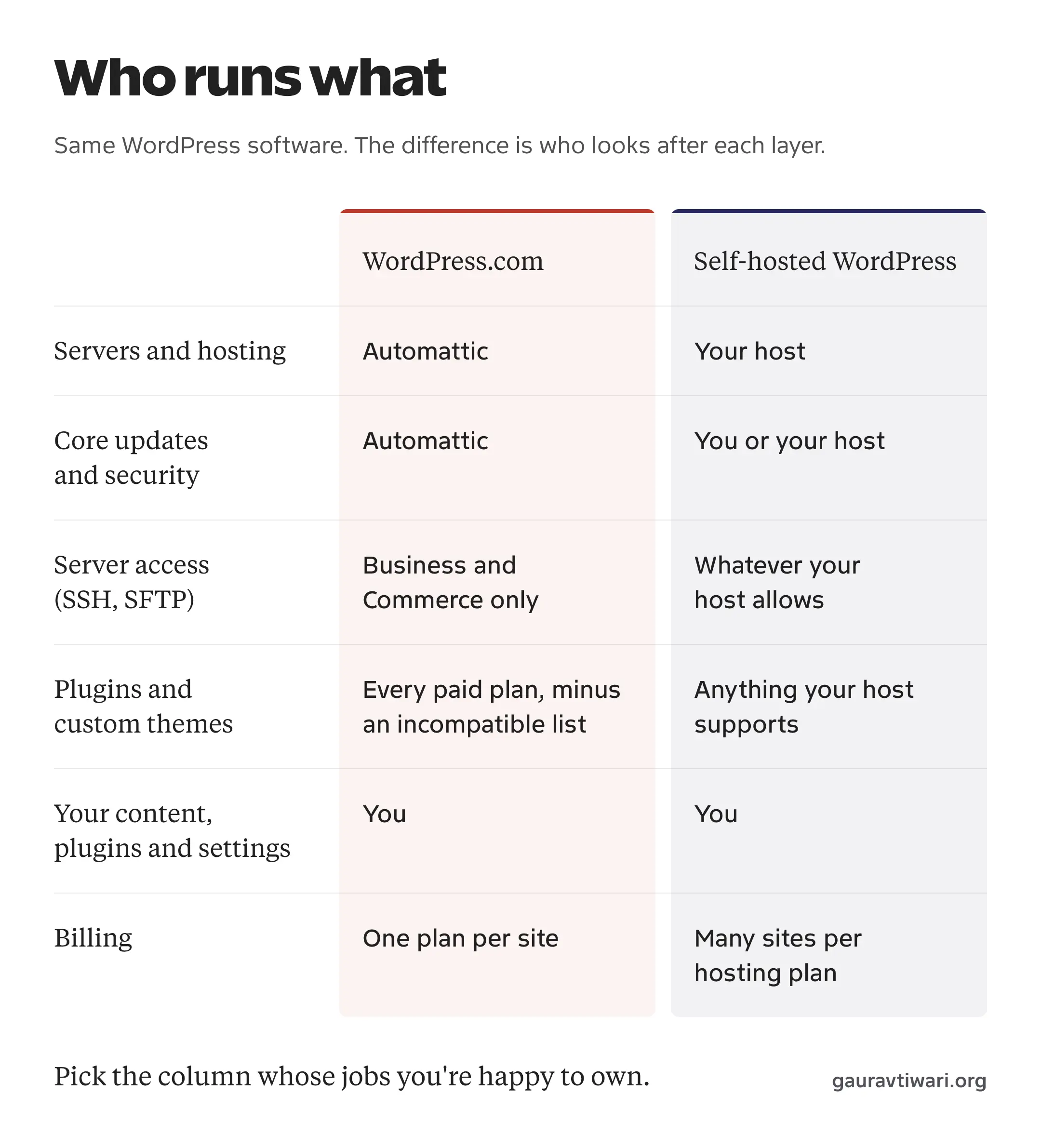
This table puts the decision points side by side. Prices are WordPress.com’s USD rates on annual billing.
| Decision point | WordPress.com Free | WordPress.com paid plans | Self-hosted WordPress |
|---|---|---|---|
| Hosting | Included | Included | You choose and pay a host |
| Yearly cost | $0 | $48 to $540, plus extras | Domain plus hosting, set by your host |
| Custom domain | No | Yes, free for the first year on annual plans | Yes, bought separately |
| Plugins | No | Every paid plan, except incompatible ones | Anything your host’s environment supports |
| Custom themes | No | Every paid plan | Any theme |
| SFTP, SSH and staging | No | Business and Commerce | Depends on the hosting plan |
| Ads on your site | WordPress.com ads | No WordPress.com ads | Only the ads you add |
| Making money | Limited | Affiliate links, WooCommerce, plus WordAds and payment blocks from Premium | Any method |
| Maintenance | Handled by WordPress.com | Platform handled; your plugins and content are yours | You or your host |
| Sites per plan | 1 | 1 | Several, depending on the host |
Once plugins are off the table, the choice comes down to how much of the hosting work you want to hand over and how many sites you’re paying for.
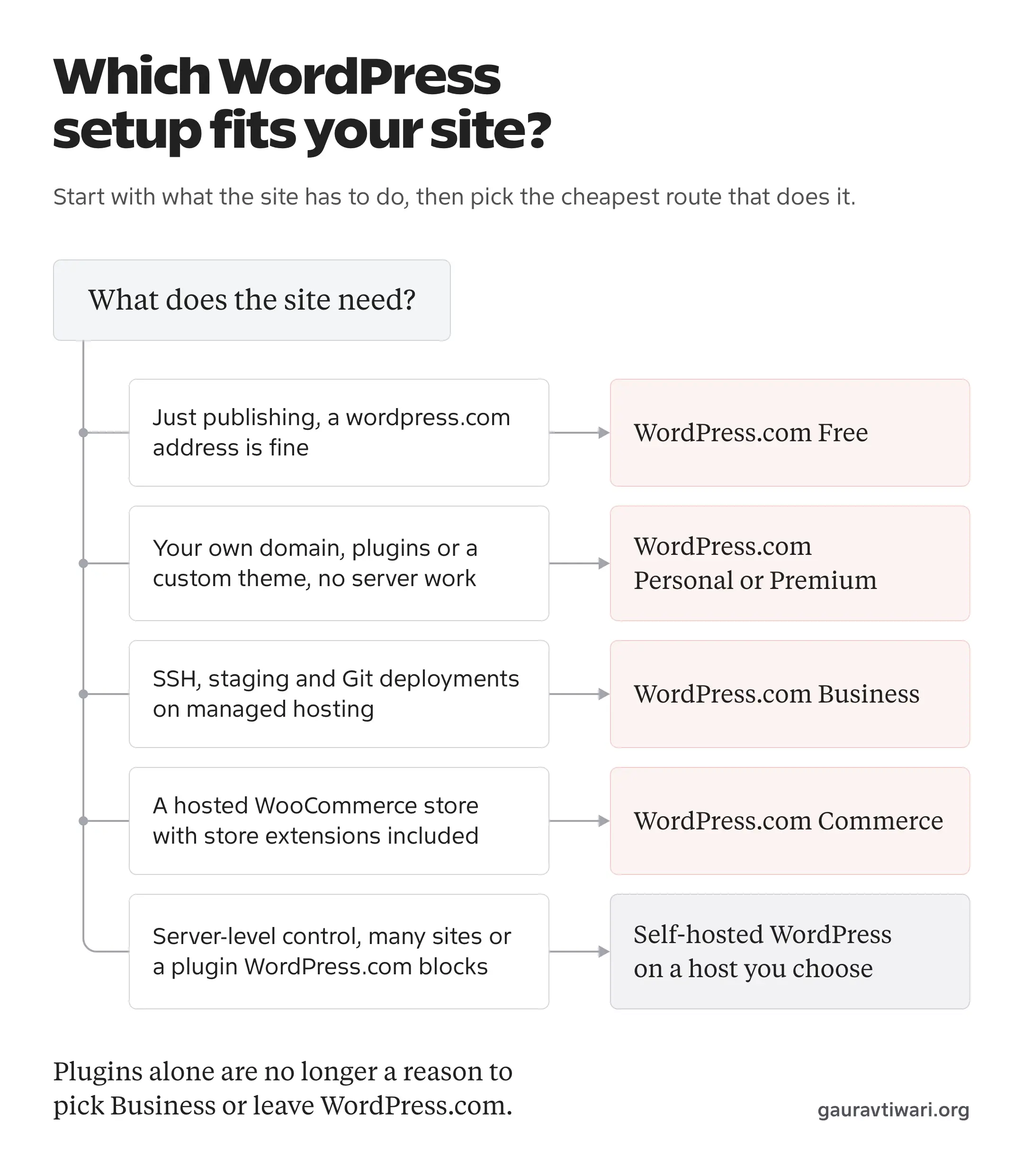
When to Choose WordPress.com
WordPress.com is the better choice when the convenience is worth more to you than control over the server. It fits well when:
- you want one site and don’t want to deal with hosting, server security or core updates
- Personal or Premium covers your storage and the plugins you need, after checking them against the incompatible list
- you’re a developer who wants managed hosting with SSH, staging and Git deployments for a client site, and the Business price per site works for the project
- you want a hosted WooCommerce store with the main store extensions bundled, which is what Commerce is for
- you want to start free and upgrade later without moving the site
The free plan is still a no-risk way to start writing. I’d move to Personal as soon as the site needs its own domain, because that’s the point where the ads and the wordpress.com address start working against you.
When to Choose WordPress.org
Self-hosted WordPress is the better choice when you want control or when you run more than one site. It fits well when:
- you want to choose the server, the PHP setup and the caching layer yourself
- you run several sites, because one hosting plan or server can hold many of them
- you need a plugin on WordPress.com’s incompatible list or a tool that runs at the server level
- you or a developer you trust are comfortable owning updates, backups and security
- you want to move hosts freely later, with nothing tied to one platform’s billing
Self-hosting can be very cheap or quite expensive depending on the host, but someone always has to look after the site, and that work is the real cost. If you’re starting a blog this way, my guide on how to start a blog covers the setup from domain to first post.
Can You Switch from WordPress.com to WordPress.org?
Yes, and it’s a well-trodden path. WordPress.com’s export tool creates an XML file of your posts, pages, comments and other content, and the WordPress importer on a self-hosted site reads it.
The export file carries your content and references to your media files. The importer can download the attached images from the old site, but treat that as something to verify after the import rather than a given. These parts need their own plan:
- media files, checked one by one on important pages after the import
- theme settings, menus and widgets, because a new theme starts from its own defaults
- plugin settings and any WordPress.com-specific features you relied on
- email subscribers and connected services, moved with their own export tools
- the domain and your URL structure, so old links keep working through the right redirects
How long the move takes depends on the site. A small blog with a few dozen posts and a site with a store, subscribers and custom redirects are different jobs, so plan the move on a test copy before you point the domain at the new host.
My Recommendation
I’d decide this on one question: who is going to look after the site?
If the answer is you, and you’re comfortable with hosting, or you have a developer who is, self-hosted WordPress gives you the most room. It also gets cheaper per site once you run more than one. That’s why this site runs on self-hosted WordPress, where the caching and the server setup are mine to change.
If the answer is that you’d rather nobody had to, WordPress.com makes much more sense now than it did before April 2026. Personal gives you a custom domain, plugins and custom themes for $48 a year, which covers a lot of blogs and small business sites. Premium earns the upgrade if you need its themes, video and ad features. Business is the developer plan, and it should be bought for SSH, staging and deployments.
What I wouldn’t do is pick by headline price alone. At $25 a month on annual billing, WordPress.com Business sits in the same range as managed WordPress hosts, and it is wise to compare it with them on backups, staging and support. A promotional shared hosting rate that renews higher is a different product.
Frequently Asked Questions
Is WordPress.com really free?
Yes. The free plan gives you a yoursite.wordpress.com address, 1 GB of storage and free themes, with no time limit. WordPress.com shows its own ads on free sites, and you can’t install plugins, upload a custom theme or use your own domain as the address. Paid plans start at $4 a month on annual billing ($48 a year) or $9 month to month.
Can I install plugins on WordPress.com?
Yes, on every paid plan, including Personal. WordPress.com opened plugins and custom themes to all paid plans on April 2, 2026. The free plan doesn’t allow plugins, and some plugins stay blocked on every plan because they conflict with WordPress.com’s managed hosting.
Can I move my site from WordPress.com to WordPress.org?
Yes. WordPress.com’s export tool creates an XML file of your content, which the WordPress importer on a self-hosted site can read. Check that images were downloaded after the import, and plan the theme settings, subscribers, domain and redirects separately. The time it takes depends on the size and features of the site.
Which is better for SEO, WordPress.com or WordPress.org?
Neither one ranks better by itself. Paid WordPress.com plans can run SEO plugins such as Rank Math or Yoast, so the old gap has narrowed a lot. Self-hosting still gives you more control at the server level, such as caching, headers and redirect rules. Your content, site speed and the SEO setup you actually use matter far more than the platform name.
Can I make money with WordPress.com?
Yes, and you don’t need Business for it. WordPress.com allows affiliate links and sponsored posts, though it doesn’t allow sites that exist mainly to send traffic to affiliate links. WordAds and the Payments and Donations blocks are available from Premium, with a WordPress.com fee of 4% on Premium, 2% on Business and 0% on Commerce on top of processing fees. WooCommerce can run on any paid plan.
Do I need coding skills for WordPress.org?
No. Most hosts install WordPress in one click, and you manage the site from the dashboard with the block editor and plugins. Coding helps when you want to build a custom theme or plugin, and most site owners never need to.
What hosting do I need for WordPress.org?
Any host that supports PHP 8.3 or newer, MySQL 8.0 or MariaDB 10.11 or newer and HTTPS will run WordPress. Shared hosting is fine for a new blog. A managed WordPress host costs more but handles updates, backups and caching for you, which makes sense once the site matters to your income.
Why are there two versions of WordPress?
There’s one WordPress and two ways to use it. Matt Mullenweg and Mike Little released WordPress as open-source software in 2003, and Mullenweg founded Automattic in 2005, which runs WordPress.com as a hosted service. WordPress.org is the home of the free software anyone can install, and WordPress.com is one company’s hosted platform built on it.
Tell Google you want more of this.
Add Gaurav Tiwari as a preferred sourceOne tap, and this site shows up more often in your own Top Stories, AI Overviews and AI Mode. Remove it any time.
Disclaimer: This site is reader-supported. If you buy through some links, I may earn a small commission at no extra cost to you. I only recommend tools I trust and would use myself. Your support helps keep gauravtiwari.org free and focused on real-world advice. Thanks. - Gaurav Tiwari