
 by
by
WordPress SEO plugins should make indexing, metadata, schema, redirects, and migrations safer. Rank Math is my default for feature-heavy sites, Yoast is the easier conservative choice, and SEOPress is the better agency value when you need five or unlimited site licenses. Install one full SEO plugin, not two.
The difficult part is not choosing the longest feature list. It is choosing a plugin whose metadata you can audit, whose schema you can control, and whose data you can migrate without losing noindex rules, redirects, canonicals, or product markup.
This site currently uses Rank Math. I have also used SEOPress on client sites and evaluated it separately; the two products are not running together here. Rankings can move after an SEO-plugin change, but content, links, crawling, templates, and algorithm updates move at the same time, so I do not attribute ranking gains to the plugin alone.
WordPress SEO Plugin Data: Installs, Versions, and Package Size
This comparison now includes a reproducible snapshot of eight SEO tools. Seven had public WordPress.org packages I could download and inspect without executing them. The package measurement counts compressed bytes, uncompressed bytes, files, and code by type.
| Plugin | Version | Active installs | Public ZIP | Best for | Main drawback |
|---|---|---|---|---|---|
| Rank Math | 1.0.275 | 4,000,000 | 3.42 MB | Feature-heavy sites | Dense settings |
| Yoast SEO | 28.1 | 10,000,000 | 5.17 MB | Beginner-friendly defaults | Many useful features are paid |
| AIOSEO | 4.9.10 | 3,000,000 | 5.85 MB | Local and WooCommerce workflows | Renewal cost |
| SEOPress | 10.0.2 | 300,000 | 2.68 MB | Agencies and white label | Bring-your-own AI and separate Insights cost |
| The SEO Framework | 5.1.4 | 200,000 | 0.75 MB | Automation with fewer prompts | Less hand-holding |
| DefiniteSEO | 3.0.0 | 30 | 2.72 MB | Simple sites testing a newer option | Limited track record |
| Link Whisper | 0.9.6 | 30,000 | 6.87 MB | Internal-link suggestions and reporting | Narrower purpose |
| Linksy | Not on WordPress.org | Not available | Not measured | Internal-link automation | No WordPress.org package metrics |
Package size is not a speed test. A larger ZIP can include admin code, translations, images, or vendor libraries that never load on the front end. Use it as a maintenance-footprint signal, then test rendered pages and database behavior on your own stack.
What Makes a WordPress SEO Plugin Good in 2026
A good WordPress SEO plugin handles the essentials first: titles, descriptions, canonical URLs, robots directives, XML sitemaps, redirects, breadcrumbs, and structured data. The differentiators are migration safety, control, compatibility, and support.
- Indexing controls: Per-post and bulk control over index, follow, canonicals, archives, attachments, feeds, and sitemaps.
- Schema control: Valid output that can be changed or disabled without fighting the theme, WooCommerce, or a second schema plugin.
- Migration safety: Importers for metadata, redirects, noindex rules, and schema settings, plus a clear uninstall path.
- Workflow fit: WooCommerce, multilingual, local SEO, editorial permissions, and agency licensing that match the site you actually run.
- AI features: Useful drafting or reporting assistance with clear limits. An
llms.txtgenerator is experimental; it is not a ranking factor or a guarantee that an AI answer engine will cite the site.
WordPress SEO Plugin Comparison
Start with the job and the migration risk. Prices below are standard public prices or starting prices checked on July 24, 2026; tax, promotions, renewals, and add-ons can change the total.
| Plugin | Best for | Free version | Paid signal | Migration note | Main drawback |
|---|---|---|---|---|---|
| Rank Math | Feature-heavy sites | Yes | Paid plans and separate AI credits | Imports major-plugin metadata; verify redirects and schema after switching | Dense settings |
| Yoast SEO | Beginner-friendly defaults | Yes | Premium is licensed per site | Mature import/export paths; still verify noindex and canonicals | Many useful features are paid |
| AIOSEO | Local and WooCommerce workflows | Yes | Introductory and renewal prices differ | Importer covers major competitors; inspect schema templates | Renewal cost |
| SEOPress | Agencies and white label | Yes | $49/1 site, $59/5, $149/unlimited | Import tools cover major plugins; inspect redirects and custom schema | Bring-your-own AI and separate Insights cost |
| The SEO Framework | Automation with fewer prompts | Yes | Extension plans | Confirm extension data and social metadata before switching | Less hand-holding |
| DefiniteSEO | Simple sites testing a newer option | Yes | Free | Smaller migration and support ecosystem | Limited track record |
The decimal scores in the review cards are editorial assessments, not laboratory benchmarks. I use the same categories across products: indexing control, schema control, migration safety, WooCommerce and multilingual fit, update history, workflow, and value.
The Top WordPress SEO Plugins
These are full-site SEO plugins. Choose one. Running two can produce duplicate titles, canonicals, schema, sitemaps, redirects, or conflicting robots directives.
Rank Math
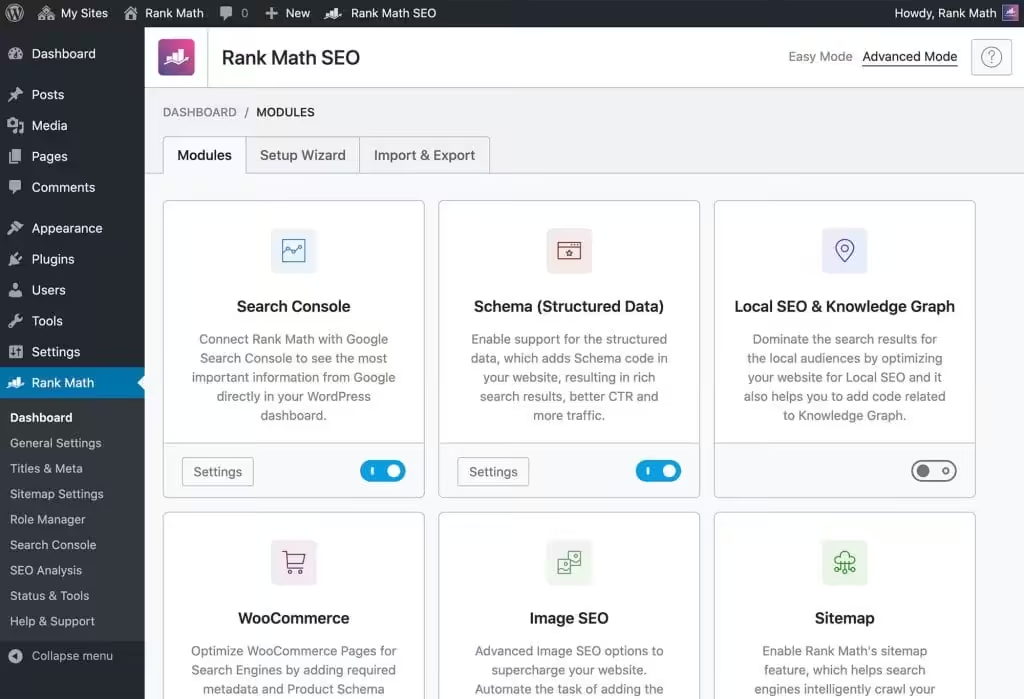
Rank Math is my default for sites that need granular schema, redirects, analytics, and WooCommerce controls in one interface. Its breadth is useful, but the settings density is a real cost for simpler sites.
The setup wizard genuinely helps. It imports settings from other plugins, configures your site settings, and gets you running in minutes. Not hours. Minutes.
I’ve used Rank Math for years across multiple sites. I keep it here because its schema, redirects, sitemap controls, and editor workflow fit the way I maintain the site. Rankings have moved during that time, but an SEO plugin is only one variable.
What Rank Math does well:
The free version includes 30+ SEO tests, 18 schema types, XML sitemaps, Google Search Console integration, and 5 focus keywords per post. That’s more than most paid plugins offered five years ago.
Rank Math sells Content AI separately. It can draft titles, descriptions, FAQs, and outlines, but credits, plan limits, and model access can change. I treat it as an editing aid, not a reason to choose the core SEO plugin.
Rank Math can separate referral traffic from services such as ChatGPT and Perplexity and can generate an llms.txt file. The reporting can be useful. Treat the file itself as an experimental discovery format, not evidence that a model will crawl, rank, or cite the site.
Rank Math plans:
| Plan | Site use | Tracked keywords | Price note |
|---|---|---|---|
| Free | Personal and business sites | None in the paid rank tracker | No license fee |
| PRO | Unlimited personally owned sites | 500 | Annual billing; regional currency and tax vary |
| Business | 100 client sites | 10,000 | Annual billing |
| Agency | 500 client sites | 50,000 | Annual billing |
Those site and tracking limits were checked on Rank Math’s official pricing page on July 24, 2026. The page showed region-specific currency, introductory discounts, renewal prices, and tax, so compare the checkout total rather than copying an old dollar figure. Content AI is a separate subscription or trial.
What’s not great:
The interface can feel overwhelming for beginners. There are many options, toggles, and settings. Power users love this. Casual bloggers might prefer something simpler.
The Content AI subscription is separate from the core Rank Math Pro license. Price the two products together if you need both; promotional and renewal totals differ.
Support response time depends on plan, queue, and issue complexity. For a production site, keep a rollback path instead of treating vendor support as the recovery plan.
Rank Math

Pros
- Broad free feature set
- Built-in schema markup with 20+ types
- Content AI for optimization suggestions
- Advanced redirection manager included free
- No upsell nag screens in free version
- Rank Tracker built into the dashboard
Cons
- Learning curve for beginners due to feature density
- Content AI credits limited on free plan
- Some advanced features require Pro license
- Can conflict with other schema plugins
Summary
A broad SEO suite with strong schema, redirects, analytics, and WooCommerce controls. It is my default on feature-heavy sites, but its dense settings need disciplined configuration.
Yoast SEO
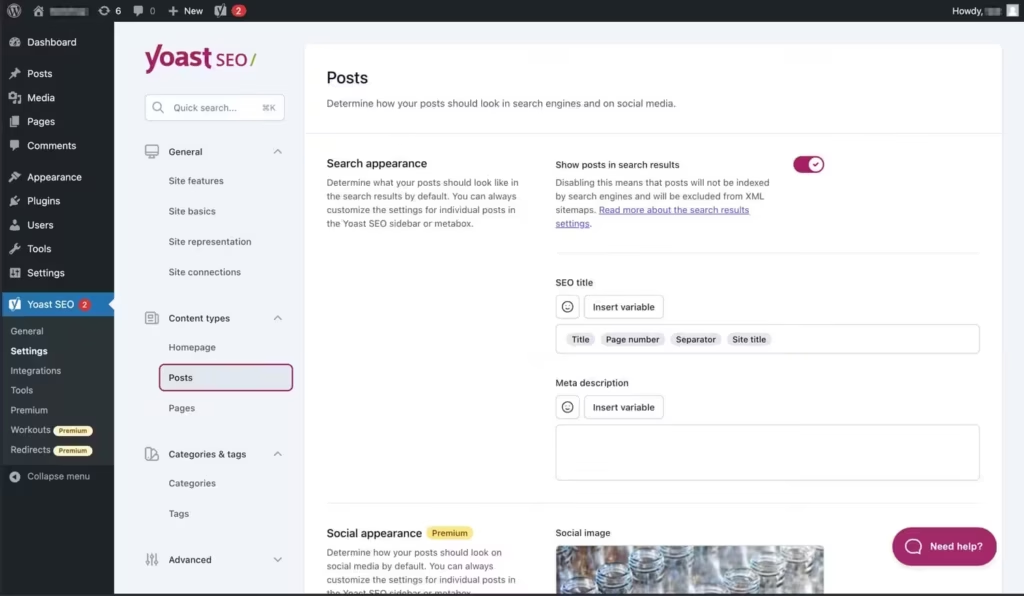
Yoast SEO has the longest track record in this comparison and a large installed base. That history means mature documentation and migration paths, but it does not make every update or configuration risk-free.
The strength is its conservative workflow, documentation, and familiar editor guidance. I would still test upgrades, schema, canonicals, and indexation controls on staging because no SEO plugin is immune to regressions or integration conflicts.
The weakness: it feels dated compared to newer competition. The interface hasn’t evolved as quickly as Rank Math or AIOSEO. Features that competitors include for free often require Yoast Premium.
What Yoast does well:
The readability analysis is genuinely useful. It catches issues like passive voice, long sentences, and paragraph structure problems. This helps writers create better content, not just better SEO.
Yoast has restructured pricing recently. Local SEO, Video SEO, and News SEO are now included in Premium at no extra cost. Previously, these were sold separately. This makes Premium a better value than before.
AI features include Yoast AI Generate for creating 5 SEO-friendly titles and meta descriptions with one click. Yoast AI Optimize provides suggestions for keyphrase placement and density. The new AI Summarize feature generates bullet-point takeaways optimized for AI Overviews.
Yoast Pricing:
| Product | Price | Notes |
|---|---|---|
| Yoast SEO Free | $0 | Core features |
| Yoast SEO Premium | $118.80/year | Includes Local, Video, News SEO |
| Yoast WooCommerce SEO | $178.80/year | Premium + WooCommerce |
| Yoast SEO AI+ | $358.80/year | Adds AI Brand Insights |
| Yoast for Shopify | $19/month | 14-day free trial |
What’s not great:
The free version feels increasingly limited. Features that competitors offer for free require Premium with Yoast. This includes multiple focus keyphrases, internal linking suggestions, and redirect management.
The AI Optimize feature is limited to about 1,000 words and only works in the Block editor. If you write long-form content or use Classic editor, this limitation hurts.
Premium pricing at $118.80/year per site isn’t cheap. If you run multiple sites, costs add up quickly. There’s no unlimited license option.
Yoast SEO

Pros
- Familiar onboarding and editor guidance
- Readability analysis helps non-SEO writers
- Excellent documentation and learning resources
- Reliable with regular updates
Cons
- Free version is increasingly limited
- Premium price ($118.80/year) is steep vs competitors
- Large sites should test editor and indexing workflows
- Schema markup options are basic compared to Rank Math
Summary
A mature SEO plugin with strong documentation, onboarding, readability guidance, and established migration paths. Premium is licensed per site and should be budgeted at renewal price.
Price: USD 118.80 /year
Visit Yoast SEOAll in One SEO for WordPress
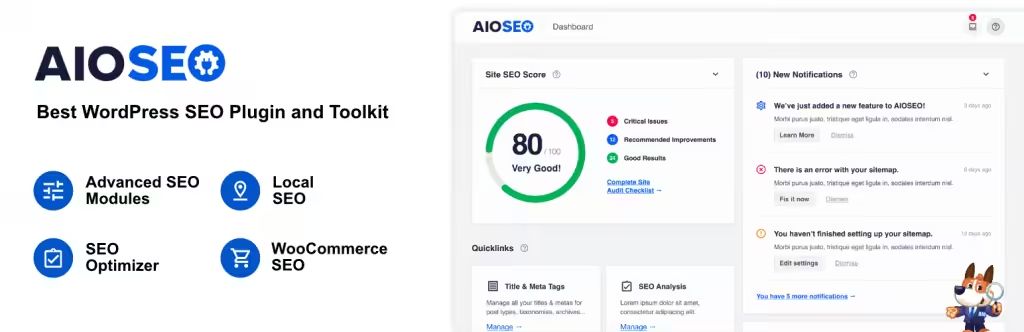
AIOSEO is the oldest WordPress SEO plugin, founded in 2007. It serves over 3 million users and has evolved significantly over the years. The current version is modern, feature-rich, and competitive with newer alternatives.
The setup wizard is genuinely one of the easiest I’ve used. Answer a few questions, and AIOSEO configures everything automatically. It works particularly well for local businesses and WooCommerce stores.
What AIOSEO does well:
AI credits are included in all paid plans. No separate subscription needed. Basic gets 10,000 credits, Elite gets 200,000. The AI Content Generator handles titles, meta descriptions, FAQs with schema, Key Points summaries, and social posts.
The new AI Assistant Block generates blog articles, summaries, and comparison tables directly in the post editor. This launched in late 2025 and works surprisingly well for first drafts.
Link Assistant is the standout feature for content-heavy sites. It provides AI-powered internal linking suggestions, identifies orphan posts, and offers one-click link insertion. This is Pro/Elite only but worth the upgrade.
AIOSEO Pricing:
| Plan | Intro Price | Regular Price | Sites | AI Credits |
|---|---|---|---|---|
| Basic | $49.50/year | $99/year | 1 | 10,000 |
| Plus | $99.50/year | $199/year | 3 | 25,000 |
| Pro | $199.50/year | $399/year | 10 | 50,000 |
| Elite | $299.50/year | $599/year | 100 | 200,000 |
What’s not great:
The AI Writing Assistant with detailed keyword reports requires a separate SEOBoost subscription at $30/month. That’s on top of your AIOSEO subscription. It adds up quickly.
Renewal prices are significantly higher than introductory prices. Basic jumps from $49.50 to $99. Elite goes from $299.50 to $599. Budget for the renewal price, not the intro deal.
The free version is fine but limited. You get 100 AI credits to test, but the real power is in paid tiers.
SEOPress
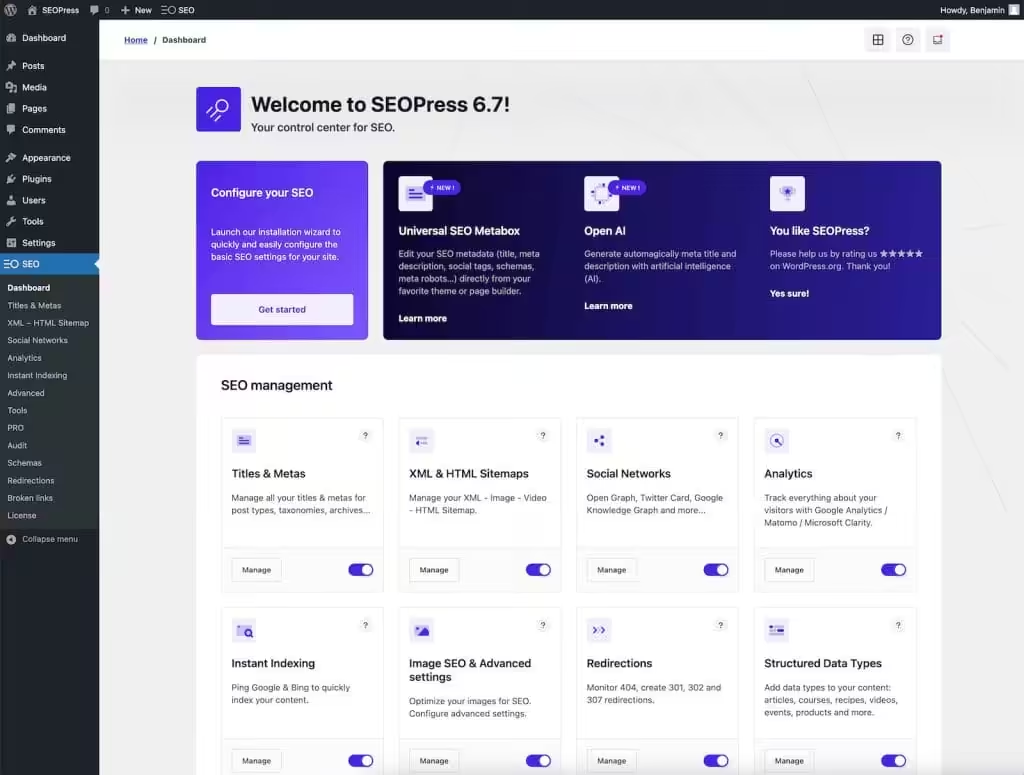
I have used SEOPress on client websites since 2019 and have evaluated it against the Rank Math setup used on this site. SEOPress is not running alongside Rank Math here; two complete SEO plugins would duplicate metadata and schema responsibilities.
SEOPress serves over 300,000 websites and takes a different approach to AI features. Instead of building proprietary AI and charging subscriptions, SEOPress lets you bring your own OpenAI API key. You pay OpenAI directly for what you use.
For client work, SEOPress’s practical advantage is licensing and white labeling. The tradeoff is a smaller support and tutorial ecosystem than Yoast or Rank Math, plus separate costs for Insights and any AI API usage.
What SEOPress does well:
SEOPress now has three PRO licenses: $49 per year for one site, $59 per year for five sites, and $149 per year for unlimited sites. Those public prices were checked on July 24, 2026 and exclude tax.
Direct OpenAI and DeepSeek integration means you get access to the latest AI models. GPT-4o, GPT-4, GPT-3.5-Turbo, plus DeepSeek as an alternative. You’re not locked into proprietary AI that might lag behind.
The free version is genuinely complete. Titles and descriptions, XML and HTML sitemaps, unlimited keyword content analysis, Google Analytics integration, social meta tags, and breadcrumbs. All free.
SEOPress Pricing:
| Plan | Price | Sites |
|---|---|---|
| Free | $0 | Unlimited |
| Pro 1 Site | $49/year | 1 |
| Pro 5 Sites | $59/year | 5 |
| Pro Unlimited | $149/year | Unlimited |
| Insights Add-on | $99/year per site | 1 |
What’s not great:
You need to manage your own OpenAI API key and pay for API usage separately. For non-technical users, this adds complexity. You’ll also need to monitor OpenAI costs, which can surprise you if you generate a lot of content.
The Insights add-on is expensive at $99/year per site. For multiple sites, this kills the budget advantage.
The feature set is slightly less comprehensive than Rank Math or AIOSEO. No built-in keyword tracking or content AI credits included. Also, I miss those SEO scores in SEOPress. You’re just assembling your own toolkit.
SEOPress

Pros
- No ads or upsells even in free version
- Lightweight with minimal performance impact
- White-label friendly for agencies
- $49 for 1 site, $59 for 5 sites, or $149 for unlimited sites
Cons
- Smaller community and fewer tutorials
- Interface is functional but not polished
- Fewer integrations with third-party tools
- Schema options less extensive than Rank Math
Summary
A strong agency-value SEO plugin with white labeling and separate 1-site, 5-site, and unlimited licenses. It is a complete alternative to Rank Math or Yoast, not a companion plugin to run beside them.
Price: USD 49 /year
Try SEOPressThe SEO Framework
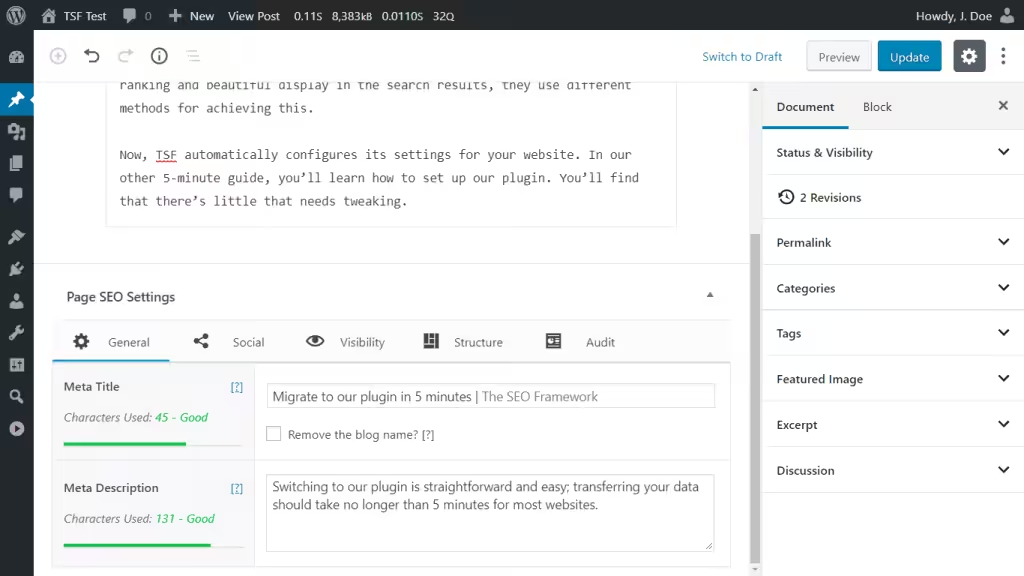
The SEO Framework takes a completely different approach. No AI features. No content generation. No keyword tracking. Just automated, efficient, privacy-first SEO.
This is the plugin for people who hate configuration. Install it, and it works. No setup wizard because there’s almost nothing to set up. Smart algorithms handle metadata automatically.
What The SEO Framework does well:
The SEO Framework exposes fewer prompts and modules than the larger suites. That can reduce administrative complexity, but actual front-end and editor impact still depends on enabled extensions, content volume, the theme, and the rest of the stack.
The philosophy is “decision over option.” Instead of giving you 50 toggles, it makes the right choice automatically. Meta descriptions generate from content. Canonical URLs set themselves. Schema outputs correctly without configuration.
Privacy-first means no phone-home features, no tracking, no external API calls unless you specifically enable them. For GDPR compliance and privacy-conscious sites, this matters.
The SEO Framework Pricing:
| Plan | Monthly equivalent | Annual | Sites | API requests/month |
|---|---|---|---|---|
| Free | $0 | $0 | Unlimited | 0 |
| Pro | $7 | $84/year | 2 | 5,000 |
| Business | $17 | $204/year | 20 | 50,000 |
| Agency | $27 | $324/year | 200 | 500,000 |
What’s not great:
No AI features at all. If you want content generation, keyword suggestions, or AI-powered optimization, look elsewhere.
The minimal interface confuses users who expect lots of options. There’s no SEO score. No content analysis. No “your post is good to go” indicator. You have to trust the automation.
Advanced features require premium extensions. Focus keyword analysis, local business schema, and Google Analytics integration are in paid tiers.
DefiniteSEO
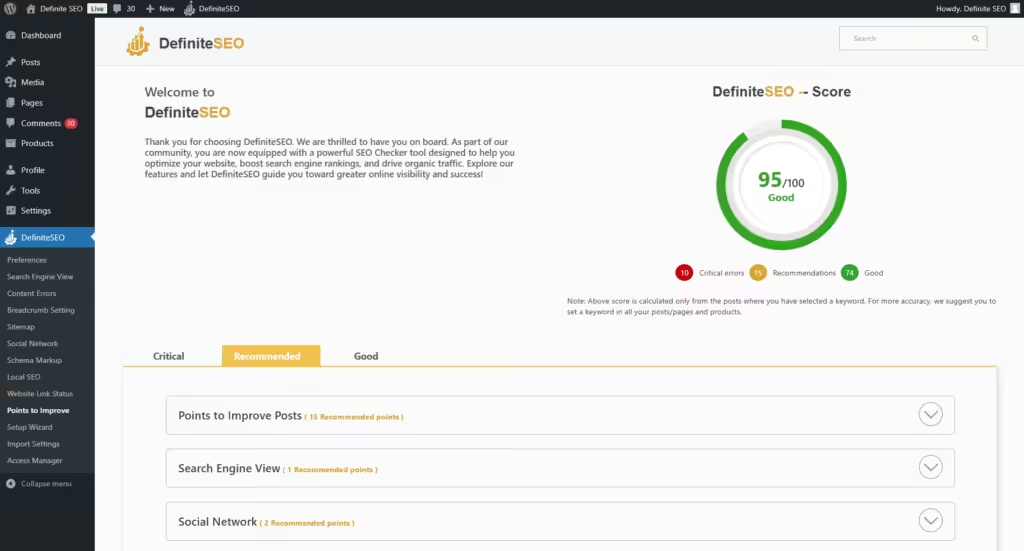
DefiniteSEO is the newcomer that punches above its weight. It’s completely free, actively maintained, and offers features that others charge for.
Don’t let the smaller user base fool you. This plugin includes smart keyword analysis without manual input, grammar checking via LanguageTool API, eight different readability tests, and comprehensive schema support. All free.
What DefiniteSEO does well:
Auto-generates titles, descriptions, and tags for posts, pages, and products. No manual tweaking required. The keyword density analysis works across titles, metas, and images without requiring you to input focus keywords.
Grammar and spelling checks hook into LanguageTool. This catches errors that standard WordPress spell-check misses.
The schema manager handles everything: articles, products, reviews, FAQs, local business. Built-in without premium upsells.
Import from Yoast, Rank Math, and other plugins works with one click. Migration is painless.
What’s not great:
New plugin with smaller community means fewer tutorials and third-party resources. When you hit a problem, you’re more on your own.
Only 20+ active installations currently. Stable and updated, but the small user base means less real-world testing at scale.
No AI content generation. Grammar checking is as close as it gets to AI assistance.
DefiniteSEO

Pros
- Focused interface for basic SEO tasks
- Fewer modules than the larger suites
- Free with no premium upsells
- Good for basic SEO needs
Cons
- Limited feature set vs top competitors
- Small user base and community
- No content AI or advanced tools
- Schema support is basic
Summary
A newer free option for simpler sites. Its smaller track record, migration ecosystem, and support footprint make it a test-on-staging choice rather than my default.
Bonus SEO Plugins for Specific Tasks
These plugins complement your main SEO plugin. They handle specific tasks that dedicated plugins sometimes overlook.
Link Whisper
Internal linking is tedious. Link Whisper automates it with AI-powered suggestions that actually make sense.
The plugin now uses LLM technology for improved suggestions. Context-aware recommendations consider relevance and SEO value. Anchor text selection generates diverse, natural-sounding text.
Link Whisper Pricing:
| License | Price | Per Site Cost |
|---|---|---|
| 1 Site | $97/year | $97 |
| 3 Sites | $197/year | $66 |
| 10 Sites | $297/year | $30 |
| 50 Sites | $497/year | $10 |
The orphan content report alone justifies the cost for large sites. Finding posts with no internal links takes hours manually. Link Whisper does it in seconds.
Get Link Whisper →
Link Whisper

Pros
- AI-powered internal link suggestions save hours
- Bulk linking tool for site-wide optimization
- Broken link reporting built-in
- Works alongside any SEO plugin
- Orphan content detection
Cons
- Annual pricing with no lifetime option
- AI suggestions need manual review
- Can slow down editor on very large sites
- Only useful for sites with 50+ posts
Summary
The best internal linking tool for WordPress. AI-powered suggestions save hours of manual linking work. Bulk linking, broken link reporting, and orphan content detection in one plugin. Essential for content-heavy sites with 50+ posts.
Price: USD 77 /year
Try Link WhisperLinksy by Plugli
Linksy uses NLP for semantic relationship understanding between posts. It’s lighter than Link Whisper and cheaper for small sites.
Linksy Pricing:
| License | Price | GenAI Credits/Month |
|---|---|---|
| 1 Site | $59/year | 300 |
| 3 Sites | $118/year | 900 |
| 10 Sites | $219/year | 3,000 |
The silo networks feature helps build topic clusters properly. Orphan post detection and focus keyword ratings are included.
One drawback: no click tracking like Link Whisper offers. But Linksy includes paragraph rewriting that Link Whisper lacks. Pick based on what matters more to you.
Linksy

Pros
- Free core version available
- Simple keyword-to-URL auto-linking
- Lightweight with minimal overhead
- Easy to set up and configure
Cons
- Less intelligent than Link Whisper AI
- No broken link detection
- No orphan content reporting
- Can over-link if not configured carefully
Summary
A lightweight alternative to Link Whisper for automated internal linking. Linksy auto-links keywords to specified URLs across your content. Less intelligent than Link Whisper but free and simple to configure.
Dynamic Month & Year into Posts
This is a sleeper hit. I created this plugin, and thousands of sites use it now. It automatically inserts the current month and year into posts using shortcodes.
Why does this matter? Posts with current dates in titles get higher click-through rates. “Best SEO Plugins October 2026” stays fresh without manual editing.
Complete shortcode reference:
| Shortcode | Output | Notes |
|---|---|---|
[year] | 2026 | Current year |
[nyear] | 2027 | Next year |
[pyear] | 2025 | Previous year |
[month] | October | Full month name |
[mon] | Oct | 3-letter month |
[monthyear] | October 2026 | Combined |
[date] | October 30, 2026 | Full date |
[weekday] | Friday | Day of week |
It works in titles, content, meta tags, breadcrumbs, and widgets, with integrations for Rank Math, Yoast, and SEOPress. The shortcode replacement is narrow in scope, but you should still test titles, caches, archives, and structured data after activation.
Download Dynamic Month & Year →
Which SEO Plugin Should You Choose?
| Feature | Rank Math | AIOSEO | SEOPress | Slim SEO | Squirrly SEO |
|---|---|---|---|---|---|
| Free Version | Yes (generous) | Yes (limited) | Yes (good) | Yes | Yes (limited) |
| Pro Price | $7.99/mo | $49.60/yr | $49/yr | $99/yr | $29.99/mo |
| Schema Markup Important | 20+ types (free) | 17+ types (pro) | Basic (free), more in pro | Auto schema | JSON-LD |
| Keyword Tracking | Yes (pro) | No | Google Trends (pro) | No | Yes (built-in) |
| Redirections | Yes (free) | Yes (pro) | Yes (free) | No | No |
| WooCommerce SEO | Yes (pro) | Yes (pro) | Yes (pro) | Basic | Yes |
| Local SEO | Yes (pro) | Yes (pro) | Yes (pro) | No | Yes |
| Internal Linking | Yes (pro) | Yes (pro) | No | No | No |
| Content AI | Yes (pro) | No | No | No | Yes (built-in) |
| Performance Impact | Light | Light | Very Light | Minimal | Moderate |
| Best For | All-in-one SEO (best free) | Beginners, Yoast migrants | Privacy-focused, lightweight | Auto SEO, minimal setup | AI-assisted SEO |
| Visit Rank Math | Visit AIOSEO | Visit SEOPress | Visit Slim SEO | Visit Squirrly |
Here’s the decision tree I’d use:
You want maximum features and don’t mind complexity: Rank Math Pro with Content AI. Best value for power users and content creators.
You want trusted reliability with minimal risk: Yoast Premium. Been around forever. Updates are careful. Support is established.
You run an agency with many client sites: SEOPress Pro Unlimited at $149/year. Bring your own AI. White-label included.
You want automation without configuration: The SEO Framework. Install and forget.
You’re on a tight budget: DefiniteSEO or SEOPress Free are both complete solutions at zero cost.
You need internal linking help: Add Link Whisper or Linksy to your main plugin.
SEO Plugin Migration Checklist
Switching SEO plugins is a data migration, not a normal plugin swap. Take an editable backup and test the importer on staging before deactivating the old plugin.
- Export or record titles, descriptions, canonicals, robots directives, redirects, breadcrumb settings, and schema templates.
- Import once, then compare representative posts, products, taxonomies, and noindexed URLs in the editor and rendered source.
- Check that only one plugin outputs canonical tags, XML sitemaps, breadcrumbs, Open Graph tags, and JSON-LD.
- Validate redirect destinations, WooCommerce product schema, multilingual canonicals, robots.txt, and sitemap URLs.
- Purge page and CDN caches, resubmit the sitemap if its URL changed, and watch Google Search Console for indexing or structured-data regressions.
The Honest Truth About AI in SEO Plugins
AI features are everywhere now. Every major plugin has them. But let’s be honest about what they actually deliver.
AI title and meta description generation works well. It saves time, produces decent options, and usually needs minimal editing. This is genuinely useful.
AI content generation is hit or miss. First drafts are okay. They give you something to work with. But they need heavy editing to sound human and provide real value.
AI keyword suggestions are useful for phrasing and clustering, but they are not a substitute for owned Google Search Console data, current SERP review, and a keyword database that reports location, volume, difficulty, and intent.
The plugins claiming AI will “revolutionize” your SEO are overselling. AI is a productivity boost, not a magic ranking button.
The Bottom Line
The WordPress SEO plugin market has matured. All the major options handle fundamentals competently. Your choice should come down to three factors:
Budget: SEOPress and DefiniteSEO offer impressive free tiers. Rank Math provides the best value for paid features. Yoast is premium-priced.
Complexity tolerance: Rank Math has the most options. The SEO Framework has the fewest. Everyone else is somewhere in between.
AI needs: Rank Math leads with 40+ AI tools. SEOPress lets you use cutting-edge OpenAI models. The SEO Framework has no AI, and that’s intentional.
Pick one main plugin. Install it. Learn it well. Don’t keep switching. Consistent optimization beats chasing features.
FAQs
What is the best all-in-one WordPress SEO plugin?
Rank Math is my default for feature-heavy sites. Yoast is the more conservative choice for teams that value familiar guidance, and SEOPress is the stronger agency-license value. The best option is the one whose schema, indexing controls, and migration path fit the site.
Is Rank Math better than Yoast SEO?
Rank Math exposes more features in its free version, while Yoast offers a more restrained workflow and longer documentation history. Neither is universally better. Compare schema, redirects, WooCommerce, editorial permissions, and migration requirements.
Can I use multiple SEO plugins together?
Do not run two full SEO plugins. They can duplicate or conflict on titles, canonicals, robots directives, schema, sitemaps, and redirects. A specialist tool such as an internal-linking plugin can coexist when it does not own those same outputs.
Do I need to pay for an SEO plugin?
No. A small site can handle core metadata, sitemaps, canonicals, and basic schema with a reputable free plugin. Pay when you need advanced schema, redirects, reporting, WooCommerce, local SEO, permissions, support, or agency licensing.
How do I migrate from one SEO plugin to another?
Back up the site, run the importer on staging, and compare titles, descriptions, canonicals, robots directives, redirects, schema, and sitemaps across representative URLs. Deactivate the old plugin only after the new output is verified.
What is the best free WordPress SEO plugin?
Rank Math is my feature-heavy free choice, while SEOPress has a strong free core with fewer promotional prompts. The better fit depends on the schema, redirect, WooCommerce, and workflow controls the site actually needs.
Do SEO plugins actually improve rankings?
SEO plugins help implement metadata, canonicals, sitemaps, robots directives, redirects, and schema consistently. They do not create rankings by themselves. Content quality, crawlability, links, intent match, templates, and competition still matter.
What’s the difference between Link Whisper and Linksy?
Link Whisper is more established with advanced reporting and click tracking. Linksy is newer but includes paragraph rewriting and costs less. Link Whisper is better for large sites needing detailed analytics. Linksy works well for smaller sites focused on automation.
Should I use AI features in SEO plugins?
Use AI features for drafts and repetitive metadata work, then review the output. They do not replace Search Console data, SERP analysis, factual verification, editorial judgment, or keyword data tied to a location and date.
What is llms.txt and why does it matter?
llms.txt is an experimental convention for summarizing preferred site content to AI systems. It is not a Google ranking factor and does not guarantee crawling, inclusion, or citations. Treat it as optional until major platforms document stable support.
More SEO and Search Resources
SEO plugins are just one piece of the ranking puzzle. I’ve written about SEO strategy, the impact of AI on search, and practical optimization guides:
| Article | Type | What You’ll Learn |
|---|---|---|
| Rank Math Review | Review | Why Rank Math is my SEO plugin of choice |
| SEO vs AI Search | Thought leadership | What AI search means for content creators |
| Surviving Google’s AI Overviews | Strategy | How to maintain traffic with AI Overviews |
| Correlation vs Causation in SEO | Thought leadership | Why most SEO “tests” prove nothing |
| Guest Posting Sites List | Resource | Quality sites for link building |
| Best SaaS Blogs | Curated list | Content strategy inspiration from top SaaS companies |
SEO Beyond Plugins
An SEO plugin handles on-page optimization and schema. But rankings depend on three other factors that plugins can’t fix:
- Site speed: See my WordPress Performance Guide and Core Web Vitals guide
- Content quality: Topical authority built through comprehensive cluster content. See my blogging guide
- Technical foundation: Clean code, proper schema, fast hosting. See my hosting recommendations
SEO Services
If you need hands-on help with your site’s search performance, I offer dedicated SEO services:
- SEO Consulting: Full technical audit, content strategy, and ongoing optimization
- Keyword Research: Data-driven keyword strategies for your niche
- Performance Optimization: Speed directly affects rankings
Tell Google you want more of this.
Add Gaurav Tiwari as a preferred sourceOne tap, and this site shows up more often in your own Top Stories, AI Overviews and AI Mode. Remove it any time.
Disclaimer: This site is reader-supported. If you buy through some links, I may earn a small commission at no extra cost to you. I only recommend tools I trust and would use myself. Your support helps keep gauravtiwari.org free and focused on real-world advice. Thanks. - Gaurav Tiwari