
 by
by
You asked an AI tool to write a blog post. It gave you 1,200 words of generic filler that reads like a Wikipedia summary crossed with a press release. Now you’re spending 45 minutes rewriting something that was supposed to save you time.
That’s the trap most people fall into. They pick an AI writing tool based on hype, paste in a vague prompt, and get back content they’d never publish under their name. The output sounds “fine” but says nothing. I burned through 4 different tools before I figured out which ones actually produce drafts worth editing.
I use AI writing tools every day for client work and my own content. The 12 tools below are the ones that have earned their spot in 2026. I’ll tell you where each one shines, where it falls short, and which one fits your workflow.
Writing tools vs. writing assistants: This article covers AI content generators. If you need grammar and style checking, I’ve already compared the best writing assistants (Grammarly, ProWritingAid, and Sapling).
These tools generate original content from your prompts, adapt writing styles, handle translations, and produce bulk content that would take a team of writers days to complete. If you also create video content, check out the best AI video generators too. These writing tools won’t replace skilled copywriters, but they’ll make your content workflow significantly faster.
Quick picks by use case
- Claude for long-form editorial quality, instruction following, and voice control
- ChatGPT/Codex for versatile writing, research, files, and technical workflows
- Jasper for marketing teams who need brand voice consistency
- Notion AI for team productivity and docs workflow
- Grok for bold, direct content with real-time web access
- Gemini for Google Workspace users and research-heavy writing
- Frase for SEO content with built-in SERP analysis
- Katteb for fact-checked, citation-backed content
- LeadScripts+ for sales copy and conversion-focused writing
- AISEO.ai for SEO-optimized articles with paraphrasing
- ContentForge for structured blog post workflows
- Blogely for end-to-end blog content management
Quick context: Model labels change faster than a useful buying guide can be republished. I care more about the workflow around the model: instruction handling, source discipline, editing control, integrations, and the amount of cleanup a draft needs. Two tools can use related models and still produce very different working experiences.
Quick Comparison
Here’s the short version if you don’t want to read 14 individual reviews.
Some links below are affiliate links, and I may earn a commission at no extra cost to you. It changes nothing about the order: I rank these on how they actually perform in my work, and the tool I recommend most on this page pays me nothing.
| Tool | Category | Best for | Free access | Plan model | Main limitation |
|---|---|---|---|---|---|
| Claude | General workbench | Long-form editorial quality and voice | Yes | Monthly or annual subscription | Slower than the alternatives |
| ChatGPT/Codex | General workbench | Writing, files, research, technical work | Yes, with limits | Monthly subscription | Needs a tight brief or it drifts generic |
| Gemini | General workbench | Google Workspace and research | Yes | Google AI Plus, Pro or Ultra | Best value only if you live in Google |
| Grok | General workbench | Real-time research, blunt drafts | Yes | Monthly subscription | Tone needs reining in for client work |
| Jasper | Marketing platform | Marketing teams needing brand voice | 7-day trial | Monthly or annual, business is custom | Priced for teams, not individuals |
| Notion AI | Workflow | Teams already working in Notion | Limited trial | Bundled into Business and Enterprise | Pointless if you don’t use Notion |
| Frase | SEO content system | SEO briefs with SERP analysis | Trial | Monthly or annual subscription | Optimisation focus, thin on voice |
| Katteb | SEO content system | Fact-checked, citation-backed drafts | Yes | Monthly subscription | Citation quality still needs checking |
| AISEO | SEO and AI visibility | Site audits and AI-mention tracking | Trial | Monthly subscription | No longer really a writing tool |
| LeadScripts+ | Marketing platform | Sales copy, emails, ad scripts | 7-day trial | Monthly subscription | Narrow; skip it for editorial work |
| ContentForge | Workflow | Structured content at lower cost | Trial | Monthly subscription | Outclassed by the workbenches on quality |
| Blogely | Workflow | Research, drafting and WordPress publishing | Free basic plan | Free tier plus paid plans | A workflow tool more than a writer |
The Best AI Writing Tools
I’ve organized these by what they’re actually best at. The first five are the heavy hitters I’d recommend to most writers. The rest are specialized tools that work well for specific use cases. If you’re building a broader content strategy, pair one of these with a good writing assistant for editing.
Claude
Claude is my #1 AI writing tool. It is not the fastest or cheapest, but its long-form writing, instruction following, and editorial control consistently leave me with less cleanup.
Where Claude really pulls ahead is instruction following. You can give it a detailed editorial brief, a specific tone, formatting rules, a word count target, and it sticks to all of them. Drift is the usual failure mode on long pieces. The tone slips, the formatting rules get quietly dropped, and by the last third you are rewriting rather than editing. Claude holds a brief further into a long article than anything else I use. That’s why I use it for client content where voice consistency matters.
What sets Claude apart for writers
Installable writing skills. This is the feature that changed my workflow. Claude Code (the CLI version) and Claude.ai Projects both support custom instructions, but Claude Code takes it further with installable skills. You can load a voice DNA file that teaches Claude your exact writing style, an anti-slop detector that catches AI-sounding phrases before you publish, editorial frameworks for different content types, and banned phrase lists. I run a full writing system through Claude with skills for blog articles, software reviews, newsletters, and SEO content. Each skill loads the right voice, structure, and quality checks automatically.
Long context window. Claude handles 200K tokens in a single conversation. You can drop an entire PDF, a competitor’s article, your brand guidelines, and a content brief into one prompt and get a draft that accounts for all of it. I regularly feed it 10-15 reference articles when writing comparison posts.
Reasoning over speed. Claude doesn’t rush to generate text. It thinks through structure, weighs the brief, and produces drafts that need less editing. In my day-to-day work I spend noticeably less time cleaning up Claude’s drafts than ChatGPT’s, though I have never sat down and timed it, so treat that as a preference rather than a measurement. The tradeoff is speed. Claude is slower. For bulk content, ChatGPT wins. For anything where quality matters, Claude wins.
Honest about limitations. Claude is more likely to say “I don’t know” than fabricate an answer. That matters when you’re writing about specific products, pricing, or technical topics. I still fact-check everything, but Claude gives me fewer things to catch.
Where it falls short
Claude now includes web search on the free plan, while Pro adds Research, Projects, integrations, and Claude Code. The main limit is usage: the free tier is tight for serious long-form work, Pro can still feel constrained during large sessions, and the heavier Max tier costs several times more. Claude can also be more cautious than ChatGPT or Grok on some topics.
Pricing: free tier with limits, a Pro subscription billed monthly or annually, and a heavier Max tier above it.
Best for: Writers who care about output quality, brands that need consistent voice, content teams running editorial workflows with custom instructions and writing skills.
Claude

Pros
- Best writing quality among all AI tools
- Exceptional at following complex editorial instructions
- Produces the most human-like long-form content
- Strong reasoning for research-backed writing
Cons
- Usage limits can interrupt long research or writing sessions
- Pro subscription needed for heavy usage
- Smaller plugin ecosystem than ChatGPT
- Can be overly cautious with certain topics
Summary
My #1 AI writing tool for long-form editorial quality, instruction following, and voice control. Claude produces thoughtful drafts that usually need less cleanup, although usage limits can interrupt large writing sessions.
ChatGPT/Codex
ChatGPT and Codex are my #2 pick because the pair covers more ground than a conventional AI writer. ChatGPT handles drafting, research, files, and conversation. Codex takes over when the work lives in a folder or codebase, where it can inspect files, make changes, run commands, and carry a task to a reviewable result.
That breadth is the advantage. Claude is the better pure writing partner; ChatGPT/Codex is the broader workbench when writing touches data, automation, or software. Codex is included with eligible ChatGPT plans, although usage limits and credit options vary by plan and task size.
Key Features
Natural Language Generation: ChatGPT can produce clean, structured writing with useful context awareness, making the output feel intentional instead of auto-generated.
Instruction Following: ChatGPT now sticks to complex instructions with far better accuracy, even in long documents, multi-step tasks, or tone-specific rewrites.
Advanced Reasoning: Current ChatGPT models handle logic-heavy writing, outlines, comparisons, and content planning more reliably than older versions.
Multimodal Support: You can drop PDFs, images, URLs, and data tables into ChatGPT and get organized insights, rewritten content, or structured outputs instantly.
Adaptive Tone Control: It understands style guides and voice requirements better, allowing you to match brand tone, simplify language, or scale up complexity at will.
Continuous Upgrades: ChatGPT now receives rolling model improvements, so factual accuracy, responsiveness, and writing quality keep evolving throughout the year.
Applications
Content Creation: From blog posts and social media content to full long-form articles, ChatGPT helps you draft clean, on-point copy that fits your instructions.
Editing and Proofreading: You can rewrite, tighten, simplify, or enhance your text with better clarity and fewer inconsistencies thanks to improved language modeling.
Customer Support: Businesses use ChatGPT to power smarter bots that understand nuance, follow support workflows, and reduce repetitive back-and-forths.
Research and Outlining: ChatGPT can analyze long PDFs, summarize pages, extract insights, and build detailed outlines that speed up your content process.
Educational Use: From tutoring to solving step-by-step problems, ChatGPT is much better at explaining concepts, creating study notes, or adapting to a learner’s level.
Creative Writing: Brainstorm stories, draft scripts, or generate creative variations with more depth and less generic filler than older AI models.
Benefits
Efficiency: You save hours on content production because ChatGPT can generate cleaner drafts that require less rewriting.
Scalability: It handles large content batches, multi-document workflows, and big editorial projects without losing context.
Cost-Effective: ChatGPT replaces multiple tools — writing, research, SEO suggestions, planning — giving better value for teams and solo creators.
Accuracy & Reliability: Newer ChatGPT models are better at following source constraints, but they can still invent details. Treat factual grounding as a workflow you enforce, not a feature you assume.
Creativity: You get unique ideas, angles, and structures instead of repetitive or template-like text.
ChatGPT is powerful, but not perfect. It can still misinterpret edge cases, mix up facts, or produce content that needs human refinement. Always check important details, especially in technical or data-heavy content. Biases can show up in outputs too, so stay mindful when using AI for sensitive or high-impact work.
ChatGPT is free to try, with a paid Plus tier above it. The upgrade is worth considering when higher limits, file analysis, research tools, and reusable workflows save you more than the monthly fee.
ChatGPT/Codex

Pros
- Broad writing, research, file, and technical workflow coverage
- Free tier is genuinely useful for daily writing
- Handles every content format from blogs to code
- Codex adds agentic file and code workflows
Cons
- Plus subscription required for best models
- Can produce generic output without detailed prompts
- Rate limits on free tier during peak hours
- Agentic usage limits vary by plan and task size
Summary
My #2 pick and the broadest AI workbench here. ChatGPT handles drafting, research, files, and conversation, while Codex extends the workflow into folders, codebases, commands, and reviewable implementation work.
Notion AI
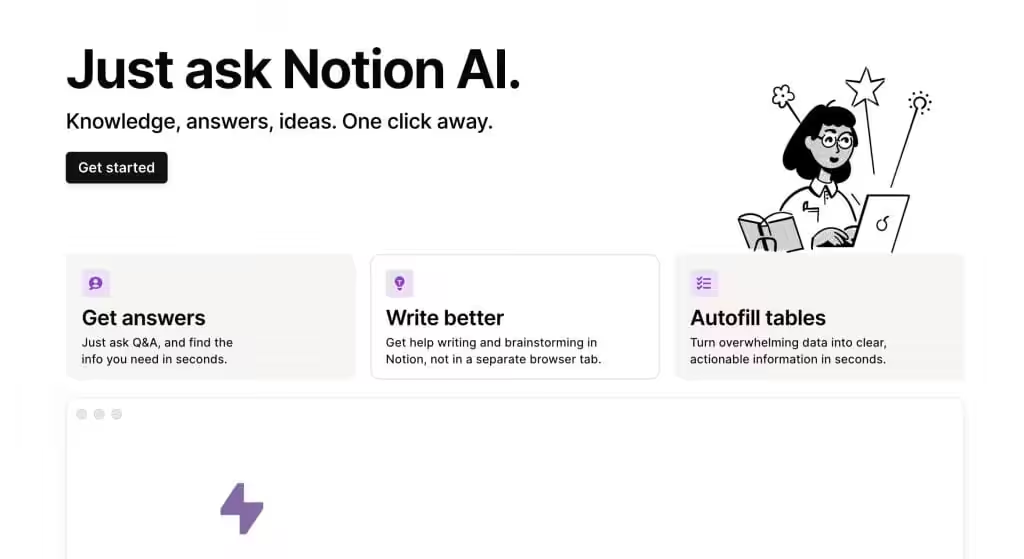
Notion AI is an innovative extension of the popular productivity tool, Notion. It integrates advanced AI capabilities to assist users in drafting, editing, and managing content. Whether you’re a student, a professional, or a content creator, Notion AI helps streamline your writing process, making it faster and more efficient.
Key Features
- Smart Writing Assistance: Notion AI can help you write content from scratch, suggest improvements, and refine your text to enhance clarity and coherence as an AI-writing tool.
- Task Automation: Automate repetitive writing tasks, like summarizing long documents, generating to-do lists, or creating meeting notes.
- Content Generation: Generate high-quality content for blogs, articles, emails, and more with minimal input.
- Research and Insights: Quickly gather information and insights on various topics to enhance your writing.
- Multilingual Capabilities: Notion AI supports multiple languages, making it useful for global teams and projects.
Applications
- Content Creation: Notion AI helps you draft blog posts, social media updates, marketing materials, and more, quickly and efficiently.
- Note-Taking and Organization: Improve your note-taking with smart suggestions, automatic summaries, and better organization of your thoughts and ideas.
- Meeting and Project Management: Use Notion AI to generate meeting agendas, project plans, and status updates, keeping everyone on the same page.
- Academic Assistance: Students can benefit from Notion AI’s ability to help draft essays, create study notes, and summarize research papers.
- Creative Projects: Notion AI aids in brainstorming ideas, outlining creative projects, and providing inspiration for writing.
Benefits
- Efficiency: Speeds up the writing process, helping you create content faster.
- Productivity: Boosts productivity by automating repetitive tasks and providing smart suggestions.
- Collaboration: Enhances collaboration by making it easier to share and organize content within teams.
- Cost-Effective: Offers a budget-friendly solution for individuals and teams looking to improve their writing and productivity.
Again, note that Notion AI is powerful, but it’s not perfect. It may sometimes produce text that requires further editing or fact-checking.
You should always review and verify the content generated. Additionally, while Notion AI supports multiple languages, its performance may vary depending on the complexity and context of the text.
Notion AI is no longer a separate per-member add-on. It is bundled into the Business and Enterprise plans, with limited trial use below those. The only piece billed separately now is Custom Agent credits, sold as add-on packs.
Notion AI

Pros
- Seamlessly integrated into Notion workspace
- Excellent for team collaboration and editing
- Smart summarization and translation built in
- Works within your existing documents and databases
Cons
- Requires Notion subscription as base
- AI add-on is an extra cost per member
- Writing output less creative than dedicated tools
- Limited to Notion environment
Summary
AI writing deeply integrated into the best productivity workspace. Notion AI excels at drafting, editing, summarizing, and brainstorming within your existing workflow. Perfect for teams who already use Notion for project management and documentation.
Price: USD 10 /member/month
Try Notion AIGrok
Grok by xAI is the outlier here, and the one people either love or dismiss on sight. It’s known for its bold personality, sharp reasoning, and the ability to generate high-quality content with a more direct and honest tone. Compared to traditional AI tools, Grok tends to give you punchier, clearer outputs, which many content marketers love when they want content that sounds more human and less corporate.
Grok 4.6, released in August 2026, handles long-form writing, analysis, and structured content far better than the versions that gave the product its early reputation. Businesses, creators, and researchers use Grok to develop content that feels conversational, confident, and deeply factual.
Key Features
- Natural Language Generation: Grok generates bold, clear writing that avoids fluff and delivers content in a straightforward style that resonates with modern readers.
- Instruction Following: It follows layered content instructions well, letting you specify tone, style, structure, and complexity without losing accuracy.
- Advanced Reasoning: Grok 4.6 handles fact-heavy writing, comparisons, and market insights more reliably than before, reducing the need for heavy rewrites.
- Real-Time Web Knowledge: Grok can pull fresh information from the open web, allowing you to produce more up-to-date content for news, trends, and fast-moving topics.
- Tone Customization: You can adjust outputs from casual to professional, or keep Grok’s signature witty tone, depending on your audience.
- Fast Output: Grok is quick — great when you need drafts, ideas, or rewritten content within seconds.
Applications
- Content Creation: Draft newsletters, blogs, and social media posts in a bold, fast, and engaging voice. Perfect for trend-based content.
- Editing and Proofreading: Rewrite or refine text to make it clearer and more concise without losing meaning.
- Research and Outlining: Use Grok to gather insights, break down complex topics, and generate actionable outlines for long-form articles.
- Marketing Copy: Generate SEO-friendly landing pages, emails, and product descriptions that hit user intent.
- Data-Driven Writing: Since it reads the live web, it’s useful for timely articles, comparisons, and competitor breakdowns.
- Creative Writing: Create witty scripts, unique angles, or fresh story ideas using Grok’s distinctive personality.
Benefits
- Efficiency: Grok produces clean, sharp content quickly, reducing your writing workload.
- Accuracy: Real-time information access makes Grok more dependable for news-oriented or fast-evolving topics.
- Cost-Effective: A single tool for writing, rewriting, researching, and ideation.
- Scalability: Handles bulk tasks like rewriting multiple articles, summarizing reports, or generating copy variations.
- Authenticity: Outputs feel natural and conversational, which improves user trust and engagement.
- Grok is powerful, but not always safe for sensitive writing. Its humor can sometimes be too direct, and it may not suit brands that require a polished or neutral tone. Always review content before publishing, especially for formal niches.
- Grok is part of the xAI Premium plan and can be accessed through web and mobile. For creators who want fast, bold, and up-to-date content, it’s a strong addition to your AI writing workflow.
Grok

Pros
- Bold, direct writing style that stands out
- Excellent reasoning and factual accuracy
- Fast content generation
- Real-time information access via X platform
Cons
- Smaller ecosystem compared to ChatGPT
- Limited third-party integrations
- Personality style not suited for all brands
- Premium tier required for best features
Summary
A bold and direct AI writing tool from xAI that prioritizes honest, punchy content over corporate fluff. Grok 4.6 handles long-form writing and analysis well with a distinctive voice that content marketers appreciate for standing out.
Gemini
Google’s Gemini is a strong competitor in the AI writing space, especially with the Gemini 3 family. It’s deeply integrated into Google’s ecosystem, making it perfect for SEO research, content writing, and productivity tasks.
Gemini is fast, factual, and excellent for structured content. With advanced multimodal abilities, it can analyze PDFs, images, charts, and videos — then convert them into clean written content for blogs, newsletters, and documentation.
Key Features
- Natural Language Generation: Gemini writes clear, neutral, and structured content that’s ideal for blogs, guides, and technical writing.
- Instruction Accuracy: It follows formatting rules, content outlines, and SEO instructions reliably.
- Google Search Integration: You can generate search-intent aligned content backed by fresh Google ecosystem knowledge.
- Multimodal Understanding: Gemini can turn screenshots, videos, slides, and PDFs into usable written content.
- Translation & Localization: Great for multilingual writing tasks and content repurposing.
- Workspace Integration: Works inside Docs, Sheets, Gmail, and Android — a huge win for workflow efficiency.
Applications
- Content Writing: Write SEO-friendly blog posts, how-to guides, and informational pages with search-backed accuracy.
- Editing & Optimization: Rewrite long articles, improve readability, and expand content based on ranking intent.
- Keyword and Topic Research: Combine Gemini with Google Search Console or Trends to plan smarter content.
- Documentation & Tutorials: Produce clean procedural or technical content with step-by-step clarity.
- Idea Generation: Brainstorm headlines, outlines, angles, and questions tailored to user intent.
- Content Repurposing: Convert PDFs, lectures, interviews, and slides into articles or summaries.
Benefits
- SEO Advantage: Because it understands Google Search patterns, Gemini is helpful for keyword-relevant content.
- Productivity Boost: Integrates into Google Workspace, speeding up team workflows.
- Accuracy: Strong fact-grounding from Google’s search-backed data.
- Versatility: Great for blogs, technical writing, and structured educational content.
- Easy Adoption: Most people already use Google tools, so adding Gemini is frictionless.
- Gemini is not as creative as Claude or as bold as Grok, but for SEO writing, technical content, and research-oriented workflows, it’s one of the smartest choices today.
- Gemini is available on a free tier and on Google’s paid AI plans, now branded Google AI Plus, Pro, and Ultra rather than the retired Gemini Advanced and Google One AI Premium names. For Google-heavy workflows, it’s a very powerful writing companion.
Gemini

Pros
- Deep Google Search integration for factual content
- Multimodal — analyzes images, PDFs, and charts
- Excellent for SEO-aligned content creation
- Free tier with generous usage limits
Cons
- Writing can feel neutral and lacks personality
- Less creative than ChatGPT or Claude for storytelling
- Advanced features need a paid Google AI plan
- Formatting consistency needs improvement
Summary
Google’s AI writing tool with deep search integration and multimodal capabilities. Gemini excels at SEO-aligned content, structured writing, and research-heavy tasks. The Google ecosystem integration makes it ideal for content marketers.
Jasper
Jasper is built specifically for marketing teams. While ChatGPT and Claude are general-purpose tools that happen to write well, Jasper is designed around marketing workflows: campaign briefs, brand voice profiles, ad copy, landing pages, and team collaboration.
The standout feature is Brand Voice. You feed Jasper your existing content, style guide, and tone preferences, and it learns to match your brand across every piece of content. For agencies managing multiple clients, this alone justifies the price. You can switch between brand profiles without re-explaining your voice every time.
Jasper also offers 50+ marketing-specific templates: AIDA frameworks, PAS copy, product descriptions, email subject lines, Facebook ads, Google ads, blog outlines, and more. These templates give you a starting structure that general-purpose tools don’t provide out of the box.
The downside? Jasper is expensive, and priced for teams rather than individuals. Its individual tier costs several times a ChatGPT or Claude subscription, and the brand-voice and collaboration features that justify it sit on the higher plan. But for marketing teams producing 20+ pieces of content per week across multiple brands, the workflow savings are real.
Pricing: a per-seat individual plan with an annual discount, and custom pricing for business. Jasper’s own pricing page is the only reliable source, because these tier names have changed more than once. 7-day free trial available.
Best for: Marketing teams, agencies managing multiple brand voices, content operations producing high-volume campaign copy.
Katteb
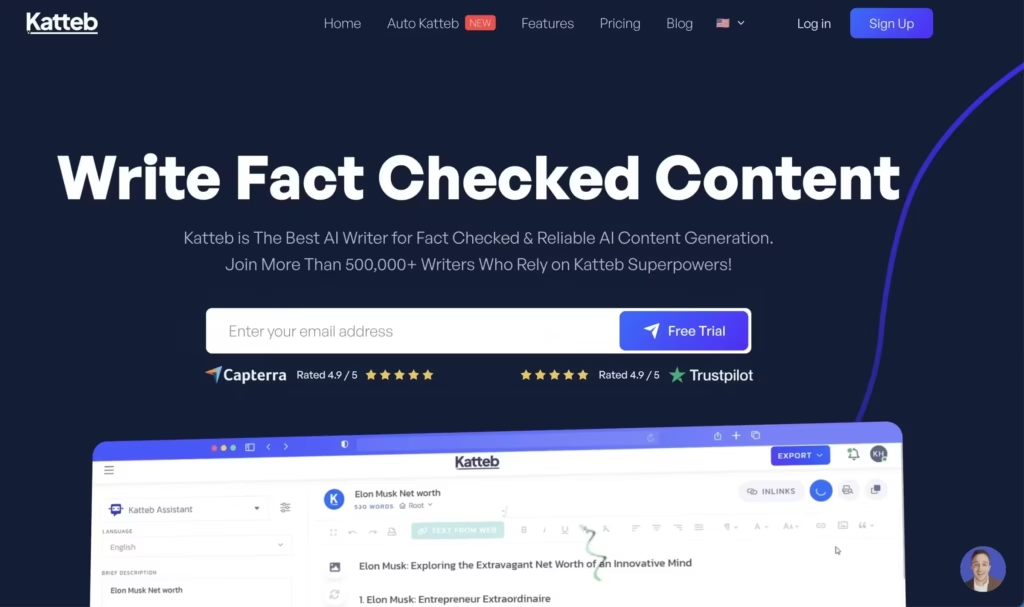
Katteb’s pitch is fact-checked AI copywriting with citations attached, and that is a genuinely better idea than most of this category has had. My caution is that a citation is not a verification. I have read enough confidently-sourced AI output to treat those citations as a starting point for checking rather than the end of it. Use it when you want the checking scaffolded for you, not done for you.
As a marketer, you can use Katteb to automate your copywriting and get more time to focus on other aspects of your business.
If you’re with an agency, you can use Katteb’s robust set of tools to draft ad campaigns, emails, and website content to quickly turn projects around for clients. It also comes with efficient tools to help e-commerce brands make their business look amazing.
It will help you grow your customer base and make more sales using everything from Google and Facebook ads and Ai-written product descriptions.
Katteb sells on a monthly subscription, with a separate white-label tier for agencies. Any lifetime deal you find is a resale offer rather than the vendor’s own pricing, so check what happens at renewal before you buy one.
Katteb

Pros
- Trained on high-performing marketing copies
- Built-in fact-checking for accuracy
- Good template variety for marketing use cases
- Affordable lifetime deal available
Cons
- Less versatile than general-purpose AI tools
- Long-form content quality is average
- Smaller user community
- Interface feels dated compared to competitors
Summary
An AI copywriting tool trained on high-performing marketing copies. Katteb specializes in conversion-focused content for ads, emails, and websites. Good value through AppSumo lifetime deals for marketers and agencies.
LeadScripts+
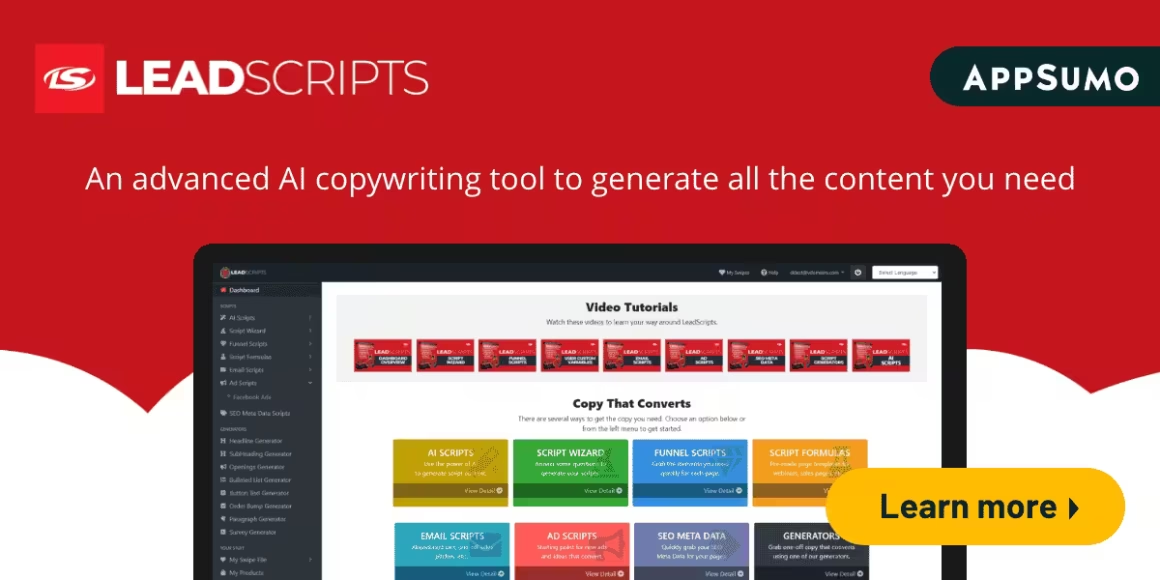
LeadScripts is the narrowest tool here and I mean that as a compliment. It is built around copy frameworks rather than a blank box, so instead of prompting your way toward a sales email you answer a few questions about the offer and get a structured draft back. That framing is the whole value. For editorial writing I would not go near it, and for a funnel it beats staring at Claude wondering what to ask for.
Most importantly, LeadScripts doesn’t require you to deal with long forms, brain freezes, and so on.
You just need to enter a few details about your service or product; LeadScripts will generate a unique marketing copy for your emails, ads, and pages seamlessly.
Thus, you can be assured that you are following a proven strategy and save yourself from the hassle of writing from scratch repeatedly.
LeadScripts+

Pros
- Proven copy strategy frameworks built in
- Good for email and sales funnel copy
- Simple input process for quick generation
- Focused specifically on conversion copy
Cons
- Limited to marketing copy use cases
- Interface needs modernization
- No blog or long-form content support
- Smaller feature set than competitors
Summary
An AI copywriting tool combining AI with proven copy frameworks for emails, sales letters, and funnels. Best suited for marketers who need structured, conversion-focused copy based on established marketing strategies.
AISEO.ai
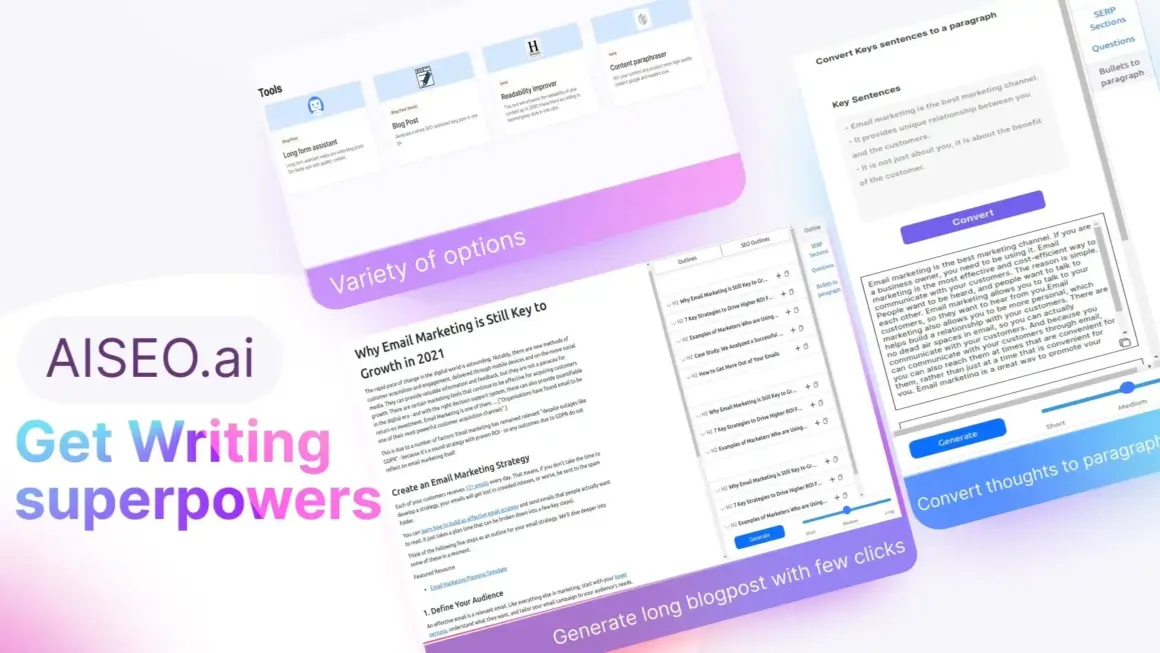
AISEO has changed shape since I first wrote about it. It still has the long-form writer and the rewriting tools, but the product now leads with an SEO agent that crawls your site and ranks fixes by impact, a brand monitor that tracks mentions across ChatGPT, Gemini, Claude, Perplexity, and Grok, and a Reddit monitor. Judge it as an SEO and AI-visibility platform with writing attached, not as a writing tool with SEO attached.
With the help of the long-form assistant, you can generate a paragraph with just one click, thus speeding up your workflow greatly.
AISEO.ai’s writing assistant also enhances your blog’s readability with a click according to the Hemingway style. It allows you to improve, rewrite, optimize, and summarize your blog posts – all in one place.
It comes with numerous copywriting templates and allows you to create unlimited custom templates.
AISEO.ai

Pros
- SEO-optimized content generation
- Hemingway-style readability improvement
- Long-form assistant for quick paragraphs
- Unlimited custom templates
Cons
- Writing quality below top-tier tools
- SEO suggestions can be basic
- Interface could be more polished
- Limited advanced editing features
Summary
An AI writing assistant focused on SEO-optimized content generation. AISEO offers blog writing, readability improvement, and content optimization with Hemingway-style analysis. Good for bloggers who want quick SEO content.
Frase
Frase is what I would pick if the bottleneck is briefs rather than drafting. It pulls the pages already ranking for a query, shows you what they cover, and turns that into an outline you can hand to a writer, which genuinely helps you optimize content for Google. What it is not is a writing tool. Its drafts come out optimisation-shaped and thin on voice, and I would rewrite them. Use Frase to decide what to say, then say it somewhere else.
Frase offers 2 plans:
- Basic Plan – For individuals just getting started with SEO and content optimization, 30 document credits and one user seat a month.
- Team Plan – For SEO or content marketing teams that need more advanced features, unlimited document credits, three user seats a month, with extra seats charged on top.
Earlier they also used to offer a Free Forever plan with one user seat, and 5 Frase Content documents credits per month.
Frase

Pros
- Excellent SERP analysis and content briefs
- Data-driven content optimization suggestions
- Good balance of AI writing and SEO tools
- Team collaboration features
Cons
- Learning curve for new users
- Basic plan limits document credits
- AI writing quality average without optimization context
- No free plan available
Summary
A powerful SEO content optimization tool that combines AI writing with SERP analysis. Frase helps you research, write, and optimize content for Google with data-driven suggestions. Excellent for content marketers serious about organic traffic.
ContentForge
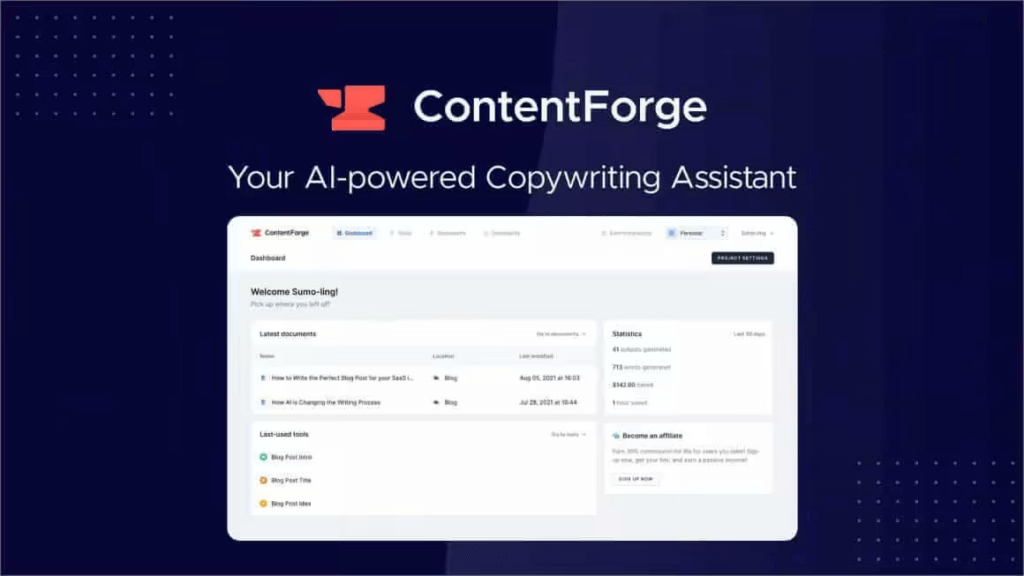
ContentForge is fine, and fine is a difficult place to sit in this category. It generates across a broad set of use cases and keeps your output organised, which was a stronger pitch before the general workbenches got good at long-form. My honest read is that it survives on price and tidiness rather than on output quality, and if you are already paying for Claude or ChatGPT it is hard to see what this adds. It lets you generate content for blog posts, ads, products, and more than 21 other use cases.
Moreover, you can conveniently organize all your content within the different available Tools, edit everything that gets generated, and add them to your favorites.
You can write long-form content using Documents with AI support. ContentForge helps you write everything from blog posts to books. If you’ve found your copywriting work difficult and time-consuming, look no further than this amazing tool!
I have used ContentForge for months now and I can say it has the best interface out there. At once, it was of the best AI tools for content writing but lately the innovations seem to have slowed.
ContentForge
Pros
- Clean and intuitive interface
- 21+ content use cases covered
- Good content organization features
- Long-form document writing support
Cons
- Writing quality below top AI tools
- Limited advanced AI features
- Small user community
- Better free alternatives now available
Summary
An AI copywriting assistant covering blog posts, ads, products, and 21+ use cases. Clean interface with document-based long-form writing and content organization features. Decent option for teams needing structured content workflows.
Blogely
Blogely is a workflow tool wearing a writing tool’s clothes, and it is better at the first job. Research on one side, draft on the other, then publish straight to WordPress without the copy-paste dance. If your drafting, research, and publishing currently live in three different apps, that is worth something.
Designed as an alternative to Upwork and Contently, Blogely helps you increase traffic by optimizing written content for SEO without any prior technical knowledge.
It seamlessly simulates the vintage writing experience by having your notepad on one side and research materials on the other. Moreover, you’ll stay in the app for your entire workflow.
Blogely is an excellent resource for content teams, bloggers, and online creators who’re hoping to produce quality content that generates traffic. It has a free basic plan with paid tiers above it. I could not confirm the lifetime deal that used to circulate for Blogely, so do not count on finding one.
Blogely

Pros
- Direct WordPress publishing integration
- SEO optimization built into workflow
- Research materials alongside writing
- One-time purchase available
Cons
- Writing quality below modern AI tools
- Interface could be more polished
- Limited language model capabilities
- Small development team
Summary
A content creation platform designed as an alternative to freelance writing services. Blogely helps you write, optimize, and publish SEO content directly to WordPress. Good for bloggers who want an all-in-one writing and publishing workflow.
Price: USD 79 (one-time)
Visit Blogely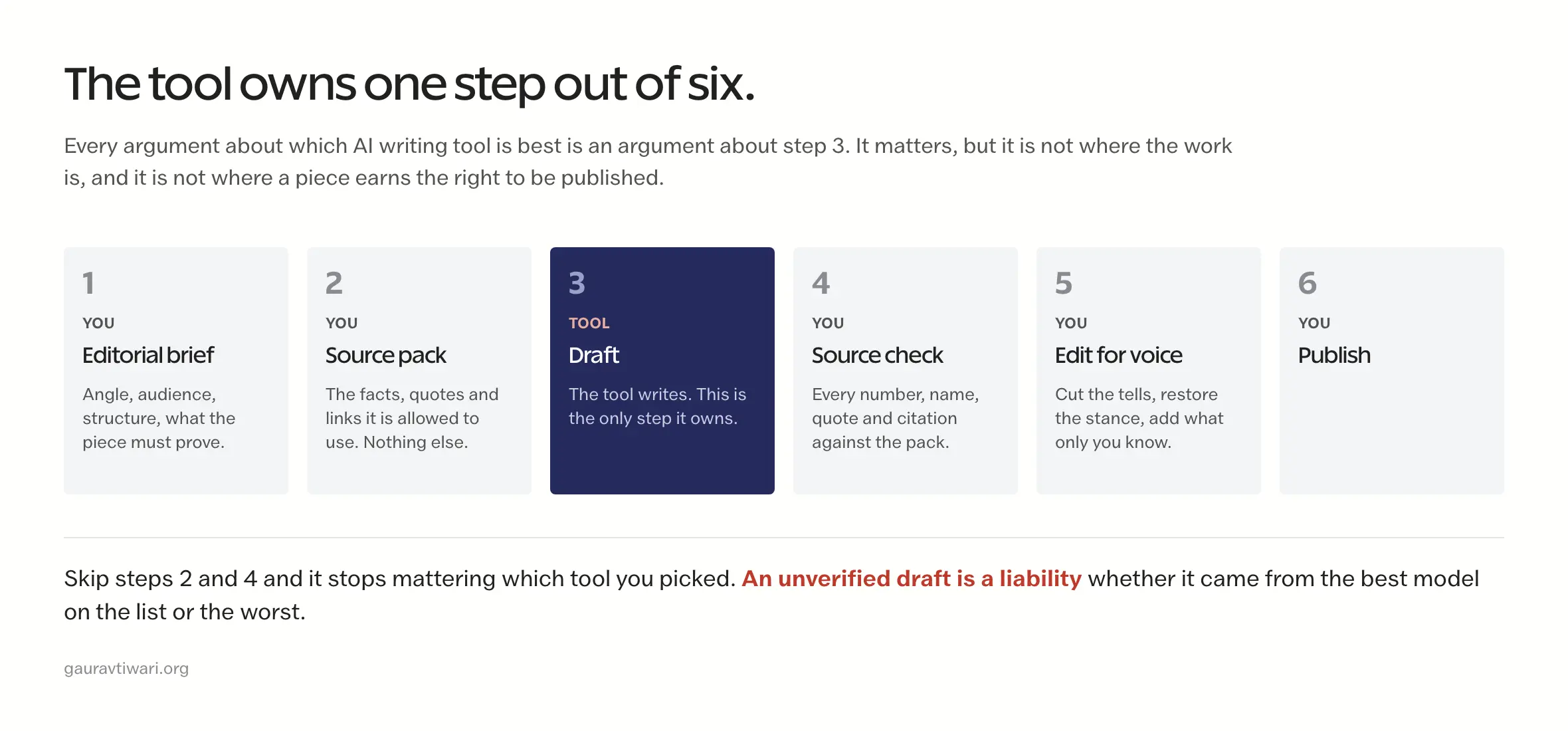
Which AI Writing Tool Should You Pick?
Here is where I actually land, and I would rather be useful than diplomatic about it:
For the strongest writing: Claude is my first pick. Its long-form quality, instruction following, and voice control give me the cleanest editorial starting point.
For the broadest workflow: ChatGPT and Codex are my second pick. Together they cover writing, research, files, automation, and technical work.
For SEO content: Frase, and I would use it for the brief rather than the draft. Its outlines are the good part.
For team productivity: Notion AI is the obvious pick if your team already lives in Notion, and pointless if it doesn’t.
For bold, direct content: Grok, with the caveat that its default register is a bit too pleased with itself for client work. Rein it in and it is genuinely less mushy than the rest.
For Google-integrated workflows: Gemini, purely because it is already where your documents live. That convenience is the argument, not the writing.
Now the unpopular part. The cheaper specialist tools here mostly lost their reason to exist over the last two years. They were built when general models were bad at long-form, and that stopped being true. Several of the products I first wrote about on this page have since changed category or quietly gone somewhere else entirely, which tells you something about how sturdy that niche was. If you’re serious about content quality, put your money into one of the general workbenches: Claude, ChatGPT/Codex, Gemini, or Grok.
Whatever you pick, the tool is the smallest variable. A clear brief, real sources, and someone willing to cut the output in half will beat a better model every time. That is not a motivational line, it is just where the quality actually comes from.
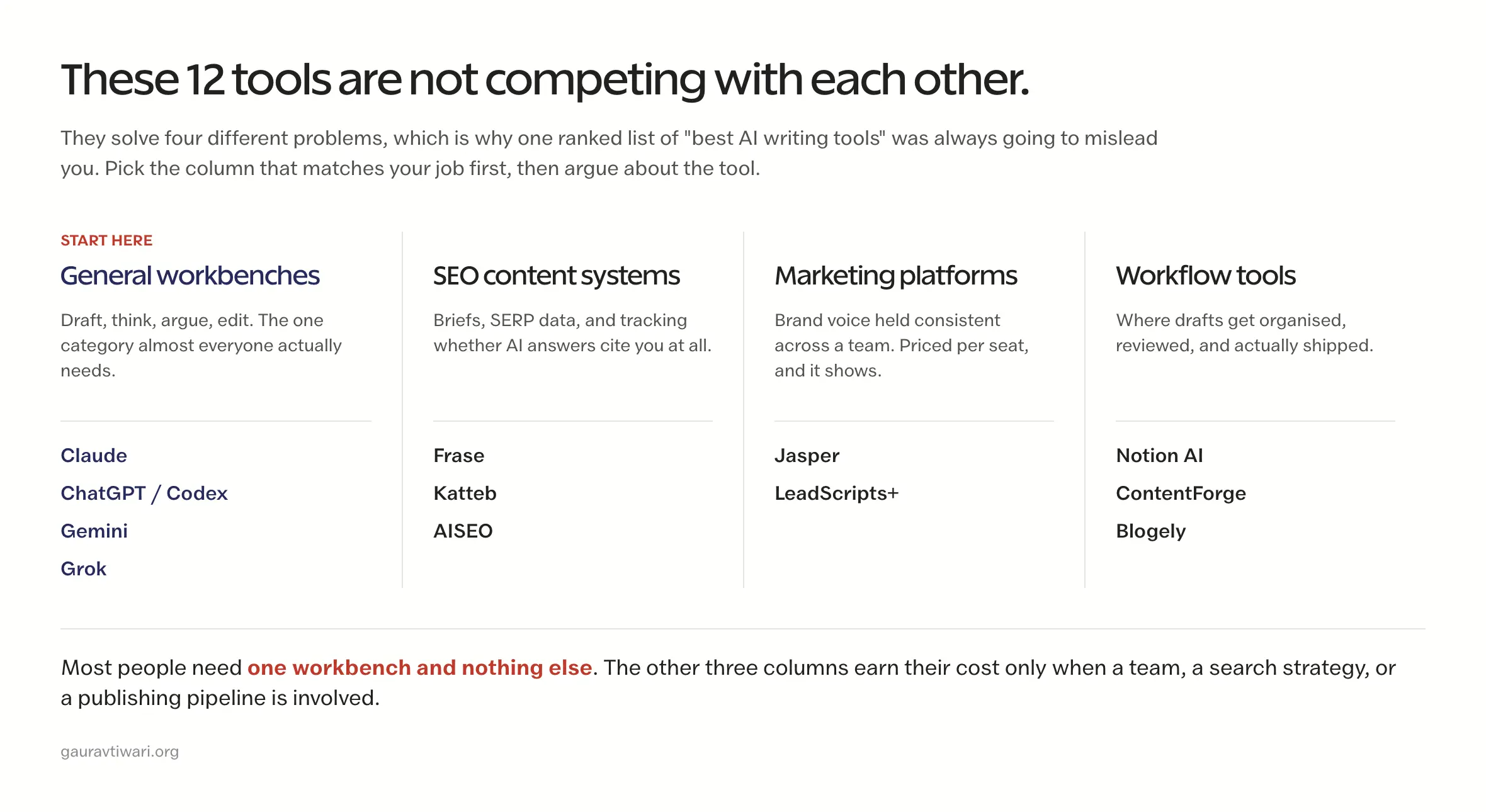
If you take one thing from this page, take the category chart near the top rather than the ranking. Knowing which of the four jobs you are hiring for saves more money than picking correctly within a column.
FAQs
What is the best AI writing tool in 2026?
Claude is my #1 AI writing tool for quality-first long-form work, instruction following, and voice control. ChatGPT/Codex is #2 when writing overlaps with research, files, automation, or software. Frase remains the specialist pick for built-in SERP analysis.
Can AI writing tools replace human writers?
No. AI writing tools are force multipliers, not replacements. They excel at generating first drafts, brainstorming ideas, and handling repetitive content tasks. But human creativity, subject matter expertise, and editorial judgment are still essential for producing content that truly connects with readers and ranks well in search engines.
What is the best free AI writing tool?
ChatGPT offers the best free tier with genuinely useful writing capabilities. Google Gemini also provides a generous free plan with strong research and SEO features. Grok by xAI has a free tier as well. For most writers, ChatGPT’s free version covers daily writing needs without requiring a paid subscription.
Is AI-generated content good for SEO?
Google has stated that it evaluates content based on quality, not how it was created. AI-generated content can rank well if it provides genuine value, answers user intent, and demonstrates expertise. The key is to use AI as a starting point and then add your unique insights, real-world experience, and editorial polish before publishing.
How much do AI writing tools cost?
Pricing moves constantly, so treat any figure in a roundup as a starting point. The general workbenches (ChatGPT, Claude, Gemini) cluster around the same monthly subscription and all have usable free tiers. Notion AI is bundled into Notion’s Business and Enterprise plans rather than sold per member. Marketing platforms like Jasper cost several times more because they are priced per seat for teams. Check the vendor’s own pricing page before committing, because several tools here changed their plan structure entirely in the past year.
Which AI writing tool is best for blog posts?
For blog writing, Claude produces the most natural and well-structured long-form content. ChatGPT is excellent for versatility and quick drafts. Frase is the best choice if you want AI writing combined with SEO optimization and SERP analysis. For teams, Notion AI integrates writing directly into your project management workflow.
Does Google penalize AI-generated content?
No, not because AI was involved. Google’s stated position is that it judges content on quality rather than on how it was produced, and appropriate AI use does not breach its guidelines. What does breach them is scaled, unoriginal, low-value content produced mainly to manipulate rankings. Google also says AI use carries no inherent ranking advantage. My own rule is simple: I treat AI output as a draft, verify every fact and source, and add something first-hand before it goes near publish. Detection is the wrong thing to worry about. Being worth reading is the right thing.
What is the difference between AI writing tools and AI writing assistants?
AI writing tools (like ChatGPT, Claude, and Jasper) generate content from scratch based on your prompts. AI writing assistants (like Grammarly, ProWritingAid, and Sapling) help you improve existing content by fixing grammar, style, and readability. Most content creators use both: an AI writing tool for drafting and an AI assistant for polishing.
Tell Google you want more of this.
Add Gaurav Tiwari as a preferred sourceOne tap, and this site shows up more often in your own Top Stories, AI Overviews and AI Mode. Remove it any time.
Disclaimer: This site is reader-supported. If you buy through some links, I may earn a small commission at no extra cost to you. I only recommend tools I trust and would use myself. Your support helps keep gauravtiwari.org free and focused on real-world advice. Thanks. - Gaurav Tiwari