
 by
by
ProWritingAid
- 25+ writing reports for style, readability, and grammar
- Lifetime plan at $399 (Grammarly has no lifetime option)
- Scrivener, Google Docs, MS Word, and Chrome integration
- Cliche, repeat, and sticky sentence detection
- GDPR compliant with 256-bit encryption
AI-powered writing assistant with 25+ reports for grammar, style, readability, and structure. Strong long-term-value alternative to Grammarly for long-form writers and editors.
Most grammar checkers fix typos but never make you a better writer. ProWritingAid is the rare one that does both, with 25+ reports that dig into style, readability, and structure instead of stopping at “is this sentence correct?” After running 50+ articles through it, the question worth answering is whether that depth justifies the steeper learning curve over Grammarly.
Verdict: ProWritingAid earns 4.3/5. Buy it if you’re a serious long-form writer (blogger, author, content marketer) who wants deep style and structure analysis, not just typo fixes, and you’ll keep most value from the $399 lifetime plan over Grammarly’s recurring $144/year. Skip it if you mostly write short emails or social posts, or if you need the fastest real-time correction. The 4.3 score reflects the same tradeoff: unusually deep reports, but a less polished interface and slower processing on long documents.
How I tested: I’ve run ProWritingAid against 50+ published articles over the past year, alongside Grammarly, Hemingway, and Sapling on the same drafts. I checked it inside Google Docs, the WordPress block editor (via the Chrome extension), and the standalone web editor, on documents from 800 to 5,000+ words. The repeats report once flagged “actually” 14 times in a single 3,000-word draft. That kind of feedback is what shaped this score: the tool caught a pattern I had stopped noticing, not just a typo.
| Pros | Cons |
|---|---|
| 25+ writing reports for style, readability, and structure | Slower real-time editing than Grammarly on long documents |
| Lifetime plan at $399 (Grammarly has no lifetime option) | Steeper learning curve, 2 to 3 weeks to master the reports |
| Scrivener integration that Grammarly doesn’t offer | Dated interface that hasn’t had a major refresh |
| Repeats, cliche, and sticky-sentence detection no rival matches | Weaker mobile experience than Grammarly’s keyboard |
- vs Grammarly: Grammarly is faster and catches more typos in real time; ProWritingAid goes far deeper on style and costs less long-term.
- vs Hemingway: Hemingway is a free readability highlighter; ProWritingAid does that plus grammar, cliches, consistency, and many more checks.
- vs Sapling: Sapling is great for real-time chat and email; ProWritingAid is built for polishing finished long-form drafts.
What ProWritingAid Actually Does
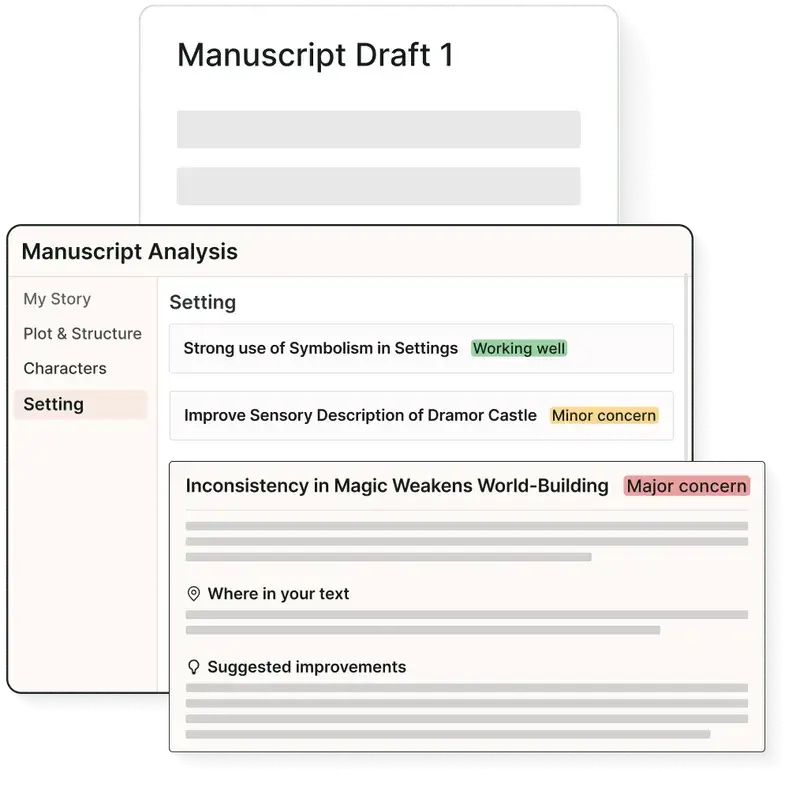
ProWritingAid is a grammar checker, style editor, and writing coach rolled into one tool. You paste your text (or connect it to your writing app), and it runs 25+ analysis reports on your content. Grammar and spelling are just the starting point.
Where most grammar tools stop at “is this sentence correct?”, ProWritingAid asks “is this sentence good?” It checks for overused words, sentence variety, pacing, readability, vague language, sticky sentences, cliches, and consistency. The depth of analysis is what separates it from simpler tools.
It integrates with Google Docs, Microsoft Word, Scrivener, Chrome, Firefox, and works as a standalone web editor. The Word and Scrivener integrations are particularly strong for authors and long-form writers. For WordPress users, the Chrome extension catches issues as you write in Gutenberg.
Key Features That Actually Matter
ProWritingAid markets itself with 25+ writing reports. Most reviews list all of them. I’ll focus on the ones that have genuinely improved my writing.
Style and Readability Analysis
This is ProWritingAid’s killer feature. It flags passive voice, hidden verbs, adverb overuse, and sentence complexity. After running 50+ articles through it, I noticed my writing getting tighter and more direct. The readability score helps you calibrate for your audience. I aim for 8th-grade level, and the tool keeps me honest.
Repeats and Echoes Report
This catches repeated words and phrases you’d never notice on your own. “Actually” appeared 14 times in one of my 3,000-word drafts. I cut it to 3. The echoes report catches close-proximity repetition that makes writing feel monotonous. Grammarly doesn’t do this at all.
Cliche and Redundancy Checker
If you write content professionally, cliches are your enemy. ProWritingAid highlights overused phrases like “at the end of the day,” “it goes without saying,” and “in today’s world.” After using this for a year, I catch myself before typing them. That’s the coaching effect most grammar tools lack.
Sticky Sentences
A sticky sentence is one overloaded with glue words (in, of, the, at, for). ProWritingAid flags sentences where glue words exceed 45% of the total. I’ve found this report incredibly useful for tightening paragraphs. It’s subtle, but it makes a real difference in how your writing flows.
Grammar and Spelling
The basics are solid. It catches subject-verb agreement, tense issues, punctuation errors, and spelling mistakes. It’s not as fast or as accurate as Grammarly at pure grammar checking, but it’s good enough. Where Grammarly catches 95% of errors, ProWritingAid catches about 90% but gives you 10x more context on why something is wrong.
Plagiarism Checker
Available on the Premium Plus plan. You get 50 checks per year. It scans against billions of web pages and academic papers. For bloggers and content marketers, it’s useful for checking if guest posts or outsourced content is original. For serious plagiarism checking, dedicated tools like Copyscape or Quetext are more thorough.
Consistency Check
Catches inconsistent capitalization, hyphenation, and spelling across your document. If you write “email” in one paragraph and “e-mail” in another, it flags it. Essential for long-form content where consistency errors creep in over 3,000+ words.
What ProWritingAid Does Well
Depth of Analysis
No other writing tool at this price point gives you this level of analysis. The 25+ reports cover everything from sentence length variation to transition usage to dialogue tag analysis. If you’re serious about improving your writing craft, not just fixing typos, ProWritingAid is unmatched.
Best Value for Money
ProWritingAid Premium costs $30/month or $120/year. The lifetime deal at $399 is where the real value is. Compare that to Grammarly Premium at $144/year with no lifetime option. Over 3 years, ProWritingAid’s lifetime plan costs $399 total vs Grammarly’s $432. And you get more features.
Scrivener and Desktop Integration
If you use Scrivener for book writing or long-form projects, ProWritingAid’s integration is excellent. Grammarly still doesn’t integrate with Scrivener. For authors, this alone justifies choosing ProWritingAid.
Privacy and Security
ProWritingAid uses 256-bit encryption and is GDPR compliant. They don’t store your writing to train AI models. For anyone writing sensitive content (business documents, legal text, client work), this matters more than most people realize.
Where ProWritingAid Falls Short
Dated Interface
The web editor feels like it was designed in 2018 and hasn’t had a major refresh. Grammarly’s interface is cleaner, faster, and more intuitive. ProWritingAid’s dashboard can feel overwhelming with all the reports and options. New users often don’t know where to start.
Slower Processing
On longer documents (5,000+ words), ProWritingAid can be noticeably slow. Running all reports at once on a long article takes 15-30 seconds. Grammarly processes in near real-time. If you’re editing quick emails or short social posts, ProWritingAid’s speed is frustrating.
Steeper Learning Curve
Grammarly works instantly: install, type, see suggestions. ProWritingAid requires you to understand what each report does and when to use it. The power is there, but it takes 2-3 weeks of active use before you know which reports matter for your writing style.
Weaker Mobile Experience
ProWritingAid’s mobile apps exist but they’re basic. If you write on your phone or tablet frequently, Grammarly’s mobile keyboard is significantly better. ProWritingAid is really a desktop-first tool.
What I Like
- 25+ writing reports that go far beyond grammar checking
- Best value: lifetime plan at $399 vs Grammarly’s recurring $144/yr
- Style analysis, cliche detection, and readability scoring
- Scrivener integration (Grammarly doesn’t have this)
- GDPR compliant, doesn’t use your writing to train AI
- Repeats and echoes report catches issues no other tool finds
What Could Be Better
- Interface looks dated compared to Grammarly
- Slower processing on long documents (5,000+ words)
- Steeper learning curve for new users
- Weaker mobile experience
- Grammar accuracy slightly behind Grammarly
- Plagiarism checks limited to 50/year on Premium+
Pricing
ProWritingAid has three tiers. The free version is useful for quick checks but severely limited.
| Plan | Price | Key Features |
|---|---|---|
| Free | $0 | 500-word limit, web editor only, 19 reports |
| Premium | $30/mo or $120/yr | Unlimited words, all integrations, all reports |
| Premium+ | $36/mo or $144/yr | Everything in Premium + 50 plagiarism checks/year |
| Lifetime | $399 one-time | Premium features forever, no recurring fees |
The lifetime plan at $399 pays for itself in under 3 years vs Premium’s annual pricing. If you write professionally, it’s the obvious choice. I’ve never seen Grammarly offer a lifetime option.
ProWritingAid vs Grammarly Pricing
| Feature | ProWritingAid | Grammarly |
|---|---|---|
| Free tier | 500 words, web only | Basic grammar, unlimited |
| Premium (annual) | $120/yr | $144/yr |
| Lifetime option | $399 | Not available |
| Writing reports | 20+ | 4 (correctness, clarity, engagement, delivery) |
| Plagiarism | 50 checks/yr ($144/yr) | Unlimited ($180/yr Business) |
| Scrivener | Yes | No |
| AI writing | Basic | Advanced (GrammarlyGO) |
For a deeper comparison, read my full breakdown: Grammarly vs ProWritingAid vs Sapling.
ProWritingAid vs Alternatives
Here’s how ProWritingAid stacks up against every major writing tool on the market. I’ve tested all of them.
| Feature | ProWritingAid | Grammarly | Hemingway | Sapling | LanguageTool |
|---|---|---|---|---|---|
| Free tier | 500 words | Unlimited basic | Free web app | Free | 10K chars |
| Premium price | $120/yr | $144/yr | $19.99 one-time | $25/mo | $59.90/yr |
| Lifetime option | $399 ✓ | No | N/A (one-time) | No | No |
| Writing reports | 20+ | 4 | 1 (readability) | 0 | 0 |
| Grammar accuracy | ★★★★☆ | ★★★★★ | ★★☆☆☆ | ★★★★☆ | ★★★★☆ |
| Style analysis | ★★★★★ | ★★★☆☆ | ★★★★☆ | ★☆☆☆☆ | ★★☆☆☆ |
| Readability | ★★★★★ | ★★★☆☆ | ★★★★★ | ★☆☆☆☆ | ★★☆☆☆ |
| Cliche detection | Yes | No | No | No | No |
| Plagiarism | 50/yr (Premium+) | Unlimited (Business) | No | No | No |
| Scrivener | Yes | No | No | No | No |
| Google Docs | Yes | Yes | No | Yes | Yes |
| Mobile app | Basic | Excellent | No | No | Basic |
| AI writing assist | Basic | GrammarlyGO | No | Autocomplete | Paraphrase |
| Privacy (GDPR) | Yes | Yes | N/A | Yes | Yes |
| Best for | Long-form writers | Everyone | Readability only | Chat/email | Multilingual |
ProWritingAid vs Grammarly
Grammarly is the market leader. It’s faster, has a better interface, and catches grammar errors more accurately. But ProWritingAid goes deeper with style analysis and writing improvement. Grammarly is better for quick editing. ProWritingAid is better for becoming a better writer.
My take: If you write short content (emails, social posts, quick web copy), Grammarly wins. If you write long-form (blog posts, books, reports), ProWritingAid gives you more value. Check out the best Grammarly alternatives for more options.
ProWritingAid vs Hemingway
Hemingway Editor is free and great for readability analysis. But it’s a single-purpose tool: it highlights complex sentences and passive voice. ProWritingAid does everything Hemingway does plus grammar, spelling, cliches, consistency, plagiarism, and many more checks. Hemingway is a starting point. ProWritingAid is the full toolkit.
ProWritingAid vs Sapling
Sapling is AI-powered and free. It’s surprisingly good at grammar checking and autocomplete suggestions. But it doesn’t have ProWritingAid’s depth of style analysis. Sapling is best for real-time chat and email. ProWritingAid is best for polishing finished drafts.
Who Should Use ProWritingAid
Bloggers and Content Marketers
If you publish 2,000+ word articles regularly, ProWritingAid catches the subtle issues that hurt readability. Overused transitions, repetitive phrasing, passive voice creep. It’s made my blog copywriting measurably tighter. The readability score keeps you writing for humans, not search engines.
Book Authors
The Scrivener integration sets it apart. No other major writing assistant works directly inside Scrivener. Plus the fiction-specific reports (dialogue tags, pacing, sentence variety) are genuinely useful for narrative writing.
Non-Native English Speakers
The contextual grammar explanations help you understand why something is wrong, not just that it’s wrong. Over time, you learn the rules instead of just accepting corrections. This learning element is stronger than what Grammarly offers.
Who Should Skip ProWritingAid
Skip ProWritingAid if you want the fastest real-time typo fixing (Grammarly is quicker and more accurate at pure grammar), you need dedicated plagiarism-only checking (Copyscape or Quetext are more thorough than 50 checks a year), or you want a minimal, distraction-free editor (Hemingway is simpler and free). It’s a deep desktop tool for long-form work, so light or mobile-first writers will fight the friction more than they gain from the depth.
Casual Writers
If you mostly write emails, Slack messages, and short social posts, ProWritingAid is overkill. Grammarly’s free plan handles that use case better with less friction.
Mobile-First Writers
If you write primarily on your phone or tablet, Grammarly’s mobile keyboard is far superior. ProWritingAid’s mobile experience is an afterthought.
AI Content Generators
If you’re using AI writing tools and just need a quick grammar pass before publishing, Grammarly’s speed and simplicity wins. ProWritingAid’s depth is wasted on AI-generated content you’re not planning to refine.
My Verdict
I’ve used ProWritingAid for long-form content editing across hundreds of articles. It doesn’t just fix your writing, it teaches you to write better. The repeats report, cliche checker, and readability analysis have tangibly improved my drafts. I catch problems now before I even run the tool, because I’ve internalized the patterns it taught me.
The downsides are real: the interface needs a modern refresh, processing is slow on long documents, and the learning curve means you won’t see full value on day one. But once you understand which reports matter for your writing, it becomes indispensable.
If you’re choosing between ProWritingAid and Grammarly, ask yourself: do you want a tool that fixes your writing, or one that improves it? Grammarly fixes. ProWritingAid improves. For bloggers, authors, and anyone who writes 2,000+ words regularly, ProWritingAid is the better long-term investment.
Bottom line: ProWritingAid earns 4.3/5. It is a strong choice for long-form writers who will actually use its detailed reports. The $399 lifetime plan can beat recurring subscriptions over time, but only if you expect to keep using the product for more than three years.
ProWritingAid
Pros
- 25+ writing analysis reports
- $399 lifetime Premium option
- Strong Scrivener and long-form workflow
- Useful repetition and readability reports
Cons
- Interface is less polished than Grammarly
- Large documents can feel slower
- Free plan checks 500 words at a time
- Advanced reports take time to learn
Summary
ProWritingAid is a strong writing assistant for long-form authors, bloggers, and editors who want deeper feedback than basic grammar correction. It offers 25+ analysis reports, a 500-word free plan, and a $399 lifetime Premium license. Its interface and large-document speed still trail Grammarly, but the lifetime option and detailed craft reports make it good long-term value.
Frequently Asked Questions
Is ProWritingAid better than Grammarly?
For long-form writing (blog posts, books, reports), yes. ProWritingAid offers deeper style analysis with 25+ reports vs Grammarly’s 4. For quick editing of emails and short content, Grammarly is faster and more intuitive. It depends on what you write.
Is ProWritingAid free version worth using?
The free version limits you to 500 words at a time and only works in the web editor. It’s fine for testing the tool, but not practical for daily use. If you write professionally, you need Premium.
Does ProWritingAid work with Google Docs?
Yes. ProWritingAid has a Google Docs add-on that works directly in your document. It also integrates with Microsoft Word, Scrivener, Chrome, Firefox, and the Mac desktop app.
Is the lifetime plan worth it?
At $399, the lifetime plan pays for itself in under 3 years vs the $120/year annual plan. If you plan to write professionally for more than 3 years, it’s a no-brainer. Grammarly doesn’t offer a lifetime option at all.
Can ProWritingAid check for plagiarism?
Only on the Premium+ plan ($144/year). You get 50 plagiarism checks per year. For heavy plagiarism checking needs, dedicated tools like Copyscape are more thorough.
Does ProWritingAid store my writing?
ProWritingAid uses 256-bit encryption, is GDPR compliant, and states they don’t store your writing to train AI models. This is a meaningful advantage for anyone editing sensitive or confidential content.
Does ProWritingAid work with WordPress?
Not directly, but the Chrome browser extension works inside the WordPress block editor (Gutenberg). It’ll underline issues as you type. For deeper analysis, paste your draft into ProWritingAid’s web editor first, clean it up, then paste into WordPress.
Tell Google you want more of this.
Add Gaurav Tiwari as a preferred sourceOne tap, and this site shows up more often in your own Top Stories, AI Overviews and AI Mode. Remove it any time.
Disclaimer: This site is reader-supported. If you buy through some links, I may earn a small commission at no extra cost to you. I only recommend tools I trust and would use myself. Your support helps keep gauravtiwari.org free and focused on real-world advice. Thanks. - Gaurav Tiwari