
 by
by
Selling a WordPress plugin from your own WooCommerce store is easy right up to the second order. The first buyer gets a zip by email. The second one asks for a license key, the third installs it on 6 client sites, and 2 months later all 3 are asking how to get version 1.1. Without a WooCommerce software license manager there’s nothing issuing keys, nothing counting sites and no update feed, and the usual answers cost a yearly fee per site, a percentage of every sale or a second store.
I have been creating WordPress plugins for over a decade now. Some were just utility plugins, while others were dedicated feature plugins for my clients. The only thing that stopped me from selling my WordPress plugins was WooCommerce’s inability to do that natively.
Until FluentCart arrived, I was using alternate tools like Hoster by dPlugins and Cloudflare Workers to deliver updates to my clients and users. There is an official WooCommerce API Manager that costs around $200 a year for one site, so it was suitable for someone making a fortune from their plugins, but not for an indie developer like me. When FluentCart was released, it made things easier, and I jumped ship. Slowly, I started shipping plugins with licenses and updates. Still, a part of me worried about how costly WooCommerce can be to deliver plugin updates and licenses.
Stackless for WooCommerce is my answer to that worry. It’s a plugin I built for core WooCommerce, and its Software Licensing module does the whole plugin-selling job inside the store you already run, from the key on the order to the update on your buyer’s Dashboard. The rest of Stackless replaces the subscriptions and payment extensions a store usually buys on top, which I’ll come to after the setup.
Both licenses cover unlimited sites: $39 a year or $99 once at the early adopter price. The walkthrough follows the demo store, which sells a fictional plugin called Formwise Pro exactly this way.
Why Selling Plugins on WooCommerce Gets Expensive
WooCommerce was built to sell a product once. A plugin sale starts a relationship instead: the buyer needs a key, the key needs a site limit and every release has to reach every licensed site for as long as the license runs. That gap shows up as a handful of pain points:
- Core WooCommerce has no licensing. A downloadable product is a zip and a download link, with no key, no activation count and no update feed, so version 1.1 reaches buyers only if they log in and download it again.
- The official extension is priced for big sellers. The WooCommerce API Manager is $199 a year for 1 site and renews at full price. A $49 plugin needs 5 sales every year just to pay for it.
- Automatic renewals are another extension. The license plugins can expire a key on a date, but charging the buyer’s card again needs a subscriptions plugin on top, and WooCommerce Subscriptions is $279 a year.
- The cheaper license plugins charge for updates. License Manager for WooCommerce and Digital License Manager issue keys for free, and update delivery comes with their Pro versions, so the real price is the Pro license plus the subscriptions plugin.
- An outside update server drifts from the store. Hoster, Kernl or a Cloudflare Worker can serve updates, but they don’t see your orders, so a refund or a failed renewal reaches them only if you wire the two together.
- The bill grows with every feature. Subscriptions, licensing, multi-currency and order bumps come to $706 a year as WooCommerce.com extensions for 1 site, before a single plugin sells. I added up the rest of the stack in how much WooCommerce extensions cost per year.
- Staging sites eat activations. A 1-site key used on staging and production counts twice unless the license manager recognizes a staging address, and every one of those is a support email.
A seller making a fortune from 1 plugin can absorb all of this. For an indie developer with a few plugins, the same bill decides whether selling them is worth the trouble at all.
What a WooCommerce Software License Manager Has to Do
Four jobs, and a plugin that does 3 of them leaves you doing the fourth by email.
- Issue a key when an order is paid, revoke it on refund and keep it in step with a subscription if the license renews yearly.
- Count activations against a site limit, so a 1-site license can’t run on 6, while staging copies don’t eat a slot.
- Answer an API the plugin can call: activate, deactivate, check, and what the latest version is.
- Serve the update itself through WordPress’s own Updates screen, with a download link that only a licensed site can use.
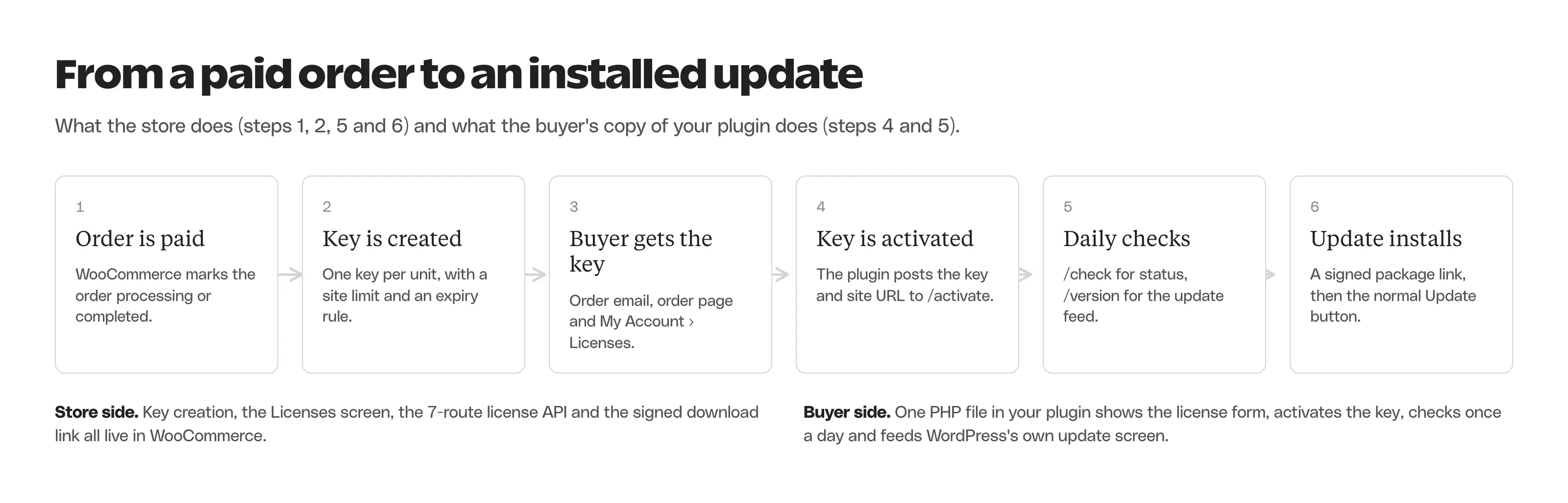
Stackless does all 4 inside WooCommerce, and the setup is 5 steps. The comparison first, because which tool you pick decides where the steps happen.
WooCommerce Software License Manager Options Compared
Prices are list prices for 1 store as of October 2026. The last column matters as much as the price, because it decides where your customers, checkout and tax setup live.
| Option | Price for 1 store | Keys and site limits | Plugin and theme updates | Yearly auto-renewals | Where the store lives |
|---|---|---|---|---|---|
| Stackless for WooCommerce | $39 a year or $99 once, unlimited sites (early adopter price; $69 and $399 after) | Yes, with staging sites left out of the count | Yes, signed downloads through a 1-file client | Built in, on Stripe, PayPal, Polar or Paddle | Your WooCommerce store |
| WooCommerce API Manager | $199 a year | Yes | Yes | Needs a subscriptions plugin, such as WooCommerce Subscriptions at $279 a year | Your WooCommerce store |
| License Manager for WooCommerce | Free; Pro from $129.99 a year | Yes | Pro only, through its WordPress SDK | Needs a subscriptions plugin | Your WooCommerce store |
| Digital License Manager | Free; Pro from $75 a year | Yes | Pro only | Needs a subscriptions plugin | Your WooCommerce store |
| Easy Digital Downloads | Professional pass, $299.50 the first year, then $599 (2 sites) | Yes | Yes | Included in the pass | EDD, a separate store |
| FluentCart Pro | $199 a year, or $249 once at the early-bird price | Yes | Yes | Included | FluentCart, a separate store |
| SureCart | Free with a 2.9% fee per sale, or $199 a year | Yes | Yes | Included | SureCart, a separate store with a hosted backend |
| Freemius | 6.1% + 50¢ per sale, plus gateway fees | Yes | Yes, through its SDK | Included | Freemius checkout, as merchant of record |
| Polar | 5% + 50¢ per sale, more on non-US cards | Keys | No WordPress update client | Included | Polar checkout, as merchant of record |
| Hoster by dPlugins | $59 once for 1 site | Yes, linked to your shop with your own code | Yes | No, it takes no payments | Update server only |
| Kernl | From $9 a month | Yes | Yes | No, it takes no payments | Hosted update server only |
Inside WooCommerce, every license plugin other than Stackless stops at the license. The API Manager, License Manager for WooCommerce and Digital License Manager all issue keys and serve updates in their paid versions, but a yearly license that charges the card again needs a subscriptions plugin on top. Digital License Manager Pro with WooCommerce Subscriptions is the cheapest of those pairings at $354 a year for 1 site, and the API Manager route is $478. Stackless does the keys, the updates and the renewal itself for $39 a year on unlimited sites.
Outside WooCommerce, FluentCart, EDD and SureCart bundle subscriptions and licensing into one store plugin, and they’re good at it. The catch is the word outside: your products, customers, gateways and tax setup have to move with you. I compared the two platforms in detail in FluentCart vs WooCommerce.
Step 1: Turn On Software Licensing
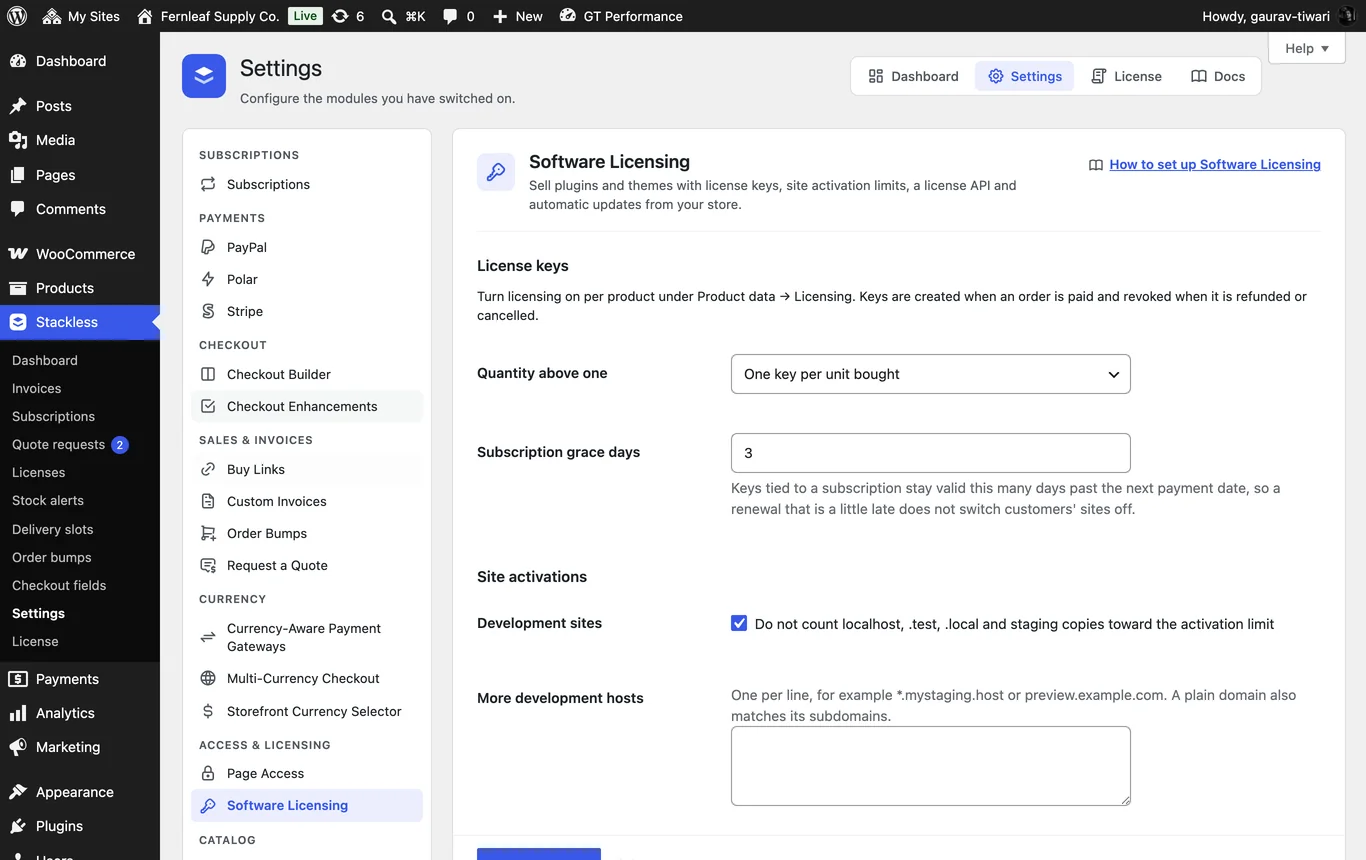
Install Stackless, then switch the module on under Stackless → Dashboard, in the Access & licensing group. A module that’s off registers no code, so nothing changes on the store until you flip it. Then open Stackless → Settings → Software Licensing. The defaults are sensible, and 4 of them are worth understanding before the first sale:
- Quantity above one. One key per unit bought (a quantity of 3 gives 3 keys), or one key with the site limit multiplied by the quantity. Agencies prefer the second.
- Subscription grace days. Default 3, up to 60. A key tied to a subscription stays valid this many days past the next payment date, so a card that fails on the due date doesn’t switch off a client’s site that evening.
- Development sites. On by default. Activations on localhost,
.test,.local, hosting staging domains (WP Engine, Kinsta, Pantheon, Flywheel, Cloudways, InstaWP) and subdomains such asstaging.ordev.don’t count toward the limit. Add your own patterns under More development hosts. - Rate limits. 30 requests a minute per IP and per key, and 10 failed lookups before an IP is blocked for 15 minutes. Download links live for 24 hours. Keep that at 12 or more because the client caches the link.
Step 2: Set Up the Product
Open the plugin’s product, go to Product data → Licensing and tick License keys. The tab shows on simple and variable products, and on Stackless subscription products, which is how a yearly license with automatic renewal works. The first group of fields is the key itself:
- Site limit: sites one key can activate. 0 is unlimited. Default 1.
- Validity: Lifetime, Follows subscription or Number of days (default 365, and each paid renewal adds the same again).
- Key prefix and format: an optional prefix such as
FWP, and a pattern where every X is a random character,XXXXX-XXXXX-XXXXX-XXXXXby default. The alphabet leaves out 0, O, 1, I and L so keys survive being read over the phone, and customers can type a key in any case with or without dashes.
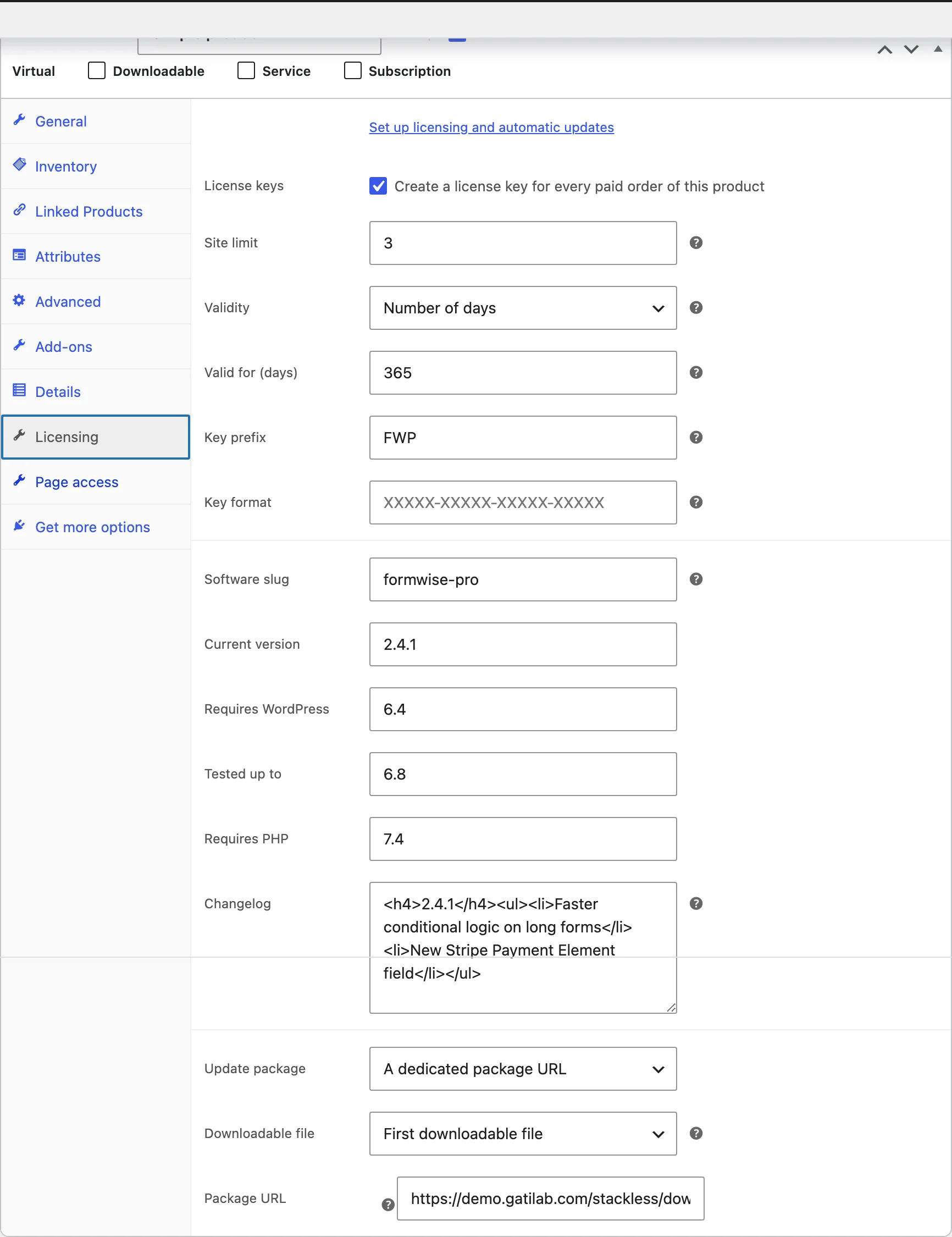
The second group is for updates, and every field maps to something WordPress shows in its update screens:
- Software slug: the plugin’s folder name,
my-plugin. It has to match the slug you pass to the client. - Current version, Requires WordPress, Tested up to, Requires PHP: what the update notice and the View details popup display.
- Changelog: basic HTML, shown under View details.
- Update package: the product’s downloadable file, or a dedicated package URL. A zip in your uploads folder is streamed through a signed link, and a remote URL is redirected to. The zip must contain the folder, so
my-plugin.zipopens tomy-plugin/my-plugin.php.
For 1-site, 5-site and unlimited tiers, make one variable product. Once licensing is saved on the parent, each variation gets its own site limit and validity, and the software fields stay on the parent so every tier shares one slug and one release.
Step 3: Add the License Client to Your Plugin
There’s no SDK to install. The client is 1 PHP file inside Stackless at wp-content/plugins/stackless/templates/software_licensing/client/class-stackless-license-client.php. Copy it into your plugin (say includes/), rename the class in the 2 places it appears near the top, and wire it up in your main plugin file:
<?php
/**
 * Plugin Name: My Plugin
 * Version:     1.2.0
 * Requires PHP: 7.4
 * Text Domain: my-plugin
 * Update URI:  https://yourstore.com
 */

defined('ABSPATH') || exit;

define('MY_PLUGIN_VERSION', '1.2.0');

require_once __DIR__ . '/includes/class-my-plugin-license-client.php';

function my_plugin_license()
{
    static $client = null;
    if ($client === null) {
        $client = new My_Plugin_License_Client([
            'store_url'   => 'https://yourstore.com',
            'slug'        => 'my-plugin',      // = Software slug on the product
            'plugin_file' => __FILE__,
            'version'     => MY_PLUGIN_VERSION,
            'product_id'  => 123,              // the WooCommerce product ID
            'name'        => 'My Plugin',
        ]);
    }
    return $client;
}
my_plugin_license()->init();

add_action('admin_menu', function () {
    add_options_page('My Plugin', 'My Plugin', 'manage_options', 'my-plugin', function () {
        echo '<div class="wrap"><h1>My Plugin</h1><h2>License</h2>';
        my_plugin_license()->render_form();
        echo '</div>';
    });
});
Three things in that file matter more than they look. The Update URI header tells WordPress this plugin never updates from WordPress.org, which stops a same-named plugin there from overwriting yours. init() runs when the file loads rather than inside a later hook, because WordPress checks for updates in the background and the filter has to be in place by then. And render_form() prints the license field and Activate button wherever you call it, only for users who can manage options, so the client adds no menu of its own.
The same file handles a theme. Pass theme instead of plugin_file in functions.php, and the update shows under Appearance → Themes with the normal Update now button:
require_once get_template_directory() . '/inc/class-my-theme-license-client.php';

function my_theme_license()
{
    static $client = null;
    if ($client === null) {
        $client = new My_Theme_License_Client([
            'store_url'  => 'https://yourstore.com',
            'theme'      => 'my-theme',   // the theme folder name
            'version'    => wp_get_theme('my-theme')->get('Version'),
            'product_id' => 456,
        ]);
    }
    return $client;
}
my_theme_license()->init();
The client keeps its data per product by slug ({slug}_stackless_license as the option, {slug}_stackless_update as the cached update answer), and every request it makes is a POST, so license keys never land in your store’s access logs. The client lesson covers the strings array for translations and the public methods if you want to build your own form.
Step 4: Test It on a Staging Site
Place a test order on your store, pay it (or mark it processing), and the order gets a note like “1 license key created”. The key shows in the order emails, on the order received page and in the customer’s My Account → Licenses tab. Then, on a staging copy of a client site:
- Install your plugin, open its settings screen and paste the key. Click Activate. The form shows the key masked to its first 6 and last 4 characters, a green Active label and “Updates until” with the expiry date.
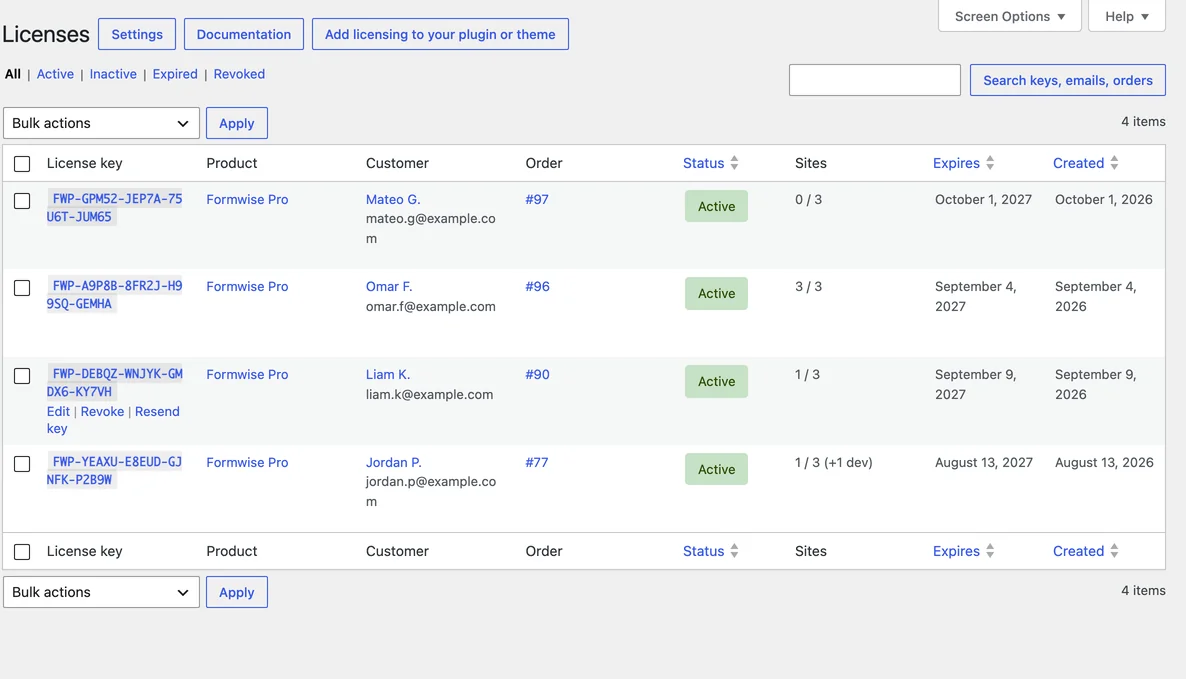
- Check Stackless → Licenses on the store. The site is listed under the key, tagged Development, not counted, because it’s a staging address.
- Bump Current version on the product above the version in your plugin header, click Update, then on the staging site visit Dashboard → Updates and click Check again. Your plugin appears with the new version, the changelog under View details and an Update now button.
- Click Deactivate on the plugin’s settings screen. The slot is freed on the store, and the key is forgotten locally.
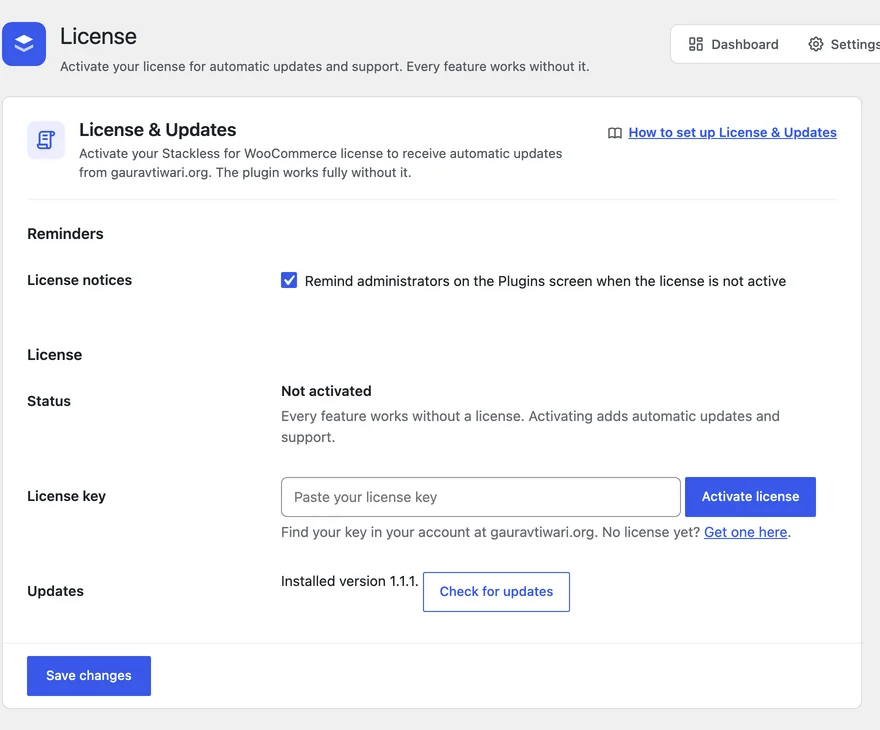
Update checks are cached for 12 hours by default and a failed request for 1 hour, so a slow store never drags down a buyer’s admin. Activating, deactivating and finishing an update all clear the cache, which is why step 3 shows the new version straight away.
Step 5: Ship a New Version
A release touches 2 different things, the update feed and the download, and a setup that updates one without the other is how buyers end up on an old version with a working key. With Stackless a release is 5 steps:
- Change the version in your plugin header (or
style.css) and in theversionyou pass to the client. - Build the zip with the plugin folder inside it.
- Replace the product’s downloadable file, or upload the zip and point Package URL at it. On a variable product the package comes from each variation’s downloadable file, so update each one, or use a package URL.
- On Product data → Licensing, set Current version to the new number, add the release to Changelog and update Tested up to if it changed.
- Click Update.
Buyers see the update the next time WordPress refreshes its update data after their cached answer runs out, so allow up to 12 hours. The download link the store hands out carries the license ID, the product ID, an expiry and a signature, never the key, and the store checks the signature, the expiry and the license status again at download time. A site with a key that has expired still sees the new version in its update list, with no download and a note to enter a valid key, which is the nudge that gets renewals paid.
Refunds, Renewals and Expiry
Keys follow the order and the subscription on their own, and these are the rules the store applies:
- A refund or cancellation revokes the order’s keys. A partial refund revokes only the refunded units’ keys, least-used first.
- Renewal orders never create new keys. With validity set to Follows subscription, a paid renewal moves the expiry to the new period end plus the grace days.
- An on-hold subscription sets the key to inactive, and back to active or trial restores it. Pending cancellation keeps the key active until the period ends with no grace. Cancelled or expired subscriptions expire the key straight away.
- A plan switch moves the key to the new product and gives it that product’s site limit.
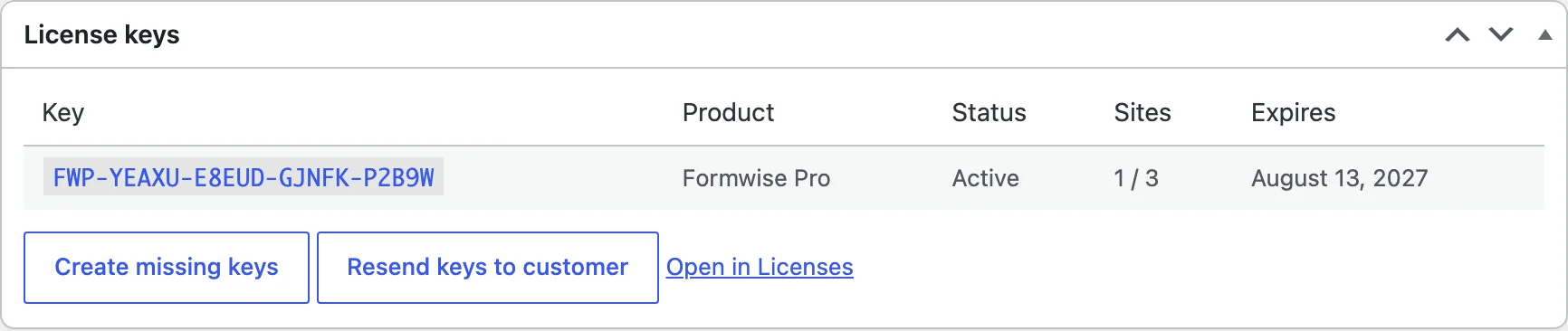
- An order paid before you turned licensing on gets its keys from the Create missing keys button in the order’s License keys box.
The client never switches your product off when a license expires. It keeps working, it stops updating, and the buyer’s license form goes back to the empty field with the store’s message. If you want features to stop with the license, check is_active() in your own code. That is a design choice I’d defend: a plugin that bricks a client’s site on a missed renewal costs more in support than the renewal is worth, and I’ve set out why in how to reduce churn in product subscriptions.
What Your Customers See
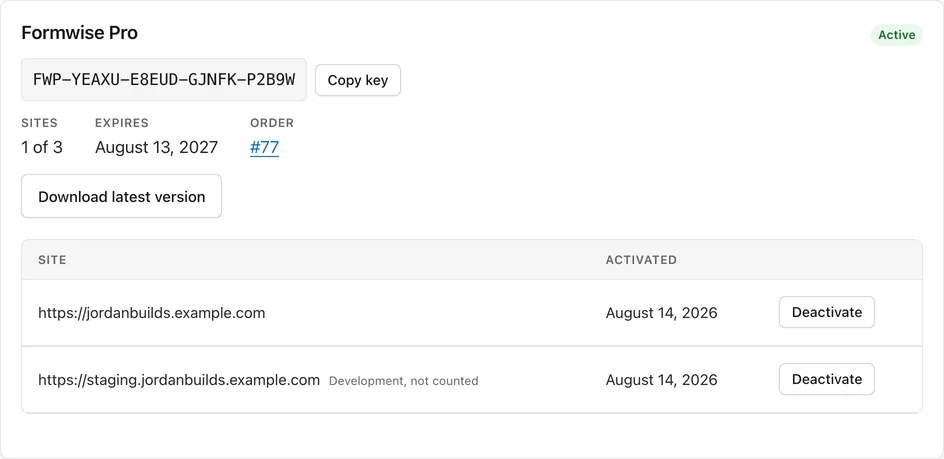
Keys show on the order received page and on each order in My Account, with a Copy button. Signed-in customers who own keys also get a Licenses tab in My Account, after Downloads, and each license card shows the product, status and key, sites used against the limit, the expiry date, a Download latest version button while the key is active, and every activated site with development sites tagged. With Customer site removal on, which is the default, customers deactivate a site themselves to free the slot, which removes the most common support email a plugin seller gets.
Keys also go into the processing, completed, invoice and customer note emails, and there is a separate “Your license keys” email under WooCommerce → Settings → Emails for resends, with the subject “Your license keys for order #{order_number}” by default. One boundary: the Licenses tab lists keys from orders placed while signed in. Guest purchases aren’t matched by email, so those keys stay with the order and its emails.
The License API
The drop-in client covers plugins and themes. A desktop app, a SaaS signup that checks a key or a build script talks to the same 7 routes directly, under https://yourstore.com/wp-json/stackless/v1/licenses/, with the license key as the only credential:
activateanddeactivate(POST): a site against a key. Activating an already active site succeeds without using another slot.check(alsovalidate): whether a key is usable, and whether a given site is activated on it.version: the update feed in WordPress’s own format, with a signedpackagelink only for a licensed site.info: the View details data. Works without a key.download: serves the package from the signed link.
curl -X POST https://yourstore.com/wp-json/stackless/v1/licenses/activate \
  -d license_key=MYP-ABCDE-FGHJK-MNPQR-STUVW \
  -d site_url=https://client-site.com \
  -d slug=my-plugin
An unknown key, a key for another product and a malformed key all get the same invalid_license answer, so keys can’t be guessed by watching responses, and every one of those answers counts toward the failed-lookup block. The API reference has every parameter, field and error code, and the filters for changing the payloads.
More Than a License Manager
Software Licensing is one module in Stackless. The rest of the plugin replaces the extensions a WooCommerce store tends to collect, and several of them matter directly when the thing you sell is code:
- Subscriptions for yearly licenses, with free trials, signup fees, failed-payment retries and plan switching with proration. Customers renew, cancel or switch plans from My Account.
- Stripe, PayPal, Polar and Paddle gateways that save the payment method and charge renewals on their own. Polar and Paddle act as merchant of record and handle sales tax and VAT for you, with one subscription per checkout.
- Multi-currency checkout with exact prices per product in each currency and a chosen gateway per currency, so a buyer in India pays in rupees while one in Germany pays in euros.
- Order Bumps that add priority support or a companion add-on with one click at checkout, priced on the server, with a take rate for each offer.
- Buy Links that fill the cart and open checkout with a coupon applied, which is exactly what a renewal or upgrade email should link to.
- Custom Invoices and Request a Quote for agency and bulk licenses. The buyer asks for a quote, accepts your proposal online and lands on the invoice to pay.
- Page Access for docs, a roadmap or a download page that only buyers can open, kept open for as long as their subscription is active.
- WooCommerce Optimizer, which stops WooCommerce prefetching about 50 Cart and Checkout block scripts on every page once the cart has items, and defers store scripts, so your docs and blog stay light.
If your store sells more than plugins, the same dashboard runs the rest of it:
- Checkout: ready-made checkout layouts in your colors, consent checkboxes with stored proof and a shorter checkout for virtual-only carts.
- Customer tools: wishlists, back-in-stock alerts, saved carts with order again, and delivery and pickup slots with capacity per slot.
- Product options: paid add-on fields, service products that skip shipping, and minimum and maximum quantities.
- Catalog: sold counts, stock urgency labels, hide price until login, custom add to cart text, free price text, external product controls and a product details table that feeds product schema.
Every module has its own switch, and a module that’s off loads no code, so a plugin shop can run Licensing, Subscriptions and Stripe and leave the wishlist off. When a plugin you already run does the same job, such as WooCommerce Subscriptions, the overlapping module pauses itself and names that plugin, so 2 plugins never bill the same customer.
That’s why the price makes sense. Bought as WooCommerce.com extensions for 1 site, subscriptions, licensing, multi-currency and order bumps alone come to $706 a year. Stackless covers all four, plus the store tools above, for $39 a year on unlimited sites, or $69 a year once the early adopter period ends.
Freemius, FluentCart, EDD or WooCommerce?
There are generally four ways to sell a WordPress plugin with licenses and updates, and I’ve used two of them.
Freemius should be chosen when you don’t want to run a store at all. It hosts the checkout, acts as merchant of record for VAT and sales tax, and lists you in its marketplace, and 6.1% plus 50 cents of each sale is the fee for all of that. On $20,000 of plugin sales a year, that’s about $1,220 plus the 50-cent fees before the gateway takes its cut. Its SDK also handles in-plugin trials and opt-in usage tracking. Polar is a lighter version of the same deal: a merchant-of-record checkout with license keys at 5% plus 50 cents, and no WordPress update client.
A separate WordPress store should be chosen when you’re starting fresh or sell only digital products. This is where I went. FluentCart made selling my plugins with licenses and updates easier, and its Pro version is $199 a year for 1 site. Easy Digital Downloads’ Software Licensing is mature and well documented, on a Professional pass that renews at $599 after the first year, and SureCart includes licensing on every plan. The cost is a second store if you also sell physical products, and a migration if your customers already live in WooCommerce. My FluentCart review covers what that store is like to run.
An update server alone should be chosen when the sale happens somewhere you can’t change, such as a client invoice or a marketplace. Hoster is $59 once and Kernl starts at $9 a month, and both serve updates and track licenses. Neither takes payments, so a refund or a lapsed renewal reaches the update server only if you wire it there. That was my setup, with Hoster and Cloudflare Workers, before FluentCart arrived.
Your own WooCommerce store, with Stackless or the API Manager, should be chosen when the store already exists and tax is already handled there. You keep the customer records, the checkout and the gateways you have, you pay nothing per sale and the licensing lives beside the orders. Between the 2, the API Manager is the older product with the longer record at $199 a year plus a subscriptions plugin for automatic renewals, and Stackless is $39 a year with subscriptions, gateways and the store modules included.
Moving a working WooCommerce store to a new platform just to get licensing is a big job for one feature, and paying close to $500 a year to license 2 or 3 plugins eats the margin an indie developer sells for. It is wise to keep the store you have and add the piece it’s missing. The Gatilab guide to selling WordPress plugins covers the business side of the choice, pricing and positioning included.

- License keys per order, site limits, expiry that follows a subscription
- 7-route license API with rate limits and signed update downloads
- Drop-in PHP client for plugins and themes: license form, daily check, WordPress updates
- Plus subscriptions, Stripe, PayPal, Polar, Paddle, multi-currency, invoices and store tools
What a License Key Can and Can’t Enforce
A WordPress plugin is GPL, and a license key doesn’t change that. Anyone who bought your plugin can legally copy it, modify it and put it on 50 sites. What the key controls is access to your store: the update feed, the download of the next version and your support. That is the whole business model of every commercial WordPress plugin, Freemius and EDD included, and it works because an unlicensed copy that never updates stops being worth running within a year.
So the site limit is a service limit, and the plugin should keep working past it. Stackless enforces it where it belongs: the 6th site on a 5-site key can’t activate, can’t download updates and sees the store’s message, while the code already installed keeps running. If you’d rather lock features behind the key, check is_active() in your own code, and know that a determined buyer can remove that check. Nulled copies of your plugin will exist the week it sells, and the defense is a steady release schedule, because a nulled copy stays frozen at the version someone copied.
Pricing follows from that. A yearly license sold as a Stackless subscription product with validity set to Follows subscription renews the key automatically on Stripe or PayPal, with the grace days covering a late card, and the expiry does the reminding. A lifetime license should use the Lifetime validity and a higher price, because you’re promising updates forever. For tiers, 1 site, 5 sites and unlimited as variations of one product is the shape buyers expect, and the unlimited tier is where agencies and the nulled-copy crowd both end up, which is fine, because they’re the ones who’d never have paid per site.
Before You Switch
Stackless runs the licensing, the renewals and the store. A few jobs sit with the tools around it, and it helps to know where each one lives before the first sale:
- Tax: VAT and sales tax run through WooCommerce’s tax settings or a tax service, the same as for anything else your store sells. If you’d rather hand tax off completely, the built-in Polar and Paddle gateways act as merchant of record for one-time orders and subscriptions with one billing schedule per checkout.
- Traffic: buyers come from your own site, docs and newsletter. There’s no marketplace listing, and no marketplace cut either.
- Usage data and trials: the client activates, checks and updates, and you can add your own opt-in tracking if you want usage numbers. Free trials run through checkout: a subscription product with a trial period issues a key that works through the trial.
- Moving from another license manager: the licensing module pauses itself while License Manager for WooCommerce or the WooCommerce Software Add-on is active, so 2 systems never answer the same plugin. Once you switch over, Create missing keys issues Stackless keys for past orders, Resend keys emails them, and your next release ships with the new client.
- Reporting: Stackless → Licenses filters and searches every key, and the subscriptions dashboard widget shows MRR per currency, churn and upcoming renewals.
- Support: I build and support Stackless myself, so the person reading your email is the one who wrote the code. The client file is plain PHP you keep a copy of, so a buyer’s site depends on your store only for activation and updates.
FAQs on Selling Plugins From WooCommerce
Can WooCommerce sell software licenses without an extension?
No. Core WooCommerce sells downloadable files but issues no keys, counts no activations and serves no updates. A software license manager adds those: Stackless, the WooCommerce API Manager, License Manager for WooCommerce or Digital License Manager inside WooCommerce, or FluentCart, EDD and Freemius outside it.
How do automatic updates work for a plugin sold outside WordPress.org?
Your plugin hooks WordPress’s update check and asks your store for the latest version. If the store’s version is newer, WordPress lists it in Dashboard → Updates with a download link from your store. With Stackless the drop-in client does this through the /version route, caches the answer for 12 hours and only receives a download link when the site’s license is active.
Do staging sites use up a license activation?
Not with Stackless’s Development sites setting on. Localhost, .test and .local addresses, hosting staging domains and subdomains such as staging. or dev. are activated but not counted. You can add your own patterns.
What happens when a customer’s license expires?
The plugin keeps working. It stops receiving updates, the license form shows the store’s expired message and the update list shows the new version without a download. If you want features to stop, check is_active() in your code.
Can I sell 1-site, 5-site and unlimited tiers?
Yes, as variations of one product. Each variation gets its own site limit and validity; the slug, version and package stay on the parent so every tier gets the same release.
Is Freemius cheaper than running my own store?
Only if the store would otherwise cost you more than its share. Freemius takes 6.1% plus 50 cents per transaction for WordPress products before gateway fees, so on $20,000 a year that’s about $1,220 plus the fixed fees. Stackless is $39 a year and the WooCommerce API Manager is $199, on a store you already pay for.
Does this work for themes as well as plugins?
Yes. The same client file handles themes: pass the theme folder name instead of the plugin file, and the update appears under Appearance → Themes and Dashboard → Updates.
Do I have to release my plugin under the GPL if I sell it?
A plugin that runs inside WordPress is a derivative work under the GPL, so yes, and the key doesn’t restrict the code. The key restricts what your store gives a site: updates, downloads and support. That is how every commercial WordPress plugin is sold.
Can a license renew automatically every year?
Yes. Sell the plugin as a Stackless subscription product, set the license validity to Follows subscription, and each paid renewal on Stripe, PayPal, Polar or Paddle moves the key’s expiry to the new period end plus the grace days. A missed payment puts the key on hold instead of revoking it.
Who handles VAT and sales tax when I sell from WooCommerce?
You do, through WooCommerce’s tax settings or a tax plugin, the same as for any other product in the store. Freemius and Polar act as merchant of record and handle it for you; Stackless’s Polar and Paddle gateways do too, for one subscription per checkout.
Should I sell plugins with FluentCart instead of WooCommerce?
If you’re starting fresh and sell only digital products, FluentCart is a good choice, and it’s where I moved my own plugin sales. FluentCart Pro includes subscriptions and licensing for $199 a year on 1 site. If your store already runs on WooCommerce, with customers, gateways and tax set up, Stackless adds the same licensing and subscriptions without a migration.
Final Remarks
If the store exists, keep the sale in it. A license manager that lives beside your orders costs a flat $39 to $199 a year instead of a percentage forever, and the 5 steps above are a morning’s work the first time and 10 minutes for every release after. Set the site limit, leave Development sites on and ship version 1.1 from the product screen rather than from your inbox. With Stackless, the same plugin then runs the yearly renewals, the gateways and the currencies, so licensing doesn’t bring a subscriptions extension along with it. If you don’t have a store and don’t want one, pay Freemius its share and let it run the checkout. The percentage is fair for what it does, and it’s the wrong deal only when you’re already running everything it charges you for.
Tell Google you want more of this.
Add Gaurav Tiwari as a preferred sourceOne tap, and this site shows up more often in your own Top Stories, AI Overviews and AI Mode. Remove it any time.
Disclaimer: This site is reader-supported. If you buy through some links, I may earn a small commission at no extra cost to you. I only recommend tools I trust and would use myself. Your support helps keep gauravtiwari.org free and focused on real-world advice. Thanks. - Gaurav Tiwari