
 by
by
FluentCart vs WooCommerce is a choice between two ways of building a WordPress store. FluentCart puts subscriptions, software licensing, taxes and reports inside one plugin. WooCommerce gives you a free core and an extension for almost everything else. If you pick the wrong one, you either pay extension renewals every year for things the other does out of the box, or you find out after launch that the one integration your store depends on doesn’t exist.
My pick for a new store that sells downloads, software, courses, services or a small mix of digital and physical products is FluentCart. WooCommerce is the better choice for a large physical catalog, live carrier shipping rates, point of sale, a marketplace or a store that already runs well on it.
I run the store on this site on FluentCart, and I built GT Extensions for FluentCart, a paid add-on, for the things FluentCart doesn’t do on its own. My FluentCart notes here are first-hand. The WooCommerce side comes from its current documentation, pricing and extension listings.
Quick Comparisons
Find the row that matters most to your store, then read that section.
| Decision point | FluentCart | WooCommerce |
|---|---|---|
| Best fit | Digital products, software, courses, services and small hybrid stores | Large physical catalogs and specialized workflows |
| Cost to start | Free | Free |
| Subscriptions | Built in | Paid extension |
| Software licensing | FluentCart Pro | Paid extension |
| Payment gateways | Stripe, PayPal, Razorpay and other official gateways | Far more, through extensions |
| Multi-currency | Needs an add-on | Built into WooPayments, or an extension |
| Shipping | Zones and classes, no live carrier rates | Live carrier rates through extensions |
| Add-on catalog | Young and growing | The largest in WordPress |
| Admin | Its own app inside wp-admin | Native WordPress screens |
What FluentCart and WooCommerce Are
WooCommerce is the open-source store plugin from Automattic, the company behind WordPress.com, and it runs on millions of stores. The free core covers products, cart, checkout, orders, inventory, shipping zones, taxes, coupons and reviews. Anything beyond that comes as an extension, either from the WooCommerce Marketplace or from a third-party developer.
FluentCart is a newer store plugin from WPManageNinja, the team behind Fluent Forms and FluentCRM. The free plugin covers digital and physical products, subscriptions, coupons, taxes with EU VAT and the major payment gateways. FluentCart Pro adds software licensing, order bumps, installments, advanced reports, store roles and a few more gateways.
So the two plugins divide the work differently. With FluentCart, one team owns most of what a digital store needs, and you add something only when you hit a gap. With WooCommerce, you start lean and assemble the store from parts, which gives you more freedom and more things to keep compatible.
FluentCart vs WooCommerce Pricing
Both plugins are free to install, and a store that sells one-time products can stay free on either. The paid parts are priced very differently. FluentCart sells 1 Pro license that covers every Pro feature. WooCommerce sells each feature as its own extension with its own yearly renewal.
| Plan | What you get | Price |
|---|---|---|
| FluentCart Free | Products, checkout, subscriptions, coupons, taxes, EU VAT, Stripe and PayPal | $0 |
| FluentCart Pro | License keys, order bumps, installments, bundles, advanced reports, store roles and more gateways | $199 a year for 1 site, or $249 once |
| GT Extensions for FluentCart | 18 modules for currencies, quotes, invoices, checkout designs and trade catalogs | $39 a year or $99 once, for unlimited sites |
| WooCommerce | Products, checkout, coupons, taxes, shipping zones, reviews and reports | $0 |
| WooCommerce extensions | 1 feature per extension, each bought and renewed separately | $39 to $279 a year each for the ones in this comparison |
This is what 4 common store types pay in a year:
| Store type | FluentCart | WooCommerce |
|---|---|---|
| One-time products | $0 | $0 |
| Subscriptions | $0 | $279 a year |
| Software store with subscriptions, license keys and order bumps | $199 a year | $537 a year |
| Trade catalog with hidden prices, quotes, quantity limits and a wishlist | $39 a year | $266 a year |
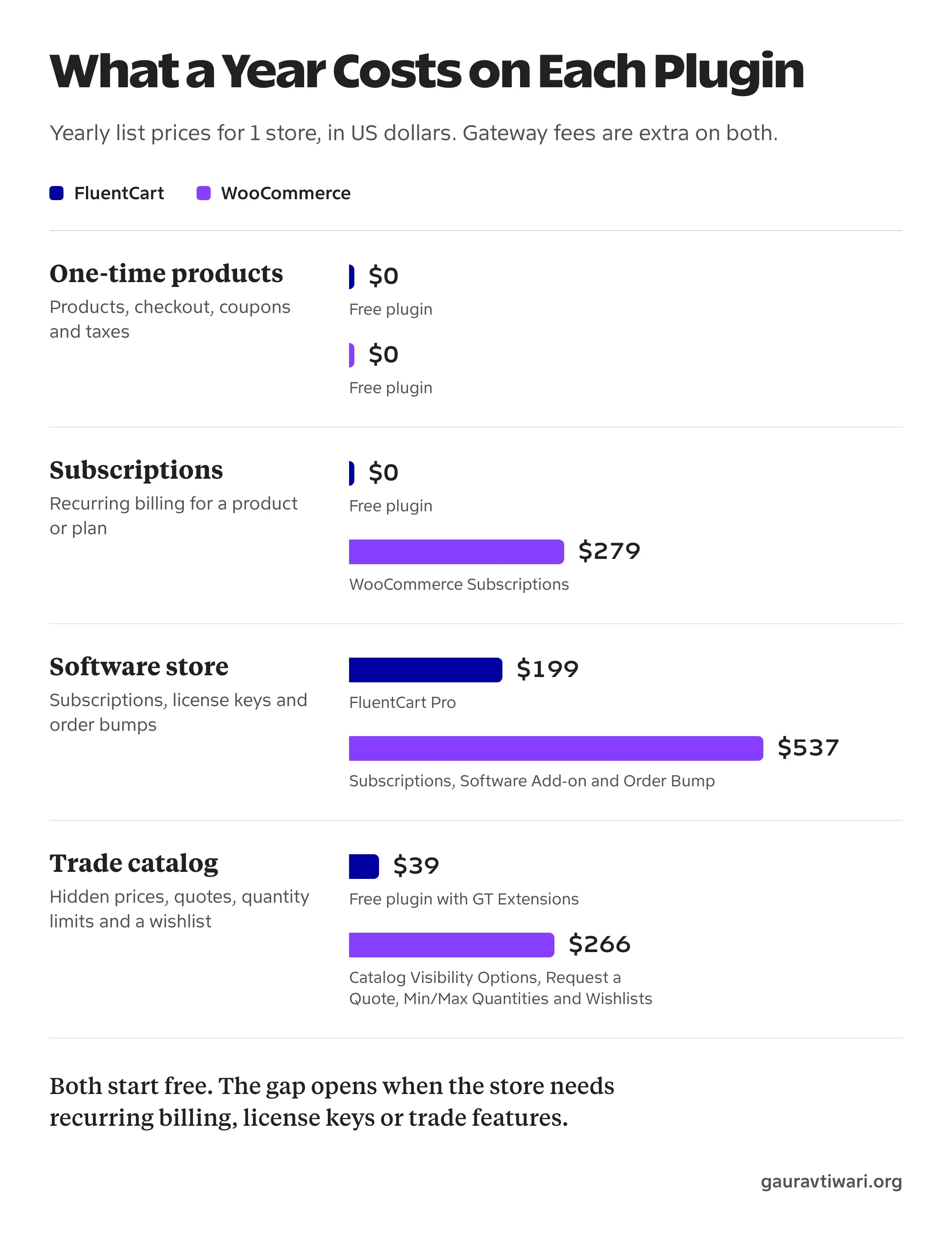
The WooCommerce amounts are list prices on its marketplace. The software store adds up WooCommerce Subscriptions, Software Add-on and Order Bump. The trade catalog adds up Catalog Visibility Options, Request a Quote, Min/Max Quantities and Wishlists. Marketplace extensions renew at the current list price, so the yearly total can go up.
FluentCart Pro also has a lifetime offer that starts at $249 for 1 site, which is $50 more than a single year. My FluentCart review covers the plans and what Pro adds in detail.
Not every WooCommerce store needs those extensions, and a store with special requirements can spend far more. WordPress.org also has free plugins for some of these jobs, and each one comes with its own support and update tradeoffs. The fair comparison is your own list: write down what the store must do, then price only those items on both sides.
There’s a third way to fill the WooCommerce column, and I built it for exactly this comparison. Stackless for WooCommerce is one plugin with a switch for each job, and it covers both example stores above on core WooCommerce:
- the software store’s subscriptions, license keys and order bumps
- the trade catalog’s hidden prices, quotes, quantity limits and wishlist
It costs $39 a year or $99 once on unlimited sites at the early adopter price, against $537 and $266 a year for the extensions. I’ve priced the rest of the stack in how much WooCommerce extensions cost per year.
Digital Products, Subscriptions and Licensing
FluentCart is the simpler setup for downloads, software and memberships. Digital delivery, recurring billing and free products with a real checkout are in the free plugin, and license keys with activation limits come with Pro. On this store, paid plugins, ebooks and free downloads sit in one catalog and go through the same checkout.
FluentCart keeps subscription carts strict, though. Its subscription rules allow 1 subscription per cart with a quantity of 1, and a subscription can’t share the cart with a one-time product. A buyer who wants a subscription and an ebook places 2 orders.
WooCommerce Subscriptions goes further on exactly these points:
- subscriptions and one-time products in the same cart
- several subscriptions in one checkout
- renewals synced to the same date for every subscriber
- gift subscriptions
- automatic renewals through more than 25 payment gateways
If your plan is 1 product with a monthly and a yearly price, FluentCart covers it for less money. If you sell subscription boxes with add-on items, or bundles that mix recurring and one-time products, WooCommerce Subscriptions is worth its price.
Physical Products and Shipping
WooCommerce is the safer choice when fulfillment is the hard part of the business. Its extension catalog has live rates from carriers, warehouse and ERP connectors, point of sale, product feeds for Google and Meta, bookings, rentals and multi-vendor marketplaces, and most of these have been in use for years.
FluentCart sells physical products with variations, stock tracking, shipping zones and shipping classes, and it now has product reviews built in. That is enough for a small catalog with flat or zone-based shipping. FluentCart’s public roadmap still lists carrier integrations and product feeds as planned work, and you shouldn’t launch a store on a feature that hasn’t shipped.
If you do stay with WooCommerce, my list of the best WooCommerce plugins will help you choose extensions with a reason behind each one.
Payments and Currencies
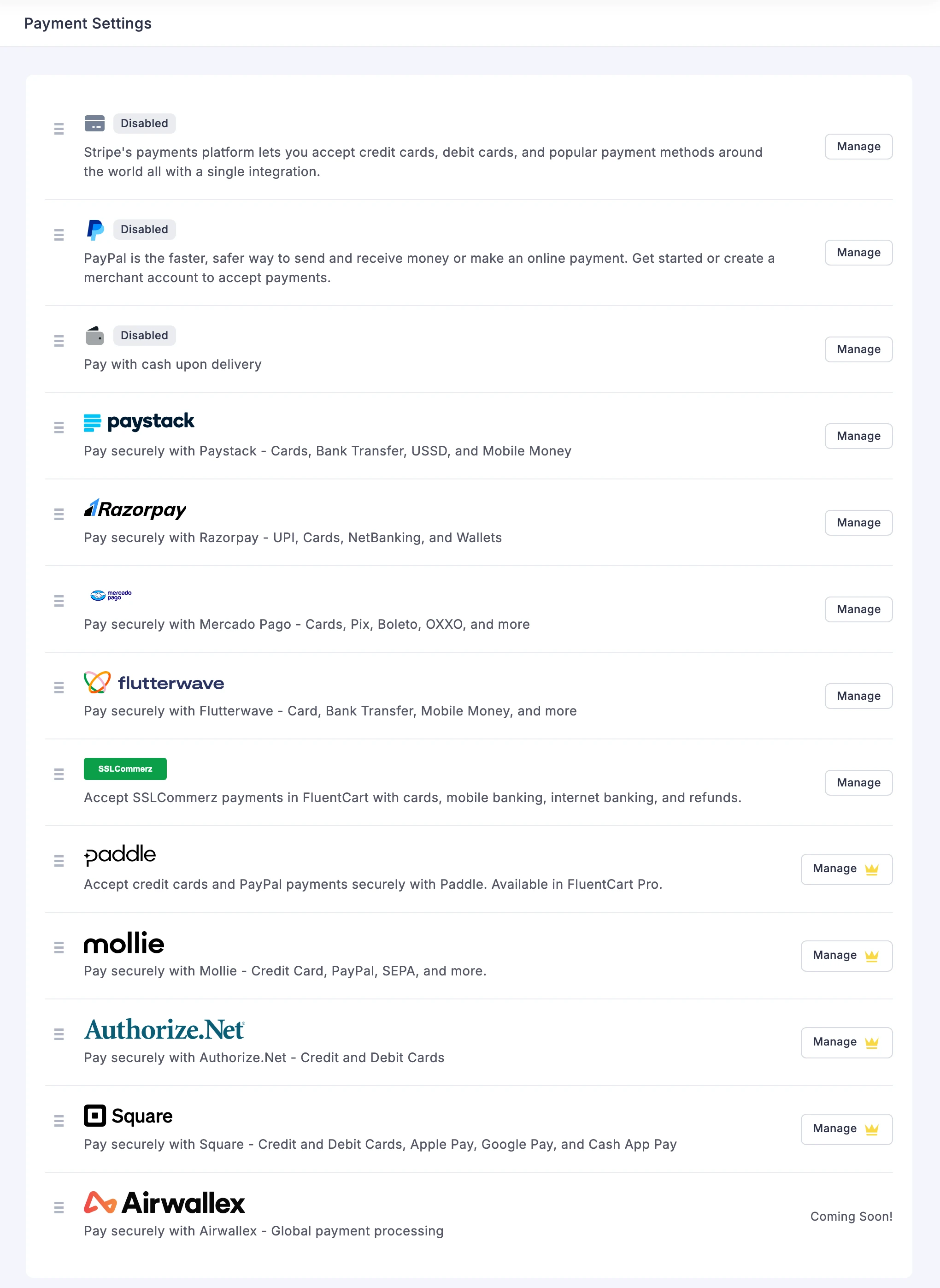
FluentCart covers the gateways most small stores need. Stripe, PayPal and cash on delivery are built in. Razorpay, Paystack, Mercado Pago, Flutterwave and SSLCommerz install as free official add-ons, and Paddle, Mollie, Authorize.Net and Square need FluentCart Pro. My guide to FluentCart payment gateways explains each group.
WooCommerce supports far more gateways, because almost every payment provider maintains its own WooCommerce plugin. If your country’s local gateway isn’t on FluentCart’s list, that alone can settle the decision.
Currency is where both need help. FluentCart charges every buyer in the one currency saved in its store settings. WooCommerce also runs one store currency. WooPayments includes multi-currency, but it is available in about 40 countries and India isn’t one of them. Everywhere else, WooCommerce stores use a multi-currency extension.
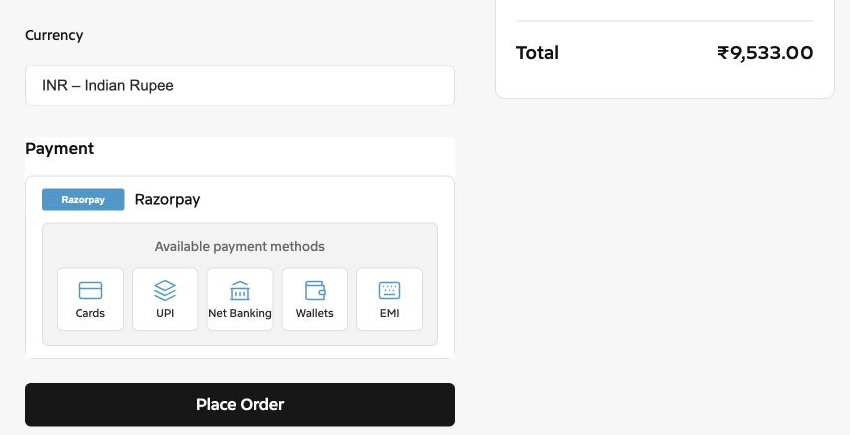
On this store, GT Extensions handles currency. Buyers can pay in USD, EUR, GBP or INR, a product can carry a fixed rupee price instead of a converted one, and buyers paying in rupees see Razorpay first while everyone else sees PayPal and Stripe. My guide on multi-currency checkout in FluentCart covers the full setup.
FluentCart vs WooCommerce Features and Costs
Neither plugin does everything on its own. WooCommerce fills its gaps with extensions from many vendors. FluentCart has fewer gaps for a digital store and a much smaller catalog to fill them from, which is the reason I wrote my own add-on.
The tables below use 4 labels:
- Free means the free plugin does it.
- Pro means FluentCart Pro, and its $199 a year covers every row marked Pro.
- GT Extensions means my add-on, and its $39 a year covers every row marked with it.
- A WooCommerce extension appears with its name and yearly list price, and each one is a separate purchase.
Products and Catalog
| Feature | FluentCart | WooCommerce |
|---|---|---|
| Simple and variable products | Free | Free |
| Digital downloads | Free | Free |
| Stock tracking | Free, with an advanced inventory workspace in Pro | Free |
| Product reviews | Free | Free |
| CSV product import | Free | Free |
| Product bundles | Pro | Product Bundles, $79 a year |
| External and affiliate products | GT Extensions | Free |
| Paid product add-ons | GT Extensions | Product Add-Ons, $79 a year |
| Product feeds for Google and Meta | Not available | Free official plugins |
Subscriptions, Licensing and Memberships
| Feature | FluentCart | WooCommerce |
|---|---|---|
| Recurring subscriptions | Free, with advanced controls in Pro | WooCommerce Subscriptions, $279 a year |
| Subscription and one-time product in 1 cart | Not available | Included in WooCommerce Subscriptions |
| Sign-up fees | Pro | Included in WooCommerce Subscriptions |
| Installment plans | Pro | Deposits, $219 a year |
| Software license keys | Pro | Software Add-on, $179 a year |
| Courses and member access | Through the FluentCommunity integration | WooCommerce Memberships, $199 a year |
Payments, Currencies and Tax
| Feature | FluentCart | WooCommerce |
|---|---|---|
| Stripe and PayPal | Free | Free |
| Razorpay, Paystack, Mercado Pago and Flutterwave | Free official add-ons | Free plugins from each provider |
| More gateways | Mollie, Paddle, Authorize.Net and Square in Pro | Far more, mostly plugins from the providers |
| Several checkout currencies | GT Extensions | WooPayments in about 40 countries, or an extension from $99 a year |
| Tax rates and tax classes | Free | Free |
| EU VAT number validation | Free | EU VAT Number, $39 a year |
| Transaction fees charged by the plugin | None | None |
Checkout and Orders
| Feature | FluentCart | WooCommerce |
|---|---|---|
| Coupons | Free, with advanced rules in Pro | Free |
| Order bumps | Pro | Order Bump, $79 a year |
| Checkout layouts | GT Extensions, 5 designs | Free, in the block editor |
| Extra checkout fields | GT Extensions | Checkout Field Editor, $49 a year |
| PDF invoices | Pro | PDF Invoices, $79 a year |
| Custom invoices with a payment link | GT Extensions | Free, through manual orders |
| Request a quote | GT Extensions | Request a Quote, $69 a year |
| Delivery and pickup slots | GT Extensions | Order Delivery, $149 a year |
Shipping and Selling in Person
| Feature | FluentCart | WooCommerce |
|---|---|---|
| Shipping zones and classes | Free | Free |
| Live carrier rates | Not available | UPS or USPS Shipping Method, $109 a year each |
| Point of sale | Not available | FooSales, $189 a year |
| Bookings and appointments | Not built in | Bookings, $249 a year |
| Multi-vendor marketplace | Not built in | Product Vendors, $119 a year |
Trade Catalogs and Returning Customers
| Feature | FluentCart | WooCommerce |
|---|---|---|
| Prices hidden until login | GT Extensions | Catalog Visibility Options, $59 a year |
| Minimum and maximum quantities | GT Extensions | Min/Max Quantities, $49 a year |
| Wishlist | GT Extensions, or the free GoWishCart plugin | Wishlists, $89 a year |
| Back-in-stock alerts | GT Extensions | Back In Stock Notifications, $59 a year |
Reports, Roles and Developer Tools
| Feature | FluentCart | WooCommerce |
|---|---|---|
| Sales reports | Free for the last 30 days, advanced reports in Pro | Free |
| Store manager roles | Pro | Free |
| REST API | Free | Free |
| Webhooks | Pro | Free |
FluentCart Pro and GT Extensions together cost $238 a year, and that covers every FluentCart row above that isn’t free. WooCommerce’s rows are priced one by one, so its total depends on how many of them your store needs.
GT Extensions costs $39 a year or $99 for a lifetime license, and it includes all 18 of its modules. These guides cover the ones in the table:
- Hide prices until login for trade and member catalogs
- Request a quote for custom orders
- Custom invoices with payment links
- Checkout designs and checkout fields
- Product page changes such as sold counts and quantity limits
On WooCommerce, the same list means several extensions from different developers, each with its own license and update cycle. That works well when somebody owns the list and tests updates on a staging site. It goes wrong when 3 plugins edit the same checkout and nobody knows which one broke it.
Performance and Admin
FluentCart loads less on the front end of a fresh store. In an independent test by Accelera, both plugins ran on the same server and theme with 10 products and no caching. FluentCart’s shop page loaded 9 CSS and 9 JavaScript files. WooCommerce’s loaded 16 and 24, before counting its Stripe plugin.
That test used an empty store and older versions of both plugins, so it tells you where each one starts. A finished store depends more on the theme, the hosting, the cache and how many extensions are active. On either plugin, the cart, checkout and account pages should stay out of the page cache.
The admin is the bigger day to day difference. WooCommerce uses WordPress’s own list screens, so anyone who has managed posts can manage orders. FluentCart’s admin is a separate app inside wp-admin. It moves between screens without reloading the page and it looks consistent, but it doesn’t behave like the rest of WordPress, and an add-on developer has to follow FluentCart’s own conventions. I felt that while building GT Extensions.
Migrating From WooCommerce to FluentCart
FluentCart has a free add-on called FluentCart Migrator, and its WooCommerce support is in beta. It runs on the same site as WooCommerce, reads the WooCommerce data and copies it into FluentCart. WooCommerce stays installed and its data stays where it is.
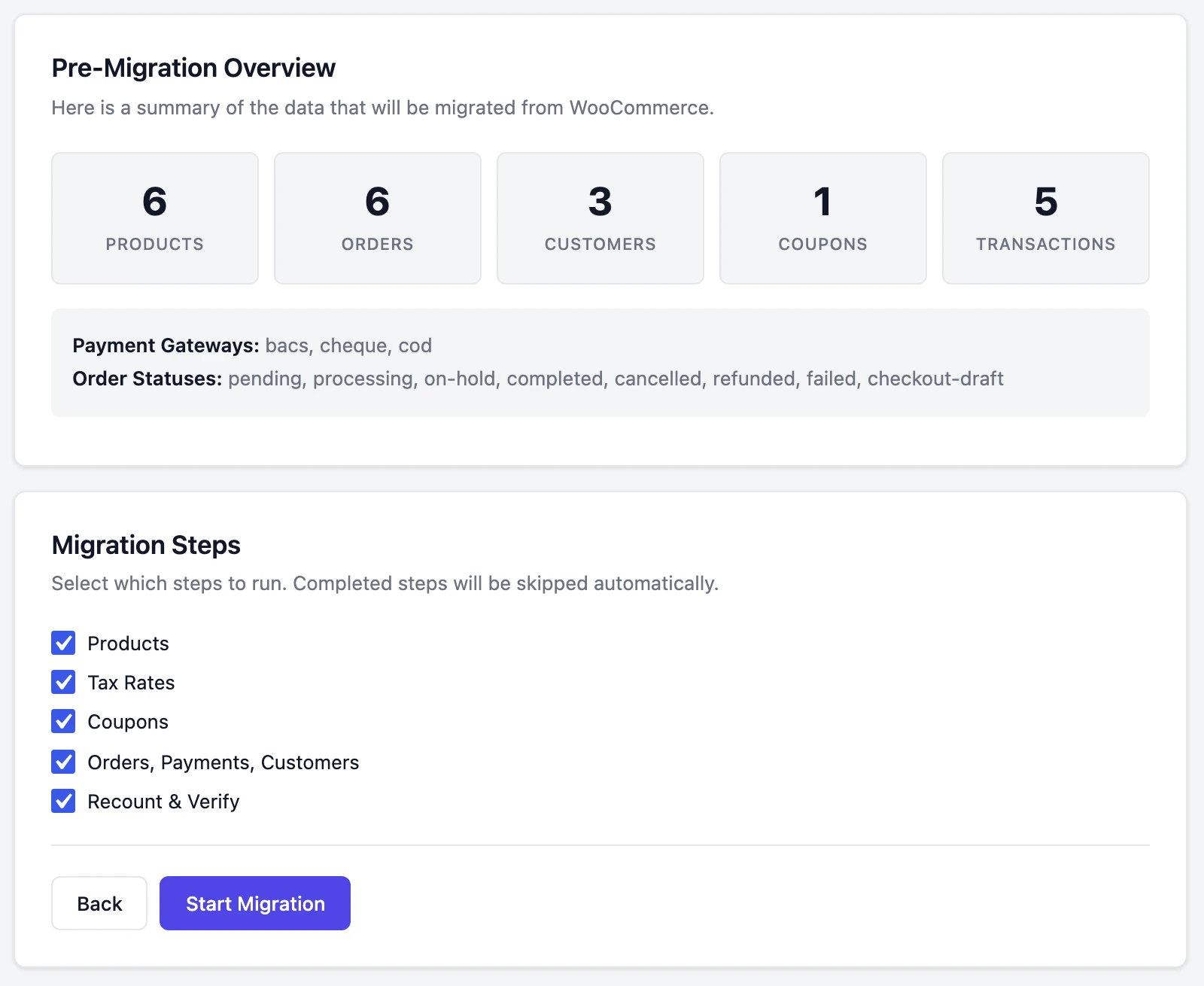
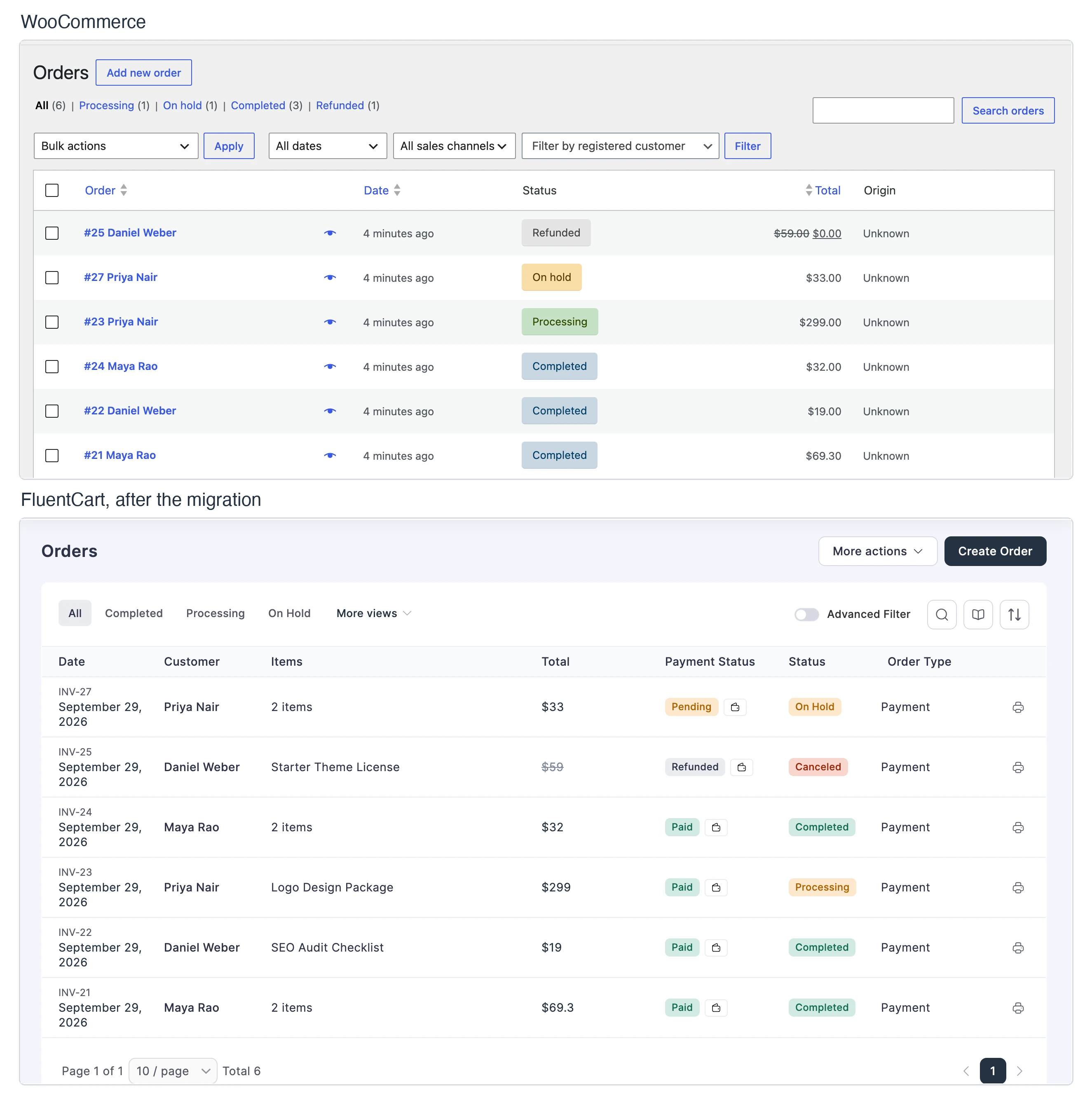
I ran it on a test store with simple products, a variable product, a coupon, customers and orders paid offline. Products arrived with their SKUs, prices, variations and stock. Orders kept their original numbers, the coupon discount and the refund. Running the migration a second time created no duplicates.
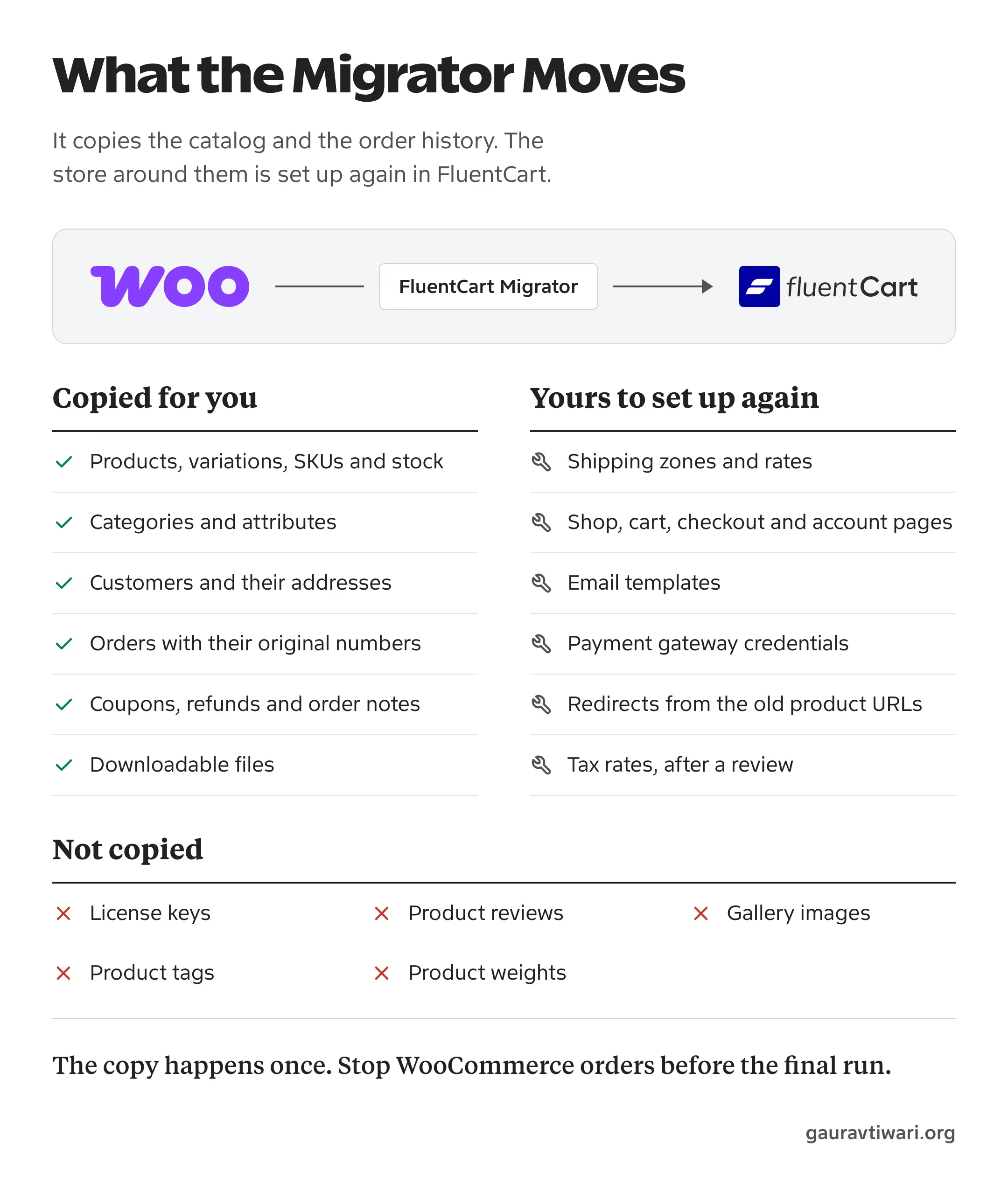
The same test showed what the tool leaves for you:
- Product URLs change. WooCommerce used
/product/and FluentCart defaulted to/item/. Category URLs changed from/product-category/to/product-categories/. Every old URL needs a redirect. - It’s a one-time copy. Once a step finishes, a second run skips it. A product and an order I added to WooCommerce after the first run never reached FluentCart.
- Tax rates need a review. A country rate came across, but my 8.25% Texas rate didn’t. FluentCart listed its own 6.25% state rate instead.
- Customers who never ordered are a separate step. The wizard skipped a registered customer with no orders. The command-line version picked it up.
- Some data stays behind. FluentCart’s migration documentation lists what the tool doesn’t copy, and the list includes license keys from WooCommerce licensing extensions, product reviews, gallery images, product tags and product weights.
- Shipping, pages, emails and gateways start fresh. FluentCart needs its own shipping zones, its own shop, cart, checkout and account pages, its own email templates and its own gateway credentials.
Subscriptions are the part with the most risk, and my test store had none. FluentCart’s documentation says a Stripe subscription with a saved card keeps charging once FluentCart is connected to the same Stripe account, while PayPal billing agreements and older Stripe tokens move to manual renewal. Subscriptions that renew automatically need FluentCart Pro.
Before you plan a migration, check why you want one. If WooCommerce itself works and the yearly extension bill is the problem, replacing the extensions is a much smaller job than replacing the store. Stackless does that on the same site, and its Subscriptions module pauses itself while WooCommerce Subscriptions is active, so the two never bill the same customer.
Migration Checklist
Run the whole list on a staging copy first, then repeat it on the live site.
- List every WooCommerce extension the store uses and find its FluentCart replacement. Stop here if one has no replacement.
- Back up the database. The migrator has no undo, so the backup is your rollback.
- Configure taxes in WooCommerce before the first run if you want the rates copied.
- Install FluentCart and the migrator, and connect the same Stripe and PayPal accounts WooCommerce used.
- Put the store in maintenance mode so no order arrives during the copy.
- Run the migration, then compare the product, order, customer and coupon counts on both sides.
- Review tax rates, then set up FluentCart’s pages, emails and shipping.
- Redirect the old product and category URLs to the new ones.
- Place test orders as a guest and as a customer, refund one and open a download link.
- Switch the menus and buttons to FluentCart and keep the migrator active. If the store has subscriptions, deactivate WooCommerce Subscriptions before the next renewal date, because two billing systems will both try to charge the same customer. Keep the WooCommerce data until a full billing cycle has gone through.
If the store has years of orders and active subscriptions, this is a project with a plan and a rollback. My FluentCart store development service covers that kind of migration.
Who Should Choose FluentCart
FluentCart fits a store where most of the selling happens through a product page and a checkout, and delivery is a download, a license or a service.
- You’re starting a new store and have no order history to move.
- You sell downloads, software, courses, memberships, services or a small physical range.
- You want subscriptions and licensing without buying an extension for each.
- Your gateways are on FluentCart’s list.
- You’re fine with a young add-on catalog and can live without a missing feature until it ships.
Who Should Choose WooCommerce
WooCommerce fits a store whose requirements list has items that only its catalog can fill.
- You need live carrier rates, warehouse or ERP sync, point of sale or product feeds.
- You run a marketplace, bookings, rentals or deposits.
- Your subscriptions mix recurring and one-time products in one cart.
- Your payment provider only maintains a WooCommerce plugin.
- Your WooCommerce store already works and nothing about it costs you sales.
- You want subscriptions and licensing built in the way FluentCart has them, but your catalog needs WooCommerce. Stackless adds both to core WooCommerce in one plugin.
- You need to hire developers quickly, because far more of them know WooCommerce.
If that’s your store, WooCommerce is free to install, and my WooCommerce development service is there if you’d like it built for you.
My Recommendation
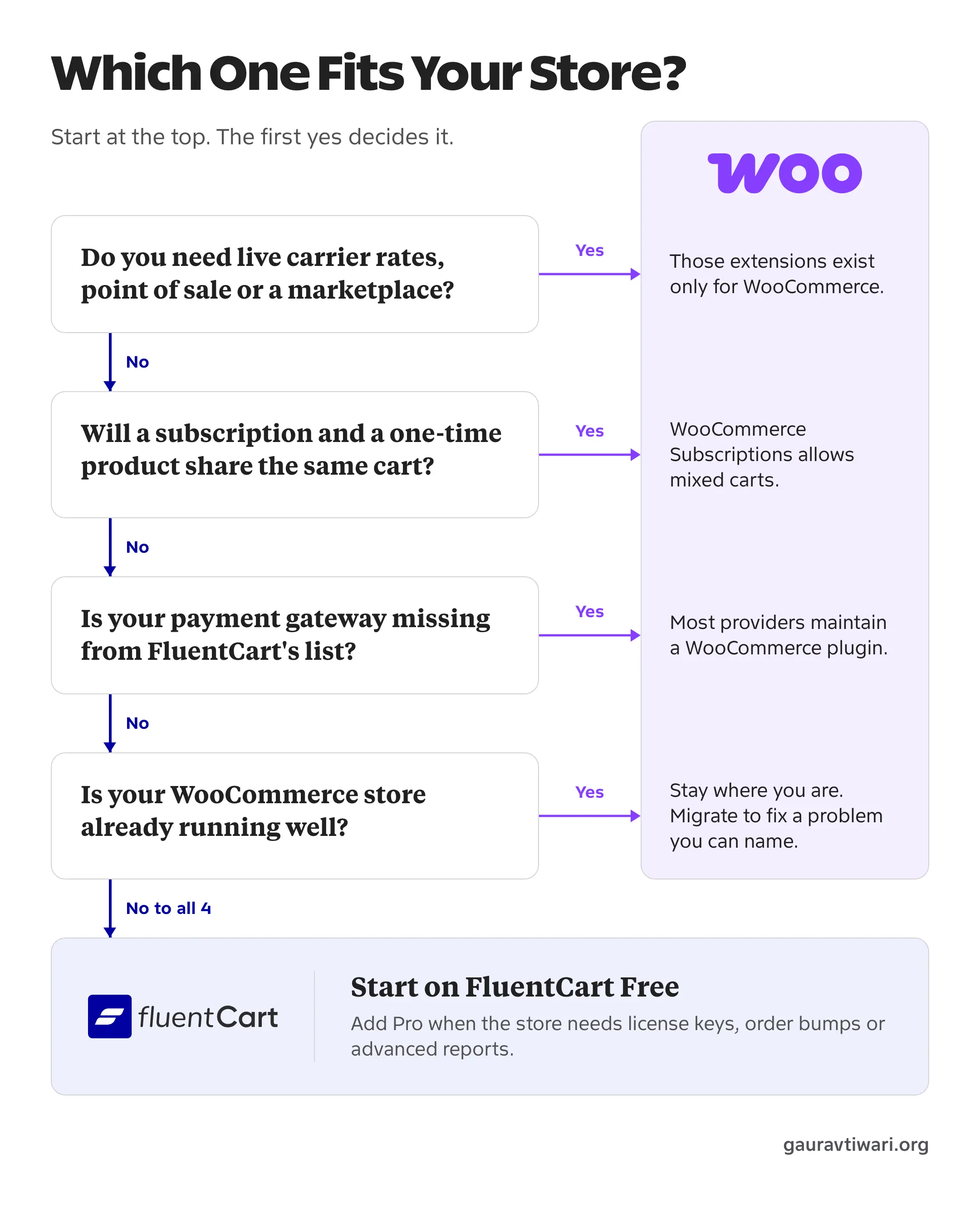
For a new digital-first store in 2026, I’d start with FluentCart Free, add one real product and take a test payment. You should move to Pro when the store needs licensing, order bumps or advanced reports, and add GT Extensions only when it needs one of the gaps filled.
For a store that depends on complex shipping, a marketplace or an integration that only exists for WooCommerce, I’d use WooCommerce and keep the extension list short. And if your WooCommerce store is stable, staying where you are is a perfectly good decision. A migration should fix a problem you can name.
If a hosted checkout appeals to you more than either of these, my SureCart vs WooCommerce comparison covers that option.
FAQs on FluentCart vs WooCommerce
Can FluentCart and WooCommerce run on the same site?
Yes. Both plugins can be active on one WordPress site, and FluentCart’s migrator needs WooCommerce active to read its data. They keep separate products, carts and checkouts, so your menus and buttons should send buyers to only one of them.
Do WooCommerce extensions and themes work with FluentCart?
WooCommerce extensions don’t work with FluentCart, because they hook into WooCommerce’s own code. FluentCart has its own add-ons, hooks and REST API. It works with block themes and classic themes, and it has blocks or widgets for Gutenberg, Bricks, Elementor and Divi.
Does FluentCart charge transaction fees?
No. FluentCart takes no cut of your sales on the free plugin or on Pro, and WooCommerce core doesn’t either. Your payment gateway still charges its own fee on every transaction.
Which one is better for a store in India?
Both work with Razorpay. FluentCart installs Razorpay as a free official add-on with UPI, cards, netbanking and wallets, and Razorpay maintains its own free plugin for WooCommerce. WooPayments isn’t available in India, so its built-in multi-currency isn’t an option there.
Tell Google you want more of this.
Add Gaurav Tiwari as a preferred sourceOne tap, and this site shows up more often in your own Top Stories, AI Overviews and AI Mode. Remove it any time.
Disclaimer: This site is reader-supported. If you buy through some links, I may earn a small commission at no extra cost to you. I only recommend tools I trust and would use myself. Your support helps keep gauravtiwari.org free and focused on real-world advice. Thanks. - Gaurav Tiwari
