
 by
by
WooCommerce itself is free, but the pricing of its extensions is outrageous. Every extension on the official marketplace costs a fortune on its own for a single site, and when you are managing multiple sites, the cost skyrockets because each site needs its own license.
The store built on WooCommerce generally isn’t free. The usual way to add subscriptions, invoices, a wishlist or a second currency is an extension from the official marketplace, each on its own yearly license, and the WooCommerce extensions cost creeps up because nobody buys the whole set on one day. Added up at list price for 1 site, the 13 extensions a growing store tends to end up with come to $1,507 a year.
That figure comes from the marketplace’s own product pages this month, so it is the price before any sale and before the 20% discount for paying 2 years at once. A store that needs only 4 or 5 of these is still paying $350 to $700 a year, and each of those licenses renews at full price whether or not the feature earned its keep.
If you are adding up the WooCommerce extensions cost for your own store, there is 1 route I would recommend before buying another license. Stackless for WooCommerce is a plugin I built that covers every row in that list, plus 14 more modules, on core WooCommerce for $39 a year or $99 LTD, and the license covers unlimited sites. I sell it, so I have kept its limits in the open below so you can weigh them against that. The first half of this piece is the bill as it stands on WooCommerce.com, and it holds whichever route you take.
What a WooCommerce Plugin Stack Costs
The total depends on what you sell, so here are 4 example stores priced from the same list. Each one is a subset of the 13 extensions in the table further down, and the numbers are yearly, for 1 site, at list price.
- A physical store with no subscriptions: invoices, wishlist, product add-ons, back in stock alerts and a checkout field editor. $355 a year.
- A membership store: subscriptions, memberships, order bumps and invoices. $636 a year, and the subscriptions extension is $279 of it.
- A developer selling plugins or themes: subscriptions, software licensing, multi-currency and order bumps. $706 a year.
- Everything on the list: all 13 paid extensions plus the free Stripe gateway. $1,507 a year, or $4,521 over 3 years if nothing changes.
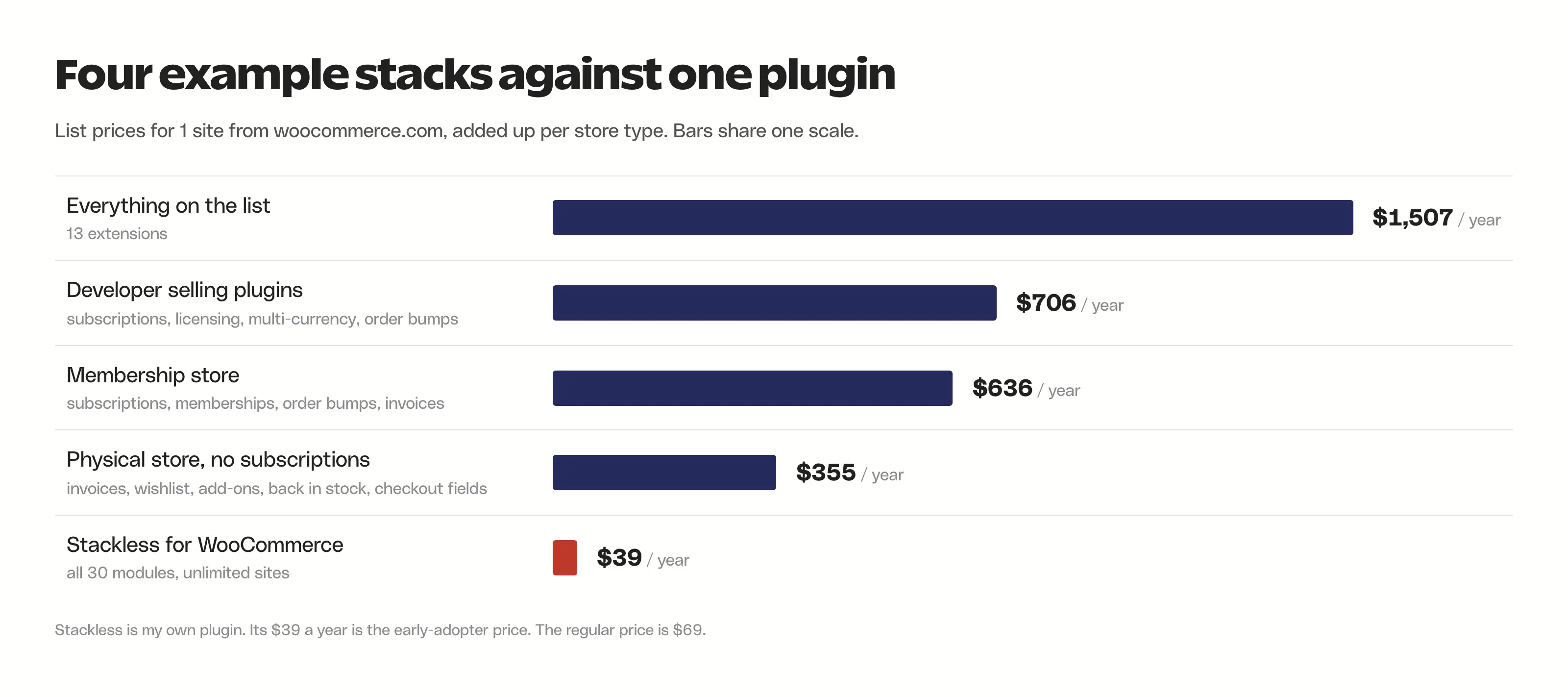
The list is conservative in one way: it has no page builder, no SEO plugin, no backup plugin and no caching plugin, because those are WordPress costs rather than WooCommerce costs and you’d pay them on a blog too.
What Each WooCommerce Extension Costs
These are the 13 I’d expect on a store that has grown past the basics, with the free Stripe gateway in the list to make a point about where the money goes. I picked them for 2 reasons: they cover the jobs a store usually buys an extension for, and they map onto what Stackless replaces. Both reasons are true and the second one is a bias you should weigh. Every price is the 1-site, 1-year list price on WooCommerce.com in October 2026. The site shows local pricing in some countries, so the dollar figure is the US one.
| Need | Extension | List price, 1 site | On Stackless |
|---|---|---|---|
| Subscriptions | WooCommerce Subscriptions | $279 a year | Subscriptions module |
| Card payments | Stripe for WooCommerce | Free | Stripe gateway built in |
| Multi-currency | Multi-Currency for WooCommerce | $149 a year | Multi-Currency, Currency Selector and gateway routing |
| Invoices | Print Invoices & Packing Lists | $79 a year | Custom Invoices (invoices, not packing slips) |
| Quotes | Quote Request for WooCommerce | $49 a year | Request Quotes module |
| Wishlist | WooCommerce Wishlists | $89 a year | Wishlist module |
| Product add-ons | Product Add-Ons | $79 a year | Product Add-ons module |
| Delivery slots | WooCommerce Order Delivery | $149 a year | Delivery Slots module |
| Software licensing | WooCommerce API Manager | $199 a year | Software Licensing (keys, activation API, update server) |
| Order bumps | Order Bump for WooCommerce | $79 a year | Order Bumps module |
| Members-only pages | WooCommerce Memberships | $199 a year | Page Access (pages for buyers, no drip or member discounts) |
| Quantity rules | Min/Max Quantities | $49 a year | Quantity Limits module |
| Back in stock alerts | Back In Stock Notifications | $59 a year | Back In Stock module |
| Checkout fields | Checkout Field Editor | $49 a year | Checkout Enhancements (consents and layouts, not custom fields) |
| All 14 | $1,507 a year | $39 a year or $99 once |
Three of the Stackless rows are partial. WooCommerce Memberships drips content and gives members discounts, and Page Access only unlocks chosen pages for people who bought a product. Print Invoices & Packing Lists prints packing slips, and Custom Invoices doesn’t. Checkout Field Editor lets you add arbitrary fields. Checkout Enhancements gives you consent checkboxes, a shorter checkout for virtual carts and 5 layouts, which is what most stores wanted the field editor for, but it isn’t the same thing. If one of those 3 gaps is your main job, keep that extension and price the rest.
The free row makes a point about where the money goes. Stripe and PayPal for WooCommerce cost nothing. Their fees are per transaction and you’d pay them on any platform. The $279 is for the subscription logic that tells the gateway when to charge the saved card, and that is the single most expensive line on the list by a wide margin.
Price Your Own Stack
Untick what you don’t need and change the site count. The prices are the ones in the table, and the difference line compares your total with the Stackless annual license.
- Your stack, per year
- $0
- Over 3 years
- $0
- Stackless, per year
- $39
- Stackless, once
- $99
- Difference in year 1
- $0
List prices from WooCommerce.com for 1 site, before sales and before the 20% discount for paying 2 years at once. Stackless covers unlimited sites, so its price does not change with the sites field.
Why the Bill Grows
Four things push a WooCommerce stack from a few licenses to a four-figure line on the accounts, and knowing them helps you decide which rows to fight.
Every extension on the marketplace is a yearly subscription for 1 site, so a second store means a second set of licenses and 3 stores mean 3 of everything. There’s no lifetime option, the 2-year plan knocks 20% off and that is the whole of the discount structure outside the sales. The marketplace runs sales of up to 40% a few times a year, and a license bought at 40% off renews at the list price 12 months later, which is how a $167 first year becomes a $279 second year on the subscriptions extension alone.
Local pricing adds a second layer. WooCommerce.com shows ₹27,050 a year for WooCommerce Subscriptions to a visitor in India, so the bill a store sees depends on where it is browsing from, and the rupee figure is worth checking against the dollar one before you buy.
The features arrive one at a time, which is why nobody notices the total. You buy the subscriptions extension when you launch the membership, the invoices plugin when the accountant asks, the wishlist when a customer asks and the multi-currency plugin when the first order from Germany comes in. Each decision is a $49 to $279 decision taken on its own, and I’ve gone through the subscriptions line in detail in WooCommerce Subscriptions alternatives because it’s the one worth fighting first.
And the price on the receipt isn’t the full price. Each extension registers its own settings page, its own database tables in some cases and its own scripts and styles on the storefront, and 13 of them together are 13 update notices, 13 changelogs to read before updating and 13 places a conflict can start. On the Stackless demo store, WooCommerce’s cart and checkout alone queued about 52 script prefetch hints on every page with a cart in it before the Optimizer module switched them off. That cost doesn’t show on any invoice, but a customer on a phone pays it.
Where One Plugin Changes the Sum
Stackless is 1 plugin with 30 modules, each on a switch, and a module that is off registers nothing. The 14 rows in the table use 16 of those modules, because multi-currency is 3 of them. The other 14 are things like sold counts, stock urgency labels, saved carts, service products, buy links and a WooCommerce Optimizer, plus PayPal and Polar gateways next to Stripe. The license is $39 a year or $99 once for unlimited sites, rising to $69 and $399 after the early-adopter period, with a 14-day refund. Against the full stack that is $1,468 a year less. Against the $355 physical-store stack it is still 9 times cheaper, and the lifetime license pays for itself against WooCommerce Subscriptions alone in about 4 months.

- Subscriptions, licensing, multi-currency, invoices, quotes, order bumps
- Stripe, PayPal and Polar gateways built in
- Wishlist, add-ons, delivery slots, back in stock, quantity limits
- 30 modules on switches; a module that is off loads nothing
The conditions matter as much as the arithmetic. Version 1.0 shipped on 13 October 2026, so this is young software from 1 developer with email support rather than a ticket desk. There’s no importer from WooCommerce Subscriptions yet, which means a store with live subscribers on the official extension should stay there until one exists. Automatic renewals run through Stripe, PayPal and Polar. Any other gateway sells subscriptions but renews by an emailed pay link. And the 3 partial rows above are real gaps. You can see every module switched on at the demo store before deciding, and the Stackless review on Gatilab goes through the modules one by one.
If the question is bigger than the plugin bill, whether to stay on WooCommerce at all, that’s a different comparison. SureCart vs WooCommerce and FluentCart vs WooCommerce cover the 2 platforms that bundle most of this list into the core product, at the cost of leaving the WooCommerce extension catalog behind.
The Limits
A few things this comparison can’t do for you:
- List prices aren’t paid prices. A store that buys everything in a 40% sale and pays 2 years at once pays less in year 1. It pays the list price from year 2.
- Nobody buys all 13. The $1,507 is a ceiling for this list, not a typical invoice. Use the calculator with your own rows.
- Free plugins exist for several rows. WordPress.org has free wishlist, badge, quantity and invoice plugins that do the basic job. I left them out because the comparison is with the official marketplace, but a store on a tight budget should look there first.
- Support quality isn’t priced. A $199 extension from a vendor with a long track record and a ticket desk is buying something a $39 plugin from 1 developer can’t offer yet.
- Prices move. Marketplace prices change without notice, and Stackless’s own price rises after the early-adopter period. Check the product page before you rely on a number here.
FAQs on WooCommerce Extensions Cost
How much does WooCommerce cost per year?
The WooCommerce plugin is free. The yearly cost is hosting, a domain and the extensions you add. At list price, 13 of the most common extensions from WooCommerce.com cost $1,507 a year for 1 site, and a store with 4 or 5 of them pays $350 to $700.
Are WooCommerce extensions a one-time payment?
No. Every extension on WooCommerce.com is a yearly subscription for 1 site. A 2-year plan saves 20%. There is no lifetime license on the official marketplace, though some third-party vendors such as CodeCanyon sellers offer one.
Do WooCommerce extensions stop working if I don’t renew?
They keep working. An expired subscription stops updates and support, which is a problem when WooCommerce ships a release that breaks the old version. Most stores renew for the updates rather than the features.
Which WooCommerce extension is the most expensive?
In a typical stack it’s WooCommerce Subscriptions at $279 a year for 1 site. WooCommerce Memberships and the API Manager are next at $199 each. The payment gateways, Stripe and PayPal, are free.
Can I get these features without paying for extensions?
Partly. WordPress.org has free plugins for wishlists, product badges, quantity rules and basic invoices. Subscriptions, software licensing and multi-currency with real exchange rates are the rows where the free options run out fast.
Is Stackless cheaper than buying the extensions separately?
Yes, by a lot: $39 a year or $99 once for unlimited sites against $1,507 a year for the full list. The limits are that 3 of its modules cover only part of what the matching extension does, it has no importer from WooCommerce Subscriptions yet and it’s new software. I built it, so weigh that too.
Final Remarks
Price the stack you have before you price the one you want. A store with 4 to 6 of these extensions is paying $400 to $800 a year at list price, and the subscriptions line is the one that decides whether the total is a nuisance or a budget item. If that line is on your invoice and your renewals run through Stripe or PayPal, 1 plugin at $39 removes most of the bill and most of the update day with it. If your subscribers are already renewing on the official extension, stay for now. Why spend extra? Think about moving away when the renewal is due and an importer exists.
Tell Google you want more of this.
Add Gaurav Tiwari as a preferred sourceOne tap, and this site shows up more often in your own Top Stories, AI Overviews and AI Mode. Remove it any time.
Disclaimer: This site is reader-supported. If you buy through some links, I may earn a small commission at no extra cost to you. I only recommend tools I trust and would use myself. Your support helps keep gauravtiwari.org free and focused on real-world advice. Thanks. - Gaurav Tiwari