by
Letting Claude Code or Codex work on a live WordPress site is fast, but every mistake lands in front of your visitors. The safer route has always been a local copy, a staging site and a migration plugin, and juggling those 3 tools eats the time the AI saved.
I spent a day with BuildPress 1.0 to see if it fixes that. My verdict is simple. If you’re a freelancer or a small agency that already builds with Claude Code or Codex, it solves this well. Its push to the live site can be undone in seconds. I’d skip it if you’re on an Intel Mac, run multisite or host on WP Engine or Kinsta today.
BuildPress is a desktop app that runs a copy of your WordPress site on your computer. An AI coding agent works on that copy, and BuildPress pushes the result to your host when you’re ready. BuildPress gave me a free yearly Creator license to test it, and everything below comes from my own runs on a MacBook Pro with Apple silicon.
If you’d rather watch than read, this video walks through every test below in about 8 minutes.

What Is BuildPress
BuildPress is a local WordPress app built around AI agents. It works with 2 agents only, Claude Code and Codex, and it uses the subscription you already pay for, so there are no AI credits to buy. BuildPress says it never sees your Claude or ChatGPT login.
Under the hood, each site gets its own bundled web server and database. My test site ran on FrankenPHP with Caddy and MySQL 8.4, with nothing for me to install and no Docker. The app is available for:
- macOS 12 or later on Apple silicon (M1 and newer)
- Windows x64
- Linux x64, as a .deb or an AppImage
Starting a site takes one dialog, and it offers 3 ways in:
- describe the site you want and let the agent build it
- start from a blank WordPress install, which was ready in a few seconds
- clone an existing website
You can also import a site from LocalWP, WordPress Studio or a backup file, including Duplicator, UpdraftPlus and .wpress archives.
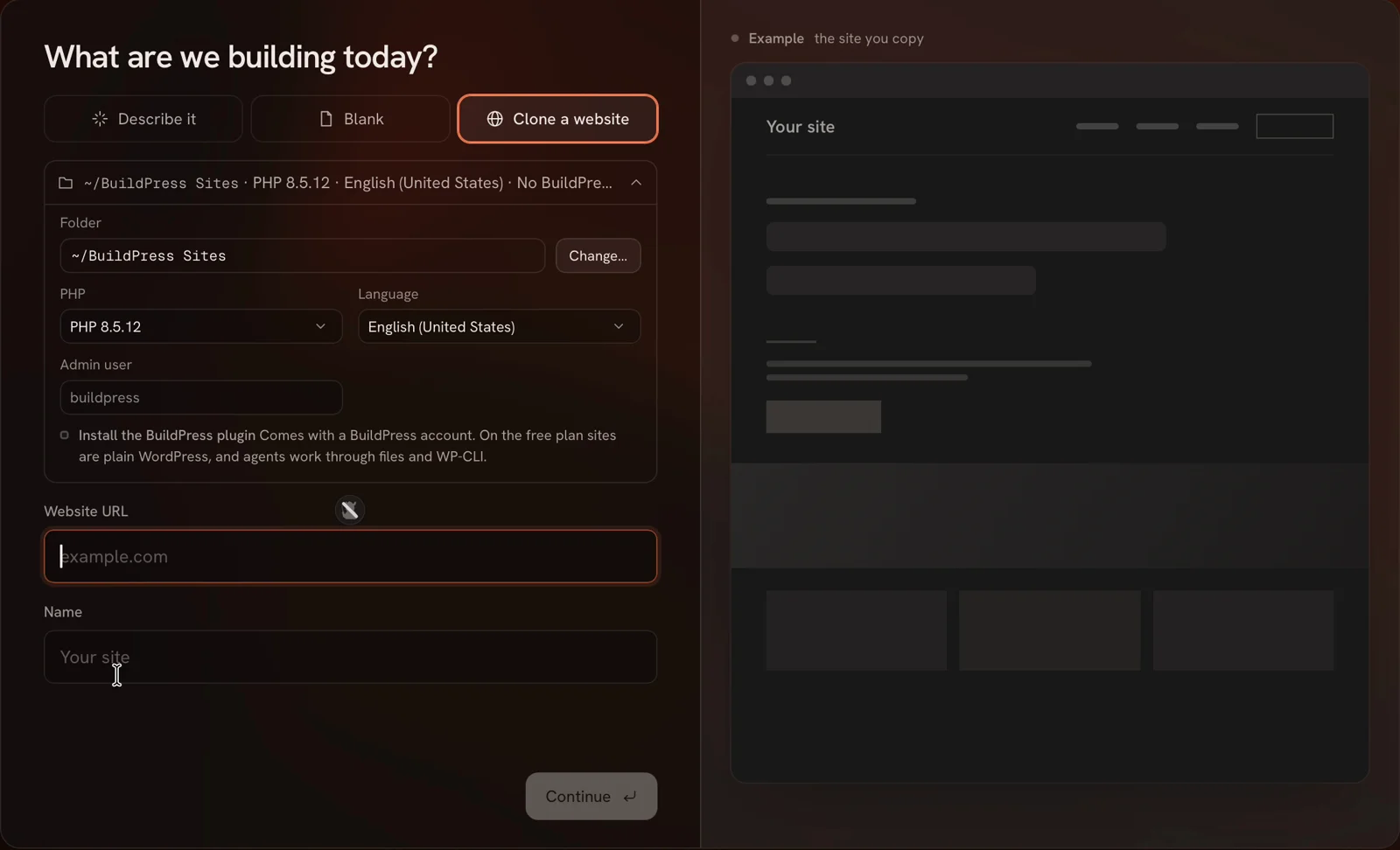
The second piece is the BuildPress plugin, which gives the agent extra WordPress tools. On a live site it also works as an MCP server, a standard way for AI tools such as Claude Code, Codex and Cursor to connect to software. I cover what it added in my test further down.
How I Tested BuildPress
These are the conditions that matter for the results below:
- App: BuildPress 1.0.0 on a MacBook Pro with Apple silicon
- Agent: Claude Code with Claude Opus 5.5 at medium effort, on my own Claude plan
- Site: a fresh local WordPress site on the default block theme
- Live target: a blank InstaWP sandbox site, connected through the app
I gave the agent these jobs, one after another on the same site:
- build a landing page from a single prompt
- change the header by pointing at it
- make a deliberately bad change that I could restore
- add a testimonials section and fix a client comment through the plugin
- push the site live and undo the push
Building a Page With an AI Agent
My first prompt asked for a landing page for a made-up coffee roaster called Ember & Oak. It had to include a hero, 3 features, a pricing table, an FAQ and a contact section. The agent finished in about 3 minutes and set the page as the homepage.
The result was built only from core WordPress blocks. What impressed me more was the checking it did before it called the job done:
- It took its own screenshots at 1440 px and 390 px wide and looked for sideways scrolling, console errors and failed requests.
- It noticed the “$29/month” price wrapping onto a second line, shrank the prices and shortened the label to “/mo”.
- It used placeholder contact details and said so.
It also told me what it could not check. The app’s browser was not logged in to wp-admin, so the agent could not confirm that every block opens cleanly in the editor. I prefer an agent that says this out loud over one that claims everything is fine.
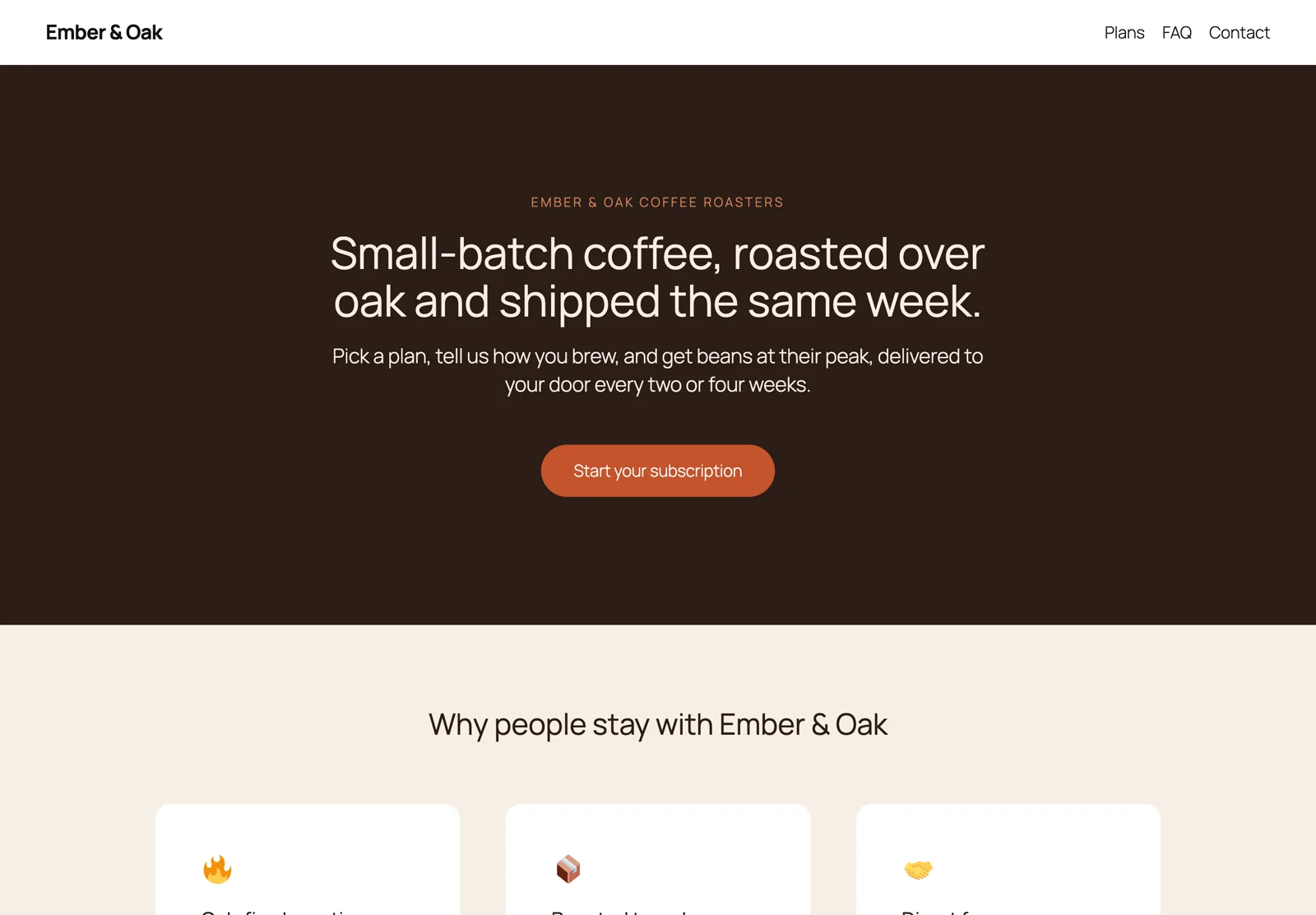
The live preview sits next to the chat, and you can switch it between desktop, tablet and phone widths. On phone width the 3 feature cards stacked properly.
Point and Edit
This is the feature I’d show someone first. You switch on pointing, click any element in the preview and a small “What should change here?” box opens right on the page. Your message goes to the agent with that element attached, so you don’t have to describe where the header is.
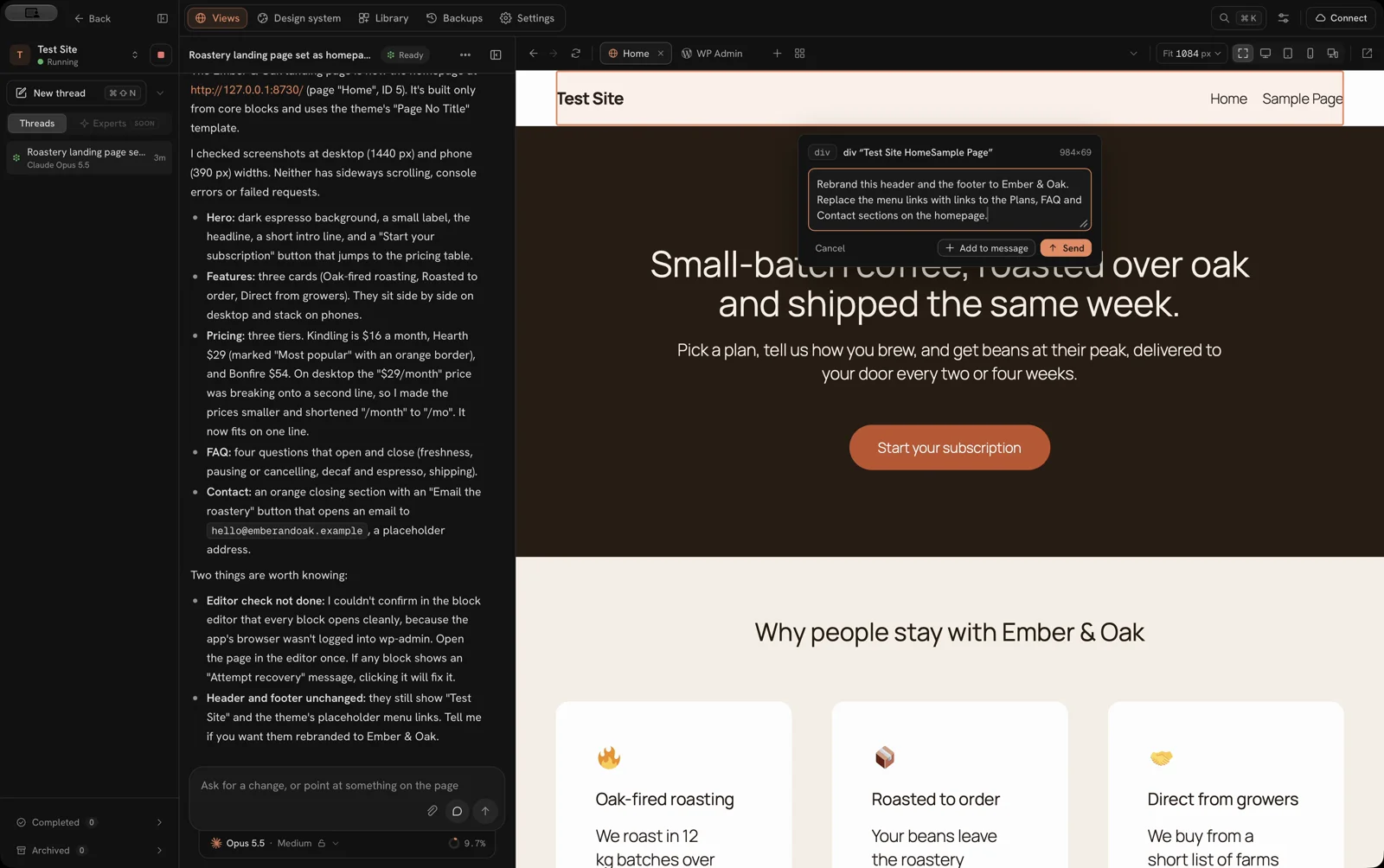
I pointed at the header and asked for the Ember & Oak name and menu links to the Plans, FAQ and Contact sections. The agent worked for 1 minute 29 seconds. While it worked, it drove the preview itself, with a “Take back control” button if I wanted it back. The result:
- The header and footer were rebranded, sharing one menu.
- It added a missing anchor ID so the FAQ link actually jumps to the FAQ.
- The changes were saved as Site Editor customizations, not edits to the theme’s files, so a theme update won’t wipe them.
It did one thing I didn’t ask for. It changed the site title and added a tagline. That was harmless here, but on a client site I’d want the agent to stay inside the request.
Backups and Restore
BuildPress does not take a backup before an agent session. The Backups tab was empty after 2 agent runs, and its empty state only suggests that you save one before a redesign or an agent session. The automatic restore point BuildPress talks about is for pulls from your live site, not for agent work.
A manual backup is easy once you know the rules. You have to finish the agent’s thread first, and then BuildPress stops the site so the copy is consistent. My backup of the test site took about 30 seconds and came to 264.7 MB.
To test it, I asked the agent to remove the FAQ and paint the hero bright green. It did it in 40 seconds and, to its credit, fixed the text contrast on the green and asked before deleting the menu link that now pointed nowhere.
The restore asked me to type the site name, stopped the site and finished in about 50 seconds. It saved the current version as its own backup first, which is the right default. The FAQ came back and the hero turned brown again.
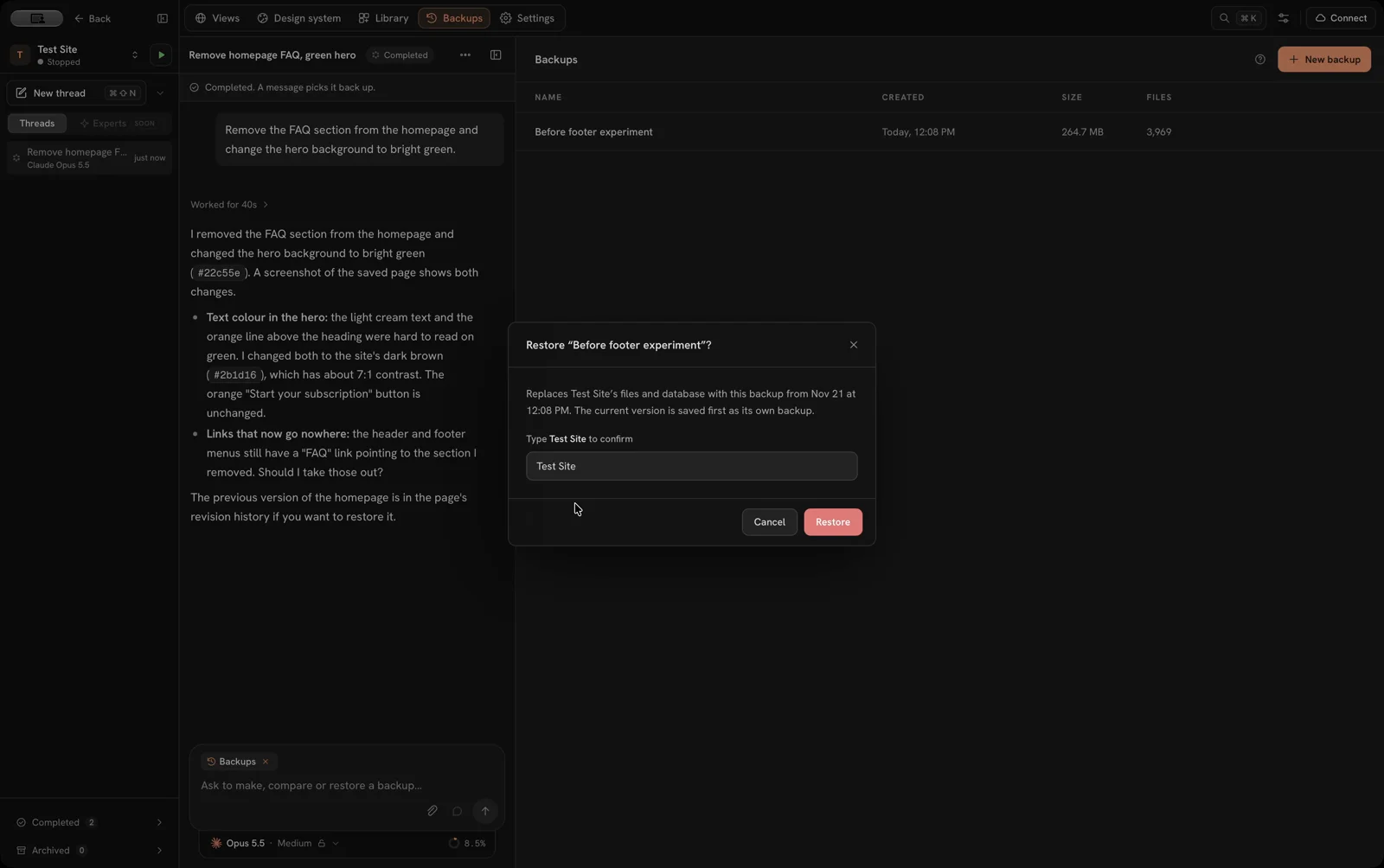
There is one catch I didn’t expect. The agent thread I had started after that backup lost its chat history. The thread was still listed, but it said the provider had no saved copy of it. Restoring a backup rolls back the agent’s notes along with the site.
Pushing to a Live Site
This is where BuildPress earns its price. I connected an InstaWP account with an API token, picked a blank InstaWP site and clicked “Check this site”. BuildPress turned on SSH for that site, added its own SSH key and ran 8 checks on SSH, WP-CLI, WordPress and the database. That took about 25 seconds, and I typed no server details.
Every push goes through 4 steps: what moves, safeguards, push, then keep or undo. The first screen lists only what differs from the live site, with the database and WordPress core switched off by default. Before anything changes, BuildPress uploads your changes next to the live files, checks them and then switches over behind WordPress’s maintenance page.
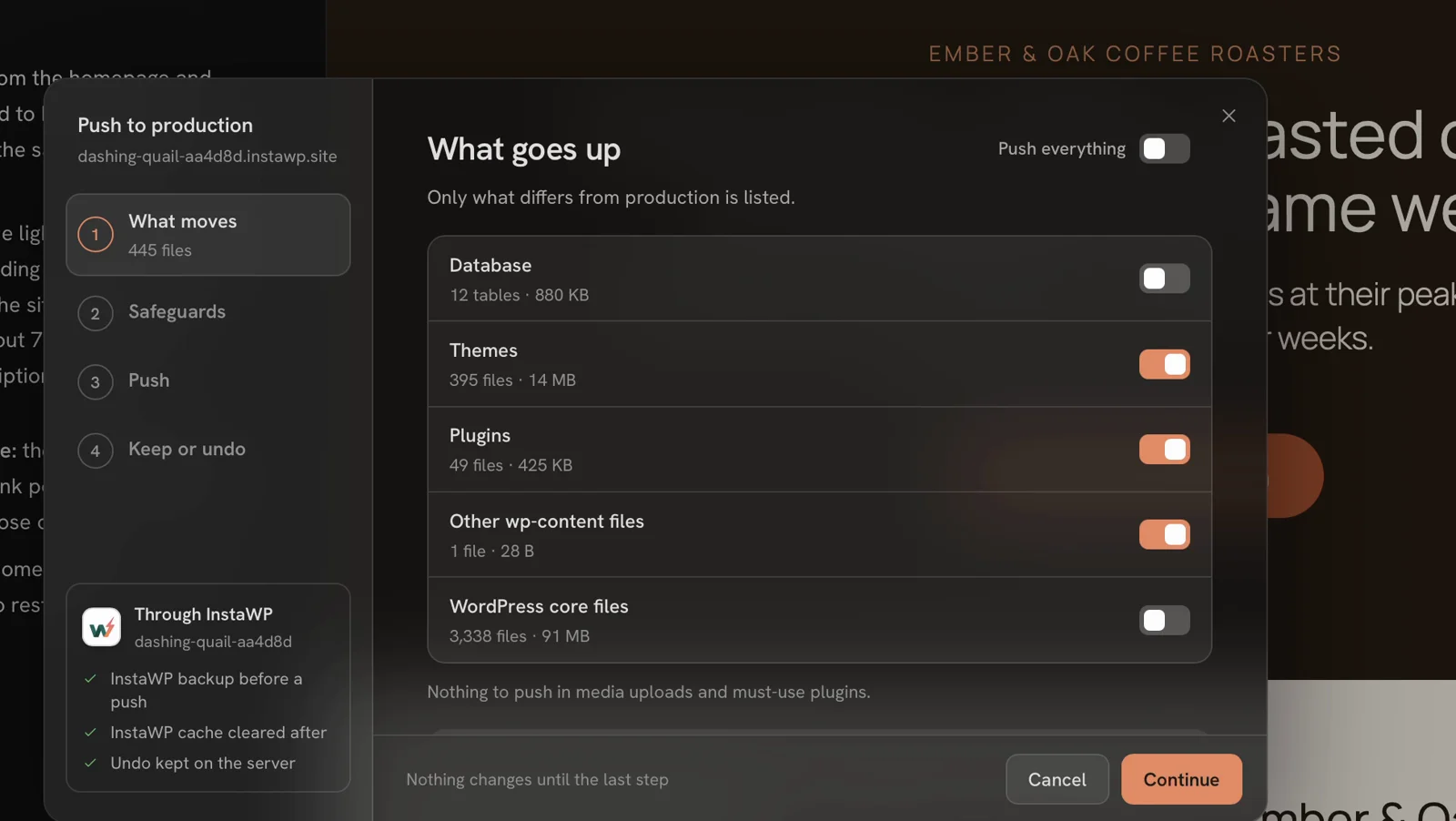
| Push | What moved | Time |
|---|---|---|
| Files only | Themes, plugins and 1 other file (445 files) | About 1 minute |
| Database | 12 tables (880 KB) | About 75 seconds |
| Undo | Put the live site back | 20 seconds |
Both pushes included an InstaWP backup before the switch. The database push asked me to type the live domain first, with a warning that it replaces the live site’s posts, pages, users and settings.
It also warned me that my local copy ran PHP 8.5 while the InstaWP site ran PHP 8.1, so code that worked locally might fail live. That check is important, because code that uses newer PHP features, such as the property hooks added in PHP 8.4, would break on the older server.
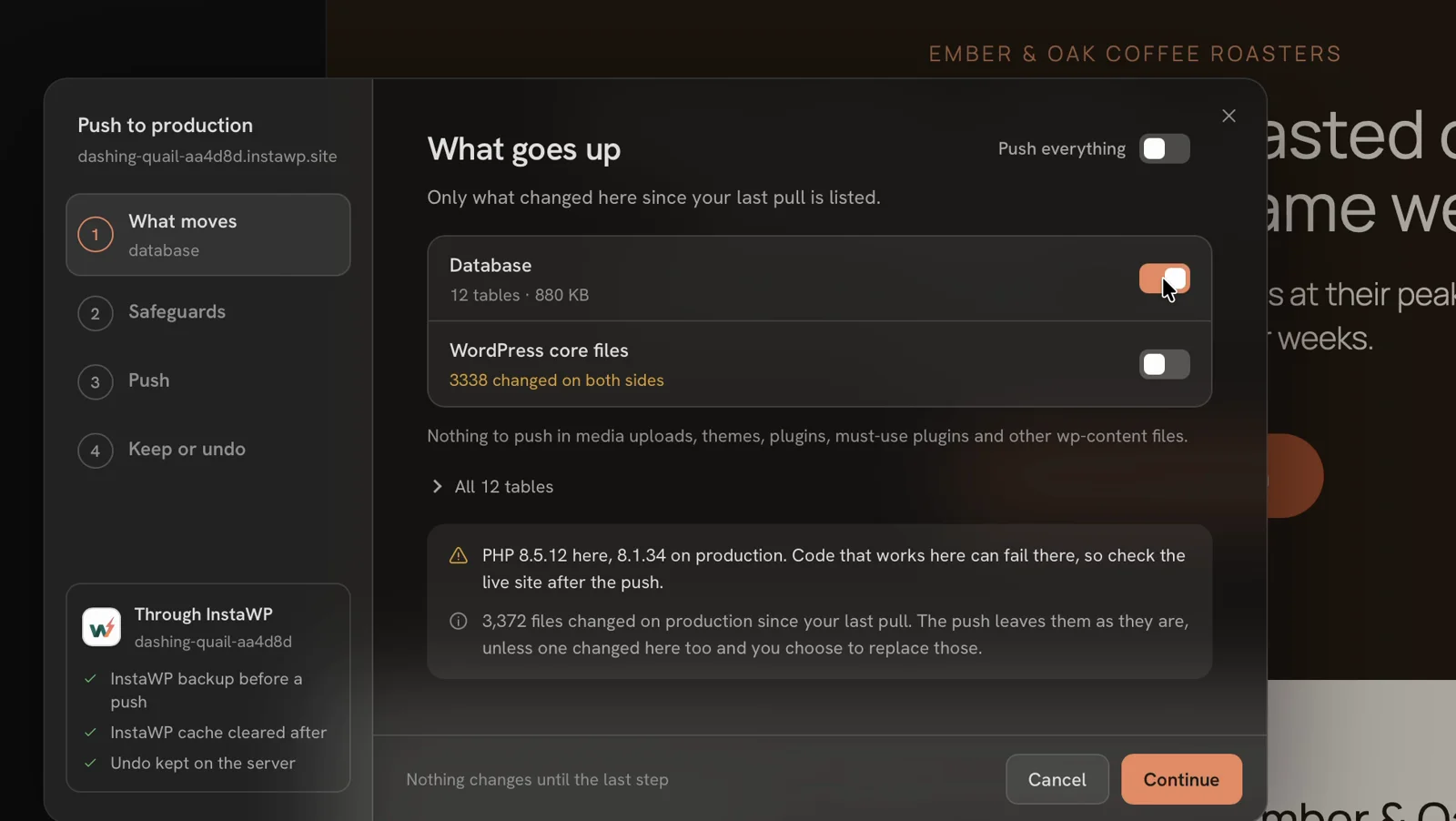
After the database push, the live site matched my local copy, and every URL pointed to the InstaWP domain with no leftover local addresses. The Undo button then put the blank site back in 20 seconds. After each push, BuildPress blocks further pushes and pulls until you choose Keep or Undo, which stops you from stacking a second push on top of one you haven’t checked.
The hosts BuildPress connects to right now are:
- InstaWP, Cloudways and Hostinger, by account connection
- any server with SSH and WP-CLI, by host and key
WP Engine, Kinsta, Pressable and Rocket.net are marked as coming soon. Multisite and SFTP-only hosting are not supported.
The BuildPress Plugin
The plugin was not on my first test site, because the new-site dialog has an “Install the BuildPress plugin” checkbox that I had left unticked. Adding it later took one click in the site’s settings and about 10 seconds. Without it, the agent still works, but only through files and WP-CLI.
With the plugin in place, the agent listed new tools for:
- design tokens, meaning the site’s shared colors, fonts and spacing
- reusable widgets
- headers, footers and templates
- checking that a page renders properly
- remembering project notes between sessions
I asked for a testimonials section, and the agent stopped to ask me 2 questions first:
- Should it set up a design system and build a reusable widget, or use plain core blocks?
- Should the quotes be clearly marked placeholders, or realistic names? It warned that fake reviews on a live site are a legal and trust risk.
I picked the design system and placeholders. It turned the page’s colors, fonts and spacing into 28 design tokens and built a reusable “Testimonial Band” block that shows up in the app’s Library. It took about 4.5 minutes.
The plugin also adds client feedback. A reviewer opens any page in feedback mode, clicks an element and leaves a pinned comment, with a screenshot and the device size saved alongside it. I had the agent leave a pin saying the testimonials heading should be bigger, then fix it from that pin. It made the change in 54 seconds, replied in the pin’s thread and set it to “In review”. It left “Complete” for me to mark, which is exactly how I’d want a client review to work.
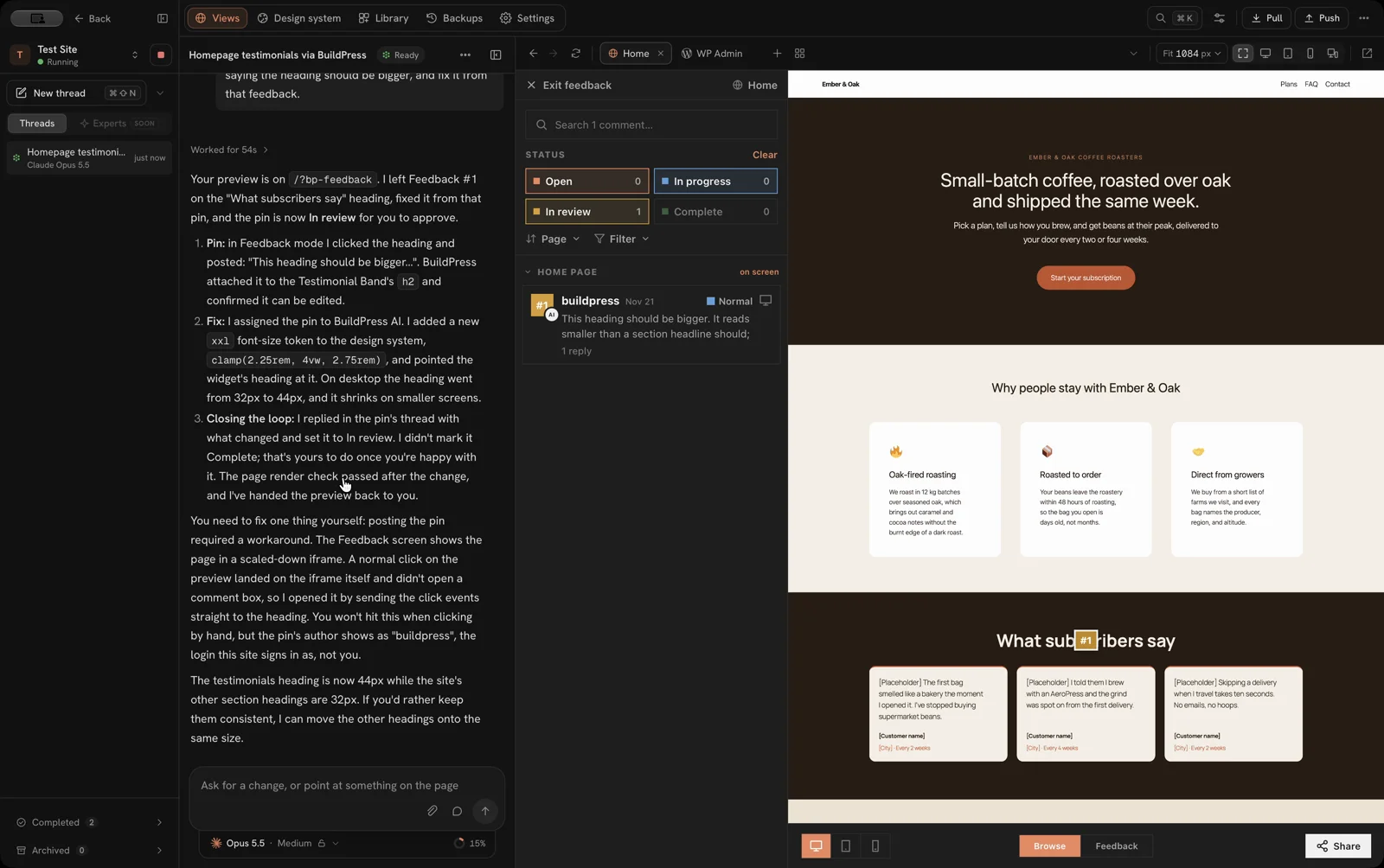
The plugin leans hard toward Elementor in its own documentation, but it worked fine with the block theme here. I did not test connecting an outside editor such as Cursor to a live site through the plugin.
BuildPress Pricing
The app is free with 1 local site. You need a paid plan to push to a host and to use the plugin on a live site. Every paid plan comes with a 14-day refund through Lemon Squeezy.
| Plan | Regular price | Local sites | Computers | Live plugin sites |
|---|---|---|---|---|
| Free | $0 | 1 | 1 | None |
| Solo | $49 a year | 3 | 1 | 1 |
| Team | $129 a year | Unlimited | 10 | 100 |
| Agency | $199 a year | Unlimited | Unlimited | Unlimited |
| Lifetime | $299 once | Unlimited | Unlimited | Unlimited |
The Black Friday sale runs until December 2 at 11:59 PM PT, and it brings Solo to $39, Team to $89, Agency to $119 and Lifetime to $179. The yearly sale price stays the same at renewal. The code LAUNCH20 takes another 20% off at checkout, which brought Solo to $31.20 and Lifetime to $143.20 when I checked.
Local sites never use up a live site from your plan. Your AI costs stay separate, because the agents run on your own Claude or ChatGPT plan.
If you work on more than 3 sites, Team is the plan I’d look at. Solo’s single live plugin site runs out fast.
The Limits
These are the things that would change my recommendation for some readers:
- Apple silicon only on Mac. Intel Macs are not supported, and neither are ARM builds for Windows or Linux.
- 2 agents. Claude Code and Codex are the only choices inside the app.
- No backup before agent work. You have to remember to make one, and making one means stopping the site.
- Restores roll back agent history. Threads started after the backup lose their chat history.
- Page changes need a database push. Pages, templates and Site Editor changes live in the database, so a files-only push leaves them behind. A database push replaces the live site’s posts, pages, users and settings, including orders and accounts made since your last pull. On a store or membership site, I’d push files only and make page changes on the live site.
- Host support is still growing. WP Engine and Kinsta users have to wait, and multisite is out.
I also hit a few small bugs:
- The preview went blank after a reload, and a second reload fixed it.
- The Library said “Nothing reusable yet” until I refreshed it by hand.
- The preview has no address bar, so I asked the agent to open the feedback page for me.
- Feedback pins made inside the app list the author as “buildpress”, the app’s auto-login user, instead of you.
BuildPress Alternatives
There are broadly three other ways to get an AI agent working on WordPress:
- LocalWP or WordPress Studio, plus Claude Code or Codex. Both run WordPress locally for free. You point the agent at the site folder yourself and push with whatever your host or the app supports. It costs nothing, but BuildPress’s push checks and the Undo step are what you give up.
- An agent on the live site. I run my own sites this way, through a plain .env file with REST and WP-CLI access. It is also what my own Site Agent plugin is built for. It is faster, but there is no local copy to throw away, and I compared these routes in my WordPress MCP setup guide.
- A cloud staging site. InstaWP alone gives you a disposable copy, but the agent still has to reach it over SSH or an API.
BuildPress sits in the middle. It keeps the agent away from your live site until you decide to push, and it makes that push reversible.
Who Should Use BuildPress
BuildPress is a good fit if you:
- build client sites with Claude Code or Codex and want a local copy without setting one up by hand
- host on InstaWP, Cloudways, Hostinger or a server with SSH
- want a push you can undo, with a host backup taken first
I’d choose differently if you:
- work on an Intel Mac, or on a host BuildPress can’t reach yet
- run a store where a database push could overwrite orders
- prefer a different agent, such as Cursor’s, inside the app
If you are new to AI coding agents, I’d pick the agent before the app, and my Claude Code vs Cursor comparison will help with that.
Putting it all together, I rate BuildPress 4.5 out of 5. The local build loop and the push with Undo earn full marks. Manual backups and the narrower platform and host support pull the score down.
BuildPress
Pros
- A blank local WordPress site was ready in a few seconds, with its own web server and database and no Docker.
- The agents run on your own Claude or ChatGPT plan, so there are no AI credits to buy.
- Point and edit sends the element you click to the agent, so you don't have to describe where it is.
- Every push takes a host backup first, and Undo put the live site back in 20 seconds.
- Feedback pins let a client comment on one element, and the agent can fix it from the pin.
Cons
- The Mac app needs Apple silicon, so Intel Macs are out.
- Only Claude Code and Codex work inside the app.
- No backup is taken before agent work, and a restore drops the chat history of later threads.
- Page changes need a database push, which replaces live users and orders.
- WP Engine, Kinsta and multisite aren't supported yet.
Summary
BuildPress gives Claude Code and Codex a local copy of your WordPress site to work on, then pushes the result to your host with a backup first and an Undo that took 20 seconds in my test. Point and edit is the feature I’d show someone first. Backups are manual, the Mac app needs Apple silicon, and WP Engine, Kinsta and multisite support isn’t there yet.
Price: USD 49 /year
Try BuildPress FreeFAQs on BuildPress
Yes, the app is free with 1 local site and no account. Pushing to a host, connecting hosting accounts and using the plugin on a live site need a paid plan.
No. BuildPress connects to your existing Claude Code or Codex subscription, or an API key, and adds no AI credits or markup.
Not yet. Both are listed as coming soon. You can push to InstaWP, Cloudways and Hostinger through an account connection, or to any server with SSH and WP-CLI.
A files-only push is safe in the same way any code deploy is. A database push replaces the live site’s users and settings, so it would overwrite orders placed since your last pull. BuildPress warns you about this before it runs.
Yes. Paid plans can build with Elementor, and the plugin has dedicated Elementor tools. My test used the default block theme, and it worked well there too.
Final Remarks
If you are still unsure, I’d let one real job decide. The free plan gives you 1 local site, which is enough to import a client site, run a change through Claude Code or Codex and see if the point-and-edit loop suits you.
I’d only pay once I needed the push. That push with a 20-second Undo is the part no free local tool gives you, and it is the reason I’d keep BuildPress for client work.
Tell Google you want more of this.
Add Gaurav Tiwari as a preferred sourceOne tap, and this site shows up more often in your own Top Stories, AI Overviews and AI Mode. Remove it any time.
Disclaimer: This site is reader-supported. If you buy through some links, I may earn a small commission at no extra cost to you. I only recommend tools I trust and would use myself. Your support helps keep gauravtiwari.org free and focused on real-world advice. Thanks. - Gaurav Tiwari