Cursor vs Claude Code: I Use Both Daily. Here’s the Split

Cursor vs Claude Code is not a contest between an AI editor and a terminal toy anymore. I use both at full depth, and the useful split is simple: Cursor is better when I want to stay close to the files, read code, steer edits, and review changes in the same window. Claude Code is better when I want to hand over a defined outcome that crosses files, tools, checks, and publishing steps.

I do not choose between them by asking which model looks strongest on a public chart. I choose by deciding how closely I need to supervise the next piece of work. That distinction has survived far more production work than any feature checklist.

My verdict is a deliberate split. Cursor earns its place as my working editor. Claude Code is my stronger daily agent driver for WordPress operations, content systems, research pipelines, and tasks that need several tools to cooperate. If your work is narrower, buying both usually adds cost and mental overhead without improving the result.

How I compared themBoth tools were used against the same repository instructions, canonical voice file, publishing rules, block documentation, and validation requirements.
Evidence used hereThe current AGENTS.md and CODEX.md architecture, shared context symlinks, WordPress block rules, and hands-on use of both products.
What I did not doI did not invent stopwatch results, token totals, intervention counts, subscription bills, or benchmark scores.
Facts current toJuly 13, 2026. Product and price claims are linked to official vendor pages.

The verdict up front

Pick Cursor if most of your day is spent reading, editing, and debugging inside a codebase. Pick Claude Code if your day is spent defining outcomes and letting an agent move through files, terminals, connected services, and repeatable operating procedures. Use both only when you genuinely work in both postures.

Annotated Cursor versus Claude Code decision flow based on close editing or delegated work.
The real split is working posture, not a universal model winner.
Cursor vs Claude Code comparison showing Cursor for close editing loops and Claude Code for delegated project work.
DecisionCursorClaude Code
Best working postureStay in the loopDelegate a bounded outcome
Best interface strengthEditor, inline review, navigation, side conversationsTerminal and agent workflow control
Model strategyChoice across several model providersNative Claude model integration
My strongest useFeature work while I am reading and shaping the codeWordPress, content operations, automation, and multi-tool tasks
Overall callBest AI editor for my in-loop workBest daily agent driver for my delegated work

This is not a diplomatic tie. Cursor wins the editor contest. Claude Code wins the delegated workflow contest. The wrong purchase happens when someone buys the winner from one category while needing the other.

What each tool actually is in 2026

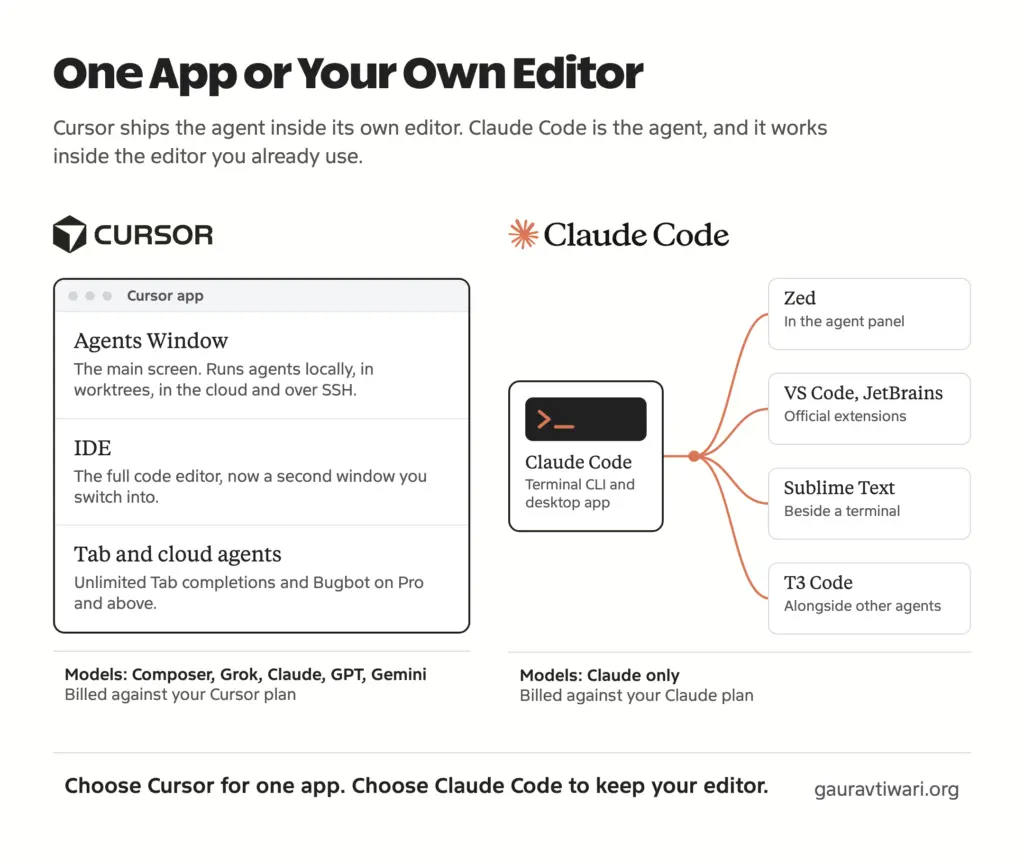
Cursor is an AI-first code editor with local agents, cloud agents, a terminal agent, model choice, autocomplete, code navigation, and review tools. Calling it a VS Code fork is technically informative but practically incomplete. By July 2026, its product shape includes editor work, isolated cloud machines, remote steering, mobile review, plugins, skills, MCP connections, subagents, rules, commands, and hooks.

The editor is still its center of gravity. Cursor’s July 10 release added durable side chats that inherit the main conversation’s context without forcing a tangent into the active thread. Its June releases added cloud subagents in separate virtual machines and an iOS public beta for paid users. Those are not decorative extras. They extend the same editor-led workflow to parallel and remote work. Cursor documents the changes in its official changelog.

Claude Code is Anthropic’s coding agent across the terminal, desktop app, web, IDE integrations, and remote sessions. The terminal remains its clearest expression because commands, files, permissions, tools, hooks, and automation sit in one operating surface. The desktop Code tab now adds worktree isolation, visual diffs, an editor, terminal panes, previews, side chats, computer use, scheduled tasks, connectors, and remote sessions. Anthropic’s desktop documentation shows how far the product has moved beyond a terminal-only label.

Both products can edit code, run commands, use MCP servers, invoke skills, and split work among subagents. Product categories no longer settle the Cursor vs Claude Code decision. The center of gravity does.

Current capabilityCursorClaude Code
Primary local surfaceAI code editorTerminal agent
Additional surfacesCLI, cloud agents, remote machines, iOSDesktop, web, IDEs, cloud sessions, CI and SDK
Inline completionCore Tab featureNot a desktop autocomplete feature
Parallel workLocal and cloud subagents, multitask workflowsSubagents, worktrees, remote sessions, experimental agent teams
ExtensibilityRules, skills, plugins, MCP, hooks, commandsCLAUDE.md, skills, plugins, MCP, hooks, subagents, agent teams
Model choiceModels from Cursor, Anthropic, OpenAI, Google, and othersClaude model family

Where Cursor wins

Cursor wins when the quality of my judgment depends on seeing the code around the edit. The file tree, symbols, diagnostics, open tabs, diff, terminal, and agent conversation are part of one feedback loop. I can read a function, ask for a change, inspect the patch, correct one assumption, and continue without turning the whole job into a delegation brief.

Cursor Side Chats page with the uninterrupted main conversation benefit highlighted.
Cursor's Side Chats are built for exploring tangents without derailing the main agent thread.

Reading and editing remain first-class work

An editor matters most when I do not yet know the exact change I want. On an unfamiliar plugin, I may need to follow a hook registration into a callback, compare the data shape at two call sites, and inspect the rendered markup before deciding what to touch. Cursor lets the agent assist that investigation while I retain spatial awareness of the repository.

That advantage also applies to small, frequent interventions. Renaming a method, completing a guard clause, changing a type, or fixing a nearby test rarely deserves a packaged agent task. Cursor Tab and inline editing reduce the distance between noticing and correcting. Claude Code can make the same edit, but the interaction is heavier when I already have the right file and line in front of me.

Winner: Cursor. It keeps code reading, manual judgment, and AI assistance in one place.

Side chats preserve the main thread

A long agent conversation develops a working theory. A side question can destroy that focus if it becomes another branch inside the same linear chat. Cursor 3.11 addresses this with durable side chats opened through /side, /btw, or the interface. They inherit context, remain available for follow-up, and can be mentioned back into the main conversation. The feature is described in Cursor’s Side Chats release note.

I use this posture for questions such as whether a WordPress callback has another consumer, whether a CSS token already exists, or whether a proposed migration has a quieter path. The side chat can inspect and answer while the main agent keeps its implementation plan intact.

Winner: Cursor. Claude Desktop also has side chats, but Cursor places the pattern directly beside the files and editor state where I need it most.

The model menu is genuinely useful

Cursor lets me change the model without changing the editor or repository context. Its current CLI page lists Cursor’s Composer 2.5, Anthropic’s Opus 4.8, OpenAI’s GPT-5.6 Sol, Google’s Gemini 3.1 Pro, and xAI’s Grok 4.5, while the product also documents Claude Fable 5. The exact list moves often, which is why I treat the official Cursor CLI model menu as the current reference rather than preserving an old roster in a buying decision.

Model choice helps when one model understands a visual refactor better, another follows a tedious migration more economically, or I want an independent review from a different model family. It is also useful when provider availability changes. I do not have to move my editor workflow with it.

Winner: Cursor. It provides the broader model menu without asking me to rebuild my working environment.

Where Claude Code wins

Claude Code wins when the assignment is a chain rather than an edit. My writing system is a useful example because a finished article can require source checks, voice instructions, an approved structure, published-only internal links, Gutenberg serialization, ACF field JSON, external-link rules, and several validation passes. The hard part is not generating paragraphs. The hard part is carrying constraints across the entire job.

Claude Code feature guide with lifecycle hooks highlighted in the Cursor versus Claude Code comparison.
Claude Code's advantage appears when repeatable work needs lifecycle automation.

Instructions can become an operating system

This repository does not rely on one giant prompt. Its AGENTS.md routes work through format files, voice guidance, quality checks, anti-slop rules, publishing instructions, block references, and task-specific skills. Claude Code is especially comfortable with this layered arrangement because persistent project guidance, skills, hooks, MCP servers, subagents, and plugins are designed as separate parts of its agent loop.

Anthropic’s extension guide gives each part a clear job: CLAUDE.md holds persistent conventions, skills load reusable workflows, MCP connects services, subagents isolate focused work, hooks respond to lifecycle events, and plugins package the pieces. That separation matches how I maintain production instructions. A publishing rule should not be buried inside a prompt about one article.

Winner: Claude Code. Its strongest feature is not a single command. It is the coherence of the instruction and automation layers.

Hooks and headless work fit repeatable operations

When a check must happen every time, I do not want to remember to ask for it. Claude Code hooks can run scripts, prompts, HTTP requests, or subagents at defined lifecycle events. That makes them useful for formatting, validation, notifications, policy checks, and other actions that should not depend on the wording of the current conversation. The official hooks reference covers tool, session, permission, compaction, and team events.

The CLI also remains better suited to scripts and non-interactive operation. Desktop interfaces are improving, but a repeatable command can live in CI, a scheduled job, or a local script without needing someone to click through a conversation. Cursor has a capable headless CLI and expanding cloud hooks, so this is no longer an uncontested category. Claude Code still feels more natural when the workflow begins as an operating procedure rather than an editor action.

Winner: Claude Code. Cursor is closing the gap, but Claude Code remains my first choice for repeatable, tool-heavy delegation.

Subagents and agent teams serve different scales

Claude Code distinguishes between subagents and agent teams. A subagent works in isolated context and returns a summary to the parent. An agent team consists of independent sessions that can communicate through a shared task structure. Agent teams are still experimental and disabled by default, so I do not treat them as a routine requirement or a reason to buy the product by themselves.

The distinction is still valuable. A source researcher, code reviewer, and schema validator do not all need the full main conversation. A subagent keeps that reading out of the primary context. A team becomes relevant only when workers need to challenge or coordinate with each other. Anthropic’s own guidance says teams cost more context than subagents, which matches the common-sense rule: use the smallest coordination mechanism that can finish the job.

Winner: Claude Code. Its documented separation between focused workers and peer-coordinated sessions gives me more control over delegation depth.

The model question is menu versus marriage

The freshest difference in the Cursor vs Claude Code decision is not whether either product has a capable model. Cursor offers a menu. Claude Code builds the product around a native relationship with Claude models. I think of that as the best model menu versus the deepest model marriage.

Cursor’s menu is the practical winner when I want to compare model behavior, route work by cost, or avoid dependence on one provider. OpenAI released GPT-5.6 Sol, Terra, and Luna on July 9, and Cursor already exposes GPT-5.6 Sol in its agent interfaces. Anthropic released Claude Fable 5 on June 9, and Cursor also provides a route to that model. One editor can cover several frontier families.

Claude Code’s native advantage appears when the model and agent harness are designed together. Claude’s tool behavior, context management, skill loading, subagents, hooks, and permission patterns are not an adapter around a rotating model list. Fable 5 is available in Claude Code through usage credits after Anthropic’s July 7 included-access window ended. The model had an involuntary access interruption from June 12 to July 1 after a US government directive. I used Fable for as long as it was available and resumed whenever access returned. The gap was not a decision to avoid it.

Anthropic explains the suspension and restoration in its Fable 5 redeployment notice. That history matters because any claim about five uninterrupted weeks of hands-on access would be false.

NeedBetter approachReason
Compare several frontier models inside one projectCursorProvider and model choice stays inside the editor.
Build a repeatable workflow around Claude-specific featuresClaude CodeThe model, tool loop, skills, hooks, and subagents share one product design.
Mechanical work at a lower model priceCursorA broader menu makes cost routing easier.
Long connected work in a Claude-native agentClaude CodeFewer integration seams and richer Claude-specific controls.

Winner: it depends on the constraint. Cursor wins model freedom. Claude Code wins native Claude depth. I will not turn vendor benchmark charts into a personal quality score.

The same production work reveals different strengths

I do not need fabricated task timings to show how the products differ. The current repository provides named, inspectable workload shapes. Each row below describes work I perform with these tools and identifies the posture that fits it. The comparison is about control and fit, not a five-point score pretending to be laboratory data.

Production taskCursor observationClaude Code observationMy call
Trace a WordPress hook through a plugin, inspect nearby code, and shape a focused fixThe editor keeps definitions, references, diagnostics, patch, and terminal together.The agent can trace and fix it, but the terminal posture is heavier while I am actively reading.Cursor
Research, draft, serialize, and validate a Gutenberg articleUseful for reviewing HTML and correcting local passages.Better at carrying the plan, voice, link, block, schema, and validation chain as one assignment.Claude Code
Refactor several files while I make architecture decisions during the editStrong because I can interrupt, inspect symbols, and reshape the patch inline.Strong after the target architecture is clearly defined.Cursor during discovery, Claude Code after definition
Run a documented SEO or publishing procedure across connected toolsPossible through MCP, plugins, and commands.My established skills and hook-oriented procedures make the chain easier to delegate.Claude Code
Ask a separate model family to challenge a proposed implementationChange models while preserving the workspace.Use a separate product or API route for a non-Claude review.Cursor
Turn a recurring validation sequence into a headless operationCursor CLI supports scripts and automation.Claude Code’s CLI, hooks, skills, and Agent SDK fit the pattern directly.Claude Code

Notice the repeated boundary. Cursor is strongest while the problem is still being understood through the code. Claude Code is strongest after the outcome and operating rules are clear enough to delegate. That boundary is far more durable than the current names of individual models.

Claude Code vs Cursor pricing

The entry price is similar, but the usage systems are not interchangeable. A Cursor vs Claude Code price comparison has to include model consumption, not only the subscription label. Cursor Pro costs $20 per month, Pro+ costs $60, and Ultra costs $200. Cursor says the individual tiers include unlimited Tab completions and agent usage priced against model API rates, with $20, $70, and $400 of included API agent usage respectively, plus bonus capacity. Current details live on Cursor’s models and pricing documentation.

Claude Pro costs $20 monthly or $200 annually. Max costs $100 for 5x Pro capacity or $200 for 20x capacity. Anthropic also sells usage bundles, and Fable 5 requires usage credits after July 7. API usage is separate from a standard Pro subscription. Anthropic lists the current consumer plans on its official pricing page.

ProductIndividual planPublished US priceImportant limit
CursorPro$20/monthAgent consumption depends on the model’s API price.
CursorPro+$60/monthMore included agent usage, not a different editor.
CursorUltra$200/monthBuilt for high agent usage.
ClaudePro$20/month or $200/yearClaude Code included; API use billed separately.
ClaudeMax 5x$100/monthFive times Pro capacity per session.
ClaudeMax 20x$200/monthTwenty times Pro capacity per session.

I am not publishing a personal bill because it would say more about my workload than yours. The useful buying calculation is whether the product removes enough friction from your dominant work posture. Two unused $20 plans are more expensive than one well-matched $100 plan. Two heavily used products can also be cheaper than forcing every task through the wrong surface.

Winner: neither on sticker price. The entry plans match. Cursor gives you an editor and multi-model routing; Claude gives you Claude Code plus the wider Claude subscription. Your usage pattern decides the practical cost.

Agent features compared

Both vendors now use the same vocabulary, which can hide meaningful implementation differences. A subagent, hook, remote session, and skill are not automatically equivalent just because the label matches. I compare them by asking where the work runs, what context it inherits, how it reports back, and whether the behavior can be enforced.

FeatureCursorClaude CodePractical difference
SubagentsLocal and cloud workers with configurable prompts, tools, and modelsIsolated workers that return summaries to the parentCursor adds model choice; Claude documents context separation especially clearly.
Remote workCloud agents in isolated VMs and branches, plus iOS controlCloud sessions, web access, and phone dispatch to desktopBoth can continue after the local machine is no longer the active surface.
HooksLocal and cloud lifecycle hooks, including conversation and subagent eventsScripts, HTTP requests, prompts, and subagents across agent lifecycle eventsBoth are serious automation layers, not simple post-save callbacks.
Skills and pluginsManaged through the Customize page at user, team, and workspace scopeSkills load on demand; plugins package skills, hooks, agents, MCP, and other componentsBoth support reusable procedures; Claude’s extension model is my more mature daily setup.
Parallel peer agentsMultitask and cloud subagentsExperimental agent teams with peer communicationClaude separates parent-child work from peer coordination.
MobileiOS beta can launch agents, review artifacts and diffs, and merge workDispatch and mobile monitoring for remote sessionsCursor currently offers the more editor-like mobile review surface.

Cursor’s cloud subagents run in their own virtual machines and branches. That is the right isolation for work that should not disturb the local workspace. Claude Desktop uses worktrees for parallel local sessions and can run remote sessions across several repositories. Neither product should be granted broad network or repository access casually. Remote autonomy increases both usefulness and the cost of a bad instruction.

Winner: Claude Code for my operations, Cursor for editor-led parallel work. The feature lists are close. My choice comes from how naturally each feature joins the rest of the product.

Using both without waste

The worst dual-tool setup duplicates every rule, memory file, command, and correction. Mine does the opposite. The repository is the shared source of truth. AGENTS.md defines the operating rules. The canonical voice file is linked into the repository. Format, quality, publishing, and block documents remain ordinary files that either agent can read.

Annotated posture diagram comparing Cursor in-loop control with Claude Code delegation.
I use Cursor to stay close and Claude Code to hand off bounded work.
  1. Put project facts and non-negotiable rules in the repository, not in a private chat history.
  2. Keep one canonical file for shared voice, architecture, or publishing guidance.
  3. Use tool-specific files only for genuine product differences.
  4. Choose the tool after defining whether the next task is editor-led or delegation-led.
  5. Run Claude Code inside Cursor’s terminal when I want Cursor’s editor and Claude’s agent loop together.
  6. Review changes with the surface that makes the risk easiest to see.

This pattern also makes switching cheaper. A model or product can change without taking the project’s institutional knowledge with it. The rules live beside the work.

Do not use both merely because both are popular. If you spend almost all day inside an editor, start with Cursor. If you mainly delegate terminal work and automate procedures, start with Claude Code. Add the second only when you can name a recurring task where the first creates visible friction.

Who should pick which

The cursor vs claude code choice becomes easier when I name the person and the work instead of ranking abstract intelligence.

  • Solo WordPress developer: choose Cursor if you spend most of the day inside PHP, JavaScript, templates, and styles. Choose Claude Code if deployments, content changes, REST operations, audits, and repeatable scripts occupy a large share of the work.
  • Content operations builder: choose Claude Code. Skills, hooks, MCP, and terminal automation fit research-to-publishing chains better than an editor-centered routine.
  • TypeScript product team: choose Cursor when engineers want AI embedded in everyday reading, completion, review, and debugging. Add Claude Code for members who own automation or cross-repository operations.
  • Beginner: choose one. Cursor makes code and diffs easier to see. Claude Code can teach well, but a terminal agent can make broad changes before a new developer understands the consequences.
  • Model experimenter: choose Cursor. The ability to compare OpenAI, Anthropic, Google, Cursor, and other models in one surface is the point.
  • Mobile reviewer: Cursor’s iOS beta is the stronger current option for launching cloud work, checking diffs, and merging from a phone.
  • Automation-heavy operator: choose Claude Code. The CLI, hooks, skills, remote work, and Agent SDK create a direct path from procedure to repeatable operation.

My final Claude Code vs Cursor split

I keep both because they solve two recurring problems I actually have. Cursor is where I stay close to code and let AI shorten the distance between reading, deciding, and editing. Claude Code is where I turn a clear outcome into a multi-step job and expect the agent to carry the operating rules through completion.

If I had to preserve only one for my current mix of WordPress, content systems, research, publishing, and automation, I would keep Claude Code. That is a verdict about my workload, not a declaration that Cursor is weaker. A developer who spends all day shaping application code inside an editor can reasonably make the opposite choice.

The durable rule is this: buy Cursor for a better coding loop. Buy Claude Code for a stronger delegated operating loop. Buy both only when your week contains enough of each to justify two subscriptions and two interaction models.

I track these product changes and the workflows that survive them in my newsletter. Subscribe if you want the next comparison after the products change again, not a recycled verdict from an older release.

Frequently asked questions

Is Claude Code better than Cursor?

Claude Code is better for my delegated, multi-tool workflows. Cursor is better when I am actively reading, editing, and reviewing code in the same interface. The better product depends on the posture your work requires.

Can Cursor use Claude models such as Fable 5?

Yes. Cursor offers models from several providers and documents Claude Fable 5 support. Model availability can change, so check Cursor’s current model selector and official documentation before choosing a plan for one model.

Can I use Claude Code inside Cursor?

Yes. Open Cursor’s integrated terminal and run Claude Code there. This gives you Cursor’s editor and diff tools while Claude Code handles the terminal agent workflow.

Which is cheaper in 2026, Cursor or Claude Code?

Both have $20 monthly entry plans. Cursor Pro+, Cursor Ultra, Claude Max, usage credits, and model-dependent consumption make heavy-use costs different. Compare your dominant workload, not only the first plan price.

Does Cursor have GPT-5.6?

Yes. Cursor’s current interfaces list GPT-5.6 Sol among the available models. The exact effort and speed variants can differ by surface and plan.

Should I pay for both Cursor and Claude Code?

Pay for both only if you regularly need an AI editor and a separate delegation-first agent. If most of your work fits one posture, start with one product and add the other after you can name a recurring limitation.

Leave a Comment