
Claude Code Pricing in 2026: Which Plan Pays Off, and When
Claude Code pricing starts at $20 per month for the Pro plan, rises to $100 or $200 per month for Max, and switches to per-token billing if you use the Claude API or paid usage credits. My recommendation is simple: start with Pro if you code for an hour or two most days. Move to Max only after the usage screen proves Pro is interrupting paid work.
The catch is that a subscription doesn’t buy a stated number of tokens. Claude, Claude Code, and supported IDE sessions share limits, long conversations consume more, and subagents can multiply usage faster than you expect. So the cheapest plan on paper can become the most frustrating plan by Wednesday afternoon… while a $100 plan can be wasteful for someone who opens the terminal twice a week.
My verdict: Pro is the right first Claude Code subscription for a solo developer. Max 5x fits daily agent work across larger repositories. Max 20x is for parallel sessions, frequent subagents, and people whose work stops when a weekly cap arrives. Keep usage credits off until you set a hard monthly limit.
Claude Code Pricing at a Glance
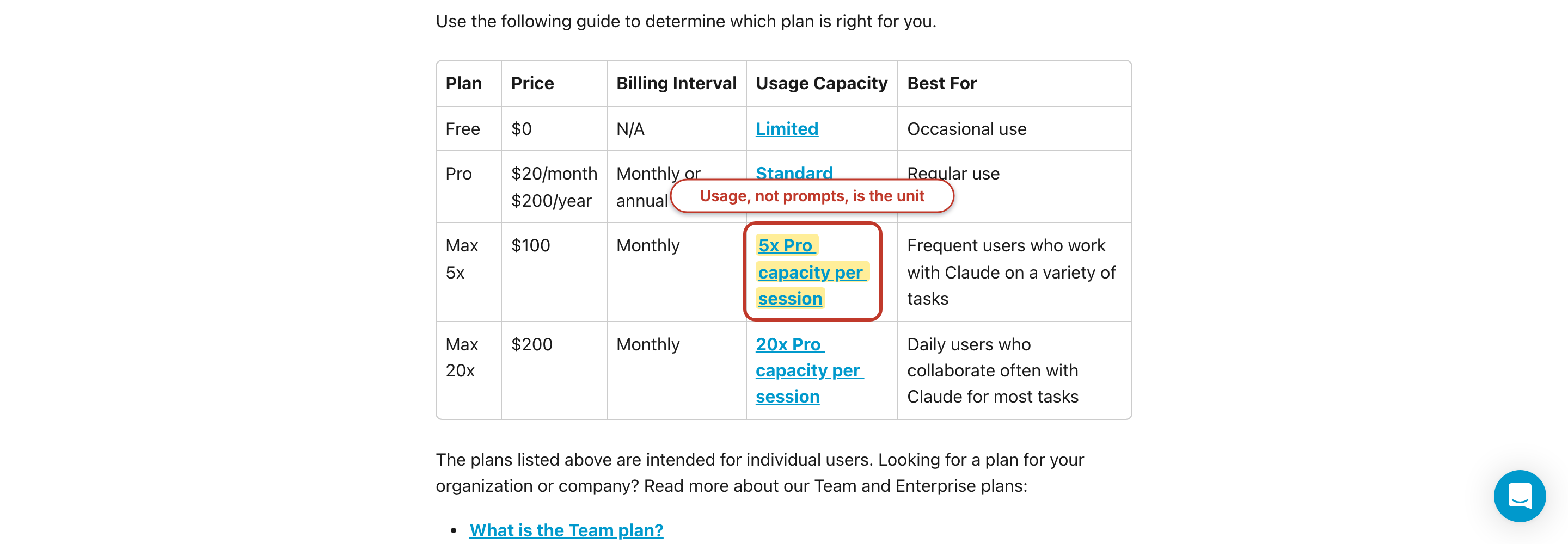
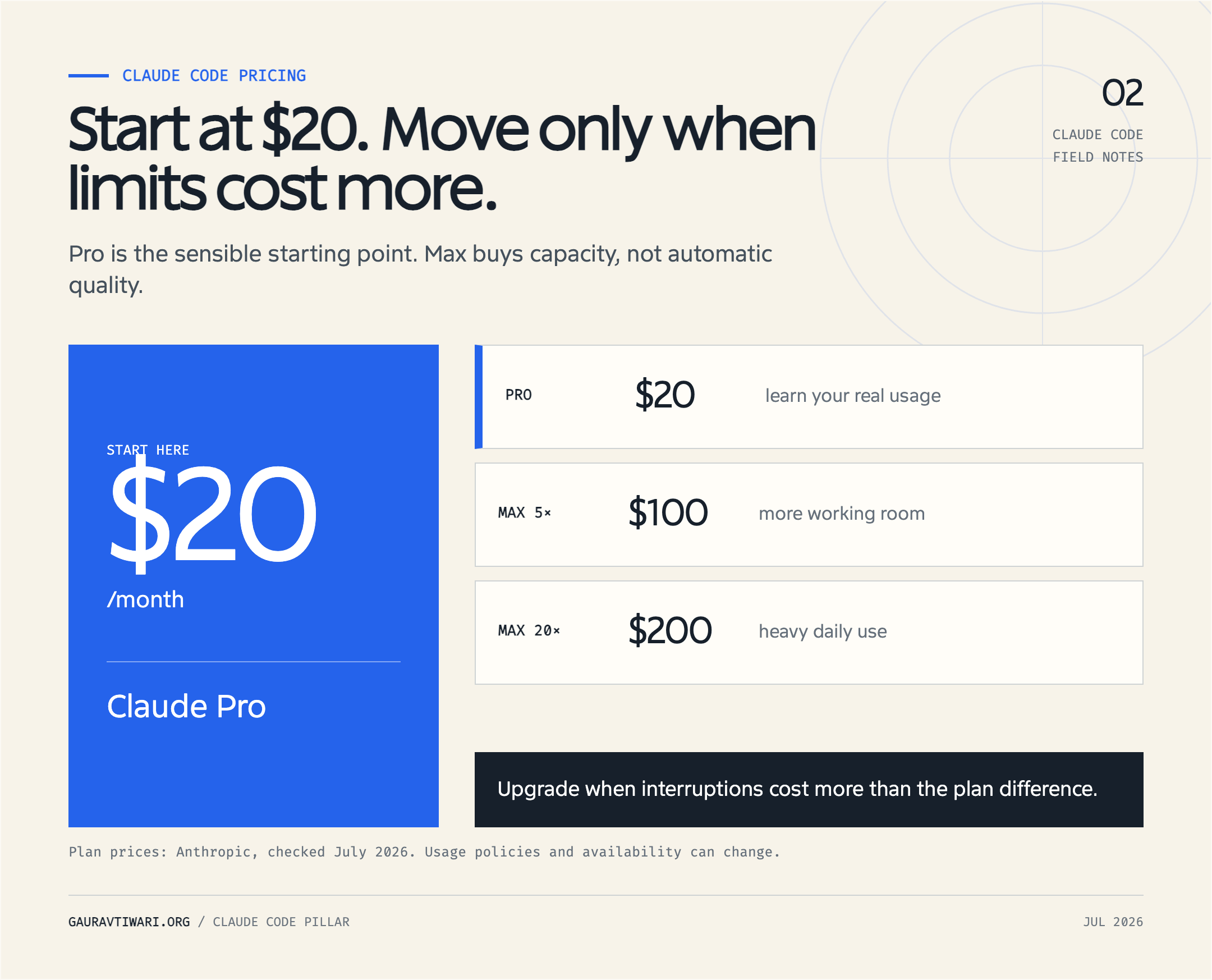
Claude Code costs $20 per month at the individual entry point, with $100 and $200 Max tiers for heavier use. This Claude Code pricing structure puts individuals on fixed plans while usage-based Enterprise and API access charge by token. Team plans start at $20 per seat per month when billed annually, and regional checkout prices can differ from these US list prices before tax.
| Plan or billing route | Current price | Claude Code access | Best fit | Main limit |
|---|---|---|---|---|
| Free | $0 | No | Claude chat and basic code generation | No terminal or IDE Claude Code access |
| Pro | $20 monthly, or $200 yearly | Yes | Light to steady solo use | Five-hour session allowance plus a weekly cap |
| Max 5x | $100 monthly | Yes | Daily coding and larger repositories | Five times Pro session usage, still capped |
| Max 20x | $200 monthly | Yes | Parallel agents and heavy daily use | Twenty times Pro session usage, still capped |
| Team Standard | $20 per seat monthly when billed annually; $25 monthly billing | Yes | Teams of 5 to 150 | Shared product limits and seat management |
| Team Premium | $100 per seat monthly when billed annually; $125 monthly billing | Yes | Heavy users inside a managed team | Five times Standard-seat usage |
| Enterprise | $20 per seat plus usage at API rates, or a sales agreement | Yes on current plans | Governance, controls, and usage billing | Spend depends on model and task |
| Claude API | Pay per input, output, and cache token | Yes | Automation and metered workloads | No included subscription usage |
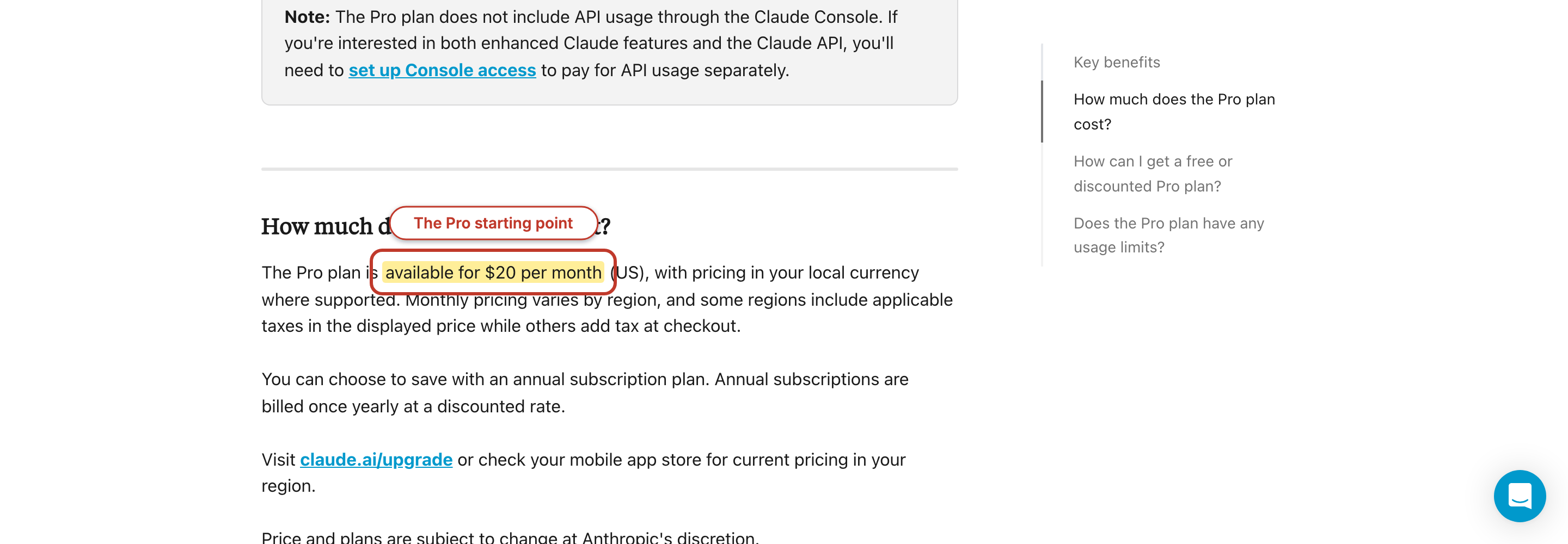
Anthropic’s current pricing page lists Pro at $17 per month when the $200 annual charge is divided across 12 months, or $20 when billed monthly. I prefer writing the annual option as “$200 upfront” because $17 sounds like a monthly commitment you can cancel after one month. It isn’t.
The same distinction matters for Team. A five-person Team Standard account has a floor of $1,200 per year at the annual rate. Monthly billing raises that floor to $125 each month, or $1,500 across a full year. The per-seat number looks small; the minimum team size is the number your budget feels.
Is Claude Code Free?
No, Claude Code isn’t included with Claude’s Free plan. You can use free Claude chat to generate code and work with files, but the terminal agent and IDE integration require Pro, Max, Team, Enterprise, or a Claude Console account that pays API rates.
This distinction catches people because “Claude can write code for free” and “Claude Code is free” sound almost identical. They describe different products. The first means a chat response can contain code. The second would mean the agent can enter your repository, read files, edit them, run commands, and keep working through a task. Anthropic’s desktop availability table leaves the Claude Code cell blank for Free and marks it available on every paid plan.
You can still install the Claude Code client without paying. Payment becomes relevant when you authenticate and send work to a model. With a Console login, there is no subscription floor, but every successful request draws from prepaid API credits. That route can cost less than Pro for occasional use. It can also cost far more during an unattended agent run if you haven’t set a workspace limit.
Watch your authentication: An ANTHROPIC_API_KEY environment variable can make Claude Code use API billing even when you have a Pro or Max subscription. Run /status and confirm the active account before a long session.
Pro vs Max: Which Claude Code Plan Fits?
Choose Pro until its limits interrupt work often enough to cost more than $80 per month in lost time. That is the Claude Code pricing decision that matters, not the largest multiplier you can buy. Move to Max 5x when the interruption has a measured cost, and choose Max 20x only when concurrent sessions, subagents, or long high-effort tasks still exhaust the $100 tier.
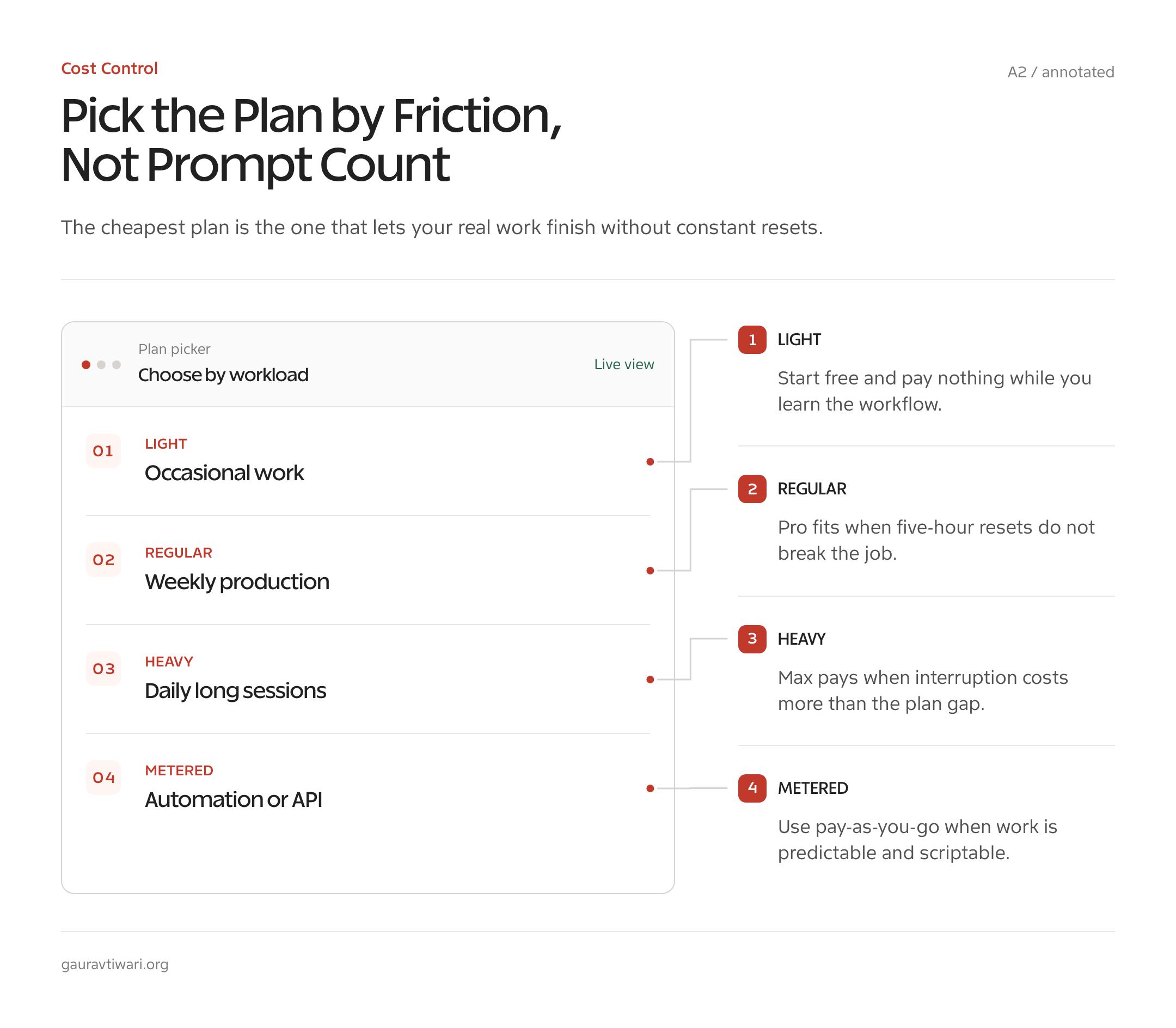
Anthropic describes Max 5x as five times the per-session usage of Pro and Max 20x as twenty times Pro. Those multipliers aren’t token grants. The Pro documentation says usage changes with conversation length, attached files, model, feature, and effort level. The Max documentation adds two weekly limits: one across all models and a second for Sonnet models.
How the five-hour and weekly limits work
Think of the five-hour allowance as a rolling work bucket, not a daily message quota. Claude chat, Claude Code in the terminal, VS Code, Cursor, JetBrains IDEs, and other covered surfaces draw from the same plan usage. When the bucket empties, you wait for the reset or approve paid credits. A new interface doesn’t create a second allowance.
On May 6, 2026, Anthropic doubled Claude Code’s five-hour rate limits for Pro, Max, Team, and seat-based Enterprise plans. It also removed the peak-hours reduction for Pro and Max. Good change. But Anthropic doesn’t publish a fixed current number of prompts, and old articles quoting 10 to 40 prompts or 50 to 200 prompts no longer give you a dependable buying rule.
Weekly caps are the second gate. Your five-hour bucket can reset while the weekly allowance remains empty. Pro has a weekly limit across all models. Max has an all-model limit and a separate Sonnet limit, with a fixed reset time visible under Settings > Usage. This is why someone can feel fine on Monday and blocked late in the week without changing how many hours they work.
A plan rule that works better than prompt estimates
- Buy Pro for one month and keep usage credits disabled.
- Use
/usageto watch the five-hour and weekly bars during normal work. - Record each time a reset blocks a paid task, not each time the bar looks low.
- Upgrade to Max 5x if those blocks cost more than $80 in your time during a month.
- Upgrade to Max 20x only if Max 5x still creates a repeatable work stoppage worth more than $100.
This rule treats your time as the scarce item. A freelancer billing $80 per hour needs one lost hour to justify the jump from Pro to Max 5x. A student coding on weekends may prefer to wait for a reset. Same tool, same limits, different answer.
Claude Code API Pricing: When Pay-As-You-Go Wins
API billing wins when your Claude Code use is occasional, automated, or easy to cap by token. A subscription wins when you work interactively most days and want a fixed monthly floor. Claude Code pricing becomes comparable across those routes only after you count input, output, and cache tokens separately.
| Claude model | Input per 1M tokens | Output per 1M tokens | 5-minute cache write | Cache read |
|---|---|---|---|---|
| Claude Fable 5 | $10 | $50 | $12.50 | $1 |
| Claude Opus 4.8 | $5 | $25 | $6.25 | $0.50 |
| Claude Sonnet 5 through August 31, 2026 | $2 | $10 | $2.50 | $0.20 |
| Claude Sonnet 5 from September 1, 2026 | $3 | $15 | $3.75 | $0.30 |
| Claude Haiku 4.5 | $1 | $5 | $1.25 | $0.10 |
These are the first-party Claude API rates from Anthropic’s model pricing documentation. A one-hour cache write costs twice the base input rate, while a five-minute write costs 1.25 times base input. A cache hit costs 10% of ordinary input. Batch processing cuts input and output prices by 50%, which matters for queued work but not an interactive terminal session.
The break-even math subscriptions don’t show
Suppose your monthly workload produces one output token for every five input tokens. At standard rates with no cache discount, 1 million input tokens plus 200,000 output tokens cost $20 on Fable 5, $10 on Opus 4.8, $4 on Sonnet 5 at its introductory rate, and $2 on Haiku 4.5.
Under that one-to-five assumption, a $20 Pro subscription equals about 1 million Fable input tokens plus 200,000 output tokens. It equals 2 million Opus input plus 400,000 output, 5 million introductory-price Sonnet input plus 1 million output, or 10 million Haiku input plus 2 million output. This isn’t a promise of included subscription tokens. It’s a clean comparison against what the same API-shaped workload would cost.
Why not convert that into hours per week? Because an hour spent asking two architectural questions can use fewer tokens than ten minutes of an agent reading a repository, running tests, and returning 5,000 lines of logs. Any article that says “eight hours equals Max” without showing token data is guessing. Use /usage for your own workload, then compare the displayed API estimate with $20, $100, or $200.
The Fable 5 Question
Claude Fable 5 is available in Claude Code, but after July 7, 2026, it uses paid usage credits rather than the included Pro, Max, Team, or eligible Enterprise allowance. Its API price is $10 per million input tokens and $50 per million output tokens, twice the Opus 4.8 rate and five times Sonnet 5’s introductory rate.
The launch history matters here. Anthropic released Fable 5 on June 9, suspended access on June 12 after US export controls took effect, and restored global access on July 1. Anthropic’s redeployment notice included Fable within up to 50% of weekly plan limits through July 7. After that date, access moved to usage credits. During my five-week evaluation window, I used Fable whenever it was available, so the evaluation wasn’t five uninterrupted weeks.
Fable is a Mythos-class model built for long-running, hard tasks. Anthropic says it can work across multi-day agents, large migrations, complex coding, professional research, and vision-heavy documents. Those are vendor claims, not my benchmark results. The price decision should rest on whether Fable solves a task that Opus 4.8 or Sonnet 5 fails, not whether the model name sits at the top of a picker.
| Model | Input per 1M | Output per 1M | Worked cost: 500K input + 50K output | Use it for |
|---|---|---|---|---|
| Claude Fable 5 | $10 | $50 | $7.50 | A task where lower tiers fail or require repeated correction |
| Claude Opus 4.8 | $5 | $25 | $3.75 | Architecture, hard debugging, and multi-step reasoning |
| Claude Sonnet 5, introductory rate | $2 | $10 | $1.50 | Most coding and production work |
| Claude Haiku 4.5 | $1 | $5 | $0.75 | Mechanical edits, classification, and narrow subagent jobs |
| GPT-5.6 Sol | $5 | $30 | $4 | Cross-vendor flagship comparison |
| GPT-5.6 Terra | $2.50 | $15 | $2 | Balanced OpenAI API work |
| GPT-5.6 Luna | $1 | $6 | $0.80 | Cost-sensitive OpenAI API work |
The worked-cost column is arithmetic, not a measured article or coding session. It excludes cache tokens, tools, retries, and reasoning differences. OpenAI’s GPT-5.6 announcement lists Sol at $5/$30, Terra at $2.50/$15, and Luna at $1/$6 per million input/output tokens. That makes Fable the costliest model in this table, so it needs to save more than $3.50 against Opus or $6 against Sonnet on the same worked token shape.
Use Fable by exception: Start a task on Sonnet 5. Move to Opus 4.8 when the job needs deeper reasoning. Pay for Fable 5 when the prior model has failed, the task can run for hours, or one correct pass is worth more than the rate difference.
What Claude Code Actually Costs Me
My Claude Code cost has two parts: the fixed plan charge and any usage credits I choose to approve after the included limit. I won’t publish a fake cost-per-article figure because subscription sessions don’t turn included usage into an authoritative invoice line for each article. Anthropic says the dollar figure in /usage is a local estimate for API users and isn’t relevant to a Pro or Max subscriber’s bill.
I use Claude Code across a content workflow that can include research, drafting, graphics, file edits, and WordPress REST tasks. That shape is expensive in context, even when the final article is only 2,800 words. The agent may read a brief, voice rules, source material, existing HTML, tool schemas, and command output before it writes the visible copy. Counting final words alone misses most of the input.
A defensible per-article number needs four counters from one isolated session: ordinary input, cache writes, cache reads, and output. It also needs the model used at each stage. Run the article in a fresh session, check /usage before and after, and use the formula below. Repeat across at least five articles, because one research-heavy topic can distort the average.
Cost = (base input x input rate)
     + (cache writes x cache-write rate)
     + (cache reads x cache-read rate)
     + (output x output rate)
For a subscription, the amount charged stays at $20, $100, or $200 until you enable credits. For an API session, the same formula produces the bill. That difference matters: the API estimate can tell you the economic value of included usage, but it doesn’t mean Anthropic added that dollar amount to your Pro invoice.
If you want a worked example, 500,000 ordinary input tokens and 50,000 output tokens cost $7.50 on Fable, $3.75 on Opus 4.8, $1.50 on introductory-price Sonnet 5, or $0.75 on Haiku 4.5 before caching. Plug in your session’s four counters. Don’t call the example your cost until the counters match.
7 Ways I Cut Claude Code Costs
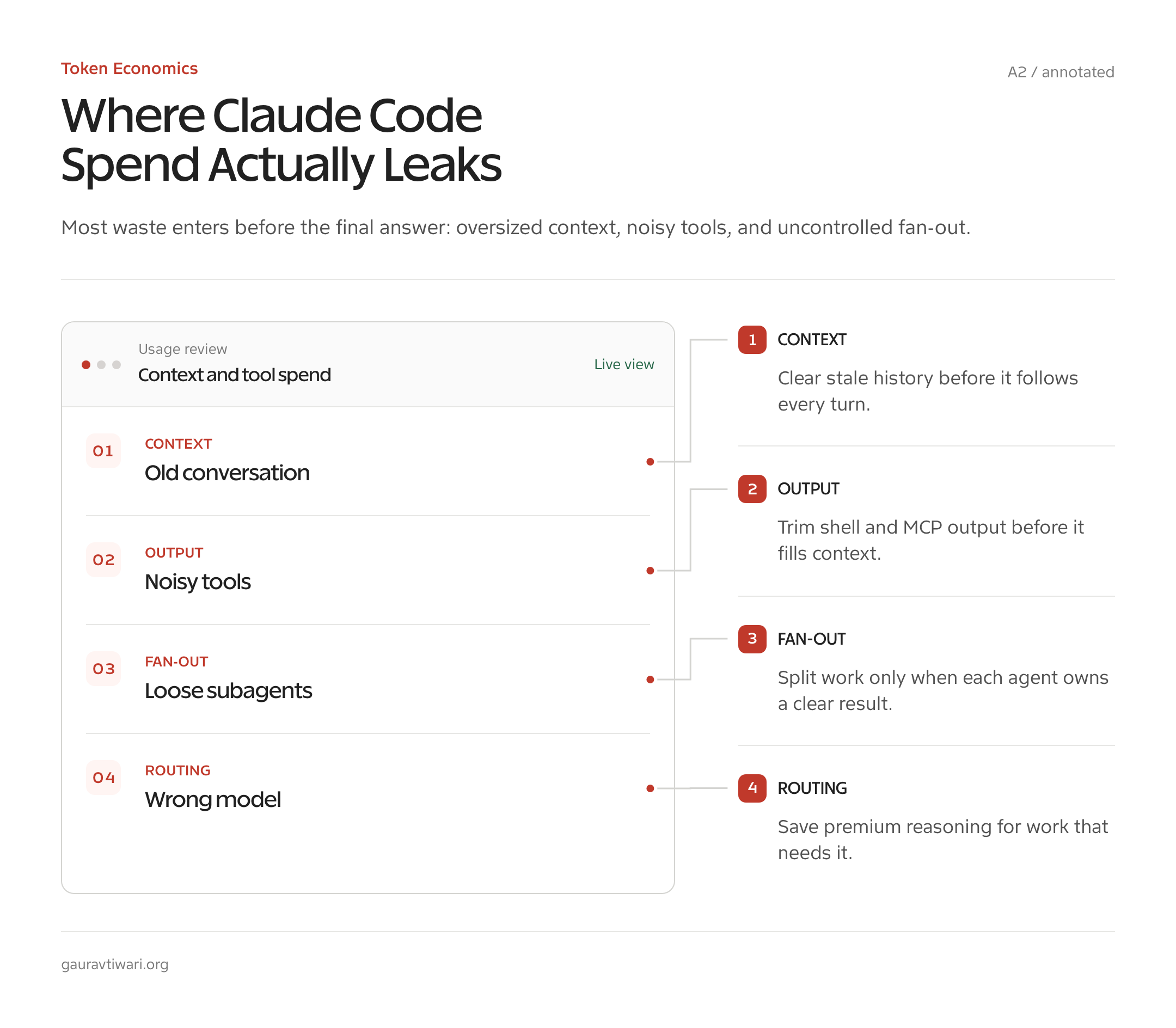
The largest Claude Code savings come from context hygiene, not coupon hunting. Clear unrelated work, control terminal output, keep cache prefixes stable, and reserve costly models for decisions that need them. These seven changes reduce both API spend and how fast subscription limits disappear.
1. Start a fresh session when the task changes
Old context is a tax paid on later turns. If you finish a pricing article and start debugging a WordPress plugin in the same session, the model keeps receiving the earlier conversation until compaction removes it. Use /rename if you want to find the session later, then /clear before the unrelated task.
This feels wasteful because the old conversation contains useful work. But Claude Code sessions are closer to a desk than a filing cabinet. Keeping every document on the desk doesn’t save filing time after you switch projects; it makes every new action carry a larger pile. The analogy breaks at caching, where an unchanged prefix can be cheap to reread, but smaller relevant context still improves the odds that the agent focuses on the right material.
2. Compact at natural task boundaries
Use /compact after a research phase, a completed feature, or a resolved debugging branch. Add a short instruction such as /compact Focus on accepted decisions, changed files, and failing tests. Claude Code then preserves the parts the next phase needs and drops the conversation clutter.
Compaction isn’t free. Anthropic’s prompt-caching documentation explains that the summary call reads the existing cached prefix, then the following turn builds a shorter conversation cache. Compacting after every few messages adds summary work and repeatedly changes the conversation prefix. Waiting until auto-compaction hits mid-task can be worse. Use it at a genuine turn in the work.
3. Route mechanical work to Sonnet or Haiku
Model choice changes the Claude Code price by as much as 10 times on output. Fable costs $50 per million output tokens. Haiku 4.5 costs $5. For renaming keys, formatting files, classifying rows, or checking whether a list matches a schema, the $45 difference buys capability the task may never use.
I use the strongest model for the hard decision, then a cheaper model for the mechanical pass. For a subagent, set model: haiku when the job is narrow. For the main session, Sonnet 5 should be the default starting point for most code in 2026. Move upward because you found a failure, not because a new model is available.
4. Keep model switches and MCP changes out of mid-task work
Claude Code caches exact prompt prefixes. Switching models creates a separate cache. Connecting or disconnecting an MCP server changes the tool definitions near the start of the prompt and invalidates everything after them. The next turn must rebuild more context, which raises API cost and consumes plan usage.
Pick the model and connect the MCP servers you need before the task grows. Run /context to see what occupies the window, and disable unused servers before starting. Command-line tools such as gh, aws, or gcloud can carry less tool-definition overhead than a large MCP collection.
5. Trim shell output before it enters context
Terminal output is one of the quietest cost multipliers. A command that prints 20,000 lines doesn’t merely fill your screen. Its result can enter the conversation, get sent again on later turns, and force earlier useful context toward compaction. Filter at the source with focused test commands, path scopes, JSON selectors, and line limits.
My more aggressive option is RTK, short for Rust Token Killer. Its Claude hook is installed with rtk hook claude and rewrites eligible Bash commands through a token-reduced proxy. Use rtk gain --history to inspect the reduction. RTK analytics can report 60% to 90% less command output on suitable operations, but don’t translate that into “90% off my bill.” Tool output is only one part of total context.
6. Control subagents before they multiply the bill
A subagent starts a separate conversation with its own system prompt, tools, context, and cache. Five subagents don’t split one allowance five ways. They create five token streams, each reading what it needs and returning a result to the parent. Parallel work can finish sooner while consuming more total usage.
Give each subagent one bounded question, the smallest file scope that answers it, a cheaper model when possible, and a compact return format. Don’t ask three agents to inspect the whole repository “for anything useful.” Use parallelism when the saved wall time is worth the extra tokens, such as independent tests or clearly separated modules.
7. Put a hard ceiling on usage credits
Usage credits turn a capped subscription into pay-as-you-go access after the included allowance ends. They work across Claude and Claude Code, reset the five-hour plan bucket on its normal schedule, and appear as a separate charge. That convenience needs a monthly ceiling.
Start with credits disabled. If a deadline makes extra usage worthwhile, enable them and set the smallest monthly limit that covers the sprint. Anthropic also sells prepaid usage bundles at discounts, but a discounted overspend is still an overspend. Check Settings > Usage after the task and turn auto-reload off if you don’t need it.
The cost order I use: remove stale context first, reduce command output second, route simple tasks to cheaper models third, and buy a larger plan last. A bigger subscription hides waste. It doesn’t remove it.
Claude Code vs Cursor vs Codex on Price
Claude Code and Cursor both have a $20 individual paid entry point, while Codex includes limited access on OpenAI’s Free plan and more access on paid ChatGPT plans. Claude Code pricing looks similar to Cursor at checkout, but each product meters heavy use differently: Claude uses plan windows and weekly caps, Cursor includes model usage then bills on demand, and Codex consumes token-based credits.
| Tool | Lowest individual entry | Paid starting point | What happens after included use | My price take |
|---|---|---|---|---|
| Claude Code | No free Claude Code tier | Pro at $20 monthly | Wait, upgrade, or approve API-rate usage credits | Best fixed-price start for terminal-first Claude users |
| Cursor | Hobby at $0 with limited agents and Tab | Individual Pro at $20 monthly | On-demand model usage billed after the included amount | Better value if the editor and autocomplete replace separate tools |
| OpenAI Codex | Limited access on ChatGPT Free | Expanded access on paid ChatGPT plans | Token-based credits map input, cached input, and output to usage | Lowest trial cost, but heavy monthly cost varies by model and tokens |
Cursor’s pricing page lists Hobby as free, Individual Pro at $20 per month, and Teams at $40 per user per month. OpenAI’s plan page lists limited Codex access on Free and expanded access on Plus, while its current Codex rate card meters GPT-5.6 Sol, Terra, and Luna by token-based credits. If you want the raw API math behind OpenAI’s models, my ChatGPT API pricing guide uses the same input, cached-input, and output separation.
I wouldn’t choose among these tools from one monthly number. Pick Claude Code if you want a terminal agent and Claude models. Pick Cursor if editor integration and Tab completion replace part of your current IDE workflow. Try Codex Free if your first goal is learning how an agent behaves before paying. Then compare one month of completed work, interruptions, and overage charges.
Is Claude Code Worth It?
Claude Code is worth $20 when it saves more than one low-value hour per month or helps you complete work you would otherwise postpone. For most solo builders, Claude Code pricing is easiest to justify at Pro. Pro isn’t worth it if you need only occasional code snippets, and Max isn’t worth it until Pro’s limits create a measured cost.
For a freelancer, the break-even point can be one bug fixed without losing an evening. For a student, $20 may buy less value than learning the same debugging path by hand. For a team, the cost isn’t the seat alone. Review policy, usage controls, security, and whether agents duplicate work before moving five people onto $100 Premium seats.
Is the $20 Claude Code Pro plan worth it? Yes, for a solo builder who uses the terminal most weekdays and can tolerate a reset during a heavy sprint. Start there. Keep paid credits off, use Sonnet for most work, and review /usage after four normal weeks. If Pro blocks revenue-producing work, Max 5x is the next move.
Skip Max 20x as a first purchase. Twenty times a limit you haven’t measured is still an unknown. The $200 plan makes sense after $100 has failed your workload, not before. This is boring budget advice, which is usually the kind that survives contact with a credit-card statement.
Frequently Asked Questions
These answers cover the pricing questions that cause the most confusion: the $20 entry plan, free access, API billing, resets, Fable 5 credits, and the cheapest practical setup.
How much does the Claude code cost?
Claude Code costs $20 per month with Claude Pro, $100 per month with Max 5x, or $200 per month with Max 20x. Pro also costs $200 when billed annually. Team seats start at $20 per user per month with annual billing. API use and paid usage credits are charged separately by token.
Is the $20 Claude code worth it?
Yes, if you use the terminal most weekdays and Claude Code saves at least one hour per month. Pro is the right starting plan for a solo builder. Keep usage credits disabled at first, watch the five-hour and weekly usage bars, and upgrade only when a reset interrupts paid work.
Is it worth it to pay for Claude for coding?
Paying for Claude is worth it when you need an agent that can read a repository, edit files, run commands, and work through tests. The free Claude chat can generate code, but it doesn’t include Claude Code. Occasional users may spend less with capped API billing, while regular users usually benefit from Pro’s fixed fee.
What is the cheapest way to use the Claude code?
For regular solo use, the cheapest practical setup is Pro at $20 per month with usage credits disabled, Sonnet as the default model, fresh sessions for unrelated tasks, and filtered command output. For rare use, a Claude Console account with a strict prepaid-credit limit can cost less than a subscription.
Is Claude Code free with a Claude account?
No. The Claude Free plan includes chat, code generation, and file tools, but not Claude Code in the terminal or IDE. Claude Code requires Pro, Max, Team, Enterprise, or a Claude Console account billed at API rates.
Does Claude Code Pro have weekly limits?
Yes. Claude Pro has a rolling five-hour session allowance and a weekly usage limit across models. Claude and Claude Code share plan usage. Max also has weekly caps, including an all-model cap and a separate Sonnet cap. Anthropic doesn’t publish a fixed current prompt count because usage varies by context, model, files, and effort.
Is Fable 5 included with Claude Pro or Max?
Fable 5 was included for up to 50% of weekly usage through July 7, 2026. After that date, Pro, Max, Team, and eligible Enterprise users access it through paid usage credits. Fable costs $10 per million input tokens and $50 per million output tokens at standard API rates.
Start with Claude Pro for one month. Use it on normal work, not a staged test, and check /usage before buying more capacity. If the five-hour or weekly cap interrupts work whose value exceeds $80, move to Max 5x. If it doesn’t, keep the $20 plan and fix context waste before paying Anthropic another dollar.