
Claude Code Hooks: The 7 Guardrails in My settings.json
Claude Code hooks are the guardrails around my AI coding workflow. They rewrite wasteful shell commands, alert me when a session needs attention, route permission requests, format changed files, and stop a few commands that should never run casually. The useful hooks are boring on purpose. They apply a deterministic rule at a precise lifecycle event and then get out of the way.
That distinction matters because hooks execute outside the model’s judgment. A vague hook does not become smart because Claude triggered it. It becomes unpredictable shell automation attached to an AI agent. My test is simple: if I cannot state the rule as “always do this, mechanically, with no judgment call,” it does not belong in a hook.
My rule: Hooks are for policy and plumbing, not intelligence. Use them to enforce, transform, record, or notify. Put work that needs interpretation in your prompt, project instructions, a skill, or an agent.
| Layer | Best use | Example | Failure to avoid |
|---|---|---|---|
| Hook | Deterministic event response | Block a push from main | Asking shell code to make a subjective decision |
| Permission rule | Static tool access policy | Deny Bash(git push *) | Treating an allow rule as a complete security boundary |
| Project instructions | Behavior and conventions | Explain how tests and releases work | Expecting prose to guarantee enforcement |
| Skill | Reusable procedure | Run a seven-step release review | Loading a large playbook for every event |
| MCP | External tools and data | Read controlled WordPress abilities | Using a connection protocol as a policy engine |
What Hooks Are in Claude Code
Claude Code hooks are user-defined handlers that run when a documented lifecycle event occurs. An event can fire before a tool call, after a tool succeeds, when permission is requested, when a notification appears, when a session starts, or when a session ends. A matcher narrows the event. One or more handlers then run as commands, HTTP requests, model prompts, agents, or MCP tools where that event supports them.
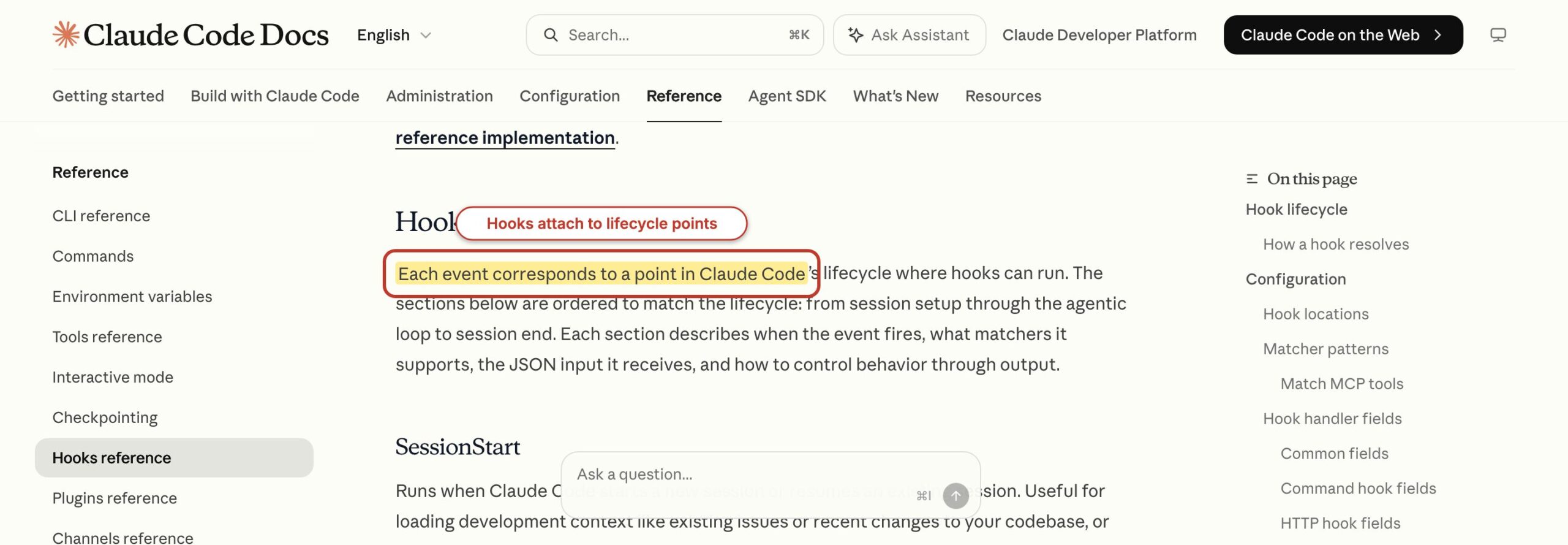
The current Anthropic hooks reference documents more than twenty lifecycle events. You do not need all of them. I group the practical ones by the decision they let me make:
- Before work:
SessionStart,Setup,InstructionsLoaded,UserPromptSubmit,UserPromptExpansion,PreToolUse, andPermissionRequestcan load context, observe instructions, record input, rewrite tool parameters, allow a request, or deny it. - After work:
PermissionDenied,PostToolUse,PostToolUseFailure, andPostToolBatchcan report a denial or failure, format output, run checks, or record what happened. - Agent coordination:
SubagentStart,SubagentStop,TeammateIdle,TaskCreated, andTaskCompletedexpose points around delegated work and agent teams. - Session lifecycle:
Notification,PreCompact,PostCompact,Stop,StopFailure, andSessionEndcover attention, compaction, completion, failure, and cleanup. - Environment changes:
ConfigChange,CwdChanged,FileChanged,WorktreeCreate, andWorktreeRemovelet integrations respond to configuration, directory, file, and worktree changes. - MCP interaction:
ElicitationandElicitationResultexpose the request and response points when an MCP server asks the user for structured input.
Some events are informational. A Notification hook can ring a bell, but it cannot prevent the notification. Others can change the next action. A PreToolUse hook can return updated tool input, allow a request, ask for confirmation, or deny the call. An exit code of 2 can block only on events that support blocking. Assuming every event behaves like PreToolUse is one of the easiest ways to build a hook that looks active but controls nothing.
How a Claude Code Hook Executes
A hook executes through four layers: event, matcher, handler, and result. Claude Code produces the event, checks whether its matcher applies, passes JSON to the handler, and interprets the handler’s exit code or JSON output. Once you understand those four layers, a large hooks file stops looking like mysterious nested configuration.
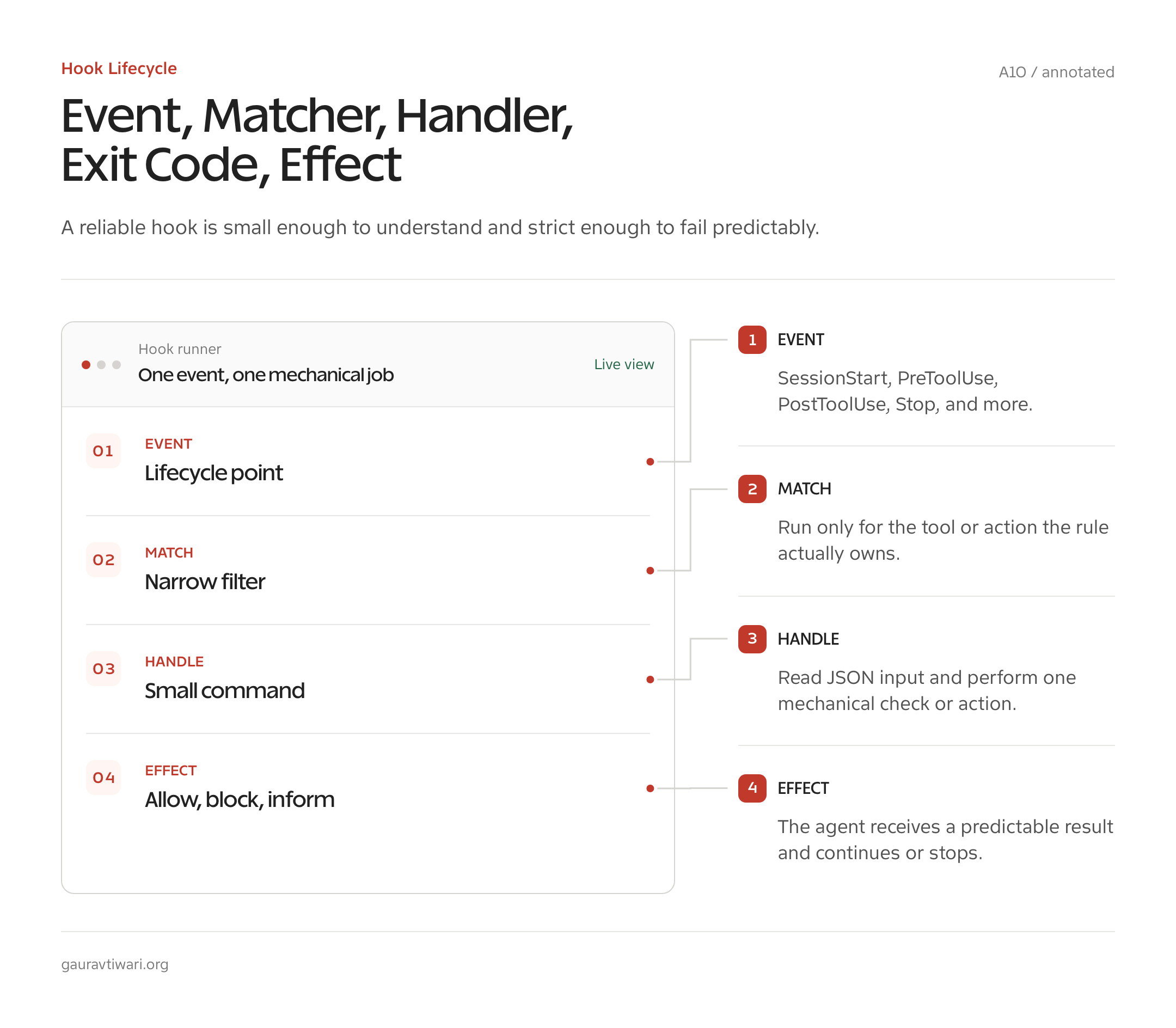
Here is the smallest useful shape. This example runs one command handler before every Bash tool call. The command reads the event JSON from standard input, prints selected fields, and exits successfully:
{
  "hooks": {
    "PreToolUse": [
      {
        "matcher": "Bash",
        "hooks": [
          {
            "type": "command",
            "command": "jq -c '{event: .hook_event_name, command: .tool_input.command}'",
            "timeout": 10
          }
        ]
      }
    ]
  }
}
Put hooks in the scope that matches their ownership. User hooks live in ~/.claude/settings.json. Shared project hooks live in .claude/settings.json. Private project hooks belong in .claude/settings.local.json, which should stay out of version control. Administrators can define managed hooks in managed settings. Plugins can ship hooks, and a skill or subagent can define hooks in frontmatter while that component is active.
For command handlers, Claude Code sends a JSON object on standard input. Common fields include session_id, transcript_path, cwd, permission_mode, and hook_event_name. Event-specific fields carry the useful part. PreToolUse includes tool_name, tool_input, and a tool-use identifier. Notification includes a message, title, and notification type. SessionStart includes a source such as startup, resume, or clear.
Exit 0 means the handler completed. Claude Code parses standard output as JSON when it is valid hook output; otherwise that output may be shown, logged, or added to context depending on the event. Exit 2 is the blocking signal for events that permit a block. Other nonzero exits usually report an error without blocking. Because those semantics vary by event, I prefer explicit hookSpecificOutput JSON when I am making a permission decision and use exit 2 as a simple fallback.
Matcher meaning depends on the event. A plain tool name is case-sensitive and exact: Bash matches Bash. Pipe alternation such as Edit|Write matches either editing tool, and tool-event matchers can use documented regular-expression patterns such as mcp__.*__write.*. Other events match their own fields, such as a session-start source or notification type. An empty or omitted matcher applies to every occurrence of events that use matchers. Several lifecycle events do not use matchers at all.
All matching hooks run in parallel, and their order is not deterministic. Claude Code deduplicates identical commands, but you should still avoid two handlers that rewrite the same tool input or race to change the same file. If one result depends on another, combine the steps in one reviewed handler instead of relying on array order.
My Production Hooks, Explained
My live setup has handlers wired across ten event types: PreToolUse, PermissionRequest, PostToolUse, PostToolUseFailure, Notification, SessionStart, SessionEnd, UserPromptSubmit, Stop, and StopFailure. I do not recommend copying that count. It grew because repeated friction justified each handler. Three patterns do most of the visible work.
RTK Rewrites Noisy Shell Commands
The most useful handler is an RTK PreToolUse hook for Bash. RTK is a Rust command proxy that rewrites supported commands so Claude receives compact, relevant output. A normal git status can become rtk git status; noisy test, build, Docker, and package-manager output can be filtered before it consumes model context.
The setup syntax changed. Current RTK installation guidance uses rtk init -g to install the Claude Code integration globally. Older examples that call rtk hook claude should not be pasted into a new configuration. After installation, rtk gain reports the output reduction RTK observed on rewritten commands.
Supacode Bridges Attention Back to My Terminal
Long sessions fail in an embarrassingly ordinary way: Claude asks a question, the terminal sits behind another window, and nothing happens. My Notification handler forwards input-needed events through a Supacode terminal bridge. The private command is not important. The pattern is: listen only for a notification category that needs human attention, send a short sanitized message, and never include a transcript or tool payload in the alert.
This is exactly what a hook should do. The notification event has already been decided by Claude Code. The hook makes no inference and grants no permission. It changes the delivery channel so I notice the event sooner.
Orca Handles a Narrow Permission Route
I also route selected PermissionRequest events through an Orca handler. This is the most sensitive pattern in the setup because an allow decision can remove a human prompt for that request. The handler is narrow: it receives structured input, applies policy outside the model, and returns a documented decision. Anything it cannot classify safely falls back to the normal permission flow.
A successful allow response uses the current nested decision shape:
{
  "hookSpecificOutput": {
    "hookEventName": "PermissionRequest",
    "decision": {
      "behavior": "allow"
    }
  }
}
I am deliberately not publishing my handler path, rules, or environment. A production permission hook should expose the policy model, not the operator’s private configuration. Start with denials and observation. Automate allows only after the exact request class is stable, low impact, and separately constrained by Claude Code permissions and the operating-system sandbox.
The Hook That Cut My Token Bill
The RTK hook earns its place because terminal output is one of the least valuable ways to fill a context window. Build tools repeat progress bars. Test runners print passing cases you did not ask about. Git and Docker expose columns that matter to a human scanning a terminal but not to the next model decision. Compacting that output before it reaches Claude is better than paying to ingest it and condense it later.
RTK’s project documentation reports 60% to 90% token reduction for common supported development commands. Treat that as a vendor-maintained command-output claim, not a promise about your total Claude bill. rtk gain measures what RTK compressed. It does not measure every prompt, tool definition, cache read, model response, or retry in an end-to-end session.
The honest way to evaluate it is to compare the same real commands in your own repositories, inspect whether important lines survive, and then watch the full account-level cost over enough sessions to smooth out task differences. My broader guide to reducing AI development costs covers the other levers. A shell-output hook helps, but model choice, context discipline, caching, agent count, and retry behavior can matter more.
There is also a boundary worth keeping: RTK rewrites supported Bash commands. It does not compress Claude Code’s built-in Read, Grep, or Glob tool results. A token claim based on shell output should not be stretched across the entire tool system.
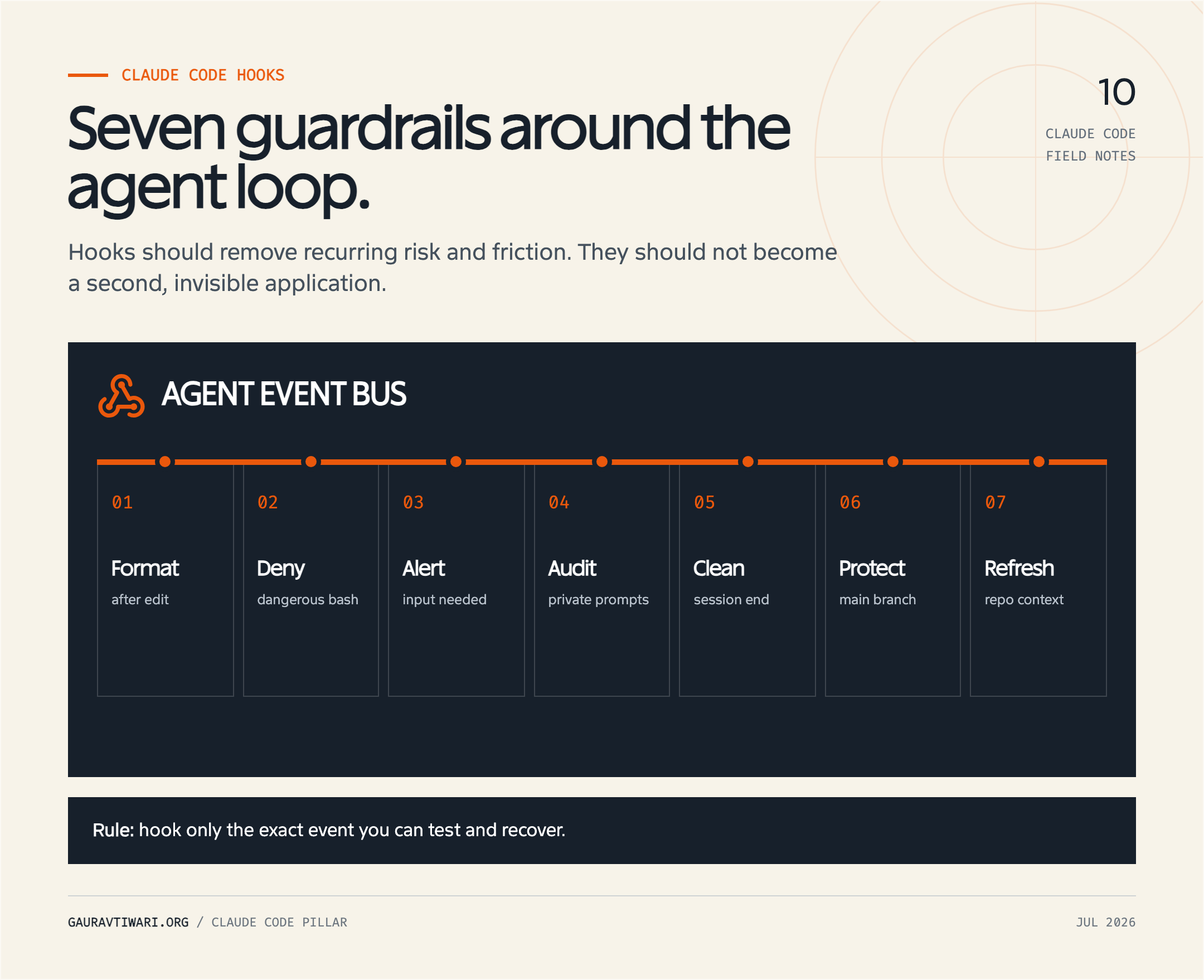
7 Claude Code Hook Recipes You Can Paste Today
These seven Claude hooks examples use the current settings structure and documented event outputs. Add one recipe at a time, keep scripts inside a reviewed .claude/hooks/ directory, make shell files executable, and test them outside Claude before relying on them. The snippets are intentionally narrow. Expand them only after you can explain the new match in one sentence.
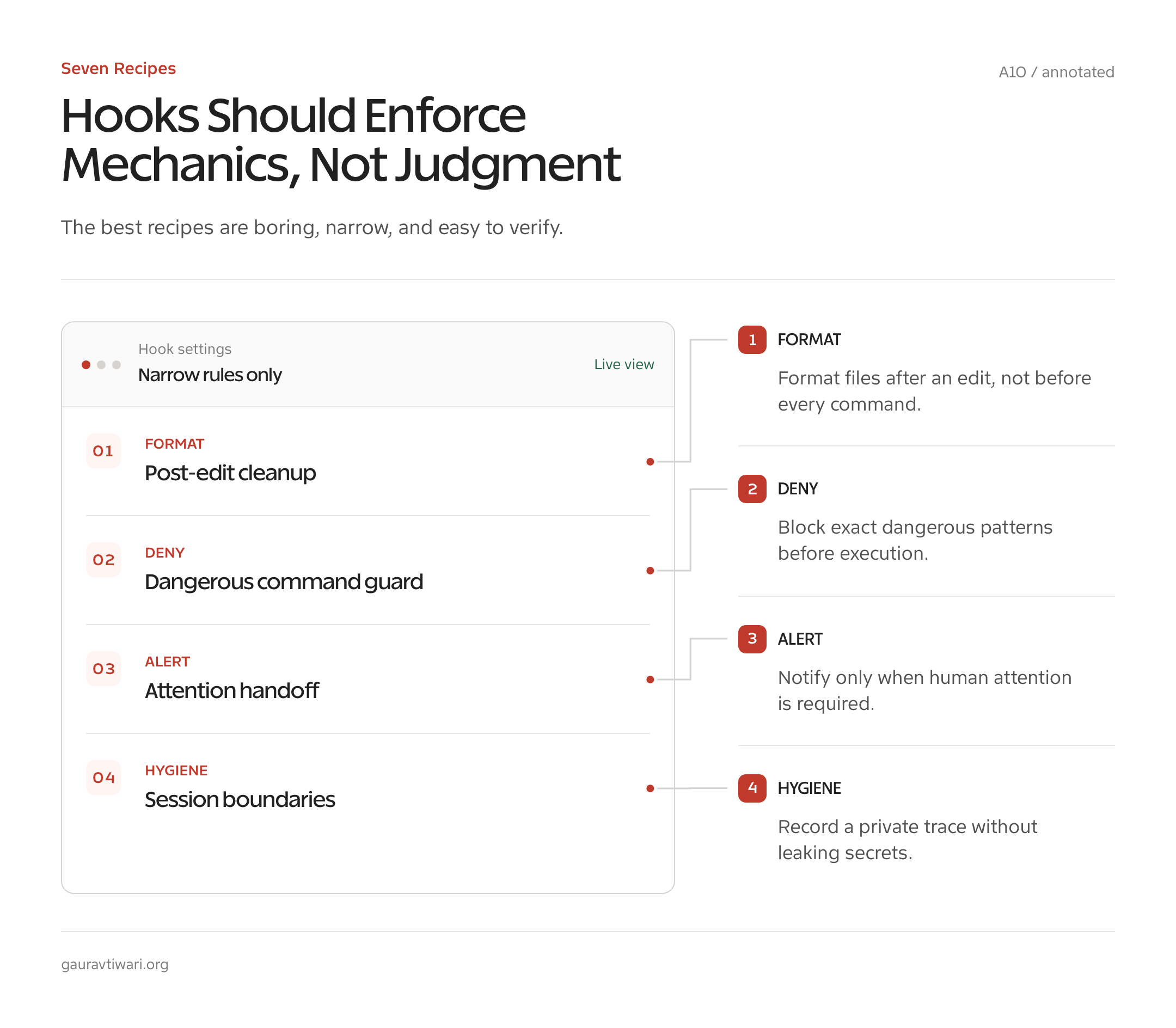
1. Auto-Format a File After Edit or Write
Use PostToolUse when the file already changed and a formatter should make deterministic cleanup. The matcher accepts both built-in file-changing tools. Save this in the appropriate settings file:
{
  "hooks": {
    "PostToolUse": [
      {
        "matcher": "Edit|Write",
        "hooks": [
          {
            "type": "command",
            "command": "\"$CLAUDE_PROJECT_DIR\"/.claude/hooks/format-file.sh",
            "timeout": 60
          }
        ]
      }
    ]
  }
}
The script reads the changed path once, resolves relative paths inside the project, rejects paths outside it, and lets Prettier ignore file types it does not understand:
#!/usr/bin/env bash
set -euo pipefail

file=$(jq -r '.tool_input.file_path // empty')
[ -n "$file" ] || exit 0

case "$file" in
  /*) target="$file" ;;
  *) target="$CLAUDE_PROJECT_DIR/$file" ;;
esac

case "$target" in
  "$CLAUDE_PROJECT_DIR"/*)
    npx prettier --write --ignore-unknown "$target"
    ;;
  *)
    echo "Skipped a path outside the project" >&2
    ;;
esac
Gotcha: A successful tool call does not guarantee the file has the language you expect. Use a formatter with an ignore option, or add a strict extension allowlist. A format failure happens after the edit, so it cannot undo the original change.
2. Deny Exact Dangerous Bash Commands
A Claude Code PreToolUse hook can deny a tool call before Bash runs. Point the Bash matcher to a reviewed script:
{
  "hooks": {
    "PreToolUse": [
      {
        "matcher": "Bash",
        "hooks": [
          {
            "type": "command",
            "command": "\"$CLAUDE_PROJECT_DIR\"/.claude/hooks/block-dangerous.sh",
            "timeout": 10
          }
        ]
      }
    ]
  }
}
The script below blocks only a short exact list. That makes its behavior understandable and avoids pretending a string match is a shell parser:
#!/usr/bin/env bash
set -euo pipefail

command=$(jq -r '.tool_input.command // empty')

case "$command" in
  "rm -rf /"|"sudo rm -rf /"|"rm -rf ~"|"git reset --hard"|"git clean -fdx")
    jq -n --arg reason "Blocked by the project's exact-command safety hook" '{
      hookSpecificOutput: {
        hookEventName: "PreToolUse",
        permissionDecision: "deny",
        permissionDecisionReason: $reason
      }
    }'
    ;;
esac
Gotcha: This is a speed bump, not a complete shell-security system. Whitespace changes, flags, wrappers, scripts, aliases, encoded commands, and equivalent tools can bypass naive matching. Pair the hook with Claude Code permission rules, restricted credentials, protected branches, backups, and sandboxing.
3. Send a Desktop Alert When Input Is Needed
The Notification event fits a side effect because it does not control the session. This macOS example displays a fixed message instead of copying possibly sensitive notification text:
{
  "hooks": {
    "Notification": [
      {
        "matcher": "permission_prompt|idle_prompt",
        "hooks": [
          {
            "type": "command",
            "command": "osascript -e 'display notification \"Claude Code needs your attention\" with title \"Claude Code\"'",
            "timeout": 10
          }
        ]
      }
    ]
  }
}
Gotcha: Notification-type names are exact values. Confirm them against the current event reference and your client version. On Linux, replace osascript with a reviewed notify-send command. Do not forward full prompts or tool inputs to a third-party alert service.
4. Keep a Private Prompt Audit Log
UserPromptSubmit fires after you submit a prompt and before Claude processes it. A local audit can help reproduce workflow failures. This handler creates a user-only JSON Lines file and records a timestamp plus the prompt:
{
  "hooks": {
    "UserPromptSubmit": [
      {
        "hooks": [
          {
            "type": "command",
            "command": "umask 077; jq -c '{at: (now | todateiso8601), prompt: .prompt}' >> \"$CLAUDE_PROJECT_DIR/.claude/prompt-audit.jsonl\"",
            "timeout": 10
          }
        ]
      }
    ]
  }
}
Gotcha: Prompts can contain client data, unpublished material, paths, credentials pasted by mistake, and personal information. Add the log to .gitignore, define a retention period, and skip this recipe in repositories where storing prompts creates more risk than value. An audit feature that becomes an ungoverned data archive is a bad trade.
5. Clean Temporary Files When a Session Ends
SessionEnd is suitable for best-effort cleanup. This example removes only regular files with a claude- prefix that are older than one day, only from the project’s own .tmp directory:
{
  "hooks": {
    "SessionEnd": [
      {
        "hooks": [
          {
            "type": "command",
            "command": "test ! -d \"$CLAUDE_PROJECT_DIR/.tmp\" || find \"$CLAUDE_PROJECT_DIR/.tmp\" -maxdepth 1 -type f -name 'claude-*' -mtime +1 -delete",
            "timeout": 30
          }
        ]
      }
    ]
  }
}
Gotcha: Session-end cleanup is not guaranteed disaster recovery. A process can crash, the machine can lose power, or the handler can fail. Keep the deletion scope narrow and make the command safe to run repeatedly. Never aim a cleanup hook at a shared system directory with a broad wildcard.
6. Protect the Main Branch From Direct Pushes
This recipe applies a local policy: if the repository is currently on main or master, deny a command beginning with git push. Reuse the PreToolUse Bash configuration from recipe two and point it at this script:
#!/usr/bin/env bash
set -euo pipefail

command=$(jq -r '.tool_input.command // empty')
branch=$(git -C "$CLAUDE_PROJECT_DIR" branch --show-current 2>/dev/null || true)

case "$branch:$command" in
  main:"git push"*|master:"git push"*)
    jq -n --arg reason "Create a feature branch or open a reviewed release path before pushing" '{
      hookSpecificOutput: {
        hookEventName: "PreToolUse",
        permissionDecision: "deny",
        permissionDecisionReason: $reason
      }
    }'
    ;;
esac
Gotcha: A local hook is weaker than server-side branch protection. It will not stop a human, another client, a script, or an alternate Git command. Use GitHub, GitLab, or your Git host to enforce the real branch policy. If you want to prohibit every ordinary push from Claude, a deny rule such as Bash(git push *) is easier to audit than a hook.
7. Load Fresh Repository Context at Session Start
A SessionStart command can print concise, current facts into Claude’s context. This one runs only on startup or resume, confirms that the directory is a Git worktree, and returns a short status plus the latest commit:
{
  "hooks": {
    "SessionStart": [
      {
        "matcher": "startup|resume",
        "hooks": [
          {
            "type": "command",
            "command": "if git -C \"$CLAUDE_PROJECT_DIR\" rev-parse --is-inside-work-tree >/dev/null 2>&1; then git -C \"$CLAUDE_PROJECT_DIR\" status --short; git -C \"$CLAUDE_PROJECT_DIR\" log -1 --oneline; fi",
            "timeout": 15
          }
        ]
      }
    ]
  }
}
Gotcha: Standard output from SessionStart enters context, so every extra line has a recurring token cost. Return facts that can change between sessions. Stable architecture and project commands belong in CLAUDE.md or the nearest project instructions, not in a shell hook that rediscovers them every time.
Debugging Hooks When They Misbehave
Broken Claude Code hooks usually fail for ordinary reasons: invalid JSON, a matcher that never fires, a missing executable bit, a command unavailable in the hook environment, incorrect quoting, an unexpected event field, or a handler that waits forever. Debug the handler as a program before debugging Claude as an agent.
- Validate the settings file. Parse it with
jq empty .claude/settings.jsonor your editor’s JSON validator. - Inspect registration. Run
/hooksin Claude Code to inspect configured hooks and see where each one came from. - Run diagnostics. Use
/doctorfor configuration and environment problems. The current documentation does not promise a per-hook runtime profiler, so do not rely on an undocumented “slow hooks” report. - Capture one real payload safely. During local development, direct standard input to a permission-restricted temporary file, inspect its keys, and delete it. Do not commit payloads or transcripts.
- Replay the script outside Claude. Pipe a minimal synthetic JSON object into the script and check its stdout, stderr, and exit status.
- Time it explicitly. Run the command with
/usr/bin/time, set a handler timeout, and move slow network work out of blocking events. - Add handlers back one at a time. A small known-good hook is easier to reason about than a full copied settings section.
Remember that command hooks may run in an environment that differs from your interactive shell. The expected PATH, version manager, alias, or shell function may not exist. Use stable executable paths where portability allows, quote every filesystem path, and make dependencies such as jq explicit in the project setup.
Stop and SubagentStop hooks have another trap: if the handler blocks a stop, Claude may continue and cause the hook to run again. The input exposes whether a stop hook is already active. Guard recursive designs and give the model a concrete reason to continue, or you can create an expensive loop whose only output is another failed attempt to stop.
Hook Security: You Are Running Shell Code
Claude Code hooks run commands with your operating-system privileges. That makes every copied hook a code-review task. A hook can read files, alter a repository, call a network service, copy a transcript, or return an allow decision. The fact that it sits inside JSON does not make it configuration-only.
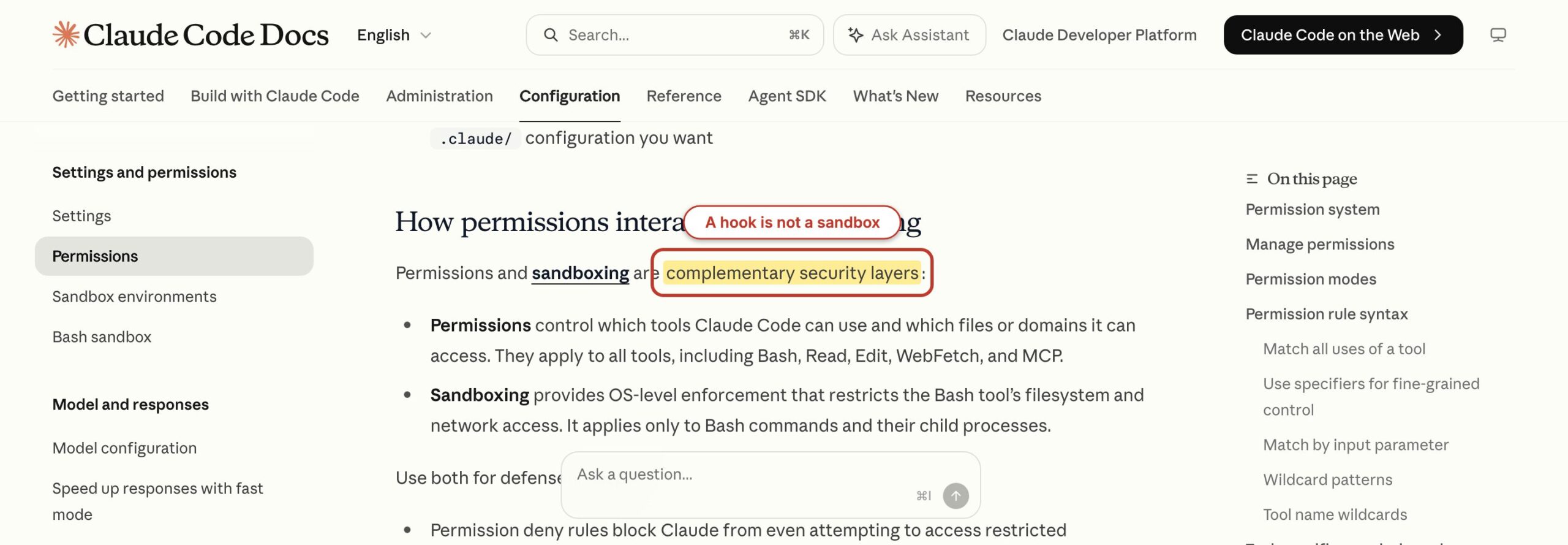
- Keep project hooks reviewable. Put shared scripts in a small directory, commit them, and require the same review as application code.
- Use the narrowest scope. A project-specific rule belongs in project settings. Do not make it a user hook that silently touches every repository.
- Minimize event data. Read the fields the decision needs. Do not ship transcripts, prompts, file contents, or credentials to an alert or logging service.
- Prefer exact allowlists. Exact tools, paths, branches, and operations are easier to defend than a growing blacklist of dangerous strings.
- Fail safely. A permission router that crashes should return control to the normal approval path, not infer an allow.
- Set timeouts. A blocked network call in
PreToolUsecan make every matching action feel broken. - Layer controls. Permission rules, sandboxing, operating-system access, limited service accounts, protected branches, and backups remain necessary.
Permission rules and hooks solve related but different problems. Claude Code evaluates deny rules before ask and allow rules. A hook can still block a tool that a static rule allows. A hook does not magically override a denied operation, and an allow hook should not be treated as authority beyond the credentials and sandbox available to the process. The Anthropic security guidance is worth reading before a hook touches deployment, production data, messaging, billing, or credentials.
The same trust rule applies to external capability. If the task needs WordPress or another service, use a narrow connection with explicit operations, such as the approach I describe in WP-MCP for controlled WordPress access. Do not hide a broad API client and a permanent token inside a shell hook just because it is convenient. My WordPress developer cheat sheet makes a useful companion when you are separating repeatable commands from agent-specific automation.
What Not to Put in a Hook
Do not put judgment in a hook. “Block direct pushes to main” is mechanical. “Allow this deployment if the change looks safe” is not. The second rule depends on context, risk, code review, tests, environment, and business impact. Turning it into a prompt hook merely hides a model decision inside infrastructure that people assume is deterministic.
- Do not add long model calls to common events. A prompt handler on every tool call multiplies latency and cost.
- Do not use hooks as a secret store. Keep credentials in the operating system, an approved secret manager, or scoped environment injection.
- Do not make cleanup destructive. Delete only files the hook created, in a directory it owns, with a narrow age and name rule.
- Do not duplicate stable documentation. Put lasting project facts in project instructions. Use
SessionStartfor current state. - Do not log by default. Decide what is collected, why, for how long, and who can read it before creating a prompt or transcript archive.
- Do not auto-approve broad categories. A convenient permission hook can quietly become the weakest control in the workflow.
- Do not copy a production hooks file wholesale. Dependencies, paths, tools, risks, and notification channels are specific to the operator.
A good settings.json hooks section should be understandable without folklore. Every handler needs an owner, a one-sentence rule, a timeout, a test input, a known failure mode, and a removal path. If nobody remembers why a hook fires, remove it until the case becomes clear again.
Start with one of the seven recipes, not all seven. My choice for most developers is the formatter because it is visible, reversible, and easy to verify. Add a deny hook only for a policy you already enforce elsewhere. Add permission automation last. That order teaches the mechanics before it raises the stakes.
Frequently Asked Questions
Claude Code hooks become much safer once event timing, scope, and permission behavior are explicit. These answers cover the decisions to settle before a hook becomes part of daily work.
What are Claude Code hooks?
Claude Code hooks are user-defined handlers that run at documented lifecycle events. A hook can inspect event JSON, execute a command or another supported handler type, and return a result that records, transforms, permits, or blocks an action where the event supports that control. Hooks are best for deterministic guardrails and automation, not subjective decisions.
Where do I put Claude Code hooks?
Put user-wide hooks in ~/.claude/settings.json, shared project hooks in .claude/settings.json, and private project hooks in .claude/settings.local.json. Administrators can use managed settings. Plugins can provide hooks, while skills and subagents can define hooks that are active only while that component runs. Choose the narrowest scope that owns the policy.
Can a Claude Code hook block a tool call?
Yes. A PreToolUse hook can deny a matching tool call before it executes by returning the documented hookSpecificOutput permission decision. Exit code 2 can also block events that support blocking. Not every event is controllable: Notification and several post-action events are side-effect points, so their handlers cannot undo an action that already happened.
Do hooks run in every Claude Code session?
Only hooks visible in the active configuration and matching the current event run. User hooks can apply across projects, project hooks apply to that repository, and private project hooks apply locally. Plugin, skill, and subagent hooks depend on whether that component is active. Event matchers further limit when a registered handler runs.
Are Claude Code hooks safe to copy from the internet?
No hook should be copied without review. Command hooks run shell code with your user privileges and can read files, call networks, change repositories, or return permission decisions. Read every command and script, remove unknown dependencies, use narrow paths and scopes, protect secrets, set timeouts, and test with synthetic input before enabling it in a real project.
What is the difference between hooks and MCP in Claude Code?
Hooks respond to Claude Code lifecycle events and enforce local automation or policy. MCP connects Claude Code to tools, resources, and prompts exposed by an external or local server. Use a hook to block a command, format a file, or send an alert. Use MCP when Claude needs a controlled capability or data source such as WordPress, a database, or a business service.
Build one hook, trigger it deliberately, inspect its result, and then leave it alone for a week. If it removes repeated friction without surprising you, keep it. That is the standard. A small hook you trust is worth more than a clever automation layer nobody can explain.