
 by
I know how hard it is to pick a WordPress helpdesk plugin from the plugin pages alone. Every page promises tickets, a customer portal and AI replies, and the feature lists look almost the same.
The differences only show up once a real customer writes in. One plugin emails them back, another stays silent and a third loads a calendar library on every page of your site.
So I installed the free versions of 5 helpdesk plugins on a clean test site. I sent each one the same ticket as a customer, replied as the agent and logged every email it sent. My short answer:
- Tickets, docs and AI chat in one plugin: Core Support.
- The cleanest free helpdesk: Fluent Support.
- The most free features: SupportCandy, after you change one setting.
Core Support is my own plugin, and I’d rather you hear that from me first. I built it as a WordPress helpdesk for businesses that sell plugins, themes, courses or services. The support portal, docs and changelogs on gauravtiwari.org run on it.
Quick Comparison
Find the job you need in the second column, then jump to that plugin. The email to ticket column matters more than it looks, because it decides whether customers can simply email you or must use a form on your site.
| Plugin | Best for | Email to ticket | Plugin files on every page | Paid from |
|---|---|---|---|---|
| Core Support | Tickets, docs and AI chat together | Included (IMAP, Cloudflare relay, Zapier, Make and n8n) | Only where you place the chat, about 6 KB | $199 once, unlimited sites |
| Fluent Support | Cleanest free helpdesk | Pro | None | $129/yr |
| SupportCandy | Most free features | Paid | About 268 KB until you change one setting | $79/yr or $249 lifetime |
| JS Help Desk | AI on a local model | Paid | About 55 KB | $99/yr |
| Awesome Support | WooCommerce and EDD product sync | Paid bundle | About 11 KB | $149/yr |
| Support Genix | Helpdesk plus basic docs | Pro | About 25 KB | $99/yr or $149 lifetime |
| Heroic Inbox | Shared inbox without a portal | Every plan | No free version to test | $199/yr |
How I Tested
I want to explain the test first, because the email results matter more than any feature list.
- Each plugin ran alone on a fresh WordPress site with the default block theme.
- I ran each plugin’s setup wizard the way a new user would.
- A logged-in test customer submitted the same refund question through each plugin’s portal.
- I replied to it as the agent from wp-admin.
- I recorded every email the plugin tried to send, to the customer and to the team.
- I opened an ordinary blog post as a logged-out visitor and added up the CSS and JavaScript each plugin loaded there.
A clean blog post on the test site loaded about 5 KB of CSS and JavaScript in total. Keep that number in mind for the SupportCandy entry.
Heroic Inbox has no free version, so its entry comes from HeroThemes’ own pricing and documentation. Core Support’s numbers come from gauravtiwari.org, which runs it every day.
Best WordPress Helpdesk Plugins
These are in the order I’d recommend them to a small WordPress business. Each heading names the job that plugin does best, so you can jump straight to yours.
Best All-in-One Helpdesk: Core Support
Core Support is my pick when you want the helpdesk, the docs and the AI chatbot in one plugin. It’s built for WordPress businesses that sell plugins, themes, courses or services and answer customers by email.
Core Support
- Inbox, customer portal and email to ticket
- WooCommerce, FluentCart and EDD order context
- Imports from Zendesk, Freshdesk and Intercom
- $199 once for unlimited sites and agents
The ticketing side covers what a small support team needs from day one:
- One inbox in wp-admin: every ticket has a status (Open, Waiting on customer or Resolved), a priority and an assigned agent, plus private notes and delivery status on replies.
- Email to ticket: mail arrives by IMAP (Gmail, Fastmail, Zoho or your host’s mailbox), by a Cloudflare relay that ships with the plugin, or by Zapier, Make and n8n.
- Spam gate: a first-time sender waits for a person to accept or discard the message before it becomes a ticket.
- Forms: Contact Form 7, WPForms, Gravity Forms, Fluent Forms and your other websites can open tickets.
- Customer context: WooCommerce, FluentCart and Easy Digital Downloads orders and licenses show beside the conversation, and FluentCRM fills in contact details.
- Team alerts: new tickets can ping Slack, Telegram, Discord or Pushover.
- Customer portal: customers follow every ticket sent from their email address, with a Support tab inside WooCommerce and FluentCart accounts.
- Encrypted attachments: files stay on your server or move to private storage, encrypted before they leave WordPress.
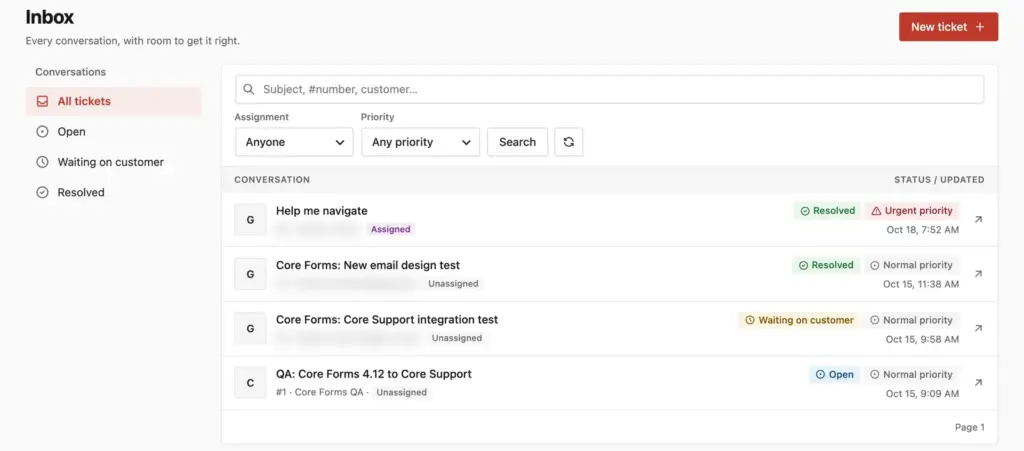
The same license includes a knowledge base at /docs/, an AI chatbot that answers from your docs with your own API key, changelogs at /changelogs/ and a public roadmap. When the chatbot can’t help, “Talk to a person” turns the chat into a ticket with the transcript attached. Live chat with a person arrives in the first half of November as an update to the same license.
On my site, the ticket portal page loads about 27 KB of Core Support CSS and JavaScript. Ordinary blog posts load only the chat launcher, about 6 KB, and only because I placed the chat site-wide.
It also imports tickets from Zendesk, Freshdesk and Intercom, which I cover below. Phone support isn’t part of it, so it pairs with whatever calling tool you already use.
Core Support costs $199 once for unlimited sites and agents. A hosted helpdesk charges about that for 1 agent in under a year, so the math gets easy once 2 or 3 people answer tickets.
Best Free Helpdesk: Fluent Support
Fluent Support is the cleanest free WordPress helpdesk plugin I tested. It loaded nothing on the ordinary blog post, gives you unlimited agents for free and has a short 2-step onboarding.
Fluent Support
- Unlimited agents in the free version
- Loads nothing on ordinary pages
- Email piping and workflows in Pro
- Pro from $129/yr
Fluent Support asks for a business name, a business email and the page for the customer portal, then offers an optional newsletter, data sharing and a Fluent Forms install. I left all 3 off.
In my ticket test, the new ticket emailed the admin inbox and my agent reply reached the customer. The customer didn’t get a “we received your ticket” email, because the Ticket Created (To Customer) notification ships switched off. You should turn it on in the business inbox’s email settings.
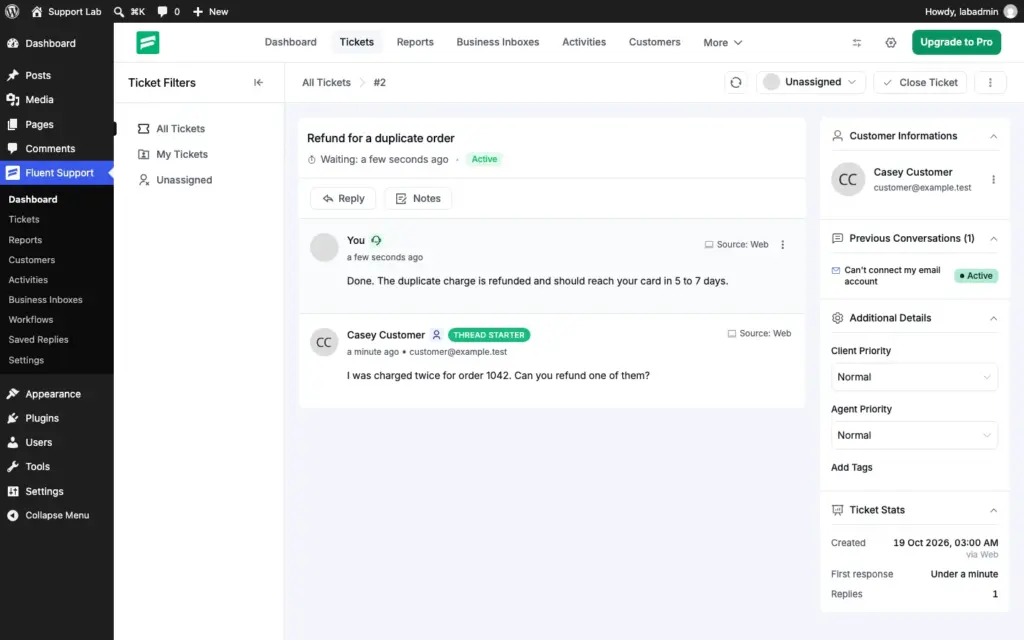
One trap: finish the onboarding before you take tickets. A ticket I created before the business inbox existed sent no emails at all, even after I replied to it.
The free version includes:
- unlimited tickets, agents and attachments
- a customer portal through a shortcode or a block
- internal notes, priorities and basic reports
- FluentCRM and Fluent Forms integrations
Email piping is Pro, along with workflows, saved replies, ticket merge, satisfaction ratings and integrations such as WooCommerce, FluentCart, Slack and Telegram. Pro starts at $129/yr for 1 site and covers 10 business inboxes. The AI reply, summary and tone tools are Pro too, and they bill your own OpenAI account.
If you want a proper free helpdesk today and the option to grow into email piping later, Fluent Support is the one I’d install.
Most Free Features: SupportCandy
SupportCandy gives you more in its free version than any other helpdesk here. It was also the only one that sent all 3 emails out of the box: a confirmation to the customer, an alert to the team and the agent’s reply.

SupportCandy
- Free AI assistant and chatbot with your own key
- Guest tickets with a one-time code
- All 3 ticket emails out of the box
- Paid from $79/yr or $249 lifetime
The free version of SupportCandy includes:
- unlimited tickets, agents and customers
- 16+ custom field types, private notes and agent collision warnings
- guest tickets with a one-time code login
- an AI assistant that drafts, polishes and summarizes replies, plus an AI chatbot, both on your own OpenAI or Gemini key
It also needs the most care. By default it loads 15 of its own files on every page of your site, including a calendar, charts and data tables, about 268 KB compressed. With the jQuery and editor files it pulls in, a blog post went from about 5 KB to about 412 KB.
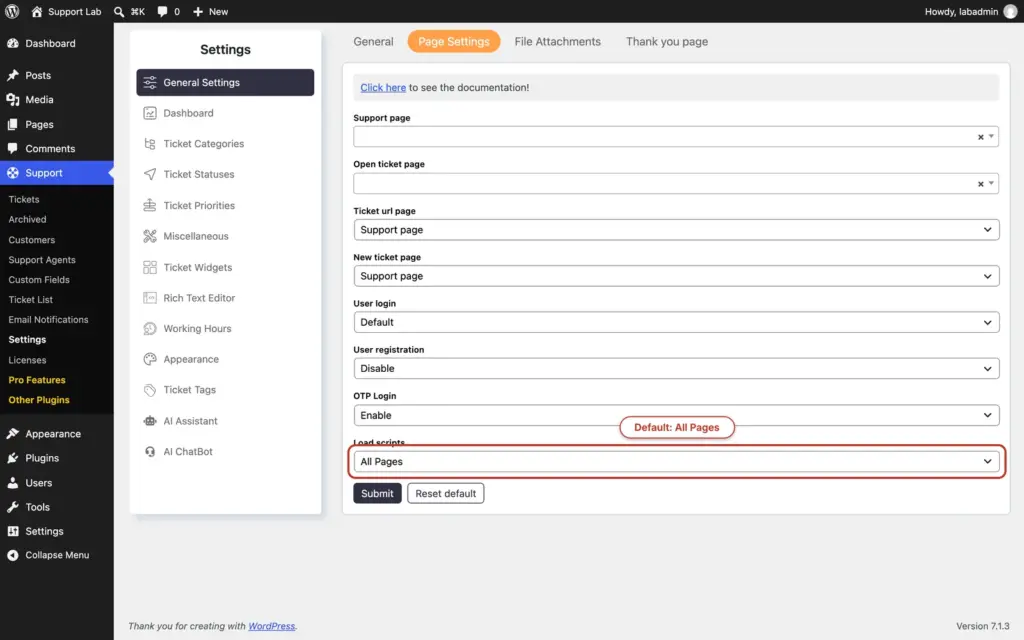
The fix takes a minute. Go to Support → Settings → General Settings → Page Settings, set Load scripts to Custom and pick your support pages. Do it before the plugin goes live.
Its 8-step setup wizard creates the support page, which the front end can’t work without, and asks for a sender name and email. The ticket form shows GDPR and terms checkboxes by default, and every agent reply asks “Are you sure?” before it posts.
Every paid plan includes all extensions: email piping, WooCommerce, canned replies, SLAs, workflows, reports and satisfaction surveys. Plans start at $79/yr for 1 site, and a $249 lifetime license is available. For a team that wants AI tools without paying for a plan, SupportCandy is the generous choice, once you’ve fixed the script setting.
Best for Local AI: JS Help Desk
JS Help Desk is the one to look at if you want AI help on tickets without sending customer messages to an outside AI company. Its free AI Copilot can summarize, translate and draft replies through a local model such as Ollama or LM Studio, or through your own hosted API key.
JS Help Desk did well in the ticket test. The customer form came prefilled with the customer’s name and email, and the new ticket emailed both the admin and the customer. My agent reply reached the customer too.
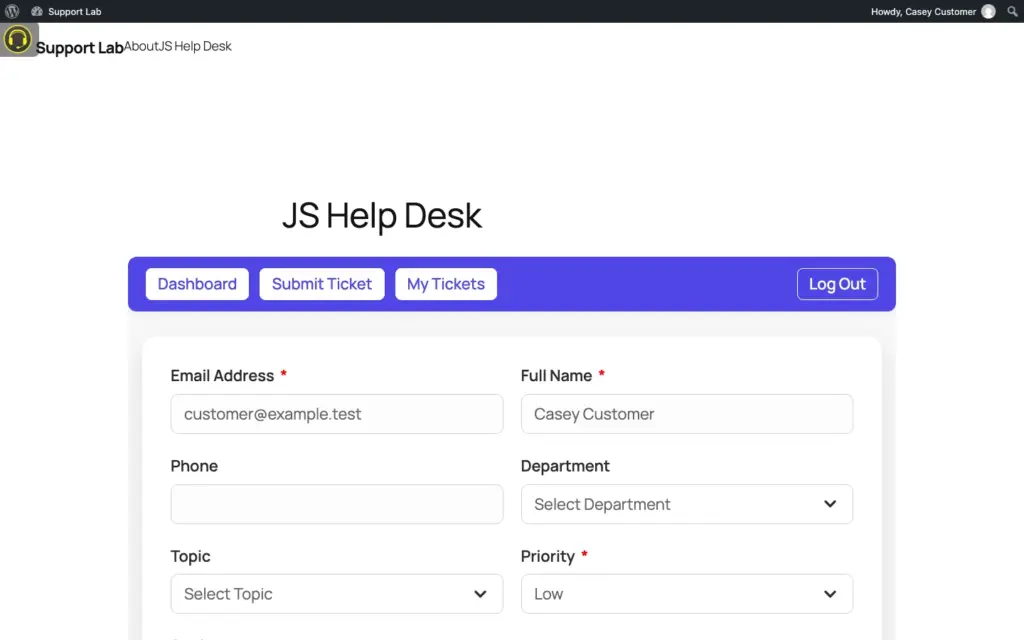
The free version also includes canned responses, help topics, departments, internal notes, reports and guest tickets. That’s more than Fluent Support gives away.
The weight is the catch:
- It loads 8 of its own files on every page, about 55 KB compressed, plus jQuery.
- Its control panel page loaded about 82 KB of plugin files.
- It adds more than 40 database tables on activation.
Paid plans include all 9 add-ons, starting at $99/yr for 1 site: email piping, SLAs, a knowledge base, an AI agent, live chat, WooCommerce and EDD. If local AI matters to you, JS Help Desk is the only one here that offers it in the free version.
Best Free Store Sync: Awesome Support
Awesome Support is the long-running option with free product sync from WooCommerce and Easy Digital Downloads, plus a free importer for Zendesk, Help Scout and Ticksy tickets.
Awesome Support gave me the most surprises in setup:
- Its 6-step wizard couldn’t add the Submit Ticket and My Tickets pages to a menu, because my block theme has no classic menus.
- By default, none of your existing users can submit tickets. The wizard asks which roles to allow, and I had to tick Subscriber.
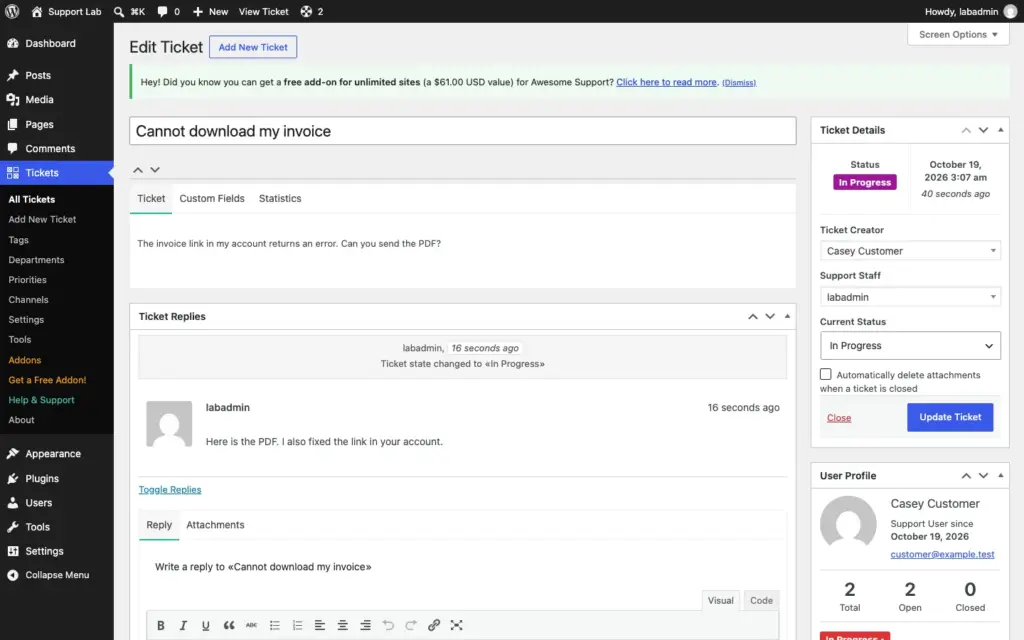
- My first ticket sent no emails at all. The E-Mails settings screen showed the notifications switched on, but they weren’t saved until I opened that screen and clicked Save.
After that one save, everything worked: the customer got a confirmation, the admin got an assignment email and my reply reached the customer. If you install it, open Tickets → Settings → E-Mails and save it once before you go live.
It loads a small popup library on every page, about 11 KB plus jQuery. Paid features come in bundles:
- Standard, $149/yr for 1 site: email piping, canned responses and an FAQ.
- PRO, $229/yr for 1 site: adds guest tickets and deeper WooCommerce and EDD support.
Reviews on WordPress.org are mixed, so I’d try the free version on a staging site first.
Best Lifetime License: Support Genix
Support Genix bundles a basic knowledge base and an AI chatbot into its free helpdesk. It’s also one of the few here with lifetime pricing, at $149 for 1 site.
Support Genix has a modern portal. Customers open a ticket in a simple pop-up with a subject, description and file upload, and logged-out visitors get a “Create Ticket as a Guest” option. Its 6-step wizard can be skipped entirely.
In my ticket test, the customer got a confirmation email. The team didn’t get an alert for the new ticket in the default setup, so someone has to watch the ticket list. The portal footer also says “Powered by Support Genix” by default.
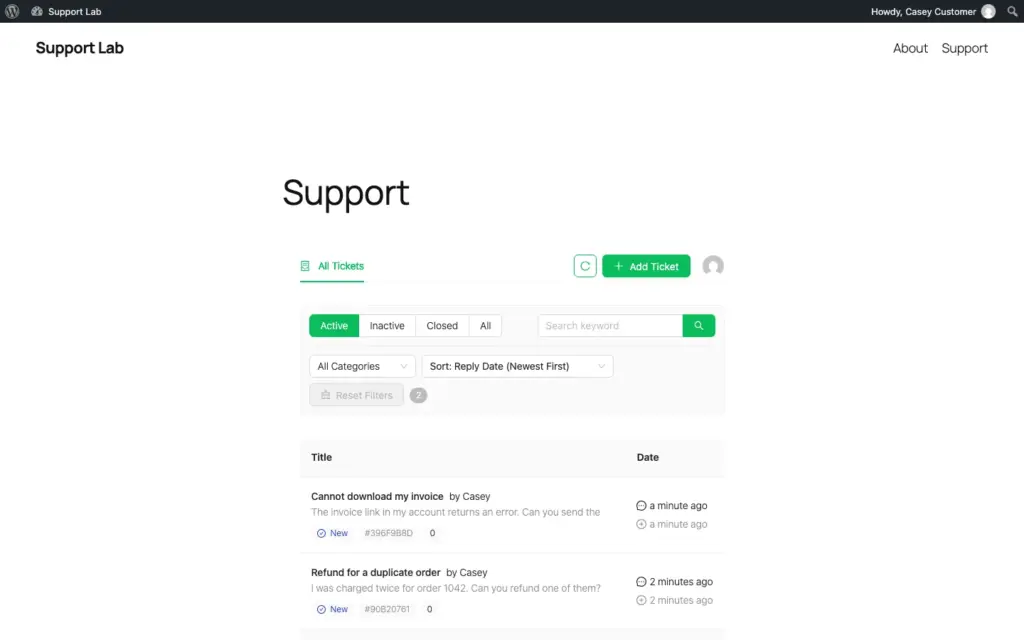
It loads its knowledge base styles and script on every page, about 25 KB plus jQuery. The AI reply assistant and chatbot run on your own OpenAI or Claude key. Email to ticket, mailbox management and automation are Pro, from $99/yr for 5 sites.
Support Genix suits a small shop that wants docs and tickets cheaply and doesn’t mind a product with few reviews so far.
Best for Email-Only Support: Heroic Inbox
Heroic Inbox works like a shared Gmail inside wp-admin, for teams whose customers email them directly. It has no customer portal and no free version, so it didn’t go through my test site.
Heroic Inbox connects to Gmail, Outlook or any IMAP mailbox on every plan:
- Essential, $199/yr for 1 site: 2 mailboxes, internal notes, collision detection, assignments, tags and attachments.
- Plus, $499/yr for 3 sites: 5 mailboxes, workflow automation, saved replies and reports.
- Pro, $749/yr for 5 sites: 10 mailboxes and 16 integrations, including WooCommerce and Easy Digital Downloads.
HeroThemes discounts the first year, and renewals are at full price. If your customers will never log into a portal, Heroic Inbox fits. Paying $749 a year for WooCommerce order history is steep, though, when Core Support and Fluent Support Pro show orders for much less.
Before you compare feature lists, send yourself a test ticket and see which emails arrive.
When a Hosted Helpdesk Fits Better
A hosted helpdesk such as Help Scout, Freshdesk or Zendesk makes sense when your team already works there, or when support runs across phone, social and several websites at once. You pay per agent, every month.
- Help Scout: a free plan for 5 users with 1 inbox and 1 docs site, then $25 per user a month on Standard, billed yearly.
- Freshdesk: Growth at $19 per agent a month, billed yearly.
- Zendesk: Support Team at $19 per agent a month, billed yearly.
Their WordPress plugins are thin. Freshdesk’s and Zendesk’s official plugins add a help widget, single sign-on and comment-to-ticket conversion, and neither has been updated in a long time. Help Scout has no official plugin and asks you to paste its Beacon code.
Here’s a worked example for a team of 3 agents, using list prices:
- Help Scout Standard: 3 × $25 × 12 = $900 a year, every year.
- Fluent Support Pro: $129 a year for 1 site.
- Core Support: $199 once.
It is wise to stay hosted if your team lives in that tool already and the bill doesn’t hurt. If you’re starting fresh on WordPress, a plugin pays for itself in the first year.
Moving From Zendesk, Freshdesk or Intercom
Most teams stay on a hosted helpdesk for one reason: years of ticket history they don’t want to lose. That history can move with you.
Core Support imports tickets from Zendesk, Freshdesk and Intercom, plus customers or tickets from a CSV file. The importer is built to be run more than once:
- Tickets, replies, private notes, attachments and requesters arrive with their original dates.
- An import sends no email, so customers never get a burst of old notifications.
- A second run skips what’s already there and brings over later changes.
- An import can be undone, and nothing changes in the old helpdesk.
Help Scout has no importer here yet, so a Help Scout team would move customers or tickets through a CSV export. Awesome Support’s free importer is the other route for Zendesk and Help Scout tickets.
My advice is to import early and keep the old helpdesk answering for a week. Then switch your support address to the new inbox and run the import once more to catch the last replies.
WordPress Customer Support Plugins by Job
Customer support on a WordPress site is usually 3 or 4 jobs, and a helpdesk covers only one of them. This is how I’d split them:
- Tickets and email: any helpdesk plugin on this page.
- Self-service answers: a knowledge base plugin. I compared 7 of them in the best WordPress knowledge base plugins and explained why docs cut tickets in the benefits of a knowledge base.
- Live chat: I compared the options in my WordPress live chat plugin roundup on Gatilab.
- Chat-first support with tickets as an add-on: Support Board leads with chat and an AI chatbot, and adds tickets as a separate app.
- Screen-sharing help: a remote support tool, which I covered in lightweight remote support tools.
- Automation: AI drafts, routing and saved replies, which I explained in how customer support automation helps human agents.
Core Support covers tickets, self-service answers and AI chat today. The others pair well with whichever helpdesk you pick.
Which One Should You Pick
There are broadly three ways small WordPress businesses handle support: a shared Gmail inbox, a hosted helpdesk, or a helpdesk plugin on their own site. The Gmail route breaks once 2 people answer, and the hosted route gets expensive per agent.
For most small teams, a plugin on your own site is the sensible middle. This is how I’d choose between them:
- You sell products and want tickets, docs and AI chat in one place: Core Support.
- You want a free helpdesk that stays out of your site’s way: Fluent Support.
- You want the most free features, including AI: SupportCandy, with scripts limited to your support pages.
- You want AI on a local model: JS Help Desk.
- You run WooCommerce or EDD and want product sync for free: Awesome Support, after you save its email settings once.
- You want docs and tickets with a lifetime license: Support Genix.
- Your customers only email you: Heroic Inbox, or Core Support’s email routes if you also want a portal.
- You’re leaving Zendesk, Freshdesk or Intercom with years of history: Core Support, because the history comes with you.
FAQs on WordPress Helpdesk Plugins
For tickets, docs and AI chat in one plugin, Core Support. For a free helpdesk, Fluent Support. For the most free features, SupportCandy, once you limit where its scripts load.
Not among the free versions I tested. Fluent Support, SupportCandy, JS Help Desk, Awesome Support and Support Genix all put email to ticket in a paid plan. Core Support includes IMAP, a Cloudflare relay and automation-tool routes in its one-time license.
Yes. Core Support imports tickets, replies, notes and attachments from Zendesk, Freshdesk and Intercom with their original dates, and Awesome Support has a free importer for Zendesk and Help Scout tickets.
A helpdesk handles questions that can wait a few hours and need a written record, such as refunds or bug reports. Live chat handles questions that need an answer while the visitor is still on the page. Many teams run both, with chat handing the harder questions to the helpdesk.
It can. In my test, Fluent Support loaded nothing on ordinary pages, while SupportCandy loaded about 268 KB of files on every page until I limited its scripts to the support page.
Yes, with some plugins. SupportCandy, JS Help Desk and Support Genix offer guest tickets in their free versions. With Core Support, customers can email your support address and never touch a form.
Final Remarks
If you’re still torn between two of these, I’d install both on a staging site and send each one the same test ticket. The one that sends the right emails and stays off your other pages is the one worth keeping.
If you sell products and want one place for tickets, docs and AI chat, I’d start with Core Support. If you want a free helpdesk today, install Fluent Support and switch on its Ticket Created (To Customer) email before your first customer writes in.
Best of luck.
Tell Google you want more of this.
Add Gaurav Tiwari as a preferred sourceOne tap, and this site shows up more often in your own Top Stories, AI Overviews and AI Mode. Remove it any time.
Disclaimer: This site is reader-supported. If you buy through some links, I may earn a small commission at no extra cost to you. I only recommend tools I trust and would use myself. Your support helps keep gauravtiwari.org free and focused on real-world advice. Thanks. - Gaurav Tiwari