
 by
by
A WordPress star rating can mean two different things: your own score for something you reviewed, or a widget where readers vote. When a post blurs the two, readers can’t tell whose rating they’re looking at.
It gets worse behind the scenes. Reader votes need storage and duplicate checks, and a cached page can keep showing an old average. Schema on the wrong kind of rating asks Google for stars the page can’t earn.
I’ll show you each kind separately: your own score with core blocks, and reader votes with the Star Rating block in GT ACF Blocks, with the checks for storage, caching and schema.
I built GT ACF Blocks, a free plugin that adds 29 ACF blocks to the editor. Its Star Rating block collects reader votes and its Product Review block shows an author’s review, and the page should always say which of the two it’s showing.
Before adding the widget, decide what readers are rating: this article or the product it discusses. That choice sets the label, the stored data and any schema.

Two Kinds of Star Ratings
Most of the confusion about star ratings in WordPress comes from 2 different things sharing 1 name. Before you add anything, decide which one you want:
- An editorial rating. You, the author, give the thing a score out of 5. It appears once, it doesn’t change unless you edit it, and in schema it is a Review with a
reviewRating. - A visitor rating. Readers click the stars and the widget shows the average and the count. In schema it is an AggregateRating with a
ratingValueand aratingCount.
Both can display stars, and on an eligible page a genuine editorial Review and a genuine AggregateRating can sit side by side. What doesn’t work is relabeling ratings of an article as product ratings to chase search stars. Google’s review snippet requirements list the supported subjects.
So a visitor rating on an ordinary blog post is a feedback signal for you and a bit of social proof for the next reader. It isn’t a search feature, whatever a plugin page implies, and I want that clear before the steps, because it changes what you should expect from them.
Before You Start
- label the subject and the source of the score explicitly. A product may have both an editorial review and genuine customer ratings, but those are separate datasets, not duplicated or invented votes
- know the page type, because that decides whether the stars can ever reach search
- test both vote submission and the freshness of displayed totals on cached pages. a vote that saves doesn’t mean the next visitor sees the new total
- for the plugin route, have ACF Pro 6.0 or newer or the free Secure Custom Fields installed. GT ACF Blocks attempts to install Secure Custom Fields when neither supported framework is installed; check that one of them is active
- start the count at 0. A rating widget that opens with “4.8 from 120 ratings” before anyone has voted is a made-up number, and a made-up AggregateRating is the kind of thing Google’s structured data policies rule out
Add an Editorial Star Rating With Core Blocks
For a rating you set yourself, the block editor doesn’t need a plugin at all. The simplest version is a Paragraph block that reads “Rating: 4.5 out of 5”, placed under the heading of the verdict section and bolded. That is a star rating a reader understands, and it has no moving parts.
If you want it to look like stars:
- Add a Paragraph block and type the rating in digits first, “4.5 out of 5”, so a screen reader and a search engine both get the number.
- Add the star characters after it if you like the look. They are text, so they follow the font and the color of the paragraph.
- Wrap it in a Group block with a light background from the Styles tab and save the group as an unsynced pattern named “Editorial rating”. Insert it twice and change one score to confirm the copies are independent.
That gives you the visible part. If the page is a real product review, the schema comes from a separate source, and the star-ratings guide and product review schema generator cover those options. If you paste JSON-LD into a Custom HTML block, check the saved output, because WordPress strips script tags for users without the unfiltered_html capability.
For a proper review page, though, I wouldn’t build the rating out of a paragraph. The Product Review block in GT ACF Blocks draws the stars, the feature scores and the pros and cons, and writes the schema from the same fields, and the product review tutorial covers it field by field. A paragraph rating is for the post that needs a score and nothing else.
Add a Visitor Star Rating With GT ACF Blocks
For stars readers can click, you need something that stores votes, and that is a plugin’s job. The WordPress review plugins roundup compares the dedicated options; this tutorial uses the Star Rating block in GT ACF Blocks, which collects visitor ratings and shows the running average. Get the plugin from the GT ACF Blocks product page, upload the ZIP under Plugins, Add New, then activate it. It needs ACF Pro or Secure Custom Fields active; the plugin tries to install Secure Custom Fields for you, but a failed install or an inactive framework still needs your attention.
The storage code exposes a public ratings submission endpoint and uses dedicated vote and total tables. The browser script updates the visible total after a successful submission. Test both on your own site, because caching and firewall rules can get in the way of either.
Duplicate protection has two different layers. The browser stores a flag for the post and block without a daily expiry. The server uses an IP-derived daily hash based on the UTC date. Neither identifies a verified person: shared networks can affect distinct visitors, while different browsers or networks complicate duplicate detection.
The script doesn’t fetch fresh totals on every page load or rewrite the JSON-LD after a vote. A cache hit can therefore show an older count even though submission works. Check how your cache clears before promising live totals.
Insert the Block
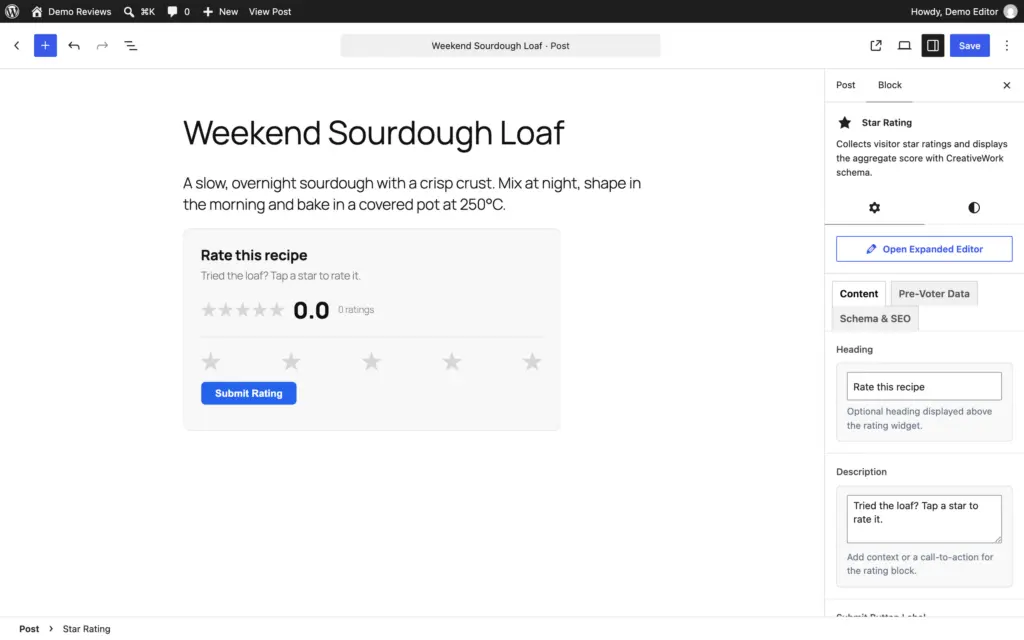
Put the cursor where the widget should sit. On a tutorial that is the end, after the reader has had a chance to use the thing. Open the inserter, expand ACF Blocks and click Star Rating, or type /star rating in an empty paragraph.
Fill the Fields
- Heading is the line above the stars. “Rate this guide” or “Was this useful?” reads better than “Rating”.
- Description is 1 sentence under it, and it can be empty.
- Submit Button Label is the submit button text, “Submit Rating” by default. Thank You Message appears after a successful submission, and the form locks rather than disappearing.
- Initial Vote Count and Initial Average Rating, on the Pre-Voter Data tab, provide starting values. Leave both at zero for new feedback with no existing votes. For a genuine migration, reconcile the source count, score scale, stored totals and block identity first; these fields aren’t a universal import tool.
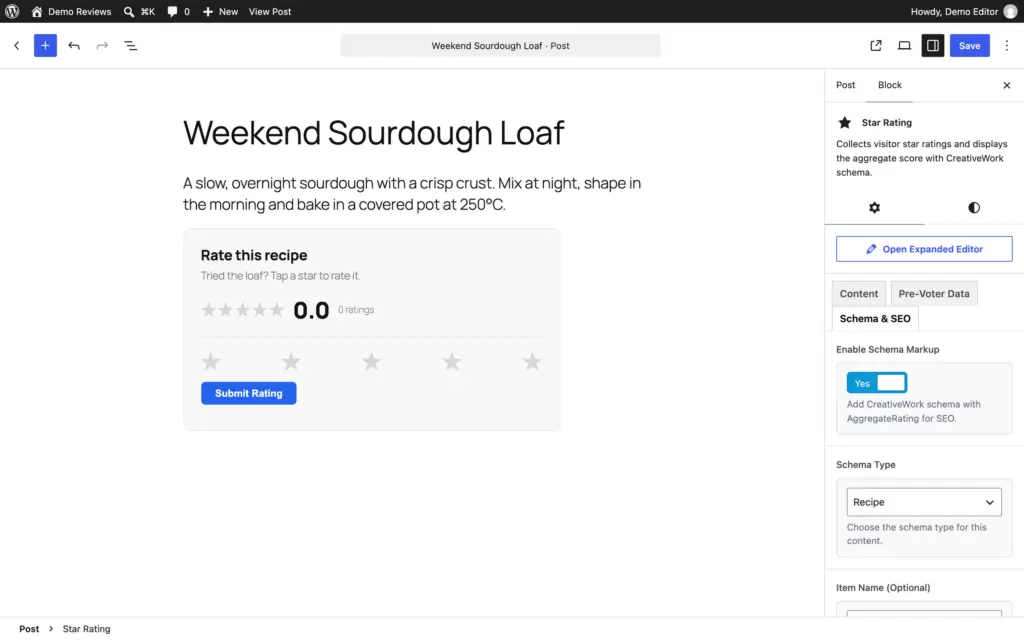
- Enable Schema Markup, on the Schema & SEO tab, is on by default. It adds AggregateRating JSON-LD, which prints nothing until the first vote arrives.
- Schema Type is the parent type in that JSON-LD: Creative Work, Article, Blog Post, Web Page, How To Guide, Recipe, Software/App or Product. It defaults to Creative Work, a type that doesn’t earn review stars. There is more on choosing it below.
- Item Name (Optional) is the name in the schema, and it defaults to the post title.
Decide Whether the Feedback Needs Schema
For a tutorial’s “Was this guide useful?” widget, I would switch Enable Schema Markup off, since it starts on. The feedback remains useful without adding another machine-readable rating to the page.
Product-rating schema needs:
- the right subject
- genuine votes
- supported properties
- a clear link to any product entity already on the page
Picking Product from the Schema Type menu isn’t enough on its own. Don’t change the parent type just to silence a duplicate warning, and don’t label votes about the article as votes about the product.
A real editorial Review and an aggregate of real product ratings can coexist. What needs fixing is contradictory or misattributed data; no rule limits a page to one rating. Keep general Article and breadcrumb markup from the site’s SEO integration.
Check the Vote Flow
Save, preview and look at the widget. In an isolated test post, record the starting count, select a score and submit it. Check that the response succeeds, the count changes once and the visible average is consistent with the test data. The form then locks and shows the thank-you message. Reload and check the browser’s remembered state. Don’t run these synthetic votes against a published article’s genuine feedback.
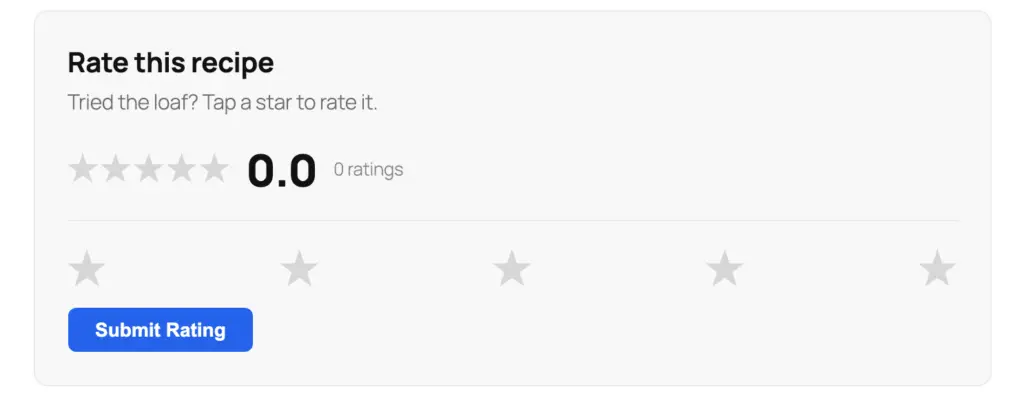
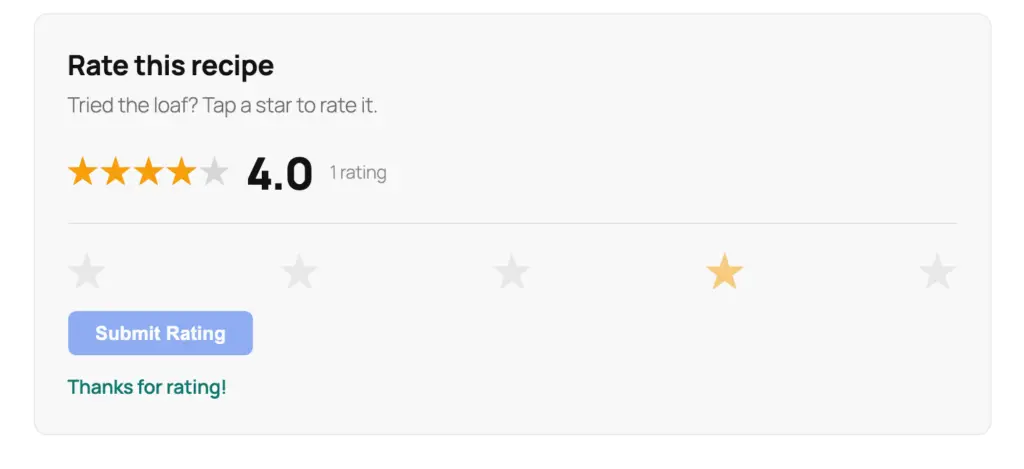
Inspect the rendered source after saving. With schema switched off, the widget should add no AggregateRating. On a real page with schema on, compare the visible total with the JSON-LD before and after a cache hit. A starting count above zero needs a source you can point to, so check imported data and stored votes before changing fields or deleting anything.
With schema on and Recipe as the type, the block printed this after one 4-star vote on a test post:
{
  "@context": "https://schema.org/",
  "@type": "Recipe",
  "name": "Weekend Sourdough Loaf",
  "url": "https://example.com/weekend-sourdough-loaf/",
  "aggregateRating": {
    "@type": "AggregateRating",
    "ratingValue": 4,
    "bestRating": 5,
    "worstRating": 1,
    "ratingCount": 1
  }
}
The block supplies the name, the URL and the rating, nothing else. A recipe needs its full Recipe markup, ingredients and instructions included, before Google considers stars for it, so this output works alongside a recipe plugin rather than replacing one.
Star Ratings and Google
The rule in 1 sentence: the stars on the page and the stars in search are 2 different things, and the page type decides whether the second one is possible at all.
- visible stars are yours to add anywhere, editorial or visitor, on any post
- search stars need an eligible type such as Product or SoftwareApplication, a rating that is visible on the page, and, for a product snippet, a page about 1 product
- an AggregateRating on an Article is valid schema that earns nothing in the listing
- nothing is guaranteed even when every rule is met
Google’s review snippet documentation added a recommendation on January 15, 2026: sites that collect user ratings should accept only ratings that come with a written comment and the reviewer’s name. The Star Rating block collects stars alone, which is one more reason to keep its schema off unless the page and the votes both qualify.
The guide to star ratings in search results on this site owns the rest of that story: eligible subjects, the SEO-plugin route, manual JSON-LD, validation and what to check when markup doesn’t lead to a search enhancement. If you run into any of that, it is the page to open next.
The Limits
A visitor rating on an article doesn’t reach search, and the block can’t change that. The Star Rating block’s job on an article is feedback.
Duplicate protection is limited, and the browser flag has no daily expiry. The IP-based server check can also affect users sharing a network. It isn’t a verified-customer system or a fraud-proof poll, so don’t base a big decision on it.
The block doesn’t collect a comment with the vote. A low rating tells you a reader was unhappy and not why. If you want the why, put a short form under the widget for the readers who click 1 or 2 stars.
Votes are associated with the post and block in database tables. Back up both content and rating data before a migration. The Initial fields aren’t an import tool on their own: match the original count, average and scale to the right block, and make sure stored totals don’t double-count the import.
And like every block in the plugin, it needs ACF Pro or Secure Custom Fields. Remove the field plugin and the widget stops rendering until it is back. The votes stay in the tables.
What Quietly Ruins It
Seeding the initial rating so a new post opens at 4.8 from 90 votes. The widget now lies to every reader, the schema lies to Google and the first person who notices is the reader who leaves 1 star and watches the average not move.
Enabling product-rating schema for votes that rate the article. Name the subject in the heading, so readers and schema agree on what the stars mean.
Asking readers for feedback before they have had a reasonable chance to use the guide. I would usually place the widget near the conclusion rather than assume every vote reflects a completed reading.
Expecting a vote on article usefulness to become a product review in search. The heading, the stored votes and the schema all have to describe the same thing.
Treating a 3.9 average as a verdict on the post. Readers who vote are the ones with a strong feeling either way, so a widget with 12 votes is telling you about 12 people and not about the post.
FAQs on WordPress Star Ratings
Do visitor star ratings show up in Google?
Not on an article or a blog post. Google shows review stars only for eligible types such as Product, SoftwareApplication, Recipe and Book, and only when the rating is visible on the page. A visitor rating on an ordinary post is feedback for you, not a search feature.
Can I add a star rating in WordPress without a plugin?
For a rating you set yourself, yes: a paragraph with “4.5 out of 5” and optional star characters, saved as a pattern. For ratings readers can click, you need a plugin, because the votes have to be stored somewhere.
Does the Star Rating block work with caching plugins?
Votes go to a REST endpoint, so a cached page still accepts them. The average shown on the page is part of the cached HTML, though, so visitors see the old total until that page’s cache clears. Purge or exclude the page when live totals matter.
Should I use the Star Rating block or the Product Review block?
The Product Review block for a review you write, with your rating, pros, cons and schema on a page about 1 product. The Star Rating block for votes from readers. On a page that already has the review block, switch the widget’s schema off, because votes about the article shouldn’t be attached to the product.
Final Remarks
Stars on the page and stars in search are separate things, and the page type decides whether the second one is possible. No plugin setting changes that.
Two things are worth doing before you add the widget to more posts. Put it after the content, not before, because the only useful vote is from someone who used the thing. And leave the seed fields at 0 on every new post, because the first reader to leave 1 star will tell you whether the number was real.
The search-results guide is where to go when the stars are valid and still not showing.
Tell Google you want more of this.
Add Gaurav Tiwari as a preferred sourceOne tap, and this site shows up more often in your own Top Stories, AI Overviews and AI Mode. Remove it any time.
